
See what people are saying
README
Mixdog



More work. Less cost. Less complexity.
Get more from your models and budget with an efficient AI coding harness—and intuitive controls for managing sessions, agents, and your entire workflow.
- More work for your budget. Cache-aware context, focused tools, and compaction reduce overhead so more of your budget goes toward the task. The published same-model Terminal-Bench comparisons below show comparable or better results with smaller contexts and lower costs at the same API rates.
- Easy to start. Simple to manage. Guided setup and visual controls help you choose models, assign agent roles, and configure workflows without becoming an expert in agent infrastructure or building your own stack.
- One workspace, your way. In Desktop, organize parallel sessions with tabs and split panes, customize agents and workflows, and keep token statistics and supported provider limits in view.
Use supported subscription accounts, API keys, or Mixdog's built-in Local Provider. Take the same agent beyond code into browsers, Windows apps, documents, images, and video—and continue live sessions across terminal, Desktop, and a paired browser on your computer or phone.
Get started
Desktop

The Windows installer is currently unsigned, so Windows SmartScreen may show a security warning.
CLI
Requires Node.js 22.19+ (22.x) or 24+.
npm install -g mixdog
mixdog
First run guides you through provider authentication, model selection, and workflow setup.
One workspace for your sessions and agents
Run multiple AI sessions side by side and manage your agents in Desktop. Combine tabs and split panes, customize how you work, and keep token usage and supported provider limits in view.
- Multiple sessions, manageable agents. Keep separate tasks in separate sessions and work on them in parallel. Manage agent definitions, assign models by role, and configure workflows in one app instead of assembling your own agent stack.
- Tabs and split panes—together. Use tabs to organize sessions and split panes to follow several side by side. Each pane can hold its own tabs, so you do not have to choose between quick switching and a simultaneous view.
- Make the workspace your own. Visual controls put layout, providers, models, agent rules, workflows, and extensions within easy reach. The model picker shows pricing, context limits, and capability metadata to help you choose—not just a list of model names.
- See where your tokens go. Usage statistics break down token totals by provider and model, including input, output, cache hits, and cache hit rate, with trends and cost figures. Subscription values use list prices; API costs may be estimates. Neither is an invoice.
- Keep remaining usage in sight. The usage panel brings supported providers' quota windows and reset times together, reducing trips to separate account dashboards. Available figures depend on the provider.
- Less window switching. Chat, a Monaco code editor, Git, terminals, and a file explorer share one workspace, keeping the conversation close to the files and changes you are working on.
- Pick up on another screen. Continue the same live session from Desktop, TUI, or a paired browser on your computer or phone, without starting a separate conversation.
Benchmarks
Terminal-Bench 2.1 — same model, same 89 tasks, same official verifier, with only the harness changed. Against the native CLI of each model family, Mixdog delivers the same results at the same speed — on a fraction of the context, for far less cost.
GPT-5.6 Sol xhigh — Mixdog vs Codex CLI
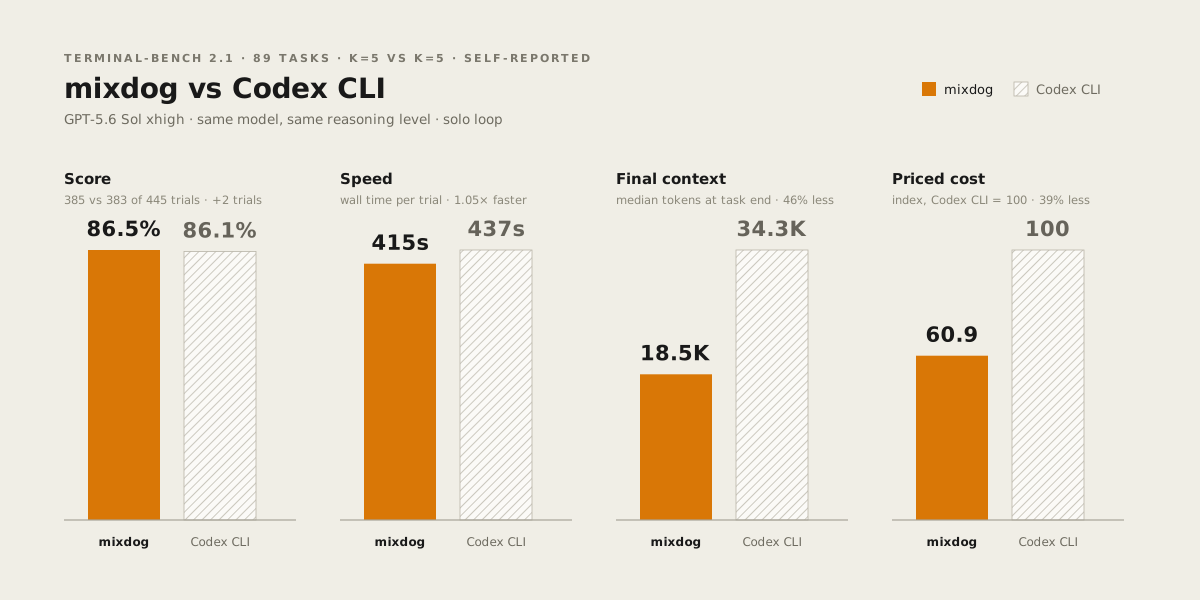
- 39% lower priced cost — $0.476 vs $0.782 per trial
- 46% smaller median final context — 18.5k vs 34.3k tokens
- 86.5% (385/445) vs Codex CLI's 86.1% (383/445) — full
k=5on both sides, pass@5 96.6% vs 95.5% - Matched speed — 415s vs 437s wall time per trial
Claude Opus 5 — Mixdog vs Claude Code
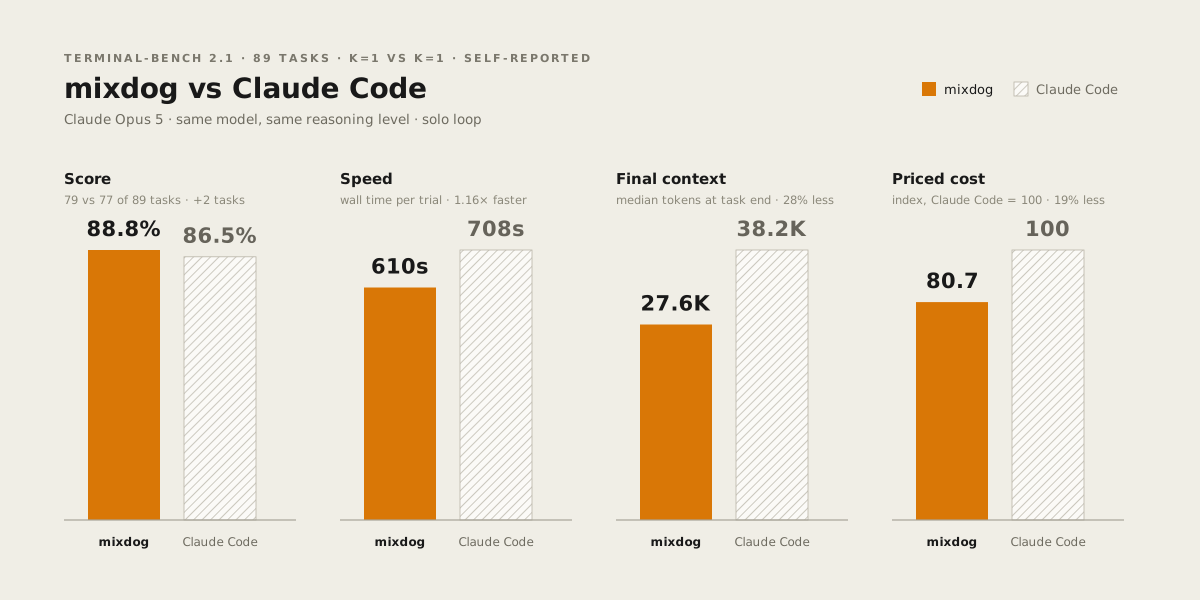
- 19% lower priced cost — $104.29 vs $129.21 per run
- 28% smaller median final context — 27.6k vs 38.2k tokens
- 79/89 vs Claude Code's 77/89
- 1.16× faster — 610s vs 708s wall time per trial
These published runs use the official Harbor verifier with fast mode off;
task failures and agent timeouts are never retried. The Sol comparison
follows the protocol the official Terminal-Bench leaderboard requires on both
sides — all 89 tasks repeated five times (k=5, 445 trials each); the
Opus-side runs are single passes (k=1, 89 trials each). Speed is the full
trial wall clock, and cost values both sides at the same current API list
rates, not actual subscription charges or invoices. These are measurements of
the pinned source revision, not a new benchmark of every subsequent release.
The leaderboard is not accepting community submissions, so every run here ships
its raw artifacts instead — Harbor verdicts, official verifier output, pinned
task checksums, and the usage snapshots behind every cost figure — alongside
the harness, presets, and metric scripts that recompute each number above:
benchmarks/terminal-bench-2.1/.
Less overhead. More budget for the work.
Mixdog reduces the overhead of repeatedly sending context, re-explaining requirements, and rediscovering prior work. Focused tools keep unnecessary text out of the prompt, while provider-aware caching reuses stable input.
Compaction keeps long conversations manageable with a handoff for continuing the task. Optional idle-time compaction reduces the history resent after long breaks, when provider caches may have expired. Approved memory and past-work retrieval help carry earlier decisions and requirements forward without loading the entire conversation archive into every prompt.
You do not have to use the same high-cost model for every role. Choose models by role and workflow to focus your budget on the work that needs them.
The benchmarks above measure single-model, single-session runs without personal memory, sub-agent delegation, or helper-model lookups. Their cost figures already account for cache usage; savings in ongoing work depend on the provider, workload, and configuration.
How Mixdog keeps context lean
Efficiency comes from several layers working together, not just a shorter prompt or a larger context window:
- Lightweight system instructions — continuously refined rules keep operating guidance focused without repeating the same policy.
- Purpose-built tools — scoped queries, batched calls, and bounded results retrieve the evidence a task needs instead of dumping whole files.
- Built-in ast-grep and code graphs — parsed symbols, signatures, calls, and imports answer structural questions without repeated text searches.
- Provider-aware caching — stable prompt layers and provider-specific cache controls help reuse context that has already been processed.
- Structured compaction — a task handoff, the latest request, and a bounded execution history keep long sessions moving.
- Idle-time context reduction — configurable automatic compaction reduces the context sent after long idle gaps, when caches may be cold.
- On-demand prompt loading — skill bodies and deferred tool schemas load when needed; stable instructions stay separate from changing state.
- Database-backed long-term memory — retrieve relevant history instead of injecting the whole archive into every session.
- Tool-result reduction — repeated results become short references, while large outputs can be saved separately and returned as previews.
Caching can reduce repeated processing and input cost, but cached tokens still count toward the model's context limit. Compaction, selective retrieval, and output reduction reduce the amount of context the model needs. See Context efficiency for the mechanisms, implementation references, and limits.
What you can do
Build, test, and review
Search repositories with text and AST-based tools, edit files, run tests and background commands, and review changes. Desktop brings the agent together with a Monaco editor, Git, terminals, and a file explorer. Use workflows and role-specific models to organize work, and extend the toolset with MCP servers, skills, hooks, and plugins.
Code graph. Inspect exports, signatures, and nested members; locate declarations and references; trace calls and imports; and assess which files a change may affect. Call relationships come from parsed call sites rather than text matches, and identifier references exclude comment-only mentions. The native engine embeds tree-sitter and ast-grep, parses 31 languages, and extracts symbols and imports for 24. Capabilities vary by language; this is structural navigation, not a replacement for a compiler's type analysis.
Code Tidy. Install the built-in capability to format, lint, and check structural rules through the agent. It respects project configuration and uses project-local, system-installed, or supported managed engines. Fixes are previewed without changing files unless explicitly applied. See Code Tidy for engine setup and rule coverage.
The GitHub integration manages repositories, issues, pull requests and reviews, Actions, releases, and notifications. Source Control commits use a manually entered summary and optional description; there is no built-in AI commit-message generator. See Git & GitHub for supported operations and permission requirements.
Keep longer work moving
Resume saved chats and recall prior work through local semantic and lexical
search. Long-term memory separates searchable conversation history (recall)
from approved shared or project-scoped preferences (memory); generated
conversation summaries do not become standing instructions.
Compaction keeps long conversations manageable while retaining the latest request and the context needed to continue. Configurable idle-time compaction can also reduce input cost when resuming after a long idle period, when the provider's cache may have expired. For an explicitly requested longer-running objective, Goals track completion conditions and tasks, support time limits and automatic continuation, and let you pause or resume the work.
Work beyond the repository
- Browser Use — operate signed-in Chromium pages, forms, tabs, and
downloads. On Windows, import a Chrome profile, including cookies and
passwords; cookie and password import require administrator approval and
a build with the native importer. Session cookies are encrypted with the
OS keychain and restored on launch when encryption is available.
Developer controls share the same pages and sign-in through
browser_devtools. - Computer Use on Windows — operate native apps through accessibility, screenshots, OCR, keyboard, and pointer input with guarded execution. An overlay provides Stop and Resume controls.
- Documents — create and edit Word, Excel, and PowerPoint files, work with PDFs, and review rendered previews alongside automated checks. Use portable OOXML editing without Microsoft Office, or Microsoft Office automation on Windows. Rendering and spreadsheet recalculation depend on the available engines. See Office runtime.
- Image and video Studio — generate and edit images, generate short video clips, and keep the results in a persistent local gallery. Continue a clip by using its last frame as the reference for a new generation; this carries over the pose, not the original motion or camera trajectory. Available models and controls depend on your signed-in provider routes.
Browser Use and Computer Use are opt-in capabilities. In interactive sessions, each asks for approval before its first live call by default; approval covers the rest of that session, and a restart asks again. Headless and agent-owned sessions without an approval UI are not gated by this first-use prompt.
Continue from another screen
Desktop, TUI, and paired browsers share live sessions rather than starting independent copies. The installable remote web app connects to Desktop over authenticated end-to-end encryption, so you can follow and continue work from a computer or phone.
Providers
Mixdog supports subscription OAuth and API-key routes, including:
- Anthropic API keys and Claude account OAuth
- OpenAI API keys and ChatGPT/Codex account OAuth
- Google Gemini API keys
- xAI API keys and Grok account OAuth
- OpenRouter API keys and its unified model catalog
- DeepSeek and OpenCode Go
- Mixdog's built-in Local Provider
Cursor and Antigravity (Gemini) account OAuth are off by default; turn them on under Settings → Developer, which warns that using these providers through OAuth risks account restrictions.
The model picker combines live provider catalogs with model metadata for context limits, pricing, tool support, reasoning, and recency.
The supported provider list above is not an arbitrary OpenAI-compatible endpoint registry. The former Ollama and LM Studio routes have been retired.
Local Provider
Download and run models directly in Mixdog, without managing a separate model server. The managed runtime currently requires Windows x64 and an NVIDIA GPU, with enough VRAM for the selected model.
Ask in chat to add a local model; Mixdog checks your hardware and guides
installation. Extensions → Plugin → Local Provider manages installed
models, download progress and resumption, and automatic unloading when idle.
Installed models are available through the mixdog-local provider.
Run
# Start in the current project
mixdog

# Select a provider and model
mixdog --provider anthropic-oauth --model claude-haiku-4-5-20251001

# Select a workflow
mixdog --workflow default

# Use read-only tools
mixdog --readonly

# Enable remote mode
mixdog --remote

# Run onboarding again
mixdog --onboarding
Run mixdog --help for the complete option reference.
Headless exec
mixdog exec runs one non-interactive, single-model session with ephemeral
configuration and no agent delegation. It requires an explicit provider and
model. It does not load the host's behavioral configuration, personal memory,
prior sessions, user profile, skills, MCP servers, or plugins:
mixdog exec --provider anthropic-oauth --model claude-opus-5 "fix the failing test"
mixdog exec --provider openai-oauth --model gpt-5.6-sol --effort xhigh --fast "review the current diff"
mixdog exec --provider openai-oauth --model gpt-5.6-sol --json "fix the failing test"
Web search and page retrieval are disabled by default. Enable them per run when needed:
mixdog exec --provider openai-oauth --model gpt-5.6-sol --web-search "research this issue"
Disabling web search does not block ordinary shell networking: package managers, Git clients, and other commands can still access the network. Headless exec is not an offline sandbox.
--memory, --workflow, --readonly, --remote, and --onboarding are not
supported by mixdog exec. Use an interactive session for personal memory and
saved-work continuation. --json emits timestamped JSONL events to stdout;
diagnostics remain on stderr.
TUI commands
/clear        start a fresh chat
/project      switch the current project
/resume       resume a saved chat
/inherit      carry this conversation into a new session on the current model
/compact      compact older conversation context
/goal         start, inspect, pause, or resume a durable session Goal
/autoclear    manage idle-time context compaction
/context      inspect the current context surface
/usage        show provider quota and balance
/providers    configure provider authentication
/model        choose the main provider and model
/websearch    choose the web search route
/workflow     choose the active workflow
/agents       inspect agents and model overrides
/effort       set reasoning effort
/fast         toggle supported model fast mode
/OutputStyle  choose the Lead response style
/theme        change the TUI color theme
/memory       inspect and edit core memory
/mcp          manage MCP servers and tools
/skills       choose a skill for the next request
/plugins      manage local plugin integrations
/setting      open runtime settings
/profile      set your title, development experience, and response language
/update       check for updates
/doctor       diagnose installation health
/quit         quit the TUI
Workflows and agents are Markdown definition packs (WORKFLOW.md, AGENT.md).
Built-in packs ship with Mixdog; custom packs live under the Mixdog data
directory.
By default the Lead does the work without delegating (Solo). Each session's orchestration mode sets how much it delegates to agents, up to Swarm for maximum delegation. Running multiple independent Desktop sessions is separate from delegating work to agents within one session.
To start a time-bounded Goal, for example:
/goal Fix the failing tests --time 1h
/goal status
/goal pause
/goal resume
Desktop app
Mixdog Desktop runs the same agent runtime as the CLI. In the Sessions panel, choose New task for agent work or New Studio for image and video work. The Projects panel has Project and Workflow tabs for managing repositories, workflow packs, and agent definitions.
The workspace includes:
- Split panes for parallel, independently routed agent sessions
- Live session handoff between the TUI, desktop windows, and paired browsers
- Monaco editor, LSP integration, diffs, and turn-by-turn edit review
- Built-in code graph navigation and installable Code Tidy checks and fixes
- Git staging, commits with manually entered messages, and branches
- GitHub repositories, issues, pull requests, reviews, Actions, releases, and notifications
- File explorer with previews, thumbnails, search, and drag-and-drop
- Integrated terminal tabs using the local system shell
- Browser Use pane with agent control and Chrome profile import on Windows
- Computer Use on Windows with guarded native input
- Word, Excel, PowerPoint, and PDF tools with rendered previews
- Image and video generation Studio with a persistent local gallery
- Visual workflow, agent, schedule, and webhook editors, plus session Goal progress and controls
- Voice dictation with an optional local transcription runtime
- Extensions hub with guided setup for Git & GitHub, Memory, Browser Use, Computer Use, Office, Code Tidy, Local Provider, and voice
- Provider setup, usage, git identity, and remote pairing settings
In Extensions, the Plugin tab manages integrations and built-in capabilities; the Skill tab lets you add and manage skills and MCP servers. Language servers start on demand when installed locally or on your system; Mixdog does not download them automatically. See language server setup.
The paired remote web app is installable on desktop and mobile browsers. It uses an authenticated end-to-end encrypted connection before session state, terminal data, files, or operation requests cross the relay, and adds mobile share-target intake, push notifications, and remote Browser Use.
Data and configuration
Mixdog uses ~/.mixdog as its home root and ~/.mixdog/data for runtime data
by default.
MIXDOG_HOME=/path/to/home mixdog
MIXDOG_DATA_DIR=/path/to/data mixdog
Useful environment variables:
MIXDOG_TUI_MOUSE=0— use terminal-native mouse behavior.MIXDOG_DISABLE_MODEL_PREFETCH=1— disable provider model prefetch.MIXDOG_MODE=ship|dev— select shipping or development diagnostics.MIXDOG_DIAGNOSTICS=1— force diagnostic trace and log output.
Core technology
| Layer | Stack |
|---|---|
| Shared agent runtime | Node.js and ECMAScript modules, shared by CLI and Desktop |
| Terminal UI | React and Ink |
| Desktop workspace | Electron, React, TypeScript, Monaco, and xterm.js |
| Native code tools | Rust, tree-sitter, and embedded ast-grep for parsing, structural queries, and rule-based checks |
| Browser automation | Chromium and the Chrome DevTools Protocol (CDP) |
| Long-term memory | Managed local PostgreSQL with pgvector and full-text search |
| Documents | Portable OOXML and PDF tooling, plus Microsoft Office automation on Windows |
These components serve different roles: native tools analyze code, database retrieval keeps historical context selective, and provider-specific caching reduces repeated model processing. See Context efficiency for how they work with prompt management and compaction.
Development
npm install
npm start

npm run smoke
npm run smoke:all
npm test                       # discovered fast-lane tests
npm test -- src/runtime/memory  # narrow to one path
npm run test:slow              # *.slow.test.mjs
npm run test:live              # built-artifact or live-system checks
npm run build:tui
npm run audit:models
For desktop development, install the root dependencies above, then:
cd apps/desktop
npm install
npm run dev
Desktop development uses a fresh, isolated test profile on each launch, including
its data, daemon and tool connections. It does not copy the installed app's
settings or sign-ins. The profile path is printed and retained in the system
temporary directory for diagnosis. CDP uses port 9342; if it is occupied, reuse
the running test app or choose another port with npm run dev -- --port 9343.
On Windows, npm run e2e:direct and npm run e2e:direct:source also use isolated
profiles and port 9342 (override with -- -Port 9343).
Both packages discover *.test.mjs and *-test.mjs under their src/ and
scripts/ directories. Fast, slow, and live tests run in separate lanes;
live checks need their corresponding built artifacts or services. See
testing practices for details.
Main directories:
src/            CLI, TUI, runtime, workflows, agents, and rules
apps/desktop/   desktop app
apps/relay/     remote web app and relay
native/         native process, search, graph, patch, and support binaries
scripts/        tests, diagnostics, benchmarks, and build scripts
benchmarks/     reproducible benchmark harnesses, results, and raw artifacts
src/vendor/     vendored runtime components
License
Mixdog is licensed under Apache-2.0. Third-party components retain their respective licenses; see NOTICE.md.
Similar repos


Languages
JavaScript
69.4%
TypeScript
20.0%
Rust
3.7%
CSS
2.4%
PowerShell
2.4%
C++
1.0%
See what people are saying
README
Mixdog
More work. Less cost. Less complexity.
Get more from your models and budget with an efficient AI coding harness—and intuitive controls for managing sessions, agents, and your entire workflow.
- More work for your budget. Cache-aware context, focused tools, and compaction reduce overhead so more of your budget goes toward the task. The published same-model Terminal-Bench comparisons below show comparable or better results with smaller contexts and lower costs at the same API rates.
- Easy to start. Simple to manage. Guided setup and visual controls help you choose models, assign agent roles, and configure workflows without becoming an expert in agent infrastructure or building your own stack.
- One workspace, your way. In Desktop, organize parallel sessions with tabs and split panes, customize agents and workflows, and keep token statistics and supported provider limits in view.
Use supported subscription accounts, API keys, or Mixdog's built-in Local Provider. Take the same agent beyond code into browsers, Windows apps, documents, images, and video—and continue live sessions across terminal, Desktop, and a paired browser on your computer or phone.
Get started
Desktop
The Windows installer is currently unsigned, so Windows SmartScreen may show a security warning.
CLI
Requires Node.js 22.19+ (22.x) or 24+.
npm install -g mixdog
mixdog
First run guides you through provider authentication, model selection, and workflow setup.
One workspace for your sessions and agents
Run multiple AI sessions side by side and manage your agents in Desktop. Combine tabs and split panes, customize how you work, and keep token usage and supported provider limits in view.
- Multiple sessions, manageable agents. Keep separate tasks in separate sessions and work on them in parallel. Manage agent definitions, assign models by role, and configure workflows in one app instead of assembling your own agent stack.
- Tabs and split panes—together. Use tabs to organize sessions and split panes to follow several side by side. Each pane can hold its own tabs, so you do not have to choose between quick switching and a simultaneous view.
- Make the workspace your own. Visual controls put layout, providers, models, agent rules, workflows, and extensions within easy reach. The model picker shows pricing, context limits, and capability metadata to help you choose—not just a list of model names.
- See where your tokens go. Usage statistics break down token totals by provider and model, including input, output, cache hits, and cache hit rate, with trends and cost figures. Subscription values use list prices; API costs may be estimates. Neither is an invoice.
- Keep remaining usage in sight. The usage panel brings supported providers' quota windows and reset times together, reducing trips to separate account dashboards. Available figures depend on the provider.
- Less window switching. Chat, a Monaco code editor, Git, terminals, and a file explorer share one workspace, keeping the conversation close to the files and changes you are working on.
- Pick up on another screen. Continue the same live session from Desktop, TUI, or a paired browser on your computer or phone, without starting a separate conversation.
Benchmarks
Terminal-Bench 2.1 — same model, same 89 tasks, same official verifier, with only the harness changed. Against the native CLI of each model family, Mixdog delivers the same results at the same speed — on a fraction of the context, for far less cost.
GPT-5.6 Sol xhigh — Mixdog vs Codex CLI
- 39% lower priced cost — $0.476 vs $0.782 per trial
- 46% smaller median final context — 18.5k vs 34.3k tokens
- 86.5% (385/445) vs Codex CLI's 86.1% (383/445) — full
k=5on both sides, pass@5 96.6% vs 95.5% - Matched speed — 415s vs 437s wall time per trial
Claude Opus 5 — Mixdog vs Claude Code
- 19% lower priced cost — $104.29 vs $129.21 per run
- 28% smaller median final context — 27.6k vs 38.2k tokens
- 79/89 vs Claude Code's 77/89
- 1.16× faster — 610s vs 708s wall time per trial
These published runs use the official Harbor verifier with fast mode off;
task failures and agent timeouts are never retried. The Sol comparison
follows the protocol the official Terminal-Bench leaderboard requires on both
sides — all 89 tasks repeated five times (k=5, 445 trials each); the
Opus-side runs are single passes (k=1, 89 trials each). Speed is the full
trial wall clock, and cost values both sides at the same current API list
rates, not actual subscription charges or invoices. These are measurements of
the pinned source revision, not a new benchmark of every subsequent release.
The leaderboard is not accepting community submissions, so every run here ships
its raw artifacts instead — Harbor verdicts, official verifier output, pinned
task checksums, and the usage snapshots behind every cost figure — alongside
the harness, presets, and metric scripts that recompute each number above:
benchmarks/terminal-bench-2.1/.
Less overhead. More budget for the work.
Mixdog reduces the overhead of repeatedly sending context, re-explaining requirements, and rediscovering prior work. Focused tools keep unnecessary text out of the prompt, while provider-aware caching reuses stable input.
Compaction keeps long conversations manageable with a handoff for continuing the task. Optional idle-time compaction reduces the history resent after long breaks, when provider caches may have expired. Approved memory and past-work retrieval help carry earlier decisions and requirements forward without loading the entire conversation archive into every prompt.
You do not have to use the same high-cost model for every role. Choose models by role and workflow to focus your budget on the work that needs them.
The benchmarks above measure single-model, single-session runs without personal memory, sub-agent delegation, or helper-model lookups. Their cost figures already account for cache usage; savings in ongoing work depend on the provider, workload, and configuration.
How Mixdog keeps context lean
Efficiency comes from several layers working together, not just a shorter prompt or a larger context window:
- Lightweight system instructions — continuously refined rules keep operating guidance focused without repeating the same policy.
- Purpose-built tools — scoped queries, batched calls, and bounded results retrieve the evidence a task needs instead of dumping whole files.
- Built-in ast-grep and code graphs — parsed symbols, signatures, calls, and imports answer structural questions without repeated text searches.
- Provider-aware caching — stable prompt layers and provider-specific cache controls help reuse context that has already been processed.
- Structured compaction — a task handoff, the latest request, and a bounded execution history keep long sessions moving.
- Idle-time context reduction — configurable automatic compaction reduces the context sent after long idle gaps, when caches may be cold.
- On-demand prompt loading — skill bodies and deferred tool schemas load when needed; stable instructions stay separate from changing state.
- Database-backed long-term memory — retrieve relevant history instead of injecting the whole archive into every session.
- Tool-result reduction — repeated results become short references, while large outputs can be saved separately and returned as previews.
Caching can reduce repeated processing and input cost, but cached tokens still count toward the model's context limit. Compaction, selective retrieval, and output reduction reduce the amount of context the model needs. See Context efficiency for the mechanisms, implementation references, and limits.
What you can do
Build, test, and review
Search repositories with text and AST-based tools, edit files, run tests and background commands, and review changes. Desktop brings the agent together with a Monaco editor, Git, terminals, and a file explorer. Use workflows and role-specific models to organize work, and extend the toolset with MCP servers, skills, hooks, and plugins.
Code graph. Inspect exports, signatures, and nested members; locate declarations and references; trace calls and imports; and assess which files a change may affect. Call relationships come from parsed call sites rather than text matches, and identifier references exclude comment-only mentions. The native engine embeds tree-sitter and ast-grep, parses 31 languages, and extracts symbols and imports for 24. Capabilities vary by language; this is structural navigation, not a replacement for a compiler's type analysis.
Code Tidy. Install the built-in capability to format, lint, and check structural rules through the agent. It respects project configuration and uses project-local, system-installed, or supported managed engines. Fixes are previewed without changing files unless explicitly applied. See Code Tidy for engine setup and rule coverage.
The GitHub integration manages repositories, issues, pull requests and reviews, Actions, releases, and notifications. Source Control commits use a manually entered summary and optional description; there is no built-in AI commit-message generator. See Git & GitHub for supported operations and permission requirements.
Keep longer work moving
Resume saved chats and recall prior work through local semantic and lexical
search. Long-term memory separates searchable conversation history (recall)
from approved shared or project-scoped preferences (memory); generated
conversation summaries do not become standing instructions.
Compaction keeps long conversations manageable while retaining the latest request and the context needed to continue. Configurable idle-time compaction can also reduce input cost when resuming after a long idle period, when the provider's cache may have expired. For an explicitly requested longer-running objective, Goals track completion conditions and tasks, support time limits and automatic continuation, and let you pause or resume the work.
Work beyond the repository
- Browser Use — operate signed-in Chromium pages, forms, tabs, and
downloads. On Windows, import a Chrome profile, including cookies and
passwords; cookie and password import require administrator approval and
a build with the native importer. Session cookies are encrypted with the
OS keychain and restored on launch when encryption is available.
Developer controls share the same pages and sign-in through
browser_devtools. - Computer Use on Windows — operate native apps through accessibility, screenshots, OCR, keyboard, and pointer input with guarded execution. An overlay provides Stop and Resume controls.
- Documents — create and edit Word, Excel, and PowerPoint files, work with PDFs, and review rendered previews alongside automated checks. Use portable OOXML editing without Microsoft Office, or Microsoft Office automation on Windows. Rendering and spreadsheet recalculation depend on the available engines. See Office runtime.
- Image and video Studio — generate and edit images, generate short video clips, and keep the results in a persistent local gallery. Continue a clip by using its last frame as the reference for a new generation; this carries over the pose, not the original motion or camera trajectory. Available models and controls depend on your signed-in provider routes.
Browser Use and Computer Use are opt-in capabilities. In interactive sessions, each asks for approval before its first live call by default; approval covers the rest of that session, and a restart asks again. Headless and agent-owned sessions without an approval UI are not gated by this first-use prompt.
Continue from another screen
Desktop, TUI, and paired browsers share live sessions rather than starting independent copies. The installable remote web app connects to Desktop over authenticated end-to-end encryption, so you can follow and continue work from a computer or phone.
Providers
Mixdog supports subscription OAuth and API-key routes, including:
- Anthropic API keys and Claude account OAuth
- OpenAI API keys and ChatGPT/Codex account OAuth
- Google Gemini API keys
- xAI API keys and Grok account OAuth
- OpenRouter API keys and its unified model catalog
- DeepSeek and OpenCode Go
- Mixdog's built-in Local Provider
Cursor and Antigravity (Gemini) account OAuth are off by default; turn them on under Settings → Developer, which warns that using these providers through OAuth risks account restrictions.
The model picker combines live provider catalogs with model metadata for context limits, pricing, tool support, reasoning, and recency.
The supported provider list above is not an arbitrary OpenAI-compatible endpoint registry. The former Ollama and LM Studio routes have been retired.
Local Provider
Download and run models directly in Mixdog, without managing a separate model server. The managed runtime currently requires Windows x64 and an NVIDIA GPU, with enough VRAM for the selected model.
Ask in chat to add a local model; Mixdog checks your hardware and guides
installation. Extensions → Plugin → Local Provider manages installed
models, download progress and resumption, and automatic unloading when idle.
Installed models are available through the mixdog-local provider.
Run
# Start in the current project
mixdog

# Select a provider and model
mixdog --provider anthropic-oauth --model claude-haiku-4-5-20251001

# Select a workflow
mixdog --workflow default

# Use read-only tools
mixdog --readonly

# Enable remote mode
mixdog --remote

# Run onboarding again
mixdog --onboarding
Run mixdog --help for the complete option reference.
Headless exec
mixdog exec runs one non-interactive, single-model session with ephemeral
configuration and no agent delegation. It requires an explicit provider and
model. It does not load the host's behavioral configuration, personal memory,
prior sessions, user profile, skills, MCP servers, or plugins:
mixdog exec --provider anthropic-oauth --model claude-opus-5 "fix the failing test"
mixdog exec --provider openai-oauth --model gpt-5.6-sol --effort xhigh --fast "review the current diff"
mixdog exec --provider openai-oauth --model gpt-5.6-sol --json "fix the failing test"
Web search and page retrieval are disabled by default. Enable them per run when needed:
mixdog exec --provider openai-oauth --model gpt-5.6-sol --web-search "research this issue"
Disabling web search does not block ordinary shell networking: package managers, Git clients, and other commands can still access the network. Headless exec is not an offline sandbox.
--memory, --workflow, --readonly, --remote, and --onboarding are not
supported by mixdog exec. Use an interactive session for personal memory and
saved-work continuation. --json emits timestamped JSONL events to stdout;
diagnostics remain on stderr.
TUI commands
/clear        start a fresh chat
/project      switch the current project
/resume       resume a saved chat
/inherit      carry this conversation into a new session on the current model
/compact      compact older conversation context
/goal         start, inspect, pause, or resume a durable session Goal
/autoclear    manage idle-time context compaction
/context      inspect the current context surface
/usage        show provider quota and balance
/providers    configure provider authentication
/model        choose the main provider and model
/websearch    choose the web search route
/workflow     choose the active workflow
/agents       inspect agents and model overrides
/effort       set reasoning effort
/fast         toggle supported model fast mode
/OutputStyle  choose the Lead response style
/theme        change the TUI color theme
/memory       inspect and edit core memory
/mcp          manage MCP servers and tools
/skills       choose a skill for the next request
/plugins      manage local plugin integrations
/setting      open runtime settings
/profile      set your title, development experience, and response language
/update       check for updates
/doctor       diagnose installation health
/quit         quit the TUI
Workflows and agents are Markdown definition packs (WORKFLOW.md, AGENT.md).
Built-in packs ship with Mixdog; custom packs live under the Mixdog data
directory.
By default the Lead does the work without delegating (Solo). Each session's orchestration mode sets how much it delegates to agents, up to Swarm for maximum delegation. Running multiple independent Desktop sessions is separate from delegating work to agents within one session.
To start a time-bounded Goal, for example:
/goal Fix the failing tests --time 1h
/goal status
/goal pause
/goal resume
Desktop app
Mixdog Desktop runs the same agent runtime as the CLI. In the Sessions panel, choose New task for agent work or New Studio for image and video work. The Projects panel has Project and Workflow tabs for managing repositories, workflow packs, and agent definitions.
The workspace includes:
- Split panes for parallel, independently routed agent sessions
- Live session handoff between the TUI, desktop windows, and paired browsers
- Monaco editor, LSP integration, diffs, and turn-by-turn edit review
- Built-in code graph navigation and installable Code Tidy checks and fixes
- Git staging, commits with manually entered messages, and branches
- GitHub repositories, issues, pull requests, reviews, Actions, releases, and notifications
- File explorer with previews, thumbnails, search, and drag-and-drop
- Integrated terminal tabs using the local system shell
- Browser Use pane with agent control and Chrome profile import on Windows
- Computer Use on Windows with guarded native input
- Word, Excel, PowerPoint, and PDF tools with rendered previews
- Image and video generation Studio with a persistent local gallery
- Visual workflow, agent, schedule, and webhook editors, plus session Goal progress and controls
- Voice dictation with an optional local transcription runtime
- Extensions hub with guided setup for Git & GitHub, Memory, Browser Use, Computer Use, Office, Code Tidy, Local Provider, and voice
- Provider setup, usage, git identity, and remote pairing settings
In Extensions, the Plugin tab manages integrations and built-in capabilities; the Skill tab lets you add and manage skills and MCP servers. Language servers start on demand when installed locally or on your system; Mixdog does not download them automatically. See language server setup.
The paired remote web app is installable on desktop and mobile browsers. It uses an authenticated end-to-end encrypted connection before session state, terminal data, files, or operation requests cross the relay, and adds mobile share-target intake, push notifications, and remote Browser Use.
Data and configuration
Mixdog uses ~/.mixdog as its home root and ~/.mixdog/data for runtime data
by default.
MIXDOG_HOME=/path/to/home mixdog
MIXDOG_DATA_DIR=/path/to/data mixdog
Useful environment variables:
MIXDOG_TUI_MOUSE=0— use terminal-native mouse behavior.MIXDOG_DISABLE_MODEL_PREFETCH=1— disable provider model prefetch.MIXDOG_MODE=ship|dev— select shipping or development diagnostics.MIXDOG_DIAGNOSTICS=1— force diagnostic trace and log output.
Core technology
| Layer | Stack |
|---|---|
| Shared agent runtime | Node.js and ECMAScript modules, shared by CLI and Desktop |
| Terminal UI | React and Ink |
| Desktop workspace | Electron, React, TypeScript, Monaco, and xterm.js |
| Native code tools | Rust, tree-sitter, and embedded ast-grep for parsing, structural queries, and rule-based checks |
| Browser automation | Chromium and the Chrome DevTools Protocol (CDP) |
| Long-term memory | Managed local PostgreSQL with pgvector and full-text search |
| Documents | Portable OOXML and PDF tooling, plus Microsoft Office automation on Windows |
These components serve different roles: native tools analyze code, database retrieval keeps historical context selective, and provider-specific caching reduces repeated model processing. See Context efficiency for how they work with prompt management and compaction.
Development
npm install
npm start

npm run smoke
npm run smoke:all
npm test                       # discovered fast-lane tests
npm test -- src/runtime/memory  # narrow to one path
npm run test:slow              # *.slow.test.mjs
npm run test:live              # built-artifact or live-system checks
npm run build:tui
npm run audit:models
For desktop development, install the root dependencies above, then:
cd apps/desktop
npm install
npm run dev
Desktop development uses a fresh, isolated test profile on each launch, including
its data, daemon and tool connections. It does not copy the installed app's
settings or sign-ins. The profile path is printed and retained in the system
temporary directory for diagnosis. CDP uses port 9342; if it is occupied, reuse
the running test app or choose another port with npm run dev -- --port 9343.
On Windows, npm run e2e:direct and npm run e2e:direct:source also use isolated
profiles and port 9342 (override with -- -Port 9343).
Both packages discover *.test.mjs and *-test.mjs under their src/ and
scripts/ directories. Fast, slow, and live tests run in separate lanes;
live checks need their corresponding built artifacts or services. See
testing practices for details.
Main directories:
src/            CLI, TUI, runtime, workflows, agents, and rules
apps/desktop/   desktop app
apps/relay/     remote web app and relay
native/         native process, search, graph, patch, and support binaries
scripts/        tests, diagnostics, benchmarks, and build scripts
benchmarks/     reproducible benchmark harnesses, results, and raw artifacts
src/vendor/     vendored runtime components
License
Mixdog is licensed under Apache-2.0. Third-party components retain their respective licenses; see NOTICE.md.
Similar repos
Languages
JavaScript
69.4%
TypeScript
20.0%
Rust
3.7%
CSS
2.4%
PowerShell
2.4%
C++
1.0%