Lightweight BitTorrent client with a built-in per-app VPN (Cloudflare WARP, Mullvad, PIA, NordVPN, IVPN or any WireGuard config). Windows, Linux, macOS.
Go
3
28 commits
updated Oct 16, 2026
A lightweight BitTorrent client with a VPN built in. Only the torrent client goes through the VPN;
the rest of your computer keeps its normal connection.
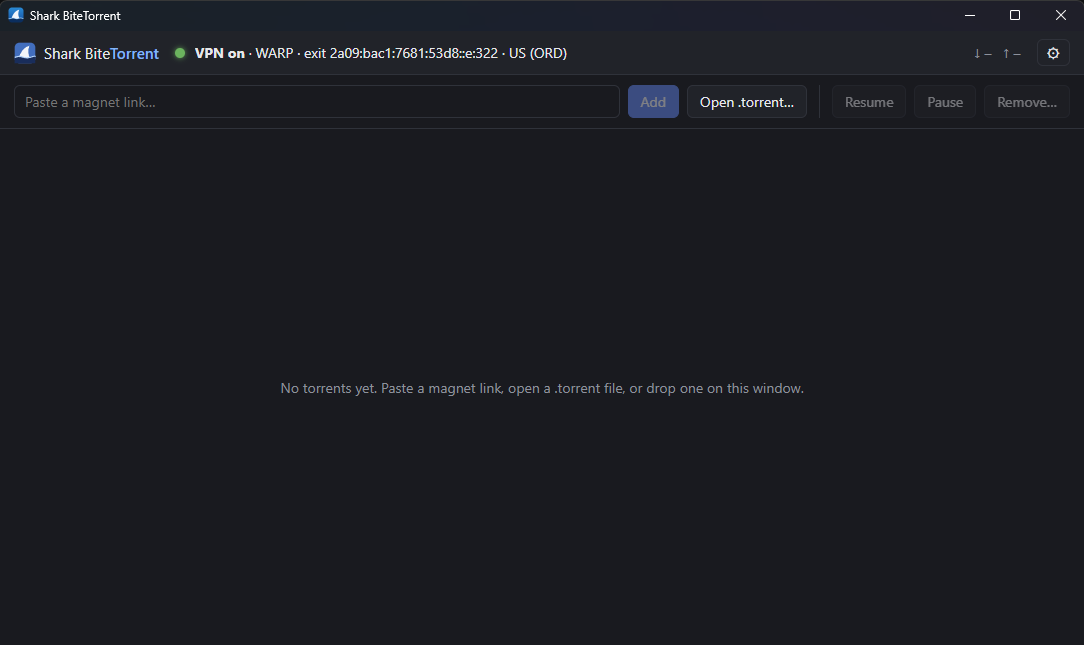
Most people who want their torrent traffic on a VPN have two options, and neither is great:
Shark BiteTorrent puts the VPN inside the app. The torrent engine has no network access except through its own WireGuard tunnel, so:
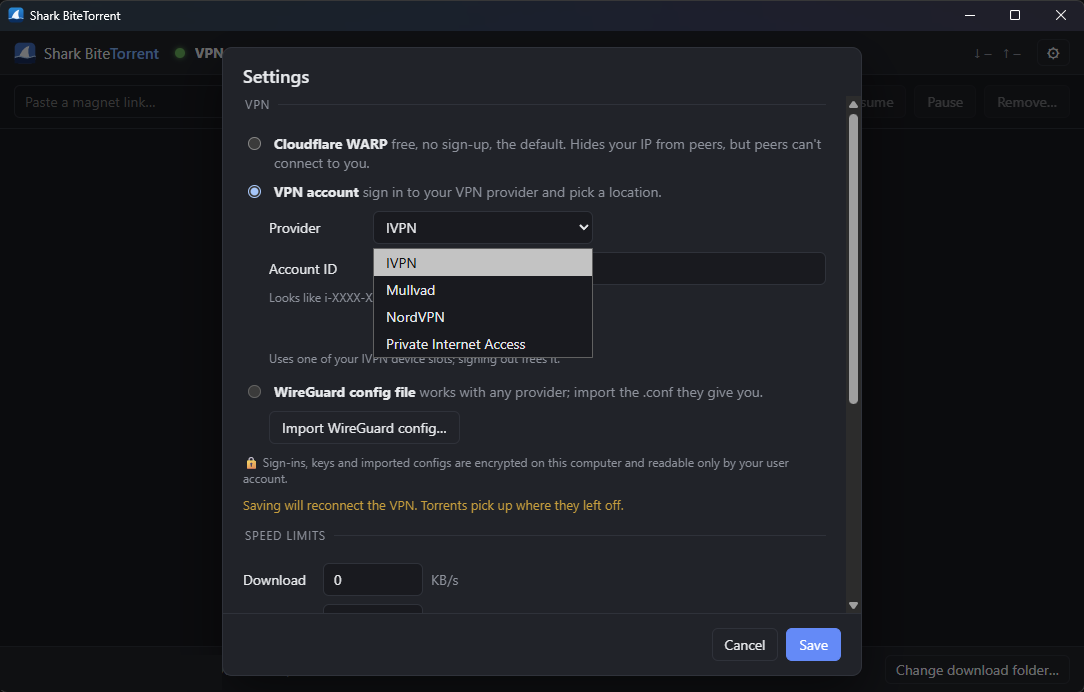
It works out of the box with free Cloudflare WARP, so there's protection from the first launch, and you can switch to a paid VPN provider at any time.
VPN
.conf file: works with any provider (Proton, AirVPN, …), with an optional forwarded port.Torrents
.torrent files: paste, open, drag and drop, or click a magnet link in your browser.movie.mp4.exe, or a program inside a video torrent). Finished files are marked as downloaded from the internet (Windows SmartScreen and Defender, macOS Gatekeeper and XProtect check them when opened) and scanned with Microsoft Defender on Windows, or ClamAV on Linux and macOS if it's installed..part files.Desktop
.torrent files and cleans up on uninstall.
Download the latest build from the Releases page.
| Platform | File | Notes |
|---|---|---|
| Windows 10/11 | SharkBiteTorrent-amd64-installer.exe | Recommended. Installs for your user and registers magnet links. |
| Windows (portable) | SharkBiteTorrent.exe | Run from anywhere. Use Settings → Open magnet links… to register. |
| Arch / CachyOS | sharkbitetorrent-*.pkg.tar.zst | sudo pacman -U sharkbitetorrent-*.pkg.tar.zst |
| Other Linux | SharkBiteTorrent-*-linux-x86_64.tar.gz | Needs GTK 3 and WebKitGTK 4.1. |
| macOS (Intel + Apple Silicon) | SharkBiteTorrent-macos-universal.zip | Unsigned: the first time, right-click the app → Open. |
Note: On Windows 11, the first magnet link you click after installing shows a one-time "Pick an app" prompt. Choose Shark BiteTorrent. Windows requires you to confirm this yourself; no installer can skip it.
flowchart LR
    subgraph App["Shark BiteTorrent process"]
        UI["UI<br/>(Svelte in a WebView)"] <--> Go["Go backend"]
        Go --> Engine["Torrent engine<br/>(anacrolix/torrent)<br/>OS sockets disabled"]
        Engine -- "peers, trackers, DHT,<br/>webseeds, DNS" --> Stack["Userspace TCP/IP stack<br/>(gVisor netstack)"]
        Stack --> WG["WireGuard<br/>(wireguard-go)"]
    end
    WG -- "one encrypted UDP socket" --> VPN["VPN server<br/>(WARP / Mullvad / PIA / …)"] --> Net(("Internet"))
    Other["Everything else on your computer"] -- "normal connection" --> ISP["Your ISP"] --> Net
wireguard-go is paired with gVisor's userspace network stack, the same approach Tailscale uses. The app gets a private, in-memory network interface that the operating system doesn't know about.anacrolix/torrent's own sockets (TCP, uTP, DHT, UPnP, WebRTC) are disabled, and the app supplies tunnel-backed replacements for peer connections, HTTP and UDP trackers, DHT and webseeds.warp=on for WARP, and for other providers, an IP different from your real one. Only then does the engine start.We checked this with the OS's own socket list: while downloading, the app's only real network socket is the WireGuard UDP socket to the VPN server.
| Decision | Why |
|---|---|
| Go + Wails (Go backend, web UI in the system WebView) | One small native app per OS without bundling a browser like Electron does. Go has the best in-process WireGuard and torrent libraries. |
| Userspace WireGuard instead of a TUN adapter | No driver, no admin rights, nothing system-wide to configure or leak. The kill switch comes for free. |
| WARP as the default VPN | Free and needs no account, so users are protected from the first launch. It isn't a privacy VPN (Cloudflare knows who you are), which is why switching providers is one click away. |
| WARP registration via wgcf's library | Cloudflare rejects requests that don't look like its official app (TLS fingerprinting). wgcf keeps up with that, and using it as a library means updates fix it. |
| WARP endpoint stored as an IP address | Some DNS resolvers block engage.cloudflareclient.com. A literal IP also avoids a DNS lookup outside the tunnel. |
| VPN sign-in only where the provider supports it | Mullvad, PIA and IVPN publish their login flow in official open-source scripts or clients, and NordVPN issues access tokens for manual setups. Proton and AirVPN have no public API, so they use .conf import instead of fragile reverse-engineering. |
Keep .conf import for every provider | Works with any WireGuard provider, and suits people who'd rather not give the app their login. |
| Encrypt secrets with the OS key store | Windows uses DPAPI. macOS and Linux keep a random key in Keychain or the Secret Service (KWallet/GNOME Keyring) and use AES-256-GCM. A copied settings file is unreadable on another account or machine, and the user never has to type a master password. Code running as the same logged-in user can still decrypt, as with browser-saved passwords. |
| Plain file I/O instead of memory-mapping | anacrolix's default memory-maps files and never unmaps them, so Windows kept removed torrents' files locked and "delete files" failed. A tiny earlyinit module switches the library to plain I/O before it initializes. |
| "Unlimited" speed is a very large finite limit | With an infinite rate limiter, anacrolix stopped connecting to peers: it saw zero download "tokens" and treated that as no budget. |
| Per-user installer (no admin) | Matches the per-user magnet registration, avoids a UAC prompt, and upgrades in place. |
| Linux release built in an Arch container | CachyOS is the main Linux target, and building on Arch matches its library versions. |
A nofunding build flag | The funding is optional for users, so removing it shouldn't need code changes. One flag strips the sponsor button and referral links, and stops the updater from installing the official (funded) release over it. |
.conf import.All platforms need:
go install github.com/wailsapp/wails/v2/cmd/[email protected]
$(go env GOPATH)/bin is on your PATH, then check your setup with wails doctor.Clone the repo:
git clone https://github.com/trevercomb/SharkBiteTorrent.git
cd SharkBiteTorrent
Requirements: WebView2 (built into Windows 10/11) and, for the installer, NSIS:
winget install GoLang.Go OpenJS.NodeJS.LTS NSIS.NSIS
Build:
# App only -> build\bin\SharkBiteTorrent.exe
wails build -trimpath -ldflags "-s -w"

# App + per-user installer -> build\bin\SharkBiteTorrent-amd64-installer.exe
wails build -trimpath -ldflags "-s -w" -nsis -installscope user
If makensis isn't found, add C:\Program Files (x86)\NSIS to your PATH.
Arch / CachyOS:
sudo pacman -S --needed base-devel go nodejs npm gtk3 webkit2gtk-4.1 xdg-utils
Debian / Ubuntu 24.04+ (install Go from go.dev if your distro's is older than 1.26):
sudo apt install build-essential pkg-config nodejs npm libgtk-3-dev libwebkit2gtk-4.1-dev xdg-utils
Fedora:
sudo dnf install golang nodejs npm gtk3-devel webkit2gtk4.1-devel xdg-utils
Build. The webkit2_41 tag selects WebKitGTK 4.1, which current distros ship:
wails build -trimpath -ldflags "-s -w" -tags webkit2_41
# -> build/bin/SharkBiteTorrent
To register magnet links for your user, open Settings → Open magnet links & .torrent files with Shark BiteTorrent. That writes a .desktop entry and runs xdg-mime.
Make an Arch package (what the release does):
v=0.2.0; name=SharkBiteTorrent-$v-linux-x86_64
mkdir -p dist/$name
cp build/bin/SharkBiteTorrent packaging/linux/sharkbitetorrent.desktop dist/$name/
cp build/appicon.png dist/$name/sharkbitetorrent.png
tar -C dist -czf packaging/arch/$name.tar.gz $name
cd packaging/arch && makepkg -si
Saved VPN logins on Linux need a Secret Service keyring. KDE's KWallet and GNOME Keyring both provide one.
Requirements: Xcode Command Line Tools, plus Go and Node (via Homebrew or the installers above):
xcode-select --install
brew install go node
Build a universal app (Intel + Apple Silicon):
wails build -trimpath -ldflags "-s -w" -platform darwin/universal
codesign --force --deep --sign - build/bin/*.app   # ad-hoc signature so it launches
# -> build/bin/SharkBiteTorrent.app
Magnet links and .torrent files are declared in the app's Info.plist (generated from wails.json), and macOS registers them when the app is moved to Applications.
Add the nofunding build tag to any build command above, on any platform:
wails build -tags nofunding -trimpath -ldflags "-s -w"                    # Windows / macOS
wails build -tags "webkit2_41 nofunding" -trimpath -ldflags "-s -w"     # Linux
That build has:
Everything else is identical. To check it, run go test -tags nofunding -run TestLinks .
wails dev                      # live-reloading app; frontend changes apply instantly
go test ./...                  # unit tests (add -short to skip the tests that need the network)
go run ./cmd/tunnelcheck       # bring up WARP and print the exit IP
go run ./cmd/enginecheck -seconds 30 [-down KB/s] [-delete] <magnet|file.torrent>
                               # headless download through the tunnel; ENGINE_STATUS=1 dumps client state
Pushing a version tag builds Windows, Linux and macOS on GitHub Actions and publishes a Release:
git tag v0.2.1 && git push origin v0.2.1
Running the Release workflow by hand from the Actions tab builds everything without publishing.
main.go, app.go          Wails entry point; app state, VPN connect/reconnect, torrents
accounts.go              VPN provider sign-in/out (encrypted storage)
links*.go                Sponsor and VPN sign-up links (links.go); the nofunding build flag strips them
tray*.go                 Tray icon (per-OS files)
internal/tunnel          In-process WireGuard + netstack, .conf parser, exit-IP check
internal/engine          anacrolix/torrent wired to the tunnel; files, limits, removal
internal/warp            Cloudflare WARP registration (via wgcf)
internal/vpnprov         Mullvad, PIA, NordVPN, IVPN sign-in and server selection
internal/secret          Encryption at rest (DPAPI / keyring + AES-GCM)
internal/platform        Open folder, magnet/.torrent registration (Windows/Linux/macOS)
internal/winassoc        Windows registry associations and Default Apps
earlyinit/               Sets the torrent library's file I/O mode before it initializes
frontend/                Svelte 5 + TypeScript UI
packaging/               Linux .desktop file and Arch PKGBUILD
build/                   Icons, Windows installer script, macOS Info.plist
.github/workflows        Release builds for all three platforms
App data (settings, saved torrents, encrypted keys) lives in:
| OS | Location |
|---|---|
| Windows | %APPDATA%\SharkBiteTorrent |
| Linux | ~/.config/SharkBiteTorrent |
| macOS | ~/Library/Application Support/SharkBiteTorrent |
Downloads default to Downloads/Torrents in your home folder.
Built on wireguard-go and gVisor netstack, anacrolix/torrent, wgcf, Wails, Svelte, fyne.io/systray and go-keyring. The PIA certificate and connection flow come from PIA's manual-connections scripts.
We'd rather tell you upfront than have you find out later.
What earns money:
What that means for you:
What never happens:
Every link lives in one file, links.go, so anyone can check exactly what the app links to. To build without any of it, use the nofunding build flag (see Build without funding links): no sponsor button, plain provider links and no referral labels. Because this is GPL software, you're free to change or remove anything else too.
Bug reports, ideas and pull requests are welcome. Please open an issue first for big changes.
Shark BiteTorrent is free software, licensed under the GNU General Public License v3.0 or later.
You can use, study, share and modify it. If you distribute a modified version, you must make its source available under the same license, so forks stay open (no closed-source or adware repackaging).
It includes third-party libraries under MIT, BSD, ISC, Apache-2.0 and MPL-2.0 licenses, all compatible with the GPL. Their notices are in THIRD_PARTY_LICENSES.txt, which also ships with every release. To regenerate it after changing dependencies, use go-licenses:
go install github.com/google/go-licenses/v2@latest
go-licenses report .   # lists every Go dependency and its license
Please use Shark BiteTorrent only for content you have the right to download and share.
Lightweight BitTorrent client with a built-in per-app VPN (Cloudflare WARP, Mullvad, PIA, NordVPN, IVPN or any WireGuard config). Windows, Linux, macOS.
Go
3
28 commits
updated Oct 16, 2026
A lightweight BitTorrent client with a VPN built in. Only the torrent client goes through the VPN;
the rest of your computer keeps its normal connection.
Most people who want their torrent traffic on a VPN have two options, and neither is great:
Shark BiteTorrent puts the VPN inside the app. The torrent engine has no network access except through its own WireGuard tunnel, so:
It works out of the box with free Cloudflare WARP, so there's protection from the first launch, and you can switch to a paid VPN provider at any time.
VPN
.conf file: works with any provider (Proton, AirVPN, …), with an optional forwarded port.Torrents
.torrent files: paste, open, drag and drop, or click a magnet link in your browser.movie.mp4.exe, or a program inside a video torrent). Finished files are marked as downloaded from the internet (Windows SmartScreen and Defender, macOS Gatekeeper and XProtect check them when opened) and scanned with Microsoft Defender on Windows, or ClamAV on Linux and macOS if it's installed..part files.Desktop
.torrent files and cleans up on uninstall.
Download the latest build from the Releases page.
| Platform | File | Notes |
|---|---|---|
| Windows 10/11 | SharkBiteTorrent-amd64-installer.exe | Recommended. Installs for your user and registers magnet links. |
| Windows (portable) | SharkBiteTorrent.exe | Run from anywhere. Use Settings → Open magnet links… to register. |
| Arch / CachyOS | sharkbitetorrent-*.pkg.tar.zst | sudo pacman -U sharkbitetorrent-*.pkg.tar.zst |
| Other Linux | SharkBiteTorrent-*-linux-x86_64.tar.gz | Needs GTK 3 and WebKitGTK 4.1. |
| macOS (Intel + Apple Silicon) | SharkBiteTorrent-macos-universal.zip | Unsigned: the first time, right-click the app → Open. |
Note: On Windows 11, the first magnet link you click after installing shows a one-time "Pick an app" prompt. Choose Shark BiteTorrent. Windows requires you to confirm this yourself; no installer can skip it.
flowchart LR
    subgraph App["Shark BiteTorrent process"]
        UI["UI<br/>(Svelte in a WebView)"] <--> Go["Go backend"]
        Go --> Engine["Torrent engine<br/>(anacrolix/torrent)<br/>OS sockets disabled"]
        Engine -- "peers, trackers, DHT,<br/>webseeds, DNS" --> Stack["Userspace TCP/IP stack<br/>(gVisor netstack)"]
        Stack --> WG["WireGuard<br/>(wireguard-go)"]
    end
    WG -- "one encrypted UDP socket" --> VPN["VPN server<br/>(WARP / Mullvad / PIA / …)"] --> Net(("Internet"))
    Other["Everything else on your computer"] -- "normal connection" --> ISP["Your ISP"] --> Net
wireguard-go is paired with gVisor's userspace network stack, the same approach Tailscale uses. The app gets a private, in-memory network interface that the operating system doesn't know about.anacrolix/torrent's own sockets (TCP, uTP, DHT, UPnP, WebRTC) are disabled, and the app supplies tunnel-backed replacements for peer connections, HTTP and UDP trackers, DHT and webseeds.warp=on for WARP, and for other providers, an IP different from your real one. Only then does the engine start.We checked this with the OS's own socket list: while downloading, the app's only real network socket is the WireGuard UDP socket to the VPN server.
| Decision | Why |
|---|---|
| Go + Wails (Go backend, web UI in the system WebView) | One small native app per OS without bundling a browser like Electron does. Go has the best in-process WireGuard and torrent libraries. |
| Userspace WireGuard instead of a TUN adapter | No driver, no admin rights, nothing system-wide to configure or leak. The kill switch comes for free. |
| WARP as the default VPN | Free and needs no account, so users are protected from the first launch. It isn't a privacy VPN (Cloudflare knows who you are), which is why switching providers is one click away. |
| WARP registration via wgcf's library | Cloudflare rejects requests that don't look like its official app (TLS fingerprinting). wgcf keeps up with that, and using it as a library means updates fix it. |
| WARP endpoint stored as an IP address | Some DNS resolvers block engage.cloudflareclient.com. A literal IP also avoids a DNS lookup outside the tunnel. |
| VPN sign-in only where the provider supports it | Mullvad, PIA and IVPN publish their login flow in official open-source scripts or clients, and NordVPN issues access tokens for manual setups. Proton and AirVPN have no public API, so they use .conf import instead of fragile reverse-engineering. |
Keep .conf import for every provider | Works with any WireGuard provider, and suits people who'd rather not give the app their login. |
| Encrypt secrets with the OS key store | Windows uses DPAPI. macOS and Linux keep a random key in Keychain or the Secret Service (KWallet/GNOME Keyring) and use AES-256-GCM. A copied settings file is unreadable on another account or machine, and the user never has to type a master password. Code running as the same logged-in user can still decrypt, as with browser-saved passwords. |
| Plain file I/O instead of memory-mapping | anacrolix's default memory-maps files and never unmaps them, so Windows kept removed torrents' files locked and "delete files" failed. A tiny earlyinit module switches the library to plain I/O before it initializes. |
| "Unlimited" speed is a very large finite limit | With an infinite rate limiter, anacrolix stopped connecting to peers: it saw zero download "tokens" and treated that as no budget. |
| Per-user installer (no admin) | Matches the per-user magnet registration, avoids a UAC prompt, and upgrades in place. |
| Linux release built in an Arch container | CachyOS is the main Linux target, and building on Arch matches its library versions. |
A nofunding build flag | The funding is optional for users, so removing it shouldn't need code changes. One flag strips the sponsor button and referral links, and stops the updater from installing the official (funded) release over it. |
.conf import.All platforms need:
go install github.com/wailsapp/wails/v2/cmd/[email protected]
$(go env GOPATH)/bin is on your PATH, then check your setup with wails doctor.Clone the repo:
git clone https://github.com/trevercomb/SharkBiteTorrent.git
cd SharkBiteTorrent
Requirements: WebView2 (built into Windows 10/11) and, for the installer, NSIS:
winget install GoLang.Go OpenJS.NodeJS.LTS NSIS.NSIS
Build:
# App only -> build\bin\SharkBiteTorrent.exe
wails build -trimpath -ldflags "-s -w"

# App + per-user installer -> build\bin\SharkBiteTorrent-amd64-installer.exe
wails build -trimpath -ldflags "-s -w" -nsis -installscope user
If makensis isn't found, add C:\Program Files (x86)\NSIS to your PATH.
Arch / CachyOS:
sudo pacman -S --needed base-devel go nodejs npm gtk3 webkit2gtk-4.1 xdg-utils
Debian / Ubuntu 24.04+ (install Go from go.dev if your distro's is older than 1.26):
sudo apt install build-essential pkg-config nodejs npm libgtk-3-dev libwebkit2gtk-4.1-dev xdg-utils
Fedora:
sudo dnf install golang nodejs npm gtk3-devel webkit2gtk4.1-devel xdg-utils
Build. The webkit2_41 tag selects WebKitGTK 4.1, which current distros ship:
wails build -trimpath -ldflags "-s -w" -tags webkit2_41
# -> build/bin/SharkBiteTorrent
To register magnet links for your user, open Settings → Open magnet links & .torrent files with Shark BiteTorrent. That writes a .desktop entry and runs xdg-mime.
Make an Arch package (what the release does):
v=0.2.0; name=SharkBiteTorrent-$v-linux-x86_64
mkdir -p dist/$name
cp build/bin/SharkBiteTorrent packaging/linux/sharkbitetorrent.desktop dist/$name/
cp build/appicon.png dist/$name/sharkbitetorrent.png
tar -C dist -czf packaging/arch/$name.tar.gz $name
cd packaging/arch && makepkg -si
Saved VPN logins on Linux need a Secret Service keyring. KDE's KWallet and GNOME Keyring both provide one.
Requirements: Xcode Command Line Tools, plus Go and Node (via Homebrew or the installers above):
xcode-select --install
brew install go node
Build a universal app (Intel + Apple Silicon):
wails build -trimpath -ldflags "-s -w" -platform darwin/universal
codesign --force --deep --sign - build/bin/*.app   # ad-hoc signature so it launches
# -> build/bin/SharkBiteTorrent.app
Magnet links and .torrent files are declared in the app's Info.plist (generated from wails.json), and macOS registers them when the app is moved to Applications.
Add the nofunding build tag to any build command above, on any platform:
wails build -tags nofunding -trimpath -ldflags "-s -w"                    # Windows / macOS
wails build -tags "webkit2_41 nofunding" -trimpath -ldflags "-s -w"     # Linux
That build has:
Everything else is identical. To check it, run go test -tags nofunding -run TestLinks .
wails dev                      # live-reloading app; frontend changes apply instantly
go test ./...                  # unit tests (add -short to skip the tests that need the network)
go run ./cmd/tunnelcheck       # bring up WARP and print the exit IP
go run ./cmd/enginecheck -seconds 30 [-down KB/s] [-delete] <magnet|file.torrent>
                               # headless download through the tunnel; ENGINE_STATUS=1 dumps client state
Pushing a version tag builds Windows, Linux and macOS on GitHub Actions and publishes a Release:
git tag v0.2.1 && git push origin v0.2.1
Running the Release workflow by hand from the Actions tab builds everything without publishing.
main.go, app.go          Wails entry point; app state, VPN connect/reconnect, torrents
accounts.go              VPN provider sign-in/out (encrypted storage)
links*.go                Sponsor and VPN sign-up links (links.go); the nofunding build flag strips them
tray*.go                 Tray icon (per-OS files)
internal/tunnel          In-process WireGuard + netstack, .conf parser, exit-IP check
internal/engine          anacrolix/torrent wired to the tunnel; files, limits, removal
internal/warp            Cloudflare WARP registration (via wgcf)
internal/vpnprov         Mullvad, PIA, NordVPN, IVPN sign-in and server selection
internal/secret          Encryption at rest (DPAPI / keyring + AES-GCM)
internal/platform        Open folder, magnet/.torrent registration (Windows/Linux/macOS)
internal/winassoc        Windows registry associations and Default Apps
earlyinit/               Sets the torrent library's file I/O mode before it initializes
frontend/                Svelte 5 + TypeScript UI
packaging/               Linux .desktop file and Arch PKGBUILD
build/                   Icons, Windows installer script, macOS Info.plist
.github/workflows        Release builds for all three platforms
App data (settings, saved torrents, encrypted keys) lives in:
| OS | Location |
|---|---|
| Windows | %APPDATA%\SharkBiteTorrent |
| Linux | ~/.config/SharkBiteTorrent |
| macOS | ~/Library/Application Support/SharkBiteTorrent |
Downloads default to Downloads/Torrents in your home folder.
Built on wireguard-go and gVisor netstack, anacrolix/torrent, wgcf, Wails, Svelte, fyne.io/systray and go-keyring. The PIA certificate and connection flow come from PIA's manual-connections scripts.
We'd rather tell you upfront than have you find out later.
What earns money:
What that means for you:
What never happens:
Every link lives in one file, links.go, so anyone can check exactly what the app links to. To build without any of it, use the nofunding build flag (see Build without funding links): no sponsor button, plain provider links and no referral labels. Because this is GPL software, you're free to change or remove anything else too.
Bug reports, ideas and pull requests are welcome. Please open an issue first for big changes.
Shark BiteTorrent is free software, licensed under the GNU General Public License v3.0 or later.
You can use, study, share and modify it. If you distribute a modified version, you must make its source available under the same license, so forks stay open (no closed-source or adware repackaging).
It includes third-party libraries under MIT, BSD, ISC, Apache-2.0 and MPL-2.0 licenses, all compatible with the GPL. Their notices are in THIRD_PARTY_LICENSES.txt, which also ships with every release. To regenerate it after changing dependencies, use go-licenses:
go install github.com/google/go-licenses/v2@latest
go-licenses report .   # lists every Go dependency and its license
Please use Shark BiteTorrent only for content you have the right to download and share.



