xuan (玄) — a lightweight JavaScript runtime for the Internet of Things, built on QuickJS. Broad Node.js compatibility, built-in MQTT / SerialPort / FFI, tiny binary (~6MB) and millisecond cold start. Runs existing npm packages on embedded and edge devices.
C
5
6 commits
updated Oct 12, 2026
The invisible runtime — a lightweight JavaScript runtime for the Internet of Things
English | 中文
xuan (pronounced "shwen") is a lightweight JavaScript runtime designed for the Internet of Things. It is built on top of QuickJS and tjs (txiki.js), and inherits their small footprint:
Built for embedded and edge devices.
import/export, dynamic import(), top-level await and require()Don't want to build from source? Grab a prebuilt binary from the Releases page, or install in one command (Linux x86_64 / macOS arm64):
curl -fsSL https://raw.githubusercontent.com/topelinux/xuan/main/scripts/install.sh | sh
The installer downloads the matching release into ~/.xuan and symlinks xuan
into ~/.local/bin (override with XUAN_HOME / XUAN_BIN_DIR).
Prebuilt assets:
| Platform | Architecture | Asset |
|---|---|---|
| Linux | x86_64 | xuan-<version>-linux-x86_64.tar.gz |
| macOS | arm64 (Apple Silicon) | xuan-<version>-macos-arm64.tar.gz |
| Windows | x86_64 | xuan-<version>-windows-x86_64.zip |
# Linux / macOS: unpack and run
tar -xzf xuan-<version>-linux-x86_64.tar.gz -C xuan
./xuan/bin/xuan -e "console.log('Hello from xuan!')"
# Windows (PowerShell): unpack and run
Expand-Archive xuan-<version>-windows-x86_64.zip -DestinationPath xuan
.\xuan\bin\xuan.exe -e "console.log('Hello from xuan!')"
Each archive ships the
xuanruntime together with its bundled shared libraries and native modules (bin/,lib/,node_modules/). Keep that directory layout intact.macOS note: the prebuilt binaries are not notarized. If Gatekeeper blocks them, run
xattr -dr com.apple.quarantine <unpacked-dir>or allow them in System Settings → Privacy & Security.
# Clone the project
git clone https://github.com/topelinux/xuan.git
cd xuan

# Initialize submodules
git submodule update --init --recursive --force

# Install JS build dependencies (esbuild, polyfills, etc.)
npm install

# Build
make
makeusesnpx esbuildto generate bundles, so runnpm installfirst.
Local changes to the bundled dependencies (
libwebsockets,quickjs,libuv,mimalloc) are stored as patches underpatches/and are applied automatically bymake. Do not edit files insidedeps/submodules directly.
// main.js
console.log('Hello from xuan!');

// IoT example: read a GPIO pin (coming soon)
// const gpio = require('gpio');
// const sensor = gpio.open(17);
// sensor.read((value) => {
//     console.log('Sensor value:', value);
// });
./build/xuan run main.js
Bundle JavaScript into a single self-contained executable that can be shipped with no runtime dependencies:
# Compile a script into a standalone executable
./build/xuan compile main.js myapp

# Run it
./myapp
Benefits:
xuan ships with an npm-compatible package manager:
# Initialize a project
./build/xuan npm init

# Install a package
./build/xuan npm install <package>

# Uninstall a package
./build/xuan npm uninstall <package>
Packages are downloaded from the npm registry into a local node_modules
directory and can be required directly.
For resource-constrained environments, bundling and minifying your application with esbuild into a single file reduces size and startup time.
Install esbuild first:
npm install -g esbuild
Then bundle:
# Bundle and minify
esbuild entry.js --bundle --minify --outfile=bundle.js
Run the bundle with xuan:
./build/xuan run bundle.js
💡 xuan compile vs. esbuild:
xuan compileembeds your JS into the runtime and produces a standalone binary, ideal for direct distribution. esbuild reduces the size of the JS payload but still requires the xuan runtime.
xuan can act as the runtime for an edge AI agent, running lightweight LLM applications on constrained devices:
# Enter the example directory
cd xuan_apps/xuanling

# Set up the LLM provider
cp config.example.json config.json

# Start an interactive chat
./build/xuan run xuan_apps/xuanling/bin/xuanling.js chat \
  --config xuan_apps/xuanling/config.json \
  --workspace /tmp/xuanling-workspace
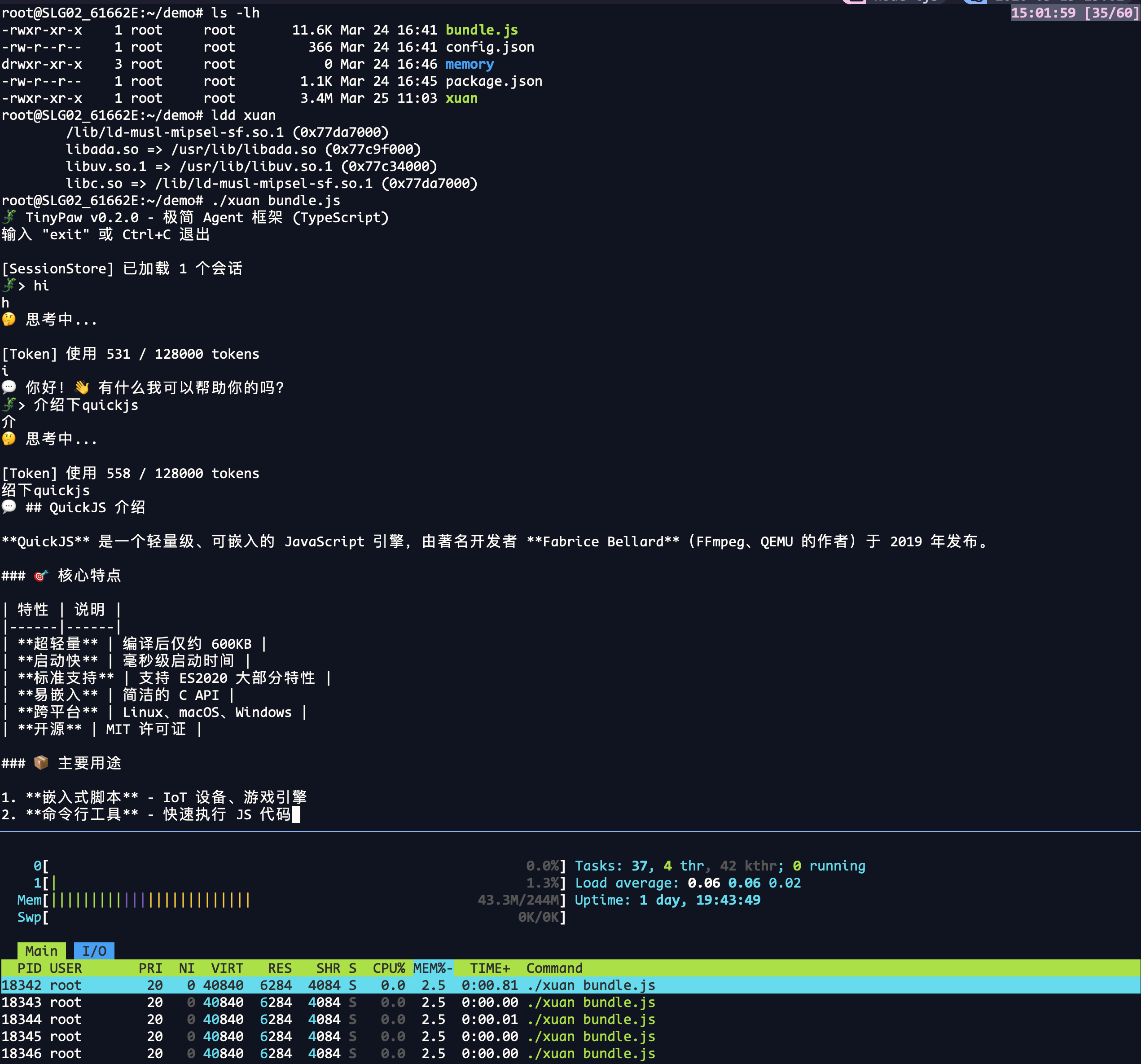
Highlights:
┌─────────────────────────────────────┐
│           xuan Runtime              │
├─────────────────────────────────────┤
│  Node.js Compatible API Layer       │
├─────────────────────────────────────┤
│  IoT Native Modules (GPIO/I2C/SPI to be added)  │
├─────────────────────────────────────┤
│  QuickJS Engine                     │
├─────────────────────────────────────┤
│  Embedded System (Linux/RTOS)       │
└─────────────────────────────────────┘
xuan ships the essential IoT modules out of the box — no extra installs needed:
| Module | Description |
|---|---|
| mqtt | MQTT client for publish/subscribe messaging |
| serialport | Serial port communication |
| ffi | Call C library functions and reuse existing C libraries |
| gpio | GPIO pin control (coming soon) |
| i2c | I2C bus communication (coming soon) |
| spi | SPI bus communication (coming soon) |
xuan supports ES Modules and CommonJS, plus async/await throughout:
import / export, dynamic import(), import.metaawaitrequire() / module.exportsModule resolution: .mjs is always ESM, .cjs is always CommonJS, and .js
follows the nearest package.json "type" (falling back to content sniffing).
// app.mjs
import { readFile } from 'node:fs/promises';

async function loadConfig() {
    const raw = await readFile('./config.json', 'utf8');
    return JSON.parse(raw);
}

// top-level await
const config = await loadConfig();

const os = await import('node:os');       // dynamic import
console.log(import.meta.dirname);         // script directory
console.log(config.id, typeof os.totalmem);
// JSON import
import data from './data.json' with { type: 'json' };
console.log(data.widget.debug);

// CommonJS interop from ESM
const os = require('node:os');
💡 The built-in modules use the
tjs:scheme (e.g.import FFI from 'tjs:ffi'), a naming convention kept from the txiki.js lineage.
const mqtt = require('mqtt');
const client = mqtt.connect('mqtt://broker.emqx.io');

client.on('message', (topic, message) => {
    console.log('recv:', topic, message.toString());
});

client.on('error', (err) => {
    console.error('error:', err);
});

client.on('connect', () => {
    console.log('connect');
    client.subscribe('iot/device/001/#', { qos: 1 }, (err) => {
        if (err) {
            console.log('subscribe error', err);
        } else {
            console.log('subscribe success');
        }
    });
    setInterval(() => {
        client.publish('iot/device/001/status', 'online', { qos: 1 });
    }, 5000);
});
const SerialPort = require('serialport');
const port = new SerialPort('/dev/ttyUSB0', { baudRate: 9600 });

port.write('AT\n');
port.on('data', (data) => {
    console.log('Received:', data.toString());
});
The FFI module lets you call C library functions directly:
import FFI from 'tjs:ffi';

// Load a C library
const libc = new FFI.Lib(FFI.Lib.LIBC_NAME);

// Call a C function: atoi
const atoi = new FFI.CFunction(
    libc.symbol('atoi'),
    FFI.types.sint,
    [FFI.types.string]
);
console.log(atoi.call('123'));  // 123

// Call a C function: getenv
const getenv = new FFI.CFunction(
    libc.symbol('getenv'),
    FFI.types.string,
    [FFI.types.string]
);
console.log(getenv.call('HOME'));  // /home/xxx

// Call a C function: time
const time = new FFI.CFunction(
    libc.symbol('time'),
    FFI.types.sint64,
    [FFI.types.pointer]
);
console.log('Current timestamp:', time.call(BigInt(0)));

// Call a custom C function
const mylib = new FFI.Lib('./libmylib.so');
const myfunc = new FFI.CFunction(
    mylib.symbol('my_function'),
    FFI.types.sint,
    [FFI.types.sint, FFI.types.sint]
);
console.log(myfunc.call(1, 2));
// const gpio = require('gpio');

// // Output mode
// const led = gpio.open(18, { mode: 'out' });
// led.write(1);  // LED on
// led.write(0);  // LED off

// // Input mode
// const button = gpio.open(23, { mode: 'in', pull: 'up' });
// const state = button.read();
// const i2c = require('i2c');
// const device = i2c.open(1, 0x68);  // bus 1, address 0x68

// device.write([0x00, 0x10]);
// const data = device.read(4);
| Runtime | Version | Mean cold start | Median | P95 | Executable size |
|---|---|---|---|---|---|
| xuan | dev | 5.37 ms | 5.35 ms | 6.07 ms | 6.2 MB |
| bun | 1.3.11 | 8.82 ms | 8.68 ms | 9.70 ms | 58 MB |
| Node.js | v24.13.0 | 20.29 ms | 20.18 ms | 21.31 ms | 112 MB |
Test date: 2026-03-27
Environment: macOS 13.7.3, Apple M1, Darwin 22.6.0
Method: all runtimes invoked with -e "0", 220 runs each, randomly interleaved; wall-clock time from process start to exit.
Note: this round only measures cold start time and executable size; resident memory was not measured.
Use the XUAN_* prefix:
XUAN_LIGHTWEIGHT_POLYFILLS=0|1
Controls whether the lightweight polyfills startup path is used. By default the
lightweight path is used for -e/--eval/eval/-h/--help/-v/--version. The
non-lightweight path additionally loads compat on top of lite.XUAN_HEAVY_WEB_POLYFILLS=0|1
Controls whether heavy Web polyfills (such as CompressionStream /
WebSocketStream) are loaded, after lite + compat.XUAN_STARTUP_PROFILE=1
Prints per-phase startup timings (stderr, sorted by duration).💡 Tip: the binary can be made even smaller by excluding optional components (such as SQLite), which is especially valuable for resource-constrained embedded devices.
git clone https://github.com/topelinux/xuan.git
cd xuan

# Initialize submodules
git submodule update --init --recursive --force

# Linux: use clang-15
export CC=clang-15
export CXX=clang++-15

# Install JS build dependencies (esbuild, polyfills, etc.)
npm install

# Build
make

# Run the test suite
make test
xuan compiles JavaScript modules into C files (src/bundles/c/**/*.c) that are
embedded into the binary.
These C bundles are build artifacts and are not committed (the repository
ignores src/bundles/c/).
Local build:
make
# generates/updates bundles automatically, then compiles
After modifying JS sources:
make js
make
Cross build:
# The script runs `make js` on the host automatically before cross compiling
BUILD_WITH_MIMALLOC=ON TJS_WAMR_SIMD=ON ./scripts/build-aarch64.sh
# ARM64
make TARGET=arm64

# RISC-V
make TARGET=riscv64

# AArch64 (GNU/Linux, dynamically linked, interpreter usually /lib/ld-linux-aarch64.so.1)
# Install zig first: brew install zig (macOS) or apt install zig (Linux)
# Without a sysroot/prebuilt libffi, a dynamic libffi (libffi.so*) is built from deps_lib/libffi-3.5.2
# WAMR SIMD is off by default to avoid fetching simde during cross builds (enable with TJS_WAMR_SIMD=ON)
# Minimal (no sysroot):
./scripts/build-aarch64.sh
# With a sysroot:
TJS_AARCH64_SYSROOT=/path/to/aarch64-sysroot ./scripts/build-aarch64.sh

# MIPS (dynamic linking)
# Install zig first: brew install zig (macOS) or apt install zig (Linux)
TJS_MIPS_SYSROOT=/path/to/target-mipsel_24kc_musl TJS_LINK_MODE=dynamic TJS_USE_DEPS_LIBUV_SHARED=ON ./scripts/build-mips-static.sh
xuan is built on these excellent projects:
Contributions are welcome! Feel free to open issues, fork the repository and send pull requests.
git checkout -b feature/AmazingFeature)git commit -m 'Add some AmazingFeature')git push origin feature/AmazingFeature)MIT License — see LICENSE.
xuan — JavaScript for Every Device
Made with ⚡ by the xuan Team
xuan (玄) — a lightweight JavaScript runtime for the Internet of Things, built on QuickJS. Broad Node.js compatibility, built-in MQTT / SerialPort / FFI, tiny binary (~6MB) and millisecond cold start. Runs existing npm packages on embedded and edge devices.
C
5
6 commits
updated Oct 12, 2026
The invisible runtime — a lightweight JavaScript runtime for the Internet of Things
English | 中文
xuan (pronounced "shwen") is a lightweight JavaScript runtime designed for the Internet of Things. It is built on top of QuickJS and tjs (txiki.js), and inherits their small footprint:
Built for embedded and edge devices.
import/export, dynamic import(), top-level await and require()Don't want to build from source? Grab a prebuilt binary from the Releases page, or install in one command (Linux x86_64 / macOS arm64):
curl -fsSL https://raw.githubusercontent.com/topelinux/xuan/main/scripts/install.sh | sh
The installer downloads the matching release into ~/.xuan and symlinks xuan
into ~/.local/bin (override with XUAN_HOME / XUAN_BIN_DIR).
Prebuilt assets:
| Platform | Architecture | Asset |
|---|---|---|
| Linux | x86_64 | xuan-<version>-linux-x86_64.tar.gz |
| macOS | arm64 (Apple Silicon) | xuan-<version>-macos-arm64.tar.gz |
| Windows | x86_64 | xuan-<version>-windows-x86_64.zip |
# Linux / macOS: unpack and run
tar -xzf xuan-<version>-linux-x86_64.tar.gz -C xuan
./xuan/bin/xuan -e "console.log('Hello from xuan!')"
# Windows (PowerShell): unpack and run
Expand-Archive xuan-<version>-windows-x86_64.zip -DestinationPath xuan
.\xuan\bin\xuan.exe -e "console.log('Hello from xuan!')"
Each archive ships the
xuanruntime together with its bundled shared libraries and native modules (bin/,lib/,node_modules/). Keep that directory layout intact.macOS note: the prebuilt binaries are not notarized. If Gatekeeper blocks them, run
xattr -dr com.apple.quarantine <unpacked-dir>or allow them in System Settings → Privacy & Security.
# Clone the project
git clone https://github.com/topelinux/xuan.git
cd xuan

# Initialize submodules
git submodule update --init --recursive --force

# Install JS build dependencies (esbuild, polyfills, etc.)
npm install

# Build
make
makeusesnpx esbuildto generate bundles, so runnpm installfirst.
Local changes to the bundled dependencies (
libwebsockets,quickjs,libuv,mimalloc) are stored as patches underpatches/and are applied automatically bymake. Do not edit files insidedeps/submodules directly.
// main.js
console.log('Hello from xuan!');

// IoT example: read a GPIO pin (coming soon)
// const gpio = require('gpio');
// const sensor = gpio.open(17);
// sensor.read((value) => {
//     console.log('Sensor value:', value);
// });
./build/xuan run main.js
Bundle JavaScript into a single self-contained executable that can be shipped with no runtime dependencies:
# Compile a script into a standalone executable
./build/xuan compile main.js myapp

# Run it
./myapp
Benefits:
xuan ships with an npm-compatible package manager:
# Initialize a project
./build/xuan npm init

# Install a package
./build/xuan npm install <package>

# Uninstall a package
./build/xuan npm uninstall <package>
Packages are downloaded from the npm registry into a local node_modules
directory and can be required directly.
For resource-constrained environments, bundling and minifying your application with esbuild into a single file reduces size and startup time.
Install esbuild first:
npm install -g esbuild
Then bundle:
# Bundle and minify
esbuild entry.js --bundle --minify --outfile=bundle.js
Run the bundle with xuan:
./build/xuan run bundle.js
💡 xuan compile vs. esbuild:
xuan compileembeds your JS into the runtime and produces a standalone binary, ideal for direct distribution. esbuild reduces the size of the JS payload but still requires the xuan runtime.
xuan can act as the runtime for an edge AI agent, running lightweight LLM applications on constrained devices:
# Enter the example directory
cd xuan_apps/xuanling

# Set up the LLM provider
cp config.example.json config.json

# Start an interactive chat
./build/xuan run xuan_apps/xuanling/bin/xuanling.js chat \
  --config xuan_apps/xuanling/config.json \
  --workspace /tmp/xuanling-workspace
Highlights:
┌─────────────────────────────────────┐
│           xuan Runtime              │
├─────────────────────────────────────┤
│  Node.js Compatible API Layer       │
├─────────────────────────────────────┤
│  IoT Native Modules (GPIO/I2C/SPI to be added)  │
├─────────────────────────────────────┤
│  QuickJS Engine                     │
├─────────────────────────────────────┤
│  Embedded System (Linux/RTOS)       │
└─────────────────────────────────────┘
xuan ships the essential IoT modules out of the box — no extra installs needed:
| Module | Description |
|---|---|
| mqtt | MQTT client for publish/subscribe messaging |
| serialport | Serial port communication |
| ffi | Call C library functions and reuse existing C libraries |
| gpio | GPIO pin control (coming soon) |
| i2c | I2C bus communication (coming soon) |
| spi | SPI bus communication (coming soon) |
xuan supports ES Modules and CommonJS, plus async/await throughout:
import / export, dynamic import(), import.metaawaitrequire() / module.exportsModule resolution: .mjs is always ESM, .cjs is always CommonJS, and .js
follows the nearest package.json "type" (falling back to content sniffing).
// app.mjs
import { readFile } from 'node:fs/promises';

async function loadConfig() {
    const raw = await readFile('./config.json', 'utf8');
    return JSON.parse(raw);
}

// top-level await
const config = await loadConfig();

const os = await import('node:os');       // dynamic import
console.log(import.meta.dirname);         // script directory
console.log(config.id, typeof os.totalmem);
// JSON import
import data from './data.json' with { type: 'json' };
console.log(data.widget.debug);

// CommonJS interop from ESM
const os = require('node:os');
💡 The built-in modules use the
tjs:scheme (e.g.import FFI from 'tjs:ffi'), a naming convention kept from the txiki.js lineage.
const mqtt = require('mqtt');
const client = mqtt.connect('mqtt://broker.emqx.io');

client.on('message', (topic, message) => {
    console.log('recv:', topic, message.toString());
});

client.on('error', (err) => {
    console.error('error:', err);
});

client.on('connect', () => {
    console.log('connect');
    client.subscribe('iot/device/001/#', { qos: 1 }, (err) => {
        if (err) {
            console.log('subscribe error', err);
        } else {
            console.log('subscribe success');
        }
    });
    setInterval(() => {
        client.publish('iot/device/001/status', 'online', { qos: 1 });
    }, 5000);
});
const SerialPort = require('serialport');
const port = new SerialPort('/dev/ttyUSB0', { baudRate: 9600 });

port.write('AT\n');
port.on('data', (data) => {
    console.log('Received:', data.toString());
});
The FFI module lets you call C library functions directly:
import FFI from 'tjs:ffi';

// Load a C library
const libc = new FFI.Lib(FFI.Lib.LIBC_NAME);

// Call a C function: atoi
const atoi = new FFI.CFunction(
    libc.symbol('atoi'),
    FFI.types.sint,
    [FFI.types.string]
);
console.log(atoi.call('123'));  // 123

// Call a C function: getenv
const getenv = new FFI.CFunction(
    libc.symbol('getenv'),
    FFI.types.string,
    [FFI.types.string]
);
console.log(getenv.call('HOME'));  // /home/xxx

// Call a C function: time
const time = new FFI.CFunction(
    libc.symbol('time'),
    FFI.types.sint64,
    [FFI.types.pointer]
);
console.log('Current timestamp:', time.call(BigInt(0)));

// Call a custom C function
const mylib = new FFI.Lib('./libmylib.so');
const myfunc = new FFI.CFunction(
    mylib.symbol('my_function'),
    FFI.types.sint,
    [FFI.types.sint, FFI.types.sint]
);
console.log(myfunc.call(1, 2));
// const gpio = require('gpio');

// // Output mode
// const led = gpio.open(18, { mode: 'out' });
// led.write(1);  // LED on
// led.write(0);  // LED off

// // Input mode
// const button = gpio.open(23, { mode: 'in', pull: 'up' });
// const state = button.read();
// const i2c = require('i2c');
// const device = i2c.open(1, 0x68);  // bus 1, address 0x68

// device.write([0x00, 0x10]);
// const data = device.read(4);
| Runtime | Version | Mean cold start | Median | P95 | Executable size |
|---|---|---|---|---|---|
| xuan | dev | 5.37 ms | 5.35 ms | 6.07 ms | 6.2 MB |
| bun | 1.3.11 | 8.82 ms | 8.68 ms | 9.70 ms | 58 MB |
| Node.js | v24.13.0 | 20.29 ms | 20.18 ms | 21.31 ms | 112 MB |
Test date: 2026-03-27
Environment: macOS 13.7.3, Apple M1, Darwin 22.6.0
Method: all runtimes invoked with -e "0", 220 runs each, randomly interleaved; wall-clock time from process start to exit.
Note: this round only measures cold start time and executable size; resident memory was not measured.
Use the XUAN_* prefix:
XUAN_LIGHTWEIGHT_POLYFILLS=0|1
Controls whether the lightweight polyfills startup path is used. By default the
lightweight path is used for -e/--eval/eval/-h/--help/-v/--version. The
non-lightweight path additionally loads compat on top of lite.XUAN_HEAVY_WEB_POLYFILLS=0|1
Controls whether heavy Web polyfills (such as CompressionStream /
WebSocketStream) are loaded, after lite + compat.XUAN_STARTUP_PROFILE=1
Prints per-phase startup timings (stderr, sorted by duration).💡 Tip: the binary can be made even smaller by excluding optional components (such as SQLite), which is especially valuable for resource-constrained embedded devices.
git clone https://github.com/topelinux/xuan.git
cd xuan

# Initialize submodules
git submodule update --init --recursive --force

# Linux: use clang-15
export CC=clang-15
export CXX=clang++-15

# Install JS build dependencies (esbuild, polyfills, etc.)
npm install

# Build
make

# Run the test suite
make test
xuan compiles JavaScript modules into C files (src/bundles/c/**/*.c) that are
embedded into the binary.
These C bundles are build artifacts and are not committed (the repository
ignores src/bundles/c/).
Local build:
make
# generates/updates bundles automatically, then compiles
After modifying JS sources:
make js
make
Cross build:
# The script runs `make js` on the host automatically before cross compiling
BUILD_WITH_MIMALLOC=ON TJS_WAMR_SIMD=ON ./scripts/build-aarch64.sh
# ARM64
make TARGET=arm64

# RISC-V
make TARGET=riscv64

# AArch64 (GNU/Linux, dynamically linked, interpreter usually /lib/ld-linux-aarch64.so.1)
# Install zig first: brew install zig (macOS) or apt install zig (Linux)
# Without a sysroot/prebuilt libffi, a dynamic libffi (libffi.so*) is built from deps_lib/libffi-3.5.2
# WAMR SIMD is off by default to avoid fetching simde during cross builds (enable with TJS_WAMR_SIMD=ON)
# Minimal (no sysroot):
./scripts/build-aarch64.sh
# With a sysroot:
TJS_AARCH64_SYSROOT=/path/to/aarch64-sysroot ./scripts/build-aarch64.sh

# MIPS (dynamic linking)
# Install zig first: brew install zig (macOS) or apt install zig (Linux)
TJS_MIPS_SYSROOT=/path/to/target-mipsel_24kc_musl TJS_LINK_MODE=dynamic TJS_USE_DEPS_LIBUV_SHARED=ON ./scripts/build-mips-static.sh
xuan is built on these excellent projects:
Contributions are welcome! Feel free to open issues, fork the repository and send pull requests.
git checkout -b feature/AmazingFeature)git commit -m 'Add some AmazingFeature')git push origin feature/AmazingFeature)MIT License — see LICENSE.
xuan — JavaScript for Every Device
Made with ⚡ by the xuan Team



