A Bash-compatible shell for Windows: a drop-in replacement for Git Bash, written from scratch in C++17 with a real POSIX shell grammar, a readline-style line editor, and bundled coreutils so a fresh install is useful immediately.
Status: early but released. Tagged 1.0.x releases exist and a golden test suite runs on every build, but there is no CI yet and behavior may change between minor versions.
Git Bash is a thin re-skin of MSYS2, and its quirks leak through: PATH
translation surprises, slow fork emulation, an aging MinTTY. wbsh is built
for modern Windows instead:
cmd.exe.ls, grep, sed, awk, find, tar, curl,
hashes and more are built in. System git, vim, less are auto-discovered./c/Users/... ↔ C:\Users\... when invoking native
Windows executables.Installer. Download wbsh-setup-x64.exe from
Releases. Per-user, no UAC,
installs to %LOCALAPPDATA%\Programs\wbsh, with opt-in tasks to add wbsh to
your PATH and an "Open wbsh here" Explorer context-menu entry.
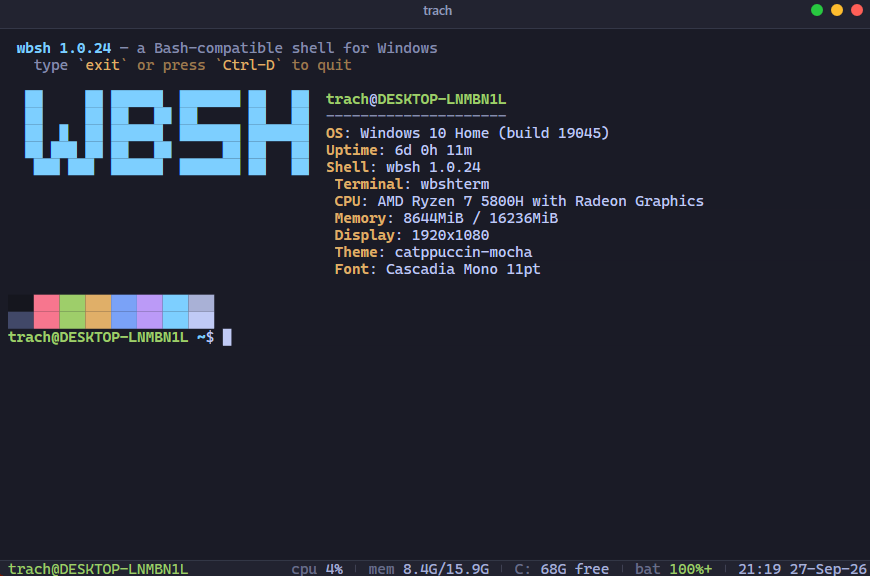
wbshterm. Every release also ships wbshterm-setup-x64.exe, a terminal
that hosts wbsh on a pseudoconsole with themes, a config file, scrollback and
selection, tmux-style panes, and shell integration. It bundles wbsh.exe, so
it works on its own; installing both is fine. See
wbshterm/README.md.
Portable ZIP. wbsh-<version>-portable-x64.zip (or the wbshterm- one):
extract and run. No registry, no PATH changes.
winget / scoop. Not yet published.
$ wbsh
 wbsh 1.0.8 — a Bash-compatible shell for Windows
   type `exit` or press `Ctrl-D` to quit
trach@DESKTOP /c/Users/trach (main)$ ls
Documents  Downloads  Desktop  ...

$ wbsh -c 'for i in {1..3}; do printf "%02d\n" "$((i * 7))"; done'
07
14
21
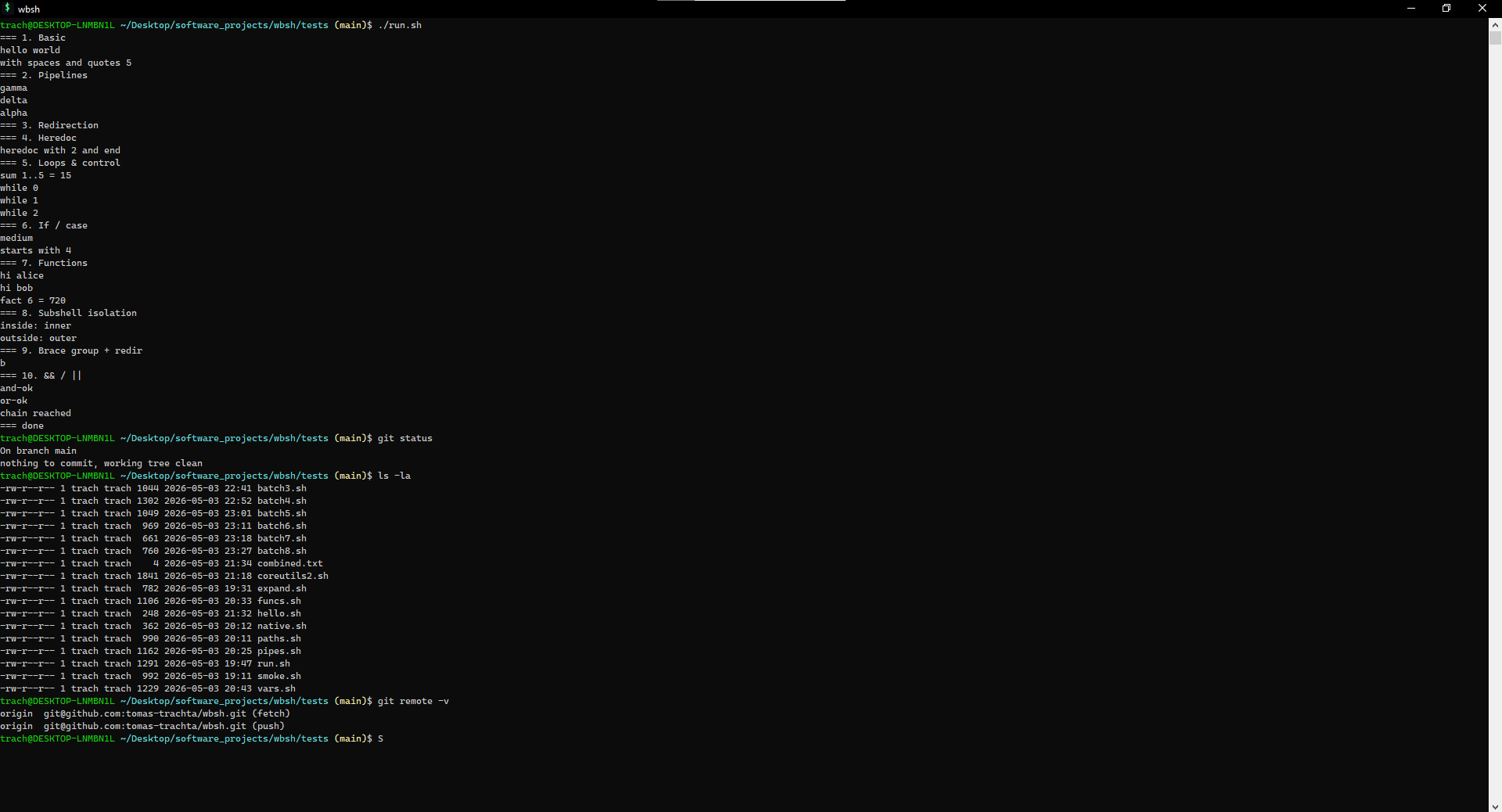
Pipelines, redirection, control flow, functions, command substitution, arithmetic, brace, parameter and glob expansion, here-docs, here-strings and traps all work.
wbsh                          interactive shell (TTY auto-detect)
wbsh [opts] -c <command>      run / dump the given string
wbsh [opts] <file>            run / dump the file (- for stdin)

  -i, --interactive           force interactive REPL
  -r, --run                   execute the script (default for files is an AST dump)
  -e, --expand                dump expanded words
  -t, --tokens                dump the token stream
  --no-ast                    suppress the AST dump
  -h, --help                  show help
The default AST dump for files is a debugging aid; pass -r to run scripts.
Persistent history, kill ring, programmable and per-tool tab completion (git, docker, npm, cargo, kubectl), reverse-incremental search, and inline predictions: the rest of the best matching history entry appears as dim ghost text, and entries whose last run failed are never suggested. Bindings follow readline:
| Keys | Action |
|---|---|
Tab | complete; second Tab lists candidates |
→ at end of line | accept the inline prediction |
← / →, Ctrl-B / Ctrl-F | move by one character |
Home / End, Ctrl-A / Ctrl-E | start / end of line |
↑ / ↓, Ctrl-P / Ctrl-N | walk history |
Ctrl-R / Ctrl-S | search history backward / forward |
Esc / Ctrl-G | cancel the search |
Ctrl-U / Ctrl-K | kill to start / end of line |
Ctrl-W | kill the previous word |
Ctrl-V | paste from the clipboard |
Ctrl-L | clear the screen |
Ctrl-C | abandon the line |
Ctrl-D (empty line) | exit |
~/.wbshrc is sourced at the start of every interactive session:
export EDITOR=code
alias ll='ls -lah'
alias gs='git status'
PS1='\[\e[35;1m\]\w\[\e[0m\]\g \$ '
| Variable | Effect |
|---|---|
PS1, PS2 | Primary and continuation prompts. Escapes below. |
PATH | Stored in POSIX form, auto-translated for spawns. |
HOME | Defaults to %USERPROFILE% in POSIX form. |
HISTFILE | History file (default $HOME/.wbsh_history). |
COLUMNS, LINES | Updated on resize; fires the WINCH trap. |
WBSH_GIT_NO_DIRTY | Skip the working-tree check in the \g prompt (huge repos). |
WBSH_NO_PATHCONV, MSYS_NO_PATHCONV | Suppress POSIX→Win32 argument translation for spawned commands. |
WBSH_PAGER | builtin makes less use the bundled pager even when a less is on PATH. |
Prompt escapes: \u user, \h / \H short / long hostname, \w / \W
working directory / its basename, \g (branch) inside a git repo, \t
time, \s wbsh, plus \n \r \a \e \\ \$ and the \[ \]
non-printing markers. Default PS1:
\[\e[32;1m\]\u@\h\[\e[0m\] \[\e[36;1m\]\w\[\e[0m\]\g\$
Shell: :, true, false, echo, printf, exec, pwd, cd, exit,
return, break, continue, export, unset, shift, set, eval,
source / ., type, command, read, test / [, local, alias,
unalias, history, trap, getopts, declare / typeset, mapfile /
readarray, shopt, let, umask, hash, times, caller, help,
compgen, complete, compopt, readonly, jobs, wait, fg, bg,
disown.
Files: ls, cat, cp, mv, rm, mkdir, rmdir, touch, ln,
link, unlink, stat, chmod, chattr, lsattr, du, df, realpath,
readlink, basename, dirname, find, dd, split, truncate, shred,
sync, fsync, flock, mktemp, pushd, popd, dirs.
Text: head, tail (-f), wc, sort, uniq, tr, cut, tee,
paste, join, tac, rev, nl, fold, column, expand, unexpand,
comm, shuf, tsort, strings, grep / egrep / fgrep, sed,
awk / gawk, diff (-r), cmp, patch, dos2unix, unix2dos,
iconv, xargs, less, more.
Encoding and hashing: base64, base32, uuencode, uudecode, xxd,
od, hexdump, hd, md5sum, sha1sum, sha256sum, sha384sum,
sha512sum, sha3sum (all with -c), cksum, sum, crc32.
Archives and compression: tar (gzip, bzip2, xz, lzma and compress are
detected on read; -z / -j / -a on write), gzip, gunzip, zcat,
bzip2, bunzip2, bzcat, xz / unxz / xzcat, lzma / unlzma /
lzcat, uncompress, zip, unzip, cpio, ar (read-only). xz and
lzma decompress only, as busybox's do.
Processes and system: ps, pgrep, pkill, pidof, kill, killall,
timeout, watch, uptime, free, nproc, env (-i, -u, NAME=value command), printenv, whoami, logname, groups, id, hostname,
uname, date, cal, sleep, usleep, stty, reset, tput,
ttysize, clear.
Other: echo, printf (%b, %q, -v), seq, expr, bc, dc,
factor, getopt, uuidgen, ascii, ipcalc, ts, yes, which,
curl, wget, fzf, tmux, utils.
/dev/zero, /dev/random, /dev/urandom and /dev/full exist for
redirections and for every bundled command that reads a file.
less hands over to a real less when one is on PATH and stdout is a
console; otherwise (or with WBSH_PAGER=builtin) the built-in pager runs.
tmux is not the real tmux: under wbshterm it opens pane mode (splits, status
bar, Ctrl-B prefix; see wbshterm/README.md),
anywhere else it says so and exits non-zero. There is no server and nothing
outlives the window.
fzf is a fuzzy picker in the spirit of
junegunn/fzf: pipe lines in, type to narrow,
Enter prints the selection. With no input it lists the directory tree. It works
mid-pipeline because it talks to the console device directly. Typed bare at the
prompt it acts on the pick: a directory is entered, a file opens through its
file association. Captured or piped uses keep printing the selection.
git, vim, less, ssh and the like are expected on PATH; git is
auto-discovered from the standard install locations.
A util is a DLL dropped into plugins: its commands join the shell and its
segments join the terminal's status bar, with no rebuild or registration.
$ utils
hello            1.0.0      A worked example: one command and one status segment.
$ hello Tomas | tr a-z A-Z
HELLO, TOMAS!
| Folder | For |
|---|---|
<install>\plugins\ | Utils that ship with an install |
%APPDATA%\wbsh\plugins\ | A user's own, no administrator needed |
each folder in WBSH_PLUGINS | A developer's own build output |
A util's command redirects, pipes and sets $? like any other, has help
text and Tab completion of its own, and cannot take a bundled command's name.
The contract is C (sdk/include/wbshsdk.h), ABI-versioned and unlinked: the
host hands a util a table of functions when it loads, so any compiler that
makes a DLL will do. A mismatched or non-util DLL is named and skipped without
affecting the others, and utils says why. utils load <dll> and
utils reload keep the edit-run loop inside one shell. wbsh.exe reaches the
SDK through LoadLibrary, so without wbshsdk.dll beside it the shell runs
exactly as before.
Every release carries wbsh-sdk-<version>.zip with the header, a template
project for MSBuild and CMake, the samples and the SDK's symbols. See
sdk/README.md to write one.
Requires Windows 10 1903+, Visual Studio 2022 or Build Tools 2022 with the Desktop development with C++ workload, and optionally Inno Setup 6 for the installer.
& "$env:ProgramFiles\Microsoft Visual Studio\2022\Community\MSBuild\Current\Bin\MSBuild.exe" `
    .\wbsh\wbsh.vcxproj -p:Configuration=Release -p:Platform=x64

.\installer\build.ps1                        # installers, portable ZIPs and the SDK ZIP, version from version.props
The binary lands at x64\Release\wbsh.exe; installer output goes to
installer\output\.
wbsh/        The shell: wbsh.vcxproj, src/, tests/ (golden suite, run-all.sh)
wbshterm/    The terminal: Win32 window, renderer, VT parser, panes; vendored ConPTY
sdk/         The util SDK: wbshsdk.dll, include/wbshsdk.h, template/, samples/, tests/
installer/   Inno Setup script and build.ps1
tools/       check_style.py (runs before every build), make_icon.py
docs/        Doxygen config; regenerate with `doxygen docs/Doxyfile`
CONTRIBUTING.md has the file-by-file architecture tour.
# From wbsh/tests/, after building:
../../x64/Release/wbsh.exe -r run-all.sh                  # every script exits 0
WBSH_GOLDEN=1 ../../x64/Release/wbsh.exe -r run-all.sh    # also diff against expected/
Each wbsh/tests/*.sh script exercises one slice of behavior and runs inside
wbsh itself, so the suite is an end-to-end check of the whole pipeline. The SDK
has its own checks in sdk\tests\sdk.ps1, which need the samples built into
x64/Release/plugins.
| wbsh | Git Bash | MSYS2 | Cygwin | WSL | |
|---|---|---|---|---|---|
| Native Windows binary | yes | yes (MSYS) | yes (MSYS) | yes | no (Linux VM) |
| Single-binary install | yes | no | no | no | no |
| Coreutils bundled | yes | yes (MSYS) | yes (pacman) | yes | yes |
| Modern console (VT mode) | yes | MinTTY | MinTTY | MinTTY | n/a |
fork() emulation | spawn-only | full (slow) | full (slow) | full (slow) | n/a |
| Real Linux syscalls | no | no | no | no | yes |
wbsh trades full POSIX behavior for being small, fast to start, and clean to integrate. If you need a real Linux environment, use WSL.
Ctrl-Z and stopped jobs.>(...); input-side <(...) already works.Pull requests welcome; see CONTRIBUTING.md for the
architecture tour, conventions, test harness and PR checklist. In short: match
the existing style, one change per PR, add a test when changing executor
behavior, and have a clean Release build, python tools/check_style.py and the
golden suite green before opening it.
Bug reports should include the wbsh version, Windows build, and the smallest reproducing script.
MIT © 2026 Tomas Trachta.
A Bash-compatible shell for Windows: a drop-in replacement for Git Bash, written from scratch in C++17 with a real POSIX shell grammar, a readline-style line editor, and bundled coreutils so a fresh install is useful immediately.
Status: early but released. Tagged 1.0.x releases exist and a golden test suite runs on every build, but there is no CI yet and behavior may change between minor versions.
Git Bash is a thin re-skin of MSYS2, and its quirks leak through: PATH
translation surprises, slow fork emulation, an aging MinTTY. wbsh is built
for modern Windows instead:
cmd.exe.ls, grep, sed, awk, find, tar, curl,
hashes and more are built in. System git, vim, less are auto-discovered./c/Users/... ↔ C:\Users\... when invoking native
Windows executables.Installer. Download wbsh-setup-x64.exe from
Releases. Per-user, no UAC,
installs to %LOCALAPPDATA%\Programs\wbsh, with opt-in tasks to add wbsh to
your PATH and an "Open wbsh here" Explorer context-menu entry.
wbshterm. Every release also ships wbshterm-setup-x64.exe, a terminal
that hosts wbsh on a pseudoconsole with themes, a config file, scrollback and
selection, tmux-style panes, and shell integration. It bundles wbsh.exe, so
it works on its own; installing both is fine. See
wbshterm/README.md.
Portable ZIP. wbsh-<version>-portable-x64.zip (or the wbshterm- one):
extract and run. No registry, no PATH changes.
winget / scoop. Not yet published.
$ wbsh
 wbsh 1.0.8 — a Bash-compatible shell for Windows
   type `exit` or press `Ctrl-D` to quit
trach@DESKTOP /c/Users/trach (main)$ ls
Documents  Downloads  Desktop  ...

$ wbsh -c 'for i in {1..3}; do printf "%02d\n" "$((i * 7))"; done'
07
14
21
Pipelines, redirection, control flow, functions, command substitution, arithmetic, brace, parameter and glob expansion, here-docs, here-strings and traps all work.
wbsh                          interactive shell (TTY auto-detect)
wbsh [opts] -c <command>      run / dump the given string
wbsh [opts] <file>            run / dump the file (- for stdin)

  -i, --interactive           force interactive REPL
  -r, --run                   execute the script (default for files is an AST dump)
  -e, --expand                dump expanded words
  -t, --tokens                dump the token stream
  --no-ast                    suppress the AST dump
  -h, --help                  show help
The default AST dump for files is a debugging aid; pass -r to run scripts.
Persistent history, kill ring, programmable and per-tool tab completion (git, docker, npm, cargo, kubectl), reverse-incremental search, and inline predictions: the rest of the best matching history entry appears as dim ghost text, and entries whose last run failed are never suggested. Bindings follow readline:
| Keys | Action |
|---|---|
Tab | complete; second Tab lists candidates |
→ at end of line | accept the inline prediction |
← / →, Ctrl-B / Ctrl-F | move by one character |
Home / End, Ctrl-A / Ctrl-E | start / end of line |
↑ / ↓, Ctrl-P / Ctrl-N | walk history |
Ctrl-R / Ctrl-S | search history backward / forward |
Esc / Ctrl-G | cancel the search |
Ctrl-U / Ctrl-K | kill to start / end of line |
Ctrl-W | kill the previous word |
Ctrl-V | paste from the clipboard |
Ctrl-L | clear the screen |
Ctrl-C | abandon the line |
Ctrl-D (empty line) | exit |
~/.wbshrc is sourced at the start of every interactive session:
export EDITOR=code
alias ll='ls -lah'
alias gs='git status'
PS1='\[\e[35;1m\]\w\[\e[0m\]\g \$ '
| Variable | Effect |
|---|---|
PS1, PS2 | Primary and continuation prompts. Escapes below. |
PATH | Stored in POSIX form, auto-translated for spawns. |
HOME | Defaults to %USERPROFILE% in POSIX form. |
HISTFILE | History file (default $HOME/.wbsh_history). |
COLUMNS, LINES | Updated on resize; fires the WINCH trap. |
WBSH_GIT_NO_DIRTY | Skip the working-tree check in the \g prompt (huge repos). |
WBSH_NO_PATHCONV, MSYS_NO_PATHCONV | Suppress POSIX→Win32 argument translation for spawned commands. |
WBSH_PAGER | builtin makes less use the bundled pager even when a less is on PATH. |
Prompt escapes: \u user, \h / \H short / long hostname, \w / \W
working directory / its basename, \g (branch) inside a git repo, \t
time, \s wbsh, plus \n \r \a \e \\ \$ and the \[ \]
non-printing markers. Default PS1:
\[\e[32;1m\]\u@\h\[\e[0m\] \[\e[36;1m\]\w\[\e[0m\]\g\$
Shell: :, true, false, echo, printf, exec, pwd, cd, exit,
return, break, continue, export, unset, shift, set, eval,
source / ., type, command, read, test / [, local, alias,
unalias, history, trap, getopts, declare / typeset, mapfile /
readarray, shopt, let, umask, hash, times, caller, help,
compgen, complete, compopt, readonly, jobs, wait, fg, bg,
disown.
Files: ls, cat, cp, mv, rm, mkdir, rmdir, touch, ln,
link, unlink, stat, chmod, chattr, lsattr, du, df, realpath,
readlink, basename, dirname, find, dd, split, truncate, shred,
sync, fsync, flock, mktemp, pushd, popd, dirs.
Text: head, tail (-f), wc, sort, uniq, tr, cut, tee,
paste, join, tac, rev, nl, fold, column, expand, unexpand,
comm, shuf, tsort, strings, grep / egrep / fgrep, sed,
awk / gawk, diff (-r), cmp, patch, dos2unix, unix2dos,
iconv, xargs, less, more.
Encoding and hashing: base64, base32, uuencode, uudecode, xxd,
od, hexdump, hd, md5sum, sha1sum, sha256sum, sha384sum,
sha512sum, sha3sum (all with -c), cksum, sum, crc32.
Archives and compression: tar (gzip, bzip2, xz, lzma and compress are
detected on read; -z / -j / -a on write), gzip, gunzip, zcat,
bzip2, bunzip2, bzcat, xz / unxz / xzcat, lzma / unlzma /
lzcat, uncompress, zip, unzip, cpio, ar (read-only). xz and
lzma decompress only, as busybox's do.
Processes and system: ps, pgrep, pkill, pidof, kill, killall,
timeout, watch, uptime, free, nproc, env (-i, -u, NAME=value command), printenv, whoami, logname, groups, id, hostname,
uname, date, cal, sleep, usleep, stty, reset, tput,
ttysize, clear.
Other: echo, printf (%b, %q, -v), seq, expr, bc, dc,
factor, getopt, uuidgen, ascii, ipcalc, ts, yes, which,
curl, wget, fzf, tmux, utils.
/dev/zero, /dev/random, /dev/urandom and /dev/full exist for
redirections and for every bundled command that reads a file.
less hands over to a real less when one is on PATH and stdout is a
console; otherwise (or with WBSH_PAGER=builtin) the built-in pager runs.
tmux is not the real tmux: under wbshterm it opens pane mode (splits, status
bar, Ctrl-B prefix; see wbshterm/README.md),
anywhere else it says so and exits non-zero. There is no server and nothing
outlives the window.
fzf is a fuzzy picker in the spirit of
junegunn/fzf: pipe lines in, type to narrow,
Enter prints the selection. With no input it lists the directory tree. It works
mid-pipeline because it talks to the console device directly. Typed bare at the
prompt it acts on the pick: a directory is entered, a file opens through its
file association. Captured or piped uses keep printing the selection.
git, vim, less, ssh and the like are expected on PATH; git is
auto-discovered from the standard install locations.
A util is a DLL dropped into plugins: its commands join the shell and its
segments join the terminal's status bar, with no rebuild or registration.
$ utils
hello            1.0.0      A worked example: one command and one status segment.
$ hello Tomas | tr a-z A-Z
HELLO, TOMAS!
| Folder | For |
|---|---|
<install>\plugins\ | Utils that ship with an install |
%APPDATA%\wbsh\plugins\ | A user's own, no administrator needed |
each folder in WBSH_PLUGINS | A developer's own build output |
A util's command redirects, pipes and sets $? like any other, has help
text and Tab completion of its own, and cannot take a bundled command's name.
The contract is C (sdk/include/wbshsdk.h), ABI-versioned and unlinked: the
host hands a util a table of functions when it loads, so any compiler that
makes a DLL will do. A mismatched or non-util DLL is named and skipped without
affecting the others, and utils says why. utils load <dll> and
utils reload keep the edit-run loop inside one shell. wbsh.exe reaches the
SDK through LoadLibrary, so without wbshsdk.dll beside it the shell runs
exactly as before.
Every release carries wbsh-sdk-<version>.zip with the header, a template
project for MSBuild and CMake, the samples and the SDK's symbols. See
sdk/README.md to write one.
Requires Windows 10 1903+, Visual Studio 2022 or Build Tools 2022 with the Desktop development with C++ workload, and optionally Inno Setup 6 for the installer.
& "$env:ProgramFiles\Microsoft Visual Studio\2022\Community\MSBuild\Current\Bin\MSBuild.exe" `
    .\wbsh\wbsh.vcxproj -p:Configuration=Release -p:Platform=x64

.\installer\build.ps1                        # installers, portable ZIPs and the SDK ZIP, version from version.props
The binary lands at x64\Release\wbsh.exe; installer output goes to
installer\output\.
wbsh/        The shell: wbsh.vcxproj, src/, tests/ (golden suite, run-all.sh)
wbshterm/    The terminal: Win32 window, renderer, VT parser, panes; vendored ConPTY
sdk/         The util SDK: wbshsdk.dll, include/wbshsdk.h, template/, samples/, tests/
installer/   Inno Setup script and build.ps1
tools/       check_style.py (runs before every build), make_icon.py
docs/        Doxygen config; regenerate with `doxygen docs/Doxyfile`
CONTRIBUTING.md has the file-by-file architecture tour.
# From wbsh/tests/, after building:
../../x64/Release/wbsh.exe -r run-all.sh                  # every script exits 0
WBSH_GOLDEN=1 ../../x64/Release/wbsh.exe -r run-all.sh    # also diff against expected/
Each wbsh/tests/*.sh script exercises one slice of behavior and runs inside
wbsh itself, so the suite is an end-to-end check of the whole pipeline. The SDK
has its own checks in sdk\tests\sdk.ps1, which need the samples built into
x64/Release/plugins.
| wbsh | Git Bash | MSYS2 | Cygwin | WSL | |
|---|---|---|---|---|---|
| Native Windows binary | yes | yes (MSYS) | yes (MSYS) | yes | no (Linux VM) |
| Single-binary install | yes | no | no | no | no |
| Coreutils bundled | yes | yes (MSYS) | yes (pacman) | yes | yes |
| Modern console (VT mode) | yes | MinTTY | MinTTY | MinTTY | n/a |
fork() emulation | spawn-only | full (slow) | full (slow) | full (slow) | n/a |
| Real Linux syscalls | no | no | no | no | yes |
wbsh trades full POSIX behavior for being small, fast to start, and clean to integrate. If you need a real Linux environment, use WSL.
Ctrl-Z and stopped jobs.>(...); input-side <(...) already works.Pull requests welcome; see CONTRIBUTING.md for the
architecture tour, conventions, test harness and PR checklist. In short: match
the existing style, one change per PR, add a test when changing executor
behavior, and have a clean Release build, python tools/check_style.py and the
golden suite green before opening it.
Bug reports should include the wbsh version, Windows build, and the smallest reproducing script.
MIT © 2026 Tomas Trachta.



