
A self-hosted model library
See the codeSee what people are saying
README

ModelHarbor
A model library on your own storage.
Find models on the Hugging Face Hub, keep exactly the files you want, and read them from a plain folder.
ModelHarbor is self-hosted software for local model weights. It is not affiliated with or endorsed by Hugging Face.
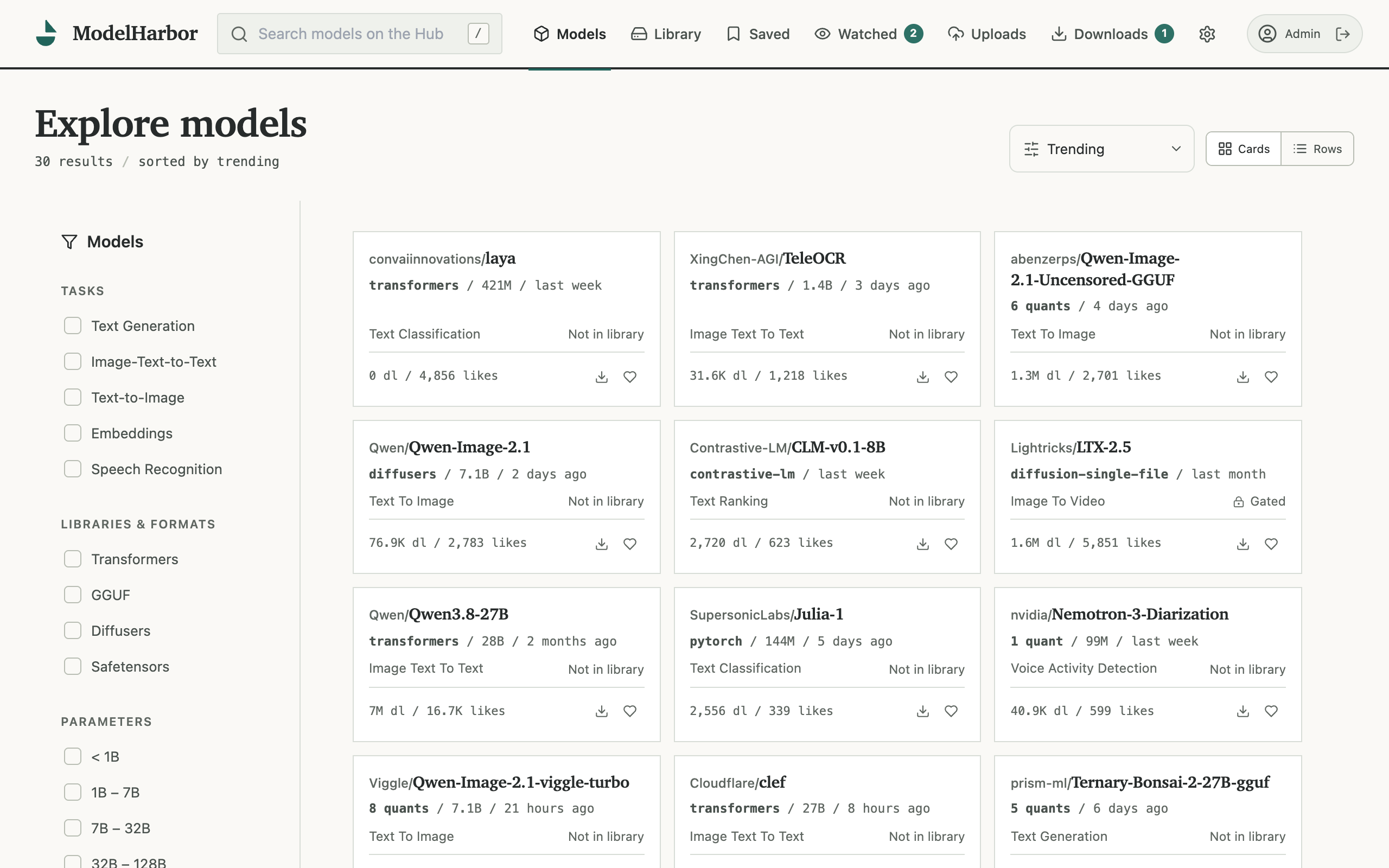
| Multi-user Roles, per-account libraries, notes, and preferences. | Shared notes Model notes travel with the team, pinned or latest. |
| Private uploads Your own weights, private by default, shareable within the install. | Storage locations Move copies between cold, warm, and hot tiers on demand. |
| Revision pinning The copy is the contract. Drift is reported, never applied. | Agentic control Scoped keys and a stable API for research and ops. |
| One container The whole service is a container and a volume. Nothing else to operate. | |
Run it
ModelHarbor ships as a container. Running it needs Docker and two host directories: one for model files, one for application state.
mkdir modelharbor && cd modelharbor
curl -O https://raw.githubusercontent.com/toks-love/modelharbor/main/docker-compose.yml
curl -o .env https://raw.githubusercontent.com/toks-love/modelharbor/main/.env.example
Edit .env — MODEL_STORAGE_PATH is the host directory that holds models — then:
docker compose up -d
Open port 7860. The first visit creates the owner account, which adds member accounts from Settings. docker compose down stops the service; model files and the database are preserved.
Session cookies are marked Secure by default, so sign-ins persist once HTTPS terminates in front of the app. On a plain-HTTP LAN, the template documents the escape hatch.
Windows users can run it with Docker Desktop through the helpers in deploy/desktop; the same document covers the compose route and a source checkout in full.
Documentation
| Deployment | Compose directory on a server, Windows desktop helpers, source checkout |
| Storage | The model folder, hand-added models, named locations, S3, moving a host, backups |
| Downloads | Download modes, gated models, watch and updates, GGUF inspection |
| Accounts | Members, saved models and notes, local uploads |
| PostgreSQL | Running the metadata database on PostgreSQL |
| Agent API | API keys and the MCP endpoint for local agents |
| Development | Running from a source checkout, tests |
License
ModelHarbor is released under the MIT License (see LICENSE). It is based on the open-source
HuggingHack project; attribution is preserved
there and in THIRD-PARTY.md.
AI assistance
toks.love developed ModelHarbor with AI assistance: an agent wrote most of the code under the careful direction and review of toks.love. toks.love owns the code, as well as any mistakes or omissions; the MIT License above applies in full.
Similar repos


Languages
Python
61.5%
TypeScript
26.5%
CSS
8.5%
JavaScript
2.9%
A self-hosted model library
See the codeSee what people are saying
README
ModelHarbor
A model library on your own storage.
Find models on the Hugging Face Hub, keep exactly the files you want, and read them from a plain folder.
ModelHarbor is self-hosted software for local model weights. It is not affiliated with or endorsed by Hugging Face.
| Multi-user Roles, per-account libraries, notes, and preferences. | Shared notes Model notes travel with the team, pinned or latest. |
| Private uploads Your own weights, private by default, shareable within the install. | Storage locations Move copies between cold, warm, and hot tiers on demand. |
| Revision pinning The copy is the contract. Drift is reported, never applied. | Agentic control Scoped keys and a stable API for research and ops. |
| One container The whole service is a container and a volume. Nothing else to operate. | |
Run it
ModelHarbor ships as a container. Running it needs Docker and two host directories: one for model files, one for application state.
mkdir modelharbor && cd modelharbor
curl -O https://raw.githubusercontent.com/toks-love/modelharbor/main/docker-compose.yml
curl -o .env https://raw.githubusercontent.com/toks-love/modelharbor/main/.env.example
Edit .env — MODEL_STORAGE_PATH is the host directory that holds models — then:
docker compose up -d
Open port 7860. The first visit creates the owner account, which adds member accounts from Settings. docker compose down stops the service; model files and the database are preserved.
Session cookies are marked Secure by default, so sign-ins persist once HTTPS terminates in front of the app. On a plain-HTTP LAN, the template documents the escape hatch.
Windows users can run it with Docker Desktop through the helpers in deploy/desktop; the same document covers the compose route and a source checkout in full.
Documentation
| Deployment | Compose directory on a server, Windows desktop helpers, source checkout |
| Storage | The model folder, hand-added models, named locations, S3, moving a host, backups |
| Downloads | Download modes, gated models, watch and updates, GGUF inspection |
| Accounts | Members, saved models and notes, local uploads |
| PostgreSQL | Running the metadata database on PostgreSQL |
| Agent API | API keys and the MCP endpoint for local agents |
| Development | Running from a source checkout, tests |
License
ModelHarbor is released under the MIT License (see LICENSE). It is based on the open-source
HuggingHack project; attribution is preserved
there and in THIRD-PARTY.md.
AI assistance
toks.love developed ModelHarbor with AI assistance: an agent wrote most of the code under the careful direction and review of toks.love. toks.love owns the code, as well as any mistakes or omissions; the MIT License above applies in full.
Similar repos
Languages
Python
61.5%
TypeScript
26.5%
CSS
8.5%
JavaScript
2.9%