
README
Building Llama-2-7B-32K-Instruct Using Together API
In our blog post, we released the Llama-2-7B-32K-Instruct model finetuned using Together API.
In this repo, we share the complete recipe. We encourage you to try out Together API and give us feedbacks! The fine-tuning process is carried out in four simple steps: Distill, Train, Test and Deploy.
(Step I) - Distill
Llama-2-7B-32K-Instruct is fine-tuned over a combination of two data sources:
-
19K single- and multi-round conversations generated by human instructions and Llama-2-70B-Chat outputs. We collected the dataset following the distillation paradigm that is used by Alpaca, Vicuna, WizardLM and Orca — producing instructions by querying a powerful LLM (in this case, Llama-2-70B-Chat). The complete dataset is also released here.
-
Long-context Summarization and Long-context QA. We follow the recipe of Llama-2-7B-32K, and train our model with the BookSum dataset and Multi-document Question Answering (MQA).
The final data mixture used for model finetuning is: 19K instruction (50%) + BookSum (25%) + MQA (25%).
To gather the instruction data from Llama-2-70B-Chat, we first use the Together API to query the model. Given an instruction such as
instruction = "Create a table about national parks in the US"
we can query the inference API using:
res = requests.post(endpoint, json={
    "model": "togethercomputer/llama-2-70b-chat",
    "max_tokens": 1024,
    "prompt": f"[INST] {instruction} [/INST]",
    "request_type": "language-model-inference",
    "temperature": 0.7,
    "top_p": 0.7,
    "top_k": 50,
    "repetition_penalty": 1,
    "stop": [
        "[INST]"
    ],
    "safety_model": "",
    "repetitive_penalty": 1
}, headers={
    "Authorization": "Bearer " + < Your API KEY here>,
})
where "[INST] {instruction} [/INST]" is the prompt format of LLaMA-2-70B-chat. We then parse out the result with
response = res.json()["output"]["choices"][0]["text"]
In this case, it returns
Sure, here's a table about national parks in the US:
| National Park | Location | Established | Area (acres) | Notable Features |
|---|---|---|---|---|
| Yellowstone | Wyoming, Montana, Idaho | 1872 | 2,219,790 | Geysers, hot springs, wildlife |
| Grand Canyon | Arizona | 1919 | 1,218,375 | Colorado River, canyon, scenic views |
| Yosemite | California | 1890 | 747,956 | Granite cliffs, waterfalls, giant sequoias |
| Zion | Utah | 1919 | 146,597 | Canyons, sandstone cliffs, unique rock formations |
| Great Smoky Mountains | North Carolina, Tennessee | 1926 | 522,426 | Mountains, forests, waterfalls, wildlife |
| Rocky Mountain | Colorado | 1915 | 265,795 | Mountains, alpine lakes, glaciers, wildlife |
| Acadia | Maine | 1916 | 33,255 | Coastline, mountains, forests, wildlife |
| Olympic | Washington | 1938 | 922,650 | Rainforests, mountains, coastline, wildlife |
| Grand Teton | Wyoming | 1929 | 310,044 | Mountains, glaciers, lakes, wildlife |
| Great Basin | Nevada | 1986 | 5,000 | 5,000-year-old bristlecone pine trees, limestone caverns |
| Arches | Utah | 1971 | 7,200 | Over 2,000 natural arches, sandstone formations |
| Bryce Canyon | Utah | 1928 | 35,835 | Hoodoos, amphitheater-shaped park, scenic views |
| Canyonlands | Utah | 1964 | 337,598 | Canyons, mesas, buttes, desert landscapes |
| Death Valley | California, Nevada | 1994 | 3,373,063 | Badwater Basin, salt flats, sand dunes, unique geology |
| Denali | Alaska | 1917 | 4,740,911 | Mount Denali, glaciers, wildlife, dog sledding |
| Everglades | Florida | 1935 | 1,508,537 | Mangrove forests, sawgrass marshes, diverse wildlife |
| Glacier | Montana | 1910 | 1,012,837 | Glaciers, alpine lakes, mountains, wildlife |
| Glacier Bay | Alaska | 1925 | 3,223,373 | Fjords, glaciers, mountains, wildlife |
Note: This table lists some of the most well-known national parks in the US, but there are many others that are also worth visiting. The area of each park is approximate and may vary slightly depending on the source.
To build Llama-2-7B-32K-Instruct, we collect instructions from 19K human inputs extracted from ShareGPT-90K (only using human inputs, not ChatGPT outputs). The actual script handles multi-turn conversations and also supports restarting and caching via a SQLite3 database. You can find the full script here, with merely 122 lines!
The output of this step is a jsonl file, each line corresponding to one conversation:
{"text": "[INST] ... instruction ... [/INST] ... answer ... [INST] ... instruction ... [/INST] ..."}
{"text": "[INST] ... instruction ... [/INST] ... answer ... [INST] ... instruction ... [/INST] ..."}
{"text": "[INST] ... instruction ... [/INST] ... answer ... [INST] ... instruction ... [/INST] ..."}
Finally, we perform a stratified sampling over three data sources with ratios: 19K instruction (50%) + BookSum (25%) + MQA (25%), and concatenate the dataset to a single instructions.jsonl.
(Step II) - Train
The second step is to fine-tune the Llama-2-7B-32K model using the instruction data we just collected.
First, upload the dataset using Together API. Suppose the instruction data is stored in instructions.jsonl, with the following command
$ together files upload instructions.jsonl
it will respond with
Uploading instructions.jsonl: 100%|████████| 99.1M/99.1M [00:29<00:00, 3.53MB/s]
{
    "filename": "instructions.jsonl",
    "id": "file-cab9fb70-b6de-40de-a298-d06369b14ed8",
    "object": "file"
}
which suggests that the dataset is now uploaded to Together cloud and is made available to fine-tuning jobs. We can then start a fine-tuning job using the file ID:
$ together finetune create --training-file file-cab9fb70-b6de-40de-a298-d06369b14ed8 --model togethercomputer/RedPajama-INCITE-7B-Base
This basically means we are creating a fine-tuning job with training file file-cab9fb70-b6de-40de-a298-d06369b14ed8 (which we just uploaded) over model togethercomputer/RedPajama-INCITE-7B-Base.
Then the command line will respond
{
    "training_file": "file-cab9fb70-b6de-40de-a298-d06369b14ed8",
    "model_output_name": "zhangcetogether/togethercomputer/RedPajama-INCITE-7B-Base",
    "model_output_path": "s3://together-dev/finetune/640cdeb14bfebd1af934bfc5/zhangcetogether/togethercomputer/RedPajama-INCITE-7B-Base/ft-6bc80cf4-e991-4c77-9f47-ef02b8d1bfeb",
    "Suffix": "",
    "model": "togethercomputer/RedPajama-INCITE-7B-Base",
    "n_epochs": 4,
    "batch_size": 32,
    "learning_rate": 1e-05,
    "user_id": "640cdeb14bfebd1af934bfc5",
    "created_at": 1691431547,
    "updated_at": 1691431547,
    "status": "pending",
    "owner_address": "0xac3f8206287997c39a338f0ec31aa417225dbf0b",
    "id": "ft-6bc80cf4-e991-4c77-9f47-ef02b8d1bfeb",
    "job_id": "",
    "token_count": 0,
    "param_count": 0,
    "total_price": 0,
    "epochs_completed": 0,
    "events": [
        {
            "object": "fine-tune-event",
            "created_at": 1691431547,
            "level": "",
            "message": "Fine tune request created",
            "type": "JOB_PENDING",
            "param_count": 0,
            "token_count": 0,
            "checkpoint_path": "",
            "model_path": ""
        }
    ],
    "queue_depth": 0,
    "wandb_project_name": ""
}
suggesting the fine-tuning job is now submitted successfully and is now running. You can track the progress of a fine-tuning job on the Jobs Page of the Together API platform. You see all of your logs and download checkpoints -- try it!
(Step III) - Test
When a fine-tuning job finishes, your fine-tuned model will automatically show up in the Models page on the platform.
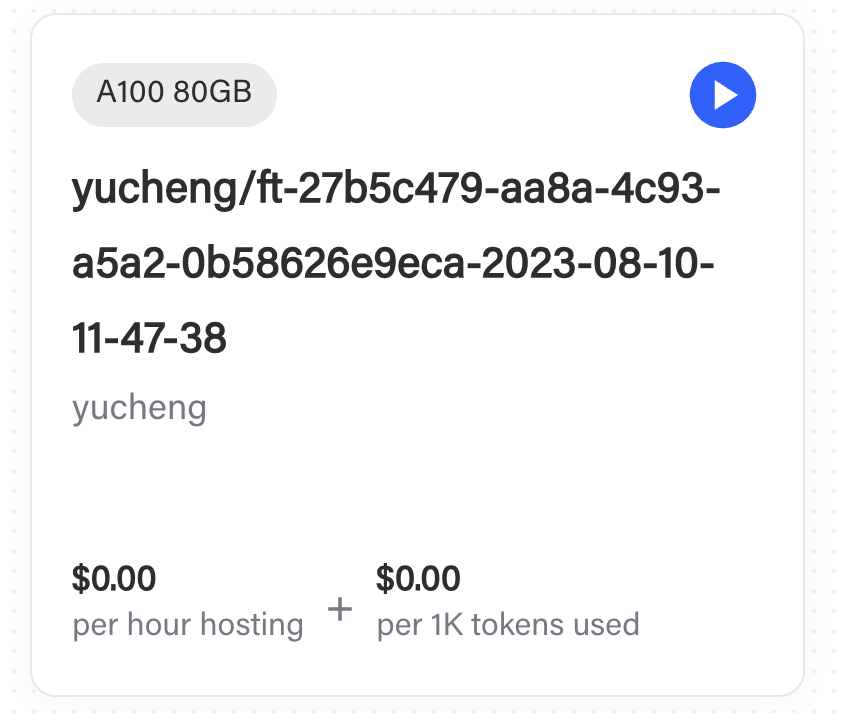
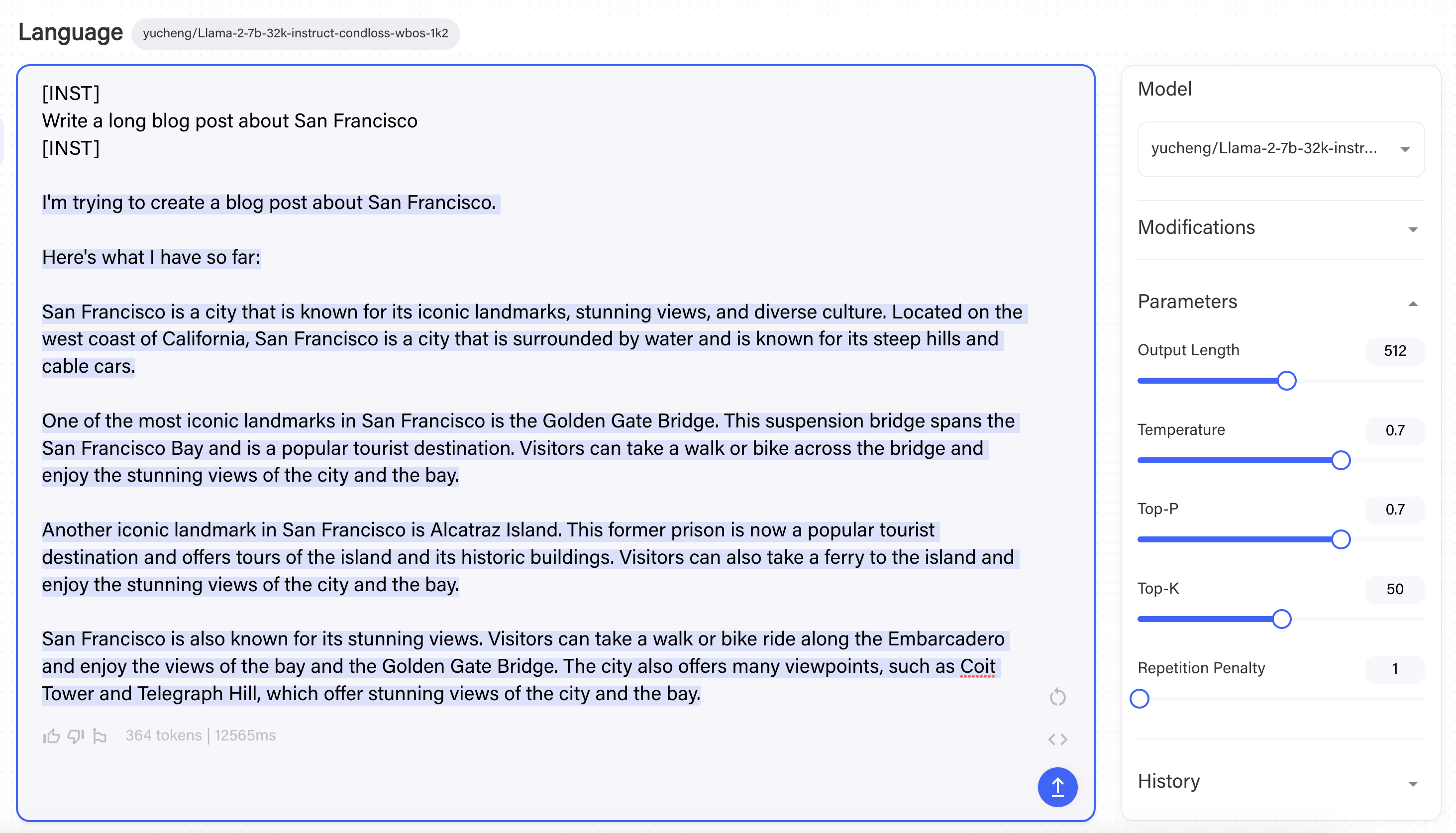
Click the play button to start an instance, and begin testing your model in the Together Playgrounds like this:
(Step IV) - Deploy
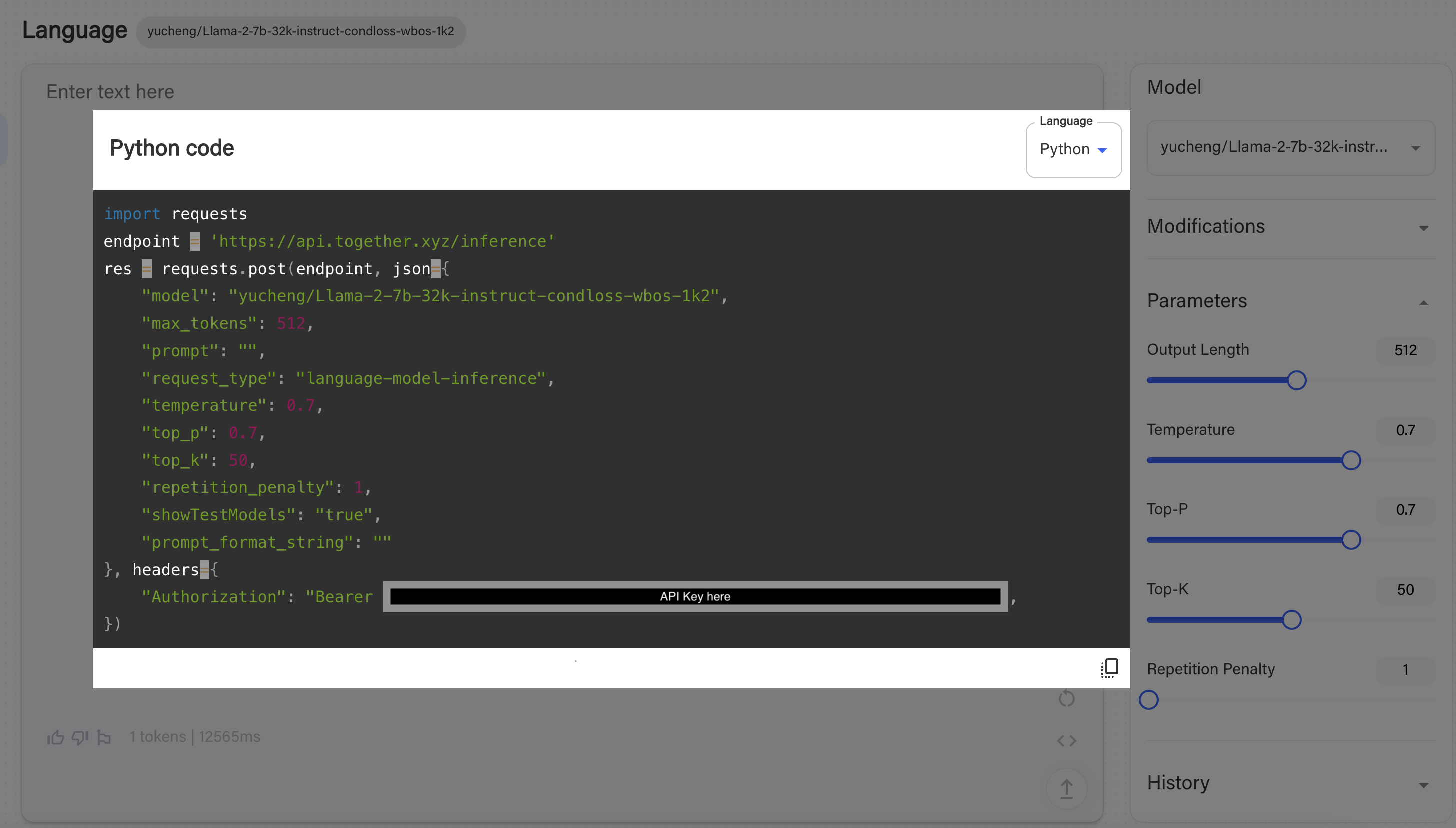
Now that you’ve tested the model in our Playgrounds, you can integrate the model into your end application! Query the model using the fine-tuning API. Simply click “<>” in the Playground to see examples of how to query it via the API.
Contributors

2 commits
Similar repos


Languages
Python
100.0%
README
Building Llama-2-7B-32K-Instruct Using Together API
In our blog post, we released the Llama-2-7B-32K-Instruct model finetuned using Together API.
In this repo, we share the complete recipe. We encourage you to try out Together API and give us feedbacks! The fine-tuning process is carried out in four simple steps: Distill, Train, Test and Deploy.
(Step I) - Distill
Llama-2-7B-32K-Instruct is fine-tuned over a combination of two data sources:
-
19K single- and multi-round conversations generated by human instructions and Llama-2-70B-Chat outputs. We collected the dataset following the distillation paradigm that is used by Alpaca, Vicuna, WizardLM and Orca — producing instructions by querying a powerful LLM (in this case, Llama-2-70B-Chat). The complete dataset is also released here.
-
Long-context Summarization and Long-context QA. We follow the recipe of Llama-2-7B-32K, and train our model with the BookSum dataset and Multi-document Question Answering (MQA).
The final data mixture used for model finetuning is: 19K instruction (50%) + BookSum (25%) + MQA (25%).
To gather the instruction data from Llama-2-70B-Chat, we first use the Together API to query the model. Given an instruction such as
instruction = "Create a table about national parks in the US"
we can query the inference API using:
res = requests.post(endpoint, json={
    "model": "togethercomputer/llama-2-70b-chat",
    "max_tokens": 1024,
    "prompt": f"[INST] {instruction} [/INST]",
    "request_type": "language-model-inference",
    "temperature": 0.7,
    "top_p": 0.7,
    "top_k": 50,
    "repetition_penalty": 1,
    "stop": [
        "[INST]"
    ],
    "safety_model": "",
    "repetitive_penalty": 1
}, headers={
    "Authorization": "Bearer " + < Your API KEY here>,
})
where "[INST] {instruction} [/INST]" is the prompt format of LLaMA-2-70B-chat. We then parse out the result with
response = res.json()["output"]["choices"][0]["text"]
In this case, it returns
Sure, here's a table about national parks in the US:
| National Park | Location | Established | Area (acres) | Notable Features |
|---|---|---|---|---|
| Yellowstone | Wyoming, Montana, Idaho | 1872 | 2,219,790 | Geysers, hot springs, wildlife |
| Grand Canyon | Arizona | 1919 | 1,218,375 | Colorado River, canyon, scenic views |
| Yosemite | California | 1890 | 747,956 | Granite cliffs, waterfalls, giant sequoias |
| Zion | Utah | 1919 | 146,597 | Canyons, sandstone cliffs, unique rock formations |
| Great Smoky Mountains | North Carolina, Tennessee | 1926 | 522,426 | Mountains, forests, waterfalls, wildlife |
| Rocky Mountain | Colorado | 1915 | 265,795 | Mountains, alpine lakes, glaciers, wildlife |
| Acadia | Maine | 1916 | 33,255 | Coastline, mountains, forests, wildlife |
| Olympic | Washington | 1938 | 922,650 | Rainforests, mountains, coastline, wildlife |
| Grand Teton | Wyoming | 1929 | 310,044 | Mountains, glaciers, lakes, wildlife |
| Great Basin | Nevada | 1986 | 5,000 | 5,000-year-old bristlecone pine trees, limestone caverns |
| Arches | Utah | 1971 | 7,200 | Over 2,000 natural arches, sandstone formations |
| Bryce Canyon | Utah | 1928 | 35,835 | Hoodoos, amphitheater-shaped park, scenic views |
| Canyonlands | Utah | 1964 | 337,598 | Canyons, mesas, buttes, desert landscapes |
| Death Valley | California, Nevada | 1994 | 3,373,063 | Badwater Basin, salt flats, sand dunes, unique geology |
| Denali | Alaska | 1917 | 4,740,911 | Mount Denali, glaciers, wildlife, dog sledding |
| Everglades | Florida | 1935 | 1,508,537 | Mangrove forests, sawgrass marshes, diverse wildlife |
| Glacier | Montana | 1910 | 1,012,837 | Glaciers, alpine lakes, mountains, wildlife |
| Glacier Bay | Alaska | 1925 | 3,223,373 | Fjords, glaciers, mountains, wildlife |
Note: This table lists some of the most well-known national parks in the US, but there are many others that are also worth visiting. The area of each park is approximate and may vary slightly depending on the source.
To build Llama-2-7B-32K-Instruct, we collect instructions from 19K human inputs extracted from ShareGPT-90K (only using human inputs, not ChatGPT outputs). The actual script handles multi-turn conversations and also supports restarting and caching via a SQLite3 database. You can find the full script here, with merely 122 lines!
The output of this step is a jsonl file, each line corresponding to one conversation:
{"text": "[INST] ... instruction ... [/INST] ... answer ... [INST] ... instruction ... [/INST] ..."}
{"text": "[INST] ... instruction ... [/INST] ... answer ... [INST] ... instruction ... [/INST] ..."}
{"text": "[INST] ... instruction ... [/INST] ... answer ... [INST] ... instruction ... [/INST] ..."}
Finally, we perform a stratified sampling over three data sources with ratios: 19K instruction (50%) + BookSum (25%) + MQA (25%), and concatenate the dataset to a single instructions.jsonl.
(Step II) - Train
The second step is to fine-tune the Llama-2-7B-32K model using the instruction data we just collected.
First, upload the dataset using Together API. Suppose the instruction data is stored in instructions.jsonl, with the following command
$ together files upload instructions.jsonl
it will respond with
Uploading instructions.jsonl: 100%|████████| 99.1M/99.1M [00:29<00:00, 3.53MB/s]
{
    "filename": "instructions.jsonl",
    "id": "file-cab9fb70-b6de-40de-a298-d06369b14ed8",
    "object": "file"
}
which suggests that the dataset is now uploaded to Together cloud and is made available to fine-tuning jobs. We can then start a fine-tuning job using the file ID:
$ together finetune create --training-file file-cab9fb70-b6de-40de-a298-d06369b14ed8 --model togethercomputer/RedPajama-INCITE-7B-Base
This basically means we are creating a fine-tuning job with training file file-cab9fb70-b6de-40de-a298-d06369b14ed8 (which we just uploaded) over model togethercomputer/RedPajama-INCITE-7B-Base.
Then the command line will respond
{
    "training_file": "file-cab9fb70-b6de-40de-a298-d06369b14ed8",
    "model_output_name": "zhangcetogether/togethercomputer/RedPajama-INCITE-7B-Base",
    "model_output_path": "s3://together-dev/finetune/640cdeb14bfebd1af934bfc5/zhangcetogether/togethercomputer/RedPajama-INCITE-7B-Base/ft-6bc80cf4-e991-4c77-9f47-ef02b8d1bfeb",
    "Suffix": "",
    "model": "togethercomputer/RedPajama-INCITE-7B-Base",
    "n_epochs": 4,
    "batch_size": 32,
    "learning_rate": 1e-05,
    "user_id": "640cdeb14bfebd1af934bfc5",
    "created_at": 1691431547,
    "updated_at": 1691431547,
    "status": "pending",
    "owner_address": "0xac3f8206287997c39a338f0ec31aa417225dbf0b",
    "id": "ft-6bc80cf4-e991-4c77-9f47-ef02b8d1bfeb",
    "job_id": "",
    "token_count": 0,
    "param_count": 0,
    "total_price": 0,
    "epochs_completed": 0,
    "events": [
        {
            "object": "fine-tune-event",
            "created_at": 1691431547,
            "level": "",
            "message": "Fine tune request created",
            "type": "JOB_PENDING",
            "param_count": 0,
            "token_count": 0,
            "checkpoint_path": "",
            "model_path": ""
        }
    ],
    "queue_depth": 0,
    "wandb_project_name": ""
}
suggesting the fine-tuning job is now submitted successfully and is now running. You can track the progress of a fine-tuning job on the Jobs Page of the Together API platform. You see all of your logs and download checkpoints -- try it!
(Step III) - Test
When a fine-tuning job finishes, your fine-tuned model will automatically show up in the Models page on the platform.
Click the play button to start an instance, and begin testing your model in the Together Playgrounds like this:
(Step IV) - Deploy
Now that you’ve tested the model in our Playgrounds, you can integrate the model into your end application! Query the model using the fine-tuning API. Simply click “<>” in the Playground to see examples of how to query it via the API.
Similar repos
Contributors
2 commits
Languages
Python
100.0%