
Helpful tools collection in a single UI built with Flowery.NET (AvaloniaUI)
C#
63
31 commits
updated Jul 31, 2026
README
OpenSourceToolkit.Net
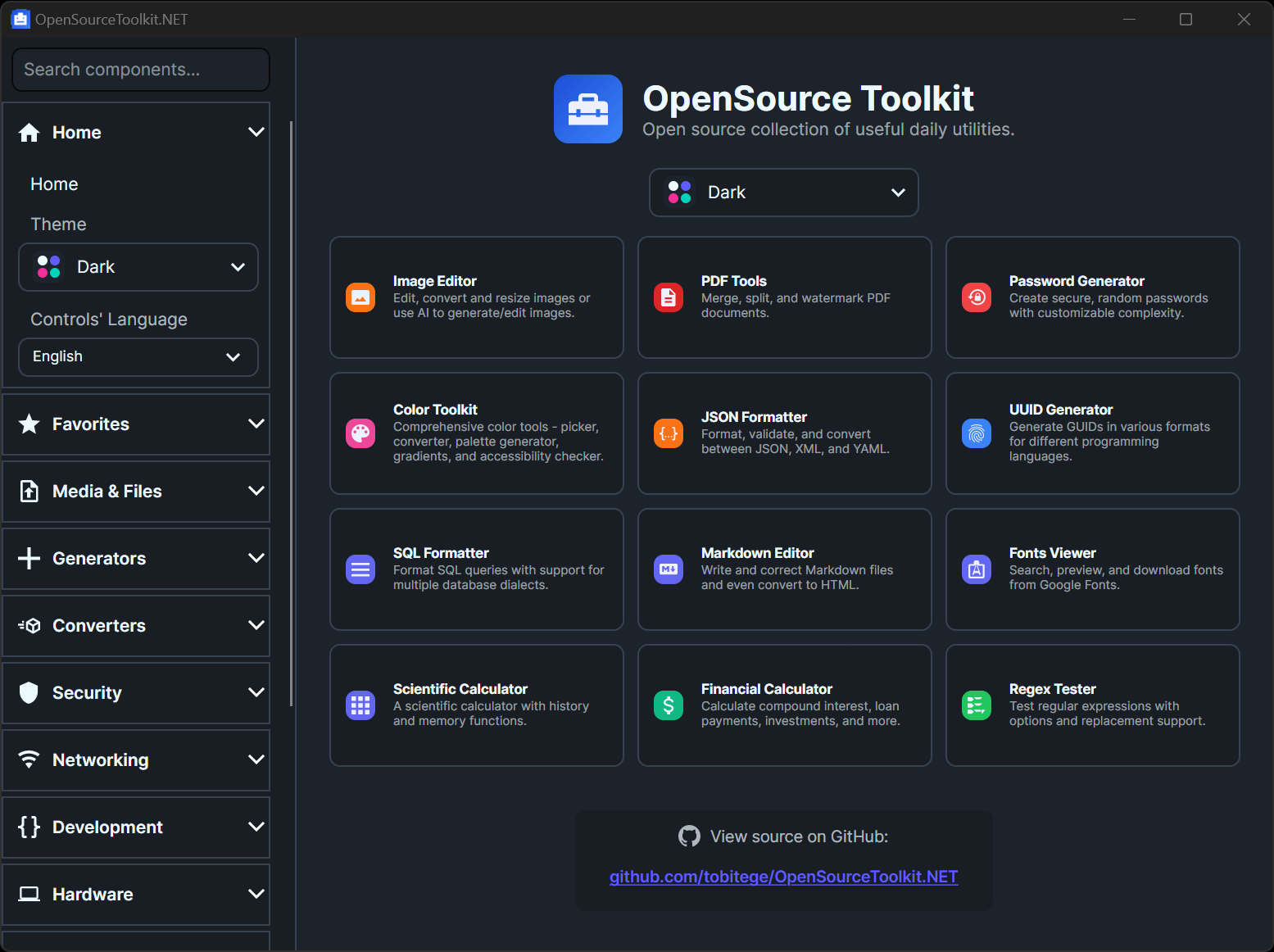
Originally started as a C#/.NET port of the utilities and tools found in the inspiring OpenSourceToolkit project, and has since been extended with additional tools and features (including a full Avalonia desktop app to explore everything interactively). Special thanks to the original author truethari for their incredible work.
This suite provides reusable, modular components for text manipulation, security, networking, hardware testing, and more. Crucially, it includes a full Avalonia UI application that allows users to interactively test and verify most functions of the 40+ tools (currently 41) and libraries in a modern desktop interface.
Porting was mainly done by help of AI, but I spent hundreds of hours tweaking the tools, adding translations, add more features and simultaneously enhancing my Flowery.NET component suite for the UI.
The total lines of code count (excluding comments) is > 91K.
🌐 Localized in 12 languages including:
🇯🇵 日本語にローカライズ済み • 🇰🇷 한국어로 현지화됨 • 🇨🇳 已本地化为简体中文
🇺🇦 Локалізовано українською • 🇸🇦 مترجم للعربية • 🇮🇱 מתורגם לעברית
🚀 Overview
- Framework: .NET 10 for Windows x64 (
net10.0-windows,win-x64) - Language: C# (LangVersion:
latest) - Output: Reusable DLLs (class libraries) and a desktop GUI (WinExe).
- Architecture: Modular design with a core library and specialized domain libraries.
📁 Project Structure
The solution OpenSourceToolkit.Net.sln is organized into the following projects:
OpenSourceToolkit.NET
- Avalonia desktop application (GUI) to test all tools interactively.
- Target framework:
net10.0-windows(win-x64) - Dependencies: All of the below,
Avalonia,Flowery.NET
| Project | Description | Dependencies |
|---|---|---|
| OpenSourceToolkit.Core | Shared primitives and base types. | None |
| OpenSourceToolkit.TextData | Generators for UUIDs, Lorem Ipsum, Mock Data, QR Codes, Privacy Policies, VCards, Regex Testing. | Bogus, QRCoder |
| OpenSourceToolkit.Converters | Utilities for Timestamp, Image Format, Text Case, Base64, and Ethereum conversions. | System.Drawing.Common |
| OpenSourceToolkit.Security | Security tools for JWT, HMAC, Hashing (MD5/SHA), and Password Generation. | System.IdentityModel.Tokens.Jwt |
| OpenSourceToolkit.Networking | Tools for IP Geolocation, Speed Testing, DNS Lookups, Uptime Monitoring, and IP Subnet Calculations. | DnsClient |
| OpenSourceToolkit.Scheduling | Cron job expression parsing and scheduling. | NCrontab |
| OpenSourceToolkit.ApiTesting | HTTP API testing framework with request/response assertions. | None |
| OpenSourceToolkit.IO | File system tools, including folder structure analysis. | None |
| OpenSourceToolkit.Documents | PDF manipulation tools (Merge, Split, Watermark). | PdfSharp |
| OpenSourceToolkit.Media | ASCII Art generation, Next.js Image URL parsing, and media utilities. | FIGLet |
| OpenSourceToolkit.Colors | Color format converters (HEX, RGB, HSL). | System.Drawing.Common |
| OpenSourceToolkit.Hardware | Hardware testing abstractions for Keyboard, Speaker, Mic, and Camera. | NAudio |
| OpenSourceToolkit.Calculators | Financial calculators (Compound Interest, Loan Payments, ROI). | None |
| OpenSourceToolkit.Tests | MSTest unit tests for ensuring parity and correctness. | MSTest |
Note: This repository also contains
OpenSourceToolkit.AI(a .NET 10 Windows x64 library), but it is not included inOpenSourceToolkit.Net.slnby default.
🧰 Tool Catalog (GUI)
The desktop app (OpenSourceToolkit.NET) currently includes 41 tools, grouped in the sidebar as follows:
Media & Files
- Image Editor
- Folder Analyzer
- ASCII Art Generator
- PDF Tools
- Clipboard Image Saver
- Audio Noise Reduction
- Fonts Viewer
Generators
- UUID Generator
- Lorem Ipsum Generator
- Mock Data Generator
- Privacy Policy Generator
- QR Code Generator
- Password Generator
- VCard Generator
Converters
- Text Case Converter
- Timestamp Converter
- Base64 Converter
- Color Toolkit
- Ethereum Converter
- JSON Formatter
Security
- Hash Generator
- HMAC Generator
- JWT Debugger
Networking
- Uptime Monitor
- DNS Lookup
- IP Location
- IP Calculator
- Speed Test
Development
- Cron Scheduler
- API Tester
- Next.js Image Decoder
- Regex Tester
- Diff Checker
- SQL Formatter
- Markdown Editor
- Theme Testing
Hardware
- Hardware Tester
- Keyboard Tester
- Stopwatch & Timer
Math
- Scientific Calculator
Finance
- Financial Calculator
🛠️ Building & Running
Prerequisites
- .NET 10 SDK
- 64-bit Windows
Build
To build the entire solution, run the following command in this directory:
dotnet build
Note: Debug builds are configured to output artifacts to a common directory:
- Debug:
bin\debug\net10.0-windows\win-x64\
Run Avalonia App (GUI)
The best way to explore the toolkit is via the Avalonia UI app, which provides a dedicated interface for every tool:
.\bin\debug\net10.0-windows\win-x64\OpenSourceToolkit.NET.exe
Run Tests
To execute the unit tests:
dotnet test
Scripts (PowerShell)
For convenience, the repo includes two PowerShell scripts under scripts/ to build and run the Avalonia desktop app.
scripts/build_desktop.ps1: buildsOpenSourceToolkit.NET(optionally alsoOpenSourceToolkit.Tests)- Examples:
pwsh ./scripts/build_desktop.ps1
pwsh ./scripts/build_desktop.ps1 -Configuration Release
pwsh ./scripts/build_desktop.ps1 -IncludeTests
pwsh ./scripts/build_desktop.ps1 -NoRestore
scripts/run_desktop.ps1: builds and startsOpenSourceToolkit.NETin the background- Examples:
pwsh ./scripts/run_desktop.ps1
pwsh ./scripts/run_desktop.ps1 -Configuration Release
📦 Usage Examples
Text & Data library
using OpenSourceToolkit.TextData;

// Generate UUID V4
string uuid = UuidGenerator.GenerateV4();

// Generate Lorem Ipsum
var generator = new LoremIpsumGenerator();
string text = generator.GenerateSentences(3);
Security library
using OpenSourceToolkit.Security;

// Compute Hash
string md5 = HashGenerator.ComputeMd5("OpenSourceToolkit");

// Generate JWT
string token = JwtHelper.GenerateToken("secret_key", "issuer", "audience");
Networking library
using OpenSourceToolkit.Networking;

// Check Uptime
var monitor = new UptimeMonitor();
var result = await monitor.CheckAsync("https://google.com");
Console.WriteLine($"Is Up: {result.IsUp}");
Hardware (Windows) library
using OpenSourceToolkit.Hardware;

// Play Tone
using (var speaker = new SpeakerTester())
{
    speaker.PlayTone(440, 1.0f); // 440Hz for 1 second
}
🧩 Dependencies
The project relies on high-quality open-source packages:
- Bogus: Fake data generation.
- QRCoder: QR Code creation.
- PdfSharp: PDF processing.
- DnsClient.NET: DNS lookups.
- NCrontab: Cron parsing.
- NAudio: Audio playback and capture.
- Avalonia: Cross-platform UI framework.
- Flowery.NET: Themed component library for Avalonia. Requires v1.7.2 or later (for
CustomThemeApplicatorsupport).
🌍 Localization
The application supports multiple languages with runtime switching. Currently supported:
- English (en) - Default / fallback
- Arabic (ar)
- Hebrew (he)
- German (de)
- Spanish (es)
- French (fr)
- Italian (it)
- Japanese (ja)
- Korean (ko)
- Turkish (tr)
- Ukrainian (uk)
- Chinese (Simplified) (zh-Hans)
For Users
Change the application language through the settings panel. All UI elements will update immediately without restart.
For Developers
Using Localization in XAML
Add the localization namespace to your view:
xmlns:loc="clr-namespace:OpenSourceToolkit.NET.Localization"
Use the Localize markup extension:
<TextBlock Text="{loc:Localize Button_Save}"/>
<Button Content="{loc:Localize Button_Generate}"/>
<TextBox Watermark="{loc:Localize Input_Placeholder}"/>
Adding New Translations
Localization strings are stored as embedded JSON files in OpenSourceToolkit.NET\Localization\ (e.g. en.json, de.json, fr.json).
- Add / update keys in
OpenSourceToolkit.NET\Localization\en.json(fallback) - Add / update the same keys in the target language JSON (e.g.
de.json) - Use the key in XAML via
{loc:Localize YourKey}
Implementation Notes
The ToolkitLocalization.SetCulture() method updates thread cultures and notifies bindings so {loc:Localize ...} updates immediately:
Thread.CurrentThread.CurrentUICulture = culture;
CultureInfo.DefaultThreadCurrentUICulture = culture;
CultureInfo.DefaultThreadCurrentCulture = culture;
CultureChanged?.Invoke(null, culture);
Instance.PropertyChanged?.Invoke(Instance, new PropertyChangedEventArgs("Item"));
Instance.PropertyChanged?.Invoke(Instance, new PropertyChangedEventArgs("Item[]"));
Translations are loaded lazily from embedded JSON resources when a language is selected.
📄 License
This project is licensed under the MIT License - see the LICENSE file for details.
🧪 Tests
The solution includes a comprehensive test suite in OpenSourceToolkit.Tests using MSTest. These 170+ tests verify the functionality of most of the libraries.
Coverage Areas
- Text & Data:
- UUID V4 generation (format, uniqueness).
- Lorem Ipsum generation (word/sentence counts).
- Mock Data (User/Address schema validation).
- QR Code (PNG and SVG generation).
- Privacy Policy (template substitution).
- Security:
- Hashing (MD5, SHA256, SHA512 correctness).
- HMAC generation (RFC compliance).
- JWT (Token generation, signing, and validation).
- Converters:
- Timestamp (Unix epoch round-trips).
- Base64 (Standard and URL-safe variants).
- Text Case (Title Case, Sentence Case).
- Color (Hex/RGB/HSL conversions).
- IO & Documents:
- Folder Analyzer (Recursive structure and size calculation).
- PDF Toolkit (Merge, Split, Watermark functionality).
- Media:
- ASCII Art (Bitmap to ASCII conversion logic).
- Scheduling:
- Cron Scheduler (Expression parsing and execution).
- Hardware:
- Keyboard Tester (Typing speed algorithms).
- Audio Device Manager (Device enumeration safety).
- Networking:
- DNS lookup tools (direct and batched queries for common record types).
- IP geolocation (dummy provider default mapping).
Running Tests
You can execute the full test suite via the command line:
dotnet test
Tests are designed to be safe and isolated, using temporary files for IO operations and simulating hardware interactions where necessary to run on CI/CD environments.
Significant stargazers

1,319 followers · starred Dec 2025
Similar repos


Languages
C#
97.5%
Python
1.9%
Helpful tools collection in a single UI built with Flowery.NET (AvaloniaUI)
C#
63
31 commits
updated Jul 31, 2026
README
OpenSourceToolkit.Net
Originally started as a C#/.NET port of the utilities and tools found in the inspiring OpenSourceToolkit project, and has since been extended with additional tools and features (including a full Avalonia desktop app to explore everything interactively). Special thanks to the original author truethari for their incredible work.
This suite provides reusable, modular components for text manipulation, security, networking, hardware testing, and more. Crucially, it includes a full Avalonia UI application that allows users to interactively test and verify most functions of the 40+ tools (currently 41) and libraries in a modern desktop interface.
Porting was mainly done by help of AI, but I spent hundreds of hours tweaking the tools, adding translations, add more features and simultaneously enhancing my Flowery.NET component suite for the UI.
The total lines of code count (excluding comments) is > 91K.
🌐 Localized in 12 languages including:
🇯🇵 日本語にローカライズ済み • 🇰🇷 한국어로 현지화됨 • 🇨🇳 已本地化为简体中文
🇺🇦 Локалізовано українською • 🇸🇦 مترجم للعربية • 🇮🇱 מתורגם לעברית
🚀 Overview
- Framework: .NET 10 for Windows x64 (
net10.0-windows,win-x64) - Language: C# (LangVersion:
latest) - Output: Reusable DLLs (class libraries) and a desktop GUI (WinExe).
- Architecture: Modular design with a core library and specialized domain libraries.
📁 Project Structure
The solution OpenSourceToolkit.Net.sln is organized into the following projects:
OpenSourceToolkit.NET
- Avalonia desktop application (GUI) to test all tools interactively.
- Target framework:
net10.0-windows(win-x64) - Dependencies: All of the below,
Avalonia,Flowery.NET
| Project | Description | Dependencies |
|---|---|---|
| OpenSourceToolkit.Core | Shared primitives and base types. | None |
| OpenSourceToolkit.TextData | Generators for UUIDs, Lorem Ipsum, Mock Data, QR Codes, Privacy Policies, VCards, Regex Testing. | Bogus, QRCoder |
| OpenSourceToolkit.Converters | Utilities for Timestamp, Image Format, Text Case, Base64, and Ethereum conversions. | System.Drawing.Common |
| OpenSourceToolkit.Security | Security tools for JWT, HMAC, Hashing (MD5/SHA), and Password Generation. | System.IdentityModel.Tokens.Jwt |
| OpenSourceToolkit.Networking | Tools for IP Geolocation, Speed Testing, DNS Lookups, Uptime Monitoring, and IP Subnet Calculations. | DnsClient |
| OpenSourceToolkit.Scheduling | Cron job expression parsing and scheduling. | NCrontab |
| OpenSourceToolkit.ApiTesting | HTTP API testing framework with request/response assertions. | None |
| OpenSourceToolkit.IO | File system tools, including folder structure analysis. | None |
| OpenSourceToolkit.Documents | PDF manipulation tools (Merge, Split, Watermark). | PdfSharp |
| OpenSourceToolkit.Media | ASCII Art generation, Next.js Image URL parsing, and media utilities. | FIGLet |
| OpenSourceToolkit.Colors | Color format converters (HEX, RGB, HSL). | System.Drawing.Common |
| OpenSourceToolkit.Hardware | Hardware testing abstractions for Keyboard, Speaker, Mic, and Camera. | NAudio |
| OpenSourceToolkit.Calculators | Financial calculators (Compound Interest, Loan Payments, ROI). | None |
| OpenSourceToolkit.Tests | MSTest unit tests for ensuring parity and correctness. | MSTest |
Note: This repository also contains
OpenSourceToolkit.AI(a .NET 10 Windows x64 library), but it is not included inOpenSourceToolkit.Net.slnby default.
🧰 Tool Catalog (GUI)
The desktop app (OpenSourceToolkit.NET) currently includes 41 tools, grouped in the sidebar as follows:
Media & Files
- Image Editor
- Folder Analyzer
- ASCII Art Generator
- PDF Tools
- Clipboard Image Saver
- Audio Noise Reduction
- Fonts Viewer
Generators
- UUID Generator
- Lorem Ipsum Generator
- Mock Data Generator
- Privacy Policy Generator
- QR Code Generator
- Password Generator
- VCard Generator
Converters
- Text Case Converter
- Timestamp Converter
- Base64 Converter
- Color Toolkit
- Ethereum Converter
- JSON Formatter
Security
- Hash Generator
- HMAC Generator
- JWT Debugger
Networking
- Uptime Monitor
- DNS Lookup
- IP Location
- IP Calculator
- Speed Test
Development
- Cron Scheduler
- API Tester
- Next.js Image Decoder
- Regex Tester
- Diff Checker
- SQL Formatter
- Markdown Editor
- Theme Testing
Hardware
- Hardware Tester
- Keyboard Tester
- Stopwatch & Timer
Math
- Scientific Calculator
Finance
- Financial Calculator
🛠️ Building & Running
Prerequisites
- .NET 10 SDK
- 64-bit Windows
Build
To build the entire solution, run the following command in this directory:
dotnet build
Note: Debug builds are configured to output artifacts to a common directory:
- Debug:
bin\debug\net10.0-windows\win-x64\
Run Avalonia App (GUI)
The best way to explore the toolkit is via the Avalonia UI app, which provides a dedicated interface for every tool:
.\bin\debug\net10.0-windows\win-x64\OpenSourceToolkit.NET.exe
Run Tests
To execute the unit tests:
dotnet test
Scripts (PowerShell)
For convenience, the repo includes two PowerShell scripts under scripts/ to build and run the Avalonia desktop app.
scripts/build_desktop.ps1: buildsOpenSourceToolkit.NET(optionally alsoOpenSourceToolkit.Tests)- Examples:
pwsh ./scripts/build_desktop.ps1
pwsh ./scripts/build_desktop.ps1 -Configuration Release
pwsh ./scripts/build_desktop.ps1 -IncludeTests
pwsh ./scripts/build_desktop.ps1 -NoRestore
scripts/run_desktop.ps1: builds and startsOpenSourceToolkit.NETin the background- Examples:
pwsh ./scripts/run_desktop.ps1
pwsh ./scripts/run_desktop.ps1 -Configuration Release
📦 Usage Examples
Text & Data library
using OpenSourceToolkit.TextData;

// Generate UUID V4
string uuid = UuidGenerator.GenerateV4();

// Generate Lorem Ipsum
var generator = new LoremIpsumGenerator();
string text = generator.GenerateSentences(3);
Security library
using OpenSourceToolkit.Security;

// Compute Hash
string md5 = HashGenerator.ComputeMd5("OpenSourceToolkit");

// Generate JWT
string token = JwtHelper.GenerateToken("secret_key", "issuer", "audience");
Networking library
using OpenSourceToolkit.Networking;

// Check Uptime
var monitor = new UptimeMonitor();
var result = await monitor.CheckAsync("https://google.com");
Console.WriteLine($"Is Up: {result.IsUp}");
Hardware (Windows) library
using OpenSourceToolkit.Hardware;

// Play Tone
using (var speaker = new SpeakerTester())
{
    speaker.PlayTone(440, 1.0f); // 440Hz for 1 second
}
🧩 Dependencies
The project relies on high-quality open-source packages:
- Bogus: Fake data generation.
- QRCoder: QR Code creation.
- PdfSharp: PDF processing.
- DnsClient.NET: DNS lookups.
- NCrontab: Cron parsing.
- NAudio: Audio playback and capture.
- Avalonia: Cross-platform UI framework.
- Flowery.NET: Themed component library for Avalonia. Requires v1.7.2 or later (for
CustomThemeApplicatorsupport).
🌍 Localization
The application supports multiple languages with runtime switching. Currently supported:
- English (en) - Default / fallback
- Arabic (ar)
- Hebrew (he)
- German (de)
- Spanish (es)
- French (fr)
- Italian (it)
- Japanese (ja)
- Korean (ko)
- Turkish (tr)
- Ukrainian (uk)
- Chinese (Simplified) (zh-Hans)
For Users
Change the application language through the settings panel. All UI elements will update immediately without restart.
For Developers
Using Localization in XAML
Add the localization namespace to your view:
xmlns:loc="clr-namespace:OpenSourceToolkit.NET.Localization"
Use the Localize markup extension:
<TextBlock Text="{loc:Localize Button_Save}"/>
<Button Content="{loc:Localize Button_Generate}"/>
<TextBox Watermark="{loc:Localize Input_Placeholder}"/>
Adding New Translations
Localization strings are stored as embedded JSON files in OpenSourceToolkit.NET\Localization\ (e.g. en.json, de.json, fr.json).
- Add / update keys in
OpenSourceToolkit.NET\Localization\en.json(fallback) - Add / update the same keys in the target language JSON (e.g.
de.json) - Use the key in XAML via
{loc:Localize YourKey}
Implementation Notes
The ToolkitLocalization.SetCulture() method updates thread cultures and notifies bindings so {loc:Localize ...} updates immediately:
Thread.CurrentThread.CurrentUICulture = culture;
CultureInfo.DefaultThreadCurrentUICulture = culture;
CultureInfo.DefaultThreadCurrentCulture = culture;
CultureChanged?.Invoke(null, culture);
Instance.PropertyChanged?.Invoke(Instance, new PropertyChangedEventArgs("Item"));
Instance.PropertyChanged?.Invoke(Instance, new PropertyChangedEventArgs("Item[]"));
Translations are loaded lazily from embedded JSON resources when a language is selected.
📄 License
This project is licensed under the MIT License - see the LICENSE file for details.
🧪 Tests
The solution includes a comprehensive test suite in OpenSourceToolkit.Tests using MSTest. These 170+ tests verify the functionality of most of the libraries.
Coverage Areas
- Text & Data:
- UUID V4 generation (format, uniqueness).
- Lorem Ipsum generation (word/sentence counts).
- Mock Data (User/Address schema validation).
- QR Code (PNG and SVG generation).
- Privacy Policy (template substitution).
- Security:
- Hashing (MD5, SHA256, SHA512 correctness).
- HMAC generation (RFC compliance).
- JWT (Token generation, signing, and validation).
- Converters:
- Timestamp (Unix epoch round-trips).
- Base64 (Standard and URL-safe variants).
- Text Case (Title Case, Sentence Case).
- Color (Hex/RGB/HSL conversions).
- IO & Documents:
- Folder Analyzer (Recursive structure and size calculation).
- PDF Toolkit (Merge, Split, Watermark functionality).
- Media:
- ASCII Art (Bitmap to ASCII conversion logic).
- Scheduling:
- Cron Scheduler (Expression parsing and execution).
- Hardware:
- Keyboard Tester (Typing speed algorithms).
- Audio Device Manager (Device enumeration safety).
- Networking:
- DNS lookup tools (direct and batched queries for common record types).
- IP geolocation (dummy provider default mapping).
Running Tests
You can execute the full test suite via the command line:
dotnet test
Tests are designed to be safe and isolated, using temporary files for IO operations and simulating hardware interactions where necessary to run on CI/CD environments.
Similar repos
Significant stargazers
1,319 followers · starred Dec 2025
Languages
C#
97.5%
Python
1.9%