
README
<img src=./images/logo-row.svg />
TileLang-Ascend

Tile Language Ascend (tilelang-ascend) is a specialized variant of the tile-lang domain-specific language, specifically optimized for Huawei Ascend NPU (Neural Processing Unit) architecture. Built upon the foundation of tile-lang's Pythonic syntax and TVM compiler infrastructure, tilelang-ascend enables developers to efficiently create high-performance AI compute kernels tailored for Ascend processors, including operations like GEMM, vector operations, and attention mechanisms. Tilelang-ascend allows developers to focus on productivity without sacrificing the low-level optimizations necessary for state-of-the-art performance on the NPU. The compiler backend supports two technical routes: Ascend C & PTO and AscendNPU IR.
Latest News
- 04/24/2026 🚀: Released DeepSeek V4 kernels DeepSeek-V4
- 03/28/2026 🚀: Released high-performance Flash Attention & Sparse Flash Attention benchmark and optimization guide, see PR#698 and PR#665.
- 03/16/2026 🚀: Introduced wheel package installation, enabling easy setup via
pip install! - 03/12/2026 ✨: New ACLGraph integration example for graph-level optimization on Ascend NPU.
- 03/03/2026 ✨: Supported shared memory (shmem) with put/get API for inter-core communication.
- 01/29/2026 📖: Published the TileLang-Ascend Programming Guide with comprehensive development tutorials.
- 01/23/2026 🚀: Landed PTO backend as a new code generation target.
- 01/21/2026 ✨: New torch_tl_ascend PyTorch integration example for seamless NPU + PyTorch workflows, see PR#292.
- 01/15/2026 ✨: Introduced T.Pipelined for software pipelining on Ascend NPU.
- 12/08/2025 ✨: Supported T.Parallel for automatic vectorization, check out PR#113 for details.
- 11/25/2025 ✨: Enabled automatic buffer reuse to reduce on-chip memory footprint, see PR#101.
- 11/17/2025 🛠️: Shipped debug tools
T.printfandT.dump_tensorfor printing and dumping device-side buffers. - 11/07/2025 ✨: Enabled automatic intra-kernel synchronization insertion, see PR#74.
- 10/28/2025 🚀: Optimized tl_templates performance and delivered a high-performance GEMM kernel.
- 09/29/2025 🎉: tilelang-ascend is now open source! A DSL for high-performance AI workloads on Ascend NPUs.
Programming Guide
For more instructions and tips on using TileLang-Ascend, please refer to the TileLang-Ascend Programming Guide.
Lessons
Welcome to the TileLang-Ascend video course series. You can access all the lessons via the links below:
| Lesson | Topic | Video Link |
|---|---|---|
| 01 | Introduction to TileLang-Ascend Development Environment | 📺 Start learning |
| 02 | TileLang-Ascend Programming Fundamentals | 📺 Start learning |
| 03 | TileLang-Ascend Developer Programming Model Deep Dive | 📺 Start learning |
| 04 | Getting Started with TileLang-Ascend Performance Tuning and Debugging Tools | 📺 Start learning |
| 05 | TileLang-Ascend Engineering Practice: Compilation, Integration, and Deployment | 📺 Start learning |
Tested Devices
Although tilelang-ascend aims to be portable across a range of Ascend devices, it has been specifically tested and validated on the following NPUs: A2 and A3.
OP Implementation Examples
tilelang-ascend provides the building blocks to implement a wide variety of operators on the NPU. Some examples include:
- Matrix Multiplication (GEMM)
- Batch GEMM
- Elementwise Operations
- Flash Attention
- Sparse Flash Attention
- Linear Attention & RNN
- Softmax
- Normalization
- Activation Functions
- Reduce
- Sort
- Convolution
- Cross Entropy Loss
- Dispatch & Combine
Within the examples directory, you will also find additional complex kernels—such as LightningIndexer, TopK Selector, and ACLGraph Integration. More operators are continuously being added.
Installation
Environment Preparation
We assume you already have an ascend environment with CANN (at least 8.3.RC1) and torch-npu (at least 2.6.0.RC1) installed. Firstly, set cann environment variables.
source {your-cann-installed-path}/ascend-toolkit/set_env.sh
TileLang-Ascend Installation
Here we provide two installation methods: installing from wheel package and compiling from source code.
Method 1: Install from Wheel Package (Recommended)
Download the pre-built wheel package and install it directly:
# Set Ascend environment variable
export ASCEND_HOME_PATH=/usr/local/Ascend/ascend-toolkit/latest

# Install the wheel package
pip install tilelang-*.whl
Method 2: Build Wheel Package from Source
If you need to build the wheel package from source:
# Clone the repository
git clone --recursive https://github.com/tile-ai/tilelang-ascend.git
cd tilelang-ascend

# Set Ascend environment variable
export ASCEND_HOME_PATH=/usr/local/Ascend/ascend-toolkit/latest

# Build and install wheel package
./build_wheel_ascend.sh [--enable-llvm]

# Install the built wheel package
pip install dist/tilelang-*.whl
Method 3: Compile and Install from Source
a) Download
git clone --recursive https://github.com/tile-ai/tilelang-ascend.git
cd tilelang-ascend
b) Compile and Install
bash install_ascend.sh
c) Environment Variable Setup
source set_env.sh
Run
In this section, you will learn how to call NPU TileLang operators.
Here we use the Matrix Multiplication operator as an example for introduction.
cd examples/gemm
python example_gemm.py
Upon success, it will print:
Kernel Output Match!
Comparison with NVIDIA Backend Implementation
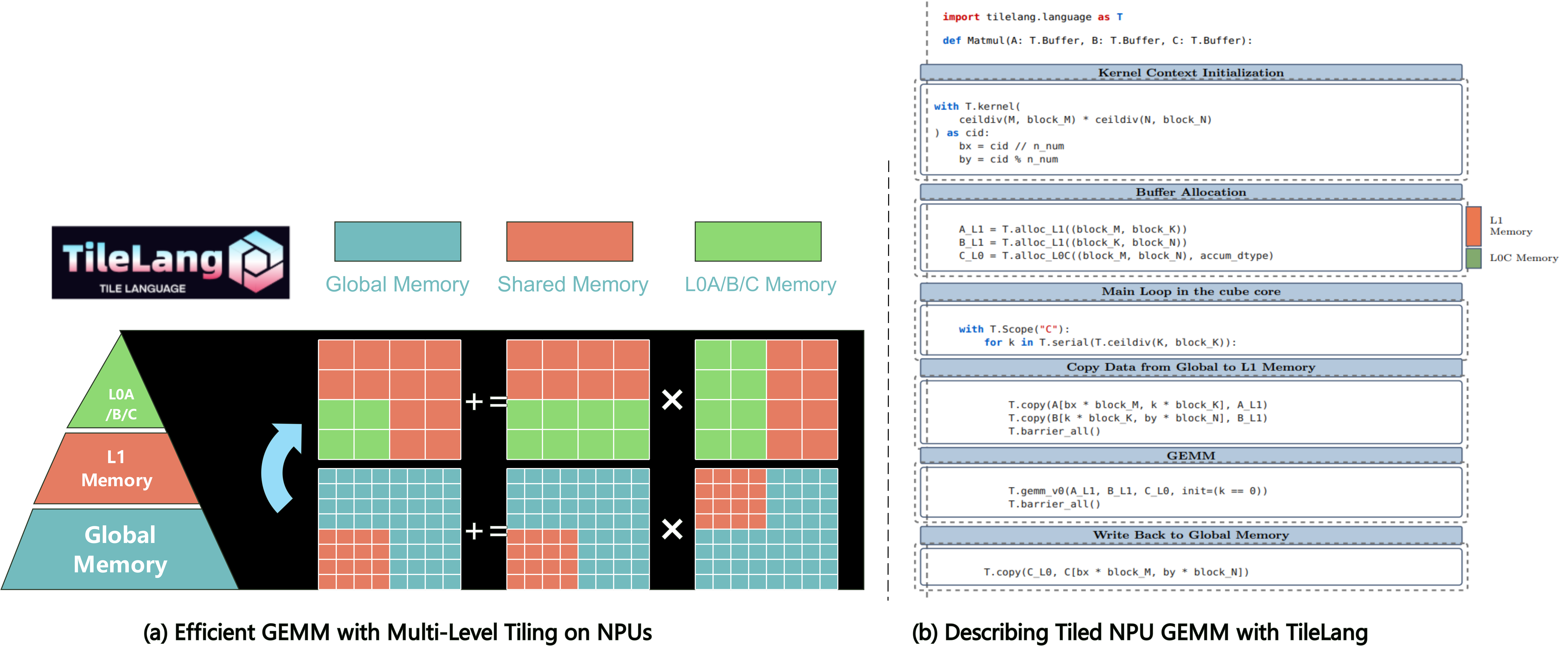
GPUs primarily feature a three-level memory hierarchy that can be analogously mapped to NPU hardware architecture as follows:
Memory Hierarchy Mapping:
global memory↔global memoryshared memory↔L1 buffer on cube core and unified buffer on vector coreregister memory↔L0A/B/C buffer
Memory Management:
TileLang-Ascend provides memory allocation primitives similar to the GPU version. For example, alloc_{L1/ub/...} functions allow on-chip memory allocation in a manner comparable to GPU programming.
Multiple Styles for Vector Operations: TileLang-Ascend offers multiple ways to express vector computations on the NPU, from high-level automatic vectorization to fine-grained tile primitives:
# Style 1: T.Parallel — automatic vectorization
for (i, j) in T.Parallel(M, N):
    C_ub[i, j] = A_ub[i, j] + B_ub[i, j]

# Style 2: Tile primitives — explicit tile-level operations
T.tile.add(C_ub, A_ub, B_ub)
Automatic Cube/Vector Scope Separation:
Cube and vector cores on A2/A3 exchange data through global memory/L2 cache. In Developer mode, the compiler automatically separates Cube/Vector scopes and inserts synchronization. In Expert mode, you explicitly specify execution scopes using T.Scope("C")/T.Scope("V") and manage synchronization via T.set_cross_flag / T.wait_cross_flag.
Quick Start
In this section, you'll learn how to write and execute a straightforward GEMM (matrix multiplication) kernel using tilelang-ascend, The next chapter will introduce how to write a high-performance gemm kernel.
GEMM Example with Annotations
Below is an example that demonstrates how to quickly implement a gemm on the ascend.
@tilelang.jit(out_idx=[-1])
def matmul(M, N, K, block_M, block_N, K_L1, dtype="float16", accum_dtype="float"):

    # Calculate number of blocks in M and N dimensions
    m_num = M // block_M
    n_num = N // block_N

    @T.prim_func
    def main(
            A: T.Tensor((M, K), dtype),  # Input matrix A (M×K)
            B: T.Tensor((K, N), dtype),  # Input matrix B (K×N)
            C: T.Tensor((M, N), dtype),  # Output matrix C (M×N)
    ):

        with T.Kernel(m_num * n_num, is_npu=True) as (cid, _):

            bx = cid // n_num  # Block row index
            by = cid % n_num   # Block column index

            # Allocate L1 cache buffers for input matrices
            A_L1 = T.alloc_L1((block_M, K_L1), dtype)      # A block in L1
            B_L1 = T.alloc_L1((K_L1, block_N), dtype)      # B block in L1

            # Allocate L0C buffer for accumulation
            C_L0 = T.alloc_L0C((block_M, block_N), accum_dtype)

            # Core computation scope
            with T.Scope("C"):
                # Calculate number of K-dimension iterations
                loop_k = T.ceildiv(K, K_L1)

                # Iterate over K dimension blocks
                for k in T.serial(loop_k):
                    # Copy A and B blocks from global memory to L1 cache
                    T.copy(A[bx * block_M, k * K_L1], A_L1)
                    T.copy(B[k * K_L1, by * block_N], B_L1)

                    # Synchronize all cores before computation
                    T.barrier_all()

                    # Perform matrix multiplication
                    T.gemm_v0(A_L1, B_L1, C_L0, init=(k == 0))

                    # Synchronize all cores after computation
                    T.barrier_all()

                # Copy final result from L0C to global memory
                T.copy(C_L0, C[bx * block_M, by * block_N])

    return main
High Performance GEMM Example. (Layout, L2 Cache Swizzling, and Pipelining, etc.)
Below is an example that demonstrates more advanced features: layout annotation, parallelized copy, and swizzle for improved L2 cache locality. This snippet shows how to adapt your kernel to maximize performance on complex hardware.
@tilelang.jit(out_idx=[-1])
def matmul(M, N, K, block_M, block_N, block_K, K_L1, S1, S2, dtype="float16", accum_dtype="float"):
    m_num = M // block_M
    n_num = N // block_N

    core_num = 20

    @T.macro
    def init_flag():
        T.set_flag("mte1", "mte2", 0)
        T.set_flag("mte1", "mte2", 1)
        T.set_flag("m", "mte1", 0)
        T.set_flag("m", "mte1", 1)
        T.set_flag("fix", "m", 0)

    @T.macro
    def clear_flag():
        T.wait_flag("mte1", "mte2", 0)
        T.wait_flag("mte1", "mte2", 1)
        T.wait_flag("m", "mte1", 0)
        T.wait_flag("m", "mte1", 1)
        T.wait_flag("fix", "m", 0)

    @T.prim_func
    def main(
            A: T.Tensor((M, K), dtype),
            B: T.Tensor((K, N), dtype),
            C: T.Tensor((M, N), dtype),
    ):
        with T.Kernel(core_num, is_npu=True) as (cid, _):
            A_L1 = T.alloc_L1((S1, block_M, K_L1), dtype)
            B_L1 = T.alloc_L1((S1, K_L1, block_N), dtype)

            T.annotate_layout({
                A_L1: make_zn_layout(A_L1),
                B_L1: make_zn_layout(B_L1),
            })

            A_L0 = T.alloc_L0A((S2, block_M, block_K), dtype)
            B_L0 = T.alloc_L0B((S2, block_K, block_N), dtype)
            C_L0 = T.alloc_L0C((block_M, block_N), accum_dtype)

            with T.Scope("C"):
                init_flag()

                for i in T.serial(T.ceildiv(m_num * n_num, core_num)):
                    T.use_swizzle(
                        i * core_num + cid, M, N, K, block_M, block_N, off=3, in_loop=True)
                    bx = cid // n_num
                    by = cid % n_num

                    loop_k = T.ceildiv(K, K_L1)

                    T.wait_flag("mte1", "mte2", 0)
                    T.copy(A[bx * block_M, 0], A_L1[0, :, :])
                    T.copy(B[0, by * block_N], B_L1[0, :, :])
                    T.set_flag("mte2", "mte1", 0)
                    T.wait_flag("fix", "m", 0)
                    for k in T.serial(loop_k):
                        if k < loop_k - 1:
                            T.wait_flag("mte1", "mte2", (k + 1) % S1)
                            T.copy(A[bx * block_M, (k + 1) * K_L1], A_L1[(k + 1) % S1, :, :])
                            T.copy(B[(k + 1) * K_L1, by * block_N], B_L1[(k + 1) % S1, :, :])
                            T.set_flag("mte2", "mte1", (k + 1) % S1)

                        loop_kk = T.ceildiv(K_L1, block_K)

                        for kk in T.serial(loop_kk):
                            if kk == 0:
                                T.wait_flag("mte2", "mte1", k % S1)
                            T.wait_flag("m", "mte1", kk % S2)
                            T.copy(A_L1[k % S1, 0, kk * block_K], A_L0[kk % S2, :, :])
                            T.copy(B_L1[k % S1, kk * block_K, 0], B_L0[kk % S2, :, :])
                            if kk == 3:
                                T.set_flag("mte1", "mte2", k % S1)
                            T.set_flag("mte1", "m", kk % S2)
                            T.wait_flag("mte1", "m", kk % S2)

                            if k == 0 and kk == 0:
                                T.mma(A_L0[kk % S2, :, :], B_L0[kk % S2, :, :], C_L0, init=True)
                            else:
                                T.mma(A_L0[kk % S2, :, :], B_L0[kk % S2, :, :], C_L0)

                            T.set_flag("m", "mte1", kk % S2)

                    T.set_flag("m", "fix", 0)
                    T.wait_flag("m", "fix", 0)
                    T.copy(C_L0, C[bx * block_M, by * block_N])
                    T.set_flag("fix", "m", 0)

                clear_flag()

                T.barrier_all()

    return main
Automatic insertion of synchronization instruction
We have supported automatic insertion of synchronization instructions within the core, which can be enabled by setting the TL_ASCEND_AUTO_SYNC attribute in the JIT's pass_configs parameter. Here is a simple example:
pass_configs = {
    tilelang.PassConfigKey.TL_ASCEND_AUTO_SYNC: True
}
@tilelang.jit(out_idx=[-1], pass_configs=pass_configs)
def vec_add(M, N, block_M, block_N, dtype="float"):
    m_num = M // block_M
    n_num = N // block_N

    VEC_NUM = 2

    @T.prim_func
    def main(
            A: T.Tensor((M, N), dtype),
            B: T.Tensor((M, N), dtype),
            C: T.Tensor((M, N), dtype),
    ):
        with T.Kernel(m_num * n_num, is_npu=True) as (cid, vid):
            bx = cid // n_num
            by = cid % n_num

            a_ub = T.alloc_ub((block_M // VEC_NUM, block_N), dtype)
            b_ub = T.alloc_ub((block_M // VEC_NUM, block_N), dtype)
            c_ub = T.alloc_ub((block_M // VEC_NUM, block_N), dtype)
            with T.Scope("V"):
                T.copy(A[bx * block_M + vid * block_M // VEC_NUM, by * block_N], a_ub)
                T.copy(B[bx * block_M + vid * block_M // VEC_NUM, by * block_N], b_ub)

                T.add(c_ub, a_ub, b_ub)

                T.copy(c_ub, C[bx * block_M + vid * block_M // VEC_NUM, by * block_N])

    return main
Automatic Buffer Reuse
We have supported automatic buffer reuse, which can be enabled by setting the TL_ASCEND_MEMORY_PLANNING attribute in the JIT's pass_configs parameter. Here is a example based on example_sparse_flash_attn.py:
pass_configs = {
    tilelang.PassConfigKey.TL_ASCEND_MEMORY_PLANNING: True
}
@tilelang.jit(out_idx=[3], pass_configs=pass_configs)
def sparse_attention_fwd(
    # other code...

    #Manual configuration of T.annotate_address is no longer needed.

    # T.annotate_address({
    #             # L1 address
    #             q_l1: 0,
    #             q_tail_l1: 65536,
    #             kv_l1: 73728,
    #             kv_tail_l1: 139264,
    #             acc_s_l1: 139264,

    #             # L0C address
    #             acc_s_l0c: 0,
    #             acc_o_l0c: 0,

    #             ## ub address
    #             acc_o: 0,
    #             sumexp: 65536,
    #             m_i: 65664,
    #             indices_ub_: 65792,
    #             kv_ub: 66048,
    #             kv_tail_ub: 67072,
    #             acc_s_ub: 66048,
    #             m_i_prev: 74240,
    #             acc_s_ub_: 74368,
    #             tmp_ub: 74368,
    #             sumexp_i_ub: 98944,
    #             acc_s_half: 98944,
    #             acc_o_ub: 98944,
    #             acc_o_half: 98944
    #         })

    # other code...
)
T.Parallel
We have supported T.parallel, which transforms the parallel iteration space into vectorized operations that are lowered into AscendC vector instructions. Here is an example based on example_sparse_flash_attn.py:
pass_configs = {
    tilelang.PassConfigKey.TL_ASCEND_AUTO_SYNC: True
}
@tilelang.jit(out_idx=[3], pass_configs=pass_configs)
def sparse_attention_fwd(
    ...
    # T.tile.add(acc_s_ub, acc_s_ub, acc_s_ub_)
    for (i, j) in T.Parallel(v_block, BI):
        acc_s_ub[i, j] = acc_s_ub[i, j] + acc_s_ub_[i, j]
    ...

    # T.tile.mul(acc_s_ub, acc_s_ub, sm_scale)
    for (i, j) in T.Parallel(v_block, BI):
        acc_s_ub[i, j] = acc_s_ub[i, j] * sm_scale
    ...

    # T.tile.max(m_i, m_i, m_i_prev)
    for i in T.Parallel(v_block):
        m_i[i] = T.max(m_i[i], m_i_prev[i])
    ...

    # for h_i in range(v_block):
        # T.tile.sub(acc_s_ub[h_i, :], acc_s_ub[h_i, :], m_i[h_i])
    for (h_i, j) in T.Parallel(v_block, D):
        acc_s_ub[h_i, j] = acc_s_ub[h_i, j] - m_i[h_i]
)
Auto-allocated Workspace
We now support automatic workspace allocation, enabling users to call operators without managing workspace or output tensor allocation—they only need to handle input tensors. Refer to example_sparse_flash_attn.py for a concrete example.
# Specify workspace positions in parameter list via workspace_idx
@tilelang.jit(out_idx=[3], workspace_idx=[4,5,6,7,8])
def sparse_attention_fwd(...):
    @T.prim_func
    def main(
            # --- Input tensors ---
            Q: T.Tensor(q_shape, dtype),
            KV: T.Tensor(kv_shape, dtype),
            Indices: T.Tensor(indices_shape, indices_dtype),

            # --- Auto-allocated output (index 3 in out_idx) ---
            Output: T.Tensor(o_shape, dtype),

            # --- Auto-allocated workspaces (indices 4-8 in workspace_idx) ---
            # These are temporary buffers managed by the runtime
            workspace_1: T.Tensor([block_num, BI, D], dtype),
            workspace_2: T.Tensor([block_num, BI, D_tail], dtype),
            workspace_3: T.Tensor([block_num, H_per_block, BI], accum_dtype),
            workspace_4: T.Tensor([block_num, H_per_block, BI], dtype),
            workspace_5: T.Tensor([block_num, H_per_block, D], accum_dtype),
    ):

    ...

# Instantiate sparse attention function
func = sparse_attention_fwd(
    heads=128,
    dim=512,
    tail_dim=64,
    topk=2048,
    kv_stride=1,
)

# Prepare input tensors
q = torch.randn((B, S, H, DQK), dtype=dtype)
kv = torch.randn((B, SKV, HKV, DQK), dtype=dtype)
indices = torch.full((B, S, HKV, topk), SKV, dtype=torch.int32)
for b in range(B):
    for t in range(S):
        for h in range(HKV):
            i_i = torch.randperm(max(1, ((t + q_start_s_index) // KV_stride)))[:topk]
            indices[b, t, h, :len(i_i)] = i_i

# Call operator - output and workspaces are automatically allocated!
output = func(q, kv, indices)
T.Pipelined
T.Pipelined enables automatic pipeline scheduling to achieve intra-core computation and data movement overlap, as well as inter-core pipeline overlap between Cube and Vector units.
Usage:
for i in T.Pipelined(loop_range, num_stages=N):
    # loop body
Usage Constraints:
T.Pipelineddoes not support nesting. You cannot place aT.Pipelinedloop inside anotherT.Pipelinedloop.- For inter-core pipelining, place both Cube and Vector operations in a single
T.Pipelinedloop. - For intra-core pipelining only, use separate
T.Pipelinedloops for Cube and Vector respectively.
# Correct: inter-core pipeline (Cube + Vector in one loop)
for i in T.Pipelined(loop, num_stages=2):
    cube_operations()
    vector_operations()

# Correct: intra-core pipeline (separate loops)
for i in T.Pipelined(loop, num_stages=2):
    cube_operations()
for i in T.Pipelined(loop, num_stages=2):
    vector_operations()

# WRONG: nested T.Pipelined is NOT supported
for i in T.Pipelined(outer, num_stages=2):
    for j in T.Pipelined(inner, num_stages=2):  # Error!
        ...
An intra-core example refers to matmul_add_pipeline.py:
for k in T.Pipelined(loop_k, num_stages=2):
    T.copy(A[bx * block_M, k * block_K], A_L1)
    T.copy(B[k * block_K, by * block_N], B_L1)

    T.barrier_all()
    if k == 0:
        T.gemm_v0(A_L1, B_L1, C_L0, init=True)
    else:
        T.gemm_v0(A_L1, B_L1, C_L0)

    T.barrier_all()
An inter-core example refers to flash_attn_bshd_pipeline.py:
for k in T.Pipelined(T.ceildiv(seq_len, block_N), num_stages=2):
    T.copy(K[bz, by, k * block_N:(k + 1) * block_N, :], k_l1)
    T.gemm_v0(q_l1, k_l1, acc_s_l0c, transpose_B=True, init=True)
    T.copy(acc_s_l0c, workspace_1[cid, :, :])

    T.tile.fill(acc_s_ub, 0.0)
    T.copy(m_i, m_i_prev)
    T.copy(
        workspace_1[cid, vid * block_M // 2:vid * block_M // 2 + block_M // 2, :],
        acc_s_ub_)
    T.tile.add(acc_s_ub, acc_s_ub, acc_s_ub_)
    T.tile.mul(acc_s_ub, acc_s_ub, sm_scale)
    ...
For performance tuning with T.Pipelined (choosing num_stages, Double Buffer, etc.), see the Flash Attention Performance Optimization Guide.
Dive Deep into TileLang Beyond GEMM
In addition to GEMM, we provide a variety of examples to showcase the versatility and power of TileLang-Ascend, including:
- FlashAttention: Implementations of FlashAttention with TileLang-Ascend.
- LightningIndexer: Implementations of LightningIndexer with TileLang-Ascend.
- SparseFlashAttention: Implementations of SparseFlashAttention with TileLang-Ascend.
Automatic insert synchronization flags between AIC and AIV, such as CrossCoreSetFlag / CrossCoreWaitFlag.
Two switches need to be turned on:
pass_configs = {
    tilelang.PassConfigKey.TL_ASCEND_AUTO_CV_COMBINE: True,
    tilelang.PassConfigKey.TL_ASCEND_AUTO_CV_SYNC: True,
}
Here is an example:
- FlashAttention: Implementations of FlashAttention without inserting synchronization flags manually.
Vid reduction & Auto CV Ratio
The parameter threads needs to be set. (Only 1 or 2 are allowed).When setting thread parameters, the return value will only have cid and no vid:
with T.Kernel(m_num * n_num, threads=2, is_npu=True) as (cid):
Therefore, ub application and transfer will no longer need to consider core allocation, and the usage will change as follows:
# UB allocation original form
c_ub = T.alloc_shared((block_M // VEC_NUM, block_N), dtype)
# New form after UB reduce elimination
c_ub = T.alloc_shared((block_M, block_N), dtype)
# UB moved to its original form
T.copy(c_ub, C[bx * block_M + vid * block_M // VEC_NUM, by * block_N])
# New form after UB transport elimination
T.copy(c_ub, C[bx * block_M, by * block_N])
# for loop original form
for h_i, j in T.Parallel(v_block // VEC_NUM, BI):
    acc_s_ub[h_i, j] = acc_s_ub[h_i, j] - m_i[h_i]
# New form after UB transport elimination
for h_i, j in T.Parallel(v_block, BI):
    acc_s_ub[h_i, j] = acc_s_ub[h_i, j] - m_i[h_i]
Here is some examples:
For a more detailed feature introduction, please see:
Workspace reduction
Workspace Reduction is automatically enabled in the compilation pipeline. No manual configuration required. It automates workspace allocation for cross-core data transfer (L0C → UB), eliminating the need for users to manually write two-stage GM copy scripts and manage workspace buffers.
@T.prim_func
def flash_attn(...):
    with T.Kernel(..., threads=2, is_npu=True) as (cid):
        # Cube computation
        T.gemm_v0(q_l1, k_l1, acc_s_l0c, transpose_B=True, init=True)

        # Single copy statement — Workspace Reduction automatically handles GM transfer
        T.copy(acc_s_l0c, acc_s_ub)

        # Vector computation
        T.tile.exp(acc_s_ub, acc_s_ub)
        T.reduce_max(acc_s_ub, m_i, dim=-1)
        T.tile.sub(acc_s_ub, acc_s_ub, m_i)
Here are some examples:
For a more detailed feature introduction, please see:
Contributing
We welcome contributions of new operators and framework improvements! Please follow the guidelines below to ensure your changes integrate smoothly.
Contributing Operators
When adding a new operator:
- Create your operator under the
examples/directory (e.g.,examples/my_op/my_op.py). - Make sure your script prints
Kernel Output Match!orTest Passed!upon success, so the CI can recognize it. - Verify that
bench_test.shcan discover and run your script — it auto-discovers*.pyfiles up to 2 levels deep underexamples/. - Run the full test suite locally before submitting:
cd examples
bash bench_test.sh
Contributing Framework Changes
When modifying the compiler, passes, or runtime:
- Ensure all existing tests pass by running
bench_test.shend-to-end. Framework changes must not break any existing operator. - The CI will also run
pytestontesting/python/— make sure those tests pass as well. - If your change adds a new API or primitive, add corresponding test coverage under
testing/python/or a new example underexamples/.
CI Overview
The current CI workflow is triggered manually via bench_test.sh.
Rule of thumb: If you add an operator, make sure
bench_test.shpicks it up. If you change the framework, make surebench_test.shstill reports 100% pass.
Upcoming Features
Check our tilelang-ascend development plan for upcoming features.
Acknowledgements
We gratefully acknowledge the valuable support provided by Huawei's HiSilicon, ICT, Compiler and Programming Language Lab and the Peking University Kunpeng & Ascend Center for Excellence in Science, Education, and Innovation.


Similar repos


Languages
C++
52.0%
Python
46.1%
README
<img src=./images/logo-row.svg />
TileLang-Ascend
Tile Language Ascend (tilelang-ascend) is a specialized variant of the tile-lang domain-specific language, specifically optimized for Huawei Ascend NPU (Neural Processing Unit) architecture. Built upon the foundation of tile-lang's Pythonic syntax and TVM compiler infrastructure, tilelang-ascend enables developers to efficiently create high-performance AI compute kernels tailored for Ascend processors, including operations like GEMM, vector operations, and attention mechanisms. Tilelang-ascend allows developers to focus on productivity without sacrificing the low-level optimizations necessary for state-of-the-art performance on the NPU. The compiler backend supports two technical routes: Ascend C & PTO and AscendNPU IR.
Latest News
- 04/24/2026 🚀: Released DeepSeek V4 kernels DeepSeek-V4
- 03/28/2026 🚀: Released high-performance Flash Attention & Sparse Flash Attention benchmark and optimization guide, see PR#698 and PR#665.
- 03/16/2026 🚀: Introduced wheel package installation, enabling easy setup via
pip install! - 03/12/2026 ✨: New ACLGraph integration example for graph-level optimization on Ascend NPU.
- 03/03/2026 ✨: Supported shared memory (shmem) with put/get API for inter-core communication.
- 01/29/2026 📖: Published the TileLang-Ascend Programming Guide with comprehensive development tutorials.
- 01/23/2026 🚀: Landed PTO backend as a new code generation target.
- 01/21/2026 ✨: New torch_tl_ascend PyTorch integration example for seamless NPU + PyTorch workflows, see PR#292.
- 01/15/2026 ✨: Introduced T.Pipelined for software pipelining on Ascend NPU.
- 12/08/2025 ✨: Supported T.Parallel for automatic vectorization, check out PR#113 for details.
- 11/25/2025 ✨: Enabled automatic buffer reuse to reduce on-chip memory footprint, see PR#101.
- 11/17/2025 🛠️: Shipped debug tools
T.printfandT.dump_tensorfor printing and dumping device-side buffers. - 11/07/2025 ✨: Enabled automatic intra-kernel synchronization insertion, see PR#74.
- 10/28/2025 🚀: Optimized tl_templates performance and delivered a high-performance GEMM kernel.
- 09/29/2025 🎉: tilelang-ascend is now open source! A DSL for high-performance AI workloads on Ascend NPUs.
Programming Guide
For more instructions and tips on using TileLang-Ascend, please refer to the TileLang-Ascend Programming Guide.
Lessons
Welcome to the TileLang-Ascend video course series. You can access all the lessons via the links below:
| Lesson | Topic | Video Link |
|---|---|---|
| 01 | Introduction to TileLang-Ascend Development Environment | 📺 Start learning |
| 02 | TileLang-Ascend Programming Fundamentals | 📺 Start learning |
| 03 | TileLang-Ascend Developer Programming Model Deep Dive | 📺 Start learning |
| 04 | Getting Started with TileLang-Ascend Performance Tuning and Debugging Tools | 📺 Start learning |
| 05 | TileLang-Ascend Engineering Practice: Compilation, Integration, and Deployment | 📺 Start learning |
Tested Devices
Although tilelang-ascend aims to be portable across a range of Ascend devices, it has been specifically tested and validated on the following NPUs: A2 and A3.
OP Implementation Examples
tilelang-ascend provides the building blocks to implement a wide variety of operators on the NPU. Some examples include:
- Matrix Multiplication (GEMM)
- Batch GEMM
- Elementwise Operations
- Flash Attention
- Sparse Flash Attention
- Linear Attention & RNN
- Softmax
- Normalization
- Activation Functions
- Reduce
- Sort
- Convolution
- Cross Entropy Loss
- Dispatch & Combine
Within the examples directory, you will also find additional complex kernels—such as LightningIndexer, TopK Selector, and ACLGraph Integration. More operators are continuously being added.
Installation
Environment Preparation
We assume you already have an ascend environment with CANN (at least 8.3.RC1) and torch-npu (at least 2.6.0.RC1) installed. Firstly, set cann environment variables.
source {your-cann-installed-path}/ascend-toolkit/set_env.sh
TileLang-Ascend Installation
Here we provide two installation methods: installing from wheel package and compiling from source code.
Method 1: Install from Wheel Package (Recommended)
Download the pre-built wheel package and install it directly:
# Set Ascend environment variable
export ASCEND_HOME_PATH=/usr/local/Ascend/ascend-toolkit/latest

# Install the wheel package
pip install tilelang-*.whl
Method 2: Build Wheel Package from Source
If you need to build the wheel package from source:
# Clone the repository
git clone --recursive https://github.com/tile-ai/tilelang-ascend.git
cd tilelang-ascend

# Set Ascend environment variable
export ASCEND_HOME_PATH=/usr/local/Ascend/ascend-toolkit/latest

# Build and install wheel package
./build_wheel_ascend.sh [--enable-llvm]

# Install the built wheel package
pip install dist/tilelang-*.whl
Method 3: Compile and Install from Source
a) Download
git clone --recursive https://github.com/tile-ai/tilelang-ascend.git
cd tilelang-ascend
b) Compile and Install
bash install_ascend.sh
c) Environment Variable Setup
source set_env.sh
Run
In this section, you will learn how to call NPU TileLang operators.
Here we use the Matrix Multiplication operator as an example for introduction.
cd examples/gemm
python example_gemm.py
Upon success, it will print:
Kernel Output Match!
Comparison with NVIDIA Backend Implementation
GPUs primarily feature a three-level memory hierarchy that can be analogously mapped to NPU hardware architecture as follows:
Memory Hierarchy Mapping:
global memory↔global memoryshared memory↔L1 buffer on cube core and unified buffer on vector coreregister memory↔L0A/B/C buffer
Memory Management:
TileLang-Ascend provides memory allocation primitives similar to the GPU version. For example, alloc_{L1/ub/...} functions allow on-chip memory allocation in a manner comparable to GPU programming.
Multiple Styles for Vector Operations: TileLang-Ascend offers multiple ways to express vector computations on the NPU, from high-level automatic vectorization to fine-grained tile primitives:
# Style 1: T.Parallel — automatic vectorization
for (i, j) in T.Parallel(M, N):
    C_ub[i, j] = A_ub[i, j] + B_ub[i, j]

# Style 2: Tile primitives — explicit tile-level operations
T.tile.add(C_ub, A_ub, B_ub)
Automatic Cube/Vector Scope Separation:
Cube and vector cores on A2/A3 exchange data through global memory/L2 cache. In Developer mode, the compiler automatically separates Cube/Vector scopes and inserts synchronization. In Expert mode, you explicitly specify execution scopes using T.Scope("C")/T.Scope("V") and manage synchronization via T.set_cross_flag / T.wait_cross_flag.
Quick Start
In this section, you'll learn how to write and execute a straightforward GEMM (matrix multiplication) kernel using tilelang-ascend, The next chapter will introduce how to write a high-performance gemm kernel.
GEMM Example with Annotations
Below is an example that demonstrates how to quickly implement a gemm on the ascend.
@tilelang.jit(out_idx=[-1])
def matmul(M, N, K, block_M, block_N, K_L1, dtype="float16", accum_dtype="float"):

    # Calculate number of blocks in M and N dimensions
    m_num = M // block_M
    n_num = N // block_N

    @T.prim_func
    def main(
            A: T.Tensor((M, K), dtype),  # Input matrix A (M×K)
            B: T.Tensor((K, N), dtype),  # Input matrix B (K×N)
            C: T.Tensor((M, N), dtype),  # Output matrix C (M×N)
    ):

        with T.Kernel(m_num * n_num, is_npu=True) as (cid, _):

            bx = cid // n_num  # Block row index
            by = cid % n_num   # Block column index

            # Allocate L1 cache buffers for input matrices
            A_L1 = T.alloc_L1((block_M, K_L1), dtype)      # A block in L1
            B_L1 = T.alloc_L1((K_L1, block_N), dtype)      # B block in L1

            # Allocate L0C buffer for accumulation
            C_L0 = T.alloc_L0C((block_M, block_N), accum_dtype)

            # Core computation scope
            with T.Scope("C"):
                # Calculate number of K-dimension iterations
                loop_k = T.ceildiv(K, K_L1)

                # Iterate over K dimension blocks
                for k in T.serial(loop_k):
                    # Copy A and B blocks from global memory to L1 cache
                    T.copy(A[bx * block_M, k * K_L1], A_L1)
                    T.copy(B[k * K_L1, by * block_N], B_L1)

                    # Synchronize all cores before computation
                    T.barrier_all()

                    # Perform matrix multiplication
                    T.gemm_v0(A_L1, B_L1, C_L0, init=(k == 0))

                    # Synchronize all cores after computation
                    T.barrier_all()

                # Copy final result from L0C to global memory
                T.copy(C_L0, C[bx * block_M, by * block_N])

    return main
High Performance GEMM Example. (Layout, L2 Cache Swizzling, and Pipelining, etc.)
Below is an example that demonstrates more advanced features: layout annotation, parallelized copy, and swizzle for improved L2 cache locality. This snippet shows how to adapt your kernel to maximize performance on complex hardware.
@tilelang.jit(out_idx=[-1])
def matmul(M, N, K, block_M, block_N, block_K, K_L1, S1, S2, dtype="float16", accum_dtype="float"):
    m_num = M // block_M
    n_num = N // block_N

    core_num = 20

    @T.macro
    def init_flag():
        T.set_flag("mte1", "mte2", 0)
        T.set_flag("mte1", "mte2", 1)
        T.set_flag("m", "mte1", 0)
        T.set_flag("m", "mte1", 1)
        T.set_flag("fix", "m", 0)

    @T.macro
    def clear_flag():
        T.wait_flag("mte1", "mte2", 0)
        T.wait_flag("mte1", "mte2", 1)
        T.wait_flag("m", "mte1", 0)
        T.wait_flag("m", "mte1", 1)
        T.wait_flag("fix", "m", 0)

    @T.prim_func
    def main(
            A: T.Tensor((M, K), dtype),
            B: T.Tensor((K, N), dtype),
            C: T.Tensor((M, N), dtype),
    ):
        with T.Kernel(core_num, is_npu=True) as (cid, _):
            A_L1 = T.alloc_L1((S1, block_M, K_L1), dtype)
            B_L1 = T.alloc_L1((S1, K_L1, block_N), dtype)

            T.annotate_layout({
                A_L1: make_zn_layout(A_L1),
                B_L1: make_zn_layout(B_L1),
            })

            A_L0 = T.alloc_L0A((S2, block_M, block_K), dtype)
            B_L0 = T.alloc_L0B((S2, block_K, block_N), dtype)
            C_L0 = T.alloc_L0C((block_M, block_N), accum_dtype)

            with T.Scope("C"):
                init_flag()

                for i in T.serial(T.ceildiv(m_num * n_num, core_num)):
                    T.use_swizzle(
                        i * core_num + cid, M, N, K, block_M, block_N, off=3, in_loop=True)
                    bx = cid // n_num
                    by = cid % n_num

                    loop_k = T.ceildiv(K, K_L1)

                    T.wait_flag("mte1", "mte2", 0)
                    T.copy(A[bx * block_M, 0], A_L1[0, :, :])
                    T.copy(B[0, by * block_N], B_L1[0, :, :])
                    T.set_flag("mte2", "mte1", 0)
                    T.wait_flag("fix", "m", 0)
                    for k in T.serial(loop_k):
                        if k < loop_k - 1:
                            T.wait_flag("mte1", "mte2", (k + 1) % S1)
                            T.copy(A[bx * block_M, (k + 1) * K_L1], A_L1[(k + 1) % S1, :, :])
                            T.copy(B[(k + 1) * K_L1, by * block_N], B_L1[(k + 1) % S1, :, :])
                            T.set_flag("mte2", "mte1", (k + 1) % S1)

                        loop_kk = T.ceildiv(K_L1, block_K)

                        for kk in T.serial(loop_kk):
                            if kk == 0:
                                T.wait_flag("mte2", "mte1", k % S1)
                            T.wait_flag("m", "mte1", kk % S2)
                            T.copy(A_L1[k % S1, 0, kk * block_K], A_L0[kk % S2, :, :])
                            T.copy(B_L1[k % S1, kk * block_K, 0], B_L0[kk % S2, :, :])
                            if kk == 3:
                                T.set_flag("mte1", "mte2", k % S1)
                            T.set_flag("mte1", "m", kk % S2)
                            T.wait_flag("mte1", "m", kk % S2)

                            if k == 0 and kk == 0:
                                T.mma(A_L0[kk % S2, :, :], B_L0[kk % S2, :, :], C_L0, init=True)
                            else:
                                T.mma(A_L0[kk % S2, :, :], B_L0[kk % S2, :, :], C_L0)

                            T.set_flag("m", "mte1", kk % S2)

                    T.set_flag("m", "fix", 0)
                    T.wait_flag("m", "fix", 0)
                    T.copy(C_L0, C[bx * block_M, by * block_N])
                    T.set_flag("fix", "m", 0)

                clear_flag()

                T.barrier_all()

    return main
Automatic insertion of synchronization instruction
We have supported automatic insertion of synchronization instructions within the core, which can be enabled by setting the TL_ASCEND_AUTO_SYNC attribute in the JIT's pass_configs parameter. Here is a simple example:
pass_configs = {
    tilelang.PassConfigKey.TL_ASCEND_AUTO_SYNC: True
}
@tilelang.jit(out_idx=[-1], pass_configs=pass_configs)
def vec_add(M, N, block_M, block_N, dtype="float"):
    m_num = M // block_M
    n_num = N // block_N

    VEC_NUM = 2

    @T.prim_func
    def main(
            A: T.Tensor((M, N), dtype),
            B: T.Tensor((M, N), dtype),
            C: T.Tensor((M, N), dtype),
    ):
        with T.Kernel(m_num * n_num, is_npu=True) as (cid, vid):
            bx = cid // n_num
            by = cid % n_num

            a_ub = T.alloc_ub((block_M // VEC_NUM, block_N), dtype)
            b_ub = T.alloc_ub((block_M // VEC_NUM, block_N), dtype)
            c_ub = T.alloc_ub((block_M // VEC_NUM, block_N), dtype)
            with T.Scope("V"):
                T.copy(A[bx * block_M + vid * block_M // VEC_NUM, by * block_N], a_ub)
                T.copy(B[bx * block_M + vid * block_M // VEC_NUM, by * block_N], b_ub)

                T.add(c_ub, a_ub, b_ub)

                T.copy(c_ub, C[bx * block_M + vid * block_M // VEC_NUM, by * block_N])

    return main
Automatic Buffer Reuse
We have supported automatic buffer reuse, which can be enabled by setting the TL_ASCEND_MEMORY_PLANNING attribute in the JIT's pass_configs parameter. Here is a example based on example_sparse_flash_attn.py:
pass_configs = {
    tilelang.PassConfigKey.TL_ASCEND_MEMORY_PLANNING: True
}
@tilelang.jit(out_idx=[3], pass_configs=pass_configs)
def sparse_attention_fwd(
    # other code...

    #Manual configuration of T.annotate_address is no longer needed.

    # T.annotate_address({
    #             # L1 address
    #             q_l1: 0,
    #             q_tail_l1: 65536,
    #             kv_l1: 73728,
    #             kv_tail_l1: 139264,
    #             acc_s_l1: 139264,

    #             # L0C address
    #             acc_s_l0c: 0,
    #             acc_o_l0c: 0,

    #             ## ub address
    #             acc_o: 0,
    #             sumexp: 65536,
    #             m_i: 65664,
    #             indices_ub_: 65792,
    #             kv_ub: 66048,
    #             kv_tail_ub: 67072,
    #             acc_s_ub: 66048,
    #             m_i_prev: 74240,
    #             acc_s_ub_: 74368,
    #             tmp_ub: 74368,
    #             sumexp_i_ub: 98944,
    #             acc_s_half: 98944,
    #             acc_o_ub: 98944,
    #             acc_o_half: 98944
    #         })

    # other code...
)
T.Parallel
We have supported T.parallel, which transforms the parallel iteration space into vectorized operations that are lowered into AscendC vector instructions. Here is an example based on example_sparse_flash_attn.py:
pass_configs = {
    tilelang.PassConfigKey.TL_ASCEND_AUTO_SYNC: True
}
@tilelang.jit(out_idx=[3], pass_configs=pass_configs)
def sparse_attention_fwd(
    ...
    # T.tile.add(acc_s_ub, acc_s_ub, acc_s_ub_)
    for (i, j) in T.Parallel(v_block, BI):
        acc_s_ub[i, j] = acc_s_ub[i, j] + acc_s_ub_[i, j]
    ...

    # T.tile.mul(acc_s_ub, acc_s_ub, sm_scale)
    for (i, j) in T.Parallel(v_block, BI):
        acc_s_ub[i, j] = acc_s_ub[i, j] * sm_scale
    ...

    # T.tile.max(m_i, m_i, m_i_prev)
    for i in T.Parallel(v_block):
        m_i[i] = T.max(m_i[i], m_i_prev[i])
    ...

    # for h_i in range(v_block):
        # T.tile.sub(acc_s_ub[h_i, :], acc_s_ub[h_i, :], m_i[h_i])
    for (h_i, j) in T.Parallel(v_block, D):
        acc_s_ub[h_i, j] = acc_s_ub[h_i, j] - m_i[h_i]
)
Auto-allocated Workspace
We now support automatic workspace allocation, enabling users to call operators without managing workspace or output tensor allocation—they only need to handle input tensors. Refer to example_sparse_flash_attn.py for a concrete example.
# Specify workspace positions in parameter list via workspace_idx
@tilelang.jit(out_idx=[3], workspace_idx=[4,5,6,7,8])
def sparse_attention_fwd(...):
    @T.prim_func
    def main(
            # --- Input tensors ---
            Q: T.Tensor(q_shape, dtype),
            KV: T.Tensor(kv_shape, dtype),
            Indices: T.Tensor(indices_shape, indices_dtype),

            # --- Auto-allocated output (index 3 in out_idx) ---
            Output: T.Tensor(o_shape, dtype),

            # --- Auto-allocated workspaces (indices 4-8 in workspace_idx) ---
            # These are temporary buffers managed by the runtime
            workspace_1: T.Tensor([block_num, BI, D], dtype),
            workspace_2: T.Tensor([block_num, BI, D_tail], dtype),
            workspace_3: T.Tensor([block_num, H_per_block, BI], accum_dtype),
            workspace_4: T.Tensor([block_num, H_per_block, BI], dtype),
            workspace_5: T.Tensor([block_num, H_per_block, D], accum_dtype),
    ):

    ...

# Instantiate sparse attention function
func = sparse_attention_fwd(
    heads=128,
    dim=512,
    tail_dim=64,
    topk=2048,
    kv_stride=1,
)

# Prepare input tensors
q = torch.randn((B, S, H, DQK), dtype=dtype)
kv = torch.randn((B, SKV, HKV, DQK), dtype=dtype)
indices = torch.full((B, S, HKV, topk), SKV, dtype=torch.int32)
for b in range(B):
    for t in range(S):
        for h in range(HKV):
            i_i = torch.randperm(max(1, ((t + q_start_s_index) // KV_stride)))[:topk]
            indices[b, t, h, :len(i_i)] = i_i

# Call operator - output and workspaces are automatically allocated!
output = func(q, kv, indices)
T.Pipelined
T.Pipelined enables automatic pipeline scheduling to achieve intra-core computation and data movement overlap, as well as inter-core pipeline overlap between Cube and Vector units.
Usage:
for i in T.Pipelined(loop_range, num_stages=N):
    # loop body
Usage Constraints:
T.Pipelineddoes not support nesting. You cannot place aT.Pipelinedloop inside anotherT.Pipelinedloop.- For inter-core pipelining, place both Cube and Vector operations in a single
T.Pipelinedloop. - For intra-core pipelining only, use separate
T.Pipelinedloops for Cube and Vector respectively.
# Correct: inter-core pipeline (Cube + Vector in one loop)
for i in T.Pipelined(loop, num_stages=2):
    cube_operations()
    vector_operations()

# Correct: intra-core pipeline (separate loops)
for i in T.Pipelined(loop, num_stages=2):
    cube_operations()
for i in T.Pipelined(loop, num_stages=2):
    vector_operations()

# WRONG: nested T.Pipelined is NOT supported
for i in T.Pipelined(outer, num_stages=2):
    for j in T.Pipelined(inner, num_stages=2):  # Error!
        ...
An intra-core example refers to matmul_add_pipeline.py:
for k in T.Pipelined(loop_k, num_stages=2):
    T.copy(A[bx * block_M, k * block_K], A_L1)
    T.copy(B[k * block_K, by * block_N], B_L1)

    T.barrier_all()
    if k == 0:
        T.gemm_v0(A_L1, B_L1, C_L0, init=True)
    else:
        T.gemm_v0(A_L1, B_L1, C_L0)

    T.barrier_all()
An inter-core example refers to flash_attn_bshd_pipeline.py:
for k in T.Pipelined(T.ceildiv(seq_len, block_N), num_stages=2):
    T.copy(K[bz, by, k * block_N:(k + 1) * block_N, :], k_l1)
    T.gemm_v0(q_l1, k_l1, acc_s_l0c, transpose_B=True, init=True)
    T.copy(acc_s_l0c, workspace_1[cid, :, :])

    T.tile.fill(acc_s_ub, 0.0)
    T.copy(m_i, m_i_prev)
    T.copy(
        workspace_1[cid, vid * block_M // 2:vid * block_M // 2 + block_M // 2, :],
        acc_s_ub_)
    T.tile.add(acc_s_ub, acc_s_ub, acc_s_ub_)
    T.tile.mul(acc_s_ub, acc_s_ub, sm_scale)
    ...
For performance tuning with T.Pipelined (choosing num_stages, Double Buffer, etc.), see the Flash Attention Performance Optimization Guide.
Dive Deep into TileLang Beyond GEMM
In addition to GEMM, we provide a variety of examples to showcase the versatility and power of TileLang-Ascend, including:
- FlashAttention: Implementations of FlashAttention with TileLang-Ascend.
- LightningIndexer: Implementations of LightningIndexer with TileLang-Ascend.
- SparseFlashAttention: Implementations of SparseFlashAttention with TileLang-Ascend.
Automatic insert synchronization flags between AIC and AIV, such as CrossCoreSetFlag / CrossCoreWaitFlag.
Two switches need to be turned on:
pass_configs = {
    tilelang.PassConfigKey.TL_ASCEND_AUTO_CV_COMBINE: True,
    tilelang.PassConfigKey.TL_ASCEND_AUTO_CV_SYNC: True,
}
Here is an example:
- FlashAttention: Implementations of FlashAttention without inserting synchronization flags manually.
Vid reduction & Auto CV Ratio
The parameter threads needs to be set. (Only 1 or 2 are allowed).When setting thread parameters, the return value will only have cid and no vid:
with T.Kernel(m_num * n_num, threads=2, is_npu=True) as (cid):
Therefore, ub application and transfer will no longer need to consider core allocation, and the usage will change as follows:
# UB allocation original form
c_ub = T.alloc_shared((block_M // VEC_NUM, block_N), dtype)
# New form after UB reduce elimination
c_ub = T.alloc_shared((block_M, block_N), dtype)
# UB moved to its original form
T.copy(c_ub, C[bx * block_M + vid * block_M // VEC_NUM, by * block_N])
# New form after UB transport elimination
T.copy(c_ub, C[bx * block_M, by * block_N])
# for loop original form
for h_i, j in T.Parallel(v_block // VEC_NUM, BI):
    acc_s_ub[h_i, j] = acc_s_ub[h_i, j] - m_i[h_i]
# New form after UB transport elimination
for h_i, j in T.Parallel(v_block, BI):
    acc_s_ub[h_i, j] = acc_s_ub[h_i, j] - m_i[h_i]
Here is some examples:
For a more detailed feature introduction, please see:
Workspace reduction
Workspace Reduction is automatically enabled in the compilation pipeline. No manual configuration required. It automates workspace allocation for cross-core data transfer (L0C → UB), eliminating the need for users to manually write two-stage GM copy scripts and manage workspace buffers.
@T.prim_func
def flash_attn(...):
    with T.Kernel(..., threads=2, is_npu=True) as (cid):
        # Cube computation
        T.gemm_v0(q_l1, k_l1, acc_s_l0c, transpose_B=True, init=True)

        # Single copy statement — Workspace Reduction automatically handles GM transfer
        T.copy(acc_s_l0c, acc_s_ub)

        # Vector computation
        T.tile.exp(acc_s_ub, acc_s_ub)
        T.reduce_max(acc_s_ub, m_i, dim=-1)
        T.tile.sub(acc_s_ub, acc_s_ub, m_i)
Here are some examples:
For a more detailed feature introduction, please see:
Contributing
We welcome contributions of new operators and framework improvements! Please follow the guidelines below to ensure your changes integrate smoothly.
Contributing Operators
When adding a new operator:
- Create your operator under the
examples/directory (e.g.,examples/my_op/my_op.py). - Make sure your script prints
Kernel Output Match!orTest Passed!upon success, so the CI can recognize it. - Verify that
bench_test.shcan discover and run your script — it auto-discovers*.pyfiles up to 2 levels deep underexamples/. - Run the full test suite locally before submitting:
cd examples
bash bench_test.sh
Contributing Framework Changes
When modifying the compiler, passes, or runtime:
- Ensure all existing tests pass by running
bench_test.shend-to-end. Framework changes must not break any existing operator. - The CI will also run
pytestontesting/python/— make sure those tests pass as well. - If your change adds a new API or primitive, add corresponding test coverage under
testing/python/or a new example underexamples/.
CI Overview
The current CI workflow is triggered manually via bench_test.sh.
Rule of thumb: If you add an operator, make sure
bench_test.shpicks it up. If you change the framework, make surebench_test.shstill reports 100% pass.
Upcoming Features
Check our tilelang-ascend development plan for upcoming features.
Acknowledgements
We gratefully acknowledge the valuable support provided by Huawei's HiSilicon, ICT, Compiler and Programming Language Lab and the Peking University Kunpeng & Ascend Center for Excellence in Science, Education, and Innovation.
Similar repos
Significant stargazers
Languages
C++
52.0%
Python
46.1%