Tidy is an open source product canvas for designers, engineers, and agents. Apache-2.0.
See the code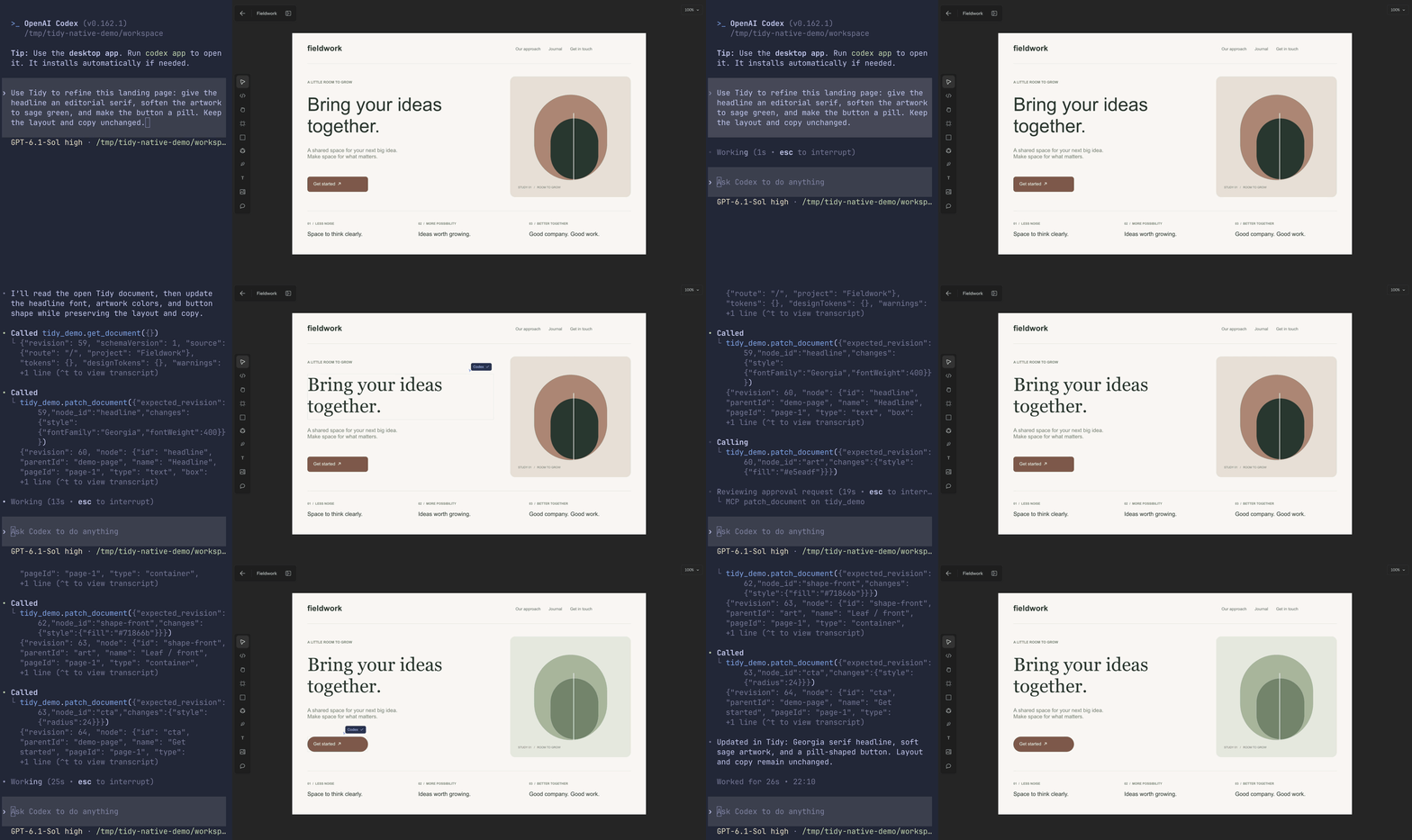
Tidy is a product canvas for designers, engineers and agents. It includes an editable design workspace, collaboration, a webpage-capture extension and an MCP server for working with designs through agents.
Tidy is open source under the Apache License 2.0. Bundled third-party assets retain their own licenses; see third-party notices.
Requirements: Bun 1.3.14, Git, Docker Compose and PostgreSQL 17 command-line tools for the disposable database tests. Use your own development mail and optional provider applications; the source contains no hosted-service credentials.
bun install --frozen-lockfile
docker compose up -d --wait
cp apps/web/.env.example apps/web/.env.local
Generate BETTER_AUTH_SECRET and a separate base64-encoded 32-byte
VAULT_ENCRYPTION_KEY in the app's local environment file. The example database
URL points to loopback PostgreSQL on port 55432; its password is a development
fixture, never a production credential. Do not inherit a production database URL
when running local commands. Fresh Docker databases apply ordered migrations
automatically; existing databases need the missing files from migrations/.
Password accounts must verify email before sign-in. Configure your own Cloudflare Email Sending token, account and sender before creating accounts; disable email previews that retain verification/reset links. Optional social sign-in, connectors, analytics, billing and native agents stay unconfigured until you add their own environment values in the environment example.
bun dev
# In another terminal, for local realtime presence:
bun dev:realtime
Open http://localhost:3000. bun dev:site starts the optional landing page on
port 3001. bun dev:extension starts the WXT extension; its default server is
localhost. To load it in your own Chrome profile, run bun run build:extension,
enable Developer mode at chrome://extensions, and load unpacked
apps/extension/.output/chrome-mv3. Set WXT_BELLA_URL to your own HTTPS app
origin when building for distribution.
Stop the local database with docker compose down; adding -v removes its data.
Local Node development bypasses Worker-specific shared attempt limits. See
self-hosting before exposing any deployment publicly.
| Workspace | Purpose |
|---|---|
apps/web | Next.js application and Cloudflare Worker |
apps/site | Optional static landing page |
apps/extension | WXT webpage capture extension |
apps/gpt-plugin | Agent plugin, skill and preview UI |
packages/design | Browser-safe document and capture schemas |
packages/design-renderer | Shared editor, preview and export rendering |
packages/ui | Shared UI controls |
Workspace commands run from the root: bun typecheck, bun lint, bun test and
bun run build. Use bun run build:worker for the Cloudflare Webpack/OpenNext build.
Source archives and new repositories with no commits are supported. You can set
NEXT_PUBLIC_APP_VERSION for a release label independent of Git.
Database fixtures own disposable PostgreSQL clusters and simulate provider HTTP.
Run the relevant suites explicitly; default unit tests skip database suites.
The account suite is bun run test:account-controls; package.json also lists
auth, MCP, agents, plans, files, versions, images, clipboard, runtime, storage, multiplayer
and connector suites. See contributing for required checks.
Run bun run bench:mcp for authenticated MCP HTTP latency, throughput, query-count
and payload benchmarks against a disposable local database. See the
MCP performance report for reproducible comparisons
and the distinction between local measurements and hosted Worker performance.
The hosted app uses Cloudflare Workers, Hyperdrive, private R2 buckets, Images
and Durable Objects. The tracked apps/web/wrangler.jsonc is a build template.
Copy it to the ignored apps/web/wrangler.deploy.jsonc and configure your own
Worker name, matching WORKER_SELF_REFERENCE, domain, Hyperdrive connection and
storage bindings. Retain the Durable Object bindings and migration tags.
Use separate runtime and migration database logins. Apply ordered
database migrations and the restricted runtime grants
before starting the app. Configure BETTER_AUTH_URL to your HTTPS origin and
supply runtime variables and secrets through Cloudflare, using
apps/web/.env.example as the configuration reference. Keep secrets out of
Wrangler files and NEXT_PUBLIC_* variables. Preserve both auth and encryption
secrets when restoring an existing database.
From the repository root, build and deploy using your private configuration:
bun run build:worker
TIDY_DEPLOY_CONFIG=./wrangler.deploy.jsonc bun run deploy:worker
The configuration path is relative to apps/web. Preview and production need
separate secrets, databases and buckets. Test authentication and workspace
isolation with two users before accepting real data. Public Node deployments
require an equivalent shared limiter, private storage and realtime transport;
the Node commands support local development.
See the agent plugin and native runner for agent setup. CI uses synthetic fixtures and a read-only token. Report vulnerabilities privately using the process in SECURITY.md.
Tidy is an open source product canvas for designers, engineers, and agents. Apache-2.0.
See the code
Tidy is a product canvas for designers, engineers and agents. It includes an editable design workspace, collaboration, a webpage-capture extension and an MCP server for working with designs through agents.
Tidy is open source under the Apache License 2.0. Bundled third-party assets retain their own licenses; see third-party notices.
Requirements: Bun 1.3.14, Git, Docker Compose and PostgreSQL 17 command-line tools for the disposable database tests. Use your own development mail and optional provider applications; the source contains no hosted-service credentials.
bun install --frozen-lockfile
docker compose up -d --wait
cp apps/web/.env.example apps/web/.env.local
Generate BETTER_AUTH_SECRET and a separate base64-encoded 32-byte
VAULT_ENCRYPTION_KEY in the app's local environment file. The example database
URL points to loopback PostgreSQL on port 55432; its password is a development
fixture, never a production credential. Do not inherit a production database URL
when running local commands. Fresh Docker databases apply ordered migrations
automatically; existing databases need the missing files from migrations/.
Password accounts must verify email before sign-in. Configure your own Cloudflare Email Sending token, account and sender before creating accounts; disable email previews that retain verification/reset links. Optional social sign-in, connectors, analytics, billing and native agents stay unconfigured until you add their own environment values in the environment example.
bun dev
# In another terminal, for local realtime presence:
bun dev:realtime
Open http://localhost:3000. bun dev:site starts the optional landing page on
port 3001. bun dev:extension starts the WXT extension; its default server is
localhost. To load it in your own Chrome profile, run bun run build:extension,
enable Developer mode at chrome://extensions, and load unpacked
apps/extension/.output/chrome-mv3. Set WXT_BELLA_URL to your own HTTPS app
origin when building for distribution.
Stop the local database with docker compose down; adding -v removes its data.
Local Node development bypasses Worker-specific shared attempt limits. See
self-hosting before exposing any deployment publicly.
| Workspace | Purpose |
|---|---|
apps/web | Next.js application and Cloudflare Worker |
apps/site | Optional static landing page |
apps/extension | WXT webpage capture extension |
apps/gpt-plugin | Agent plugin, skill and preview UI |
packages/design | Browser-safe document and capture schemas |
packages/design-renderer | Shared editor, preview and export rendering |
packages/ui | Shared UI controls |
Workspace commands run from the root: bun typecheck, bun lint, bun test and
bun run build. Use bun run build:worker for the Cloudflare Webpack/OpenNext build.
Source archives and new repositories with no commits are supported. You can set
NEXT_PUBLIC_APP_VERSION for a release label independent of Git.
Database fixtures own disposable PostgreSQL clusters and simulate provider HTTP.
Run the relevant suites explicitly; default unit tests skip database suites.
The account suite is bun run test:account-controls; package.json also lists
auth, MCP, agents, plans, files, versions, images, clipboard, runtime, storage, multiplayer
and connector suites. See contributing for required checks.
Run bun run bench:mcp for authenticated MCP HTTP latency, throughput, query-count
and payload benchmarks against a disposable local database. See the
MCP performance report for reproducible comparisons
and the distinction between local measurements and hosted Worker performance.
The hosted app uses Cloudflare Workers, Hyperdrive, private R2 buckets, Images
and Durable Objects. The tracked apps/web/wrangler.jsonc is a build template.
Copy it to the ignored apps/web/wrangler.deploy.jsonc and configure your own
Worker name, matching WORKER_SELF_REFERENCE, domain, Hyperdrive connection and
storage bindings. Retain the Durable Object bindings and migration tags.
Use separate runtime and migration database logins. Apply ordered
database migrations and the restricted runtime grants
before starting the app. Configure BETTER_AUTH_URL to your HTTPS origin and
supply runtime variables and secrets through Cloudflare, using
apps/web/.env.example as the configuration reference. Keep secrets out of
Wrangler files and NEXT_PUBLIC_* variables. Preserve both auth and encryption
secrets when restoring an existing database.
From the repository root, build and deploy using your private configuration:
bun run build:worker
TIDY_DEPLOY_CONFIG=./wrangler.deploy.jsonc bun run deploy:worker
The configuration path is relative to apps/web. Preview and production need
separate secrets, databases and buckets. Test authentication and workspace
isolation with two users before accepting real data. Public Node deployments
require an equivalent shared limiter, private storage and realtime transport;
the Node commands support local development.
See the agent plugin and native runner for agent setup. CI uses synthetic fixtures and a read-only token. Report vulnerabilities privately using the process in SECURITY.md.



