
Frosted-glass icon theme for Linux — folders, apps, 134 file types and top-bar status icons
TypeScript
0
80 commits
updated Sep 19, 2026
See what people are saying (1)
README
Frost
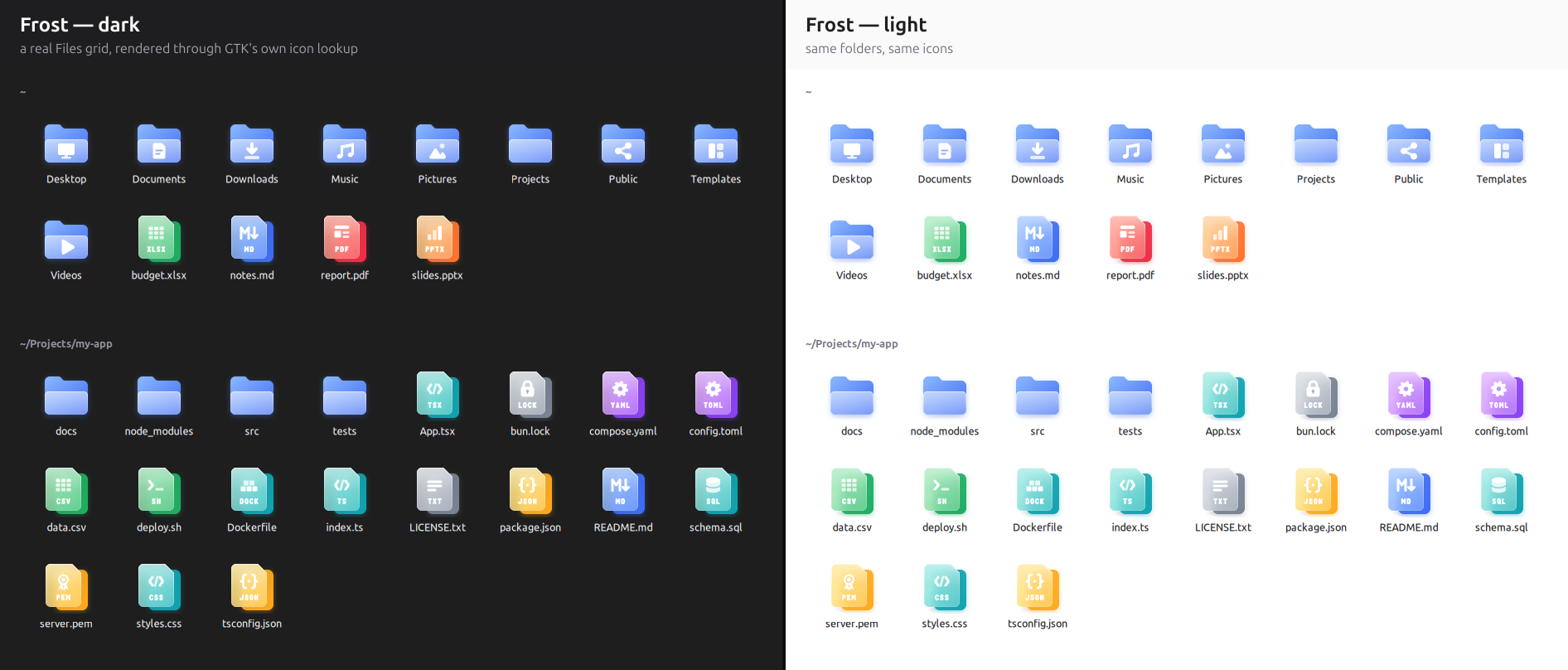
A frosted-glass icon theme for Linux — folders, apps, 134 file types and top-bar status icons, each one a vivid colour seen through a soft pane of frosted glass, with a crisp white symbol on top.
curl -fsSL https://raw.githubusercontent.com/thissayantan/frost-icon-theme/main/install.sh | sh
Then pick Frost in GNOME Tweaks → Appearance → Icons (or run
gsettings set org.gnome.desktop.interface icon-theme 'Frost').
Why Frost
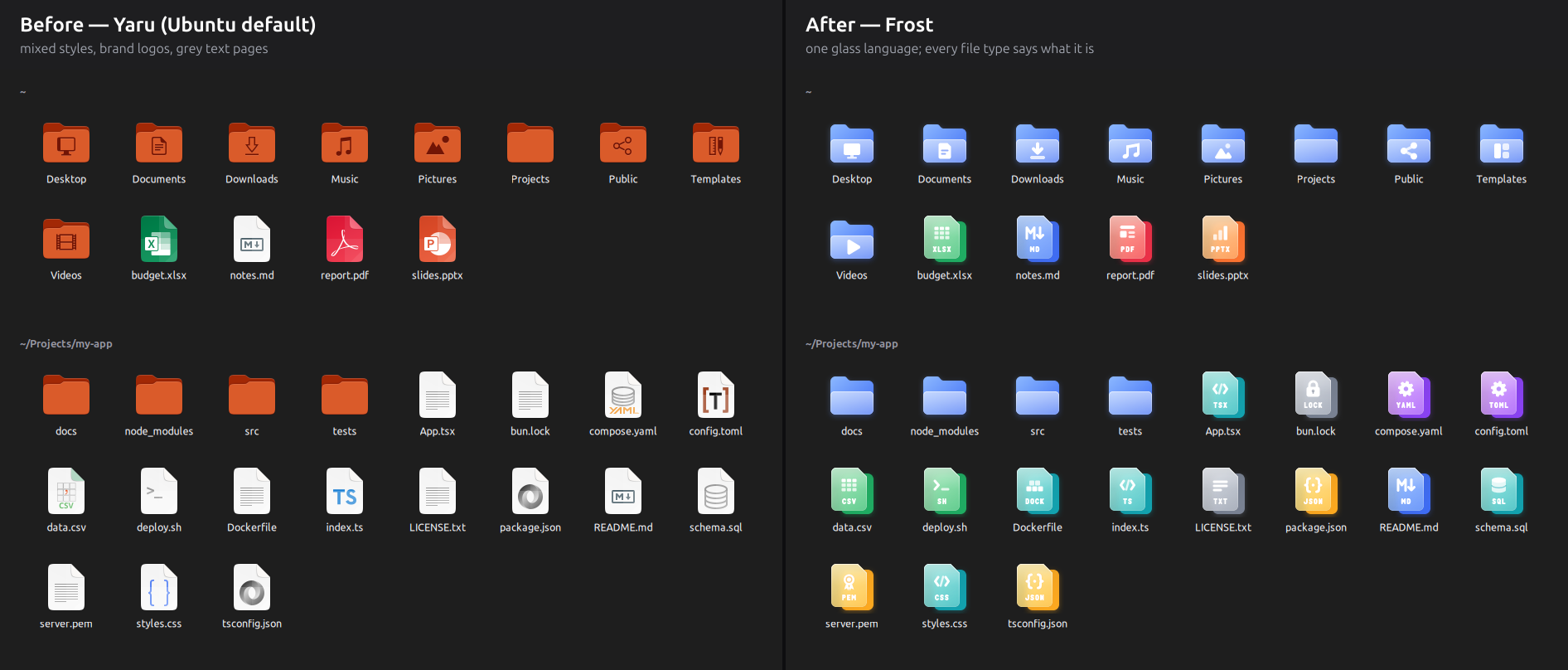
- One glass language everywhere — the same two shapes and a glyph for folders, places, apps and files. No macOS lookalikes, no brand logos, no mixed styles.
- File types that say what they are — JSON is
{ }, Markdown isM↓, a lock file is a padlock, a certificate is a rosette, a Dockerfile is a stack of crates. Colour tells the kind, and from 48 px a short label (JSON, MD, PEM, LOCK, GO…) tells the exact type. All 134 file types → - Fixes for developer files — GNOME types
bun.lock,.env, Dockerfiles and.gitignoreas plain text,.tsas a Qt translation file andgo.modas a tracker-music module. The optional MIME add-on (--mime) gives them real types, per user, reversibly. - Top-bar status icons you can read — Wi-Fi, VPN, Bluetooth, volume, microphone (orange while in use), battery with charging/charged marks, night light: pixel-exact at 16 px, recoloured by GNOME Shell.
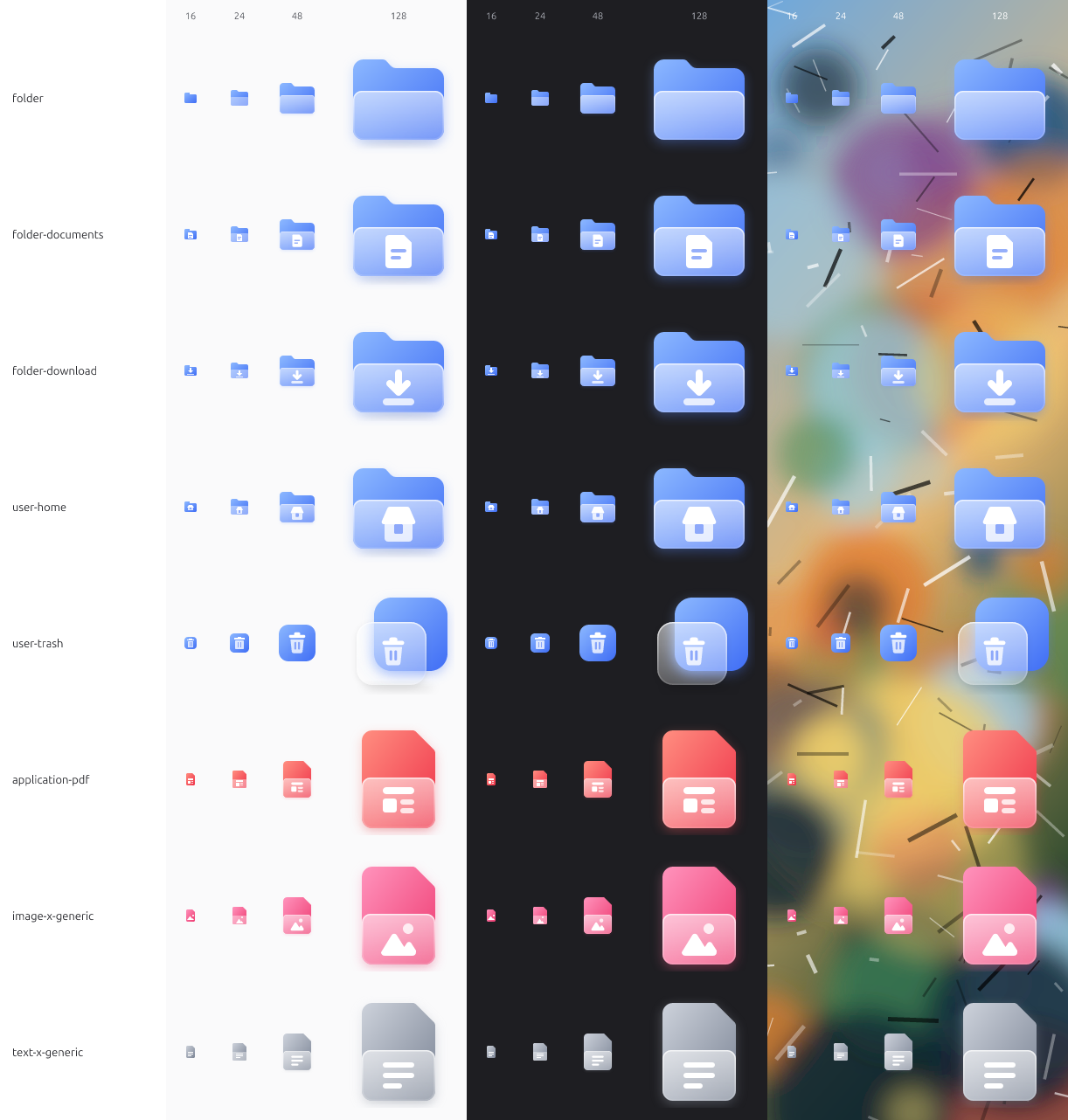
- Crisp at every size — small sizes are hand-drawn on the pixel grid, not scaled down. HiDPI
@2xincluded.
Install
One line (downloads the latest release to ~/.local/share/icons/Frost; never changes your theme):
curl -fsSL https://raw.githubusercontent.com/thissayantan/frost-icon-theme/main/install.sh | sh
# with the developer file-type fixes:
curl -fsSL https://raw.githubusercontent.com/thissayantan/frost-icon-theme/main/install.sh | sh -s -- --mime
Also on gnome-look.org.
Manual: download Frost-v*.tar.xz from Releases,
extract it, and copy the Frost folder to ~/.local/share/icons/.
Recommended: install Papirus too
(sudo apt install papirus-icon-theme). Frost only ships icons it has redrawn well; everything else falls back to
Papirus, then Adwaita.
Uninstall: sh install.sh --uninstall (removes the theme and the MIME add-on), then pick another icon theme.
Compatibility
Made and tested on GNOME 50 / GTK 4.22, Ubuntu 26.04. The glass is baked into PNGs (16–256 px, @2x), so
it looks the same in GTK 4, GTK 3, Qt/KDE apps and the GNOME Shell app grid. Status icons are plain symbolic SVG
so the shell can recolour them.
Every size is checked, not just the big one

FAQ
Why isn't Firefox / Chrome / VS Code themed? Frost never redraws trademarked logos. Brand apps keep their own icon (via Papirus), which is also what their makers ask for.
An icon I use is missing. Request it —
include the app's Icon= name (from its .desktop file) or the file's type (gio info -a standard::icon FILE).
Build it yourself
Requires Bun and Python 3.
bun install
bun run build           # src/**/*.svg → dist/Frost (PNG @1x/@2x, aliases, index.theme, icon cache)
bun run verify          # lint + index.theme checks + real GTK lookup of every shipped name
bun run install:local   # → ~/.local/share/icons/Frost (+ MIME add-on)
bun run pack            # → dist/Frost-v<version>.tar.xz
Design rules: docs/DESIGN.md. Pipeline and decisions: docs/ARCHITECTURE.md.
How to contribute: CONTRIBUTING.md. Shipped vs inherited: docs/COVERAGE.md.
Credits
- Visual direction inspired by Glassmorphism – Glass Icon set (Free) by Kristaps Elsiņš / uibits (CC BY 4.0). Frost's artwork is original — no geometry was copied.
- The Markdown mark (
M↓) is by Dustin Curtis, public domain (CC0). - Fallback icons: Papirus, Adwaita. Rendering: resvg.
- Built with a lot of help from Claude Code (design reviews, pipeline, pixel hinting).
License
MIT — icons and tools alike. Use it, change it, ship it.
Contributors

80 commits
Similar repos


Languages
TypeScript
50.1%
Python
46.5%
Shell
3.5%
Frosted-glass icon theme for Linux — folders, apps, 134 file types and top-bar status icons
TypeScript
0
80 commits
updated Sep 19, 2026
See what people are saying (1)
README
Frost
A frosted-glass icon theme for Linux — folders, apps, 134 file types and top-bar status icons, each one a vivid colour seen through a soft pane of frosted glass, with a crisp white symbol on top.
curl -fsSL https://raw.githubusercontent.com/thissayantan/frost-icon-theme/main/install.sh | sh
Then pick Frost in GNOME Tweaks → Appearance → Icons (or run
gsettings set org.gnome.desktop.interface icon-theme 'Frost').
Why Frost
- One glass language everywhere — the same two shapes and a glyph for folders, places, apps and files. No macOS lookalikes, no brand logos, no mixed styles.
- File types that say what they are — JSON is
{ }, Markdown isM↓, a lock file is a padlock, a certificate is a rosette, a Dockerfile is a stack of crates. Colour tells the kind, and from 48 px a short label (JSON, MD, PEM, LOCK, GO…) tells the exact type. All 134 file types → - Fixes for developer files — GNOME types
bun.lock,.env, Dockerfiles and.gitignoreas plain text,.tsas a Qt translation file andgo.modas a tracker-music module. The optional MIME add-on (--mime) gives them real types, per user, reversibly. - Top-bar status icons you can read — Wi-Fi, VPN, Bluetooth, volume, microphone (orange while in use), battery with charging/charged marks, night light: pixel-exact at 16 px, recoloured by GNOME Shell.
- Crisp at every size — small sizes are hand-drawn on the pixel grid, not scaled down. HiDPI
@2xincluded.
Install
One line (downloads the latest release to ~/.local/share/icons/Frost; never changes your theme):
curl -fsSL https://raw.githubusercontent.com/thissayantan/frost-icon-theme/main/install.sh | sh
# with the developer file-type fixes:
curl -fsSL https://raw.githubusercontent.com/thissayantan/frost-icon-theme/main/install.sh | sh -s -- --mime
Also on gnome-look.org.
Manual: download Frost-v*.tar.xz from Releases,
extract it, and copy the Frost folder to ~/.local/share/icons/.
Recommended: install Papirus too
(sudo apt install papirus-icon-theme). Frost only ships icons it has redrawn well; everything else falls back to
Papirus, then Adwaita.
Uninstall: sh install.sh --uninstall (removes the theme and the MIME add-on), then pick another icon theme.
Compatibility
Made and tested on GNOME 50 / GTK 4.22, Ubuntu 26.04. The glass is baked into PNGs (16–256 px, @2x), so
it looks the same in GTK 4, GTK 3, Qt/KDE apps and the GNOME Shell app grid. Status icons are plain symbolic SVG
so the shell can recolour them.
Every size is checked, not just the big one
FAQ
Why isn't Firefox / Chrome / VS Code themed? Frost never redraws trademarked logos. Brand apps keep their own icon (via Papirus), which is also what their makers ask for.
An icon I use is missing. Request it —
include the app's Icon= name (from its .desktop file) or the file's type (gio info -a standard::icon FILE).
Build it yourself
Requires Bun and Python 3.
bun install
bun run build           # src/**/*.svg → dist/Frost (PNG @1x/@2x, aliases, index.theme, icon cache)
bun run verify          # lint + index.theme checks + real GTK lookup of every shipped name
bun run install:local   # → ~/.local/share/icons/Frost (+ MIME add-on)
bun run pack            # → dist/Frost-v<version>.tar.xz
Design rules: docs/DESIGN.md. Pipeline and decisions: docs/ARCHITECTURE.md.
How to contribute: CONTRIBUTING.md. Shipped vs inherited: docs/COVERAGE.md.
Credits
- Visual direction inspired by Glassmorphism – Glass Icon set (Free) by Kristaps Elsiņš / uibits (CC BY 4.0). Frost's artwork is original — no geometry was copied.
- The Markdown mark (
M↓) is by Dustin Curtis, public domain (CC0). - Fallback icons: Papirus, Adwaita. Rendering: resvg.
- Built with a lot of help from Claude Code (design reviews, pipeline, pixel hinting).
License
MIT — icons and tools alike. Use it, change it, ship it.
Similar repos
Contributors
80 commits
Languages
TypeScript
50.1%
Python
46.5%
Shell
3.5%