An open-source implementation of the "Intelligent UI" experience introduced in ChatGPT, built on OpenUI.
In ChatGPT's Intelligent UI, a request such as "plan a day in San Francisco" returns an interactive answer (a map, photographs and an editable itinerary) rather than text. This repository reproduces that experience with open-source components, so that the same kind of interface can be built, modified and shipped inside any application.
OpenUI is the open standard for Generative UI.
This project is independent and is not affiliated with or endorsed by OpenAI. "Intelligent UI" refers to the ChatGPT feature that this demo recreates.
ChatGPT's Intelligent UI (left) and this project (right) answering the same request. Select the image to play the video.
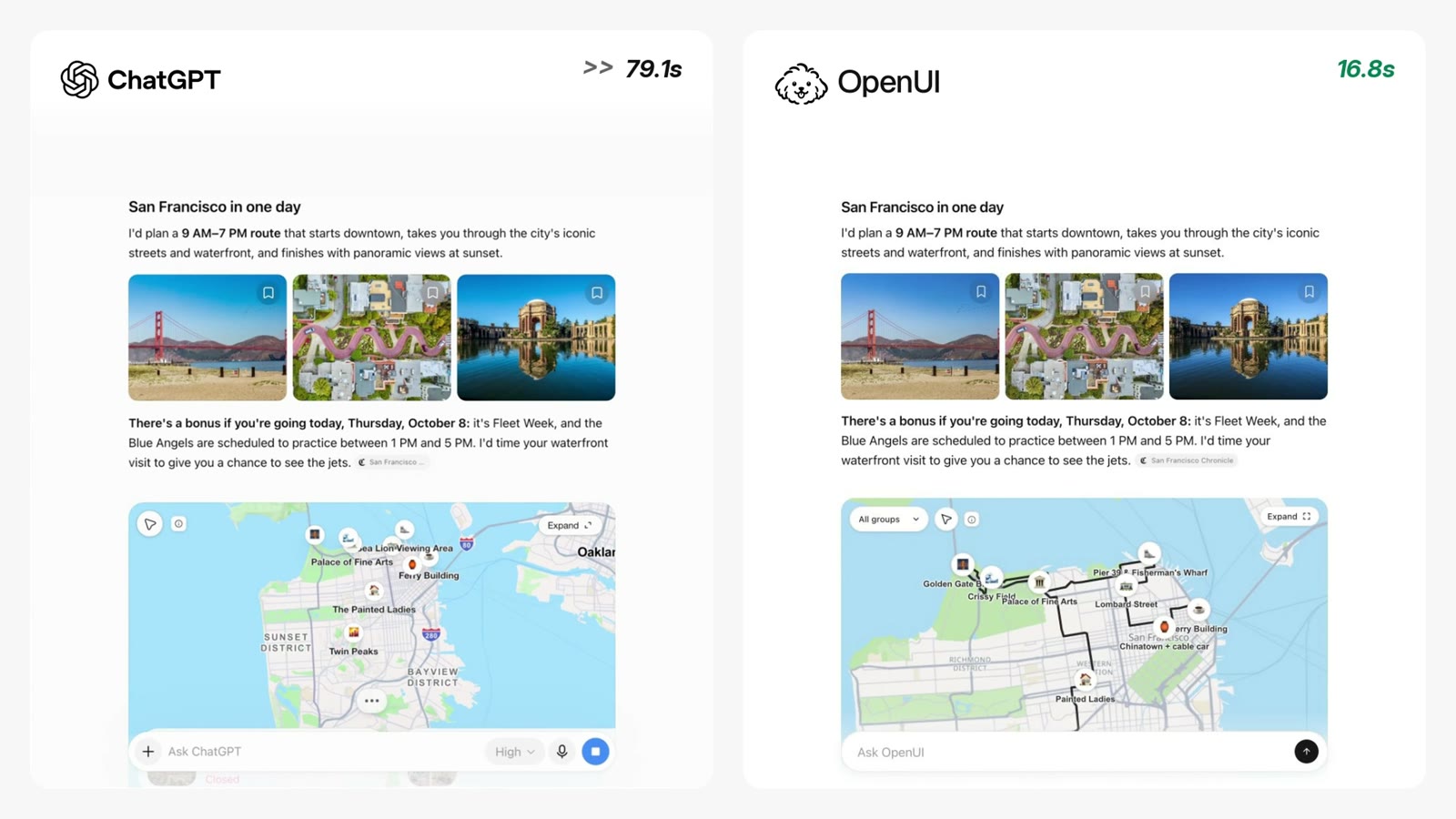
The model streams OpenUI Lang through OpenUI Gateway, and the app renders it as an answer built from custom travel components. They are defined in this repository (src/lib/travel/components.tsx) with OpenUI's defineComponent and registered alongside OpenUI's built-in chat components:
TravelHeading and TravelProse: editorial headings and paragraphs with streaming word fades.TravelImage and TravelGallery: a three-photo strip using Gateway image-search results, with Wikipedia fallbacks.TravelStop and TravelItinerary: destination data and compact photo/text rows, sharing the same stop references with TravelMap.TravelMap: a MapLibre GL street map with emoji pins, category filters, expansion and map-to-itinerary selection. Pins appear while the answer streams; once it ends, the map frames the route and draws its line.TravelSuggestions: extra places with "+ Add to my route". Adding one puts a pin on the map and appends it to the itinerary; every stop can also be removed and added back.The "Customize your route" form at the end of each answer uses OpenUI's built-in form components (Form, RadioGroup, CheckBoxGroup, Button) and sends the chosen preferences back to the model with @ToAssistant.
Requires Node 24.
cp .env.example .env.local   # add your THESYS_API_KEY
npm install
npm run dev
Open http://localhost:3000 and try: I'm in San Francisco for a day, plan a sightseeing route for me
| Variable | Required | Purpose |
|---|---|---|
THESYS_API_KEY | Yes | OpenUI Gateway key, used only on the server. |
THESYS_MODEL | No | A {provider}/{model} id. Defaults to openai/gpt-5.5. |
/api/chat calls OpenUI Gateway's Responses API with generateSystemPrompt({ cloud: true }), so Gateway validates and corrects the generated OpenUI Lang against this app's component library. Gateway's hosted image_search tool finds current photos; the model copies the returned URLs into TravelImage.src and TravelStop.imageUrl.image_search, are available only there. An application already built on Chat Completions can keep that protocol and pair it with openAIReadableStreamAdapter or openAIAdapter in the browser.useStateField), so AgentInterface saves them with the message. /api/chat turns them into a short note so the model knows the user's current route on the next turn./api/wiki and /api/street-route, which validate input and cache results. Street geometry comes from the public OSRM demo server's driving profile: a road overview, not walking or transit directions. When it's unavailable, a labelled direct connection is drawn instead.AgentInterface's theme prop. All the stylesheets read those tokens rather than repeating their values.| File | Purpose |
|---|---|
src/app/layout.tsx | Root layout: page metadata, the Inter font and globals.css. |
src/app/page.tsx | The chat page. Renders AgentInterface with the component library, theme, welcome screen and starter prompts, and connects it to /api/chat. |
src/app/globals.css | Global CSS reset. |
src/app/shell.css | Restyles the AgentInterface shell (sidebar, composer, starters, message bubbles), using theme tokens where they exist. |
src/app/api/chat/route.ts | Chat endpoint. Validates the request, forwards the conversation to OpenUI Gateway with image search enabled, and streams the response back. |
src/app/api/wiki/route.ts | Wikipedia lookup: photos and coordinates for a place, cached on the server. |
src/app/api/street-route/route.ts | Street geometry between stops from OSRM, cached on the server. |
src/lib/library.ts | The OpenUI component library: OpenUI's chat components plus the travel components, with the Travel group's layout note. |
src/lib/prompt-options.ts | Extra prompt examples and rules for travel answers, added on top of OpenUI's defaults. |
src/lib/response-theme.ts | Theme tokens (colors, fonts, radii, shadows, chat bubbles), built with createTheme(). |
src/lib/response-theme.css | Styles OpenUI's built-in components inside answers (buttons, forms, tabs, tables), and defines the --iui-* aliases the travel styles use. |
src/lib/route/root.tsx | The Card root every answer renders inside; accepts the travel components as children. |
src/lib/route/route.css | Layout of the answer container. |
src/lib/route/store.ts | useRouteStore(): route edits kept in OpenUI's response state, plus the client side of the Wikipedia lookup. |
src/lib/travel/components.tsx | The travel components the model can generate (defineComponent + Zod schema each), plus photo fallback logic. |
src/lib/travel/map.tsx | The map behind TravelMap: pins, filter, expand, framing and the route line. |
src/lib/travel/map-utils.ts | Map helpers: coordinates, bounds, partial lines for the draw animation, pin elements and the emoji check. |
src/lib/travel/use-street-route.ts | Hook that loads street geometry from /api/street-route in the background. |
src/lib/travel/use-dialog.ts | Hook for the expanded map dialog: scroll lock, focus trap, Escape to close. |
src/lib/travel/vector-basemap.ts | Loads MapLibre and defines the vector map style and the raster fallback style. |
src/lib/travel/travel.css | Styles for the travel components and map. |
src/generated/spec.json | Library spec sent to Gateway in the system prompt. Regenerate with npm run generate after changing a component schema. |
docs/openui-chatgpt-comparison.mp4 | Side-by-side video of ChatGPT and this project; docs/openui-chatgpt-comparison.jpg is its README preview. |
.env.example | The environment variables to copy into .env.local. |
npm run generate       # after changing a component schema
npx tsc --noEmit
npm run build
Then try the San Francisco prompt and another city such as Lisbon. Check the photo strip, pins appearing during the stream, the route reveal, map filters and expansion, adding and removing places, and the customize form, on desktop and mobile.
6,375 followers · starred Oct 2026
An open-source implementation of the "Intelligent UI" experience introduced in ChatGPT, built on OpenUI.
In ChatGPT's Intelligent UI, a request such as "plan a day in San Francisco" returns an interactive answer (a map, photographs and an editable itinerary) rather than text. This repository reproduces that experience with open-source components, so that the same kind of interface can be built, modified and shipped inside any application.
OpenUI is the open standard for Generative UI.
This project is independent and is not affiliated with or endorsed by OpenAI. "Intelligent UI" refers to the ChatGPT feature that this demo recreates.
ChatGPT's Intelligent UI (left) and this project (right) answering the same request. Select the image to play the video.
The model streams OpenUI Lang through OpenUI Gateway, and the app renders it as an answer built from custom travel components. They are defined in this repository (src/lib/travel/components.tsx) with OpenUI's defineComponent and registered alongside OpenUI's built-in chat components:
TravelHeading and TravelProse: editorial headings and paragraphs with streaming word fades.TravelImage and TravelGallery: a three-photo strip using Gateway image-search results, with Wikipedia fallbacks.TravelStop and TravelItinerary: destination data and compact photo/text rows, sharing the same stop references with TravelMap.TravelMap: a MapLibre GL street map with emoji pins, category filters, expansion and map-to-itinerary selection. Pins appear while the answer streams; once it ends, the map frames the route and draws its line.TravelSuggestions: extra places with "+ Add to my route". Adding one puts a pin on the map and appends it to the itinerary; every stop can also be removed and added back.The "Customize your route" form at the end of each answer uses OpenUI's built-in form components (Form, RadioGroup, CheckBoxGroup, Button) and sends the chosen preferences back to the model with @ToAssistant.
Requires Node 24.
cp .env.example .env.local   # add your THESYS_API_KEY
npm install
npm run dev
Open http://localhost:3000 and try: I'm in San Francisco for a day, plan a sightseeing route for me
| Variable | Required | Purpose |
|---|---|---|
THESYS_API_KEY | Yes | OpenUI Gateway key, used only on the server. |
THESYS_MODEL | No | A {provider}/{model} id. Defaults to openai/gpt-5.5. |
/api/chat calls OpenUI Gateway's Responses API with generateSystemPrompt({ cloud: true }), so Gateway validates and corrects the generated OpenUI Lang against this app's component library. Gateway's hosted image_search tool finds current photos; the model copies the returned URLs into TravelImage.src and TravelStop.imageUrl.image_search, are available only there. An application already built on Chat Completions can keep that protocol and pair it with openAIReadableStreamAdapter or openAIAdapter in the browser.useStateField), so AgentInterface saves them with the message. /api/chat turns them into a short note so the model knows the user's current route on the next turn./api/wiki and /api/street-route, which validate input and cache results. Street geometry comes from the public OSRM demo server's driving profile: a road overview, not walking or transit directions. When it's unavailable, a labelled direct connection is drawn instead.AgentInterface's theme prop. All the stylesheets read those tokens rather than repeating their values.| File | Purpose |
|---|---|
src/app/layout.tsx | Root layout: page metadata, the Inter font and globals.css. |
src/app/page.tsx | The chat page. Renders AgentInterface with the component library, theme, welcome screen and starter prompts, and connects it to /api/chat. |
src/app/globals.css | Global CSS reset. |
src/app/shell.css | Restyles the AgentInterface shell (sidebar, composer, starters, message bubbles), using theme tokens where they exist. |
src/app/api/chat/route.ts | Chat endpoint. Validates the request, forwards the conversation to OpenUI Gateway with image search enabled, and streams the response back. |
src/app/api/wiki/route.ts | Wikipedia lookup: photos and coordinates for a place, cached on the server. |
src/app/api/street-route/route.ts | Street geometry between stops from OSRM, cached on the server. |
src/lib/library.ts | The OpenUI component library: OpenUI's chat components plus the travel components, with the Travel group's layout note. |
src/lib/prompt-options.ts | Extra prompt examples and rules for travel answers, added on top of OpenUI's defaults. |
src/lib/response-theme.ts | Theme tokens (colors, fonts, radii, shadows, chat bubbles), built with createTheme(). |
src/lib/response-theme.css | Styles OpenUI's built-in components inside answers (buttons, forms, tabs, tables), and defines the --iui-* aliases the travel styles use. |
src/lib/route/root.tsx | The Card root every answer renders inside; accepts the travel components as children. |
src/lib/route/route.css | Layout of the answer container. |
src/lib/route/store.ts | useRouteStore(): route edits kept in OpenUI's response state, plus the client side of the Wikipedia lookup. |
src/lib/travel/components.tsx | The travel components the model can generate (defineComponent + Zod schema each), plus photo fallback logic. |
src/lib/travel/map.tsx | The map behind TravelMap: pins, filter, expand, framing and the route line. |
src/lib/travel/map-utils.ts | Map helpers: coordinates, bounds, partial lines for the draw animation, pin elements and the emoji check. |
src/lib/travel/use-street-route.ts | Hook that loads street geometry from /api/street-route in the background. |
src/lib/travel/use-dialog.ts | Hook for the expanded map dialog: scroll lock, focus trap, Escape to close. |
src/lib/travel/vector-basemap.ts | Loads MapLibre and defines the vector map style and the raster fallback style. |
src/lib/travel/travel.css | Styles for the travel components and map. |
src/generated/spec.json | Library spec sent to Gateway in the system prompt. Regenerate with npm run generate after changing a component schema. |
docs/openui-chatgpt-comparison.mp4 | Side-by-side video of ChatGPT and this project; docs/openui-chatgpt-comparison.jpg is its README preview. |
.env.example | The environment variables to copy into .env.local. |
npm run generate       # after changing a component schema
npx tsc --noEmit
npm run build
Then try the San Francisco prompt and another city such as Lisbon. Check the photo strip, pins appearing during the stream, the route reveal, map filters and expansion, adding and removing places, and the customize form, on desktop and mobile.
6,375 followers · starred Oct 2026



