
Measure your speakers with a microphone and generate a validated, protective parametric calibration for the Omarchy bar.
Python
32
66 commits
updated Sep 16, 2026
README
Omarchy Speaker Calibrator
Measure your speakers with a microphone. Get them to sound the way they should. In about thirty seconds, from the Omarchy bar.
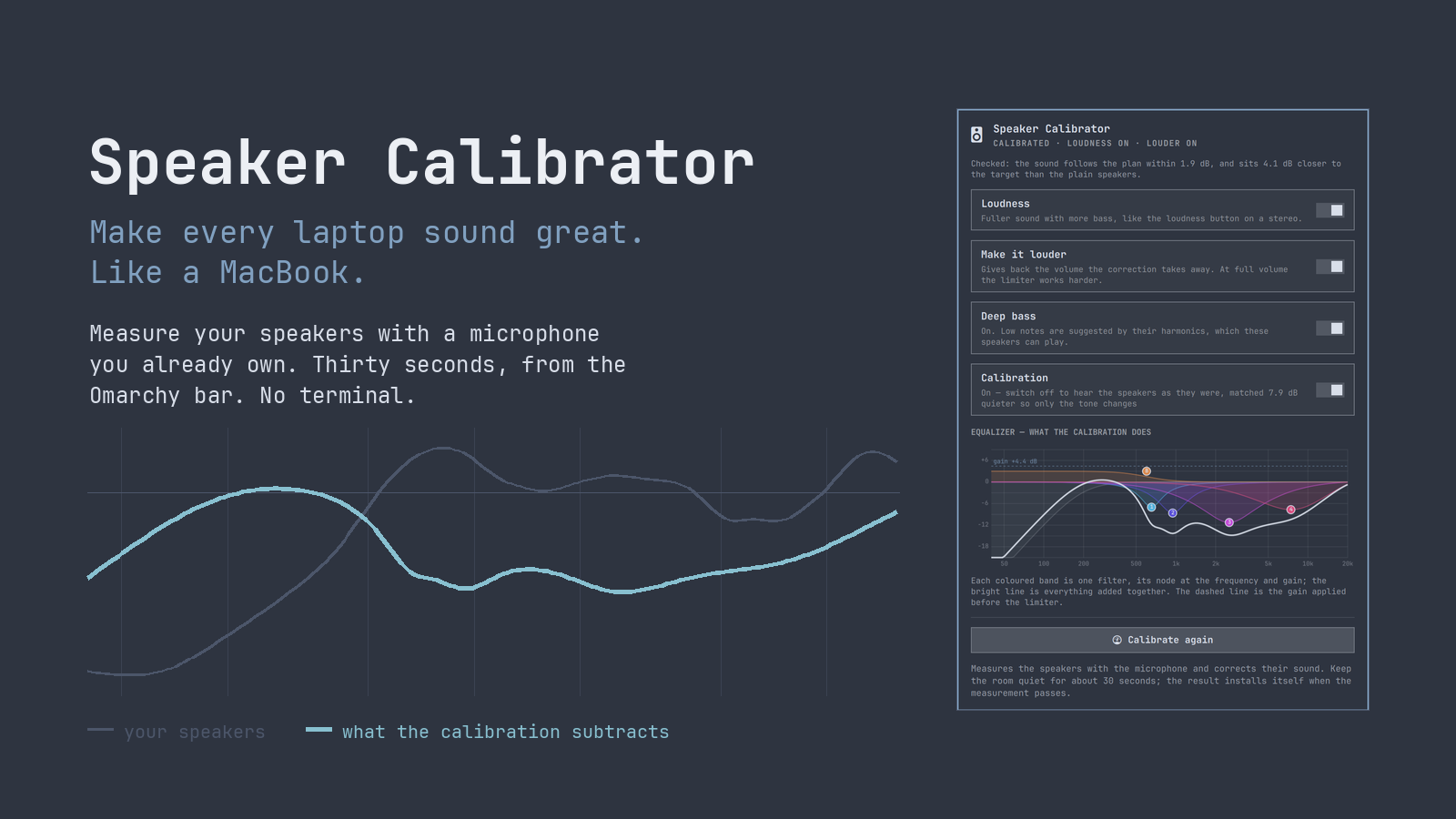
Laptop speakers have peaks and dips of ten decibels or more, and no two machines are wrong in the same way. This measures yours with a microphone you already own, works out what to subtract, and installs a PipeWire filter that does it. Everything happens in the panel. Nothing needs a terminal.
Install
omarchy plugin add https://github.com/thefreshoffice/omarchy-speaker-calibrator.git --enable
That is the whole installation. Omarchy asks where to put the bar widget.
The filter chain uses lsp-plugins-lv2, which Omarchy pacstraps from its own
package list, so it is already there. Measuring additionally needs
python-numpy and python-scipy, which Omarchy does not ship; the panel
notices they are absent and installs them in one press, again from Omarchy's
own packages rather than the AUR. Nothing here needs a terminal.
Using it
- Click the speaker icon in the bar.
- Press Calibrate speakers. Your built-in speakers and microphones are already selected.
- Be quiet for about thirty seconds. You will hear six sweeps: three per speaker.
- That is it. If the measurement passes its quality checks it installs itself and you are listening to the result.
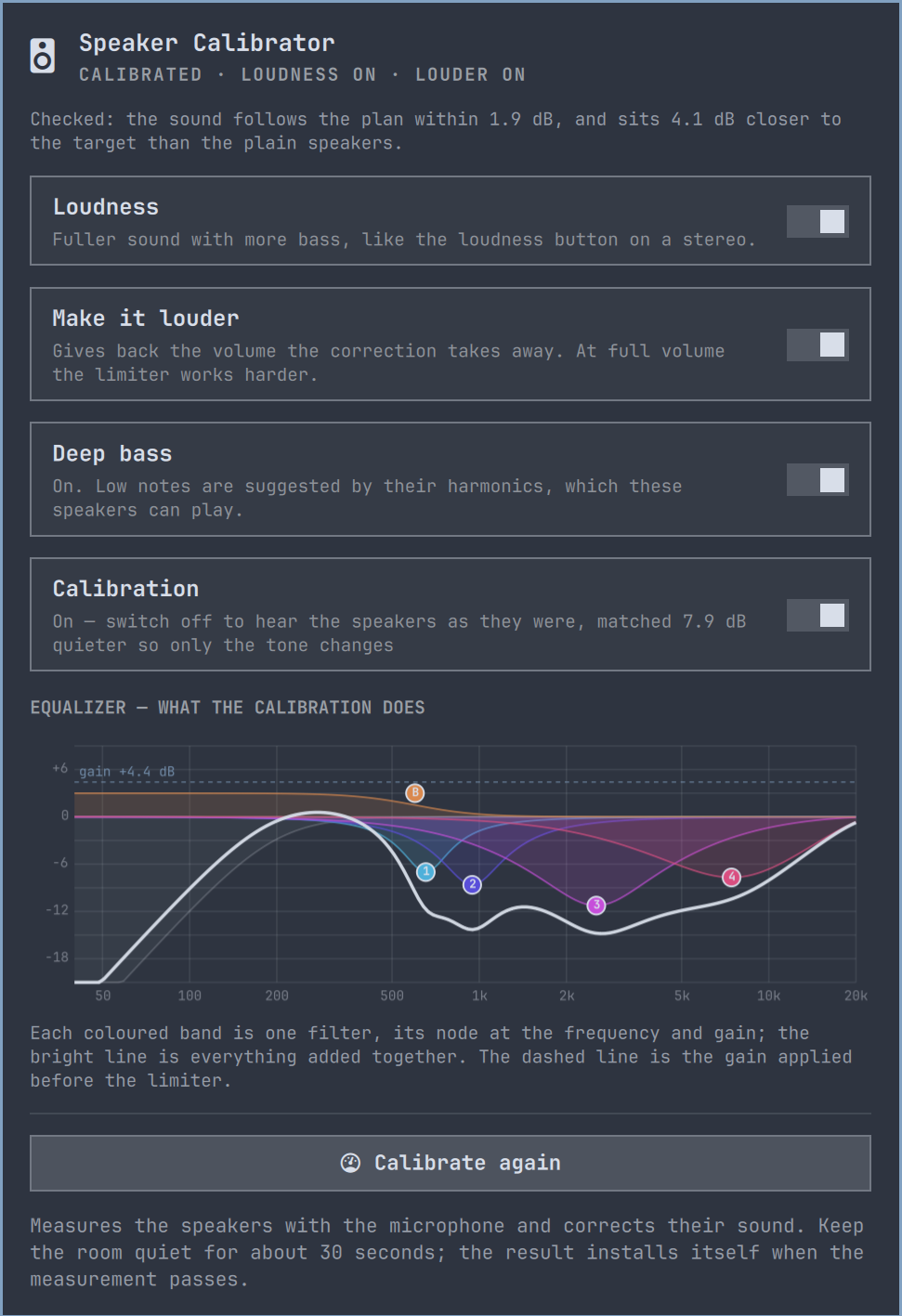
Middle-click the bar icon to re-scan for devices. If a measurement fails a quality gate it is kept for diagnosis but never installed, so a bad measurement cannot make your speakers worse.
The four switches
| Switch | What it does |
|---|---|
| Loudness | Fuller sound with more bass, like the loudness button on a stereo. |
| Make it louder | Gives back the volume the correction takes away. The limiter works harder at full volume. |
| Deep bass | Suggests low notes the speakers cannot physically play, using their harmonics. Needs one optional package. |
| Calibration | Switch it off to hear the plain speakers, level-matched so only the tone changes. |
Everything else lives under Advanced: voicing, the three loudness levels, channel balance, loudness compensation, the measurement details, and a comparison of what each microphone measured.
Deep bass needs one optional package
Everything above runs on what Omarchy ships. Deep bass is the exception.
It needs a free package called bankstown, and it is not installed unless you
press the button that installs it.
The reason it is optional is that bankstown is not one of Omarchy's curated
packages, so it is built from source on your machine rather than installed as
a reviewed binary. That is a judgement about software you install, so the
plugin does not make it for you. The panel tells you what it is about to do
before it does anything, and you can read
the upstream source first.
What gets built is fixed. The plugin ships its own bass-enhancer/PKGBUILD,
which names upstream release 1.1.0 by the full hash of its commit
(e9829c9bccf5ed73768135c0ddd506f5a6690f9e) and by the checksum of that
commit's archive. makepkg fetches exactly that, the build script reads back
the commit and tree hashes of what was fetched and stops if they differ, and
only then does cargo build it with the dependency set frozen to that
commit's Cargo.lock. Nothing is looked up in the AUR, at install time or
ever, so a later change to the AUR package or to upstream cannot reach you
through this plugin. Building needs the Rust toolchain, which makepkg
installs from Omarchy's own package repositories if it is missing, and the
finished package is installed by pacman, which asks for your password in the
terminal window that opens. Should Omarchy's repositories ever carry
bankstown themselves, the plugin installs that signed package instead.
bankstown is written by James Calligeros and released under the MIT
licence, which is installed alongside it.
Leave it alone and the calibration is complete and unaffected.
Why it works
Small speakers cannot move enough air to make a low note at all. Rather than asking them to try, Deep bass plays the harmonics of those notes, which the speakers can produce, and the ear supplies the fundamental it never heard.
A note is not only its fundamental. A bass guitar playing a 55 Hz note also radiates energy at 110, 165 and 220 Hz, and the ear works out the pitch from the spacing of that series rather than from the presence of the lowest tone. Remove the fundamental entirely and the pitch does not change: only a 55 Hz note produces harmonics spaced 55 Hz apart. This is the missing fundamental, described by Seebeck in 1841, and it is why a telephone limited to 300 Hz and above still carries a voice whose fundamental is near 100 Hz.
How it works
Measuring
Three exponential sine sweeps per speaker, left and right measured independently. The analyzer deconvolves the response, finds the direct sound, and reads the magnitude through a window of fifteen cycles: 150 ms at 100 Hz, 15 ms at 1 kHz, 1.5 ms at 10 kHz. That keeps the desk reflection you also hear while dropping later room reflections, so the filters are fitted to the speaker rather than to the room around the microphone.
The room between sweeps is put through the identical deconvolution to measure the noise floor at every frequency. The resulting signal-to-noise ratio widens the optimizer's uncertainty wherever the floor is close, which on small speakers is mostly the bass. Clock drift between playback and recording is estimated and corrected. Clipping, sweep prominence, alignment, repeatability, microphone gain stability and harmonic residuals are all checked.
When a built-in microphone array offers two or more channels, every channel is analyzed independently and their raw recordings are never mixed. The responses are combined with a robust median, and disagreement between microphones is added to the uncertainty curve, which suppresses risky corrections.
Fitting
Cuts are the normal solution. The optimizer penalises boosts more than ten times as strongly, and every filter is cross-validated against a held-out repeat of the measurement, so a correction has to improve a sweep it was not fitted to before it is kept.
Smoothing follows the ear's own resolution rather than a fixed fraction of an octave, and weights peaks over dips: a resonance is audible and worth removing, while a cancellation of the same depth is usually a null at the microphone that moves when your head does.
A protective high-pass goes where the measurement says the speaker gives up, and everything is fitted above that.
Checking the result
Check the calibration replays the sweeps through the installed filter and measures what actually comes out. It reports how closely the sound follows the plan and whether it sits closer to the target than the plain speakers did. A check is always made with the microphone the calibration was made with, on the same channels: another microphone would measure the difference between two microphones, not between the speakers and the plan. If that microphone is not connected, the button says so and waits. The deep-bass add-on is muted during a check, because it invents harmonics no linear model predicts and would otherwise read as error.
Improve from the check feeds that residual back in and fits again, using the same gates. It is level-neutral, so iterating never drifts the overall loudness.
Advanced
Flat or Warm. Flat is balanced with more clarity. Warm is softer and less sharp for long listening. Both are voicings of the same measurement.
Loudness: Protected, Balanced, Matched. How much of the loudness the cuts removed is added back as input gain: none, half, or all of it up to 6 dB. Matched is the loudest and makes the limiter work hardest.
Bass: Normal or Full. Full adds a +3 dB low shelf placed clear of the high-pass corner, paid for by input trim like any boost.
Channel balance trims a broadband level difference between the two speakers, which pulls the stereo image off centre. It only ever acts on a measurement made with an external microphone at the listening position, only when the difference stands clear of what the measurement itself varies by, and only by turning the louder side down. A built-in array sits closer to one speaker than the other, so what it measures is where it is rather than what reaches you.
Loudness compensation follows the volume and puts back what hearing drops as the level falls, using the ISO 226:2023 equal-loudness curves. Full volume is the reference: it does nothing there and more the further down you play. The loudness stays the same either way; only the tone moves. It is the one part of this that needs something running in the background, because only the output device knows the listening level.
Which microphones can measure
The list offers real capture devices and nothing else. A Bluetooth headset appears on the system as a microphone, but its input runs over HFP or HSP: mono, eight to sixteen kilohertz, with automatic gain and noise suppression applied inside the headset. It cannot describe a loudspeaker, and a calibration fitted to one would be correcting for the headset. Those are named in the panel as connected but unusable rather than quietly dropped.
Comparing the two microphones
Advanced keeps the last measurement from each kind of microphone and draws them on one set of axes, levelled on the 250 Hz to 1 kHz band so you see the difference in shape rather than in sensitivity, with the difference read out by band underneath.
This is the honest answer to whether an external microphone is worth it. A built-in array sits inside the case, inches from one driver and behind whatever the lid is made of. A measuring microphone sits where your head is. Where the two curves disagree, the built-in one is describing its own position rather than the sound that reaches you.
Only the curve is kept, a few kilobytes, never the recording.
Safety model
The whole point is that a bad measurement cannot damage anything or make the sound worse than it started.
- One filter section may cut at most 12 dB, and the whole correction is held to -15 dB at any frequency. With an uncalibrated built-in microphone the limit tightens by frequency: -6 dB at 160 Hz, -8 dB at 10 kHz, the full -15 dB only in the reliable midrange.
- Boosts are spent from a budget, not merely capped. Every decibel is electrical headroom the limiter must be given back, which is the same headroom Make it louder would otherwise return, and it is also cone travel: for the same pressure a driver moves four times as far an octave lower. Each decibel is priced by the inverse square of frequency, measured from where this speaker gives up. The same 4 dB dip at 260 Hz earns 0.31 dB on a laptop whose knee is at 196 Hz and the full 1.5 dB on speakers measured down to 55 Hz. What it cost is recorded in the profile.
- The protective high-pass goes at the highest frequency below 400 Hz where the speaker falls more than 15 dB short of its target, clamped to between 50 and 200 Hz. Below that the cone still travels as far as ever while producing almost nothing, so the content is removed rather than amplified. The slope doubles only when the corner is at or below 100 Hz, where a steep filter cannot be heard. The high-pass is added to the target too, so the optimizer never spends filters boosting back what was deliberately removed.
- Every positive correction is matched by automatic input trim plus 1 dB of margin, so no band is ever driven more than 5 dB harder than the uncorrected speaker at the same volume setting. The limiter ceiling stays at -1 dBFS, with auto-level and boost disabled.
- Switching the calibration off level-matches the plain speakers to the loudness the correction plays at, so the comparison is about tone rather than volume. It only ever turns the plain sound down, never up.
- A measurement is always taken with the correction flattened, so the plugin can never fit a correction on top of itself.
- The filter graph always has the same shape, so installing or comparing profiles updates its controls rather than restarting the audio client.
- Existing tuning files are backed up before replacement, and failed or clipped measurements are saved for diagnosis but cannot be installed.
What leaves your machine
Nothing. There is no API, no telemetry, no update check and no account. The plugin never opens a socket.
The one exception is the optional bankstown package, and only if you press
the button that installs it: makepkg then fetches the pinned upstream commit
from github.com and cargo fetches the crates named in its Cargo.lock from
crates.io, in a terminal window you can watch.
The microphone is opened only while a measurement is running. The recordings
stay on disk under ~/.local/share/omarchy-speaker-calibrator/ and are never
uploaded.
Removing it
omarchy plugin remove thefreshoffice.speaker-calibrator
Press Disable in the panel first. That restores the default output, stops both services and takes the filter out of the audio path. If the plugin is removed while a calibration is still active, the PipeWire filter keeps running from the files below until they are deleted or the machine restarts, and the panel is no longer there to switch it off.
Removing the plugin deletes its own directory and nothing else. These are created outside it and stay behind:
| Path | What it is |
|---|---|
~/.config/systemd/user/omarchy-speaker-tuning.service | runs the filter graph |
~/.config/systemd/user/omarchy-speaker-loudness.service | follows the volume for loudness compensation |
~/.config/pipewire/omarchy-speaker-tuning.conf | the filter sink |
~/.config/pipewire/omarchy-speaker-tuning.conf.d/90-tuning.conf | the measured filters |
~/.local/share/omarchy-speaker-calibrator/ | profiles, checks, and the recorded sweeps |
Those recordings are audio captured in your room by your microphone. Nothing is ever sent anywhere, but they survive removal until deleted.
To remove all of it after disabling:
systemctl --user disable --now omarchy-speaker-tuning.service omarchy-speaker-loudness.service
rm -f ~/.config/systemd/user/omarchy-speaker-tuning.service \
      ~/.config/systemd/user/omarchy-speaker-loudness.service \
      ~/.config/pipewire/omarchy-speaker-tuning.conf \
      ~/.config/pipewire/omarchy-speaker-tuning.conf.d/90-tuning.conf
systemctl --user daemon-reload
rm -rf ~/.local/share/omarchy-speaker-calibrator
If you installed bankstown it is a normal system package and is left alone.
Remove it with pacman -R bankstown if you want it gone. The directory it was
built in, under ~/.cache/omarchy-speaker-calibrator/, is removed as soon as
the build finishes, whether or not it succeeded.
Runtime dependencies
| Package | Ships with Omarchy | Needed for |
|---|---|---|
pipewire | yes | everything |
lsp-plugins-lv2 | yes | the filter chain, the limiter, loudness compensation |
python-numpy | no | measuring |
python-scipy | no | measuring |
bankstown | no; built from a pinned upstream commit by the plugin's own PKGBUILD | the optional Deep bass switch |
rust | no; installed from the official repositories by makepkg when building bankstown | building the optional Deep bass add-on |
Only measuring waits on the two Omarchy does not ship. The panel checks all
three and offers to install whichever are missing, so removing one by hand is
recoverable without a terminal. The plugin uses Arch's system Python so its DSP
environment is deterministic even when another Python is first on PATH.
Research basis
The target curve follows the in-room response listeners prefer in controlled tests (Olive, Welti and McMullin), which slopes gently down rather than being flat. Fixing peaks while leaving dips largely alone follows Toole and Välimäki: a resonance is a property of the speaker, while a deep null is usually interference that moves with your head. Smoothing follows the ear's critical bandwidth rather than a fixed fraction of an octave. Loudness compensation uses the ISO 226:2023 equal-loudness contours, and Deep bass relies on the missing fundamental, first described by Seebeck in 1841.
Licence
MIT.
Contributors

66 commits
See what people are saying
Similar repos


Languages
Python
75.9%
QML
23.1%
Measure your speakers with a microphone and generate a validated, protective parametric calibration for the Omarchy bar.
Python
32
66 commits
updated Sep 16, 2026
README
Omarchy Speaker Calibrator
Measure your speakers with a microphone. Get them to sound the way they should. In about thirty seconds, from the Omarchy bar.
Laptop speakers have peaks and dips of ten decibels or more, and no two machines are wrong in the same way. This measures yours with a microphone you already own, works out what to subtract, and installs a PipeWire filter that does it. Everything happens in the panel. Nothing needs a terminal.
Install
omarchy plugin add https://github.com/thefreshoffice/omarchy-speaker-calibrator.git --enable
That is the whole installation. Omarchy asks where to put the bar widget.
The filter chain uses lsp-plugins-lv2, which Omarchy pacstraps from its own
package list, so it is already there. Measuring additionally needs
python-numpy and python-scipy, which Omarchy does not ship; the panel
notices they are absent and installs them in one press, again from Omarchy's
own packages rather than the AUR. Nothing here needs a terminal.
Using it
- Click the speaker icon in the bar.
- Press Calibrate speakers. Your built-in speakers and microphones are already selected.
- Be quiet for about thirty seconds. You will hear six sweeps: three per speaker.
- That is it. If the measurement passes its quality checks it installs itself and you are listening to the result.
Middle-click the bar icon to re-scan for devices. If a measurement fails a quality gate it is kept for diagnosis but never installed, so a bad measurement cannot make your speakers worse.
The four switches
| Switch | What it does |
|---|---|
| Loudness | Fuller sound with more bass, like the loudness button on a stereo. |
| Make it louder | Gives back the volume the correction takes away. The limiter works harder at full volume. |
| Deep bass | Suggests low notes the speakers cannot physically play, using their harmonics. Needs one optional package. |
| Calibration | Switch it off to hear the plain speakers, level-matched so only the tone changes. |
Everything else lives under Advanced: voicing, the three loudness levels, channel balance, loudness compensation, the measurement details, and a comparison of what each microphone measured.
Deep bass needs one optional package
Everything above runs on what Omarchy ships. Deep bass is the exception.
It needs a free package called bankstown, and it is not installed unless you
press the button that installs it.
The reason it is optional is that bankstown is not one of Omarchy's curated
packages, so it is built from source on your machine rather than installed as
a reviewed binary. That is a judgement about software you install, so the
plugin does not make it for you. The panel tells you what it is about to do
before it does anything, and you can read
the upstream source first.
What gets built is fixed. The plugin ships its own bass-enhancer/PKGBUILD,
which names upstream release 1.1.0 by the full hash of its commit
(e9829c9bccf5ed73768135c0ddd506f5a6690f9e) and by the checksum of that
commit's archive. makepkg fetches exactly that, the build script reads back
the commit and tree hashes of what was fetched and stops if they differ, and
only then does cargo build it with the dependency set frozen to that
commit's Cargo.lock. Nothing is looked up in the AUR, at install time or
ever, so a later change to the AUR package or to upstream cannot reach you
through this plugin. Building needs the Rust toolchain, which makepkg
installs from Omarchy's own package repositories if it is missing, and the
finished package is installed by pacman, which asks for your password in the
terminal window that opens. Should Omarchy's repositories ever carry
bankstown themselves, the plugin installs that signed package instead.
bankstown is written by James Calligeros and released under the MIT
licence, which is installed alongside it.
Leave it alone and the calibration is complete and unaffected.
Why it works
Small speakers cannot move enough air to make a low note at all. Rather than asking them to try, Deep bass plays the harmonics of those notes, which the speakers can produce, and the ear supplies the fundamental it never heard.
A note is not only its fundamental. A bass guitar playing a 55 Hz note also radiates energy at 110, 165 and 220 Hz, and the ear works out the pitch from the spacing of that series rather than from the presence of the lowest tone. Remove the fundamental entirely and the pitch does not change: only a 55 Hz note produces harmonics spaced 55 Hz apart. This is the missing fundamental, described by Seebeck in 1841, and it is why a telephone limited to 300 Hz and above still carries a voice whose fundamental is near 100 Hz.
How it works
Measuring
Three exponential sine sweeps per speaker, left and right measured independently. The analyzer deconvolves the response, finds the direct sound, and reads the magnitude through a window of fifteen cycles: 150 ms at 100 Hz, 15 ms at 1 kHz, 1.5 ms at 10 kHz. That keeps the desk reflection you also hear while dropping later room reflections, so the filters are fitted to the speaker rather than to the room around the microphone.
The room between sweeps is put through the identical deconvolution to measure the noise floor at every frequency. The resulting signal-to-noise ratio widens the optimizer's uncertainty wherever the floor is close, which on small speakers is mostly the bass. Clock drift between playback and recording is estimated and corrected. Clipping, sweep prominence, alignment, repeatability, microphone gain stability and harmonic residuals are all checked.
When a built-in microphone array offers two or more channels, every channel is analyzed independently and their raw recordings are never mixed. The responses are combined with a robust median, and disagreement between microphones is added to the uncertainty curve, which suppresses risky corrections.
Fitting
Cuts are the normal solution. The optimizer penalises boosts more than ten times as strongly, and every filter is cross-validated against a held-out repeat of the measurement, so a correction has to improve a sweep it was not fitted to before it is kept.
Smoothing follows the ear's own resolution rather than a fixed fraction of an octave, and weights peaks over dips: a resonance is audible and worth removing, while a cancellation of the same depth is usually a null at the microphone that moves when your head does.
A protective high-pass goes where the measurement says the speaker gives up, and everything is fitted above that.
Checking the result
Check the calibration replays the sweeps through the installed filter and measures what actually comes out. It reports how closely the sound follows the plan and whether it sits closer to the target than the plain speakers did. A check is always made with the microphone the calibration was made with, on the same channels: another microphone would measure the difference between two microphones, not between the speakers and the plan. If that microphone is not connected, the button says so and waits. The deep-bass add-on is muted during a check, because it invents harmonics no linear model predicts and would otherwise read as error.
Improve from the check feeds that residual back in and fits again, using the same gates. It is level-neutral, so iterating never drifts the overall loudness.
Advanced
Flat or Warm. Flat is balanced with more clarity. Warm is softer and less sharp for long listening. Both are voicings of the same measurement.
Loudness: Protected, Balanced, Matched. How much of the loudness the cuts removed is added back as input gain: none, half, or all of it up to 6 dB. Matched is the loudest and makes the limiter work hardest.
Bass: Normal or Full. Full adds a +3 dB low shelf placed clear of the high-pass corner, paid for by input trim like any boost.
Channel balance trims a broadband level difference between the two speakers, which pulls the stereo image off centre. It only ever acts on a measurement made with an external microphone at the listening position, only when the difference stands clear of what the measurement itself varies by, and only by turning the louder side down. A built-in array sits closer to one speaker than the other, so what it measures is where it is rather than what reaches you.
Loudness compensation follows the volume and puts back what hearing drops as the level falls, using the ISO 226:2023 equal-loudness curves. Full volume is the reference: it does nothing there and more the further down you play. The loudness stays the same either way; only the tone moves. It is the one part of this that needs something running in the background, because only the output device knows the listening level.
Which microphones can measure
The list offers real capture devices and nothing else. A Bluetooth headset appears on the system as a microphone, but its input runs over HFP or HSP: mono, eight to sixteen kilohertz, with automatic gain and noise suppression applied inside the headset. It cannot describe a loudspeaker, and a calibration fitted to one would be correcting for the headset. Those are named in the panel as connected but unusable rather than quietly dropped.
Comparing the two microphones
Advanced keeps the last measurement from each kind of microphone and draws them on one set of axes, levelled on the 250 Hz to 1 kHz band so you see the difference in shape rather than in sensitivity, with the difference read out by band underneath.
This is the honest answer to whether an external microphone is worth it. A built-in array sits inside the case, inches from one driver and behind whatever the lid is made of. A measuring microphone sits where your head is. Where the two curves disagree, the built-in one is describing its own position rather than the sound that reaches you.
Only the curve is kept, a few kilobytes, never the recording.
Safety model
The whole point is that a bad measurement cannot damage anything or make the sound worse than it started.
- One filter section may cut at most 12 dB, and the whole correction is held to -15 dB at any frequency. With an uncalibrated built-in microphone the limit tightens by frequency: -6 dB at 160 Hz, -8 dB at 10 kHz, the full -15 dB only in the reliable midrange.
- Boosts are spent from a budget, not merely capped. Every decibel is electrical headroom the limiter must be given back, which is the same headroom Make it louder would otherwise return, and it is also cone travel: for the same pressure a driver moves four times as far an octave lower. Each decibel is priced by the inverse square of frequency, measured from where this speaker gives up. The same 4 dB dip at 260 Hz earns 0.31 dB on a laptop whose knee is at 196 Hz and the full 1.5 dB on speakers measured down to 55 Hz. What it cost is recorded in the profile.
- The protective high-pass goes at the highest frequency below 400 Hz where the speaker falls more than 15 dB short of its target, clamped to between 50 and 200 Hz. Below that the cone still travels as far as ever while producing almost nothing, so the content is removed rather than amplified. The slope doubles only when the corner is at or below 100 Hz, where a steep filter cannot be heard. The high-pass is added to the target too, so the optimizer never spends filters boosting back what was deliberately removed.
- Every positive correction is matched by automatic input trim plus 1 dB of margin, so no band is ever driven more than 5 dB harder than the uncorrected speaker at the same volume setting. The limiter ceiling stays at -1 dBFS, with auto-level and boost disabled.
- Switching the calibration off level-matches the plain speakers to the loudness the correction plays at, so the comparison is about tone rather than volume. It only ever turns the plain sound down, never up.
- A measurement is always taken with the correction flattened, so the plugin can never fit a correction on top of itself.
- The filter graph always has the same shape, so installing or comparing profiles updates its controls rather than restarting the audio client.
- Existing tuning files are backed up before replacement, and failed or clipped measurements are saved for diagnosis but cannot be installed.
What leaves your machine
Nothing. There is no API, no telemetry, no update check and no account. The plugin never opens a socket.
The one exception is the optional bankstown package, and only if you press
the button that installs it: makepkg then fetches the pinned upstream commit
from github.com and cargo fetches the crates named in its Cargo.lock from
crates.io, in a terminal window you can watch.
The microphone is opened only while a measurement is running. The recordings
stay on disk under ~/.local/share/omarchy-speaker-calibrator/ and are never
uploaded.
Removing it
omarchy plugin remove thefreshoffice.speaker-calibrator
Press Disable in the panel first. That restores the default output, stops both services and takes the filter out of the audio path. If the plugin is removed while a calibration is still active, the PipeWire filter keeps running from the files below until they are deleted or the machine restarts, and the panel is no longer there to switch it off.
Removing the plugin deletes its own directory and nothing else. These are created outside it and stay behind:
| Path | What it is |
|---|---|
~/.config/systemd/user/omarchy-speaker-tuning.service | runs the filter graph |
~/.config/systemd/user/omarchy-speaker-loudness.service | follows the volume for loudness compensation |
~/.config/pipewire/omarchy-speaker-tuning.conf | the filter sink |
~/.config/pipewire/omarchy-speaker-tuning.conf.d/90-tuning.conf | the measured filters |
~/.local/share/omarchy-speaker-calibrator/ | profiles, checks, and the recorded sweeps |
Those recordings are audio captured in your room by your microphone. Nothing is ever sent anywhere, but they survive removal until deleted.
To remove all of it after disabling:
systemctl --user disable --now omarchy-speaker-tuning.service omarchy-speaker-loudness.service
rm -f ~/.config/systemd/user/omarchy-speaker-tuning.service \
      ~/.config/systemd/user/omarchy-speaker-loudness.service \
      ~/.config/pipewire/omarchy-speaker-tuning.conf \
      ~/.config/pipewire/omarchy-speaker-tuning.conf.d/90-tuning.conf
systemctl --user daemon-reload
rm -rf ~/.local/share/omarchy-speaker-calibrator
If you installed bankstown it is a normal system package and is left alone.
Remove it with pacman -R bankstown if you want it gone. The directory it was
built in, under ~/.cache/omarchy-speaker-calibrator/, is removed as soon as
the build finishes, whether or not it succeeded.
Runtime dependencies
| Package | Ships with Omarchy | Needed for |
|---|---|---|
pipewire | yes | everything |
lsp-plugins-lv2 | yes | the filter chain, the limiter, loudness compensation |
python-numpy | no | measuring |
python-scipy | no | measuring |
bankstown | no; built from a pinned upstream commit by the plugin's own PKGBUILD | the optional Deep bass switch |
rust | no; installed from the official repositories by makepkg when building bankstown | building the optional Deep bass add-on |
Only measuring waits on the two Omarchy does not ship. The panel checks all
three and offers to install whichever are missing, so removing one by hand is
recoverable without a terminal. The plugin uses Arch's system Python so its DSP
environment is deterministic even when another Python is first on PATH.
Research basis
The target curve follows the in-room response listeners prefer in controlled tests (Olive, Welti and McMullin), which slopes gently down rather than being flat. Fixing peaks while leaving dips largely alone follows Toole and Välimäki: a resonance is a property of the speaker, while a deep null is usually interference that moves with your head. Smoothing follows the ear's critical bandwidth rather than a fixed fraction of an octave. Loudness compensation uses the ISO 226:2023 equal-loudness contours, and Deep bass relies on the missing fundamental, first described by Seebeck in 1841.
Licence
MIT.
See what people are saying
Similar repos
Contributors
66 commits
Languages
Python
75.9%
QML
23.1%