
A lightweight macOS terminal with vertical tabs, session persistence, and native UI
See the codeREADME
Macterm
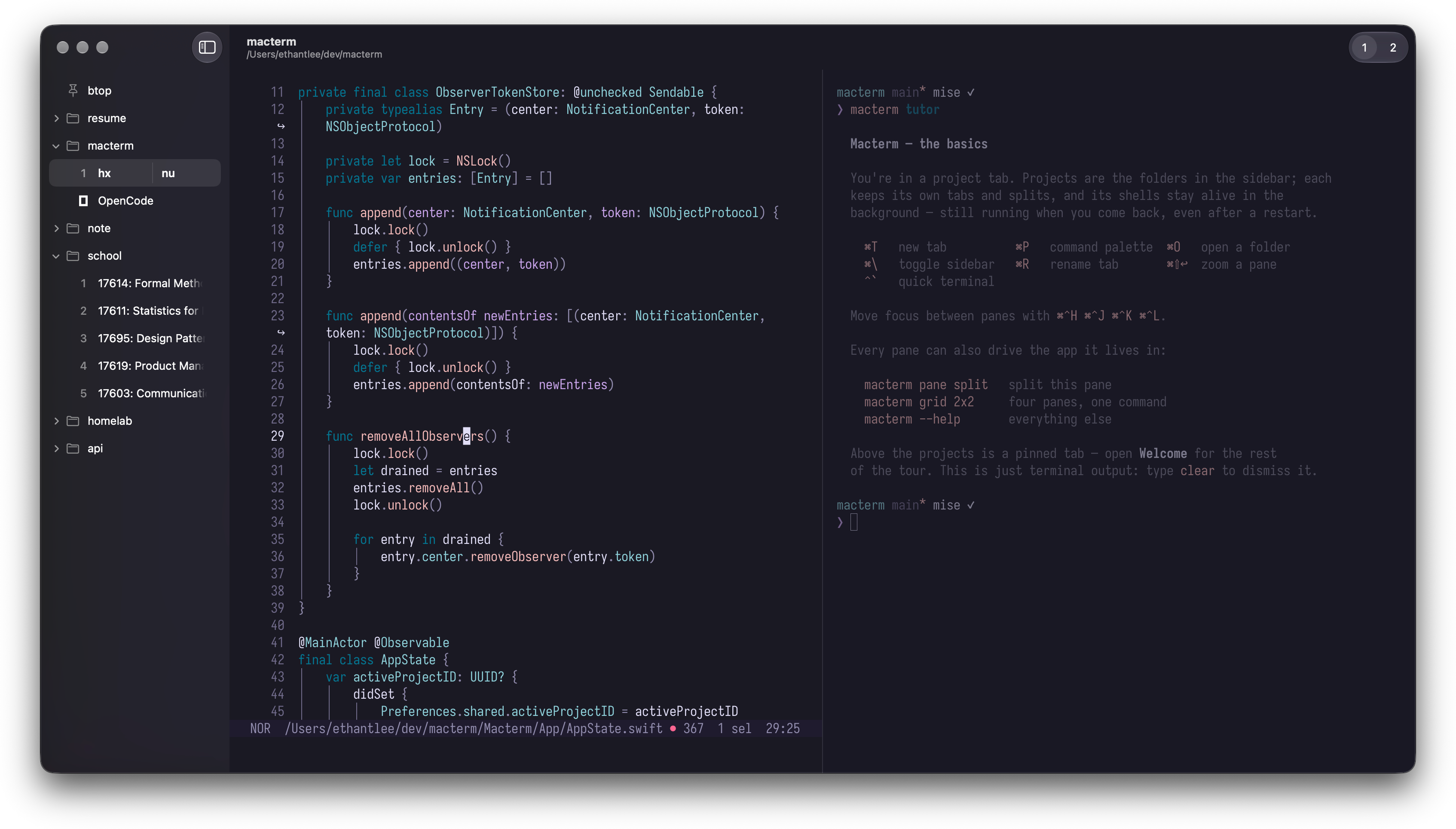
A lightweight macOS terminal with vertical tabs, session persistence, and native UI. Built on libghostty.




[!NOTE] This project is unrelated to MacTerm, a pre-existing macOS terminal emulator that shares the name.
Features
- Session persistence
Quitting detaches your shells instead of killing them; relaunching brings them back with scrollback and running processes intact. - Multiplexing
Drag a pane onto another to join them, or separate one into its own tab — by drag or by keybind. Projects, tabs, and split layouts are saved and restored on relaunch. - Remote projects
Open a directory on another machine over SSH. Your shells keep running there, surviving quits, dropped connections, and even a local reboot. - Vertical project sidebar
Organize projects and their tabs in a native macOS sidebar, stacked vertically where there's room to read them. Right-click any folder in Finder → Services → New Macterm Project Here to add one without leaving Finder. - Pinned tabs
Pin a tab above your projects to keep it running: it starts on every launch, and restores itself with its command if the session dies. - Command palette
Press ⌘P to split panes, switch projects, or open a directory. Every action is a keystroke away, and each row shows its keybind. - Declarative layouts
Describe a project's tabs, splits, and per-pane commands in YAML; Macterm builds the workspace from it on open. - Control CLI
A bundledmactermcommand drives the running app, so scripts and AI agents can spawn panes, run commands, and script layouts.macterm skillsprints skills that teach a coding agent to use it. - Quick terminal
A global drop-down terminal on a hotkey (⌃`), for scratch work from anywhere. - Adaptive background
The window picks up the background color the running program paints. A full-screen TUI tints the whole window to match; in a split, each pane takes its own. - Ghostty compatibility
Reads your existing Ghostty config. Theme, font, keybinds: all of it just works.
Install
Homebrew
brew install --cask thdxg/tap/macterm
The cask strips the Gatekeeper quarantine attribute on install, so the app launches without extra prompts.
From Releases
Download the latest .dmg from Releases, open it, and drag Macterm to Applications. Since the app isn't signed with an Apple Developer certificate, clear the quarantine flag once:
xattr -cr /Applications/Macterm.app
Sparkle handles updates from there, verifying an EdDSA signature on each one — so you won't need xattr again.
Configuration
Macterm reads your Ghostty config from the same locations Ghostty does (~/.config/ghostty/config or ~/Library/Application Support/com.mitchellh.ghostty/config), so an existing setup carries over unchanged. Every key is documented in the Ghostty option reference. A minimal config looks like this:
theme = catppuccin-mocha
font-family = JetBrains Mono
font-size = 14
Macterm's defaults differ from Ghostty's for a few keys (theme, font size, padding, macos-option-as-alt, and tab-inherit-working-directory = false so new tabs open at the project root). They are loaded before your config, so any key you set wins. The full list is defaultsBody in MactermConfig.swift.
Macterm's own settings — window opacity, sidebar behavior, quick-terminal size, keymaps — live in Macterm → Settings. See the configuration docs for the full precedence order and the few chrome keys Macterm overrides.
Cookbook
Workflows and recipes from the community — the layouts, keybinds, and scripts people actually run to get more out of Macterm. Three to start with: one ⌃hjkl chord that moves between nvim's splits and Macterm's panes, driving an interactive program from a script, and giving a coding agent control of Macterm.
Got a recipe of your own? Start a Cookbook topic — anyone can post, and anyone can borrow.
Contributing
See CONTRIBUTING.md for setup, build, and PR guidelines.
License
MIT
Contributors


Similar repos


Languages
Swift
90.5%
Shell
3.4%
Python
3.0%
JavaScript
1.3%
A lightweight macOS terminal with vertical tabs, session persistence, and native UI
See the codeREADME
Macterm
A lightweight macOS terminal with vertical tabs, session persistence, and native UI. Built on libghostty.
[!NOTE] This project is unrelated to MacTerm, a pre-existing macOS terminal emulator that shares the name.
Features
- Session persistence
Quitting detaches your shells instead of killing them; relaunching brings them back with scrollback and running processes intact. - Multiplexing
Drag a pane onto another to join them, or separate one into its own tab — by drag or by keybind. Projects, tabs, and split layouts are saved and restored on relaunch. - Remote projects
Open a directory on another machine over SSH. Your shells keep running there, surviving quits, dropped connections, and even a local reboot. - Vertical project sidebar
Organize projects and their tabs in a native macOS sidebar, stacked vertically where there's room to read them. Right-click any folder in Finder → Services → New Macterm Project Here to add one without leaving Finder. - Pinned tabs
Pin a tab above your projects to keep it running: it starts on every launch, and restores itself with its command if the session dies. - Command palette
Press ⌘P to split panes, switch projects, or open a directory. Every action is a keystroke away, and each row shows its keybind. - Declarative layouts
Describe a project's tabs, splits, and per-pane commands in YAML; Macterm builds the workspace from it on open. - Control CLI
A bundledmactermcommand drives the running app, so scripts and AI agents can spawn panes, run commands, and script layouts.macterm skillsprints skills that teach a coding agent to use it. - Quick terminal
A global drop-down terminal on a hotkey (⌃`), for scratch work from anywhere. - Adaptive background
The window picks up the background color the running program paints. A full-screen TUI tints the whole window to match; in a split, each pane takes its own. - Ghostty compatibility
Reads your existing Ghostty config. Theme, font, keybinds: all of it just works.
Install
Homebrew
brew install --cask thdxg/tap/macterm
The cask strips the Gatekeeper quarantine attribute on install, so the app launches without extra prompts.
From Releases
Download the latest .dmg from Releases, open it, and drag Macterm to Applications. Since the app isn't signed with an Apple Developer certificate, clear the quarantine flag once:
xattr -cr /Applications/Macterm.app
Sparkle handles updates from there, verifying an EdDSA signature on each one — so you won't need xattr again.
Configuration
Macterm reads your Ghostty config from the same locations Ghostty does (~/.config/ghostty/config or ~/Library/Application Support/com.mitchellh.ghostty/config), so an existing setup carries over unchanged. Every key is documented in the Ghostty option reference. A minimal config looks like this:
theme = catppuccin-mocha
font-family = JetBrains Mono
font-size = 14
Macterm's defaults differ from Ghostty's for a few keys (theme, font size, padding, macos-option-as-alt, and tab-inherit-working-directory = false so new tabs open at the project root). They are loaded before your config, so any key you set wins. The full list is defaultsBody in MactermConfig.swift.
Macterm's own settings — window opacity, sidebar behavior, quick-terminal size, keymaps — live in Macterm → Settings. See the configuration docs for the full precedence order and the few chrome keys Macterm overrides.
Cookbook
Workflows and recipes from the community — the layouts, keybinds, and scripts people actually run to get more out of Macterm. Three to start with: one ⌃hjkl chord that moves between nvim's splits and Macterm's panes, driving an interactive program from a script, and giving a coding agent control of Macterm.
Got a recipe of your own? Start a Cookbook topic — anyone can post, and anyone can borrow.
Contributing
See CONTRIBUTING.md for setup, build, and PR guidelines.
License
MIT
Similar repos
Contributors
Languages
Swift
90.5%
Shell
3.4%
Python
3.0%
JavaScript
1.3%