Web Rendering Proxy: Use vintage, historical, legacy browsers on modern web
Go
1,301
514 commits
updated Aug 9, 2026
A browser-in-browser proxy server that allows to use historical / vintage web browsers on the modern web.
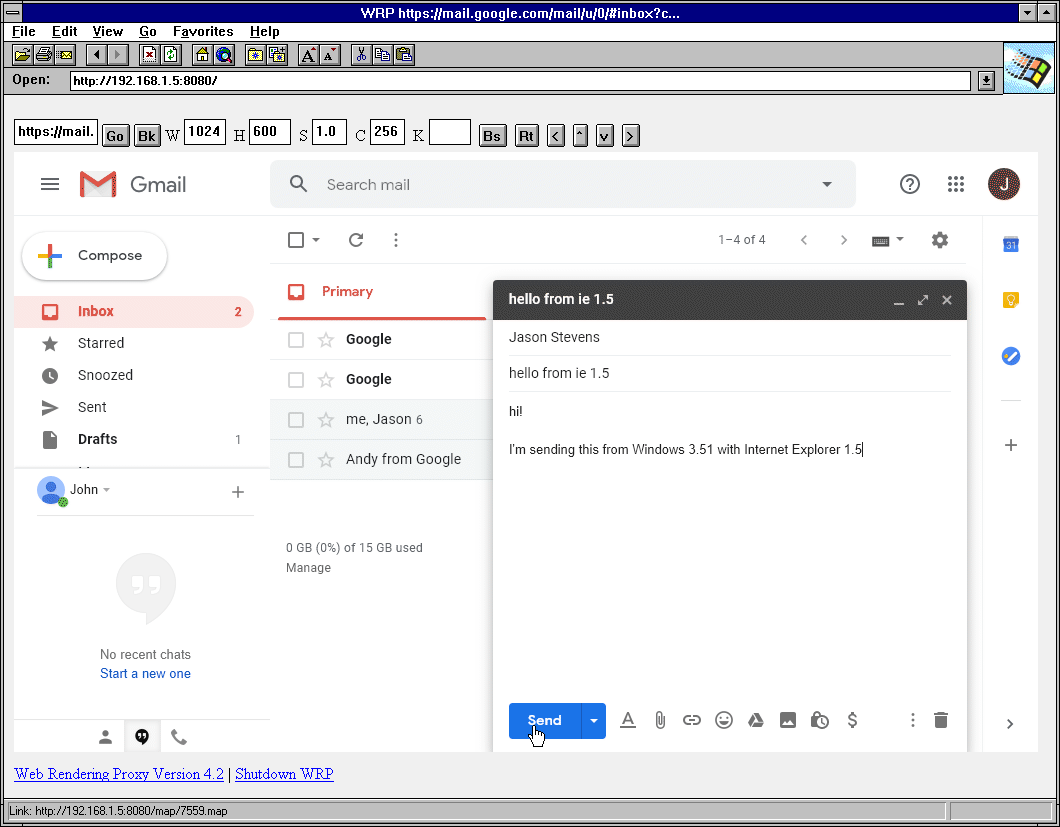
Different modes have different uses. ISMAP mode will be better for flashy modern web. Simple HTML mode will be better for reading articles or documentation.
http://address:port of the WRP server or set your proxy address there./proxy.pac automatic configuration mode.http:// addresses only, the proxy will automatically rewrite them to https:// as needed.https:// addresses are limited in functionality (no /suffix or paths).0 (or flag -g 1152x0x216. However this should not be used with old and low spec clients. Such tall images will be very large, take a lot of memory and long time to process, especially for GIFs.GIP - an ultra fast, optimized, parallel encoded GIF type.The first unnamed input box is either search (google) or URL starting with http/https
Go Navigate to the url or perform search
Bk History Back
St Stop, also re-capture screenshot without refreshing page, for example if page
render takes a long time or it updates / changes periodically
Re Remote Reload / Refresh
Up Page Up
Dn Page Down
W is width in pixels, adjust it to get rid of horizontal scroll bar
H is height in pixels, adjust it to get rid of vertical scroll bar.
It can also be set to 0 to produce one very tall image and use
client scroll. This 0 size is experimental, buggy and should be
used with PNG and lots of memory on a client side.
Z Zoom or scale
M Mode - ISMAP (clickable imagemap) or simple HTML mode
T Image type PNG / GIF / JPEG
C Colors, for GIF images only
K Keystroke input, you can type some letters in it and when you click Go it will be typed in the remote browser.
Bs Backspace
Rt Return / enter
WRP supports customizing it's own UI using HTML Template file. Download wrp.html place in the same directory with wrp binary customize it to your liking.
https://hub.docker.com/r/tenox7/wrp
$ docker run -d --rm -p 8080:8080 tenox7/wrp:latest
It's possible to run WRP on AWS App Runner.
First you need to upload the Docker image to ECR - Instructions.
Create App Runner service using the uploaded image using the AWS Console or CLI.
aws apprunner create-service --service-name my-app-runner-service --source-configuration '{
    "ImageRepository": {
        "ImageIdentifier": "<account_id>.dkr.ecr.<region>.amazonaws.com/wrp:latest",
        "ImageRepositoryType": "ECR",
        "ImageConfiguration": {"Port": "8000"},
        "AutoDeploymentsEnabled": true
    }
}' --instance-configuration '{
    "Cpu": "1024",
    "Memory": "2048",
    "InstanceRoleArn": "arn:aws:iam::<account_id>:role/AppRunnerECRAccessRole"
}'
CLI:
$ az container create --resource-group wrp --name wrp --image tenox7/wrp:latest --cpu 1 --memory 2 --ports 80 --protocol tcp --os-type Linux --ip-address Public --command-line '/wrp -l :80 -t png -g 1280x0x256'
$ gcloud run deploy --platform managed --image=tenox7/wrp:latest --memory=2Gi --args='-t=png','-g=1280x0x256'
Unfortunately Google Cloud Run forces you to use HTTPS, which likely won't work with old browsers.
-l   listen address:port (default :8080)
-m   mode, either ismap (graphical) or html
-t   image type gif, png or jpg (default gif)
-g   image geometry, WxHxC, height can be 0 for unlimited (default 1152x600x216)
     C (number of colors) is only used for GIF
-q   Jpeg image quality, default 75%
-h   headless mode, hide browser window on the server (default true)
-n   do not free maps and images after use (default false)
-ui  html template file (default "wrp.html")
-ua  user agent, override the default "headless" agent (only for ismap mode)
-s   delay/sleep after page is rendered before screenshot is taken (default 2s)
-b   browser executable path (e.g., for Brave Browser)
-profile  Chrome user-data dir, persists cookies/logins and the session between runs
HTML FORMs and ISMAP. Typically Mosaic 2.0 would be minimum version for forms. However ISMAP was supported since 0.6B, so if you manually enter url using ?url=..., you can use the earlier version.This program does not have a GUI and is run from the command line. After downloading, you may need to enable executable bit on Unix systems, for example:
$ cd ~/Downloads
$ chmod +x wrp-amd64-macos
$ ./wrp-amd64-macos
Click st to re-capture screenshot. You may want to increase the page delay using -s flag.
This is a well known issue. WRP has some provisions to work around it, but it's a cat and mouse game. By default WRP tries to obtain some current valid User Agent from https://github.com/jnrbsn/user-agents rather than using the internal "HeadlessChrome". You can override this to your own, for example:
$ wrp -ua="Mozilla/5.0 (Macintosh; Intel Mac OS X 10_15_7) AppleWebKit/537.36 (KHTML, like Gecko) Chrome/119.0.0.0 Safari/537.36"
Use -profile ~/.wrp-chrome to persist cookies/logins between runs. Log in once with -h=false, then restart headless. Run WRP on the same machine you logged in on (the cookie key lives in the OS keychain).
With -profile WRP also remembers the session in wrp-session.json inside the profile dir and restores it on the next run: image geometry, zoom, image type, colors, quality and mode for the ISMAP/HTML UI, the VNC framebuffer size and zoom, plus the open tabs, which are reopened where you left off. Flags given on the command line always win, for example -g 1024x768x256 overrides the saved geometry and -vncpage skips reopening tabs.
Because https://hub.docker.com/r/chromedp/headless-shell/ doesn't have one. WRP uses that image. If you have a fork that builds for armv6 let me know.
It's just GIF but optimized. Avoids dithering, uses fast color palette and parallel encoding. https://github.com/tenox7/gip
webkit2png.py and pcidade.py, blog post.You may also be interested in:
License: Apache 2.0
Copyright (c) 2013-2026 Antoni Sawicki
1,321 followers · starred Aug 2024
1,885 followers · starred Jul 2024
89 followers · starred Feb 2018
249 followers · starred Nov 2019
Web Rendering Proxy: Use vintage, historical, legacy browsers on modern web
Go
1,301
514 commits
updated Aug 9, 2026
A browser-in-browser proxy server that allows to use historical / vintage web browsers on the modern web.
Different modes have different uses. ISMAP mode will be better for flashy modern web. Simple HTML mode will be better for reading articles or documentation.
http://address:port of the WRP server or set your proxy address there./proxy.pac automatic configuration mode.http:// addresses only, the proxy will automatically rewrite them to https:// as needed.https:// addresses are limited in functionality (no /suffix or paths).0 (or flag -g 1152x0x216. However this should not be used with old and low spec clients. Such tall images will be very large, take a lot of memory and long time to process, especially for GIFs.GIP - an ultra fast, optimized, parallel encoded GIF type.The first unnamed input box is either search (google) or URL starting with http/https
Go Navigate to the url or perform search
Bk History Back
St Stop, also re-capture screenshot without refreshing page, for example if page
render takes a long time or it updates / changes periodically
Re Remote Reload / Refresh
Up Page Up
Dn Page Down
W is width in pixels, adjust it to get rid of horizontal scroll bar
H is height in pixels, adjust it to get rid of vertical scroll bar.
It can also be set to 0 to produce one very tall image and use
client scroll. This 0 size is experimental, buggy and should be
used with PNG and lots of memory on a client side.
Z Zoom or scale
M Mode - ISMAP (clickable imagemap) or simple HTML mode
T Image type PNG / GIF / JPEG
C Colors, for GIF images only
K Keystroke input, you can type some letters in it and when you click Go it will be typed in the remote browser.
Bs Backspace
Rt Return / enter
WRP supports customizing it's own UI using HTML Template file. Download wrp.html place in the same directory with wrp binary customize it to your liking.
https://hub.docker.com/r/tenox7/wrp
$ docker run -d --rm -p 8080:8080 tenox7/wrp:latest
It's possible to run WRP on AWS App Runner.
First you need to upload the Docker image to ECR - Instructions.
Create App Runner service using the uploaded image using the AWS Console or CLI.
aws apprunner create-service --service-name my-app-runner-service --source-configuration '{
    "ImageRepository": {
        "ImageIdentifier": "<account_id>.dkr.ecr.<region>.amazonaws.com/wrp:latest",
        "ImageRepositoryType": "ECR",
        "ImageConfiguration": {"Port": "8000"},
        "AutoDeploymentsEnabled": true
    }
}' --instance-configuration '{
    "Cpu": "1024",
    "Memory": "2048",
    "InstanceRoleArn": "arn:aws:iam::<account_id>:role/AppRunnerECRAccessRole"
}'
CLI:
$ az container create --resource-group wrp --name wrp --image tenox7/wrp:latest --cpu 1 --memory 2 --ports 80 --protocol tcp --os-type Linux --ip-address Public --command-line '/wrp -l :80 -t png -g 1280x0x256'
$ gcloud run deploy --platform managed --image=tenox7/wrp:latest --memory=2Gi --args='-t=png','-g=1280x0x256'
Unfortunately Google Cloud Run forces you to use HTTPS, which likely won't work with old browsers.
-l   listen address:port (default :8080)
-m   mode, either ismap (graphical) or html
-t   image type gif, png or jpg (default gif)
-g   image geometry, WxHxC, height can be 0 for unlimited (default 1152x600x216)
     C (number of colors) is only used for GIF
-q   Jpeg image quality, default 75%
-h   headless mode, hide browser window on the server (default true)
-n   do not free maps and images after use (default false)
-ui  html template file (default "wrp.html")
-ua  user agent, override the default "headless" agent (only for ismap mode)
-s   delay/sleep after page is rendered before screenshot is taken (default 2s)
-b   browser executable path (e.g., for Brave Browser)
-profile  Chrome user-data dir, persists cookies/logins and the session between runs
HTML FORMs and ISMAP. Typically Mosaic 2.0 would be minimum version for forms. However ISMAP was supported since 0.6B, so if you manually enter url using ?url=..., you can use the earlier version.This program does not have a GUI and is run from the command line. After downloading, you may need to enable executable bit on Unix systems, for example:
$ cd ~/Downloads
$ chmod +x wrp-amd64-macos
$ ./wrp-amd64-macos
Click st to re-capture screenshot. You may want to increase the page delay using -s flag.
This is a well known issue. WRP has some provisions to work around it, but it's a cat and mouse game. By default WRP tries to obtain some current valid User Agent from https://github.com/jnrbsn/user-agents rather than using the internal "HeadlessChrome". You can override this to your own, for example:
$ wrp -ua="Mozilla/5.0 (Macintosh; Intel Mac OS X 10_15_7) AppleWebKit/537.36 (KHTML, like Gecko) Chrome/119.0.0.0 Safari/537.36"
Use -profile ~/.wrp-chrome to persist cookies/logins between runs. Log in once with -h=false, then restart headless. Run WRP on the same machine you logged in on (the cookie key lives in the OS keychain).
With -profile WRP also remembers the session in wrp-session.json inside the profile dir and restores it on the next run: image geometry, zoom, image type, colors, quality and mode for the ISMAP/HTML UI, the VNC framebuffer size and zoom, plus the open tabs, which are reopened where you left off. Flags given on the command line always win, for example -g 1024x768x256 overrides the saved geometry and -vncpage skips reopening tabs.
Because https://hub.docker.com/r/chromedp/headless-shell/ doesn't have one. WRP uses that image. If you have a fork that builds for armv6 let me know.
It's just GIF but optimized. Avoids dithering, uses fast color palette and parallel encoding. https://github.com/tenox7/gip
webkit2png.py and pcidade.py, blog post.You may also be interested in:
License: Apache 2.0
Copyright (c) 2013-2026 Antoni Sawicki
1,321 followers · starred Aug 2024
1,885 followers · starred Jul 2024
89 followers · starred Feb 2018
249 followers · starred Nov 2019



