
Go++ Programming Language. A practical superset of Go with classes, exceptions, enums, and more—compiled to ordinary Go.
See the codeSee what people are saying
README
Go++

A superset of Go that provides modern features while staying true to the spirit of Go language.
Go++ is distributed under the BSD 3-Clause license, the same license used by Go. Bundled third-party components may have separate licenses; see their notices.
What's implemented?
Go++ adds expressive language features while keeping Go packages, generated code, and the familiar build toolchain in reach. The guides below explain each feature with comparisons and examples.
Language features
- Classes — Group fields and methods around an
implicit
this, with concise construction and generated Go structs. - Static methods and factories — Put type-level operations on a class and provide named ways to construct values.
- Polymorphism — Use class values through compatible base types and interfaces, including when calling methods.
- Multiple inheritance — Compose behavior from multiple base classes, with qualified access when members conflict.
- Overloading — Reuse a function or method name for different arities and statically distinguishable argument types.
- Named arguments and defaults — Make call sites clearer and omit arguments that have a declared default.
- Structural records — Pass composite values without declaring one-off structs for every function boundary.
- Enums — Define closed, named value sets with grouped declarations, validation, ordered values, and member metadata.
- Lambdas and the prelude — Write concise functions and use familiar collection, string, and map helpers.
- Extension methods — Add compile-time methods to existing types, including several types in one extension block.
- String interpolation — Embed values in
quoted or raw strings, with formatting and
String()support. - Regular expressions — Compile and use regular expressions through concise prelude helpers.
- Safe access — Use
?.to access members of nullable class values without repeating explicit nil checks. - Lazy error fallback — Use
??to evaluate a fallback only when the value on its left is absent or erroneous. - Exception handling — Keep Go-style error
values while adding
throw,try, typedcatch, andfinallysyntax. - Program exit hook — Register
atExitwork that runs during normal program shutdown. - Annotations and introspection — Declare typed metadata, validate its targets, and inspect it at runtime.
Application features and standard library
- Serialization — Generate JSON, YAML, and GOB conversion methods from class annotations and field metadata.
- HTTP servers and routes — Build servers with annotated routing, request binding, middleware, and lifecycle hooks.
- OpenAPI, Swagger, and OAuth — Generate API documentation and interactive Swagger UI, with OAuth/OIDC support.
- ORM and SQL — Map annotated models to SQL and use database operations that invoke validation and lifecycle hooks.
- Typed templates — Define HTML/XML templates
as functions and render them with Go's
html/templateprotections. - External template reloads — Reload
.gpp.tplfiles during development without rebuilding the server. - Embedded assets — Include files and directories in the program through source-level declarations.
- Cron scheduling — Schedule annotated functions or dynamic jobs with explicit start and stop controls.
- Suite-based tests — Organize tests into
suites, methods, and annotations, then run them through
gpp test.
Go compatibility and tooling
- Go compatibility — Use ordinary Go imports
and dotted Go++ packages mapped to module paths; standalone programs can omit
package main. - Mixed Go and Go++ builds — Call Go from Go++ and Go++ from Go while compiling both languages in one project.
- Project CLI — Initialize, build, run,
test, format, and inspect Go++ projects with the
gppcommand. - Formatter — Format Go++ syntax consistently and check formatting in CI.
- Source documentation — Read declarations and API documentation directly from Go++ source.
- Language server — Get editor diagnostics, completion, navigation, semantic highlighting, and quick fixes.
Visual Studio Code
The Go++ VS Code extension provides Go++ syntax highlighting, snippets, formatting, and optional language-server support for diagnostics, completion, and navigation.
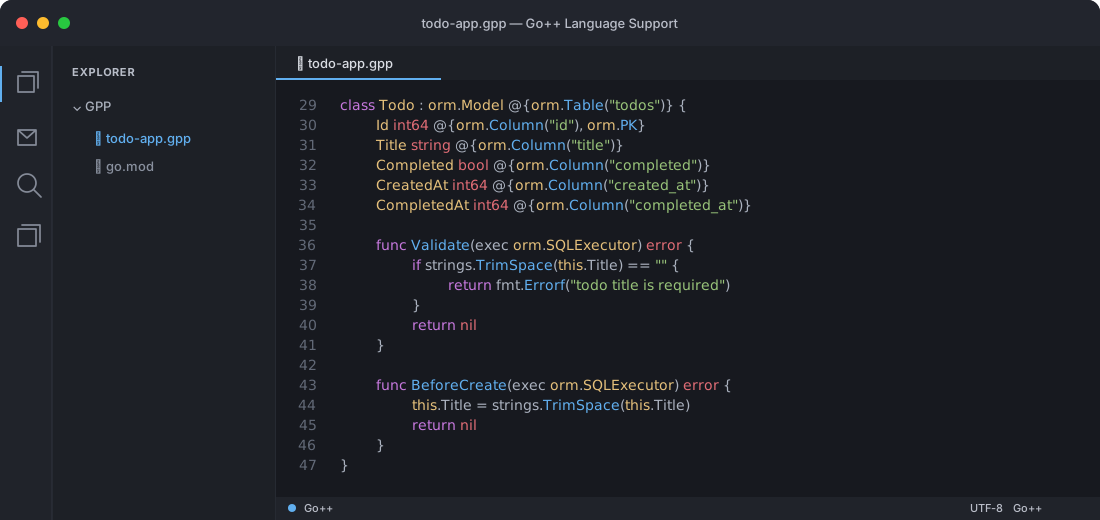
The editor view below shows the Todo model in the full example.
Install and build
The repository root is the installable Go++ CLI:
go install github.com/telgatech/gpp@latest
It provides one gpp executable with project commands:
gpp init|compile|build|run|clean|fmt|test|doc|env|doctor|version|lsp
Create and run a starter project:
gpp init hello
cd hello
gpp run
gpp init creates a root go.mod, runs go mod tidy, and initializes a Git
repository with an init commit when the target is not already inside a Git
worktree. The initial commit includes only the generated project files.
Build a native executable. Intermediate Go source remains in the hidden compiler workspace rather than beside the Go++ source:
gpp build examples/hello.gpp -o ./hello
Use gpp doctor to check the Go toolchain and embedded standard library, and
gpp clean to remove generated build artifacts.
Format Go++ source with the shared canonical formatter. It uses four-space indentation, preserves comments and opaque literal/template content, and supports CI-friendly check mode:
gpp fmt examples/hello.gpp
gpp fmt --check ./...
gpp fmt --stdout examples/hello.gpp
Pass -emit-go to gpp build when you want the generated Go workspace path
reported for inspection.
Go++ tests use the bundled gpp/test suite library and ordinary Go test
execution underneath:
gpp test examples/testing.gpp
gpp test --tag crud examples/testing.gpp
gpp test --priority high examples/testing.gpp
The compiler's CI also runs go test ./... and
scripts/smoke-examples.sh. That smoke test creates
a fresh project with gpp init, copies in the complete examples tree, then
runs or builds every example (and executes the Go++ testing example). Run it
locally before submitting compiler changes:
./scripts/smoke-examples.sh
Inspect Go++ source-level documentation without exposing generated Go:
gpp doc gpp/http.Server
gpp doc string.TrimSpace
gpp doc --json gpp/http.Server
gpp doc --search template
Start the editor language server over standard input/output:
gpp lsp
The server keeps open-document overlays in memory and provides diagnostics,
completion, hover, navigation, references, rename, symbols, formatting, and
signature help without running a Go backend build on every change. Use
gpp lsp --log=/tmp/gpp-lsp.log when protocol-side diagnostics are needed;
logs never go to stdout.
Documentation site
The technical documentation is built with VitePress. It includes a practical
landing page, getting-started and language guides, compiler/tooling notes, and
the specifications mirrored from spec/ at build time:
npm install
npm run docs:dev
Build and preview the static site locally:
npm run docs:build
npm run docs:preview
Pushes to main build and deploy the site through GitHub Pages using the
workflow in .github/workflows/docs.yml. In the repository settings, set
Pages → Build and deployment → Source to GitHub Actions once.
Build and run
For a complete project build, use the build subcommand. It clears stale
generated source, runs go mod tidy to resolve imports, and runs go build:
gpp build examples/hello.gpp
Use run for the same generation and dependency setup followed by execution:
gpp run examples/hello.gpp
During gpp run, external .gpp.tpl sources are watched when used with
gpp/http.Server; valid edits reload automatically and invalid edits leave
the previous templates active. Production gpp build uses the compiled
template sources without starting a watcher.
Use a separate output directory when switching between standalone examples:
gpp run -output /tmp/gpp-orm examples/orm.gpp
Multiple Go++ files can be passed to the same build. For example, the cross-package example is built and run as one generated project:
gpp run \
  examples/packages/people.gpp \
  examples/packages/main.gpp
Go++ and Go can also live in the same build. The mixed-compilation examples demonstrate both directions:
gpp run -output /tmp/gpp-go-from-gpp examples/mixed/go_from_gpp
gpp run -output /tmp/gpp-go-imports-gpp examples/mixed/go_imports_gpp
The first lets Go++ call functions from native.go; the second lets ordinary
Go import the generated generated/mixed package.
The ORM example also resolves its SQLite dependency automatically:
gpp run -output /tmp/gpp-orm examples/orm.gpp
Build an executable at a chosen path with -o:
gpp build -o ./hello examples/hello.gpp
Generated Go is written to a stable, per-project workspace under the system
cache. The CLI creates that workspace's go.mod with the default module path
generated; choose another path with -module when local Go package imports
need a real module path. Set GPP_CACHE to choose the cache root:
GPP_CACHE=/var/cache/gpp gpp -module example.com/myapp examples/*.gpp
Choose a different generated output directory with -output:
gpp -output build/gpp examples/hello.gpp
The standard Go++ prelude is available automatically. Disable it for minimal
or diagnostic builds with -no-prelude.
The enum example demonstrates implicit and explicit values, grouped enum declarations, validated conversion, and metadata:
gpp run examples/enums.gpp
Expression-level error fallback is demonstrated by:
gpp run examples/expr_catch.gpp
Class introspection exposes generated name, fields, methods,
annotations, owner, type, get, set, and addr metadata while
preserving ordinary Go structs and stdlib interoperability.
Similar repos


Languages
Go
99.3%
Go++ Programming Language. A practical superset of Go with classes, exceptions, enums, and more—compiled to ordinary Go.
See the codeSee what people are saying
README
Go++
A superset of Go that provides modern features while staying true to the spirit of Go language.
Go++ is distributed under the BSD 3-Clause license, the same license used by Go. Bundled third-party components may have separate licenses; see their notices.
What's implemented?
Go++ adds expressive language features while keeping Go packages, generated code, and the familiar build toolchain in reach. The guides below explain each feature with comparisons and examples.
Language features
- Classes — Group fields and methods around an
implicit
this, with concise construction and generated Go structs. - Static methods and factories — Put type-level operations on a class and provide named ways to construct values.
- Polymorphism — Use class values through compatible base types and interfaces, including when calling methods.
- Multiple inheritance — Compose behavior from multiple base classes, with qualified access when members conflict.
- Overloading — Reuse a function or method name for different arities and statically distinguishable argument types.
- Named arguments and defaults — Make call sites clearer and omit arguments that have a declared default.
- Structural records — Pass composite values without declaring one-off structs for every function boundary.
- Enums — Define closed, named value sets with grouped declarations, validation, ordered values, and member metadata.
- Lambdas and the prelude — Write concise functions and use familiar collection, string, and map helpers.
- Extension methods — Add compile-time methods to existing types, including several types in one extension block.
- String interpolation — Embed values in
quoted or raw strings, with formatting and
String()support. - Regular expressions — Compile and use regular expressions through concise prelude helpers.
- Safe access — Use
?.to access members of nullable class values without repeating explicit nil checks. - Lazy error fallback — Use
??to evaluate a fallback only when the value on its left is absent or erroneous. - Exception handling — Keep Go-style error
values while adding
throw,try, typedcatch, andfinallysyntax. - Program exit hook — Register
atExitwork that runs during normal program shutdown. - Annotations and introspection — Declare typed metadata, validate its targets, and inspect it at runtime.
Application features and standard library
- Serialization — Generate JSON, YAML, and GOB conversion methods from class annotations and field metadata.
- HTTP servers and routes — Build servers with annotated routing, request binding, middleware, and lifecycle hooks.
- OpenAPI, Swagger, and OAuth — Generate API documentation and interactive Swagger UI, with OAuth/OIDC support.
- ORM and SQL — Map annotated models to SQL and use database operations that invoke validation and lifecycle hooks.
- Typed templates — Define HTML/XML templates
as functions and render them with Go's
html/templateprotections. - External template reloads — Reload
.gpp.tplfiles during development without rebuilding the server. - Embedded assets — Include files and directories in the program through source-level declarations.
- Cron scheduling — Schedule annotated functions or dynamic jobs with explicit start and stop controls.
- Suite-based tests — Organize tests into
suites, methods, and annotations, then run them through
gpp test.
Go compatibility and tooling
- Go compatibility — Use ordinary Go imports
and dotted Go++ packages mapped to module paths; standalone programs can omit
package main. - Mixed Go and Go++ builds — Call Go from Go++ and Go++ from Go while compiling both languages in one project.
- Project CLI — Initialize, build, run,
test, format, and inspect Go++ projects with the
gppcommand. - Formatter — Format Go++ syntax consistently and check formatting in CI.
- Source documentation — Read declarations and API documentation directly from Go++ source.
- Language server — Get editor diagnostics, completion, navigation, semantic highlighting, and quick fixes.
Visual Studio Code
The Go++ VS Code extension provides Go++ syntax highlighting, snippets, formatting, and optional language-server support for diagnostics, completion, and navigation.
The editor view below shows the Todo model in the full example.
Install and build
The repository root is the installable Go++ CLI:
go install github.com/telgatech/gpp@latest
It provides one gpp executable with project commands:
gpp init|compile|build|run|clean|fmt|test|doc|env|doctor|version|lsp
Create and run a starter project:
gpp init hello
cd hello
gpp run
gpp init creates a root go.mod, runs go mod tidy, and initializes a Git
repository with an init commit when the target is not already inside a Git
worktree. The initial commit includes only the generated project files.
Build a native executable. Intermediate Go source remains in the hidden compiler workspace rather than beside the Go++ source:
gpp build examples/hello.gpp -o ./hello
Use gpp doctor to check the Go toolchain and embedded standard library, and
gpp clean to remove generated build artifacts.
Format Go++ source with the shared canonical formatter. It uses four-space indentation, preserves comments and opaque literal/template content, and supports CI-friendly check mode:
gpp fmt examples/hello.gpp
gpp fmt --check ./...
gpp fmt --stdout examples/hello.gpp
Pass -emit-go to gpp build when you want the generated Go workspace path
reported for inspection.
Go++ tests use the bundled gpp/test suite library and ordinary Go test
execution underneath:
gpp test examples/testing.gpp
gpp test --tag crud examples/testing.gpp
gpp test --priority high examples/testing.gpp
The compiler's CI also runs go test ./... and
scripts/smoke-examples.sh. That smoke test creates
a fresh project with gpp init, copies in the complete examples tree, then
runs or builds every example (and executes the Go++ testing example). Run it
locally before submitting compiler changes:
./scripts/smoke-examples.sh
Inspect Go++ source-level documentation without exposing generated Go:
gpp doc gpp/http.Server
gpp doc string.TrimSpace
gpp doc --json gpp/http.Server
gpp doc --search template
Start the editor language server over standard input/output:
gpp lsp
The server keeps open-document overlays in memory and provides diagnostics,
completion, hover, navigation, references, rename, symbols, formatting, and
signature help without running a Go backend build on every change. Use
gpp lsp --log=/tmp/gpp-lsp.log when protocol-side diagnostics are needed;
logs never go to stdout.
Documentation site
The technical documentation is built with VitePress. It includes a practical
landing page, getting-started and language guides, compiler/tooling notes, and
the specifications mirrored from spec/ at build time:
npm install
npm run docs:dev
Build and preview the static site locally:
npm run docs:build
npm run docs:preview
Pushes to main build and deploy the site through GitHub Pages using the
workflow in .github/workflows/docs.yml. In the repository settings, set
Pages → Build and deployment → Source to GitHub Actions once.
Build and run
For a complete project build, use the build subcommand. It clears stale
generated source, runs go mod tidy to resolve imports, and runs go build:
gpp build examples/hello.gpp
Use run for the same generation and dependency setup followed by execution:
gpp run examples/hello.gpp
During gpp run, external .gpp.tpl sources are watched when used with
gpp/http.Server; valid edits reload automatically and invalid edits leave
the previous templates active. Production gpp build uses the compiled
template sources without starting a watcher.
Use a separate output directory when switching between standalone examples:
gpp run -output /tmp/gpp-orm examples/orm.gpp
Multiple Go++ files can be passed to the same build. For example, the cross-package example is built and run as one generated project:
gpp run \
  examples/packages/people.gpp \
  examples/packages/main.gpp
Go++ and Go can also live in the same build. The mixed-compilation examples demonstrate both directions:
gpp run -output /tmp/gpp-go-from-gpp examples/mixed/go_from_gpp
gpp run -output /tmp/gpp-go-imports-gpp examples/mixed/go_imports_gpp
The first lets Go++ call functions from native.go; the second lets ordinary
Go import the generated generated/mixed package.
The ORM example also resolves its SQLite dependency automatically:
gpp run -output /tmp/gpp-orm examples/orm.gpp
Build an executable at a chosen path with -o:
gpp build -o ./hello examples/hello.gpp
Generated Go is written to a stable, per-project workspace under the system
cache. The CLI creates that workspace's go.mod with the default module path
generated; choose another path with -module when local Go package imports
need a real module path. Set GPP_CACHE to choose the cache root:
GPP_CACHE=/var/cache/gpp gpp -module example.com/myapp examples/*.gpp
Choose a different generated output directory with -output:
gpp -output build/gpp examples/hello.gpp
The standard Go++ prelude is available automatically. Disable it for minimal
or diagnostic builds with -no-prelude.
The enum example demonstrates implicit and explicit values, grouped enum declarations, validated conversion, and metadata:
gpp run examples/enums.gpp
Expression-level error fallback is demonstrated by:
gpp run examples/expr_catch.gpp
Class introspection exposes generated name, fields, methods,
annotations, owner, type, get, set, and addr metadata while
preserving ordinary Go structs and stdlib interoperability.
Similar repos
Languages
Go
99.3%