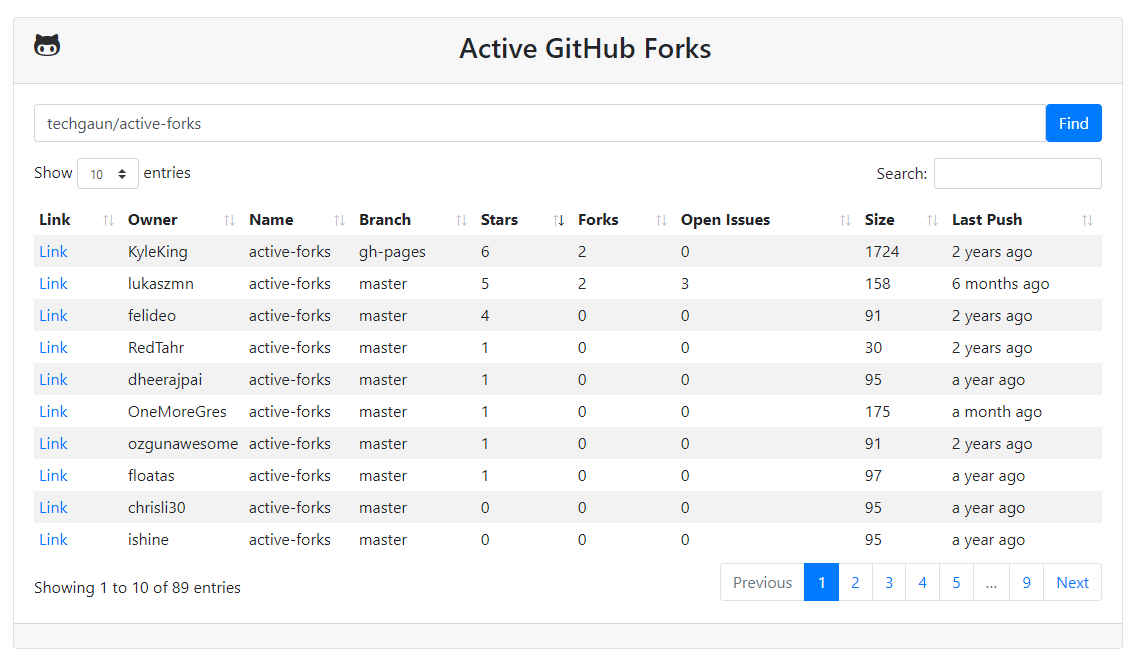
Find active github forks of a repo https://git.io/vSnrC
See the codeFind the active github forks of a project
NOTE: Looking for maintainer(s) to keep this project going
While I want to be able to spend some time on this, I've had a lot of changes in life in general and thus can not spend as much time on this repo. If you are interested in taking over to maintain this project, please file an issue.
This project allows you to find the most active forks of a repository.
The extension is available on the Chrome Web Store — install it from there for Chrome and other Chromium-based browsers.
The extension/ directory contains its source, a cross-browser
(Chrome, Edge, Firefox — Manifest V3) extension:
It needs only the activeTab and contextMenus permissions and talks solely
to api.github.com.
Store releases are automated — see
extension/PUBLISHING.md. To install from source:
chrome://extensions, enable "Developer mode", click
"Load unpacked", and select the extension/ directory.about:debugging#/runtime/this-firefox, click "Load
Temporary Add-on…", and select extension/manifest.json.If you would like to use this tool as a bookmarklet,
you can do so by saving the following javascript code as the bookmarklet.
Since Github doesn't allow javascript in its markdown, you can add it manually.
Hit Ctrl+D to create a new bookmark and paste the javascript below into the URL
or "Location" entry (you may have to click "More" to see the URL field).
Any time you're on a Github repo you can click the bookmarklet
and it'll bring up the Active Forks of that repo.
javascript:(function(){if(window.location.hostname.match(/github.com+/)){var%20a=window.location.pathname.split('/',3);if(a.length==3){var%20b=encodeURIComponent(a[1]+'/'+a[2]);window.open('https://techgaun.github.io/active-forks/index.html#'+b,'_blank','noreferrer,noopener');return}}window.alert('Not%20a%20valid%20GitHub%20page')})();
This repository is available under either the Apache License version 2.0 or (at your option) the European Union Public License version 1.2.
SPDX-License-Identifier: Apache-2.0 OR EUPL-1.2
(top 24 of 30)
150 followers · starred Sep 2026
1,043 followers · starred Oct 2021
2,617 followers · starred Jan 2020
178 followers · starred Aug 2021
Find active github forks of a repo https://git.io/vSnrC
See the codeFind the active github forks of a project
NOTE: Looking for maintainer(s) to keep this project going
While I want to be able to spend some time on this, I've had a lot of changes in life in general and thus can not spend as much time on this repo. If you are interested in taking over to maintain this project, please file an issue.
This project allows you to find the most active forks of a repository.
The extension is available on the Chrome Web Store — install it from there for Chrome and other Chromium-based browsers.
The extension/ directory contains its source, a cross-browser
(Chrome, Edge, Firefox — Manifest V3) extension:
It needs only the activeTab and contextMenus permissions and talks solely
to api.github.com.
Store releases are automated — see
extension/PUBLISHING.md. To install from source:
chrome://extensions, enable "Developer mode", click
"Load unpacked", and select the extension/ directory.about:debugging#/runtime/this-firefox, click "Load
Temporary Add-on…", and select extension/manifest.json.If you would like to use this tool as a bookmarklet,
you can do so by saving the following javascript code as the bookmarklet.
Since Github doesn't allow javascript in its markdown, you can add it manually.
Hit Ctrl+D to create a new bookmark and paste the javascript below into the URL
or "Location" entry (you may have to click "More" to see the URL field).
Any time you're on a Github repo you can click the bookmarklet
and it'll bring up the Active Forks of that repo.
javascript:(function(){if(window.location.hostname.match(/github.com+/)){var%20a=window.location.pathname.split('/',3);if(a.length==3){var%20b=encodeURIComponent(a[1]+'/'+a[2]);window.open('https://techgaun.github.io/active-forks/index.html#'+b,'_blank','noreferrer,noopener');return}}window.alert('Not%20a%20valid%20GitHub%20page')})();
This repository is available under either the Apache License version 2.0 or (at your option) the European Union Public License version 1.2.
SPDX-License-Identifier: Apache-2.0 OR EUPL-1.2
(top 24 of 30)
150 followers · starred Sep 2026
1,043 followers · starred Oct 2021
2,617 followers · starred Jan 2020
178 followers · starred Aug 2021