Upload multiple artifacts to GitHub Release in parallel
See the code


ghr creates GitHub Release and uploads artifacts in parallel.
This demo creates GitHub Release page with v1.0.0 tag and uploads cross-compiled golang binaries.
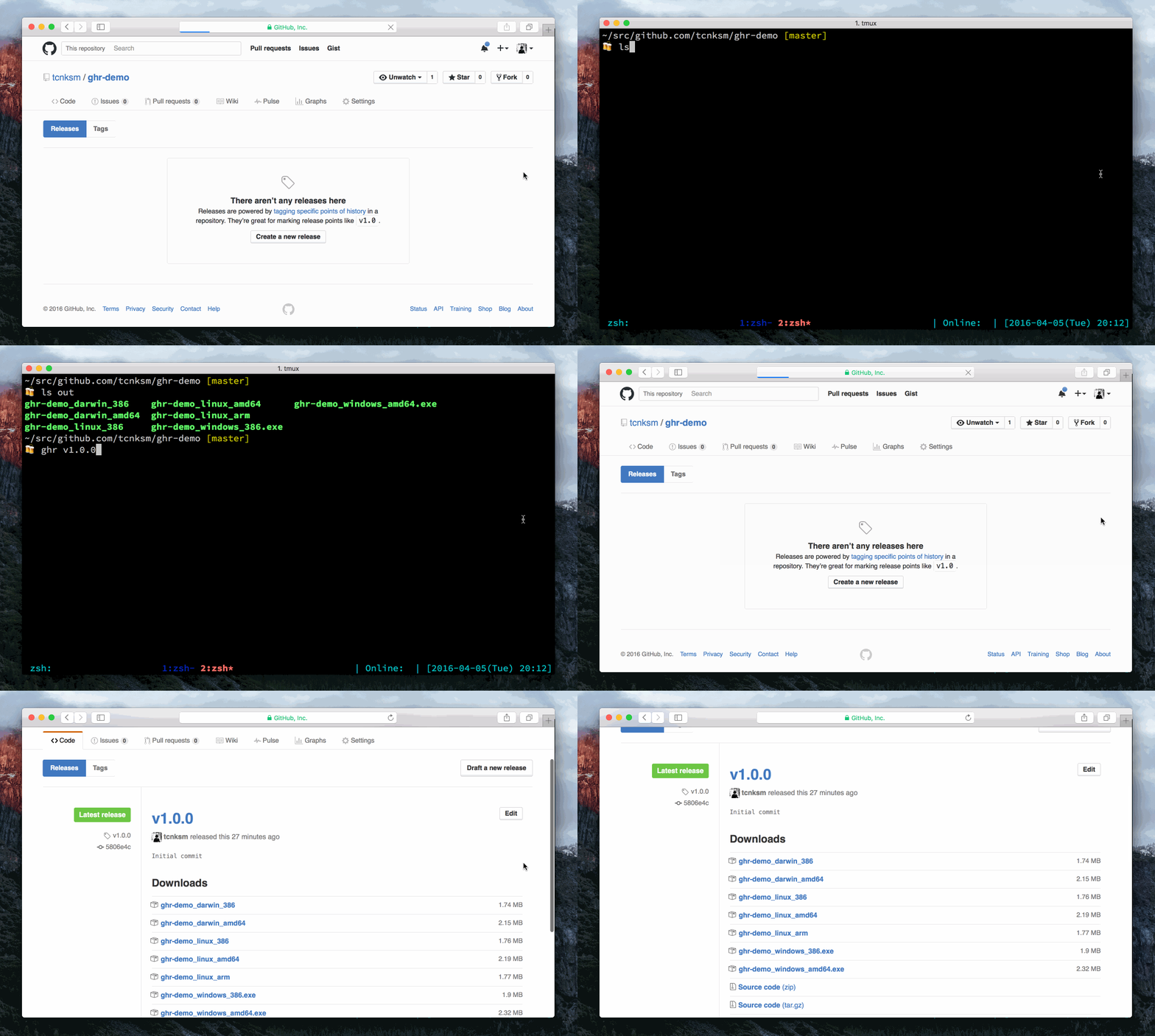
You can see release page here.
Using ghr is simple. After setting GitHub API token (see more on GitHub API Token section), change into your repository root directory and run the following command:
$ ghr [option] TAG [PATH]
You must provide TAG (git tag) and optionally a PATH to artifacts you want to upload. You can specify a file or a directory. If you provide a directory, all files in that directory will be uploaded.
ghr assumes that you are in a git repository when executed. This is because normally the artifacts you want to upload to a GitHub Release page are in that repository or generated there. With this assumption, ghr implicitly reads repository URL from .git/config file. But you can change this kind of information, see Options section.
To use ghr, you need to get a GitHub token with an account which has enough permissions to create releases. To get a token, visit GitHub account settings page, then go to Applications for the user. Here you can create a token in the Personal access tokens section. For a private repository you need repo scope and for a public repository you need public_repo scope.
When using ghr, you can set it via GITHUB_TOKEN env var, -token command line option or github.token property in .gitconfig file.
For instance, to set it via environment variable:
$ export GITHUB_TOKEN="....."
Or set it in github.token in gitconfig:
$ git config --global github.token "....."
Note that environment variable take precedence over gitconfig value.
You can use ghr for GitHub Enterprise. Change API endpoint via the environment variable.
$ export GITHUB_API=http://github.company.com/api/v3/
To upload all files in pkg/ directory with tag v0.1.0
$ ghr v0.1.0 pkg/
--> Uploading: pkg/0.1.0_SHASUMS
--> Uploading: pkg/ghr_0.1.0_darwin_386.zip
--> Uploading: pkg/ghr_0.1.0_darwin_amd64.zip
--> Uploading: pkg/ghr_0.1.0_linux_386.zip
--> Uploading: pkg/ghr_0.1.0_linux_amd64.zip
--> Uploading: pkg/ghr_0.1.0_windows_386.zip
--> Uploading: pkg/ghr_0.1.0_windows_amd64.zip
You can set some options:
$ ghr \
    -t TOKEN \        # Set Github API Token
    -u USERNAME \     # Set Github username
    -r REPO \         # Set repository name
    -c COMMIT \       # Set target commitish, branch or commit SHA
    -n TITLE \        # Set release title
    -b BODY \         # Set text describing the contents of the release
    -p NUM \          # Set amount of parallelism (Default is number of CPU)
    -delete \         # Delete release and its git tag in advance if it exists (same as -recreate)
    -replace \        # Replace artifacts if it is already uploaded
    -draft \          # Release as draft (Unpublish)
    -soft \           # Stop uploading if the same tag already exists
    -prerelease \     # Create prerelease
    -generatenotes \  # Generate Release Notes automatically (See below)
    TAG PATH
If you are a macOS user, you can use Homebrew:
$ brew install ghr
If you are on another platform, you can download a binary from our release page and place it in $PATH directory.
Or you can use go install.
$ go install github.com/tcnksm/ghr@latest
You can use ghr as a GitHub Action in your workflows. This action downloads and runs ghr to create a GitHub Release and upload artifacts.
- uses: tcnksm/ghr@v0
  with:
    tag: ${{ github.ref_name }}
    path: dist/
| Name | Description | Required | Default |
|---|---|---|---|
version | Version of ghr to install | No | v0.17.2 |
tag | Git tag for the release | Yes | |
path | Path to artifacts to upload (file or directory) | No | . |
commitish | Target commitish, branch or commit SHA | No | |
name | GitHub release title | No | |
body | Text describing the contents of the release | No | |
draft | Create release as draft | No | false |
prerelease | Create as prerelease | No | false |
latest | Set the release as latest (true, false, or auto) | No | |
replace | Replace artifacts if already uploaded | No | false |
delete | Recreate release if it already exists | No | false |
soft | Stop uploading if the tag already exists | No | false |
generatenotes | Generate release notes automatically | No | false |
parallel | Parallelization factor for uploads | No | |
owner | GitHub repository owner | No | |
repository | GitHub repository name | No | |
token | GitHub token for authentication | No | ${{ github.token }} |
name: Release
on:
  push:
    tags:
      - "v*"
jobs:
  release:
    runs-on: ubuntu-latest
    permissions:
      contents: write
    steps:
      - uses: actions/checkout@v4
      - uses: actions/setup-go@v5
        with:
          go-version-file: go.mod
      - name: Build
        run: make crossbuild
      - uses: tcnksm/ghr@v0
        with:
          tag: ${{ github.ref_name }}
          path: dist/
          replace: "true"
github-release can also create and edit releases and upload artifacts. It has many options. ghr is a simple alternative. And ghr will parallelize upload artifacts.GitHub added the ability to automatically generate the body of a Release based on a format specified in
.github/release.yml in Oct 2021. You can read more about that format here.
ghr now has the -generatenotes flag to enable that content to be programmatically added instead of manually supplying the body.
make test command and confirm that it passes using correct variables e.g. GITHUB_TOKEN=$GITHUB_TOKEN TEST_REPO_OWNER=tcnksm TEST_REPO_NAME=ghr make testgofmt -s -w .Overall
Maintained
Code review
Go module
Latest release
Releases this year
1,389 followers · starred Jan 2019
541 followers · starred Jun 2016
796 followers · starred Jan 2015
329 followers · starred Sep 2019
Upload multiple artifacts to GitHub Release in parallel
See the code
ghr creates GitHub Release and uploads artifacts in parallel.
This demo creates GitHub Release page with v1.0.0 tag and uploads cross-compiled golang binaries.
You can see release page here.
Using ghr is simple. After setting GitHub API token (see more on GitHub API Token section), change into your repository root directory and run the following command:
$ ghr [option] TAG [PATH]
You must provide TAG (git tag) and optionally a PATH to artifacts you want to upload. You can specify a file or a directory. If you provide a directory, all files in that directory will be uploaded.
ghr assumes that you are in a git repository when executed. This is because normally the artifacts you want to upload to a GitHub Release page are in that repository or generated there. With this assumption, ghr implicitly reads repository URL from .git/config file. But you can change this kind of information, see Options section.
To use ghr, you need to get a GitHub token with an account which has enough permissions to create releases. To get a token, visit GitHub account settings page, then go to Applications for the user. Here you can create a token in the Personal access tokens section. For a private repository you need repo scope and for a public repository you need public_repo scope.
When using ghr, you can set it via GITHUB_TOKEN env var, -token command line option or github.token property in .gitconfig file.
For instance, to set it via environment variable:
$ export GITHUB_TOKEN="....."
Or set it in github.token in gitconfig:
$ git config --global github.token "....."
Note that environment variable take precedence over gitconfig value.
You can use ghr for GitHub Enterprise. Change API endpoint via the environment variable.
$ export GITHUB_API=http://github.company.com/api/v3/
To upload all files in pkg/ directory with tag v0.1.0
$ ghr v0.1.0 pkg/
--> Uploading: pkg/0.1.0_SHASUMS
--> Uploading: pkg/ghr_0.1.0_darwin_386.zip
--> Uploading: pkg/ghr_0.1.0_darwin_amd64.zip
--> Uploading: pkg/ghr_0.1.0_linux_386.zip
--> Uploading: pkg/ghr_0.1.0_linux_amd64.zip
--> Uploading: pkg/ghr_0.1.0_windows_386.zip
--> Uploading: pkg/ghr_0.1.0_windows_amd64.zip
You can set some options:
$ ghr \
    -t TOKEN \        # Set Github API Token
    -u USERNAME \     # Set Github username
    -r REPO \         # Set repository name
    -c COMMIT \       # Set target commitish, branch or commit SHA
    -n TITLE \        # Set release title
    -b BODY \         # Set text describing the contents of the release
    -p NUM \          # Set amount of parallelism (Default is number of CPU)
    -delete \         # Delete release and its git tag in advance if it exists (same as -recreate)
    -replace \        # Replace artifacts if it is already uploaded
    -draft \          # Release as draft (Unpublish)
    -soft \           # Stop uploading if the same tag already exists
    -prerelease \     # Create prerelease
    -generatenotes \  # Generate Release Notes automatically (See below)
    TAG PATH
If you are a macOS user, you can use Homebrew:
$ brew install ghr
If you are on another platform, you can download a binary from our release page and place it in $PATH directory.
Or you can use go install.
$ go install github.com/tcnksm/ghr@latest
You can use ghr as a GitHub Action in your workflows. This action downloads and runs ghr to create a GitHub Release and upload artifacts.
- uses: tcnksm/ghr@v0
  with:
    tag: ${{ github.ref_name }}
    path: dist/
| Name | Description | Required | Default |
|---|---|---|---|
version | Version of ghr to install | No | v0.17.2 |
tag | Git tag for the release | Yes | |
path | Path to artifacts to upload (file or directory) | No | . |
commitish | Target commitish, branch or commit SHA | No | |
name | GitHub release title | No | |
body | Text describing the contents of the release | No | |
draft | Create release as draft | No | false |
prerelease | Create as prerelease | No | false |
latest | Set the release as latest (true, false, or auto) | No | |
replace | Replace artifacts if already uploaded | No | false |
delete | Recreate release if it already exists | No | false |
soft | Stop uploading if the tag already exists | No | false |
generatenotes | Generate release notes automatically | No | false |
parallel | Parallelization factor for uploads | No | |
owner | GitHub repository owner | No | |
repository | GitHub repository name | No | |
token | GitHub token for authentication | No | ${{ github.token }} |
name: Release
on:
  push:
    tags:
      - "v*"
jobs:
  release:
    runs-on: ubuntu-latest
    permissions:
      contents: write
    steps:
      - uses: actions/checkout@v4
      - uses: actions/setup-go@v5
        with:
          go-version-file: go.mod
      - name: Build
        run: make crossbuild
      - uses: tcnksm/ghr@v0
        with:
          tag: ${{ github.ref_name }}
          path: dist/
          replace: "true"
github-release can also create and edit releases and upload artifacts. It has many options. ghr is a simple alternative. And ghr will parallelize upload artifacts.GitHub added the ability to automatically generate the body of a Release based on a format specified in
.github/release.yml in Oct 2021. You can read more about that format here.
ghr now has the -generatenotes flag to enable that content to be programmatically added instead of manually supplying the body.
make test command and confirm that it passes using correct variables e.g. GITHUB_TOKEN=$GITHUB_TOKEN TEST_REPO_OWNER=tcnksm TEST_REPO_NAME=ghr make testgofmt -s -w .Overall
Maintained
Code review
Go module
Latest release
Releases this year
1,389 followers · starred Jan 2019
541 followers · starred Jun 2016
796 followers · starred Jan 2015
329 followers · starred Sep 2019



