
Open-source revenue recognition & analytics for Stripe and Metronome. Built by ex-Stripe engineers.
See the codeSee what people are saying (1)
README
Book of Revenue



Book of Revenue (BOR) is an open-source revenue recognition and analytics for Stripe and Metronome. Built by ex-Stripe engineer.
It is a drop-in replacement for Stripe Revenue Recognition and offers revenue analytics that are aligned with the accounting standards.
Demo: demo.bookofrevenue.com (username: controller, password: 1234)
Key Features:
- Standard-Compliant: Translates Stripe transactions into precise journal entries that are aligned with the ASC 606 (for US) and IFRS 15 (global) accounting standards.
- Comprehensive Billing Coverage: Handles all Stripe Billing scenarios out of the box—including upgrades, downgrades, usage-based billing, credit grants, discounts, credit notes, taxes, uncollectibles, voids, multi-currency billing, and more.
- Accounting-grade Analytics: Delivers revenue analytics that automatically ties back to your accounting data.
- Near-Real-Time Data: Provides continuous, up-to-date visibility into your financial health. The current latency is ~45 minutes.
- Fully Auditable: Maintains audit-ready precision with full visibility into every transaction's journal entries, from executive summaries to individual line items.
- Customizable (coming soon!): Supports powerful custom revenue allocation rules, chart of accounts (COA) mapping, service period overrides, transaction exclusions, and date overrides (e.g. void date, uncollectible date).
- Native Metronome integration: Combines your Metronome and Stripe data into one set of accurate reports and analytics, updated daily — so usage and billing finally line up in the same numbers.
Comprehensive Reporting:
- Net revenue (i.e. monthly recognized revenue)
- Net revenue waterfall
- Deferred revenue
- AR Aging (aka overdue invoiced amount)
- Direct cash flow
- Net revenue retention (NRR)
- Gross revenue retention (GRR)
- Monthly active customers (i.e. the customers that contribute to revenue in a month)
- Contractual liabilities (e.g. customer balance, credit grants)
- Debits & credits
- Balance sheet
- Income statement
Website: bookofrevenue.com
Questions? Contact us at tanin (at) bookofrevenue.com
Screenshots
Click on a screenshot to see it in full size.

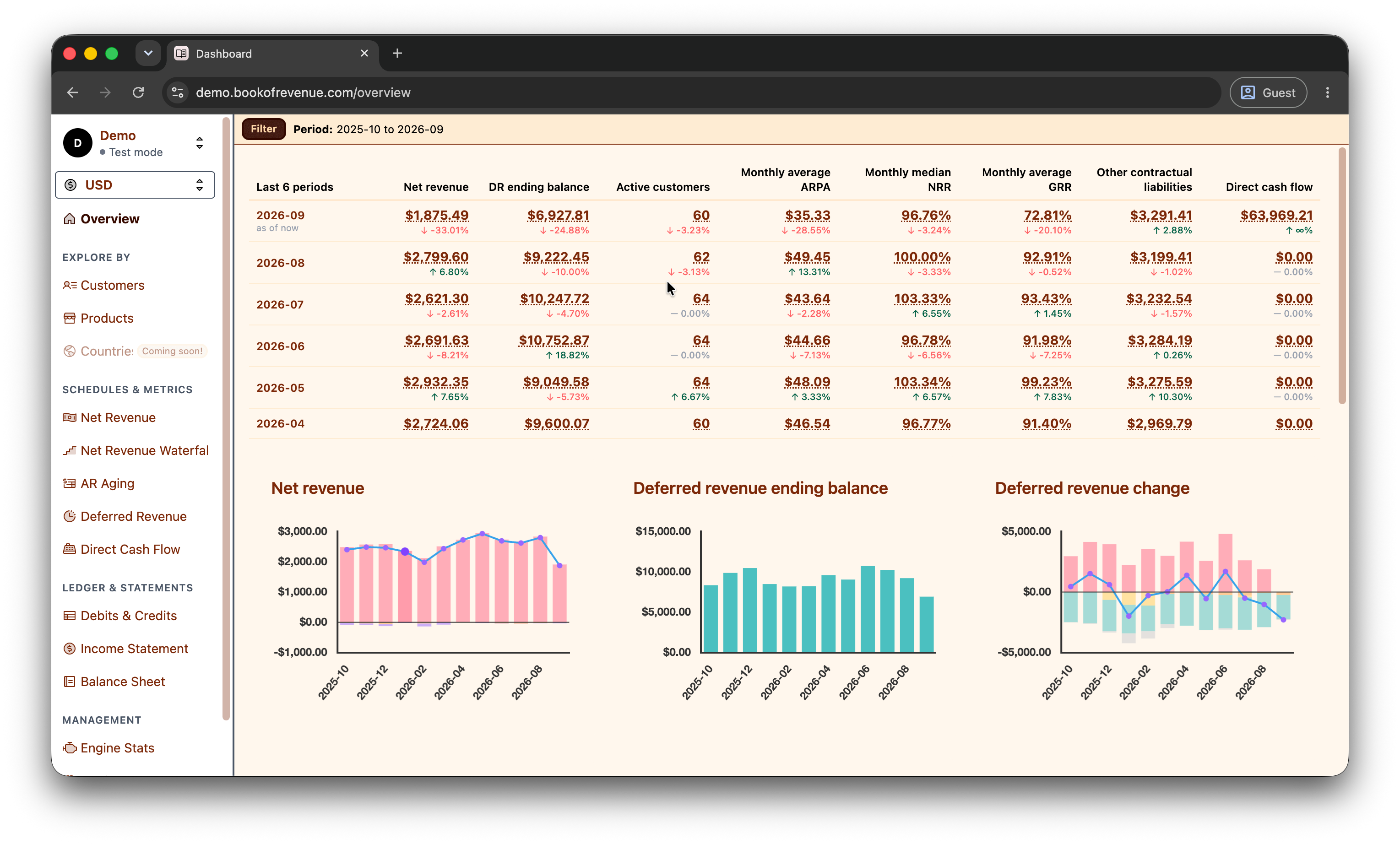
Overview |

Overview (more charts 1) |

Overview (more charts 2) |

Net revenue by customer and month |

GRR by customer and month |

Deferred revenue by customer and month |

Net revenue by product and month |

Net revenue breakdown for one specific product in a certain month |

Net revenue waterfall |

Net revenue waterfall by customer |

AR aging by customer |

Deferred revenue inflow and outflow |

Debits & credits |

Income statement |

Balance sheet |

Transaction (account summary) |

Transaction (debits & credits) |
Deploy
Requirements:
- A machine (e.g. dedicated machine, VPS, EC2, Render) that supports Docker
- A domain name (can be an IP address)
- A Postgres database or a persistent disk for deploying a Postgres instance
- BOR can manage its own Postgres instance if there's a persistent disk.
- For EC2 and Render, we recommend attaching a persistent disk. It's simpler to manage and cheaper.
- A Stripe API key (supports the live, test, and sandbox mode)
There are two ways: (1) use a managed Postgres instance or (2) let BOR manage its own Postgres on a persistent disk.
Use a managed Postgres instance
Deploy the docker image: tanin47/book-of-revenue:<VERSION> (see Releases for the latest version) and set the following environment variables:
DATABASE_URL: a Postgres database URL. The format:postgres://USER:PASSWORD@HOST:PORT/DATABASE_NAMEAPP_DOMAIN: the domain name of your BOR instance e.g.test.bookofrevenue.comCOOKIE_SECRET_KEY: any random string that is at least 32 characters long. This is used as the encryption key for the cookies
Let BOR manage its own Postgres on persistent disk
- SSH into your machine
- Install Docker
- Make a new directory for BOR and
cdinto the directory - Run
bash <(curl -sSL https://github.com/tanin47/book-of-revenue/releases/latest/download/install.sh) - Follow the instructions to set up the app domain and the data directory path in the
.envfile - Visit
http://APP_DOMAIN(not https) to set up an SSL certificate with Let's Encrypt - After setting up the SSL certificate, you will be asked to register with the username, password, and a Stripe API key.
Metronome setup
You'll need to contact Metronome (solutions@metronome.com) to set up the data export to BOR's postgres.
Please see this guide
Analytics and tracking
Self-hosted BOR doesn't track nor collect any data.
Contributing
Please see DEVELOP.md
Contributors

11 commits
Similar repos


Languages
Scala
62.2%
CSS
19.6%
Svelte
15.4%
TypeScript
1.2%
HTML
1.2%
Open-source revenue recognition & analytics for Stripe and Metronome. Built by ex-Stripe engineers.
See the codeSee what people are saying (1)
README
Book of Revenue
Book of Revenue (BOR) is an open-source revenue recognition and analytics for Stripe and Metronome. Built by ex-Stripe engineer.
It is a drop-in replacement for Stripe Revenue Recognition and offers revenue analytics that are aligned with the accounting standards.
Demo: demo.bookofrevenue.com (username: controller, password: 1234)
Key Features:
- Standard-Compliant: Translates Stripe transactions into precise journal entries that are aligned with the ASC 606 (for US) and IFRS 15 (global) accounting standards.
- Comprehensive Billing Coverage: Handles all Stripe Billing scenarios out of the box—including upgrades, downgrades, usage-based billing, credit grants, discounts, credit notes, taxes, uncollectibles, voids, multi-currency billing, and more.
- Accounting-grade Analytics: Delivers revenue analytics that automatically ties back to your accounting data.
- Near-Real-Time Data: Provides continuous, up-to-date visibility into your financial health. The current latency is ~45 minutes.
- Fully Auditable: Maintains audit-ready precision with full visibility into every transaction's journal entries, from executive summaries to individual line items.
- Customizable (coming soon!): Supports powerful custom revenue allocation rules, chart of accounts (COA) mapping, service period overrides, transaction exclusions, and date overrides (e.g. void date, uncollectible date).
- Native Metronome integration: Combines your Metronome and Stripe data into one set of accurate reports and analytics, updated daily — so usage and billing finally line up in the same numbers.
Comprehensive Reporting:
- Net revenue (i.e. monthly recognized revenue)
- Net revenue waterfall
- Deferred revenue
- AR Aging (aka overdue invoiced amount)
- Direct cash flow
- Net revenue retention (NRR)
- Gross revenue retention (GRR)
- Monthly active customers (i.e. the customers that contribute to revenue in a month)
- Contractual liabilities (e.g. customer balance, credit grants)
- Debits & credits
- Balance sheet
- Income statement
Website: bookofrevenue.com
Questions? Contact us at tanin (at) bookofrevenue.com
Screenshots
Click on a screenshot to see it in full size.
|
Overview |
Overview (more charts 1) |
Overview (more charts 2) |
|
Net revenue by customer and month |
GRR by customer and month |
Deferred revenue by customer and month |
|
Net revenue by product and month |
Net revenue breakdown for one specific product in a certain month |
Net revenue waterfall |
|
Net revenue waterfall by customer |
AR aging by customer |
Deferred revenue inflow and outflow |
|
Debits & credits |
Income statement |
Balance sheet |
|
Transaction (account summary) |
Transaction (debits & credits) |
Deploy
Requirements:
- A machine (e.g. dedicated machine, VPS, EC2, Render) that supports Docker
- A domain name (can be an IP address)
- A Postgres database or a persistent disk for deploying a Postgres instance
- BOR can manage its own Postgres instance if there's a persistent disk.
- For EC2 and Render, we recommend attaching a persistent disk. It's simpler to manage and cheaper.
- A Stripe API key (supports the live, test, and sandbox mode)
There are two ways: (1) use a managed Postgres instance or (2) let BOR manage its own Postgres on a persistent disk.
Use a managed Postgres instance
Deploy the docker image: tanin47/book-of-revenue:<VERSION> (see Releases for the latest version) and set the following environment variables:
DATABASE_URL: a Postgres database URL. The format:postgres://USER:PASSWORD@HOST:PORT/DATABASE_NAMEAPP_DOMAIN: the domain name of your BOR instance e.g.test.bookofrevenue.comCOOKIE_SECRET_KEY: any random string that is at least 32 characters long. This is used as the encryption key for the cookies
Let BOR manage its own Postgres on persistent disk
- SSH into your machine
- Install Docker
- Make a new directory for BOR and
cdinto the directory - Run
bash <(curl -sSL https://github.com/tanin47/book-of-revenue/releases/latest/download/install.sh) - Follow the instructions to set up the app domain and the data directory path in the
.envfile - Visit
http://APP_DOMAIN(not https) to set up an SSL certificate with Let's Encrypt - After setting up the SSL certificate, you will be asked to register with the username, password, and a Stripe API key.
Metronome setup
You'll need to contact Metronome (solutions@metronome.com) to set up the data export to BOR's postgres.
Please see this guide
Analytics and tracking
Self-hosted BOR doesn't track nor collect any data.
Contributing
Please see DEVELOP.md
Similar repos
Contributors
11 commits
Languages
Scala
62.2%
CSS
19.6%
Svelte
15.4%
TypeScript
1.2%
HTML
1.2%