
README
Wax
WebAuthn library for elixir

Goal: implement a comprehensive FIDO2 library on the server side (Relying party or RP in the WebAuthn terminology) to authenticate users with WebAuthn.
For semantics (FIDO2, WebAuthn, FIDO...), read this article
Demo app
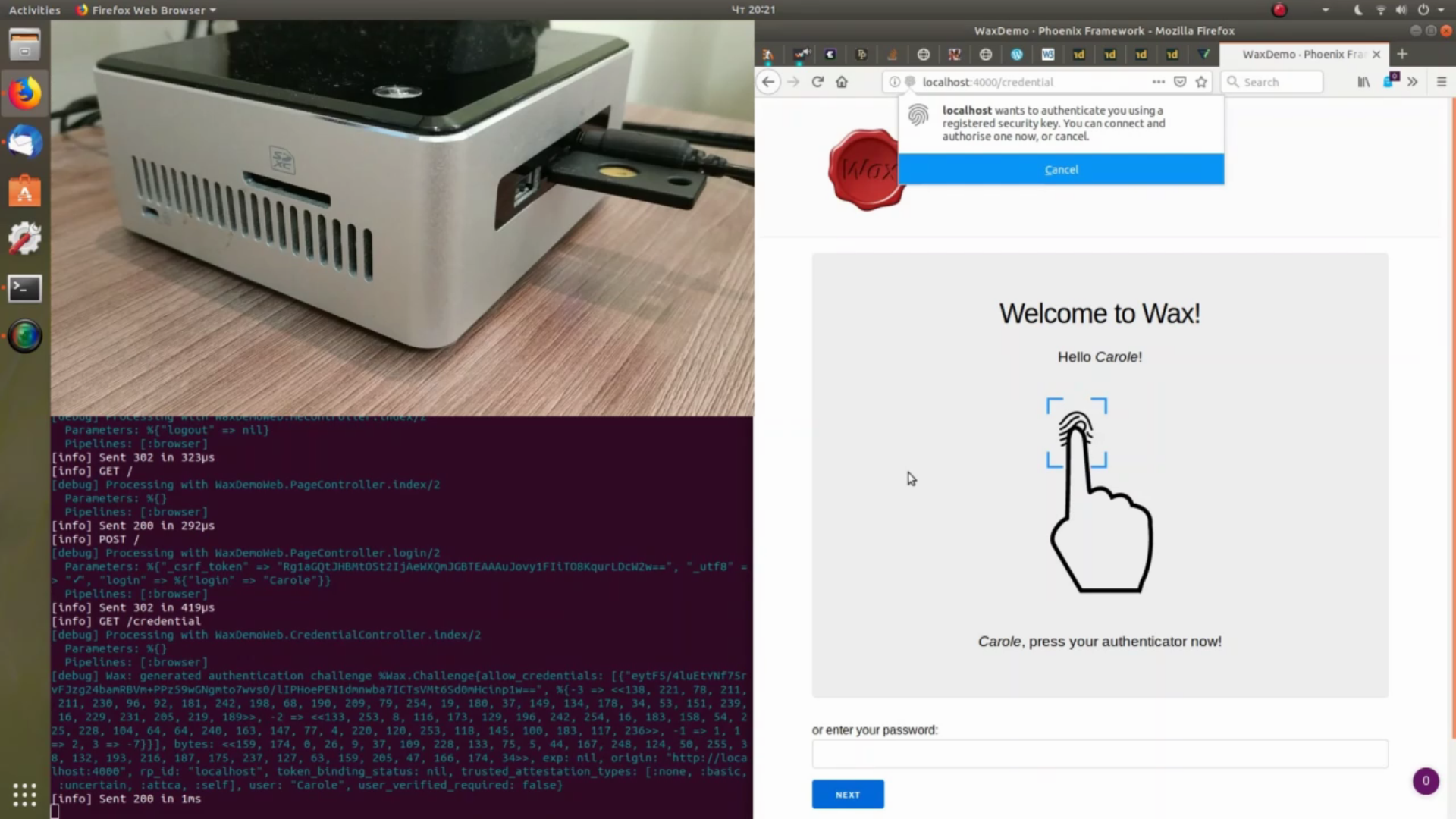
You can try out and study WebAuthn authentication with Wax thanks to the wax_demo test application.
See also a video demonstration of an authentication flow which allows replacing the password authentication scheme by a WebAuthn password-less authentication:
Project status
- Support the FIDO2 standard (especially all types of attestation statement formats and all mandatory algorithms). See the "Support of FIDO2" section for further information
- Passes all the 170 tests of the official test suite (tested using WaxFidoTestSuiteServer)
- This library has not be reviewed by independent security / FIDO2 specialists - use it at your own risks or blindly trust its author!
- This library does not come with a javascript library to handle WebAuthn calls
Compatibility
OTP25+
Installation
Add the following line to your list of dependencies in mix.exs:
def deps do
  [
    {:wax_, "~> 0.7.0"}
  ]
end
Note that due to a name collision, the application
name is :wax_, and not :wax. It doesn't cause issues using both library because the other's
package doesn't use the atom Wax as the base module name.
Usage
To use FIDO2 for authentication, you must first register a new FIDO2 key for a user. The process is therefore the following:
- Register a FIDO2 key for a user
- Authenticate as much as you want the user using the FIDO2 key registered in step 1
Optionaly, you might want to store more than one key, for instance if the user have several authenticators.
The Wax library doesn't provide with a user data store to store the key generated in step
1 and to retrieve it in step 2. Instead, it lets you use any data store. The data to
be stored is described in the Wax module's documentation.
Registration
Wax provides with 2 functions for registration:
Wax.new_registration_challenge/1: generates a challenge that must subsequently be sent to the client for use by the javascript WebAuthn APIWax.register/3: takes into parameter the response of the WebAuthn javascript API and the challenge generated in step 1, and verifies it
Since the challenge generated in step 1 must be passed as a parameter in step 2, it is required to persist it on the server side, for instance in the session:
# generating a challenge

challenge = Wax.new_registration_challenge()

conn
|> put_session(:challenge, challenge)
|> render(register_key_page, challenge: challenge.bytes)
# the challenge is to be sent on the client one way or another
# this can be direct within the HTML, or using an API call
to be then retrieved when verifying the assertion:
challenge = get_session(conn, :challenge)

case Wax.register(attestation_object, client_data_json, challenge) do
	{:ok, {authenticator_data, attestation_result}} ->
		# success case

	{:error, e} ->
		# verification failure
end
In the success case, a server will save the credential id (generated by the WebAuthn javascript call) and the cose key in its user database for use for authentication.
Authenticator data contains the COSE key generated by the authenticator, which can be
found in authenticator_data.attested_credential_data.credential_public_key:
%{
  -3 => <<182, 81, 183, 218, 92, 107, 106, 120, 60, 51, 75, 104, 141, 130,
    119, 232, 34, 245, 84, 203, 246, 165, 148, 179, 169, 31, 205, 126, 241,
    188, 241, 176>>,
  -2 => <<89, 29, 193, 225, 4, 234, 101, 162, 32, 6, 15, 14, 130, 179, 223,
    207, 53, 2, 134, 184, 178, 127, 51, 145, 57, 180, 104, 242, 138, 96, 27,
    221>>,
  -1 => 1,
  1 => 2,
  3 => -7
}
It probably doesn't need to be searchable or indexed, which is why one can store as a binary.
To convert back and forth Elixir data structures to binary and store the keys in a database
(SQL, for instance), take a look at the Erlang functions :erlang.term_to_binary/1 and
:erlang.binary_to_term/1.
For further information, refer to the Wax module documentation.
Authentication
The process is quite similar, with 2 functions for authentication:
Wax.new_authentication_challenge/1: generates a challenge from a list of{credential id, key}saved during the registration processes. It also has to be sent to the client for use by the javascript WebAuthn APIWax.authenticate/5: to be called to verify the WebAuthn javascript API response with the returned data (composed of signature, authenticator data, etc.) with the challenge generated in step 1
This also requires storing the challenge:
cred_ids_and_keys = UserStore.get_keys(username)

challenge = Wax.new_authentication_challenge(allow_credentials: cred_ids_and_keys)

conn
|> put_session(:authentication_challenge, challenge)
|> render(auth_verify_page, challenge: challenge.bytes, creds: cred_ids_and_keys)
# the challenge is to be sent on the client one way or another
# this can be direct within the HTML, or using an API call
to be passed as a paramter to the Wax.authenticate/5 function:
challenge = get_session(conn, :authentication_challenge)

case Wax.authenticate(raw_id, authenticator_data, sig, client_data_json, challenge) do
	{:ok, _} ->
		# ok, user authenticated

	{:error, _} ->
		# invalid WebAuthn response
end
For further information, refer to the Wax module documentation.
Options
The options are set when generating the challenge (for both registration and authentication). Options can be configured either globally in the configuration file or when generating the challenge. Some also have default values.
Option values set during challenge generation take precedence over globally configured options, which takes precedence over default values.
These options are:
| Option | Type | Applies to | Default value | Notes |
|---|---|---|---|---|
attestation | "none" or "direct" | registration | "none" | |
origin | String.t() or [String.t()] | registration & authentication | Mandatory. Example: https://www.example.com or ["www.example.com", "biz.example.com"] | |
rp_id | String.t() or :auto | registration & authentication | If set to :auto, automatically determined from the origin (set to the host) if it is a string | With :auto, it defaults to the full host (e.g.: www.example.com). This option allow you to set the rp_id to another valid value (e.g.: example.com) |
user_verification | "discouraged", "preferred" or "required" | registration & authentication | "preferred" | |
trusted_attestation_types | [t:Wax.Attestation.type/0] | registration | [:none, :basic, :uncertain, :attca, :anonca, :self] | |
verify_trust_root | boolean() | registration | true | Only for u2f and packed attestation. tpm attestation format is always checked against metadata |
acceptable_authenticator_statuses | [String.t()] | registration | ["FIDO_CERTIFIED", "FIDO_CERTIFIED_L1", "FIDO_CERTIFIED_L1plus", "FIDO_CERTIFIED_L2", "FIDO_CERTIFIED_L2plus", "FIDO_CERTIFIED_L3", "FIDO_CERTIFIED_L3plus"] | The "UPDATE_AVAILABLE" status is not whitelisted by default |
timeout | non_neg_integer() | registration & authentication | 20 * 60 | The validity duration of a challenge, in seconds |
android_key_allow_software_enforcement | boolean() | registration | false | When registration is a Android key, determines whether software enforcement is acceptable (true) or only hardware enforcement is (false) |
silent_authentication_enabled | boolean() | authentication | false | See https://github.com/fido-alliance/conformance-tools-issues/issues/434 |
bytes | binary() | registration & authentication | random bytes | Allows to provide with your own challenge. This is not recommended unless you know what you're doing. Refer to the Security considerations for more information |
origin_verify_fun | MFA tuple | registration & authentication | {Wax, :origins_match?, []} | The origin can be checked against a unique origin or a list of origin, using the :origin option. This option allows to modify the verify function so as to, for example, check subdomains of an allowed origin. It accepts an MFA tuple. The origins from the client data and the challenge are appended to the arguments |
FIDO2 Metadata
If you use attestation, you need to enabled metadata.
Configuring MDSv3 metadata
This is the official metadata service of the FIDO foundation.
Set the :update_metadata environment variable to true and metadata will load
automatically through HTTP from
https://mds3.fidoalliance.org/.
Loading FIDO2 metadata from a directory
In addition to the FIDO2 metadata service, it is possible to load metadata from a directory.
To do so, the :metadata_dir application environment variable must be set to one of:
- a
String.t(): the path to the directory containing the metadata files - an
atom(): in this case, the files are loaded from the"fido2_metadata"directory of the private ("priv/") directory of the application (whose name is the atom)
In both case, Wax tries to load all files (even directories and other special files).
Example configuration
config :wax_,
  origin: "http://localhost:4000",
  rp_id: :auto,
  metadata_dir: :my_application
will try to load all files of the "priv/fido2_metadata/" of the :my_application as FIDO2
metadata statements. On failure, a warning is emitted.
Security considerations
- Make sure to understand the implications of not using attested credentials before
accepting
noneorselfattestation types, or disabling it forpackedandu2fformats by disabling it with theverify_trust_rootoption - This library has not be reviewed by independent security / FIDO2 specialists - use it at your own risks or blindly trust its author! If you're knowledgeable about FIDO2 and willing to help reviewing it, please contact the author
- When providing your own challenge, please make sure to understand that:
- it explicitly violates the recommandation in the standard
- it exposes you to some attacks (such as replay attacks)
- you have no guarantee that the user understood what he has been signing (no specific browser UI was presented)
- When using the
origin_verify_funoption, make sure to understand the security implications of it. In particular, if you're using it to check against subdomains using a wildcard (*.example.com), use a library such asDomainatrex- incorrect wildcard parsing is a frequent cause of security blunder
Changes
See CHANGELOG.md.
Support of FIDO2
Server Requirements and Transport Binding Profile
2. Registration and Attestations
- Mandatory: registration support
- Mandatory: random challenge
- 2.1. Validating Attestation
- Mandatory: attestation validation
- Mandatory: attestation certificate chains (note: can be disabled through an option)
- Mandatory: validation of attestation through the FIDO Metadata Service
- 2.2. Attestation Types
- Mandatory: basic attestation
- Mandatory: self attestation
- Mandatory: private CA attestation
- Optional: elliptic curve direct anonymous attestation
- 2.3. Attestation Formats
- Mandatory: packed attestation
- Mandatory: TPM attestation
- Optional: Android key attestation
- Mandatory: U2F attestation
- Deprecated: Android Safetynet attestation (removed in
v0.7.0) - Mandatory: Apple Anonymous
3. Authentication and Assertions
- Mandatory: authentication
- Mandatory: random challenge
- Mandatory: assertion signature validation
- Mandatory: TUP verification (note: and also user verified, through an option)
4. Communication Channel Requirements
- Optional: TokenBinding support (won't be supported following Chrome drop of the now dead token binding standard)
- Mandatory: registration and authentication support without extension
- Optional: extension support
- Optional: appid extension support
- Mandatory: RS1 (RSASSA-PKCS1-v1_5 w/ SHA-1) algorithm support
- Mandatory: RS256 (RSASSA-PKCS1-v1_5 w/ SHA-256) algorithm support
- Optional: RS384 (RSASSA-PKCS1-v1_5 w/ SHA-384) algorithm support
- Optional: RS512 (RSASSA-PKCS1-v1_5 w/ SHA-512) algorithm support
- Optional: PS256 (RSASSA-PSS w/ SHA-256) algorithm support
- Optional: PS384 (RSASSA-PSS w/ SHA-384) algorithm support
- Optional: PS512 (RSASSA-PSS w/ SHA-512) algorithm support
- Mandatory: ES256 (ECDSA using P-256 and SHA-256) algorithm support
- Optional: ES384 (ECDSA using P-384 and SHA-384) algorithm support
- Optional: ES512 (ECDSA using P-521 and SHA-512) algorithm support
- Optional: EdDSA algorithm support
- Optional: ES256K (ECDSA using P-256K and SHA-256) algorithm support
- Mandatory: compliance with the FIDO privacy principles (note: out-of-scope, to be implemented by the server using the Wax library)
- optional: API implementation (
WaxAPIRest)
FIDO Metadata Service
3.1.8 Metadata TOC object processing rules
- TOC verification against the
x5uattribute (note: doesn't seem to be used) - TOC verification against the
x5cattribute - TOC CRLs verification
- Loading and verification of metadata statements against the hased value of the TOC
- Handling of the status of the authenticator (through whitelisting, see the
:acceptable_authenticator_statusesoption)
Global environment variables
setup_for_conformance_suite: set totrueto enable what's needed top run the conformance test suite. Only works when the Mix environment is:dev
Contributors


Similar repos


Languages
Elixir
100.0%
README
Wax
WebAuthn library for elixir
Goal: implement a comprehensive FIDO2 library on the server side (Relying party or RP in the WebAuthn terminology) to authenticate users with WebAuthn.
For semantics (FIDO2, WebAuthn, FIDO...), read this article
Demo app
You can try out and study WebAuthn authentication with Wax thanks to the wax_demo test application.
See also a video demonstration of an authentication flow which allows replacing the password authentication scheme by a WebAuthn password-less authentication:
Project status
- Support the FIDO2 standard (especially all types of attestation statement formats and all mandatory algorithms). See the "Support of FIDO2" section for further information
- Passes all the 170 tests of the official test suite (tested using WaxFidoTestSuiteServer)
- This library has not be reviewed by independent security / FIDO2 specialists - use it at your own risks or blindly trust its author!
- This library does not come with a javascript library to handle WebAuthn calls
Compatibility
OTP25+
Installation
Add the following line to your list of dependencies in mix.exs:
def deps do
  [
    {:wax_, "~> 0.7.0"}
  ]
end
Note that due to a name collision, the application
name is :wax_, and not :wax. It doesn't cause issues using both library because the other's
package doesn't use the atom Wax as the base module name.
Usage
To use FIDO2 for authentication, you must first register a new FIDO2 key for a user. The process is therefore the following:
- Register a FIDO2 key for a user
- Authenticate as much as you want the user using the FIDO2 key registered in step 1
Optionaly, you might want to store more than one key, for instance if the user have several authenticators.
The Wax library doesn't provide with a user data store to store the key generated in step
1 and to retrieve it in step 2. Instead, it lets you use any data store. The data to
be stored is described in the Wax module's documentation.
Registration
Wax provides with 2 functions for registration:
Wax.new_registration_challenge/1: generates a challenge that must subsequently be sent to the client for use by the javascript WebAuthn APIWax.register/3: takes into parameter the response of the WebAuthn javascript API and the challenge generated in step 1, and verifies it
Since the challenge generated in step 1 must be passed as a parameter in step 2, it is required to persist it on the server side, for instance in the session:
# generating a challenge

challenge = Wax.new_registration_challenge()

conn
|> put_session(:challenge, challenge)
|> render(register_key_page, challenge: challenge.bytes)
# the challenge is to be sent on the client one way or another
# this can be direct within the HTML, or using an API call
to be then retrieved when verifying the assertion:
challenge = get_session(conn, :challenge)

case Wax.register(attestation_object, client_data_json, challenge) do
	{:ok, {authenticator_data, attestation_result}} ->
		# success case

	{:error, e} ->
		# verification failure
end
In the success case, a server will save the credential id (generated by the WebAuthn javascript call) and the cose key in its user database for use for authentication.
Authenticator data contains the COSE key generated by the authenticator, which can be
found in authenticator_data.attested_credential_data.credential_public_key:
%{
  -3 => <<182, 81, 183, 218, 92, 107, 106, 120, 60, 51, 75, 104, 141, 130,
    119, 232, 34, 245, 84, 203, 246, 165, 148, 179, 169, 31, 205, 126, 241,
    188, 241, 176>>,
  -2 => <<89, 29, 193, 225, 4, 234, 101, 162, 32, 6, 15, 14, 130, 179, 223,
    207, 53, 2, 134, 184, 178, 127, 51, 145, 57, 180, 104, 242, 138, 96, 27,
    221>>,
  -1 => 1,
  1 => 2,
  3 => -7
}
It probably doesn't need to be searchable or indexed, which is why one can store as a binary.
To convert back and forth Elixir data structures to binary and store the keys in a database
(SQL, for instance), take a look at the Erlang functions :erlang.term_to_binary/1 and
:erlang.binary_to_term/1.
For further information, refer to the Wax module documentation.
Authentication
The process is quite similar, with 2 functions for authentication:
Wax.new_authentication_challenge/1: generates a challenge from a list of{credential id, key}saved during the registration processes. It also has to be sent to the client for use by the javascript WebAuthn APIWax.authenticate/5: to be called to verify the WebAuthn javascript API response with the returned data (composed of signature, authenticator data, etc.) with the challenge generated in step 1
This also requires storing the challenge:
cred_ids_and_keys = UserStore.get_keys(username)

challenge = Wax.new_authentication_challenge(allow_credentials: cred_ids_and_keys)

conn
|> put_session(:authentication_challenge, challenge)
|> render(auth_verify_page, challenge: challenge.bytes, creds: cred_ids_and_keys)
# the challenge is to be sent on the client one way or another
# this can be direct within the HTML, or using an API call
to be passed as a paramter to the Wax.authenticate/5 function:
challenge = get_session(conn, :authentication_challenge)

case Wax.authenticate(raw_id, authenticator_data, sig, client_data_json, challenge) do
	{:ok, _} ->
		# ok, user authenticated

	{:error, _} ->
		# invalid WebAuthn response
end
For further information, refer to the Wax module documentation.
Options
The options are set when generating the challenge (for both registration and authentication). Options can be configured either globally in the configuration file or when generating the challenge. Some also have default values.
Option values set during challenge generation take precedence over globally configured options, which takes precedence over default values.
These options are:
| Option | Type | Applies to | Default value | Notes |
|---|---|---|---|---|
attestation | "none" or "direct" | registration | "none" | |
origin | String.t() or [String.t()] | registration & authentication | Mandatory. Example: https://www.example.com or ["www.example.com", "biz.example.com"] | |
rp_id | String.t() or :auto | registration & authentication | If set to :auto, automatically determined from the origin (set to the host) if it is a string | With :auto, it defaults to the full host (e.g.: www.example.com). This option allow you to set the rp_id to another valid value (e.g.: example.com) |
user_verification | "discouraged", "preferred" or "required" | registration & authentication | "preferred" | |
trusted_attestation_types | [t:Wax.Attestation.type/0] | registration | [:none, :basic, :uncertain, :attca, :anonca, :self] | |
verify_trust_root | boolean() | registration | true | Only for u2f and packed attestation. tpm attestation format is always checked against metadata |
acceptable_authenticator_statuses | [String.t()] | registration | ["FIDO_CERTIFIED", "FIDO_CERTIFIED_L1", "FIDO_CERTIFIED_L1plus", "FIDO_CERTIFIED_L2", "FIDO_CERTIFIED_L2plus", "FIDO_CERTIFIED_L3", "FIDO_CERTIFIED_L3plus"] | The "UPDATE_AVAILABLE" status is not whitelisted by default |
timeout | non_neg_integer() | registration & authentication | 20 * 60 | The validity duration of a challenge, in seconds |
android_key_allow_software_enforcement | boolean() | registration | false | When registration is a Android key, determines whether software enforcement is acceptable (true) or only hardware enforcement is (false) |
silent_authentication_enabled | boolean() | authentication | false | See https://github.com/fido-alliance/conformance-tools-issues/issues/434 |
bytes | binary() | registration & authentication | random bytes | Allows to provide with your own challenge. This is not recommended unless you know what you're doing. Refer to the Security considerations for more information |
origin_verify_fun | MFA tuple | registration & authentication | {Wax, :origins_match?, []} | The origin can be checked against a unique origin or a list of origin, using the :origin option. This option allows to modify the verify function so as to, for example, check subdomains of an allowed origin. It accepts an MFA tuple. The origins from the client data and the challenge are appended to the arguments |
FIDO2 Metadata
If you use attestation, you need to enabled metadata.
Configuring MDSv3 metadata
This is the official metadata service of the FIDO foundation.
Set the :update_metadata environment variable to true and metadata will load
automatically through HTTP from
https://mds3.fidoalliance.org/.
Loading FIDO2 metadata from a directory
In addition to the FIDO2 metadata service, it is possible to load metadata from a directory.
To do so, the :metadata_dir application environment variable must be set to one of:
- a
String.t(): the path to the directory containing the metadata files - an
atom(): in this case, the files are loaded from the"fido2_metadata"directory of the private ("priv/") directory of the application (whose name is the atom)
In both case, Wax tries to load all files (even directories and other special files).
Example configuration
config :wax_,
  origin: "http://localhost:4000",
  rp_id: :auto,
  metadata_dir: :my_application
will try to load all files of the "priv/fido2_metadata/" of the :my_application as FIDO2
metadata statements. On failure, a warning is emitted.
Security considerations
- Make sure to understand the implications of not using attested credentials before
accepting
noneorselfattestation types, or disabling it forpackedandu2fformats by disabling it with theverify_trust_rootoption - This library has not be reviewed by independent security / FIDO2 specialists - use it at your own risks or blindly trust its author! If you're knowledgeable about FIDO2 and willing to help reviewing it, please contact the author
- When providing your own challenge, please make sure to understand that:
- it explicitly violates the recommandation in the standard
- it exposes you to some attacks (such as replay attacks)
- you have no guarantee that the user understood what he has been signing (no specific browser UI was presented)
- When using the
origin_verify_funoption, make sure to understand the security implications of it. In particular, if you're using it to check against subdomains using a wildcard (*.example.com), use a library such asDomainatrex- incorrect wildcard parsing is a frequent cause of security blunder
Changes
See CHANGELOG.md.
Support of FIDO2
Server Requirements and Transport Binding Profile
2. Registration and Attestations
- Mandatory: registration support
- Mandatory: random challenge
- 2.1. Validating Attestation
- Mandatory: attestation validation
- Mandatory: attestation certificate chains (note: can be disabled through an option)
- Mandatory: validation of attestation through the FIDO Metadata Service
- 2.2. Attestation Types
- Mandatory: basic attestation
- Mandatory: self attestation
- Mandatory: private CA attestation
- Optional: elliptic curve direct anonymous attestation
- 2.3. Attestation Formats
- Mandatory: packed attestation
- Mandatory: TPM attestation
- Optional: Android key attestation
- Mandatory: U2F attestation
- Deprecated: Android Safetynet attestation (removed in
v0.7.0) - Mandatory: Apple Anonymous
3. Authentication and Assertions
- Mandatory: authentication
- Mandatory: random challenge
- Mandatory: assertion signature validation
- Mandatory: TUP verification (note: and also user verified, through an option)
4. Communication Channel Requirements
- Optional: TokenBinding support (won't be supported following Chrome drop of the now dead token binding standard)
- Mandatory: registration and authentication support without extension
- Optional: extension support
- Optional: appid extension support
- Mandatory: RS1 (RSASSA-PKCS1-v1_5 w/ SHA-1) algorithm support
- Mandatory: RS256 (RSASSA-PKCS1-v1_5 w/ SHA-256) algorithm support
- Optional: RS384 (RSASSA-PKCS1-v1_5 w/ SHA-384) algorithm support
- Optional: RS512 (RSASSA-PKCS1-v1_5 w/ SHA-512) algorithm support
- Optional: PS256 (RSASSA-PSS w/ SHA-256) algorithm support
- Optional: PS384 (RSASSA-PSS w/ SHA-384) algorithm support
- Optional: PS512 (RSASSA-PSS w/ SHA-512) algorithm support
- Mandatory: ES256 (ECDSA using P-256 and SHA-256) algorithm support
- Optional: ES384 (ECDSA using P-384 and SHA-384) algorithm support
- Optional: ES512 (ECDSA using P-521 and SHA-512) algorithm support
- Optional: EdDSA algorithm support
- Optional: ES256K (ECDSA using P-256K and SHA-256) algorithm support
- Mandatory: compliance with the FIDO privacy principles (note: out-of-scope, to be implemented by the server using the Wax library)
- optional: API implementation (
WaxAPIRest)
FIDO Metadata Service
3.1.8 Metadata TOC object processing rules
- TOC verification against the
x5uattribute (note: doesn't seem to be used) - TOC verification against the
x5cattribute - TOC CRLs verification
- Loading and verification of metadata statements against the hased value of the TOC
- Handling of the status of the authenticator (through whitelisting, see the
:acceptable_authenticator_statusesoption)
Global environment variables
setup_for_conformance_suite: set totrueto enable what's needed top run the conformance test suite. Only works when the Mix environment is:dev
Similar repos
Contributors
Languages
Elixir
100.0%