t1m0thyj/collage-builder

TypeScript

3

83 commits

updated Oct 18, 2026

See the code

See what people are saying

SourceMessageScoreDate

I built a free collage maker web app that works offline (r/SideProject)

I created this [Collage Builder](https://t1m0thyj.github.io/collage-builder/) to make collages of photos from my road trips. Previously I've used the free tier of tools like Fotor and got annoyed by their limitations. So I decided to build an alternative that's completely free, doesn't require…

3

Oct 13, 2026

README

Collage Builder

Create photo collages right in your browser. Choose a layout, arrange your photos, and download a finished collage — no installation or account needed. Your photos stay on your device.
Open Collage Builder

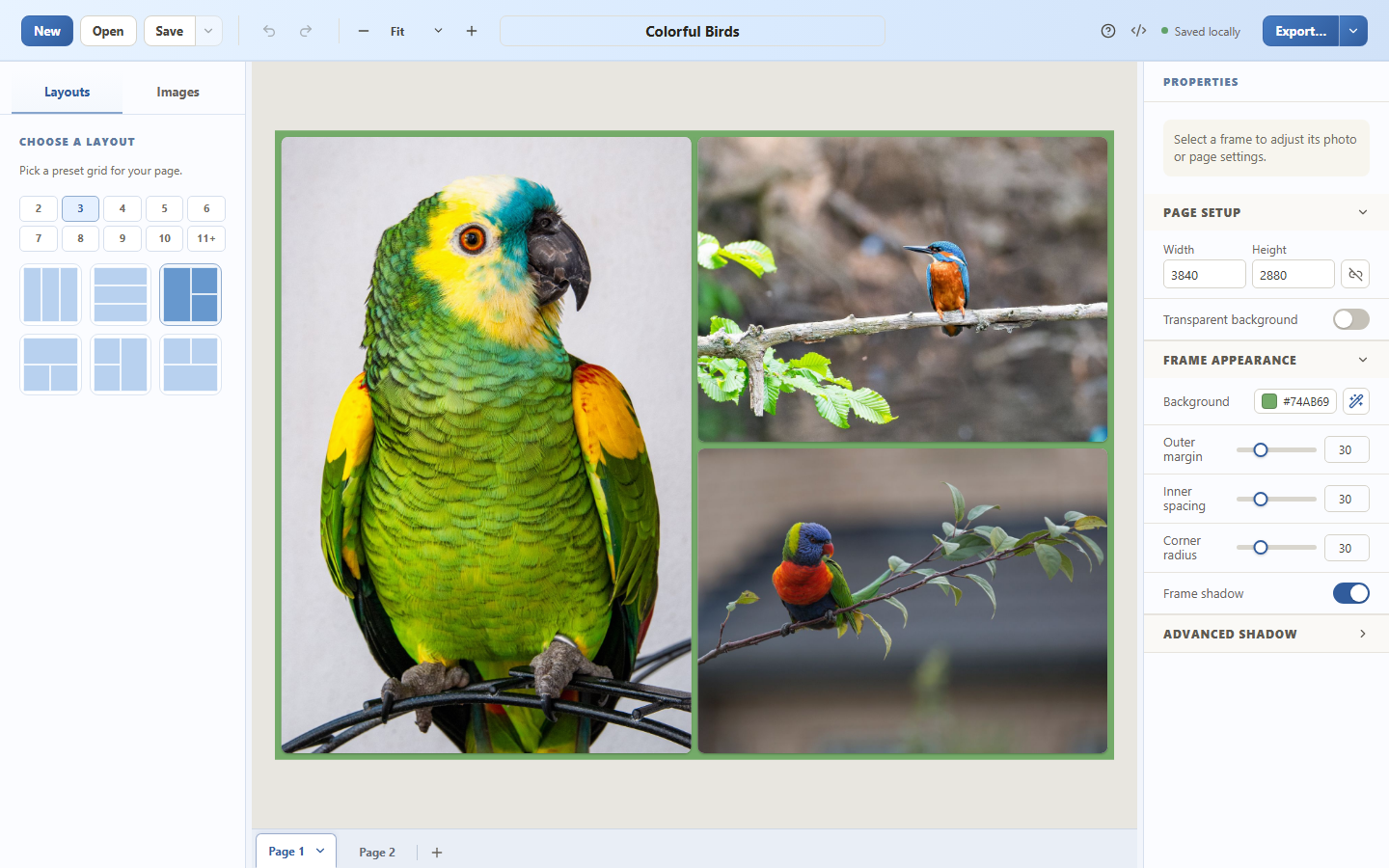
Collage Builder editor showing a three-photo bird collage, layout choices, and page appearance controls

Download the sample collage to try it yourself. Bird photos are royalty-free under the Pexels License [1] [2] [3].

Make your first collage

  1. Open the app and choose Add photos, or drag your photos into the editor.
  2. Pick a layout and drag photos into its frames.
  3. Adjust the crop, spacing, rounded corners, background color, and shadows to suit your photos.
  4. Choose Export to download your collage as PNG or JPEG.

Use Save to keep an editable .collage project with your photos included, then Open it to continue later. To recreate the screenshot, open the sample linked above. The user guide covers more options and keyboard shortcuts.

For the best experience, use a desktop or tablet with a browser window at least 768 pixels wide.

Features

  • Flexible layouts: arrange your photos in rectangular frames and customize their appearance.
  • Multiple pages: create a collection of collages in one project; export a single page, all pages, or a range.
  • Common photo formats: import JPEG, PNG, WebP, HEIC, and HEIF images.
  • Editable projects: save everything in a portable .collage file, or use a smaller .collage.json project that links to your image files.
  • Private editing: photos, projects, and recovery saves stay in your browser unless you save or export them. Read the privacy details.
  • Offline access: open the app while online and wait for the offline icon in the top bar (hover to see App available offline). You can then return in the same browser without a connection. See offline use.

The app automatically keeps recent drafts in your browser. Use Save for work you want to keep; clearing this website's browser data removes those drafts.

Help and feedback

Development and self-hosting

To run Collage Builder locally:

Requires Bun 1.4 or newer. The development and CI version is pinned in .bun-version.

bun install --frozen-lockfile
bun run dev

For a production build, run bun run build. The output in dist/ can be served by any static HTTPS host.

See the development guide, self-hosting instructions, and release process for more details.

License

Copyright 2026 Timothy Johnson. Licensed under the Apache License 2.0. Third-party components remain under their own licenses.

t1m0thyj/collage-builder

TypeScript

3

83 commits

updated Oct 18, 2026

See the code

See what people are saying

SourceMessageScoreDate

I built a free collage maker web app that works offline (r/SideProject)

I created this [Collage Builder](https://t1m0thyj.github.io/collage-builder/) to make collages of photos from my road trips. Previously I've used the free tier of tools like Fotor and got annoyed by their limitations. So I decided to build an alternative that's completely free, doesn't require…

3

Oct 13, 2026

README

Collage Builder

Create photo collages right in your browser. Choose a layout, arrange your photos, and download a finished collage — no installation or account needed. Your photos stay on your device.

Open Collage Builder

Collage Builder editor showing a three-photo bird collage, layout choices, and page appearance controls

Download the sample collage to try it yourself. Bird photos are royalty-free under the Pexels License [1] [2] [3].

Make your first collage

  1. Open the app and choose Add photos, or drag your photos into the editor.
  2. Pick a layout and drag photos into its frames.
  3. Adjust the crop, spacing, rounded corners, background color, and shadows to suit your photos.
  4. Choose Export to download your collage as PNG or JPEG.

Use Save to keep an editable .collage project with your photos included, then Open it to continue later. To recreate the screenshot, open the sample linked above. The user guide covers more options and keyboard shortcuts.

For the best experience, use a desktop or tablet with a browser window at least 768 pixels wide.

Features

  • Flexible layouts: arrange your photos in rectangular frames and customize their appearance.
  • Multiple pages: create a collection of collages in one project; export a single page, all pages, or a range.
  • Common photo formats: import JPEG, PNG, WebP, HEIC, and HEIF images.
  • Editable projects: save everything in a portable .collage file, or use a smaller .collage.json project that links to your image files.
  • Private editing: photos, projects, and recovery saves stay in your browser unless you save or export them. Read the privacy details.
  • Offline access: open the app while online and wait for the offline icon in the top bar (hover to see App available offline). You can then return in the same browser without a connection. See offline use.

The app automatically keeps recent drafts in your browser. Use Save for work you want to keep; clearing this website's browser data removes those drafts.

Help and feedback

Development and self-hosting

To run Collage Builder locally:

Requires Bun 1.4 or newer. The development and CI version is pinned in .bun-version.

bun install --frozen-lockfile
bun run dev

For a production build, run bun run build. The output in dist/ can be served by any static HTTPS host.

See the development guide, self-hosting instructions, and release process for more details.

License

Copyright 2026 Timothy Johnson. Licensed under the Apache License 2.0. Third-party components remain under their own licenses.