KGRxn-LLM is a knowledge-graph-integrated framework designed to advance knowledge-grounded molecular reasoning with LLMs. It includes a hierarchical chemical knowledge graph and a benchmark for evaluating the molecular reaction reasoning ability of LLMs.
Python
2
0 commits
updated May 11, 2026
Official code repository for the paper: KGRxn-LLM: Knowledge Graph Enhanced Large Language Models for Molecular Reaction Reasoning
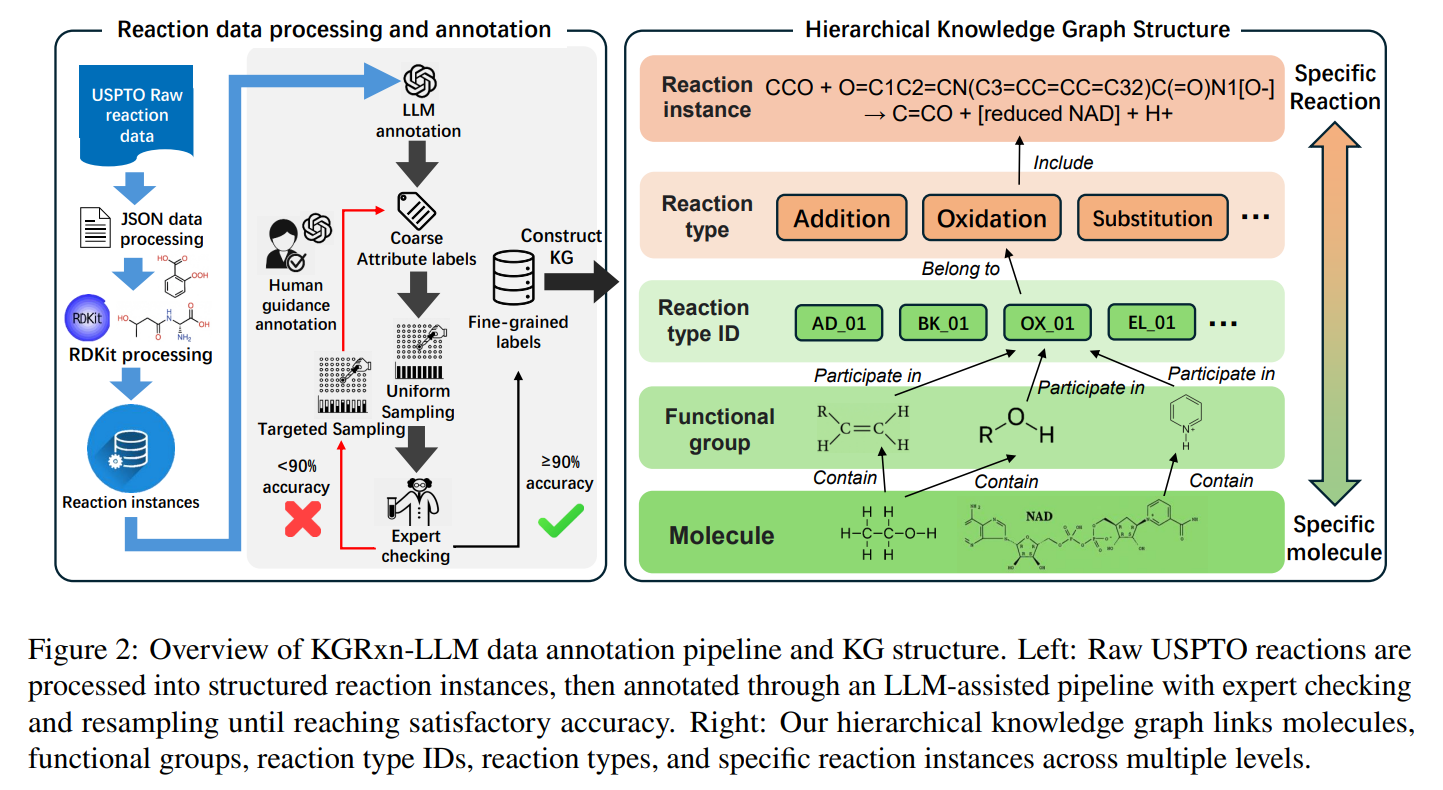
KGRxn-LLM augments LLMs with a hierarchical chemical knowledge graph and a functional-group-centric agentic retrieval mechanism for molecular reaction reasoning. This repo contains:
method/) that LLMs query at inference time.benchmark/KGRXN_bench/) and evaluation scripts for every model reported in the paper.git clone https://github.com/svical/KGRxn-LLM.git
cd KGRXN-LLM
conda create -n kgrxn python=3.11 -y && conda activate kgrxn
pip install -r requirements.txt
Requires Python 3.11+ with RDKit, DeepChem, PyTorch + Transformers, and a Neo4j instance (Aura free tier works).
Copy .env.example to .env at the project root and fill in your Neo4j details. The .env file is gitignored. For an Aura instance, the credentials.txt that Aura gives you has the exact format expected.
cp .env.example .env
$EDITOR .env
NEO4J_URI=neo4j+s://YOUR_INSTANCE_ID.databases.neo4j.io
NEO4J_USERNAME=neo4j
NEO4J_PASSWORD=your_password
NEO4J_DATABASE=neo4j
All RAG/tool modules under method/ and the util/run_cypher.py loader read these values at import time via method/_neo4j_config.py. Real environment variables (e.g. export NEO4J_URI=...) override .env.
Download ord_search_results.json from Google Drive and place it in the project root, then run:
./run_pipeline.sh ord_search_results.json
This runs all annotation steps in util/ on every reaction in the input and writes outputs to csvfile/ and cypher_files/. Pass --limit N for a quick smoke test on the first N reactions. You can also run individual steps in util/ for debugging purpose.
With .env configured (see Installation), simply:
python util/run_cypher.py cypher_files/reaction_types.cypher
python util/run_cypher.py cypher_files/molecules_and_FG.cypher
python util/run_cypher.py cypher_files/reactions.cypher
python util/run_cypher.py cypher_files/molecule_properties.cypher
Defaults are read from .env; pass --uri / --user / --password / --database to override per-invocation.
If you want to regenerate KGRxn-Bench from your own KG:
python generate_benchmark/functional_group_question.py
python generate_benchmark/reaction_type_question.py
python generate_benchmark/reaction_product.py
python generate_benchmark/add_wrong_in_product.py
python generate_benchmark/reagent_question.py
The pre-built benchmark is already provided in benchmark/KGRXN_bench/.
Each model has its own subdirectory under evaluation/. Set CUDA_VISIBLE_DEVICES and run:
# Vanilla baseline
python evaluation/qwen2.5_7b/qwen2.5_7b_instruct_vanilla_fg.py

# KG-augmented
python evaluation/qwen2.5_7b/qwen2.5_7b_instruct_KG_fg.py
Available models:
| Directory | Model | Vanilla | KG |
|---|---|---|---|
qwen2.5_7b/ | Qwen2.5-7B-Instruct | ✓ | ✓ |
llama3.1_8b/ | Llama-3.1-8B-Instruct | ✓ | ✓ |
chemllm_7b/ | ChemLLM-7B-Chat | ✓ | |
chemllm_7b_1.5_dpo/ | ChemLLM-7B-Chat-1.5-DPO | ✓ | |
chemdfm/ | ChemDFM-v1.5-8B | ✓ | |
nach0_base/ | nach0-base | ✓ | |
llamsmol_mistral_7b/ | LlaSMol-Mistral-7B | ✓ |
Each task has its own script:
*_fg.py (functional group), *_rt.py (reaction type), *_rp.py (reaction product), *_reagent.py (reagent prediction). Append _ood for the hold-out split.
from method.functional_group_tool import identify_functional_groups
from method.reaction_type_tool import identify_reaction_type
from method.reaction_product_tool import predict_reaction_product
from method.reagent_tool import predict_reagent

identify_functional_groups("CCO")
identify_reaction_type("CCBr.CCO>>CCOCC")
predict_reaction_product(["CCO", "CC(=O)O"], "Condensation")
predict_reagent(["CCBr"], "CCOCC")
Each tool runs Tier 1 exact-match against Neo4j, falling back to Tier 2 functional-group similarity (Jaccard, threshold 0.3) when no exact match exists.
├── run_pipeline.sh              # One-click data annotation pipeline
├── reaction_type_rules.json     # Reaction classification rules
├── question_type.txt            # Supported RAG question types
├── util/                        # Data annotation scripts
├── method/                      # RAG / tool-use implementations
├── generate_benchmark/          # KGRxn-Bench question generators
├── benchmark/KGRXN_bench/       # Pre-built KGRxn-Bench CSVs
└── evaluation/                  # Per-model evaluation scripts
This project is licensed under the MIT License — see the LICENSE file for details.
KGRxn-LLM is a knowledge-graph-integrated framework designed to advance knowledge-grounded molecular reasoning with LLMs. It includes a hierarchical chemical knowledge graph and a benchmark for evaluating the molecular reaction reasoning ability of LLMs.
Python
2
0 commits
updated May 11, 2026
Official code repository for the paper: KGRxn-LLM: Knowledge Graph Enhanced Large Language Models for Molecular Reaction Reasoning
KGRxn-LLM augments LLMs with a hierarchical chemical knowledge graph and a functional-group-centric agentic retrieval mechanism for molecular reaction reasoning. This repo contains:
method/) that LLMs query at inference time.benchmark/KGRXN_bench/) and evaluation scripts for every model reported in the paper.git clone https://github.com/svical/KGRxn-LLM.git
cd KGRXN-LLM
conda create -n kgrxn python=3.11 -y && conda activate kgrxn
pip install -r requirements.txt
Requires Python 3.11+ with RDKit, DeepChem, PyTorch + Transformers, and a Neo4j instance (Aura free tier works).
Copy .env.example to .env at the project root and fill in your Neo4j details. The .env file is gitignored. For an Aura instance, the credentials.txt that Aura gives you has the exact format expected.
cp .env.example .env
$EDITOR .env
NEO4J_URI=neo4j+s://YOUR_INSTANCE_ID.databases.neo4j.io
NEO4J_USERNAME=neo4j
NEO4J_PASSWORD=your_password
NEO4J_DATABASE=neo4j
All RAG/tool modules under method/ and the util/run_cypher.py loader read these values at import time via method/_neo4j_config.py. Real environment variables (e.g. export NEO4J_URI=...) override .env.
Download ord_search_results.json from Google Drive and place it in the project root, then run:
./run_pipeline.sh ord_search_results.json
This runs all annotation steps in util/ on every reaction in the input and writes outputs to csvfile/ and cypher_files/. Pass --limit N for a quick smoke test on the first N reactions. You can also run individual steps in util/ for debugging purpose.
With .env configured (see Installation), simply:
python util/run_cypher.py cypher_files/reaction_types.cypher
python util/run_cypher.py cypher_files/molecules_and_FG.cypher
python util/run_cypher.py cypher_files/reactions.cypher
python util/run_cypher.py cypher_files/molecule_properties.cypher
Defaults are read from .env; pass --uri / --user / --password / --database to override per-invocation.
If you want to regenerate KGRxn-Bench from your own KG:
python generate_benchmark/functional_group_question.py
python generate_benchmark/reaction_type_question.py
python generate_benchmark/reaction_product.py
python generate_benchmark/add_wrong_in_product.py
python generate_benchmark/reagent_question.py
The pre-built benchmark is already provided in benchmark/KGRXN_bench/.
Each model has its own subdirectory under evaluation/. Set CUDA_VISIBLE_DEVICES and run:
# Vanilla baseline
python evaluation/qwen2.5_7b/qwen2.5_7b_instruct_vanilla_fg.py

# KG-augmented
python evaluation/qwen2.5_7b/qwen2.5_7b_instruct_KG_fg.py
Available models:
| Directory | Model | Vanilla | KG |
|---|---|---|---|
qwen2.5_7b/ | Qwen2.5-7B-Instruct | ✓ | ✓ |
llama3.1_8b/ | Llama-3.1-8B-Instruct | ✓ | ✓ |
chemllm_7b/ | ChemLLM-7B-Chat | ✓ | |
chemllm_7b_1.5_dpo/ | ChemLLM-7B-Chat-1.5-DPO | ✓ | |
chemdfm/ | ChemDFM-v1.5-8B | ✓ | |
nach0_base/ | nach0-base | ✓ | |
llamsmol_mistral_7b/ | LlaSMol-Mistral-7B | ✓ |
Each task has its own script:
*_fg.py (functional group), *_rt.py (reaction type), *_rp.py (reaction product), *_reagent.py (reagent prediction). Append _ood for the hold-out split.
from method.functional_group_tool import identify_functional_groups
from method.reaction_type_tool import identify_reaction_type
from method.reaction_product_tool import predict_reaction_product
from method.reagent_tool import predict_reagent

identify_functional_groups("CCO")
identify_reaction_type("CCBr.CCO>>CCOCC")
predict_reaction_product(["CCO", "CC(=O)O"], "Condensation")
predict_reagent(["CCBr"], "CCOCC")
Each tool runs Tier 1 exact-match against Neo4j, falling back to Tier 2 functional-group similarity (Jaccard, threshold 0.3) when no exact match exists.
├── run_pipeline.sh              # One-click data annotation pipeline
├── reaction_type_rules.json     # Reaction classification rules
├── question_type.txt            # Supported RAG question types
├── util/                        # Data annotation scripts
├── method/                      # RAG / tool-use implementations
├── generate_benchmark/          # KGRxn-Bench question generators
├── benchmark/KGRXN_bench/       # Pre-built KGRxn-Bench CSVs
└── evaluation/                  # Per-model evaluation scripts
This project is licensed under the MIT License — see the LICENSE file for details.



