🖩 Do live calculations in rofi!



A rofi plugin that uses qalculate's qalc to parse natural language input and provide results.
Since this uses qalculate's amazing qalc you can try natural language queries such 500 + 25% or 5000 EUR to USD or 150 to hex. It can also solve linear equations on the fly. Try 60x + 30 = 50, for instance.
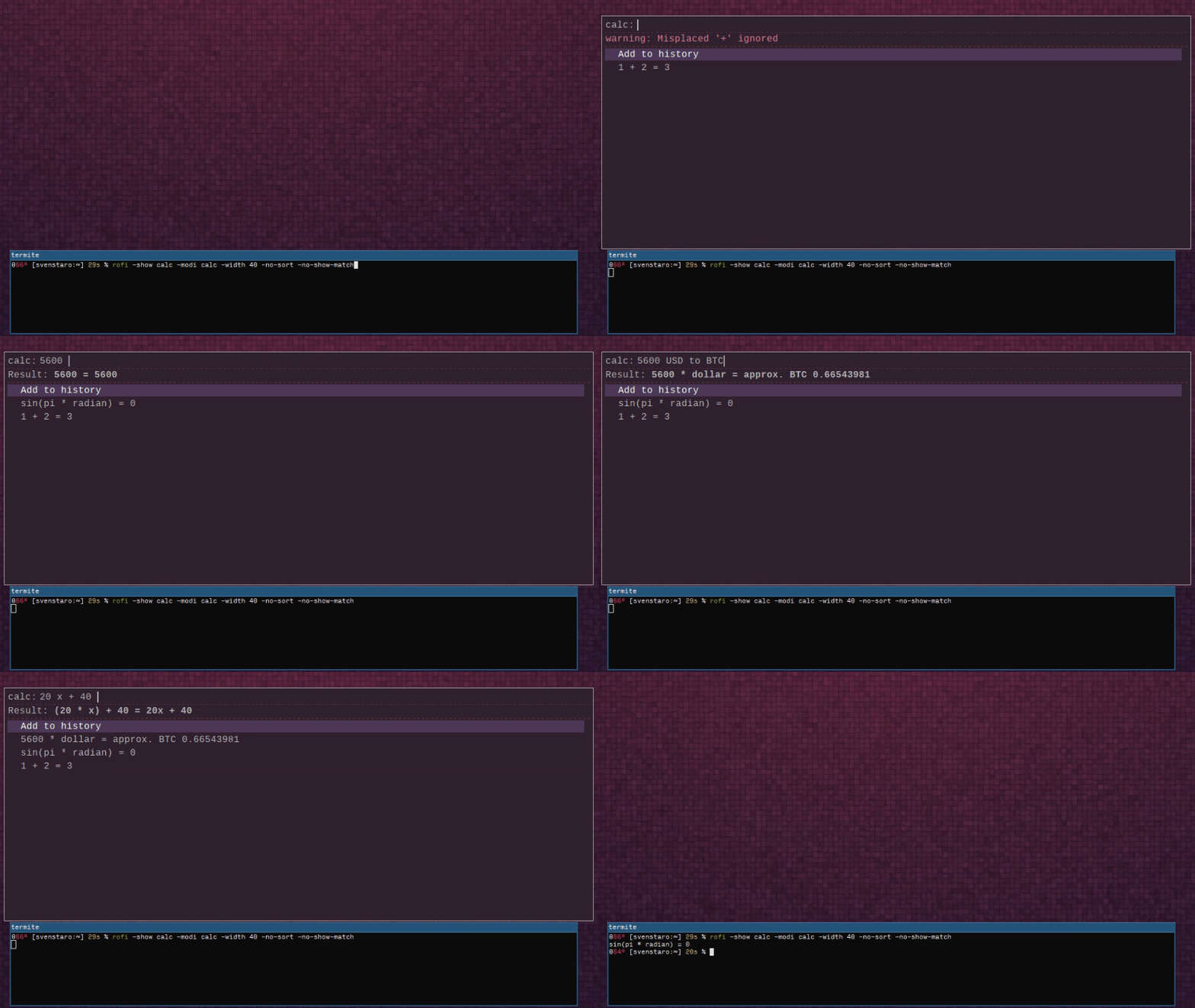
Run rofi like:
rofi -show calc -modi calc -no-show-match -no-sort
The result of the current input can be selected with Ctrl+Return, and history entries can be selected with Return. By default this will just output the equation/result.
The history file by default sits at $HOME/.local/share/rofi/rofi_calc_history in case you ever need to delete it or change it manually.
You can disable persistent history if you don't like that.

You need a C compilation toolchain (a cc, meson, pkg-config, ...), rofi (version >= 1.7.6) as well as qalculate (version > 2.0).
You will also need development headers for rofi. Depending on your distribution these may be included in different packages:
rofi, libqalculate, mesonzypper in rofi rofi-devel qalculate mesonapt install rofi-dev qalc mesonapt install rofi-dev qalc mesoneopkg it rofi-devel libqalculateqalculate meson (find rofi-devel headers yourself)dnf install qalculate meson libtool cairo-devel rofi-develxbps-install -S rofi-devel libqalculate meson libtoolSome distributions ship an extremely outdated version of qalculate so you might have to compile your own.
If that is the case, see here.
rofi-calc uses meson as a build system. If installing from git, the following steps should install it:
git clone https://github.com/svenstaro/rofi-calc.git
cd rofi-calc/
meson setup build
meson compile -C build/
# meson install
Use the -qalc-binary option to specify the name or location of qalculate's qalc binary. Defaults to qalc.
Use the -terse option to reduce the output of qalc to just the result of the input expression.
Use the -no-unicode option to disable qalc's Unicode mode.
Use the -calc-command option to specify a shell command to execute which will be interpolated with the following keys:
{expression}: the left-side of the equation (currently not available when using -terse){result}: the right of the equationThe following example copies the result to the clipboard upon pressing the key combination defined by -kb-accept-custom
(by default Control+Return).
NOTE: {result} should be quoted since it may contain characters that your shell would otherwise interpret:
rofi -show calc -modi calc -no-show-match -no-sort -calc-command "echo -n '{result}' | xclip"
Alternatively, this example would immediately type out the result (using xdotool) wherever your cursor currently is
(upon pressing Control+Return/-kb-accept-custom):
rofi -modi calc -show calc -calc-command 'xdotool type --clearmodifiers "{result}"'
The -calc-command-history option will additionally add the output of qalc to history when the -calc-command is run.
This will have no effect if -no-history is enabled.
It's convenient to bind it to a key combination in i3. For instance, you could use:
bindsym $mod+c exec --no-startup-id "rofi -show calc -modi calc -no-show-match -no-sort > /dev/null"
To disable the bold font applied to the results by default, you can use the flag -no-bold and run rofi like:
rofi -show calc -modi calc -no-show-match -no-sort -no-bold
To disable persistent history, use -no-persist-history:
rofi -show calc -modi calc -no-show-match -no-sort -no-persist-history
This will disable writing and loading the history file and thus you'll lose and entered entries upon quitting rofi-calc.
To disable the history entirely, use -no-history:
rofi -show calc -modi calc -no-show-match -no-sort -no-history -lines 0
The benefit of this is that you can simply enter a term and press Return and that'll already
act on the result by printing it to stdout or via -calc-command if configured.
To automatically save last calculation to the history on rofi close, use -automatic-save-to-history.:
rofi -show calc -modi calc -no-show-match -no-sort -automatic-save-to-history
This means that calculations are put into history even if you don't press Return.
To reuse the result of the last calculation as input, use -reuse-result:
rofi -show calc -modi calc -no-show-match -no-sort -reuse-result
This will have no effect if -no-history is enabled.
To enable thousand separators in the output (e.g. 5 * 12 = 6,000, rather than 6000) add the following to ~/.config/qalculate/qalc.cfg
For , separator:
digit_grouping=2
For space separator:
digit_grouping=1
To use a different output format for numeric representations (for instance, some locales use , instead of . as a decimal separator),
set LC_NUMERIC to a different value like this:
LC_NUMERIC=de_DE.UTF-8 rofi -show calc -modi calc -no-show-match -no-sort
To set a different default locale, set your LC_MONETARY variable:
LC_MONETARY=de_DE.UTF-8 rofi -show calc -modi calc -no-show-match -no-sort
Make sure the locale is actually available on your system!
Use the -hint-result option to specify the text of the hint before result.
Use the -hint-welcome option to specify the welcome text.
Configuration options can also be set in the rofi config file. To do so, use the below format. Note that commandline options will override the config file.
configuration {
    calc {
        hint-result: "Res: ";
        hint-welcome: "Calc";
    }
}
also see example config file
If you are using a custom theme with rofi (e.g. rofi -show drun -theme ~/.config/rofi/mytheme.rasi) and don't see the result of the calculation, that's because the rofi-calc mode relies on the message widget that might be hidden by some themes.
In your mytheme.rasi file or any file, it might @import, look for the following
mainbox {
    children: [...]
}
make sure the list contains message
for example
mainbox {
    children: [inputbar, message, listview]
}
Reference Rofi docs: Layout, Base Widgets, Children
The error message is rendered in the same textbox as the result. By default, it uses the color PaleVioletRed, which can be changed by supplying the -calc-error-color '$COLOR' option, where $COLOR can be in one of the following formats:
#{HEX}{3} (rgb)#{HEX}{4} (rgba)#{HEX}{6} (rrggbb)#{HEX}{8} (rrggbbaa){named-color}Reference Rofi docs: Color
NOTE: Other color formats mentioned there (like rgb[a](), hsl[a](), etc.) can not be used and will throw a Pango-WARNING.
If you're developing this, it might be helpful to start rofi directly with a locally compiled plugin like this:
cd rofi-calc
just run
This is mostly a note for me on how to release this thing:
CHANGELOG.md is up to date.meson.build.146 followers · starred Aug 2021
28 followers · starred Feb 2021
56 followers · starred Feb 2020
78 followers · starred Oct 2018
🖩 Do live calculations in rofi!
A rofi plugin that uses qalculate's qalc to parse natural language input and provide results.
Since this uses qalculate's amazing qalc you can try natural language queries such 500 + 25% or 5000 EUR to USD or 150 to hex. It can also solve linear equations on the fly. Try 60x + 30 = 50, for instance.
Run rofi like:
rofi -show calc -modi calc -no-show-match -no-sort
The result of the current input can be selected with Ctrl+Return, and history entries can be selected with Return. By default this will just output the equation/result.
The history file by default sits at $HOME/.local/share/rofi/rofi_calc_history in case you ever need to delete it or change it manually.
You can disable persistent history if you don't like that.
You need a C compilation toolchain (a cc, meson, pkg-config, ...), rofi (version >= 1.7.6) as well as qalculate (version > 2.0).
You will also need development headers for rofi. Depending on your distribution these may be included in different packages:
rofi, libqalculate, mesonzypper in rofi rofi-devel qalculate mesonapt install rofi-dev qalc mesonapt install rofi-dev qalc mesoneopkg it rofi-devel libqalculateqalculate meson (find rofi-devel headers yourself)dnf install qalculate meson libtool cairo-devel rofi-develxbps-install -S rofi-devel libqalculate meson libtoolSome distributions ship an extremely outdated version of qalculate so you might have to compile your own.
If that is the case, see here.
rofi-calc uses meson as a build system. If installing from git, the following steps should install it:
git clone https://github.com/svenstaro/rofi-calc.git
cd rofi-calc/
meson setup build
meson compile -C build/
# meson install
Use the -qalc-binary option to specify the name or location of qalculate's qalc binary. Defaults to qalc.
Use the -terse option to reduce the output of qalc to just the result of the input expression.
Use the -no-unicode option to disable qalc's Unicode mode.
Use the -calc-command option to specify a shell command to execute which will be interpolated with the following keys:
{expression}: the left-side of the equation (currently not available when using -terse){result}: the right of the equationThe following example copies the result to the clipboard upon pressing the key combination defined by -kb-accept-custom
(by default Control+Return).
NOTE: {result} should be quoted since it may contain characters that your shell would otherwise interpret:
rofi -show calc -modi calc -no-show-match -no-sort -calc-command "echo -n '{result}' | xclip"
Alternatively, this example would immediately type out the result (using xdotool) wherever your cursor currently is
(upon pressing Control+Return/-kb-accept-custom):
rofi -modi calc -show calc -calc-command 'xdotool type --clearmodifiers "{result}"'
The -calc-command-history option will additionally add the output of qalc to history when the -calc-command is run.
This will have no effect if -no-history is enabled.
It's convenient to bind it to a key combination in i3. For instance, you could use:
bindsym $mod+c exec --no-startup-id "rofi -show calc -modi calc -no-show-match -no-sort > /dev/null"
To disable the bold font applied to the results by default, you can use the flag -no-bold and run rofi like:
rofi -show calc -modi calc -no-show-match -no-sort -no-bold
To disable persistent history, use -no-persist-history:
rofi -show calc -modi calc -no-show-match -no-sort -no-persist-history
This will disable writing and loading the history file and thus you'll lose and entered entries upon quitting rofi-calc.
To disable the history entirely, use -no-history:
rofi -show calc -modi calc -no-show-match -no-sort -no-history -lines 0
The benefit of this is that you can simply enter a term and press Return and that'll already
act on the result by printing it to stdout or via -calc-command if configured.
To automatically save last calculation to the history on rofi close, use -automatic-save-to-history.:
rofi -show calc -modi calc -no-show-match -no-sort -automatic-save-to-history
This means that calculations are put into history even if you don't press Return.
To reuse the result of the last calculation as input, use -reuse-result:
rofi -show calc -modi calc -no-show-match -no-sort -reuse-result
This will have no effect if -no-history is enabled.
To enable thousand separators in the output (e.g. 5 * 12 = 6,000, rather than 6000) add the following to ~/.config/qalculate/qalc.cfg
For , separator:
digit_grouping=2
For space separator:
digit_grouping=1
To use a different output format for numeric representations (for instance, some locales use , instead of . as a decimal separator),
set LC_NUMERIC to a different value like this:
LC_NUMERIC=de_DE.UTF-8 rofi -show calc -modi calc -no-show-match -no-sort
To set a different default locale, set your LC_MONETARY variable:
LC_MONETARY=de_DE.UTF-8 rofi -show calc -modi calc -no-show-match -no-sort
Make sure the locale is actually available on your system!
Use the -hint-result option to specify the text of the hint before result.
Use the -hint-welcome option to specify the welcome text.
Configuration options can also be set in the rofi config file. To do so, use the below format. Note that commandline options will override the config file.
configuration {
    calc {
        hint-result: "Res: ";
        hint-welcome: "Calc";
    }
}
also see example config file
If you are using a custom theme with rofi (e.g. rofi -show drun -theme ~/.config/rofi/mytheme.rasi) and don't see the result of the calculation, that's because the rofi-calc mode relies on the message widget that might be hidden by some themes.
In your mytheme.rasi file or any file, it might @import, look for the following
mainbox {
    children: [...]
}
make sure the list contains message
for example
mainbox {
    children: [inputbar, message, listview]
}
Reference Rofi docs: Layout, Base Widgets, Children
The error message is rendered in the same textbox as the result. By default, it uses the color PaleVioletRed, which can be changed by supplying the -calc-error-color '$COLOR' option, where $COLOR can be in one of the following formats:
#{HEX}{3} (rgb)#{HEX}{4} (rgba)#{HEX}{6} (rrggbb)#{HEX}{8} (rrggbbaa){named-color}Reference Rofi docs: Color
NOTE: Other color formats mentioned there (like rgb[a](), hsl[a](), etc.) can not be used and will throw a Pango-WARNING.
If you're developing this, it might be helpful to start rofi directly with a locally compiled plugin like this:
cd rofi-calc
just run
This is mostly a note for me on how to release this thing:
CHANGELOG.md is up to date.meson.build.146 followers · starred Aug 2021
28 followers · starred Feb 2021
56 followers · starred Feb 2020
78 followers · starred Oct 2018



