
Converts LaTeX tags to unicode: \mathcal{H} → ℋ. Available on the web or as Automator script for the Mac.
See the codeREADME
UnicodeIt
Tested on Linux, Mac and Windows: 
Converts LaTeX tags to unicode. Available online at unicodeit.net.
Examples
\alpha α, \beta β, \infty ∞       e^+ e⁺, \mu^- μ⁻               \exists ∃, \nexists ∄
\int ∫, \sum ∑, \partial ∂        \to →, p\bar{p} pp̅             \mathcal{H} ℋ, \mathbb{R} ℝ
\slash{\partial} ∂̸                \underline{x} x̲                \phone ☎, \checkmark ✓
\dot{x} ẋ, \ddot{x} ẍ             A^6 A⁶, m_0 m₀                 \Im ℑ, \Re ℜ, \hbar ℏ
\gamma γ, \Gamma Γ                \~{O} Õ                        \perp ⊥, \parallel ∥
\sfrac{3}{5} ⅗                    \therefore ∴, \because ∵       \subset ⊂, \supset ⊃
Python
Install with pip install unicodeit and run
python -m unicodeit.cli \\alpha
or in Python
import unicodeit
print(unicodeit.replace('\\alpha'))
JavaScript / TypeScript
Install with npm install unicodeit --save-dev and use it like this:
var unicodeit = require('unicodeit');
console.log(unicodeit.replace('\\alpha'));
Mac Automator
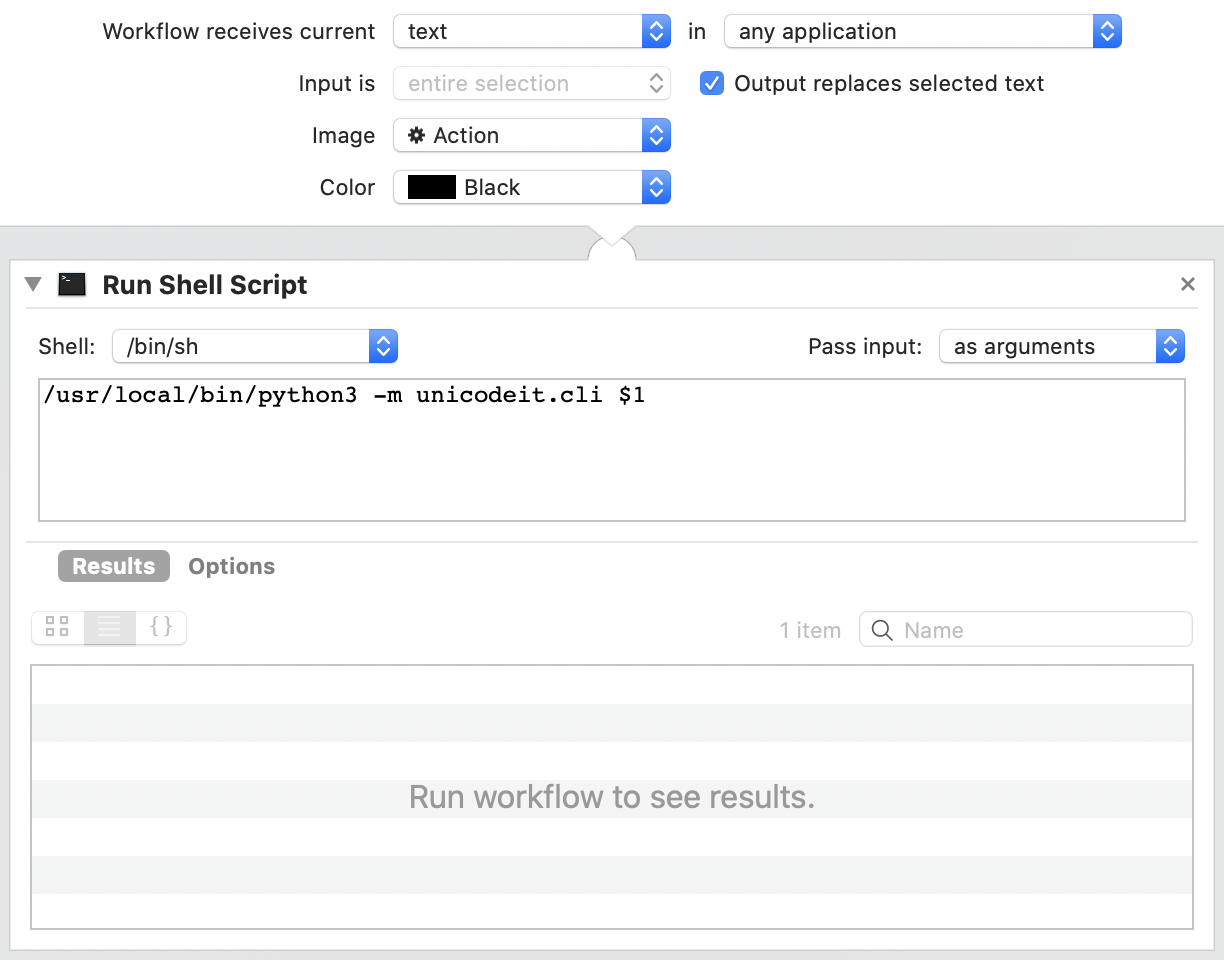
Create your own Automator Workflow:
- Create a new "Quick Action" (might also be labeled as "Service").
- At the top, leave the defaults: "Service receives selected text in any application"
- Select the checkmark "output replaces selected text".
- Add the action "Run Shell Script".
- From dropdown, select to "pass in: as arguments".
- The command is:
/usr/local/bin/python3 -m unicodeit.cli $1. This Python interpreter must have unicodeit installed; e.g. with/usr/local/bin/python3 -m pip install unicodeit. - It should look something like this:
To set a keyboard shortcut, go to System Preferences →
Keyboard → Shortcuts → Services → Text → UnicodeItAction.
Choose a keyboard shortcut like Command+Option+Shift U.
Now you are all set to use your new keyboard shortcut in many apps, like here in Keynote:

[dev] New Release Flow
- update version in
uncodeit/__init__.pyandpackage.json - create a new release on Github
Contributors




Similar repos


Languages
Python
57.0%
TypeScript
40.7%
HTML
1.4%
Converts LaTeX tags to unicode: \mathcal{H} → ℋ. Available on the web or as Automator script for the Mac.
See the codeREADME
UnicodeIt
Tested on Linux, Mac and Windows:
Converts LaTeX tags to unicode. Available online at unicodeit.net.
Examples
\alpha α, \beta β, \infty ∞       e^+ e⁺, \mu^- μ⁻               \exists ∃, \nexists ∄
\int ∫, \sum ∑, \partial ∂        \to →, p\bar{p} pp̅             \mathcal{H} ℋ, \mathbb{R} ℝ
\slash{\partial} ∂̸                \underline{x} x̲                \phone ☎, \checkmark ✓
\dot{x} ẋ, \ddot{x} ẍ             A^6 A⁶, m_0 m₀                 \Im ℑ, \Re ℜ, \hbar ℏ
\gamma γ, \Gamma Γ                \~{O} Õ                        \perp ⊥, \parallel ∥
\sfrac{3}{5} ⅗                    \therefore ∴, \because ∵       \subset ⊂, \supset ⊃
Python
Install with pip install unicodeit and run
python -m unicodeit.cli \\alpha
or in Python
import unicodeit
print(unicodeit.replace('\\alpha'))
JavaScript / TypeScript
Install with npm install unicodeit --save-dev and use it like this:
var unicodeit = require('unicodeit');
console.log(unicodeit.replace('\\alpha'));
Mac Automator
Create your own Automator Workflow:
- Create a new "Quick Action" (might also be labeled as "Service").
- At the top, leave the defaults: "Service receives selected text in any application"
- Select the checkmark "output replaces selected text".
- Add the action "Run Shell Script".
- From dropdown, select to "pass in: as arguments".
- The command is:
/usr/local/bin/python3 -m unicodeit.cli $1. This Python interpreter must have unicodeit installed; e.g. with/usr/local/bin/python3 -m pip install unicodeit. - It should look something like this:
To set a keyboard shortcut, go to System Preferences →
Keyboard → Shortcuts → Services → Text → UnicodeItAction.
Choose a keyboard shortcut like Command+Option+Shift U.
Now you are all set to use your new keyboard shortcut in many apps, like here in Keynote:
[dev] New Release Flow
- update version in
uncodeit/__init__.pyandpackage.json - create a new release on Github
Similar repos
Contributors
Languages
Python
57.0%
TypeScript
40.7%
HTML
1.4%