
Design and Implementation of a CI/CD Pipeline for a Java Web Application Using Jenkins, Maven, and Apache Tomcat
Java
0
17 commits
updated Sep 30, 2026
See what people are saying
README
Release Observatory — Java CI/CD Pipeline
Developed by Sithum Wickramanayaka
Design and Implementation of a CI/CD Pipeline for a Java Web Application Using Jenkins, Maven, and Apache Tomcat
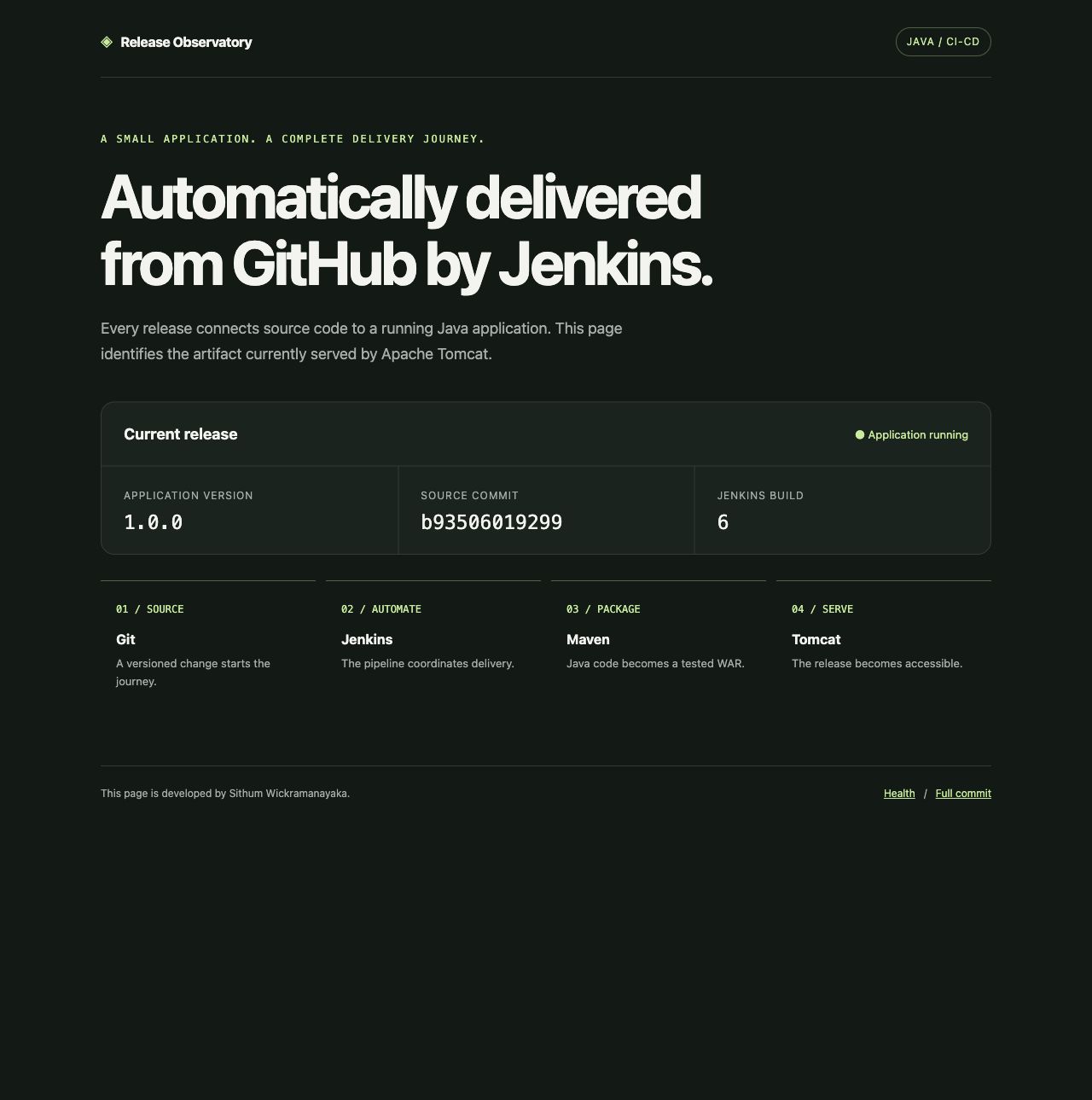
Release Observatory is a small Java web application that makes a deployed release identifiable by its version, source commit, and Jenkins build number. The project demonstrates source checkout, compilation, automated testing, WAR packaging, artifact archiving, Tomcat deployment, and HTTP verification.
Live demo and screenshots
Open the temporary AWS demo · Evidence gallery · Project report
The demo uses HTTP on port 8081 and is available while the temporary EC2 server runs. Its public IP may change after a stop/start. Jenkins is private and requires an SSH tunnel; there is no public administrator login. The AWS Free Plan consumes credits and is not permanent free hosting.
AWS EC2 hosting
The project runs on the java-cicd-demo EC2 instance in Mumbai, using c7i-flex.large. The supplied console screenshot shows Running and 3/3 checks passed.
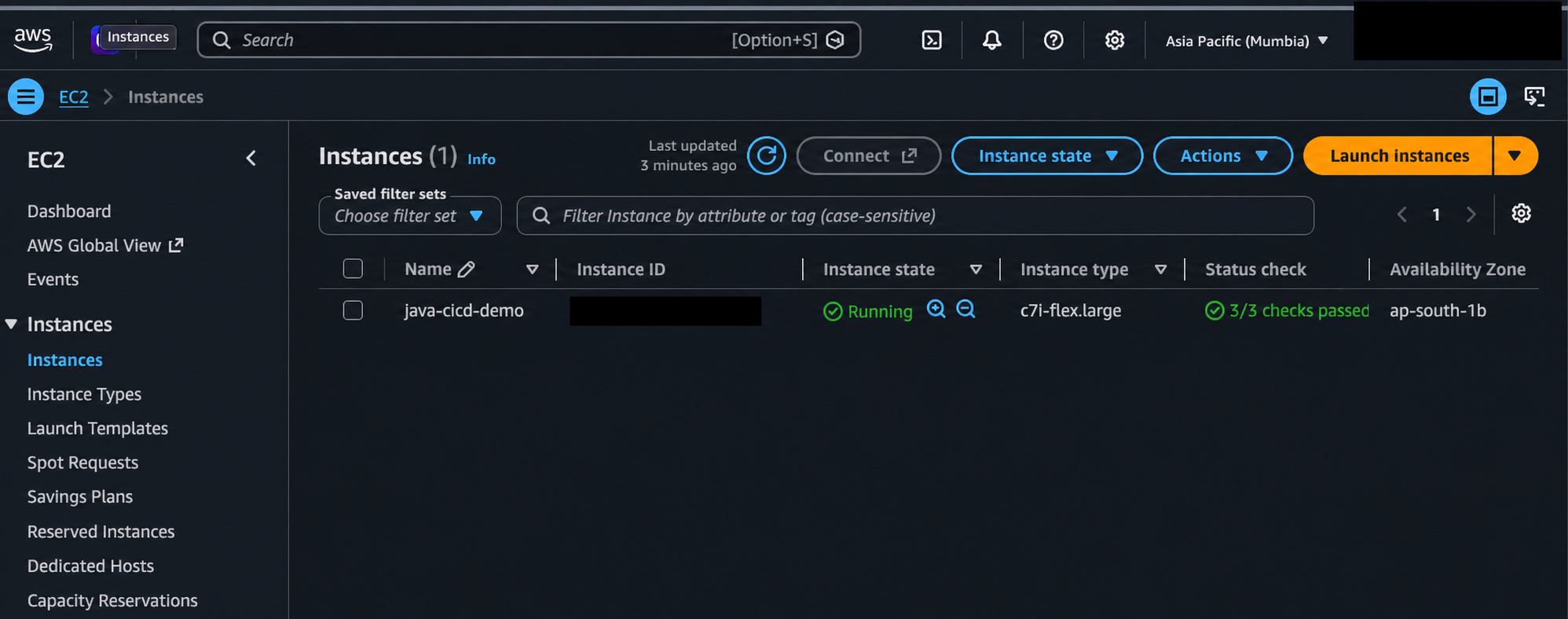
Redacted copy of the supplied AWS console screenshot. Account details and the instance ID are hidden; visible deployment facts were checked against the original. The unredacted original is retained locally and excluded from Git.
Verified outcomes
| Scenario | Environment | Recorded result |
|---|---|---|
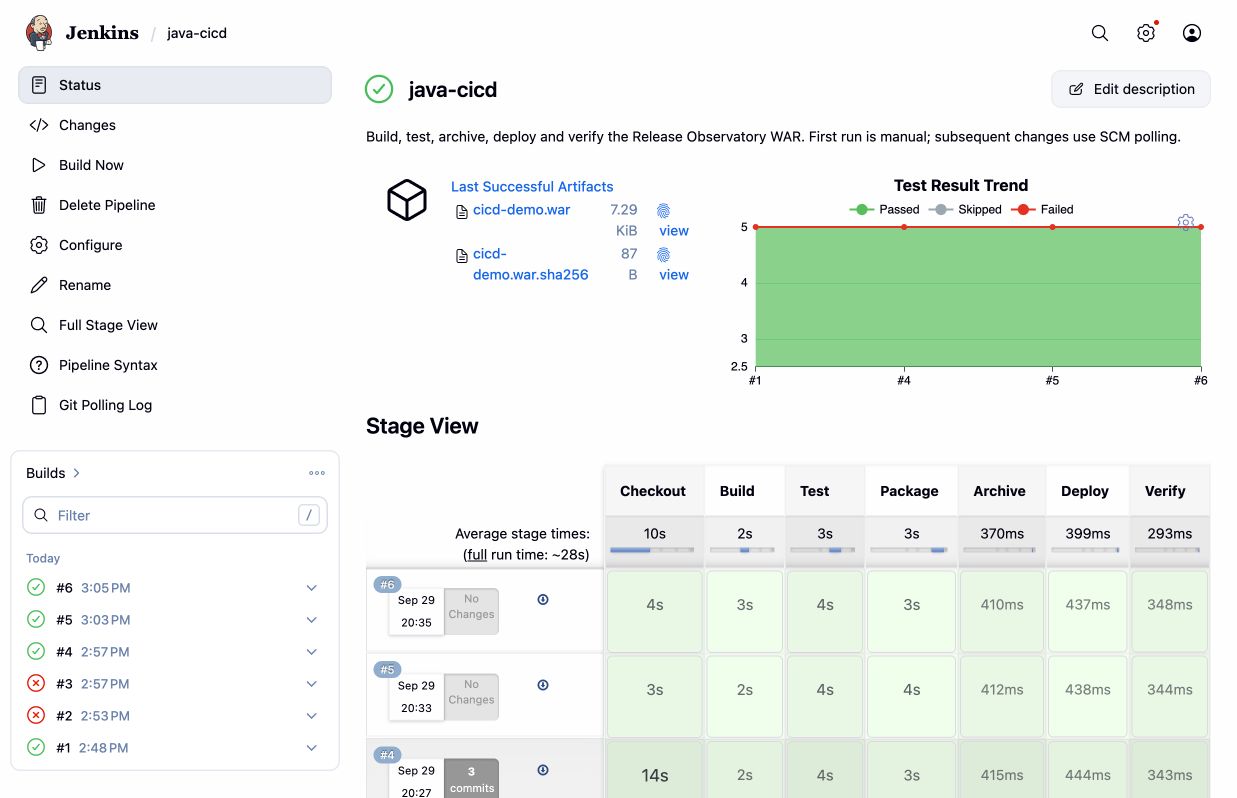
| Build, test, archive, deploy and verify | Local #1 / AWS #1 | Successful delivery from a private GitHub repository |
| Visible update detected by SCM polling | Local #2 | Automatically deployed commit 3da6be3 |
| Deliberately failing test | Local #3 | Deployment skipped; previous release kept running |
| Corrected test | Local #4 | Five passing tests and successful recovery |
| Author credit in footer | AWS #4–#6 | Commit b935060 deployed successfully |
Results and screenshots were recorded on September 29, 2026. They are historical evidence, not a live status badge. AWS #2/#3 encountered GitHub SSH authentication failures; a retry succeeded. These are distinct from the intentional local test failure.
Technology
Java 21 · Maven 3.9.11 · JUnit 5 · Jenkins 2.568.3 · Apache Tomcat 10.1.60 · Nginx 1.28.0 · Docker Compose · Ubuntu 24.04 on AWS EC2.
The app is packaged as a WAR using Jakarta Servlet 6. Its homepage, /health, and /version make the deployed build observable. Exact runtime versions are saved in the evidence folder.
Architecture
View full-size SVG · Download editable draw.io source · Diagram guide and icon credits
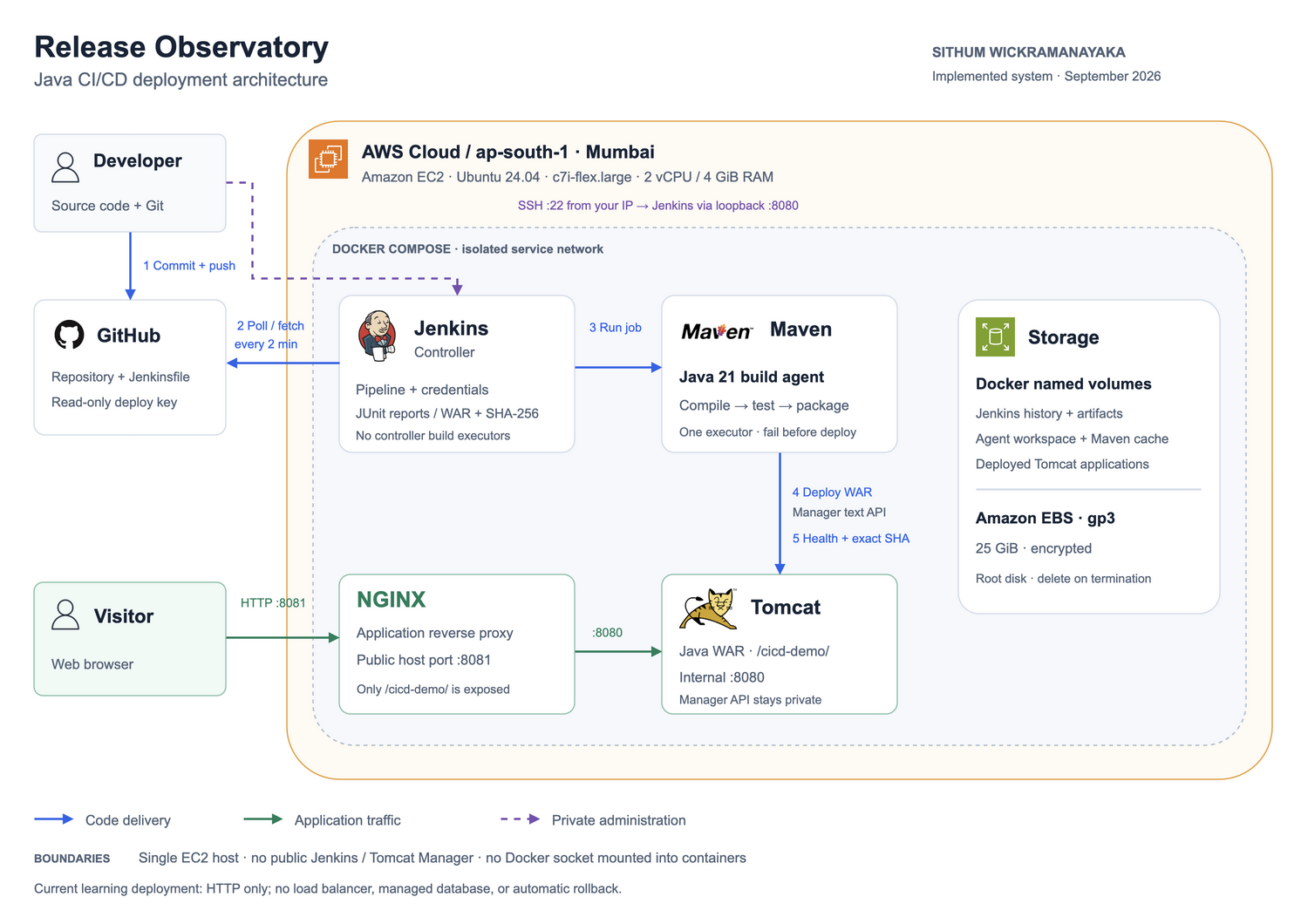
Jenkins administration binds to the server's loopback interface and is reached through an SSH tunnel. The public proxy serves only /cicd-demo/; Tomcat Manager has no published host port. Jenkins builds run on a dedicated agent, not on its controller. No service mounts the Docker socket.
Start here
- Follow setup for local containers or a fresh Ubuntu server.
- Follow AWS deployment when launching the temporary Free Plan server.
- Browse the captured evidence, or repeat the demonstration.
- Read the report for results, tradeoffs, troubleshooting and improvements.
- Follow teardown after exporting evidence.
Quick start
Prerequisites: Docker Engine/Desktop with Compose v2, Git, Python 3, and about 4 GB of available memory for the stack. Downloading images and plugins requires internet access.
git clone https://github.com/suwickramanayaka/java-jenkins-maven-tomcat-cicd.git
cd java-jenkins-maven-tomcat-cicd
python3 scripts/configure.py \
  --repository https://github.com/suwickramanayaka/java-jenkins-maven-tomcat-cicd.git \
  --ssh-deploy-key
docker compose up -d --build
docker compose ps
Register .secrets/github_ssh_key.pub under repository Settings → Deploy keys, leaving write access disabled. Omit --ssh-deploy-key for a public repository. Alternatively, --private-repository prompts locally for a repository-scoped read-only token. Never place credentials in a URL or commit them.
- Jenkins: http://localhost:8080/ (username
admin) - Administrator password: read
.secrets/jenkins_admin_passwordprivately. - Pipeline job:
java-cicd. Choose Build Now once to establish polling. - Application after deployment: http://localhost:8081/cicd-demo/
Generated secrets remain under .secrets/, which Git ignores. .env contains repository and network settings and is also ignored.
Build without Jenkins
From a directory whose path contains no colon, with Java 21 and Maven:
mvn -B -ntp clean verify
The WAR is target/cicd-demo.war. Java classpaths use : as a separator on macOS/Linux; a directory name containing CI:CD can therefore break a host Maven build. Use the short clone directory above or build inside the container.
Pipeline behavior
| Stage | Outcome |
|---|---|
| Checkout | Clean workspace, checkout configured branch, record full commit SHA |
| Build | Compile Java with release metadata |
| Test | Run required JUnit tests, publish reports even on failure |
| Package | Build WAR; Maven reruns tests as part of its lifecycle |
| Archive | Save WAR and SHA-256 checksum, fingerprint artifacts |
| Deploy | Upload the archived WAR's source file using a Jenkins credential |
| Verify | Require UP, the exact expected commit, and the homepage |
Failures stop later stages. Concurrent builds are disabled to prevent deployment races. A failure after deployment does not automatically restore the old application; rollback is a documented future improvement. The single-server design allows brief downtime during redeployment and is intended for this learning project.
Repository layout
src/                 Java servlet, release metadata and unit tests
Jenkinsfile          Seven-stage delivery pipeline
compose.yaml         Controller, agent, Tomcat and application proxy
infrastructure/      Container images, bootstrap and proxy configuration
scripts/             Configuration, Ubuntu setup, deployment and smoke checks
docs/                Setup, AWS guide, report, teardown and captured evidence
Recreate later
Provision a fresh Ubuntu server, clone this repository, install Docker, regenerate local secrets, start Compose, and run the pipeline. GitHub holds the source and setup, not Jenkins history or credentials. A new server can have a new IP address. AWS Free Plan eligibility and remaining credits must be checked again; recreating a server does not renew them.
References and attribution
- Jenkins Pipeline documentation
- Jenkins Docker documentation
- Maven lifecycle
- Tomcat Manager API
- Docker Engine on Ubuntu
- AWS Free Plan
Original project contributions include the release dashboard, release identity checks, tests, Jenkins bootstrap, deployment scripts, private management access, and reproducible documentation.
Author
Developed by Sithum Wickramanayaka as a personal learning project.
Similar repos


Languages
Java
40.9%
Groovy
20.9%
Shell
17.5%
Python
14.2%
Dockerfile
6.5%
Design and Implementation of a CI/CD Pipeline for a Java Web Application Using Jenkins, Maven, and Apache Tomcat
Java
0
17 commits
updated Sep 30, 2026
See what people are saying
README
Release Observatory — Java CI/CD Pipeline
Developed by Sithum Wickramanayaka
Design and Implementation of a CI/CD Pipeline for a Java Web Application Using Jenkins, Maven, and Apache Tomcat
Release Observatory is a small Java web application that makes a deployed release identifiable by its version, source commit, and Jenkins build number. The project demonstrates source checkout, compilation, automated testing, WAR packaging, artifact archiving, Tomcat deployment, and HTTP verification.
Live demo and screenshots
Open the temporary AWS demo · Evidence gallery · Project report
The demo uses HTTP on port 8081 and is available while the temporary EC2 server runs. Its public IP may change after a stop/start. Jenkins is private and requires an SSH tunnel; there is no public administrator login. The AWS Free Plan consumes credits and is not permanent free hosting.
AWS EC2 hosting
The project runs on the java-cicd-demo EC2 instance in Mumbai, using c7i-flex.large. The supplied console screenshot shows Running and 3/3 checks passed.
Redacted copy of the supplied AWS console screenshot. Account details and the instance ID are hidden; visible deployment facts were checked against the original. The unredacted original is retained locally and excluded from Git.
Verified outcomes
| Scenario | Environment | Recorded result |
|---|---|---|
| Build, test, archive, deploy and verify | Local #1 / AWS #1 | Successful delivery from a private GitHub repository |
| Visible update detected by SCM polling | Local #2 | Automatically deployed commit 3da6be3 |
| Deliberately failing test | Local #3 | Deployment skipped; previous release kept running |
| Corrected test | Local #4 | Five passing tests and successful recovery |
| Author credit in footer | AWS #4–#6 | Commit b935060 deployed successfully |
Results and screenshots were recorded on September 29, 2026. They are historical evidence, not a live status badge. AWS #2/#3 encountered GitHub SSH authentication failures; a retry succeeded. These are distinct from the intentional local test failure.
Technology
Java 21 · Maven 3.9.11 · JUnit 5 · Jenkins 2.568.3 · Apache Tomcat 10.1.60 · Nginx 1.28.0 · Docker Compose · Ubuntu 24.04 on AWS EC2.
The app is packaged as a WAR using Jakarta Servlet 6. Its homepage, /health, and /version make the deployed build observable. Exact runtime versions are saved in the evidence folder.
Architecture
View full-size SVG · Download editable draw.io source · Diagram guide and icon credits
Jenkins administration binds to the server's loopback interface and is reached through an SSH tunnel. The public proxy serves only /cicd-demo/; Tomcat Manager has no published host port. Jenkins builds run on a dedicated agent, not on its controller. No service mounts the Docker socket.
Start here
- Follow setup for local containers or a fresh Ubuntu server.
- Follow AWS deployment when launching the temporary Free Plan server.
- Browse the captured evidence, or repeat the demonstration.
- Read the report for results, tradeoffs, troubleshooting and improvements.
- Follow teardown after exporting evidence.
Quick start
Prerequisites: Docker Engine/Desktop with Compose v2, Git, Python 3, and about 4 GB of available memory for the stack. Downloading images and plugins requires internet access.
git clone https://github.com/suwickramanayaka/java-jenkins-maven-tomcat-cicd.git
cd java-jenkins-maven-tomcat-cicd
python3 scripts/configure.py \
  --repository https://github.com/suwickramanayaka/java-jenkins-maven-tomcat-cicd.git \
  --ssh-deploy-key
docker compose up -d --build
docker compose ps
Register .secrets/github_ssh_key.pub under repository Settings → Deploy keys, leaving write access disabled. Omit --ssh-deploy-key for a public repository. Alternatively, --private-repository prompts locally for a repository-scoped read-only token. Never place credentials in a URL or commit them.
- Jenkins: http://localhost:8080/ (username
admin) - Administrator password: read
.secrets/jenkins_admin_passwordprivately. - Pipeline job:
java-cicd. Choose Build Now once to establish polling. - Application after deployment: http://localhost:8081/cicd-demo/
Generated secrets remain under .secrets/, which Git ignores. .env contains repository and network settings and is also ignored.
Build without Jenkins
From a directory whose path contains no colon, with Java 21 and Maven:
mvn -B -ntp clean verify
The WAR is target/cicd-demo.war. Java classpaths use : as a separator on macOS/Linux; a directory name containing CI:CD can therefore break a host Maven build. Use the short clone directory above or build inside the container.
Pipeline behavior
| Stage | Outcome |
|---|---|
| Checkout | Clean workspace, checkout configured branch, record full commit SHA |
| Build | Compile Java with release metadata |
| Test | Run required JUnit tests, publish reports even on failure |
| Package | Build WAR; Maven reruns tests as part of its lifecycle |
| Archive | Save WAR and SHA-256 checksum, fingerprint artifacts |
| Deploy | Upload the archived WAR's source file using a Jenkins credential |
| Verify | Require UP, the exact expected commit, and the homepage |
Failures stop later stages. Concurrent builds are disabled to prevent deployment races. A failure after deployment does not automatically restore the old application; rollback is a documented future improvement. The single-server design allows brief downtime during redeployment and is intended for this learning project.
Repository layout
src/                 Java servlet, release metadata and unit tests
Jenkinsfile          Seven-stage delivery pipeline
compose.yaml         Controller, agent, Tomcat and application proxy
infrastructure/      Container images, bootstrap and proxy configuration
scripts/             Configuration, Ubuntu setup, deployment and smoke checks
docs/                Setup, AWS guide, report, teardown and captured evidence
Recreate later
Provision a fresh Ubuntu server, clone this repository, install Docker, regenerate local secrets, start Compose, and run the pipeline. GitHub holds the source and setup, not Jenkins history or credentials. A new server can have a new IP address. AWS Free Plan eligibility and remaining credits must be checked again; recreating a server does not renew them.
References and attribution
- Jenkins Pipeline documentation
- Jenkins Docker documentation
- Maven lifecycle
- Tomcat Manager API
- Docker Engine on Ubuntu
- AWS Free Plan
Original project contributions include the release dashboard, release identity checks, tests, Jenkins bootstrap, deployment scripts, private management access, and reproducible documentation.
Author
Developed by Sithum Wickramanayaka as a personal learning project.
Similar repos
Languages
Java
40.9%
Groovy
20.9%
Shell
17.5%
Python
14.2%
Dockerfile
6.5%