
The implementation of Sympatheia: Emotionally Adaptive Voice Assistant with Continuous Affect Conditioning
See the codeREADME
Sympatheia: Emotionally Adaptive Voice Assistant with Continuous Affect Conditioning
[Paper] | [Demo] | [Dataset (Sympatheia-18k)] | [Model]
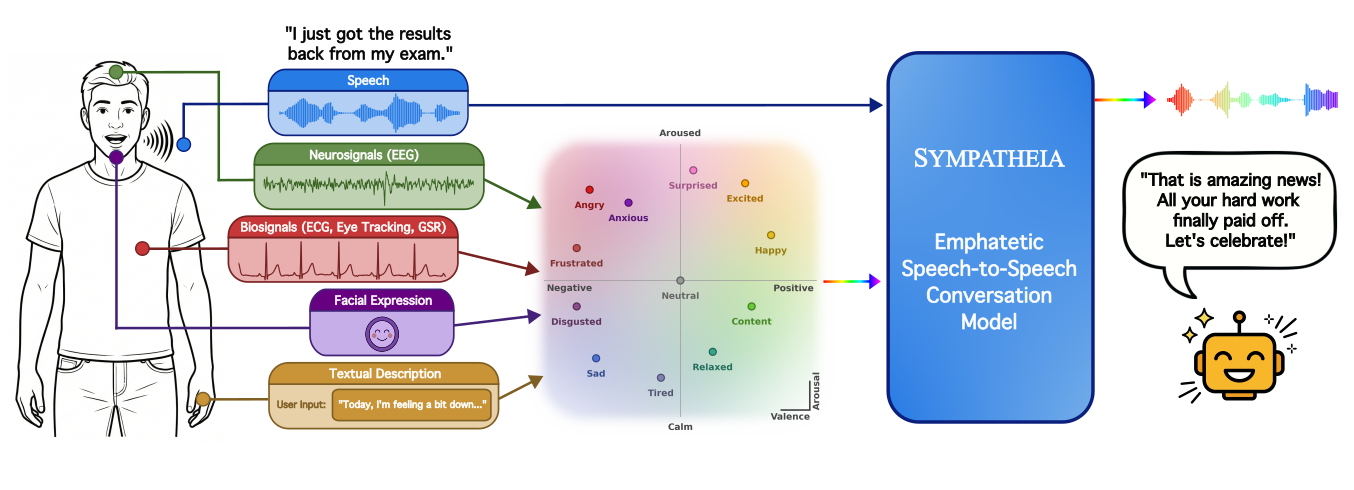
Sympatheia is a speech-to-speech empathetic dialogue framework that conditions response generation on continuous valence–arousal (VA) affect signals inferred from the user's spoken query and, when available, from pluggable external emotion sensing modules (face, EEG/physiological signals, textual affect descriptions). The model is built on GLM-4-Voice-9B and fine-tuned on Sympatheia-18k, a synthetic corpus of 18k emotion-conditioned spoken dialogue pairs spanning 12 emotion anchors.
Setup
1. Clone and install dependencies
git clone https://github.com/susameddin/sympatheia.git
cd sympatheia
pip install -r requirements.txt
Note: The CosyVoice TTS components in
src/cosyvoice/requirematcha-tts,conformer,phonemizer, andhyperpyyaml, which are included inrequirements.txt. The dataset creation pipeline additionally requires the Qwen3-TTS package (qwen_tts), and the evaluation judge scripts require Qwen3-Omni. Install these separately if you plan to re-generate the dataset or run the LLM judge.
2. Download decoder weights
Download flow.pt and hift.pt from the GLM-4-Voice decoder page and place them in src/glm-4-voice-decoder/:
# Using huggingface_hub
python -c "
from huggingface_hub import hf_hub_download
hf_hub_download('THUDM/glm-4-voice-decoder', 'flow.pt', local_dir='src/glm-4-voice-decoder')
hf_hub_download('THUDM/glm-4-voice-decoder', 'hift.pt', local_dir='src/glm-4-voice-decoder')
"
3. Base language model
The base model THUDM/glm-4-voice-9b is downloaded automatically from HuggingFace during training or inference. Ensure you have a HuggingFace account and internet access, or pre-cache it with:
python -c "from transformers import AutoModel; AutoModel.from_pretrained('THUDM/glm-4-voice-9b')"
Pretrained Model Weights
The Sympatheia LoRA adapter checkpoint is available at huggingface.co/susameddin/Sympatheia.
# Download checkpoint
huggingface-cli download susameddin/Sympatheia --local-dir /path/to/checkpoint
Download the checkpoint folder and place it anywhere convenient -- the inference and evaluation scripts accept a --checkpoint argument pointing to the folder.
Dataset: Sympatheia-18k
The full dataset is available at huggingface.co/datasets/susameddin/Sympatheia-18k.
Sympatheia-18k consists of two complementary splits:
- Emotional split (~12k examples): Affect-rich user queries paired with emotion-appropriate spoken responses, ~1k examples per emotion. Teaches semantic and acoustic emotional alignment.
- Neutral split (~6k examples): 500 emotionally neutral queries each paired with 12 emotion-conditioned responses (one per anchor). Teaches explicit VA-controlled affect generation when speech is neutral or ambiguous.
The dataset was generated using Qwen3-32B (text) and Qwen3-TTS (speech) with emotion-specific style and response strategy controls.
If you want to re-generate the dataset, the full pipeline is in src/dataset_creation/. See Dataset Creation below.
Training
Training fine-tunes GLM-4-Voice-9B with LoRA on Sympatheia-18k. All hyperparameters are in src/config.yaml; the DeepSpeed Stage 3 config is in src/ds_config.json.
cd src
# Single-node, 4-GPU (adjust --num_processes for your setup)
accelerate launch --config_file ds_config.json \
    --num_processes 4 \
    train_sympatheia.py
Or directly with DeepSpeed:
cd src
deepspeed --num_gpus=4 train_sympatheia.py
Checkpoints are saved to src/experiments/{run_name}/checkpoint-{step}/.
Inference
inference_sympatheia.py generates audio responses for all 12 emotion anchors plus interpolations (happy↔sad, anxious↔relaxed) and the no-VA baseline.
cd src

# Run inference on a downloaded checkpoint
python inference_sympatheia.py \
    --checkpoint /path/to/checkpoint

# Or sweep multiple checkpoints from a training run
python inference_sympatheia.py \
    --experiment-dir experiments/<run-name> \
    --checkpoints <step1> <step2> <step3>
Outputs are written to checkpoint-{step}/results_12emo/ as output_{emotion}_v{val:.2f}_a{aro:.2f}.wav.
Emotion comparison mode (generates with-VA vs. no-VA responses for a set of eval queries):
python inference_sympatheia.py \
    --checkpoint /path/to/checkpoint \
    --compare-mode \
    --eval-audio-dir /path/to/eval/audio
Interactive Demo
cd src
python gradio_demo.py \
    --checkpoint /path/to/checkpoint \
    --port 7860
The demo supports four emotion input modes:
- Select Manually: 12 emotion presets (angry, anxious, content, disgusted, excited, frustrated, happy, neutral, relaxed, sad, surprised, tired) via dropdown, plus fine-grained valence and arousal sliders.
- Detect From Audio: no VA injection; the model uses its own built-in emotion detection from the user's speech.
- Describe Your Feeling: enter a free-text description of how you feel and it is automatically mapped to valence/arousal via a language model.
- Detect From Face: stream webcam video; audio goes to the speech model and face expressions from the video are analyzed for emotion automatically. A static face image upload is also supported.
By default the demo creates a public Gradio share link, so it can be accessed from a browser on a different machine. Pass --ssl to enable HTTPS for microphone access.
Evaluation
The evaluation pipeline has two stages: (1) generating model responses for each condition and (2) scoring them with an audio-capable LLM judge (Gemini or Qwen3-Omni).
All evaluation scripts are under src/eval/. Run them from src/.
Stage 1a: Generate responses -- Neutral query setting
The neutral setting evaluates whether the model adapts its response when the user audio is neutral but the system prompt specifies a target emotion.
cd src
python eval/generate_responses/sympatheia_neutral/generate_responses_neutral_sympatheia.py \
    --finetuned-experiment experiments/<run-name> \
    --checkpoint-step <step> \
    --num-samples 100 \
    --emotions angry anxious content disgusted excited frustrated happy neutral relaxed sad surprised tired
Outputs: {eval_output_dir}/finetuned_va/ and {eval_output_dir}/finetuned_na/ audio files + manifest.jsonl.
Stage 1b: Generate responses -- Emotional query setting
The emotional setting evaluates empathetic response when the user audio itself carries the target emotion.
cd src
python eval/generate_responses/sympatheia_emotional/generate_responses_emotional_sympatheia.py \
    --finetuned-experiment experiments/<run-name> \
    --checkpoint-step <step> \
    --num-samples 100 \
    --emotions angry anxious content disgusted excited frustrated happy neutral relaxed sad surprised tired
Outputs: same structure as neutral setting.
Stage 2: LLM-as-a-judge scoring
Two judges are provided. Both listen to the same generated audio and score it on the same 1--5 rubric with byte-identical prompts, so the only variable between them is the judge model.
Gemini (hosted API):
cd src
export GEMINI_API_KEY=...   # or put it in a .env file at the repo root

# Neutral setting judge
python eval/judge/judge_gemini_neutral.py \
    --manifest /path/to/manifest.jsonl \
    --conditions finetuned_va finetuned_na

# Emotional setting judge
python eval/judge/judge_gemini_emotional.py \
    --manifest /path/to/manifest.jsonl \
    --conditions finetuned_va finetuned_na
Outputs: judgments_gemini.jsonl + summary_gemini.json with mean scores per condition and emotion.
Qwen3-Omni (local, no API cost):
cd src
# Neutral setting judge
python eval/judge/judge_qwen3omni_neutral.py \
    --manifest /path/to/manifest.jsonl \
    --conditions finetuned_va finetuned_na

# Emotional setting judge
python eval/judge/judge_qwen3omni_emotional.py \
    --manifest /path/to/manifest.jsonl \
    --conditions finetuned_va finetuned_na
Outputs: judgments.jsonl + summary.json with mean scores per condition and emotion.
Gemini judge: Requires
google-genai(inrequirements.txt) and an API key inGEMINI_API_KEYorGOOGLE_API_KEY. Select a different model with--model.
Qwen3-Omni judge: The judge scripts expect a local Qwen3-Omni model. Point the
--model-pathargument to your local copy, or set the default path in the script.
Baseline model requirements:
requirements.txtcovers only Sympatheia's training and inference pipeline. Each baseline evaluation script requires the corresponding model to be installed separately; refer to each model's own repository for setup instructions.
Dataset Creation
The full Sympatheia-18k generation pipeline is in src/dataset_creation/, organized as two
per-split stages (emotional/ and neutral/) plus a shared merge step. Each stage is driven
by a shell script that runs its steps in order; run them from src/.
Full pipeline
cd src
bash dataset_creation/run_all_pipeline.sh
This runs the emotional split, then the neutral split, then merges the two into
encoded_train.jsonl / encoded_eval.jsonl.
Stage 1: Emotional split (affect-rich queries + responses)
cd src

# Preview a few samples per emotion before committing to a full run
bash dataset_creation/run_emotional_pipeline.sh preview

# Run the whole stage (text -> audio -> convert -> na -> validate)
bash dataset_creation/run_emotional_pipeline.sh all

# ...or one step at a time
bash dataset_creation/run_emotional_pipeline.sh text      # 1. Emotion-conditioned text pairs (Qwen3-32B)
bash dataset_creation/run_emotional_pipeline.sh audio     # 2. Emotion-styled audio (Qwen3-TTS)
bash dataset_creation/run_emotional_pipeline.sh convert   # 3. Encode audio to GLM-4-Voice token format
bash dataset_creation/run_emotional_pipeline.sh na        # 4. N/A variant (masks ~1/3 of VA values)
bash dataset_creation/run_emotional_pipeline.sh validate  # 5. Validate the split
Stage 2: Neutral split (neutral queries × 12 response emotions)
cd src

# Preview a few neutral queries with their 12 responses
bash dataset_creation/run_neutral_pipeline.sh preview

# Run the whole stage (text -> audio -> convert -> validate)
bash dataset_creation/run_neutral_pipeline.sh all

# ...or one step at a time
bash dataset_creation/run_neutral_pipeline.sh text      # 1. Neutral queries with 12 emotion response variants
bash dataset_creation/run_neutral_pipeline.sh audio     # 2. Query and response audio
bash dataset_creation/run_neutral_pipeline.sh convert   # 3. Encode audio to GLM-4-Voice token format
bash dataset_creation/run_neutral_pipeline.sh validate  # 4. Validate the split
Merge both splits
cd src
python dataset_creation/merge_splits.py \
    --emotional-dir /path/to/Sympatheia-18k/Emotional \
    --neutral-dir   /path/to/Sympatheia-18k/Neutral \
    --output-dir    /path/to/Sympatheia-18k
Emotion Sensing Modules
Each sensing module in src/integration/ outputs a softmax distribution over its native emotion taxonomy, which is mapped to a VA coordinate via probability-weighted anchor averaging (Eq. 1 in the paper).
| Module | Directory | Dataset |
|---|---|---|
| Facial expression | integration/face_module/ | AffectNet+ |
| EEG + Eye tracking | integration/seed_module/ | SEED-VII |
| ECG + GSR | integration/yaad_module/ | YAAD |
| Textual affect description | integration/text_module/ | ISEAR |
Sensing module integration experiments are in src/integration/; the end-to-end evaluations that drive Sympatheia from sensed VA are in src/eval/generate_responses/sensing/.
Project Structure
sympatheia/
├── README.md
├── requirements.txt
├── sympatheia.pdf
├── figure/                          # Paper figures
│   └── overview.png
├── docs/                            # GitHub Pages demo site
└── src/
    ├── train_sympatheia.py          # LoRA fine-tuning entry point
    ├── inference_sympatheia.py      # Batch inference with VA conditions
    ├── gradio_demo.py               # Interactive Gradio demo
    ├── config.yaml                  # Training hyperparameters
    ├── ds_config.json               # DeepSpeed ZeRO Stage 3 config
    ├── constants.py                 # 12-emotion VA anchor mapping
    ├── speech_tokenizer/            # WhisperVQ speech tokenizer
    ├── cosyvoice/                   # Flow-matching speech decoder components
    ├── vocoder_src/                 # GLM-4-Voice vocoder utilities
    ├── glm-4-voice-decoder/         # Decoder weights (flow.pt, hift.pt -- downloaded, see Setup)
    ├── dataset_creation/            # Sympatheia-18k generation pipeline
    │   ├── emotional/               # Emotional split: text, audio, encoding, N/A variant
    │   ├── neutral/                 # Neutral split: text, audio, encoding
    │   ├── merge_splits.py          # Merges both splits into Sympatheia-18k
    │   └── run_*.sh                 # Per-split and end-to-end pipeline drivers
    ├── integration/                 # Emotion sensing modules
    │   ├── face_module/             # HSEmotion facial expression classifier
    │   ├── seed_module/             # MAET EEG + eye tracking (SEED-VII)
    │   ├── yaad_module/             # ResNet1D ECG + GSR (YAAD)
    │   └── text_module/             # DistilRoBERTa textual affect
    ├── eval/
    │   ├── generate_responses/      # Response generation scripts per model
    │   │   ├── sympatheia_neutral/  # Neutral-query evaluation
    │   │   ├── sympatheia_emotional/# Emotional-query evaluation
    │   │   ├── interpolation/       # VA intensity and inter-emotion ramps
    │   │   └── sensing/             # End-to-end sensing-module evaluation
    │   ├── judge/                   # Qwen3-Omni and Gemini LLM-as-a-judge scripts
    │   └── metrics/                 # Prosody, coherence, naturalness, interpolation
    └── experiments/                 # Training checkpoints (created at runtime)
Responsible Use
Sympatheia is intended to make spoken assistants more emotionally aware and supportive. Users and deployers should be aware of the following:
- Opt-in sensing only. External affect signals (face, physiological, voice) constitute sensitive personal data. Any real-world deployment should use opt-in consent, disclose what signals are collected and how they are used, and allow users to disable or override affect conditioning at any time.
- No covert surveillance. This system must not be used for covert emotion sensing, protected-attribute inference, eligibility decisions, or clinical diagnosis without separate validation and governance.
- Upstream estimate quality. Incorrect affect estimates from sensing modules can produce over- or under-calibrated responses. Physiological signals in particular are noisy and subject-dependent. Evaluate sensing accuracy on the intended user population before deployment.
- No universal VA mapping. The emotion anchors and VA coordinates used here are practical design choices, not universal psychological truths. Affect varies across speakers, cultures, and contexts.
License
The Sympatheia code is released under the Apache 2.0 License. The Sympatheia-18k dataset is released under CC BY 4.0. The GLM-4-Voice base model is subject to the GLM-4-Voice License.
Contributors

50 commits
Similar repos




Languages
Python
99.1%
The implementation of Sympatheia: Emotionally Adaptive Voice Assistant with Continuous Affect Conditioning
See the codeREADME
Sympatheia: Emotionally Adaptive Voice Assistant with Continuous Affect Conditioning
[Paper] | [Demo] | [Dataset (Sympatheia-18k)] | [Model]
Sympatheia is a speech-to-speech empathetic dialogue framework that conditions response generation on continuous valence–arousal (VA) affect signals inferred from the user's spoken query and, when available, from pluggable external emotion sensing modules (face, EEG/physiological signals, textual affect descriptions). The model is built on GLM-4-Voice-9B and fine-tuned on Sympatheia-18k, a synthetic corpus of 18k emotion-conditioned spoken dialogue pairs spanning 12 emotion anchors.
Setup
1. Clone and install dependencies
git clone https://github.com/susameddin/sympatheia.git
cd sympatheia
pip install -r requirements.txt
Note: The CosyVoice TTS components in
src/cosyvoice/requirematcha-tts,conformer,phonemizer, andhyperpyyaml, which are included inrequirements.txt. The dataset creation pipeline additionally requires the Qwen3-TTS package (qwen_tts), and the evaluation judge scripts require Qwen3-Omni. Install these separately if you plan to re-generate the dataset or run the LLM judge.
2. Download decoder weights
Download flow.pt and hift.pt from the GLM-4-Voice decoder page and place them in src/glm-4-voice-decoder/:
# Using huggingface_hub
python -c "
from huggingface_hub import hf_hub_download
hf_hub_download('THUDM/glm-4-voice-decoder', 'flow.pt', local_dir='src/glm-4-voice-decoder')
hf_hub_download('THUDM/glm-4-voice-decoder', 'hift.pt', local_dir='src/glm-4-voice-decoder')
"
3. Base language model
The base model THUDM/glm-4-voice-9b is downloaded automatically from HuggingFace during training or inference. Ensure you have a HuggingFace account and internet access, or pre-cache it with:
python -c "from transformers import AutoModel; AutoModel.from_pretrained('THUDM/glm-4-voice-9b')"
Pretrained Model Weights
The Sympatheia LoRA adapter checkpoint is available at huggingface.co/susameddin/Sympatheia.
# Download checkpoint
huggingface-cli download susameddin/Sympatheia --local-dir /path/to/checkpoint
Download the checkpoint folder and place it anywhere convenient -- the inference and evaluation scripts accept a --checkpoint argument pointing to the folder.
Dataset: Sympatheia-18k
The full dataset is available at huggingface.co/datasets/susameddin/Sympatheia-18k.
Sympatheia-18k consists of two complementary splits:
- Emotional split (~12k examples): Affect-rich user queries paired with emotion-appropriate spoken responses, ~1k examples per emotion. Teaches semantic and acoustic emotional alignment.
- Neutral split (~6k examples): 500 emotionally neutral queries each paired with 12 emotion-conditioned responses (one per anchor). Teaches explicit VA-controlled affect generation when speech is neutral or ambiguous.
The dataset was generated using Qwen3-32B (text) and Qwen3-TTS (speech) with emotion-specific style and response strategy controls.
If you want to re-generate the dataset, the full pipeline is in src/dataset_creation/. See Dataset Creation below.
Training
Training fine-tunes GLM-4-Voice-9B with LoRA on Sympatheia-18k. All hyperparameters are in src/config.yaml; the DeepSpeed Stage 3 config is in src/ds_config.json.
cd src
# Single-node, 4-GPU (adjust --num_processes for your setup)
accelerate launch --config_file ds_config.json \
    --num_processes 4 \
    train_sympatheia.py
Or directly with DeepSpeed:
cd src
deepspeed --num_gpus=4 train_sympatheia.py
Checkpoints are saved to src/experiments/{run_name}/checkpoint-{step}/.
Inference
inference_sympatheia.py generates audio responses for all 12 emotion anchors plus interpolations (happy↔sad, anxious↔relaxed) and the no-VA baseline.
cd src

# Run inference on a downloaded checkpoint
python inference_sympatheia.py \
    --checkpoint /path/to/checkpoint

# Or sweep multiple checkpoints from a training run
python inference_sympatheia.py \
    --experiment-dir experiments/<run-name> \
    --checkpoints <step1> <step2> <step3>
Outputs are written to checkpoint-{step}/results_12emo/ as output_{emotion}_v{val:.2f}_a{aro:.2f}.wav.
Emotion comparison mode (generates with-VA vs. no-VA responses for a set of eval queries):
python inference_sympatheia.py \
    --checkpoint /path/to/checkpoint \
    --compare-mode \
    --eval-audio-dir /path/to/eval/audio
Interactive Demo
cd src
python gradio_demo.py \
    --checkpoint /path/to/checkpoint \
    --port 7860
The demo supports four emotion input modes:
- Select Manually: 12 emotion presets (angry, anxious, content, disgusted, excited, frustrated, happy, neutral, relaxed, sad, surprised, tired) via dropdown, plus fine-grained valence and arousal sliders.
- Detect From Audio: no VA injection; the model uses its own built-in emotion detection from the user's speech.
- Describe Your Feeling: enter a free-text description of how you feel and it is automatically mapped to valence/arousal via a language model.
- Detect From Face: stream webcam video; audio goes to the speech model and face expressions from the video are analyzed for emotion automatically. A static face image upload is also supported.
By default the demo creates a public Gradio share link, so it can be accessed from a browser on a different machine. Pass --ssl to enable HTTPS for microphone access.
Evaluation
The evaluation pipeline has two stages: (1) generating model responses for each condition and (2) scoring them with an audio-capable LLM judge (Gemini or Qwen3-Omni).
All evaluation scripts are under src/eval/. Run them from src/.
Stage 1a: Generate responses -- Neutral query setting
The neutral setting evaluates whether the model adapts its response when the user audio is neutral but the system prompt specifies a target emotion.
cd src
python eval/generate_responses/sympatheia_neutral/generate_responses_neutral_sympatheia.py \
    --finetuned-experiment experiments/<run-name> \
    --checkpoint-step <step> \
    --num-samples 100 \
    --emotions angry anxious content disgusted excited frustrated happy neutral relaxed sad surprised tired
Outputs: {eval_output_dir}/finetuned_va/ and {eval_output_dir}/finetuned_na/ audio files + manifest.jsonl.
Stage 1b: Generate responses -- Emotional query setting
The emotional setting evaluates empathetic response when the user audio itself carries the target emotion.
cd src
python eval/generate_responses/sympatheia_emotional/generate_responses_emotional_sympatheia.py \
    --finetuned-experiment experiments/<run-name> \
    --checkpoint-step <step> \
    --num-samples 100 \
    --emotions angry anxious content disgusted excited frustrated happy neutral relaxed sad surprised tired
Outputs: same structure as neutral setting.
Stage 2: LLM-as-a-judge scoring
Two judges are provided. Both listen to the same generated audio and score it on the same 1--5 rubric with byte-identical prompts, so the only variable between them is the judge model.
Gemini (hosted API):
cd src
export GEMINI_API_KEY=...   # or put it in a .env file at the repo root

# Neutral setting judge
python eval/judge/judge_gemini_neutral.py \
    --manifest /path/to/manifest.jsonl \
    --conditions finetuned_va finetuned_na

# Emotional setting judge
python eval/judge/judge_gemini_emotional.py \
    --manifest /path/to/manifest.jsonl \
    --conditions finetuned_va finetuned_na
Outputs: judgments_gemini.jsonl + summary_gemini.json with mean scores per condition and emotion.
Qwen3-Omni (local, no API cost):
cd src
# Neutral setting judge
python eval/judge/judge_qwen3omni_neutral.py \
    --manifest /path/to/manifest.jsonl \
    --conditions finetuned_va finetuned_na

# Emotional setting judge
python eval/judge/judge_qwen3omni_emotional.py \
    --manifest /path/to/manifest.jsonl \
    --conditions finetuned_va finetuned_na
Outputs: judgments.jsonl + summary.json with mean scores per condition and emotion.
Gemini judge: Requires
google-genai(inrequirements.txt) and an API key inGEMINI_API_KEYorGOOGLE_API_KEY. Select a different model with--model.
Qwen3-Omni judge: The judge scripts expect a local Qwen3-Omni model. Point the
--model-pathargument to your local copy, or set the default path in the script.
Baseline model requirements:
requirements.txtcovers only Sympatheia's training and inference pipeline. Each baseline evaluation script requires the corresponding model to be installed separately; refer to each model's own repository for setup instructions.
Dataset Creation
The full Sympatheia-18k generation pipeline is in src/dataset_creation/, organized as two
per-split stages (emotional/ and neutral/) plus a shared merge step. Each stage is driven
by a shell script that runs its steps in order; run them from src/.
Full pipeline
cd src
bash dataset_creation/run_all_pipeline.sh
This runs the emotional split, then the neutral split, then merges the two into
encoded_train.jsonl / encoded_eval.jsonl.
Stage 1: Emotional split (affect-rich queries + responses)
cd src

# Preview a few samples per emotion before committing to a full run
bash dataset_creation/run_emotional_pipeline.sh preview

# Run the whole stage (text -> audio -> convert -> na -> validate)
bash dataset_creation/run_emotional_pipeline.sh all

# ...or one step at a time
bash dataset_creation/run_emotional_pipeline.sh text      # 1. Emotion-conditioned text pairs (Qwen3-32B)
bash dataset_creation/run_emotional_pipeline.sh audio     # 2. Emotion-styled audio (Qwen3-TTS)
bash dataset_creation/run_emotional_pipeline.sh convert   # 3. Encode audio to GLM-4-Voice token format
bash dataset_creation/run_emotional_pipeline.sh na        # 4. N/A variant (masks ~1/3 of VA values)
bash dataset_creation/run_emotional_pipeline.sh validate  # 5. Validate the split
Stage 2: Neutral split (neutral queries × 12 response emotions)
cd src

# Preview a few neutral queries with their 12 responses
bash dataset_creation/run_neutral_pipeline.sh preview

# Run the whole stage (text -> audio -> convert -> validate)
bash dataset_creation/run_neutral_pipeline.sh all

# ...or one step at a time
bash dataset_creation/run_neutral_pipeline.sh text      # 1. Neutral queries with 12 emotion response variants
bash dataset_creation/run_neutral_pipeline.sh audio     # 2. Query and response audio
bash dataset_creation/run_neutral_pipeline.sh convert   # 3. Encode audio to GLM-4-Voice token format
bash dataset_creation/run_neutral_pipeline.sh validate  # 4. Validate the split
Merge both splits
cd src
python dataset_creation/merge_splits.py \
    --emotional-dir /path/to/Sympatheia-18k/Emotional \
    --neutral-dir   /path/to/Sympatheia-18k/Neutral \
    --output-dir    /path/to/Sympatheia-18k
Emotion Sensing Modules
Each sensing module in src/integration/ outputs a softmax distribution over its native emotion taxonomy, which is mapped to a VA coordinate via probability-weighted anchor averaging (Eq. 1 in the paper).
| Module | Directory | Dataset |
|---|---|---|
| Facial expression | integration/face_module/ | AffectNet+ |
| EEG + Eye tracking | integration/seed_module/ | SEED-VII |
| ECG + GSR | integration/yaad_module/ | YAAD |
| Textual affect description | integration/text_module/ | ISEAR |
Sensing module integration experiments are in src/integration/; the end-to-end evaluations that drive Sympatheia from sensed VA are in src/eval/generate_responses/sensing/.
Project Structure
sympatheia/
├── README.md
├── requirements.txt
├── sympatheia.pdf
├── figure/                          # Paper figures
│   └── overview.png
├── docs/                            # GitHub Pages demo site
└── src/
    ├── train_sympatheia.py          # LoRA fine-tuning entry point
    ├── inference_sympatheia.py      # Batch inference with VA conditions
    ├── gradio_demo.py               # Interactive Gradio demo
    ├── config.yaml                  # Training hyperparameters
    ├── ds_config.json               # DeepSpeed ZeRO Stage 3 config
    ├── constants.py                 # 12-emotion VA anchor mapping
    ├── speech_tokenizer/            # WhisperVQ speech tokenizer
    ├── cosyvoice/                   # Flow-matching speech decoder components
    ├── vocoder_src/                 # GLM-4-Voice vocoder utilities
    ├── glm-4-voice-decoder/         # Decoder weights (flow.pt, hift.pt -- downloaded, see Setup)
    ├── dataset_creation/            # Sympatheia-18k generation pipeline
    │   ├── emotional/               # Emotional split: text, audio, encoding, N/A variant
    │   ├── neutral/                 # Neutral split: text, audio, encoding
    │   ├── merge_splits.py          # Merges both splits into Sympatheia-18k
    │   └── run_*.sh                 # Per-split and end-to-end pipeline drivers
    ├── integration/                 # Emotion sensing modules
    │   ├── face_module/             # HSEmotion facial expression classifier
    │   ├── seed_module/             # MAET EEG + eye tracking (SEED-VII)
    │   ├── yaad_module/             # ResNet1D ECG + GSR (YAAD)
    │   └── text_module/             # DistilRoBERTa textual affect
    ├── eval/
    │   ├── generate_responses/      # Response generation scripts per model
    │   │   ├── sympatheia_neutral/  # Neutral-query evaluation
    │   │   ├── sympatheia_emotional/# Emotional-query evaluation
    │   │   ├── interpolation/       # VA intensity and inter-emotion ramps
    │   │   └── sensing/             # End-to-end sensing-module evaluation
    │   ├── judge/                   # Qwen3-Omni and Gemini LLM-as-a-judge scripts
    │   └── metrics/                 # Prosody, coherence, naturalness, interpolation
    └── experiments/                 # Training checkpoints (created at runtime)
Responsible Use
Sympatheia is intended to make spoken assistants more emotionally aware and supportive. Users and deployers should be aware of the following:
- Opt-in sensing only. External affect signals (face, physiological, voice) constitute sensitive personal data. Any real-world deployment should use opt-in consent, disclose what signals are collected and how they are used, and allow users to disable or override affect conditioning at any time.
- No covert surveillance. This system must not be used for covert emotion sensing, protected-attribute inference, eligibility decisions, or clinical diagnosis without separate validation and governance.
- Upstream estimate quality. Incorrect affect estimates from sensing modules can produce over- or under-calibrated responses. Physiological signals in particular are noisy and subject-dependent. Evaluate sensing accuracy on the intended user population before deployment.
- No universal VA mapping. The emotion anchors and VA coordinates used here are practical design choices, not universal psychological truths. Affect varies across speakers, cultures, and contexts.
License
The Sympatheia code is released under the Apache 2.0 License. The Sympatheia-18k dataset is released under CC BY 4.0. The GLM-4-Voice base model is subject to the GLM-4-Voice License.
Similar repos
Contributors
50 commits
Languages
Python
99.1%