FinnLens turns bank alerts, card statements, investment emails, and renewals into one calm financial command center while you own your data.
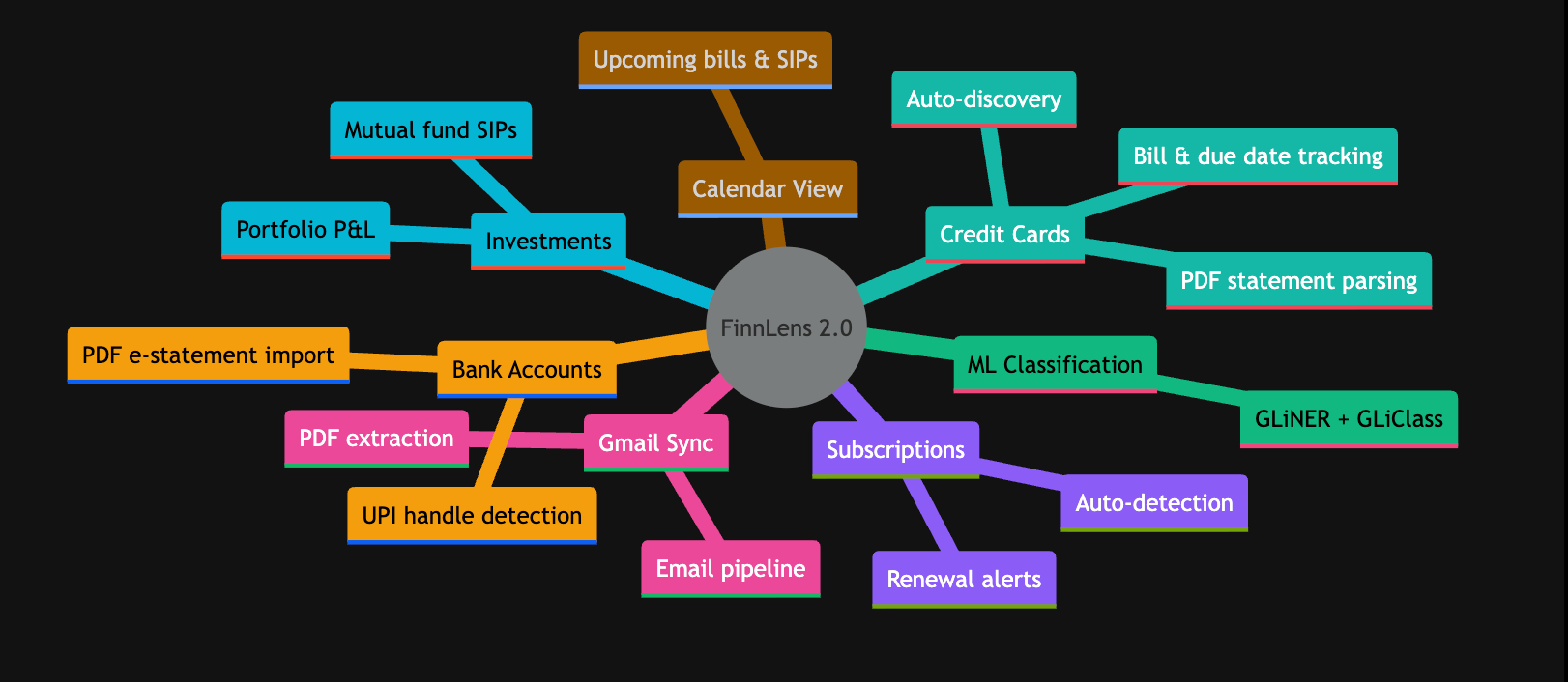
See the codeA personal finance intelligence platform. Connect your Gmail, and FinnLens automatically extracts credit card transactions, subscriptions, and investments from your emails — with PDF statement parsing.
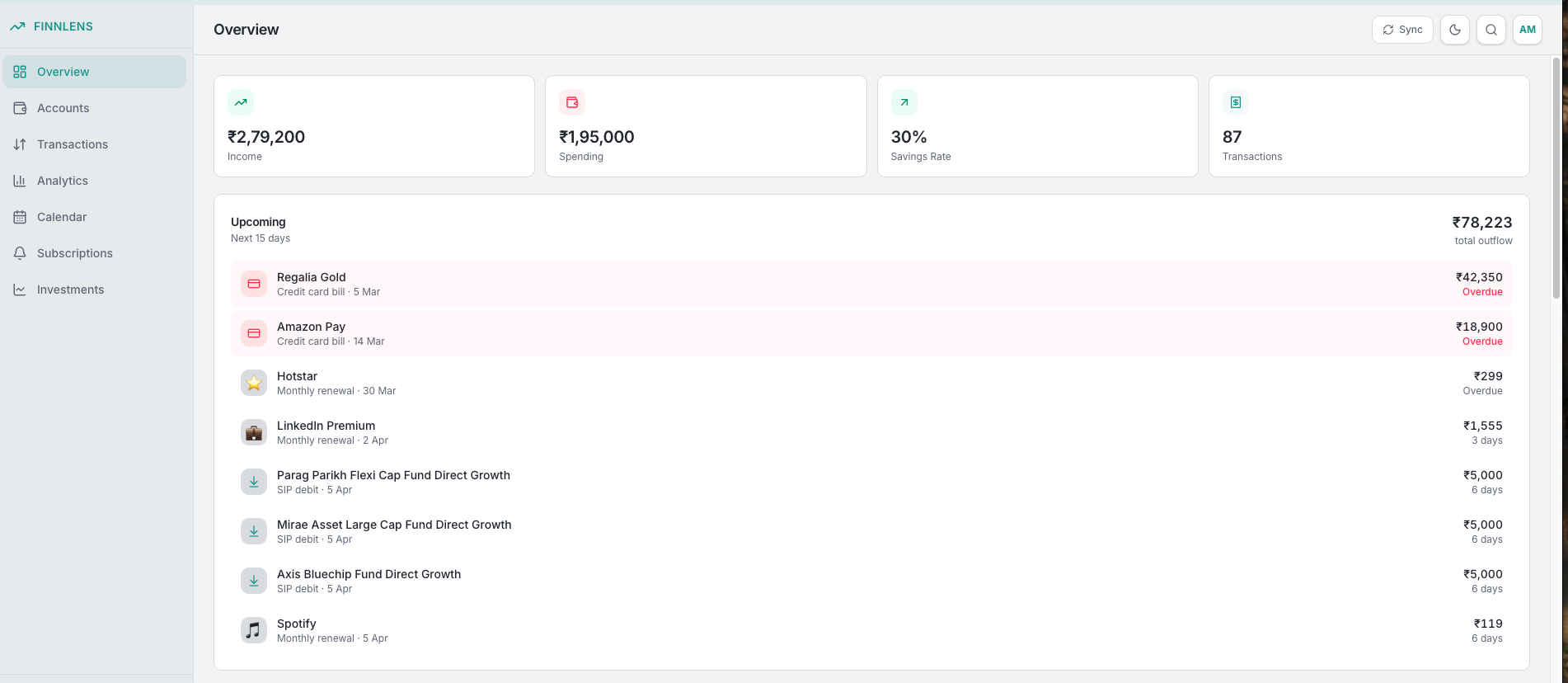
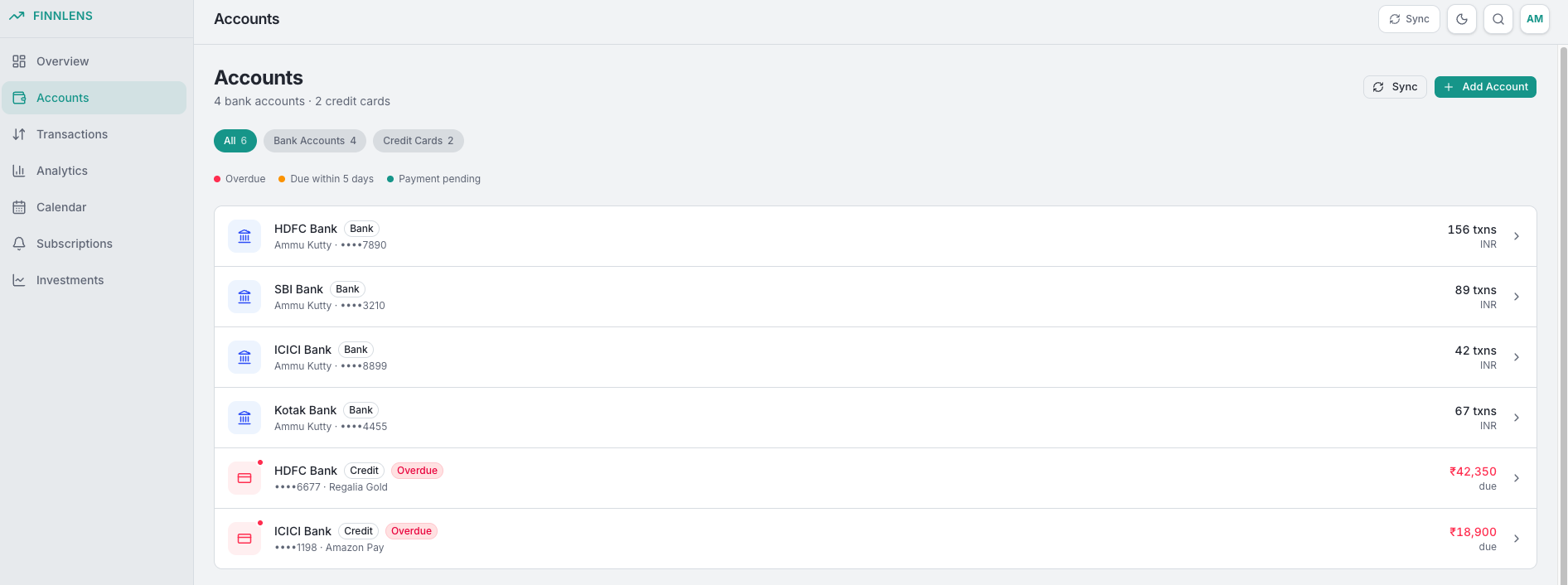
| Dashboard | Accounts |
|---|---|
 |  |
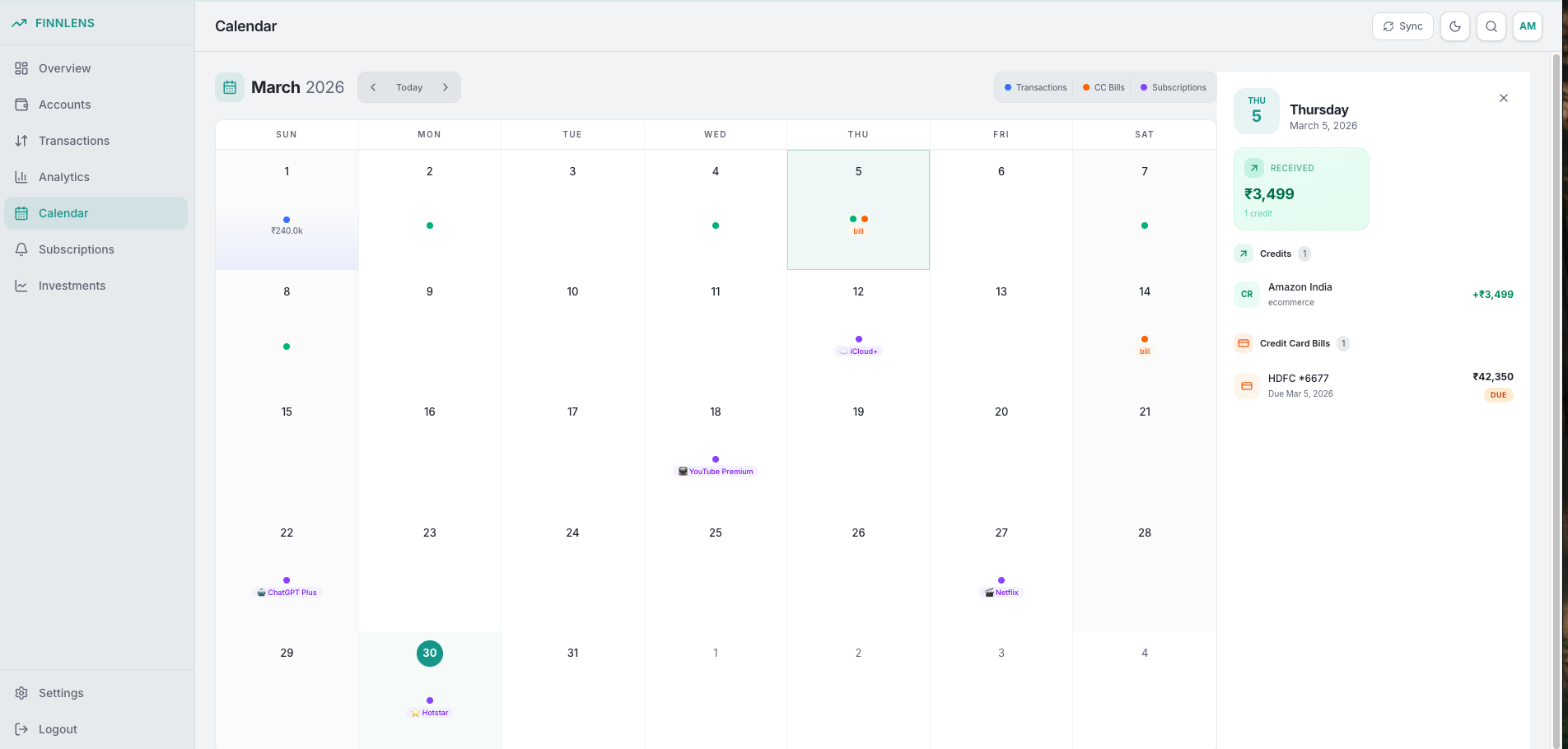
| Calendar View | Gmail Sync |
|---|---|
 | 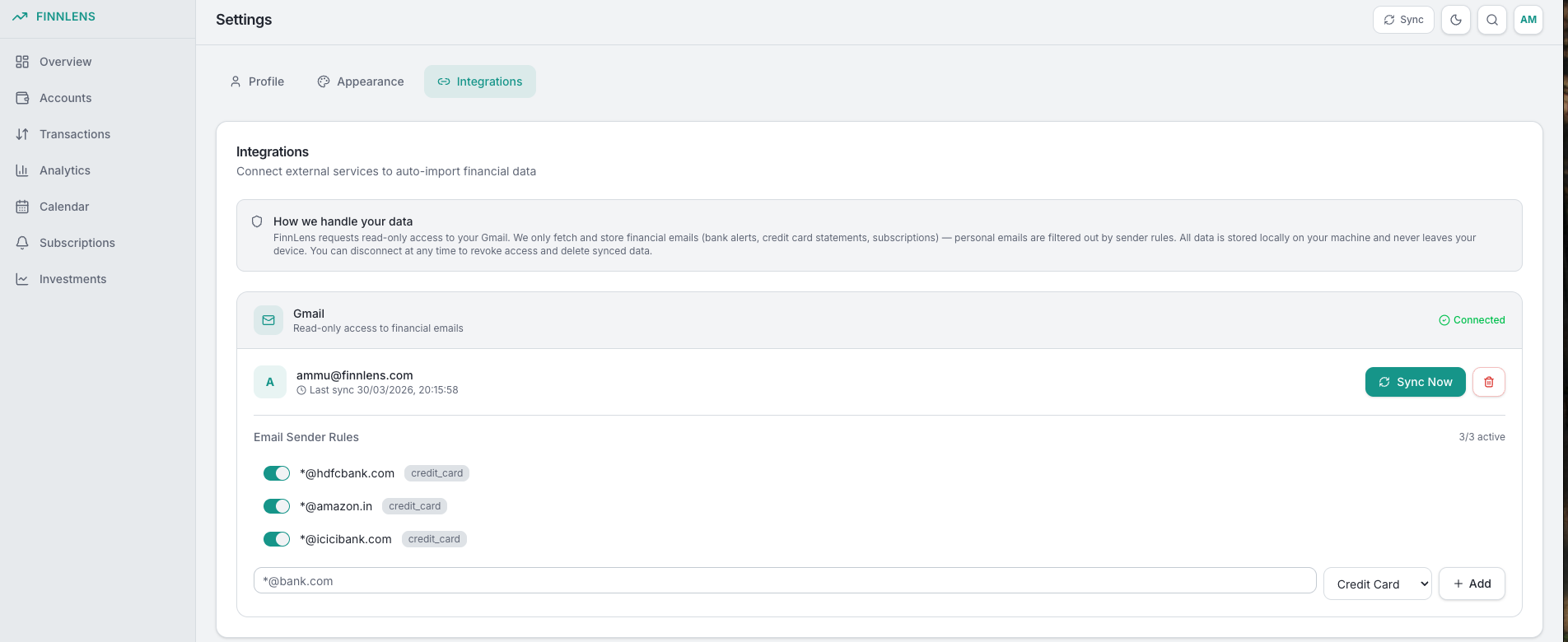 |
| Investment Tracking | Subscription Tracking |
|---|---|
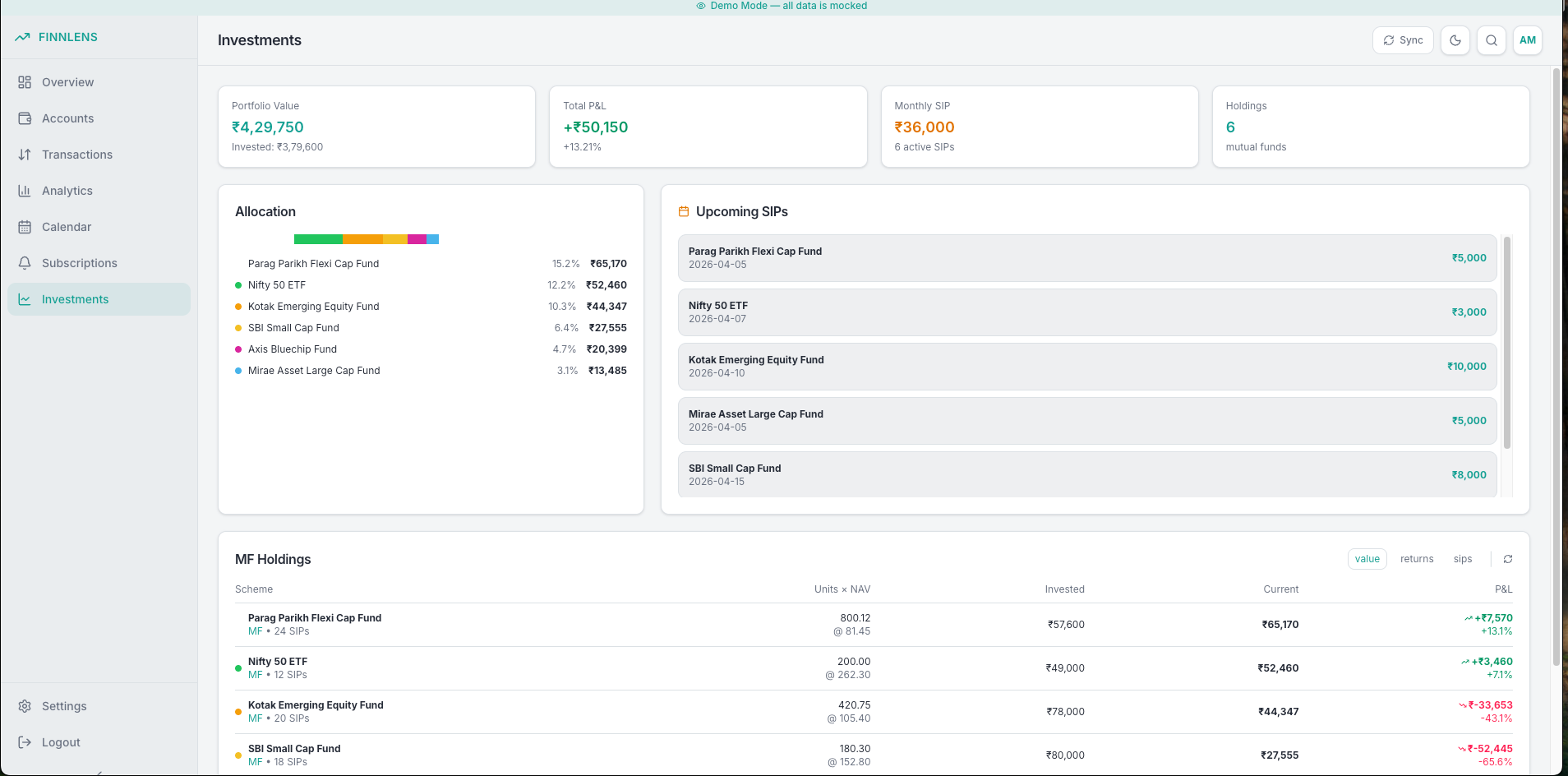 | 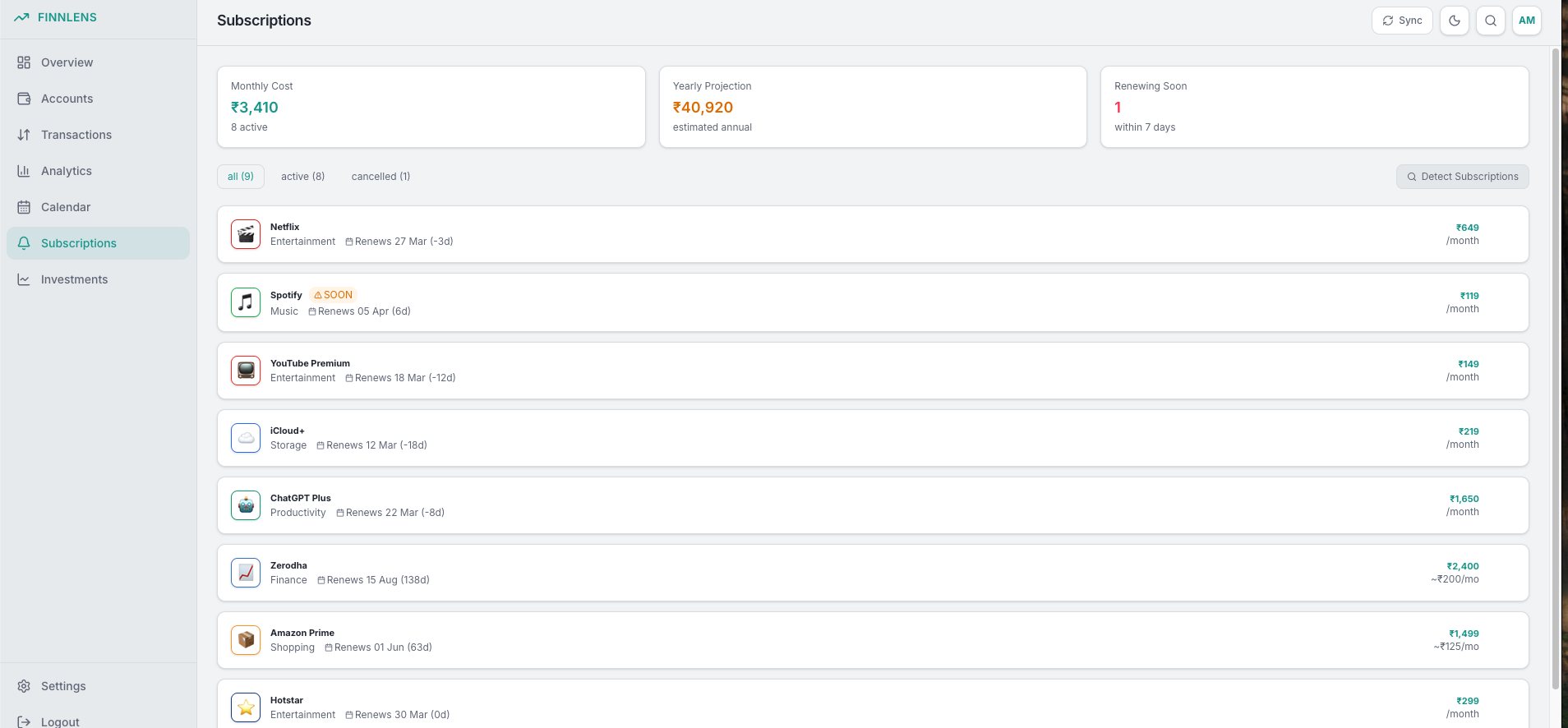 |
| Layer | Tech |
|---|---|
| Frontend | React 19, Vite, Tailwind CSS v4, shadcn/ui, TanStack Query |
| Backend | Django 6, Django Bolt (Rust-powered API server) |
| Auth | JWT via django-bolt (email/password) |
| Gmail Sync | Google OAuth 2.0 + PKCE (read-only) |
| ML | GLiNER (entity extraction), GLiClass (classification) |
| pdfplumber (text + table extraction) | |
| Database | PostgreSQL 16 (production), SQLite (local dev fallback) |
| Task queue | arq + Redis |
| Package managers | pnpm (frontend), uv (backend) |
| AI coding agents | Claude Code (Opus), OpenCode (GLM-5) |
finn-lens/
├── frontend/                  # React app (Vite + Tailwind v4 + shadcn/ui)
├── backend/                   # Django + Django Bolt API
│   ├── accounts/              # Auth viewsets (login, me)
│   ├── banking/               # Credit cards, transactions, bills, subscriptions
│   │   ├── email_extractor/   # Standalone email data extraction (publishable)
│   │   └── parsers/           # PDF statement parsers
│   ├── gmail/                 # Gmail sync, email parsing, sender rules
│   │   └── parsers/           # Email content parsers (CC alerts, statements, etc.)
│   ├── classifier/            # ML classification pipeline
│   ├── oauth/                 # Google OAuth endpoints
│   └── finnlens/              # Django settings
├── docker-compose.yml         # Development (hot-reload, volume mounts)
├── docker-compose.prod.yml    # Production overlay (optimized builds, Caddy)
└── Makefile                   # All run commands
Choose your setup:
# 1. Clone and configure backend env
cp backend/.env.example backend/.env
# Edit backend/.env with your Google OAuth credentials (see GCP Setup below)

# 2. Build and start all services
make docker-build
make docker-up

# 3. Run migrations and create a user
make docker-migrate
make docker-createsuperuser

# 4. View logs
make docker-logs
Open http://localhost:5174 and sign in with your superuser credentials.
make docker-down
make docker-shell
| Service | Port |
|---|---|
| Frontend (Vite) | http://localhost:5174 |
| Backend API | http://localhost:8000 |
| PostgreSQL | localhost:5432 |
| Redis | localhost:6379 |
uv — pip install uvpnpm — npm install -g pnpmbrew install redis (macOS) or apt install redis (Linux)cd backend
# Install dependencies
uv sync
# Copy and configure environment
cp .env.example .env # edit with your Google OAuth credentials
# Run migrations and create a user
uv run python manage.py migrate
uv run python manage.py createsuperuser
# Start the API server (port 8000)
uv run python manage.py runbolt --dev
cd frontend

# Install dependencies
pnpm install

# Start dev server (port 5174)
pnpm dev
The arq worker processes the Gmail sync pipeline (fetch → classify → parse → materialize).
# Terminal 1: Start Redis
make redis

# Terminal 2: Start worker (auto-reloads on code changes)
make worker
make -j4 up
Open http://localhost:5174 and sign in with your superuser credentials.
Production mode uses:
--processes 4, connection pooling via psycopg[pool]# 1. Configure backend/.env with production values:
# - DEBUG=False
# - ALLOWED_HOSTS=your-domain.com
# - BOLT_JWT_SECRET=<strong random value, min 32 chars>
# - SECRET_KEY=<strong random value>
# - CORS_ALLOWED_ORIGINS=https://your-domain.com
# - DATABASE_URL=postgresql://finnlens:finnlens@postgres:5432/finnlens (set automatically by compose)
# 2. Optional: override compose settings via environment
# POSTGRES_PASSWORD=your-strong-password
# FRONTEND_PORT=443
# ALLOWED_HOSTS=your-domain.com,127.0.0.1
# CORS_ALLOWED_ORIGINS=https://your-domain.com
# 3. Build and start
make docker-prod
# 4. Run migrations
docker compose -f docker-compose.yml -f docker-compose.prod.yml exec backend \
uv run python manage.py migrate
# 5. Create superuser
docker compose -f docker-compose.yml -f docker-compose.prod.yml exec backend \
uv run python manage.py createsuperuser
make docker-prod-down
| Service | Port |
|---|---|
| Frontend (Caddy) | 80 (configurable via FRONTEND_PORT) |
| PostgreSQL | Not exposed externally |
| Redis | Not exposed externally |
Note: For automatic HTTPS, update the
Caddyfilewith your domain: replace:80withyour-domain.com.
Demo mode runs the frontend with zero backend dependency — all API calls are intercepted and return realistic mocked data (Indian financial data: INR, Indian banks, merchants).
cd frontend

# Dev server with demo mode
pnpm dev:demo

# Production demo build
pnpm build:demo
Open http://localhost:5174 — you'll see a marketing landing page instead of the login form. Click "Quick Login as Demo User" or enter demo / demo.
The marketing landing page is only enabled for pnpm dev:demo. pnpm build:demo still uses mocked data, but keeps the normal login page.
What works in demo mode:
What is mocked:
demo:demo credentials, no JWT validation)FinnLens) and createFinnLensemailprofilehttps://www.googleapis.com/auth/gmail.readonlyFinnLens Webhttp://localhost:5174 (local dev)http://localhost (Docker prod)https://finnlens.com)http://localhost:5174/oauth/google/callback (local dev)http://localhost/oauth/google/callback (Docker prod)https://your-domain.com/oauth/google/callback (production)Add to backend/.env:
GOOGLE_CLIENT_ID=<your-client-id>
GOOGLE_CLIENT_SECRET=<your-client-secret>
GOOGLE_REDIRECT_URI=http://localhost:5174/oauth/google/callback
GMAIL_TOKEN_ENCRYPTION_KEY=<generate with command below>
Generate a Fernet encryption key for storing Gmail tokens securely:
uv run python -c "from cryptography.fernet import Fernet; print(Fernet.generate_key().decode())"
make docker-createsuperuser
cd backend
uv run python manage.py createsuperuser
Follow the prompts — email and password are all that's required.
Tip: If you get a database connection error, make sure PostgreSQL is running and
DATABASE_URLis set correctly inbackend/.env.
After signing in, you'll land on the Dashboard. You should see an empty state with no accounts or transactions.
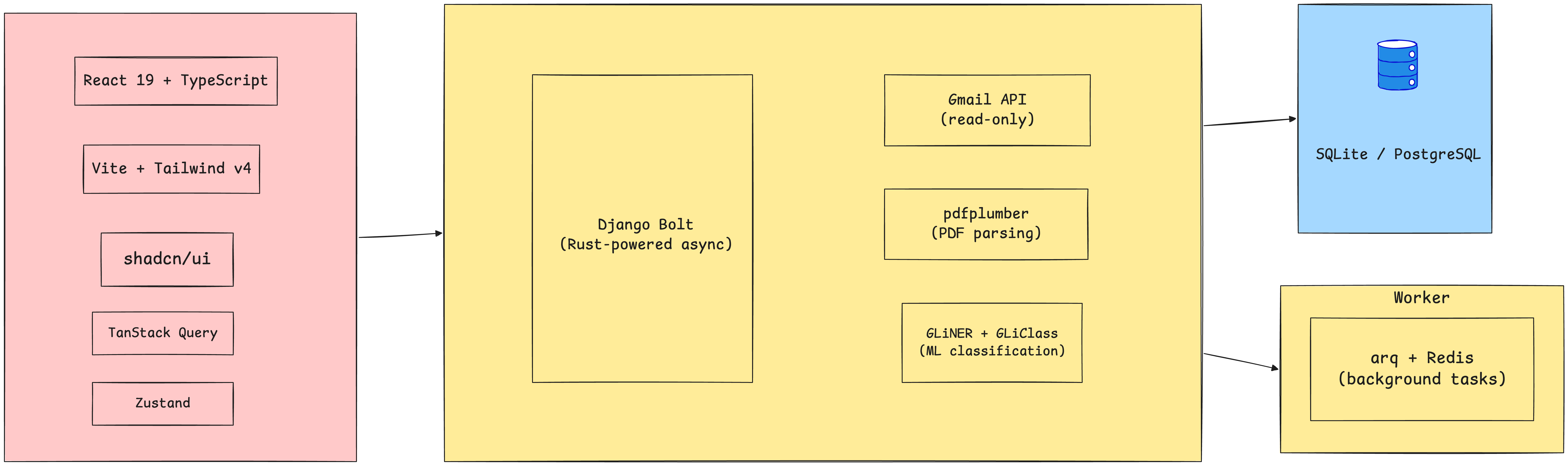
The banking/email_extractor module extracts structured CC statement data from email HTML with zero Django dependencies. Can be published as a separate package.
from banking.email_extractor import extract_cc_statement

result = extract_cc_statement(subject="...", body_html="...")
print(result.total_due)              # 13593.37
print(result.min_due)                # 930.0
print(result.due_date)               # 2026-03-30
print(result.billing_period_start)   # 2026-02-13
print(result.billing_period_end)     # 2026-03-12
print(result.card_last4)             # 9005
print(result.pdf_password)           # suji0501
| Command | Description |
|---|---|
make backend | Start backend (local) |
make frontend | Start frontend (local) |
make worker | Start arq worker (local) |
make redis | Start Redis (local) |
make migrate | Run Django migrations (local) |
make -j4 up | Start all local services in parallel |
make docker-build | Build Docker images |
make docker-up | Start Docker dev services |
make docker-down | Stop Docker dev services |
make docker-logs | Tail Docker logs |
make docker-shell | Shell into backend container |
make docker-migrate | Run migrations in Docker |
make docker-createsuperuser | Create superuser in Docker |
make docker-prod | Build and start production |
make docker-prod-down | Stop production |
backend/.env.example as the source of truth for backend environment variables.Technical backlog status for core data coverage:
| Features | Status | Supported now (parser-level) | Pending |
|---|---|---|---|
| Bank statement parser | partial | ICICI | IDFC FIRST, SBI, Federal Bank |
| Credit card statement parser | partial | ICICI, Axis (+ generic fallback) | HDFC, SBI Card, Kotak, IndusInd, Standard Chartered, RBL, Yes Bank, AMEX, HSBC, Citi |
| Investment email parser | partial | Groww | Zerodha, Kite, Angel One |
| Subscription parser | partial | Generic parser | Platform-specific parsers |
| Notifications | pending | None | End-to-end notification system |
Notes:
FinnLens turns bank alerts, card statements, investment emails, and renewals into one calm financial command center while you own your data.
See the codeA personal finance intelligence platform. Connect your Gmail, and FinnLens automatically extracts credit card transactions, subscriptions, and investments from your emails — with PDF statement parsing.
| Dashboard | Accounts |
|---|---|
| |
| Calendar View | Gmail Sync |
|---|---|
| |
| Investment Tracking | Subscription Tracking |
|---|---|
| |
| Layer | Tech |
|---|---|
| Frontend | React 19, Vite, Tailwind CSS v4, shadcn/ui, TanStack Query |
| Backend | Django 6, Django Bolt (Rust-powered API server) |
| Auth | JWT via django-bolt (email/password) |
| Gmail Sync | Google OAuth 2.0 + PKCE (read-only) |
| ML | GLiNER (entity extraction), GLiClass (classification) |
| pdfplumber (text + table extraction) | |
| Database | PostgreSQL 16 (production), SQLite (local dev fallback) |
| Task queue | arq + Redis |
| Package managers | pnpm (frontend), uv (backend) |
| AI coding agents | Claude Code (Opus), OpenCode (GLM-5) |
finn-lens/
├── frontend/                  # React app (Vite + Tailwind v4 + shadcn/ui)
├── backend/                   # Django + Django Bolt API
│   ├── accounts/              # Auth viewsets (login, me)
│   ├── banking/               # Credit cards, transactions, bills, subscriptions
│   │   ├── email_extractor/   # Standalone email data extraction (publishable)
│   │   └── parsers/           # PDF statement parsers
│   ├── gmail/                 # Gmail sync, email parsing, sender rules
│   │   └── parsers/           # Email content parsers (CC alerts, statements, etc.)
│   ├── classifier/            # ML classification pipeline
│   ├── oauth/                 # Google OAuth endpoints
│   └── finnlens/              # Django settings
├── docker-compose.yml         # Development (hot-reload, volume mounts)
├── docker-compose.prod.yml    # Production overlay (optimized builds, Caddy)
└── Makefile                   # All run commands
Choose your setup:
# 1. Clone and configure backend env
cp backend/.env.example backend/.env
# Edit backend/.env with your Google OAuth credentials (see GCP Setup below)

# 2. Build and start all services
make docker-build
make docker-up

# 3. Run migrations and create a user
make docker-migrate
make docker-createsuperuser

# 4. View logs
make docker-logs
Open http://localhost:5174 and sign in with your superuser credentials.
make docker-down
make docker-shell
| Service | Port |
|---|---|
| Frontend (Vite) | http://localhost:5174 |
| Backend API | http://localhost:8000 |
| PostgreSQL | localhost:5432 |
| Redis | localhost:6379 |
uv — pip install uvpnpm — npm install -g pnpmbrew install redis (macOS) or apt install redis (Linux)cd backend
# Install dependencies
uv sync
# Copy and configure environment
cp .env.example .env # edit with your Google OAuth credentials
# Run migrations and create a user
uv run python manage.py migrate
uv run python manage.py createsuperuser
# Start the API server (port 8000)
uv run python manage.py runbolt --dev
cd frontend

# Install dependencies
pnpm install

# Start dev server (port 5174)
pnpm dev
The arq worker processes the Gmail sync pipeline (fetch → classify → parse → materialize).
# Terminal 1: Start Redis
make redis

# Terminal 2: Start worker (auto-reloads on code changes)
make worker
make -j4 up
Open http://localhost:5174 and sign in with your superuser credentials.
Production mode uses:
--processes 4, connection pooling via psycopg[pool]# 1. Configure backend/.env with production values:
# - DEBUG=False
# - ALLOWED_HOSTS=your-domain.com
# - BOLT_JWT_SECRET=<strong random value, min 32 chars>
# - SECRET_KEY=<strong random value>
# - CORS_ALLOWED_ORIGINS=https://your-domain.com
# - DATABASE_URL=postgresql://finnlens:finnlens@postgres:5432/finnlens (set automatically by compose)
# 2. Optional: override compose settings via environment
# POSTGRES_PASSWORD=your-strong-password
# FRONTEND_PORT=443
# ALLOWED_HOSTS=your-domain.com,127.0.0.1
# CORS_ALLOWED_ORIGINS=https://your-domain.com
# 3. Build and start
make docker-prod
# 4. Run migrations
docker compose -f docker-compose.yml -f docker-compose.prod.yml exec backend \
uv run python manage.py migrate
# 5. Create superuser
docker compose -f docker-compose.yml -f docker-compose.prod.yml exec backend \
uv run python manage.py createsuperuser
make docker-prod-down
| Service | Port |
|---|---|
| Frontend (Caddy) | 80 (configurable via FRONTEND_PORT) |
| PostgreSQL | Not exposed externally |
| Redis | Not exposed externally |
Note: For automatic HTTPS, update the
Caddyfilewith your domain: replace:80withyour-domain.com.
Demo mode runs the frontend with zero backend dependency — all API calls are intercepted and return realistic mocked data (Indian financial data: INR, Indian banks, merchants).
cd frontend

# Dev server with demo mode
pnpm dev:demo

# Production demo build
pnpm build:demo
Open http://localhost:5174 — you'll see a marketing landing page instead of the login form. Click "Quick Login as Demo User" or enter demo / demo.
The marketing landing page is only enabled for pnpm dev:demo. pnpm build:demo still uses mocked data, but keeps the normal login page.
What works in demo mode:
What is mocked:
demo:demo credentials, no JWT validation)FinnLens) and createFinnLensemailprofilehttps://www.googleapis.com/auth/gmail.readonlyFinnLens Webhttp://localhost:5174 (local dev)http://localhost (Docker prod)https://finnlens.com)http://localhost:5174/oauth/google/callback (local dev)http://localhost/oauth/google/callback (Docker prod)https://your-domain.com/oauth/google/callback (production)Add to backend/.env:
GOOGLE_CLIENT_ID=<your-client-id>
GOOGLE_CLIENT_SECRET=<your-client-secret>
GOOGLE_REDIRECT_URI=http://localhost:5174/oauth/google/callback
GMAIL_TOKEN_ENCRYPTION_KEY=<generate with command below>
Generate a Fernet encryption key for storing Gmail tokens securely:
uv run python -c "from cryptography.fernet import Fernet; print(Fernet.generate_key().decode())"
make docker-createsuperuser
cd backend
uv run python manage.py createsuperuser
Follow the prompts — email and password are all that's required.
Tip: If you get a database connection error, make sure PostgreSQL is running and
DATABASE_URLis set correctly inbackend/.env.
After signing in, you'll land on the Dashboard. You should see an empty state with no accounts or transactions.
The banking/email_extractor module extracts structured CC statement data from email HTML with zero Django dependencies. Can be published as a separate package.
from banking.email_extractor import extract_cc_statement

result = extract_cc_statement(subject="...", body_html="...")
print(result.total_due)              # 13593.37
print(result.min_due)                # 930.0
print(result.due_date)               # 2026-03-30
print(result.billing_period_start)   # 2026-02-13
print(result.billing_period_end)     # 2026-03-12
print(result.card_last4)             # 9005
print(result.pdf_password)           # suji0501
| Command | Description |
|---|---|
make backend | Start backend (local) |
make frontend | Start frontend (local) |
make worker | Start arq worker (local) |
make redis | Start Redis (local) |
make migrate | Run Django migrations (local) |
make -j4 up | Start all local services in parallel |
make docker-build | Build Docker images |
make docker-up | Start Docker dev services |
make docker-down | Stop Docker dev services |
make docker-logs | Tail Docker logs |
make docker-shell | Shell into backend container |
make docker-migrate | Run migrations in Docker |
make docker-createsuperuser | Create superuser in Docker |
make docker-prod | Build and start production |
make docker-prod-down | Stop production |
backend/.env.example as the source of truth for backend environment variables.Technical backlog status for core data coverage:
| Features | Status | Supported now (parser-level) | Pending |
|---|---|---|---|
| Bank statement parser | partial | ICICI | IDFC FIRST, SBI, Federal Bank |
| Credit card statement parser | partial | ICICI, Axis (+ generic fallback) | HDFC, SBI Card, Kotak, IndusInd, Standard Chartered, RBL, Yes Bank, AMEX, HSBC, Citi |
| Investment email parser | partial | Groww | Zerodha, Kite, Angel One |
| Subscription parser | partial | Generic parser | Platform-specific parsers |
| Notifications | pending | None | End-to-end notification system |
Notes:



