Direct voxel grid optimization for fast radiance field reconstruction.
See the codeDirect Voxel Grid Optimization (CVPR2022 Oral, project page, DVGO paper, DVGO v2 paper).
https://user-images.githubusercontent.com/2712505/153380311-19d6c3a1-9130-489a-af16-ad36c78f10a9.mp4
https://user-images.githubusercontent.com/2712505/153380197-991d1689-6418-499c-a192-d757f9a64b64.mp4
A short guide to capture custom forward-facing scenes and rendering fly-through videos.
Below are two rgb and depth fly-through videos from custom captured scenes.
https://user-images.githubusercontent.com/2712505/174267754-619d4f81-dd04-4c50-ba7f-434774cb890e.mp4
git clone [email protected]:sunset1995/DirectVoxGO.git
cd DirectVoxGO
pip install -r requirements.txt
Pytorch and torch_scatter installation is machine dependent, please install the correct version for your machine.
PyTorch, numpy, torch_scatter: main computation.scipy, lpips: SSIM and LPIPS evaluation.tqdm: progress bar.mmcv: config system.opencv-python: image processing.imageio, imageio-ffmpeg: images and videos I/O.Ninja: to build the newly implemented torch extention just-in-time.einops: torch tensor shaping with pretty api.torch_efficient_distloss: O(N) realization for the distortion loss.data
├── nerf_synthetic # Link: https://drive.google.com/drive/folders/128yBriW1IG_3NJ5Rp7APSTZsJqdJdfc1
│ └── [chair|drums|ficus|hotdog|lego|materials|mic|ship]
│ ├── [train|val|test]
│ │ └── r_*.png
│ └── transforms_[train|val|test].json
│
├── Synthetic_NSVF # Link: https://dl.fbaipublicfiles.com/nsvf/dataset/Synthetic_NSVF.zip
│ └── [Bike|Lifestyle|Palace|Robot|Spaceship|Steamtrain|Toad|Wineholder]
│ ├── intrinsics.txt
│ ├── rgb
│ │ └── [0_train|1_val|2_test]_*.png
│ └── pose
│ └── [0_train|1_val|2_test]_*.txt
│
├── BlendedMVS # Link: https://dl.fbaipublicfiles.com/nsvf/dataset/BlendedMVS.zip
│ └── [Character|Fountain|Jade|Statues]
│ ├── intrinsics.txt
│ ├── rgb
│ │ └── [0|1|2]_*.png
│ └── pose
│ └── [0|1|2]_*.txt
│
├── TanksAndTemple # Link: https://dl.fbaipublicfiles.com/nsvf/dataset/TanksAndTemple.zip
│ └── [Barn|Caterpillar|Family|Ignatius|Truck]
│ ├── intrinsics.txt
│ ├── rgb
│ │ └── [0|1|2]_*.png
│ └── pose
│ └── [0|1|2]_*.txt
│
├── deepvoxels # Link: https://drive.google.com/drive/folders/1ScsRlnzy9Bd_n-xw83SP-0t548v63mPH
│ └── [train|validation|test]
│ └── [armchair|cube|greek|vase]
│ ├── intrinsics.txt
│ ├── rgb/*.png
│ └── pose/*.txt
│
├── nerf_llff_data # Link: https://drive.google.com/drive/folders/128yBriW1IG_3NJ5Rp7APSTZsJqdJdfc1
│ └── [fern|flower|fortress|horns|leaves|orchids|room|trex]
│
├── tanks_and_temples # Link: https://drive.google.com/file/d/11KRfN91W1AxAW6lOFs4EeYDbeoQZCi87/view?usp=sharing
│ └── [tat_intermediate_M60|tat_intermediate_Playground|tat_intermediate_Train|tat_training_Truck]
│ └── [train|test]
│ ├── intrinsics/*txt
│ ├── pose/*txt
│ └── rgb/*jpg
│
├── lf_data # Link: https://drive.google.com/file/d/1gsjDjkbTh4GAR9fFqlIDZ__qR9NYTURQ/view?usp=sharing
│ └── [africa|basket|ship|statue|torch]
│ └── [train|test]
│ ├── intrinsics/*txt
│ ├── pose/*txt
│ └── rgb/*jpg
│
├── 360_v2 # Link: https://jonbarron.info/mipnerf360/
│ └── [bicycle|bonsai|counter|garden|kitchen|room|stump]
│ ├── poses_bounds.npy
│ └── [images_2|images_4]
│
├── nerf_llff_data # Link: https://drive.google.com/drive/folders/14boI-o5hGO9srnWaaogTU5_ji7wkX2S7
│ └── [fern|flower|fortress|horns|leaves|orchids|room|trex]
│ ├── poses_bounds.npy
│ └── [images_2|images_4]
│
└── co3d # Link: https://github.com/facebookresearch/co3d
└── [donut|teddybear|umbrella|...]
├── frame_annotations.jgz
├── set_lists.json
└── [129_14950_29917|189_20376_35616|...]
├── images
│ └── frame*.jpg
└── masks
└── frame*.png
Training
$ python run.py --config configs/nerf/lego.py --render_test
Use --i_print and --i_weights to change the log interval.
Evaluation
To only evaluate the testset PSNR, SSIM, and LPIPS of the trained lego without re-training, run:
$ python run.py --config configs/nerf/lego.py --render_only --render_test \
                                              --eval_ssim --eval_lpips_vgg
Use --eval_lpips_alex to evaluate LPIPS with pre-trained Alex net instead of VGG net.
Render video
$ python run.py --config configs/nerf/lego.py --render_only --render_video
Use --render_video_factor 4 for a fast preview.
Reproduction: all config files to reproduce our results.
  $ ls configs/*
  configs/blendedmvs:
  Character.py  Fountain.py  Jade.py  Statues.py

  configs/nerf:
  chair.py  drums.py  ficus.py  hotdog.py  lego.py  materials.py  mic.py  ship.py

  configs/nsvf:
  Bike.py  Lifestyle.py  Palace.py  Robot.py  Spaceship.py  Steamtrain.py  Toad.py  Wineholder.py

  configs/tankstemple:
  Barn.py  Caterpillar.py  Family.py  Ignatius.py  Truck.py

  configs/deepvoxels:
  armchair.py  cube.py  greek.py  vase.py

  configs/tankstemple_unbounded:
  M60.py  Playground.py  Train.py  Truck.py

  configs/lf:
  africa.py  basket.py  ship.py  statue.py  torch.py

  configs/nerf_unbounded:
  bicycle.py  bonsai.py  counter.py  garden.py  kitchen.py  room.py  stump.py

  configs/llff:
  fern.py  flower.py  fortress.py  horns.py  leaves.py  orchids.py  room.py  trex.py
Coming soon hopefully.
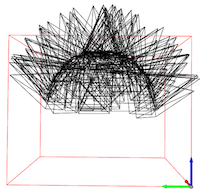
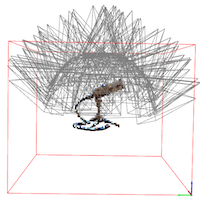
Adjusting the data related config fields to fit your camera coordinate system is recommend before implementing a new one. We provide two visualization tools for debugging.
--export_bbox_and_cams_only {filename}.npz:
python run.py --config configs/nerf/mic.py --export_bbox_and_cams_only cam_mic.npz
python tools/vis_train.py cam_mic.npz
--export_coarse_only {filename}.npz (assumed coarse_last.tar available in the train log):
python run.py --config configs/nerf/mic.py --export_coarse_only coarse_mic.npz
python tools/vis_volume.py coarse_mic.npz 0.001 --cam cam_mic.npz
| Inspecting the cameras & BBox | Inspecting the learned coarse volume |
|---|---|
 |  |
We have reported some ablation experiments in our paper supplementary material.
Setting N_iters, N_rand, num_voxels, rgbnet_depth, rgbnet_width to larger values or setting stepsize to smaller values typically leads to better quality but need more computation.
The weight_distortion affects the training speed and quality as well.
Only stepsize is tunable in testing phase, while all the other fields should remain the same as training.
You will need them for scaling to a higher grid resolution. But we believe our simplest dense grid could still be your good starting point if you have other challenging problems to deal with.
The code base is origined from an awesome nerf-pytorch implementation, but it becomes very different from the code base now.
182 followers · starred Jan 2022
1,502 followers · starred Nov 2022
149 followers · starred Apr 2022
65 followers · starred Nov 2022
Direct voxel grid optimization for fast radiance field reconstruction.
See the codeDirect Voxel Grid Optimization (CVPR2022 Oral, project page, DVGO paper, DVGO v2 paper).
https://user-images.githubusercontent.com/2712505/153380311-19d6c3a1-9130-489a-af16-ad36c78f10a9.mp4
https://user-images.githubusercontent.com/2712505/153380197-991d1689-6418-499c-a192-d757f9a64b64.mp4
A short guide to capture custom forward-facing scenes and rendering fly-through videos.
Below are two rgb and depth fly-through videos from custom captured scenes.
https://user-images.githubusercontent.com/2712505/174267754-619d4f81-dd04-4c50-ba7f-434774cb890e.mp4
git clone [email protected]:sunset1995/DirectVoxGO.git
cd DirectVoxGO
pip install -r requirements.txt
Pytorch and torch_scatter installation is machine dependent, please install the correct version for your machine.
PyTorch, numpy, torch_scatter: main computation.scipy, lpips: SSIM and LPIPS evaluation.tqdm: progress bar.mmcv: config system.opencv-python: image processing.imageio, imageio-ffmpeg: images and videos I/O.Ninja: to build the newly implemented torch extention just-in-time.einops: torch tensor shaping with pretty api.torch_efficient_distloss: O(N) realization for the distortion loss.data
├── nerf_synthetic # Link: https://drive.google.com/drive/folders/128yBriW1IG_3NJ5Rp7APSTZsJqdJdfc1
│ └── [chair|drums|ficus|hotdog|lego|materials|mic|ship]
│ ├── [train|val|test]
│ │ └── r_*.png
│ └── transforms_[train|val|test].json
│
├── Synthetic_NSVF # Link: https://dl.fbaipublicfiles.com/nsvf/dataset/Synthetic_NSVF.zip
│ └── [Bike|Lifestyle|Palace|Robot|Spaceship|Steamtrain|Toad|Wineholder]
│ ├── intrinsics.txt
│ ├── rgb
│ │ └── [0_train|1_val|2_test]_*.png
│ └── pose
│ └── [0_train|1_val|2_test]_*.txt
│
├── BlendedMVS # Link: https://dl.fbaipublicfiles.com/nsvf/dataset/BlendedMVS.zip
│ └── [Character|Fountain|Jade|Statues]
│ ├── intrinsics.txt
│ ├── rgb
│ │ └── [0|1|2]_*.png
│ └── pose
│ └── [0|1|2]_*.txt
│
├── TanksAndTemple # Link: https://dl.fbaipublicfiles.com/nsvf/dataset/TanksAndTemple.zip
│ └── [Barn|Caterpillar|Family|Ignatius|Truck]
│ ├── intrinsics.txt
│ ├── rgb
│ │ └── [0|1|2]_*.png
│ └── pose
│ └── [0|1|2]_*.txt
│
├── deepvoxels # Link: https://drive.google.com/drive/folders/1ScsRlnzy9Bd_n-xw83SP-0t548v63mPH
│ └── [train|validation|test]
│ └── [armchair|cube|greek|vase]
│ ├── intrinsics.txt
│ ├── rgb/*.png
│ └── pose/*.txt
│
├── nerf_llff_data # Link: https://drive.google.com/drive/folders/128yBriW1IG_3NJ5Rp7APSTZsJqdJdfc1
│ └── [fern|flower|fortress|horns|leaves|orchids|room|trex]
│
├── tanks_and_temples # Link: https://drive.google.com/file/d/11KRfN91W1AxAW6lOFs4EeYDbeoQZCi87/view?usp=sharing
│ └── [tat_intermediate_M60|tat_intermediate_Playground|tat_intermediate_Train|tat_training_Truck]
│ └── [train|test]
│ ├── intrinsics/*txt
│ ├── pose/*txt
│ └── rgb/*jpg
│
├── lf_data # Link: https://drive.google.com/file/d/1gsjDjkbTh4GAR9fFqlIDZ__qR9NYTURQ/view?usp=sharing
│ └── [africa|basket|ship|statue|torch]
│ └── [train|test]
│ ├── intrinsics/*txt
│ ├── pose/*txt
│ └── rgb/*jpg
│
├── 360_v2 # Link: https://jonbarron.info/mipnerf360/
│ └── [bicycle|bonsai|counter|garden|kitchen|room|stump]
│ ├── poses_bounds.npy
│ └── [images_2|images_4]
│
├── nerf_llff_data # Link: https://drive.google.com/drive/folders/14boI-o5hGO9srnWaaogTU5_ji7wkX2S7
│ └── [fern|flower|fortress|horns|leaves|orchids|room|trex]
│ ├── poses_bounds.npy
│ └── [images_2|images_4]
│
└── co3d # Link: https://github.com/facebookresearch/co3d
└── [donut|teddybear|umbrella|...]
├── frame_annotations.jgz
├── set_lists.json
└── [129_14950_29917|189_20376_35616|...]
├── images
│ └── frame*.jpg
└── masks
└── frame*.png
Training
$ python run.py --config configs/nerf/lego.py --render_test
Use --i_print and --i_weights to change the log interval.
Evaluation
To only evaluate the testset PSNR, SSIM, and LPIPS of the trained lego without re-training, run:
$ python run.py --config configs/nerf/lego.py --render_only --render_test \
                                              --eval_ssim --eval_lpips_vgg
Use --eval_lpips_alex to evaluate LPIPS with pre-trained Alex net instead of VGG net.
Render video
$ python run.py --config configs/nerf/lego.py --render_only --render_video
Use --render_video_factor 4 for a fast preview.
Reproduction: all config files to reproduce our results.
  $ ls configs/*
  configs/blendedmvs:
  Character.py  Fountain.py  Jade.py  Statues.py

  configs/nerf:
  chair.py  drums.py  ficus.py  hotdog.py  lego.py  materials.py  mic.py  ship.py

  configs/nsvf:
  Bike.py  Lifestyle.py  Palace.py  Robot.py  Spaceship.py  Steamtrain.py  Toad.py  Wineholder.py

  configs/tankstemple:
  Barn.py  Caterpillar.py  Family.py  Ignatius.py  Truck.py

  configs/deepvoxels:
  armchair.py  cube.py  greek.py  vase.py

  configs/tankstemple_unbounded:
  M60.py  Playground.py  Train.py  Truck.py

  configs/lf:
  africa.py  basket.py  ship.py  statue.py  torch.py

  configs/nerf_unbounded:
  bicycle.py  bonsai.py  counter.py  garden.py  kitchen.py  room.py  stump.py

  configs/llff:
  fern.py  flower.py  fortress.py  horns.py  leaves.py  orchids.py  room.py  trex.py
Coming soon hopefully.
Adjusting the data related config fields to fit your camera coordinate system is recommend before implementing a new one. We provide two visualization tools for debugging.
--export_bbox_and_cams_only {filename}.npz:
python run.py --config configs/nerf/mic.py --export_bbox_and_cams_only cam_mic.npz
python tools/vis_train.py cam_mic.npz
--export_coarse_only {filename}.npz (assumed coarse_last.tar available in the train log):
python run.py --config configs/nerf/mic.py --export_coarse_only coarse_mic.npz
python tools/vis_volume.py coarse_mic.npz 0.001 --cam cam_mic.npz
| Inspecting the cameras & BBox | Inspecting the learned coarse volume |
|---|---|
| |
We have reported some ablation experiments in our paper supplementary material.
Setting N_iters, N_rand, num_voxels, rgbnet_depth, rgbnet_width to larger values or setting stepsize to smaller values typically leads to better quality but need more computation.
The weight_distortion affects the training speed and quality as well.
Only stepsize is tunable in testing phase, while all the other fields should remain the same as training.
You will need them for scaling to a higher grid resolution. But we believe our simplest dense grid could still be your good starting point if you have other challenging problems to deal with.
The code base is origined from an awesome nerf-pytorch implementation, but it becomes very different from the code base now.
182 followers · starred Jan 2022
1,502 followers · starred Nov 2022
149 followers · starred Apr 2022
65 followers · starred Nov 2022



