
强大的 Frida 重打包工具,用于 iOS 和 Android。轻松修改 Frida 特征,增强隐蔽性,绕过检测。简化逆向工程和安全测试。Powerful Frida repackaging tool for iOS and Android. Easily modify Frida servers to enhance stealth and bypass detection. Streamlines reverse engineering and security testing.
Go
930
114 commits
updated Sep 11, 2026
README
Fridare











任何问题,请到仓库的 fridare issues 内提交,会进行反馈和修复bug,也推荐加QQ群,更好的沟通,但请先提交 issue ,作者再忙也会不定期一次性处理问题,更欢迎朋友们推送PR协同解决问题,感谢!☺️
Fridare 是面向 iOS / Android / Linux / Windows 的 Frida 自动化魔改工具:改名称、端口与协议面标识,降低常见环境检测命中率。提供 命令行 + 跨平台 GUI,并支持 静态补丁 与 Docker 源码重编译 双技术路线。
| 版本 | 要点 | 下载 |
|---|---|---|
| v4.0.8(当前 GUI) | 修 inject 资源改名 / ninja 花指令依赖 / 16.x snapshot;GUI 路径编过 16.7.19 与 17.17.1;不是免杀 | v4.0.8 |
| v4.0.7 | 源码页 stealth 开关(去符号/花指令/行为标记);静态魔改可去符号;不是免杀 | v4.0.7 |
| v4.0.6 | Docker toolchain-v4(MinGW + aarch64);监听端口用 -l | v4.0.6 |
| kxmwp-17.17.1(当前 Frida 产物) | 官方 17.17.0;linux-x86_64 GUI 路径 stealth 重编;不是免杀;端口用 -l | kxmwp-17.17.1 |
| kxmwp-16.7.19 | 官方 16.7.19 八平台 GUI 源码重编译(Android NDK r25)+ host wheels;不是免杀 | kxmwp-16.7.19 |
| kxmwp-17.17.0 | Frida 17.17.0 deep 产物(8 平台 server + host wheels) | kxmwp-17.17.0 |
| v4.0.5 | seed 脚本 Docker stage 修复;plan 扫描加速;README/CHANGELOG 精装;MinGW wrap 失败清理 | v4.0.5 |
| v4.0.4 | 双技术路线:默认 hex 静态魔改 + 可选 Docker 深度源码重编译;Windows MinGW server;服务端/客户端协议同步(re.{magic}. · /re/{magic}/ · {magic}:rpc);内置 AI Agent;OpenAI 端点探测;代理默认不走 | v4.0.4 |
| v4.0.3 | CLI 多平台静态链接(win/linux/darwin × amd64/arm64)+ Windows GUI 预编译 | v4.0.3 |
| v4.0.0 | Fyne GUI + Windows 原生 deb 魔改 | v4.0.0 |
文档:双技术路线 · v4.0.8 · 16 vs 17 · 16.7.19 · 17.17.1 · Windows · Android · iOS · frida-tools · 安装 · CHANGELOG
双技术路线(v4.0.4)
| 路线 | GUI | 依赖 | 速度 | 适用 |
|---|---|---|---|---|
| A · 静态补丁(默认) | frida 魔改 / frida-tools 魔改 / iOS DEB | 无 Docker | 秒级 | 日常改名、改端口、对齐 tools |
| B · 源码重编译(可选) | 源码重编译 · 一键深度定制 | 仅 Docker/Linux 内编译(Host 不装 Frida 工具链) | 小时级 | 深度隐藏、协议面同步、Windows MinGW server |
深度魔改(deep)要点:魔改名固定 5 位小写 a-z;server 与 host client wheel 必须成对(同一 magic);对象路径含 /re/{magic}/,避免只改 re.frida. 导致 UNKNOWN_METHOD。详细说明见 docs/dual-track.md。
kxmwp-17.17.1 安装注意
- host-wheels / pip:tools 文件名必须是 PEP 440 本地版本,带
+。17:frida_tools-14.10.4+frida.17.17.0.fridare.kxmwp-py3-none-any.whl。16:frida_tools-13.7.1+frida.16.7.19.fridare.kxmwp-py3-none-any.whl。请重新下载 kxmwp-16.7.19 的host-wheels.zip(旧 zip 里frida_tools-tools.frida.16.7.19…pip 拒装)。写成14.10.4.frida.也会报Invalid wheel filename(#36)。16/17 的 tools 不能混用。 - Android
kxmwp-serverabort(backend_class != null):请用本 tag 重新下载frida-kxmwp-17.17.1-android-arm64-server.zip。旧包 helper dex 仍是re/frida,native 已是re.kxmwp。 - 16.x
frida-ps:undefined symbol: kxmwp_agent_main:请重新下载 kxmwp-16.7.19 的android-arm64zip。补丁只改 agent ELF 的 hash,并把 GumJS 全局改成Kxmwp(不会把Frida.写回产物)。客户端必须frida==16.7.19魔改 wheel。 - Frida 17
Java.perform:fridaCLI /frida-trace自带 java-bridge。Pythonsession.create_script要自己处理frida:load-bridge,否则Java is not defined。nativeInterceptor不受影响。用法见 docs/kxmwp-17.17.1.md。
GUI:打开「源码重编译」→ 选 deep →「一键深度定制(①+② deep)」
Host:只跑 GUI / AI 改挂载源码 / docker 客户端
Docker:clone · configure · make(含 MinGW windows-x86_64)
产物:catalog/<ver>/<target>/<magic>/binaries/*-server.exe + python/host wheels + PROTOCOL-SYNC
写给 Windows 用户(.cmd / .bat 小坑)
中文 Windows 里 cmd.exe 用的不是 UTF-8,而是系统代码页(常见 GBK/CP936)。所以:
.cmd/.bat里请只用英文(ASCII) —— 写中文(哪怕文件是 UTF-8)容易乱码、if/goto异常、脚本跑一半就挂。- 换行必须是 Windows 的 CRLF(
\r\n) —— 用 LF 存盘时,部分环境下批处理会解析失败。 - 本仓库
win/patch-frida.cmd、win/patch-frida-tools.cmd、ui/build.bat都按上面规则写好了;GUI / PowerShell / Markdown 可以用中文,不受影响。 - 改完脚本可自检:
powershell -File win\test_cmd_ascii.ps1
更细的说明见 win/README.md。
欢迎大家入QQ群讨论:QQ 555354813 ,如本项目对你有所帮助,记得给作者加星鼓励哦!
特性
v4.x 核心能力
| 能力 | 说明 |
|---|---|
| 双技术路线 | 静态 hex 补丁(默认)+ Docker 源码重编译(可选 deep) |
| 协议面同步 | re.{magic}. · /re/{magic}/ · {magic}:rpc · Frida.* API 面,server↔client 成对 |
| GUI(Fyne) | 下载 / 魔改 / tools / DEB / 源码重编译 / 设置;一键深度定制 |
| 内置 AI Agent | OpenAI 兼容端点;「测试端点连接」;端点默认不走 GUI 代理(可开) |
| Docker-only 编译 | Host 永不执行 configure/make;MinGW 交叉产出 Windows server |
| 多平台发布 | CLI 静态链接 6 架构;Windows GUI 预编译(Releases) |
| Windows deb | 本机解压/改包/重打包,无需 WSL |
| 魔改名契约 | 全链路 5 位小写 a-z(与 hexreplace 一致) |
经典能力(CLI + GUI 共用)
- 自动下载并修改指定版本 frida-server / agent / gadget
- 自定义名称与端口;arm / arm64 等架构
- 二进制替换:frida-server、frida-agent、frida-tools
- 修改版
.deb打包;Conda / 多 Python 环境 - macho / elf / pe;Windows · Linux · macOS · Android · iOS
- 配置文件、依赖检查、模块列表与自更新
欢迎使用一键安装快速上手:
curl -s https://raw.githubusercontent.com/suifei/fridare/main/fridare.sh | bash -s install
🎉 GUI 与 v4 大版本(摘要)
v4.0.4 — 双轨深度魔改 · Docker · Agent(2026-08)
- 源码重编译标签默认 deep;一键深度 = 开发魔改 + Docker 编译
- Windows
x86_64-w64-mingw32server 产物 + host wheel PROTOCOL-SYNC - MinGW wrap 预种子脚本自动 stage 进容器
/work - OpenAI 端点真实 HTTP 探测;代理出口开关默认关
- 详见 docs/dual-track.md 与 CHANGELOG
v4.0.0 — 图形界面发布(2025-01-02)
重大更新:图形用户界面发布
Fridare 现在提供了基于 Fyne 框架的现代化图形用户界面,让 Frida 服务器的修改变得更加直观和便捷!
🚀 GUI版本亮点
- 🎨 现代化界面:采用 Fyne 框架构建的跨平台原生GUI应用
- 🖱️ 拖拽操作:支持文件拖拽,简化文件选择流程
- 📊 实时监控:可视化进度条和实时日志显示
- ⚙️ 可视化配置:图形化的配置管理界面
- 🔧 多工具集成:包含创建、修补、GUI三个独立工具
📦 本机构建 GUI
依赖:Go 1.21+;GUI 需要 CGO + 本机 C 编译器(Windows 上 MinGW/gcc 在 PATH)。CLI 工具可 CGO_ENABLED=0 纯静态构建。
Windows(推荐 PowerShell,无需 bash):
cd ui
.\build.ps1
# 或 .\build.bat
Linux / macOS:
cd ui
./build.sh
# 交叉编译 Windows GUI: ./build.sh windows   # 仍需目标侧图形依赖,一般建议本机构建
产物(ui/build/):
| 文件 | 说明 |
|---|---|
fridare-gui.exe / fridare-gui | 主 GUI(Windows 为 -H windowsgui,无黑框控制台) |
fridare-create.exe / fridare-create | 创建 / 打包工具 |
fridare-patch.exe / fridare-patch | 补丁工具 |
🖥️ 运行
.\build\fridare-gui.exe          # Windows
./build/fridare-gui              # Linux / macOS
预编译包请直接下 Releases(无需本地装 Go)。
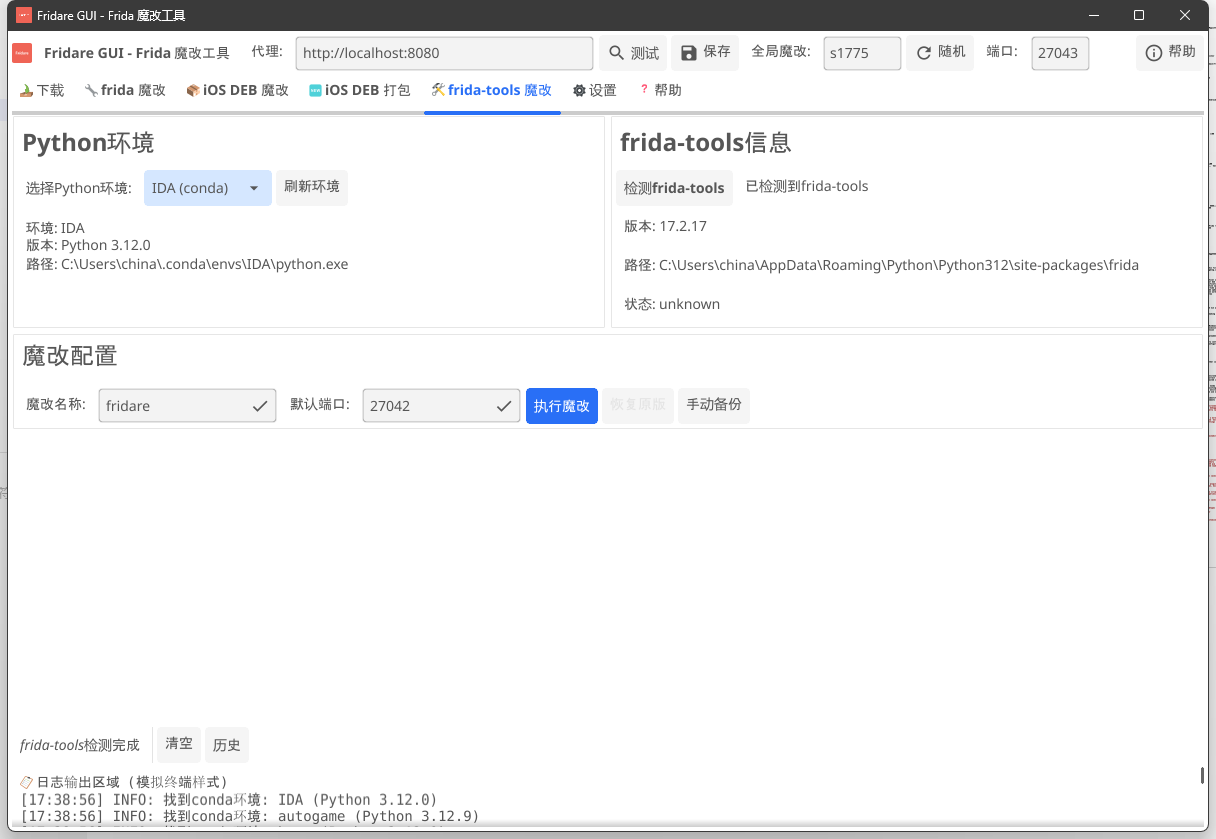
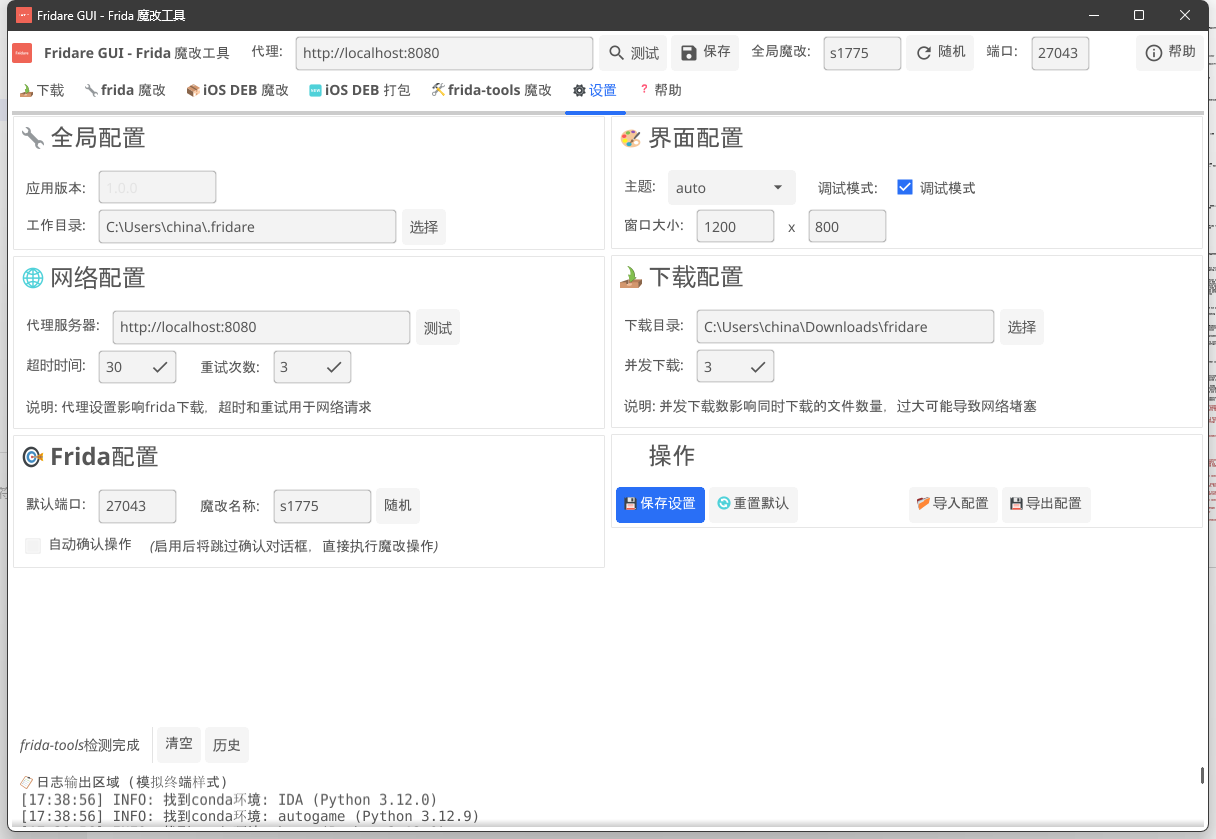
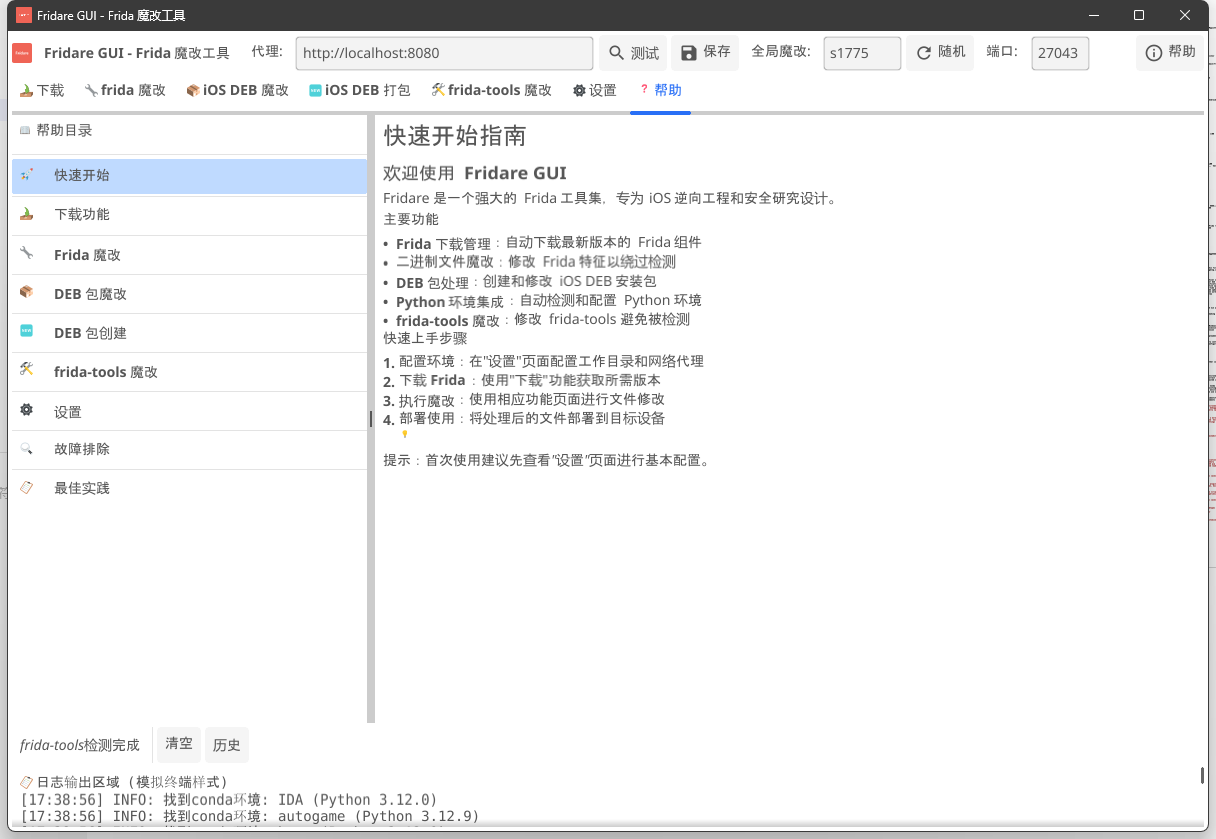
📸 GUI版本截图
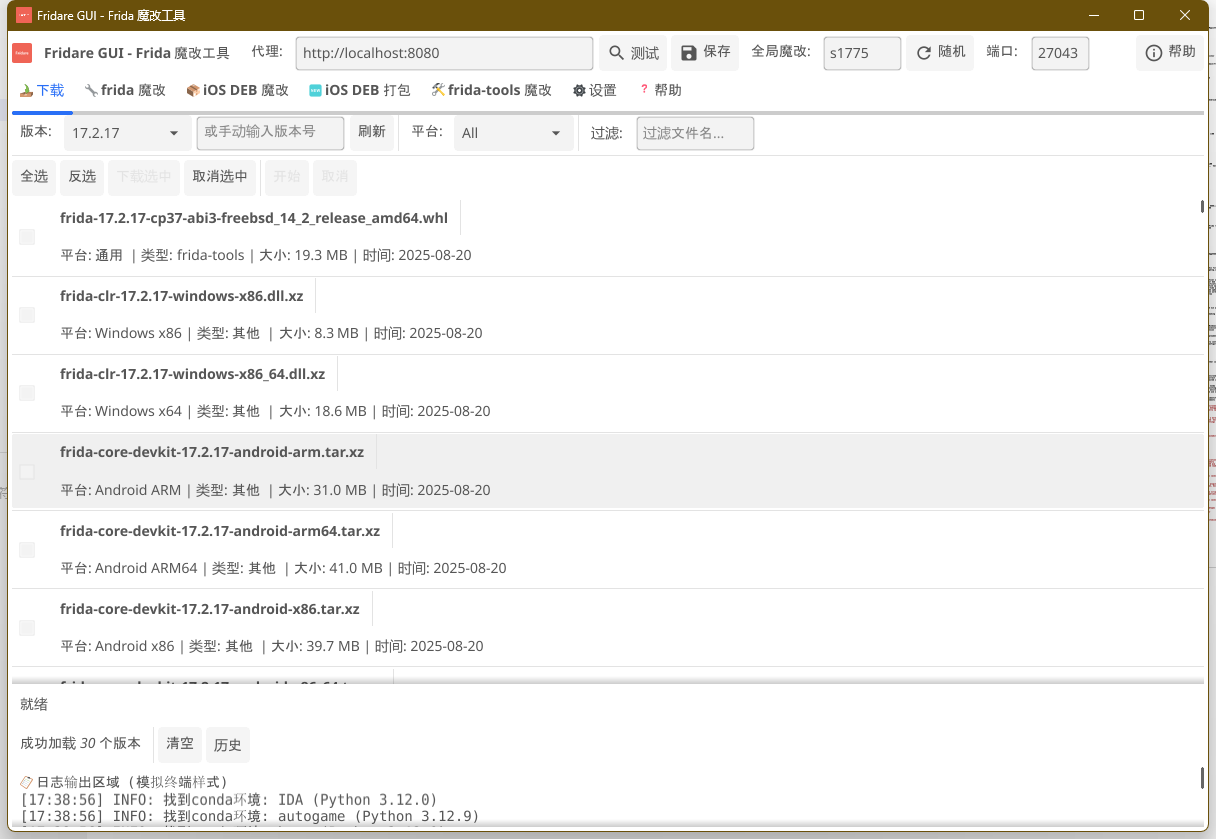
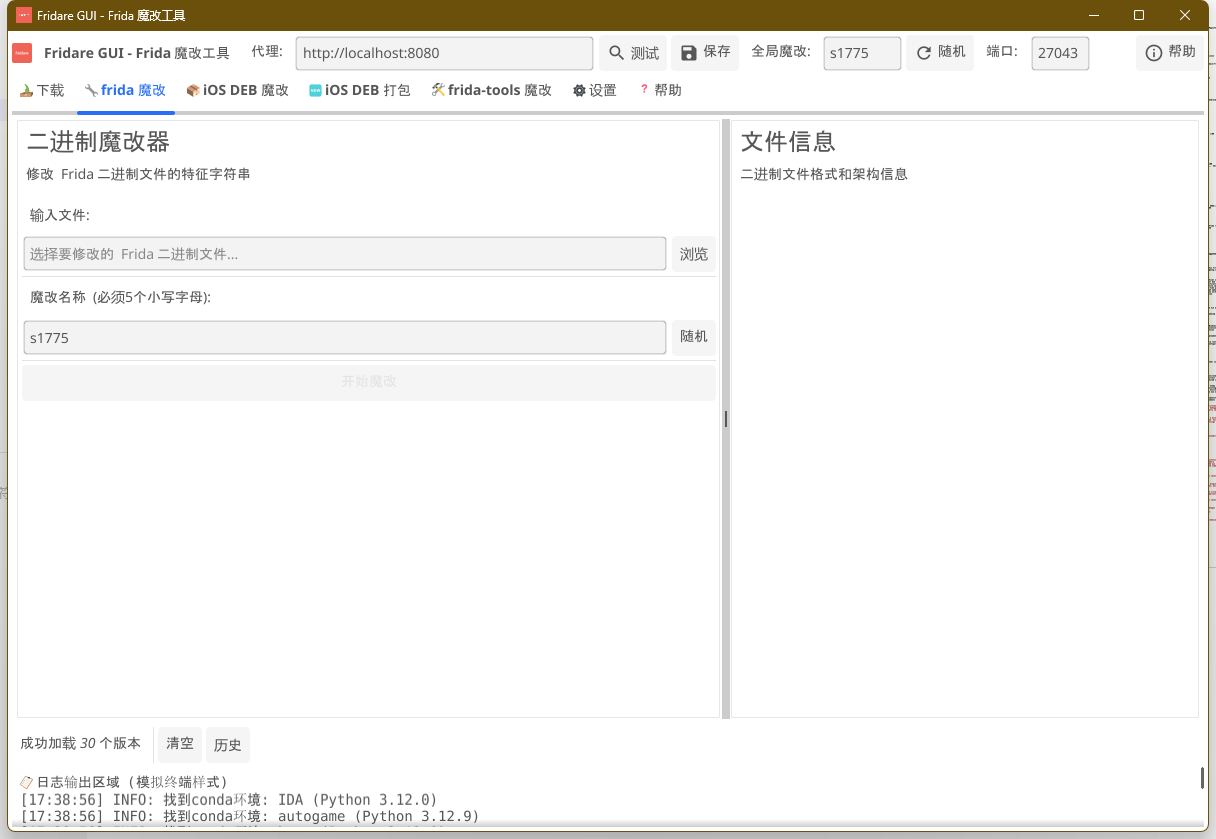
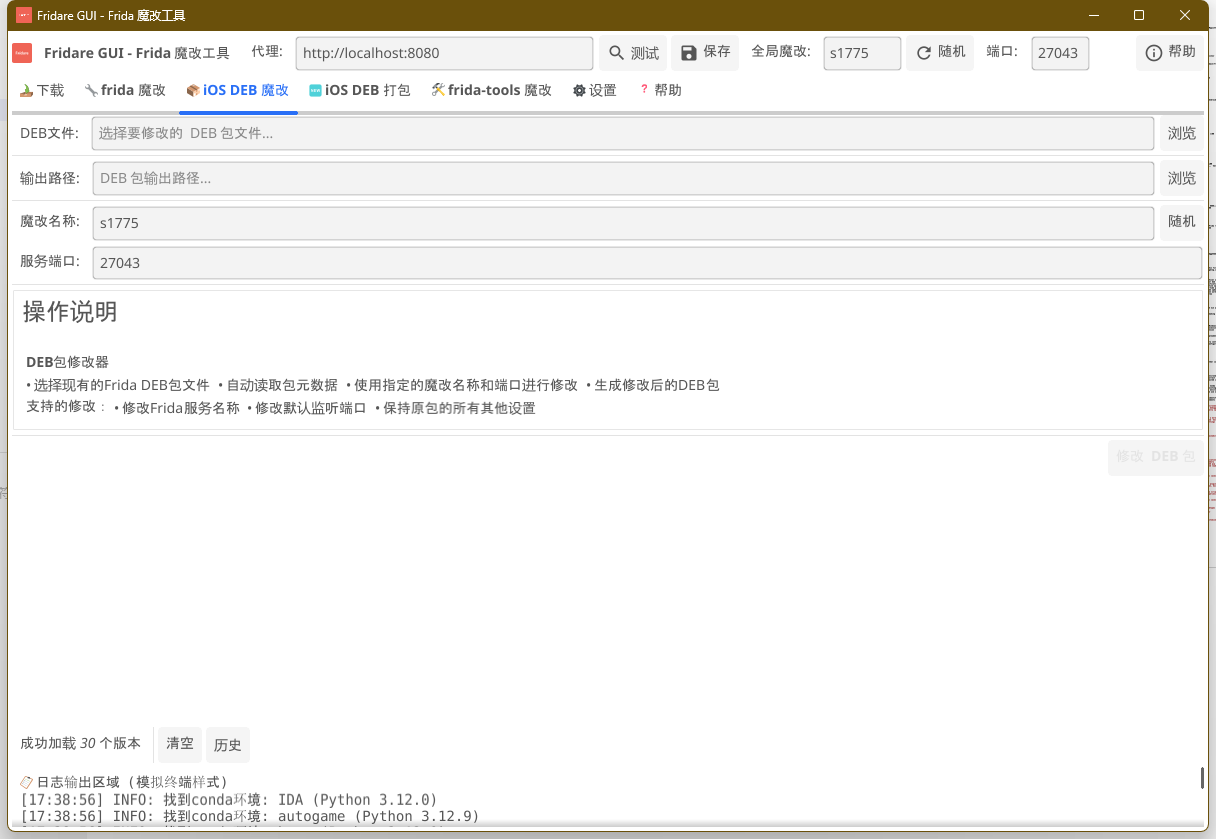
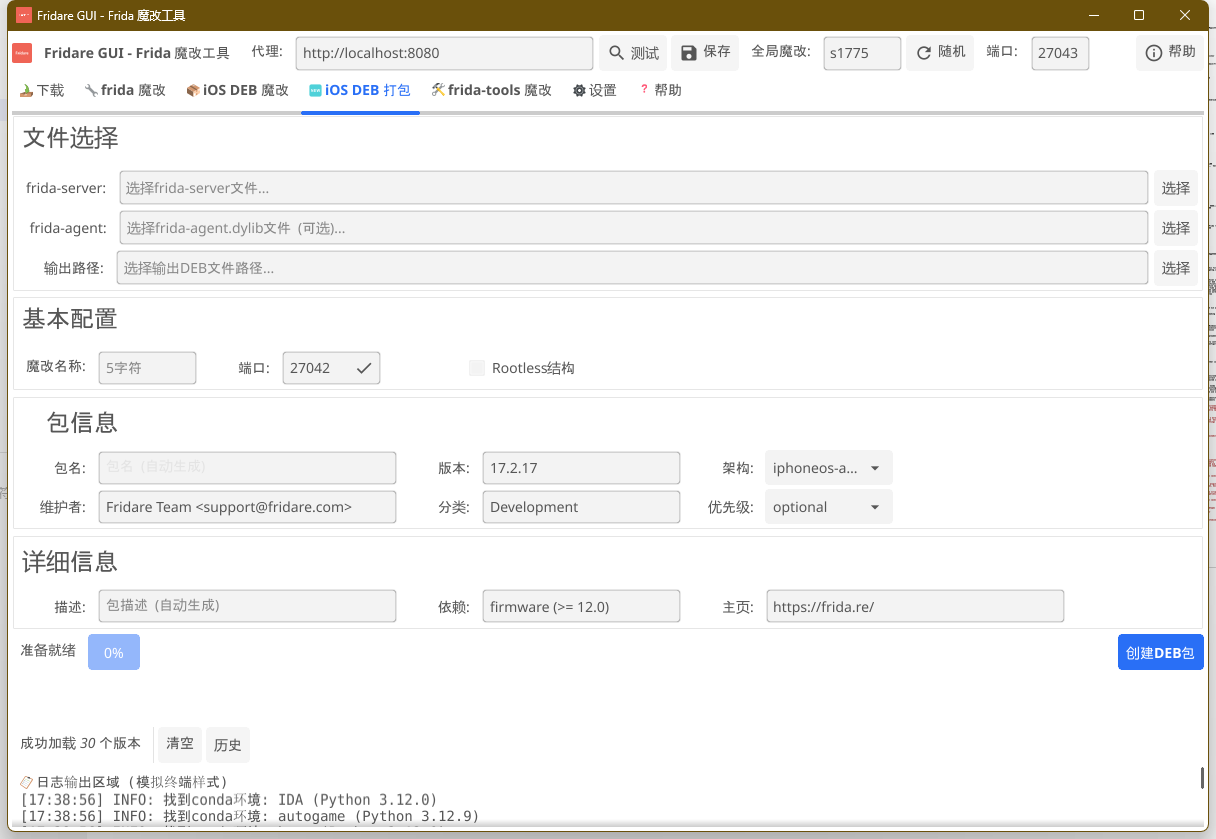

🔧 Windows平台deb包完全支持
v4.0.0版本的重大突破之一是在Windows平台下实现了对deb包的完全支持:
核心优势
- 无需Linux环境:直接在Windows下处理deb包,告别WSL和虚拟机
- 原生deb处理:完整的解压、修改、重新打包工具链
- GUI可视化操作:图形界面下的拖拽式deb包处理
- 一键式工作流:从下载到修改到打包的完整自动化流程
技术实现
- 实现了Windows平台下的原生deb包解析算法
- 集成了跨平台的tar.gz和ar归档处理能力
- 支持Debian控制文件的读取和修改
- 保持Linux兼容的文件权限和结构
使用场景
# 直接在Windows下修改iOS deb包
./fridare-gui.exe  # 拖拽deb文件进行可视化修改

# 或使用命令行
./fridare-patch.exe -i frida-server.deb -o modified.deb
这项功能让Windows用户无需额外环境即可完成完整的Frida服务器定制工作流程!
[v3.1.5] - 2024-07-29 Windows 支持
Added
- 新增
patch-frida.cmd脚本,用于在 Windows 环境下修改 frida-server - 新增
patch-frida-tools.cmd脚本,用于在 Windows 环境下修改 frida-tools - 增加对 Windows 平台的全面支持
- 更新了使用说明,增加了 Windows 平台的详细教程
[v3.1.4] - 2024-07-18
Added
- 增加
patch-tools命令,用于修补 frida-tools 模块 - 新增
render_markdown函数,用于在终端中渲染简单的 Markdown 格式 - 添加
generate_random_name函数,用于生成随机的 Frida 魔改名 - 实现
move_file函数,用于处理文件移动时的 "are identical" 错误
Improved
- 优化
list_frida_versions函数,现在能够渲染 Markdown 格式的版本说明 - 改进
build_frida函数,支持使用本地 deb 文件进行构建 - 增强
patch_frida_tools和restore_frida_tools函数的功能和错误处理 - 优化
modify_frida_tools函数,提高修改 frida-tools 的可靠性 - 改进
download_frida_module函数,增加对特定操作系统和架构的支持
Fixed
- 修复了在某些情况下无法正确获取 Frida 路径的问题
- 解决了移动文件时可能遇到的 "are identical" 错误
Changed
- 更新
show_main_usage和其他使用说明函数,以反映新增的功能 - 调整
parse_arguments函数,支持新增的patch-tools命令 - 修改配置文件的处理方式,增加了对
FRIDA_NAME的支持
Other Changes
- 代码结构优化,提高了整体可读性和可维护性
- 增加了更多的日志输出,提供更详细的执行信息
- 更新了版本号至 3.1.4
v3.1.2 - 2024-07-17
Added
- 增加对多平台的支持:现在支持
macOS、iOS、Android、Linux和Windows - 新增
upgrade命令:用于自动更新 Fridare 脚本 - 新增一键安装功能
Changed
- 优化版本检查和更新流程
Fixed
- 修复了在 Windows 系统上无法正确识别和安装 Frida 工具的问题
- 修复了在 macOS 系统上无法正确下载 Frida 工具的问题
Other Changes
- 更新版本号至 3.1.2
- 代码重构和优化,提高整体性能和稳定性
v3.1.1
- 增加了
upgrade命令,用于自动更新 Fridare 脚本
v3.1.0
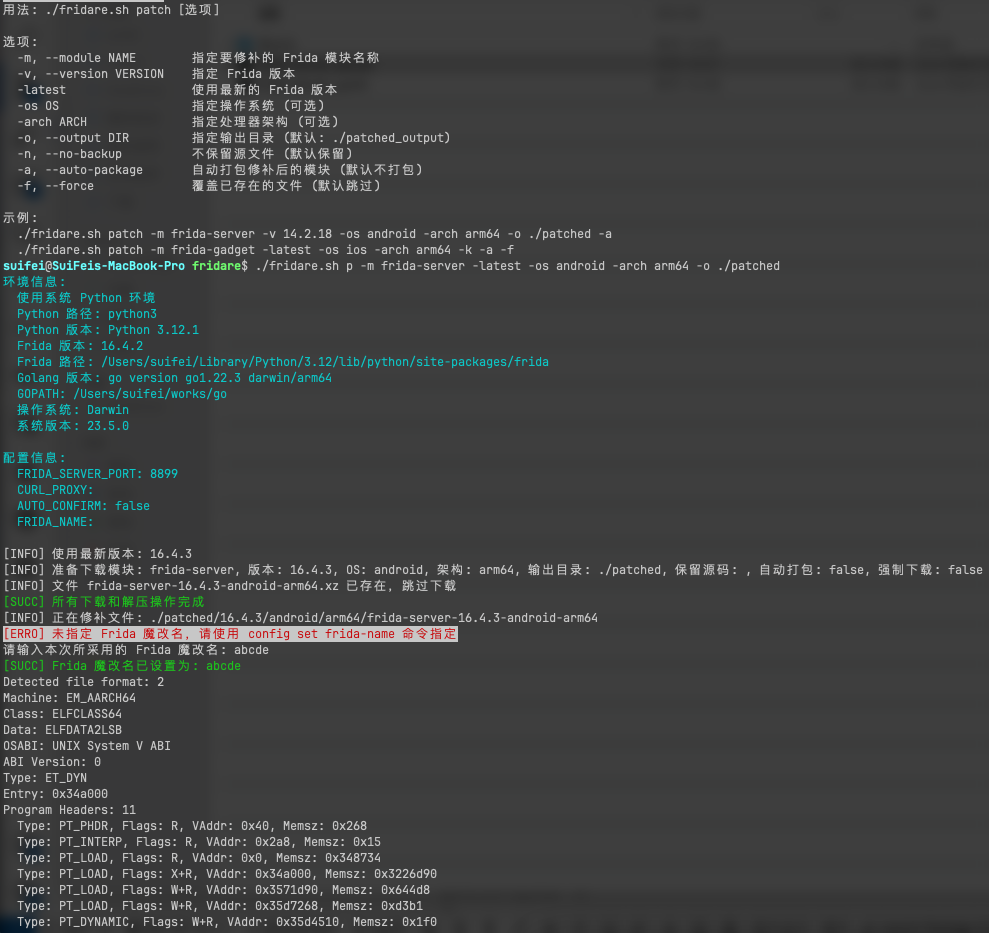
- 增加了
patch命令,用于修补指定的 Frida 模块- 例如:
安卓 frida-server./fridare.sh p -m frida-server -latest -os android -arch arm64 -o ./patched
- 例如:
- 增加了对
patch命令的帮助信息 - 增加对 ELF 和 PE 文件格式的支持(支持 Windows,Linux,MacOS,Android,IOS)
- 更新了
build、download等命令的用法说明 - 修复了一些小的 Bug 并改进了脚本的稳定性
v3.0.1 Fixed
- 修复在 Conda 环境中无法正确识别和修改 Frida 工具的问题
- 解决多个 Python 环境共存时的兼容性问题
新增特性 v3.0.0
- 新增
fridare.sh脚本,整合所有功能,提供更完整的命令行界面 - 新增
build,ls,download,lm,setup,config, 和help命令 - 新增配置文件支持,可以保存和加载用户设置
- 新增颜色输出,提升用户体验
- 新增自动检查和安装依赖功能
- 新增下载特定 Frida 模块的功能
- 新增列出可用 Frida 版本和模块的功能
v2.2.0 (仅测试 macOS arm 架构,其它架构未测试)
- 新增加 frida-tools 补丁,适配
frida:rpc特征魔改- 解决 Android 内存扫描该字符串问题
- 自动扫描本地 pip 安装 frida-tools 的位置,对
core.py文件进行魔改,对_frida.abi3.so文件进行魔改
- 新增加 frida-agent.dylib 魔改,从文件名称,加载位置进行隐藏
- 解决 agent 加载未隐藏问题
v2.1.1
- 引入
autoinstall.sh脚本,实现 Frida 插件的自动部署。 - 引入
Makefile,简化项目的构建和部署流程。 - 运行之前请确保本机已经安装了 issh 命令。并配置好了 ssh 的免密登录。
配置 issh 的 ssh 免密登陆
# 生成 keygen 密钥,如果已生成可以跳过
ssh-keygen -t rsa -b 4096 -C "<EMAIL>"
# 配置手机IP,如果USB连接可以不配置
issh ip set <iPhone-IP>
# 拷贝公钥到手机 /var/root ,需要 root 密码 alpine
issh scp ~/.ssh/id_rsa.pub
# 远程服务器添加公钥到 authorized_keys 文件
issh run "mkdir -p ~/.ssh && cat /var/root/id_rsa.pub >> ~/.ssh/authorized_keys && chmod 600 ~/.ssh/authorized_keys && chmod 700 ~/.ssh"
Frida 魔改脚本的结构和功能
fridare.sh - Frida 魔改脚本
│
├── 主要功能
│   ├── 构建魔改版 Frida (build)
│   │   ├── 支持指定版本或最新版本
│   │   ├── 自动生成随机5字符名称
│   │   ├── 自定义端口设置
│   │   └── 支持 arm 和 arm64 架构
│   ├── 列出可用 Frida 版本 (ls, list)
│   │   └── 从 GitHub API 获取版本信息
│   ├── 下载特定版本 Frida (download)
│   │   ├── 支持下载单个或所有模块
│   │   └── 可选的自动解压功能
│   ├── 列出可用 Frida 模块 (lm, list-modules)
│   ├── 检查并安装系统依赖 (setup)
│   │   ├── 自动检测缺失依赖
│   │   └── 使用包管理器安装依赖
│   └── 配置选项设置 (config)
│       ├── 设置 HTTP 代理
│       ├── 设置 Frida 服务器端口
│       └── 设置 Frida 魔改名称
│
├── 脚本结构
│   ├── 初始化配置 (initialize_config)
│   │   └── 读取和创建配置文件
│   ├── 参数解析 (parse_arguments)
│   │   └── 支持多种命令行选项
│   ├── 命令处理
│   │   ├── build: 构建魔改版 Frida
│   │   ├── patch: 修补指定的 Frida 模块
│   │   ├── setup: 设置环境
│   │   ├── config: 管理配置
│   │   ├── list: 列出版本
│   │   ├── download: 下载模块
│   │   └── list-modules: 列出模块
│   └── 主函数 (main)
│       └── 整合所有功能的入口点
│
├── 构建过程 (build_frida)
│   ├── 版本检查
│   │   └── 支持最新版本自动检测
│   ├── 环境准备
│   │   ├── 检查 Python 环境 (包括 Conda)
│   │   └── 检查 Golang 环境
│   ├── 下载 Frida (download_frida)
│   ├── 解包 deb 文件
│   ├── 修改文件
│   │   ├── 修改启动守护程序 (modify_launch_daemon)
│   │   │   └── 更新 plist 文件
│   │   ├── 修改 Debian 文件 (modify_debian_files)
│   │   │   ├── 更新 control 文件
│   │   │   ├── 更新 extrainst_ 文件
│   │   │   └── 更新 prerm 文件
│   │   └── 修改二进制文件 (modify_binary)
│   │       ├── 修改 frida-server
│   │       ├── 修改 frida-agent.dylib
│   │       └── 使用 hexreplace 工具
│   ├── 重新打包 deb 文件 (repackage_deb)
│   └── 修改 frida-tools (modify_frida_tools)
│       ├── 修改 Python 库文件
│       └── 更新 core.py 中的字符串
│
├── 辅助功能
│   ├── 日志输出 (log_info, log_success, log_warning, log_error)
│   │   └── 支持彩色输出
│   ├── 用户确认 (confirm_execution)
│   │   └── 可选的自动确认模式
│   ├── 依赖检查 (check_dependencies)
│   ├── 依赖安装 (install_dependencies)
│   ├── 配置管理 (set_config, unset_config, list_config)
│   └── Frida 版本和模块列表 (list_frida_versions, list_frida_modules)
│
├── 下载功能 (download_frida_module)
│   ├── 版本选择 (最新版或指定版本)
│   ├── 模块选择 (单个模块或全部模块)
│   ├── 下载过程
│   │   └── 支持 HTTP 代理
│   └── 解压处理
│       └── 可选的自动解压功能
│
└── 安全和权限
    ├── sudo 权限保持 (sudo_keep_alive)
    └── 清理过程 (cleanup)
前提条件
- macOS 操作系统(用于运行构建脚本)
- Homebrew
- Python 3
- Go (用于编译 hexreplace 工具)
- 越狱的 iOS 设备
- 在 iOS 设备上安装 OpenSSH
安装
方式一:命令行版本
- 克隆此仓库:
git clone https://github.com/suifei/fridare.git
cd fridare
- 运行设置命令
./fridare.sh setup
此命令将检查并安装所需的依赖项。
- 查看帮助
./fridare.sh help
方式二:GUI 版本(推荐)
最快:直接下载 Releases 中的 Windows GUI 包,无需本机 Go。
本机构建(开发 / 魔改 GUI 源码时):
| 系统 | 依赖 | 命令 |
|---|---|---|
| Windows | Go 1.21+、MinGW gcc 在 PATH(如 C:\msys64\mingw64\bin) | cd ui → .\build.ps1 |
| Linux / macOS | Go + CGO 图形依赖 | cd ui → ./build.sh |
# Windows 示例:把 MSYS2 MinGW 放进当前会话 PATH 后构建
$env:Path = "C:\msys64\mingw64\bin;" + $env:Path
cd ui
.\build.ps1
.\build\fridare-gui.exe
GUI 特色
- 直观界面 · 拖拽文件 · 实时日志 / 进度
- 双技术路线:静态魔改标签 + 源码重编译 / 一键深度
- 设置页:OpenAI 端点探测、代理出口开关
- Windows 原生 deb 处理,无需 WSL
使用方法
Fridare 提供了多个命令来满足不同的需求:
命令清单
build: 重新打包 Fridals或list: 列出可用的 Frida 版本download: 下载特定版本的 Fridalm或list-modules: 列出可用的 Frida 模块setup: 检查并安装系统依赖config: 设置配置选项help: 显示帮助信息
使用范例
- 构建魔改版 Frida
./fridare.sh build -v 16.0.19 -p 8899 -y
这个命令会构建版本 16.0.19 的 Frida,设置端口为 8899,并自动确认所有提示。
- 列出可用的 Frida 版本
./fridare.sh ls
- 下载特定版本的 Frida
./fridare.sh download -v 16.0.19 -m frida-server ./output
这个命令会下载版本 16.0.19 的 frida-server 模块到 ./output 目录。
- 下载最新版本的所有 Frida 模块
./fridare.sh download -latest -all ./output
- 列出可用的 Frida 模块
./fridare.sh lm
- 设置环境
./fridare.sh setup
这个命令会检查并安装所需的系统依赖。
- 配置设置
./fridare.sh config set proxy http://127.0.0.1:7890
./fridare.sh config set port 9999
./fridare.sh config set frida-name abcde
这些命令分别设置代理、端口和 Frida 魔改名。
- 列出当前配置
./fridare.sh config ls
- 获取特定命令的帮助信息
./fridare.sh help build
这个命令会显示 build 命令的详细用法。
- 使用最新版本构建 Frida
./fridare.sh build -latest -p 9999 -y
这个命令会使用最新版本的 Frida 进行构建,设置端口为 9999,并自动确认所有提示。
- 下载但不解压 Frida 模块
./fridare.sh download -latest -m frida-gadget --no-extract ./output
这个命令会下载最新版本的 frida-gadget 模块到 ./output 目录,但不会自动解压。
- 安装 frida-tools
./fridare.sh config frida-tools
这个命令会安装或更新 frida-tools。
- 将生成的 .deb 包传输到您的 iOS 设备:
scp ./dist/frida_16.3.3_iphoneos-arm_tcp.deb root@<iPhone-IP>:/var/root/
- SSH 进入您的 iOS 设备并安装修改后的包:
ssh root@<iPhone-IP>
dpkg -i /var/root/frida_16.3.3_iphoneos-arm_tcp.deb
这些示例涵盖了脚本的主要功能和常见使用场景。可帮助您快速上手使用。
安装兼容版本的 Frida 工具
为确保兼容性,请安装与修改后的服务器版本相匹配的 Frida 工具:
pip install frida-tools==12.4.3
对于 Node.js 用户:
npm install frida@16.3.3
访问 frida-server
如果您的设备通过 USB 访问,您可以使用以下命令连接到本地 frida-server:
frida -U -f <target-process>
使用远程 frida-server
如果不使用usb数据线时,可以使用以下命令连接到远程 frida-server :
frida -H <iPhone-IP>:8899 -U
frida-trace -H <iPhone-IP>:8899 ...
frida-ps -H <iPhone-IP>:8899
frida-inject -H <iPhone-IP>:8899 ...
原理
Fridare 项目的核心原理:
1. frida-server 修改原理
Fridare 的核心思想是修改 frida-server ,使其更难被检测。这主要通过以下几个方面实现:
-
重命名服务器文件: 将
frida-server重命名为随机生成的名称(如abcde),这样可以避免简单的名称检测。 -
修改启动配置: 更新 LaunchDaemons plist 文件,使其使用新的服务器名称和自定义端口。这样可以改变服务器的启动方式和监听端口。
-
二进制文件修改: 使用二进制替换技术,将服务器二进制文件中的 "frida" 相关字符串替换为自定义字符串。这可以避免通过扫描二进制文件来检测 Frida。
2. deb 包修改和重打包
项目使用 dpkg-deb 工具解包和重新打包 deb 文件。这允许我们修改包的内容,包括:
- 更新 DEBIAN/control 文件中的包名
- 修改 DEBIAN/extrainst_ 和 DEBIAN/prerm 脚本以使用新的服务器名称
- 替换和重命名实际的服务器二进制文件
3. 自动化流程
fridare.sh 脚本自动化了整个过程:
- 下载指定版本的 frida-server
- 生成随机名称
- 修改所有必要的文件
- 重新打包 deb 文件
4. 兼容性考虑
脚本同时处理 arm 和 arm64 架构的包,确保在不同的 iOS 设备上的兼容性。
5. 安全性增强
通过更改服务器名称、端口和内部字符串,这个项目使得通过常规方法检测 Frida 的存在变得更加困难。这对于在某些可能会主动检测和阻止 Frida 的应用中使用 Frida 非常有用。
6. 灵活性
通过允许用户指定 Frida 版本和端口,该工具提供了很大的灵活性,可以适应不同的需求和环境。
7. 二进制修改技术
使用 hexreplace 来执行二进制替换,在不重新编译 Frida 的情况下修改二进制文件。这种方法虽然有效,但也有局限性,因为它只能替换固定长度的字符串。
注意事项
- 默认的 root 用户密码为 "alpine"。出于安全考虑,强烈建议更改此密码。
- 请确保您的 iOS 设备已越狱并安装了 OpenSSH。
- 此工具仅用于教育和研究目的。请遵守所有适用的法律和条款。
贡献
欢迎提交问题和拉取请求。对于重大更改,请先开issue讨论您想要更改的内容。
许可证
Fridare
Fridare automates Frida customization on iOS / Android / Linux / Windows: rename binaries, change ports, and align protocol fingerprints. Ships CLI + cross-platform GUI, with two tracks:
| Track | What | Needs |
|---|---|---|
| A · Static patch (default) | hex/string replace on official binaries + tools | No Docker |
| B · Source rebuild (optional) | AI/host edits + Docker-only configure/make (incl. MinGW Windows server) | Docker |
v4.0.8: GUI-path rebuild for official 16.7.19 and product-label 17.17.1; inject rename / ninja ARGS-only junk / 16.x snapshot disable. Not AV evasion. See docs/release-v4.0.8.md.
CHANGELOG · Chinese docs above · Windows notes
Features (English summary)
- Dual-track Frida mods · Fyne GUI · Windows native deb · multi-arch static CLI
- Magic name: exactly 5 lowercase a–z end-to-end
- Optional local rebuild:
cd ui && ./build.shor.\build.ps1(CGO for GUI)
Historical English changelog notes
[v3.1.4] - 2024-07-18
Added
- Introduced new
patch-toolscommand for modifying the frida-tools module - Implemented
render_markdownfunction to display simple Markdown formatting in the terminal - Added
generate_random_namefunction to create random Frida modification names - Created
move_filefunction to handle "are identical" errors during file moves
Improved
- Enhanced
list_frida_versionsfunction to render Markdown-formatted version descriptions - Upgraded
build_fridafunction to support building from local deb files - Expanded functionality and error handling in
patch_frida_toolsandrestore_frida_toolsfunctions - Optimized
modify_frida_toolsfunction for more reliable frida-tools modifications - Enhanced
download_frida_modulefunction with support for specific OS and architecture
Fixed
- Resolved issues with incorrect Frida path detection in certain scenarios
- Addressed "are identical" errors that could occur during file moves
Changed
- Updated
show_main_usageand other usage instruction functions to reflect new features - Adjusted
parse_argumentsfunction to accommodate the newpatch-toolscommand - Modified configuration file handling to include support for
FRIDA_NAME
Other
- Improved overall code structure for better readability and maintainability
- Added more detailed log outputs for enhanced execution information
- Updated version number to 3.1.4
New Features v3.0.0
- Added
fridare.shscript, integrating all functionalities and providing a more complete command-line interface - Added
build,ls,download,lm,setup,config, andhelpcommands - Added configuration file support for saving and loading user settings
- Added color output to enhance user experience
- Added automatic dependency checking and installation
- Added functionality to download specific Frida modules
- Added listing of available Frida versions and modules
New Features v2.2.0 (Tested only on macOS arm architecture, other architectures not tested)
- Added frida-tools patch, adapting to
frida:rpcfeature modification- Resolves the issue of Android memory scanning for this string
- Automatically scans the local pip installation location of frida-tools, modifies the
core.pyfile, and modifies the_frida.abi3.sofile
- Added frida-agent.dylib modification, hiding from filename and load location
- Resolves the issue of unhidden agent loading
New Features v2.1.1
- Introduced
autoinstall.shscript for automatic deployment of Frida plugins. - Introduced
Makefileto simplify the project build and deployment process. - Before running, please ensure that the issh command is installed on your machine. And configure password-free SSH login.
Configure password-free SSH login for issh
# Generate keygen, skip if already generated
ssh-keygen -t rsa -b 4096 -C "<EMAIL>"
# Configure iPhone IP, can be skipped if using USB connection
issh ip set <iPhone-IP>
# Copy public key to /var/root on the phone, requires root password alpine
issh scp ~/.ssh/id_rsa.pub
# Add public key to authorized_keys file on remote server
issh run "mkdir -p ~/.ssh && cat /var/root/id_rsa.pub >> ~/.ssh/authorized_keys && chmod 600 ~/.ssh/authorized_keys && chmod 700 ~/.ssh"
Features
- 🎉 Brand New GUI Version: Modern graphical user interface based on Fyne framework
- 🖥️ Cross-Platform Support: Native GUI applications for Windows, macOS, Linux
- 📱 Intuitive Operation: Visual Frida server modification and configuration management
- 📊 Real-time Feedback: Graphical log display and progress bar visualization
- 🔧 Windows deb Package Support: Native deb package modification and creation on Windows without Linux environment
- Automatically download and modify specified versions of frida-server
- Randomly generate new frida-server names
- Customize frida-server ports
- Support for arm and arm64 architectures
- Binary replacement modification
- frida-server
- frida-agent.dylib
- frida-tools
- Generate modified .deb packages ready for direct installation
- Integrated command-line interface providing multiple functionalities
- Configuration file support for saving user settings
- Automatic dependency checking and installation
- Download specific Frida modules
- List available Frida versions and modules
Structure and Functionality of the Frida Modification Script
fridare.sh - Frida Modification Script
│
├── Main Functions
│   ├── Build Modified Frida (build)
│   │   ├── Support for specified version or latest version
│   │   ├── Auto-generate random 5-character name
│   │   ├── Custom port setting
│   │   └── Support for arm and arm64 architectures
│   ├── List Available Frida Versions (ls, list)
│   │   └── Fetch version info from GitHub API
│   ├── Download Specific Frida Version (download)
│   │   ├── Support for downloading single or all modules
│   │   └── Optional auto-extraction feature
│   ├── List Available Frida Modules (lm, list-modules)
│   ├── Check and Install System Dependencies (setup)
│   │   ├── Auto-detect missing dependencies
│   │   └── Install dependencies using package manager
│   └── Configure Options (config)
│       ├── Set HTTP proxy
│       ├── Set Frida server port
│       └── Set Frida modification name
│
├── Script Structure
│   ├── Initialize Configuration (initialize_config)
│   │   └── Read and create configuration file
│   ├── Parse Arguments (parse_arguments)
│   │   └── Support various command-line options
│   ├── Command Processing
│   │   ├── build: Build modified Frida
│   │   ├── setup: Set up environment
│   │   ├── config: Manage configuration
│   │   ├── list: List versions
│   │   ├── download: Download modules
│   │   └── list-modules: List modules
│   └── Main Function (main)
│       └── Entry point integrating all functionalities
│
├── Build Process (build_frida)
│   ├── Version Check
│   │   └── Support for latest version auto-detection
│   ├── Environment Preparation
│   │   ├── Check Python environment (including Conda)
│   │   └── Check Golang environment
│   ├── Download Frida (download_frida)
│   ├── Unpack deb File
│   ├── Modify Files
│   │   ├── Modify Launch Daemon (modify_launch_daemon)
│   │   │   └── Update plist file
│   │   ├── Modify Debian Files (modify_debian_files)
│   │   │   ├── Update control file
│   │   │   ├── Update extrainst_ file
│   │   │   └── Update prerm file
│   │   └── Modify Binary Files (modify_binary)
│   │       ├── Modify frida-server
│   │       ├── Modify frida-agent.dylib
│   │       └── Use hexreplace tool
│   ├── Repackage deb File (repackage_deb)
│   └── Modify frida-tools (modify_frida_tools)
│       ├── Modify Python library files
│       └── Update strings in core.py
│
├── Auxiliary Functions
│   ├── Log Output (log_info, log_success, log_warning, log_error)
│   │   └── Support for colored output
│   ├── User Confirmation (confirm_execution)
│   │   └── Optional auto-confirm mode
│   ├── Dependency Check (check_dependencies)
│   ├── Dependency Installation (install_dependencies)
│   ├── Configuration Management (set_config, unset_config, list_config)
│   └── Frida Version and Module Lists (list_frida_versions, list_frida_modules)
│
├── Download Functionality (download_frida_module)
│   ├── Version Selection (latest or specified version)
│   ├── Module Selection (single module or all modules)
│   ├── Download Process
│   │   └── Support for HTTP proxy
│   └── Extraction Processing
│       └── Optional auto-extraction feature
│
└── Security and Permissions
    ├── Maintain sudo Privileges (sudo_keep_alive)
    └── Cleanup Process (cleanup)
Prerequisites
- macOS operating system (for running build scripts)
- Homebrew
- Python 3
- Go (for compiling the hexreplace tool)
- Jailbroken iOS device
- OpenSSH installed on iOS device
Installation
- Clone this repository:
git clone https://github.com/suifei/fridare.git
cd fridare
- Run the setup command:
./fridare.sh setup
This command will check and install the required dependencies.
- View the help information:
./fridare.sh help
Usage
Fridare provides multiple commands to meet different needs:
Command List
build: Repackage Fridalsorlist: List available Frida versionsdownload: Download a specific version of Fridalmorlist-modules: List available Frida modulessetup: Check and install system dependenciesconfig: Set configuration optionshelp: Display help information
Usage Examples
- Build a modified version of Frida
./fridare.sh build -v 16.0.19 -p 8899 -y
This command will build Frida version 16.0.19, set the port to 8899, and automatically confirm all prompts.
- List available Frida versions
./fridare.sh ls
- Download a specific version of Frida
./fridare.sh download -v 16.0.19 -m frida-server ./output
This command will download the frida-server module of version 16.0.19 to the ./output directory.
- Download all Frida modules of the latest version
./fridare.sh download -latest -all ./output
- List available Frida modules
./fridare.sh lm
- Set up the environment
./fridare.sh setup
This command will check and install the required system dependencies.
- Configure settings
./fridare.sh config set proxy http://127.0.0.1:7890
./fridare.sh config set port 9999
./fridare.sh config set frida-name abcde
These commands set the proxy, port, and Frida modification name respectively.
- List current configuration
./fridare.sh config ls
- Get help information for a specific command
./fridare.sh help build
This command will display detailed usage for the build command.
- Build Frida using the latest version
./fridare.sh build -latest -p 9999 -y
This command will build using the latest version of Frida, set the port to 9999, and automatically confirm all prompts.
- Download but don't extract Frida module
./fridare.sh download -latest -m frida-gadget --no-extract ./output
This command will download the latest version of the frida-gadget module to the ./output directory but won't automatically extract it.
- Install frida-tools
./fridare.sh config frida-tools
This command will install or update frida-tools.
- Transfer the generated .deb package to your iOS device:
scp ./dist/frida_16.3.3_iphoneos-arm_tcp.deb root@<iPhone-IP>:/var/root/
- SSH into your iOS device and install the modified package:
ssh root@<iPhone-IP>
dpkg -i /var/root/frida_16.3.3_iphoneos-arm_tcp.deb
These examples cover the main functionalities and common usage scenarios of the script. They can help you quickly get started with using it.
Installing Compatible Frida Tools
To ensure compatibility, please install Frida tools that match the modified server version:
pip install frida-tools==12.4.3
For Node.js users:
npm install frida@16.3.3
Accessing frida-server
If your device is accessed via USB, you can use the following command to connect to the local frida-server:
frida -U -f <target-process>
Using Remote frida-server
If not using a USB data cable, you can use the following commands to connect to the remote frida-server:
frida -H <iPhone-IP>:8899 -U
frida-trace -H <iPhone-IP>:8899 ...
frida-ps -H <iPhone-IP>:8899
frida-inject -H <iPhone-IP>:8899 ...
Principles
Core principles of the Fridare project:
1. frida-server Modification Principle
The core idea of Fridare is to modify frida-server to make it harder to detect. This is mainly achieved through the following aspects:
-
Renaming the server file: Rename
frida-serverto a randomly generated name (e.g.,abcde), which avoids simple name detection. -
Modifying startup configuration: Update the LaunchDaemons plist file to use the new server name and custom port. This changes the way the server starts and the port it listens on.
-
Binary file modification: Use binary replacement techniques to replace "frida" related strings in the server binary file with custom strings. This can avoid detection of Frida by scanning the binary file.
2. deb Package Modification and Repackaging
The project uses the dpkg-deb tool to unpack and repack deb files. This allows us to modify the contents of the package, including:
- Updating the package name in the DEBIAN/control file
- Modifying DEBIAN/extrainst_ and DEBIAN/prerm scripts to use the new server name
- Replacing and renaming the actual server binary file
3. Automated Process
The fridare.sh script automates the entire process:
- Downloading the specified version of frida-server
- Generating random names
- Modifying all necessary files
- Repacking the deb file
4. Compatibility Considerations
The script handles packages for both arm and arm64 architectures, ensuring compatibility on different iOS devices.
5. Enhanced Security
By changing the server name, port, and internal strings, this project makes it more difficult to detect the presence of Frida through conventional methods. This is particularly useful for using Frida in applications that might actively detect and block Frida.
6. Flexibility
By allowing users to specify the Frida version and port, the tool provides great flexibility to adapt to different needs and environments.
7. Binary Modification Technique
Using hexreplace to perform binary replacements, modifying binary files without recompiling Frida. While effective, this method has limitations as it can only replace fixed-length strings.
Notes
- The default root user password is "alpine". For security reasons, it is strongly recommended to change this password.
- Please ensure your iOS device is jailbroken and has OpenSSH installed.
- This tool is for educational and research purposes only. Please comply with all applicable laws and terms.
Contributing
Issues and pull requests are welcome. For major changes, please open an issue first to discuss what you would like to change.
License


Similar repos


Languages
Go
88.1%
Shell
9.0%
PowerShell
1.6%
强大的 Frida 重打包工具,用于 iOS 和 Android。轻松修改 Frida 特征,增强隐蔽性,绕过检测。简化逆向工程和安全测试。Powerful Frida repackaging tool for iOS and Android. Easily modify Frida servers to enhance stealth and bypass detection. Streamlines reverse engineering and security testing.
Go
930
114 commits
updated Sep 11, 2026
README
Fridare
任何问题,请到仓库的 fridare issues 内提交,会进行反馈和修复bug,也推荐加QQ群,更好的沟通,但请先提交 issue ,作者再忙也会不定期一次性处理问题,更欢迎朋友们推送PR协同解决问题,感谢!☺️
Fridare 是面向 iOS / Android / Linux / Windows 的 Frida 自动化魔改工具:改名称、端口与协议面标识,降低常见环境检测命中率。提供 命令行 + 跨平台 GUI,并支持 静态补丁 与 Docker 源码重编译 双技术路线。
| 版本 | 要点 | 下载 |
|---|---|---|
| v4.0.8(当前 GUI) | 修 inject 资源改名 / ninja 花指令依赖 / 16.x snapshot;GUI 路径编过 16.7.19 与 17.17.1;不是免杀 | v4.0.8 |
| v4.0.7 | 源码页 stealth 开关(去符号/花指令/行为标记);静态魔改可去符号;不是免杀 | v4.0.7 |
| v4.0.6 | Docker toolchain-v4(MinGW + aarch64);监听端口用 -l | v4.0.6 |
| kxmwp-17.17.1(当前 Frida 产物) | 官方 17.17.0;linux-x86_64 GUI 路径 stealth 重编;不是免杀;端口用 -l | kxmwp-17.17.1 |
| kxmwp-16.7.19 | 官方 16.7.19 八平台 GUI 源码重编译(Android NDK r25)+ host wheels;不是免杀 | kxmwp-16.7.19 |
| kxmwp-17.17.0 | Frida 17.17.0 deep 产物(8 平台 server + host wheels) | kxmwp-17.17.0 |
| v4.0.5 | seed 脚本 Docker stage 修复;plan 扫描加速;README/CHANGELOG 精装;MinGW wrap 失败清理 | v4.0.5 |
| v4.0.4 | 双技术路线:默认 hex 静态魔改 + 可选 Docker 深度源码重编译;Windows MinGW server;服务端/客户端协议同步(re.{magic}. · /re/{magic}/ · {magic}:rpc);内置 AI Agent;OpenAI 端点探测;代理默认不走 | v4.0.4 |
| v4.0.3 | CLI 多平台静态链接(win/linux/darwin × amd64/arm64)+ Windows GUI 预编译 | v4.0.3 |
| v4.0.0 | Fyne GUI + Windows 原生 deb 魔改 | v4.0.0 |
文档:双技术路线 · v4.0.8 · 16 vs 17 · 16.7.19 · 17.17.1 · Windows · Android · iOS · frida-tools · 安装 · CHANGELOG
双技术路线(v4.0.4)
| 路线 | GUI | 依赖 | 速度 | 适用 |
|---|---|---|---|---|
| A · 静态补丁(默认) | frida 魔改 / frida-tools 魔改 / iOS DEB | 无 Docker | 秒级 | 日常改名、改端口、对齐 tools |
| B · 源码重编译(可选) | 源码重编译 · 一键深度定制 | 仅 Docker/Linux 内编译(Host 不装 Frida 工具链) | 小时级 | 深度隐藏、协议面同步、Windows MinGW server |
深度魔改(deep)要点:魔改名固定 5 位小写 a-z;server 与 host client wheel 必须成对(同一 magic);对象路径含 /re/{magic}/,避免只改 re.frida. 导致 UNKNOWN_METHOD。详细说明见 docs/dual-track.md。
kxmwp-17.17.1 安装注意
- host-wheels / pip:tools 文件名必须是 PEP 440 本地版本,带
+。17:frida_tools-14.10.4+frida.17.17.0.fridare.kxmwp-py3-none-any.whl。16:frida_tools-13.7.1+frida.16.7.19.fridare.kxmwp-py3-none-any.whl。请重新下载 kxmwp-16.7.19 的host-wheels.zip(旧 zip 里frida_tools-tools.frida.16.7.19…pip 拒装)。写成14.10.4.frida.也会报Invalid wheel filename(#36)。16/17 的 tools 不能混用。 - Android
kxmwp-serverabort(backend_class != null):请用本 tag 重新下载frida-kxmwp-17.17.1-android-arm64-server.zip。旧包 helper dex 仍是re/frida,native 已是re.kxmwp。 - 16.x
frida-ps:undefined symbol: kxmwp_agent_main:请重新下载 kxmwp-16.7.19 的android-arm64zip。补丁只改 agent ELF 的 hash,并把 GumJS 全局改成Kxmwp(不会把Frida.写回产物)。客户端必须frida==16.7.19魔改 wheel。 - Frida 17
Java.perform:fridaCLI /frida-trace自带 java-bridge。Pythonsession.create_script要自己处理frida:load-bridge,否则Java is not defined。nativeInterceptor不受影响。用法见 docs/kxmwp-17.17.1.md。
GUI:打开「源码重编译」→ 选 deep →「一键深度定制(①+② deep)」
Host:只跑 GUI / AI 改挂载源码 / docker 客户端
Docker:clone · configure · make(含 MinGW windows-x86_64)
产物:catalog/<ver>/<target>/<magic>/binaries/*-server.exe + python/host wheels + PROTOCOL-SYNC
写给 Windows 用户(.cmd / .bat 小坑)
中文 Windows 里 cmd.exe 用的不是 UTF-8,而是系统代码页(常见 GBK/CP936)。所以:
.cmd/.bat里请只用英文(ASCII) —— 写中文(哪怕文件是 UTF-8)容易乱码、if/goto异常、脚本跑一半就挂。- 换行必须是 Windows 的 CRLF(
\r\n) —— 用 LF 存盘时,部分环境下批处理会解析失败。 - 本仓库
win/patch-frida.cmd、win/patch-frida-tools.cmd、ui/build.bat都按上面规则写好了;GUI / PowerShell / Markdown 可以用中文,不受影响。 - 改完脚本可自检:
powershell -File win\test_cmd_ascii.ps1
更细的说明见 win/README.md。
欢迎大家入QQ群讨论:QQ 555354813 ,如本项目对你有所帮助,记得给作者加星鼓励哦!
特性
v4.x 核心能力
| 能力 | 说明 |
|---|---|
| 双技术路线 | 静态 hex 补丁(默认)+ Docker 源码重编译(可选 deep) |
| 协议面同步 | re.{magic}. · /re/{magic}/ · {magic}:rpc · Frida.* API 面,server↔client 成对 |
| GUI(Fyne) | 下载 / 魔改 / tools / DEB / 源码重编译 / 设置;一键深度定制 |
| 内置 AI Agent | OpenAI 兼容端点;「测试端点连接」;端点默认不走 GUI 代理(可开) |
| Docker-only 编译 | Host 永不执行 configure/make;MinGW 交叉产出 Windows server |
| 多平台发布 | CLI 静态链接 6 架构;Windows GUI 预编译(Releases) |
| Windows deb | 本机解压/改包/重打包,无需 WSL |
| 魔改名契约 | 全链路 5 位小写 a-z(与 hexreplace 一致) |
经典能力(CLI + GUI 共用)
- 自动下载并修改指定版本 frida-server / agent / gadget
- 自定义名称与端口;arm / arm64 等架构
- 二进制替换:frida-server、frida-agent、frida-tools
- 修改版
.deb打包;Conda / 多 Python 环境 - macho / elf / pe;Windows · Linux · macOS · Android · iOS
- 配置文件、依赖检查、模块列表与自更新
欢迎使用一键安装快速上手:
curl -s https://raw.githubusercontent.com/suifei/fridare/main/fridare.sh | bash -s install
🎉 GUI 与 v4 大版本(摘要)
v4.0.4 — 双轨深度魔改 · Docker · Agent(2026-08)
- 源码重编译标签默认 deep;一键深度 = 开发魔改 + Docker 编译
- Windows
x86_64-w64-mingw32server 产物 + host wheel PROTOCOL-SYNC - MinGW wrap 预种子脚本自动 stage 进容器
/work - OpenAI 端点真实 HTTP 探测;代理出口开关默认关
- 详见 docs/dual-track.md 与 CHANGELOG
v4.0.0 — 图形界面发布(2025-01-02)
重大更新:图形用户界面发布
Fridare 现在提供了基于 Fyne 框架的现代化图形用户界面,让 Frida 服务器的修改变得更加直观和便捷!
🚀 GUI版本亮点
- 🎨 现代化界面:采用 Fyne 框架构建的跨平台原生GUI应用
- 🖱️ 拖拽操作:支持文件拖拽,简化文件选择流程
- 📊 实时监控:可视化进度条和实时日志显示
- ⚙️ 可视化配置:图形化的配置管理界面
- 🔧 多工具集成:包含创建、修补、GUI三个独立工具
📦 本机构建 GUI
依赖:Go 1.21+;GUI 需要 CGO + 本机 C 编译器(Windows 上 MinGW/gcc 在 PATH)。CLI 工具可 CGO_ENABLED=0 纯静态构建。
Windows(推荐 PowerShell,无需 bash):
cd ui
.\build.ps1
# 或 .\build.bat
Linux / macOS:
cd ui
./build.sh
# 交叉编译 Windows GUI: ./build.sh windows   # 仍需目标侧图形依赖,一般建议本机构建
产物(ui/build/):
| 文件 | 说明 |
|---|---|
fridare-gui.exe / fridare-gui | 主 GUI(Windows 为 -H windowsgui,无黑框控制台) |
fridare-create.exe / fridare-create | 创建 / 打包工具 |
fridare-patch.exe / fridare-patch | 补丁工具 |
🖥️ 运行
.\build\fridare-gui.exe          # Windows
./build/fridare-gui              # Linux / macOS
预编译包请直接下 Releases(无需本地装 Go)。
📸 GUI版本截图
🔧 Windows平台deb包完全支持
v4.0.0版本的重大突破之一是在Windows平台下实现了对deb包的完全支持:
核心优势
- 无需Linux环境:直接在Windows下处理deb包,告别WSL和虚拟机
- 原生deb处理:完整的解压、修改、重新打包工具链
- GUI可视化操作:图形界面下的拖拽式deb包处理
- 一键式工作流:从下载到修改到打包的完整自动化流程
技术实现
- 实现了Windows平台下的原生deb包解析算法
- 集成了跨平台的tar.gz和ar归档处理能力
- 支持Debian控制文件的读取和修改
- 保持Linux兼容的文件权限和结构
使用场景
# 直接在Windows下修改iOS deb包
./fridare-gui.exe  # 拖拽deb文件进行可视化修改

# 或使用命令行
./fridare-patch.exe -i frida-server.deb -o modified.deb
这项功能让Windows用户无需额外环境即可完成完整的Frida服务器定制工作流程!
[v3.1.5] - 2024-07-29 Windows 支持
Added
- 新增
patch-frida.cmd脚本,用于在 Windows 环境下修改 frida-server - 新增
patch-frida-tools.cmd脚本,用于在 Windows 环境下修改 frida-tools - 增加对 Windows 平台的全面支持
- 更新了使用说明,增加了 Windows 平台的详细教程
[v3.1.4] - 2024-07-18
Added
- 增加
patch-tools命令,用于修补 frida-tools 模块 - 新增
render_markdown函数,用于在终端中渲染简单的 Markdown 格式 - 添加
generate_random_name函数,用于生成随机的 Frida 魔改名 - 实现
move_file函数,用于处理文件移动时的 "are identical" 错误
Improved
- 优化
list_frida_versions函数,现在能够渲染 Markdown 格式的版本说明 - 改进
build_frida函数,支持使用本地 deb 文件进行构建 - 增强
patch_frida_tools和restore_frida_tools函数的功能和错误处理 - 优化
modify_frida_tools函数,提高修改 frida-tools 的可靠性 - 改进
download_frida_module函数,增加对特定操作系统和架构的支持
Fixed
- 修复了在某些情况下无法正确获取 Frida 路径的问题
- 解决了移动文件时可能遇到的 "are identical" 错误
Changed
- 更新
show_main_usage和其他使用说明函数,以反映新增的功能 - 调整
parse_arguments函数,支持新增的patch-tools命令 - 修改配置文件的处理方式,增加了对
FRIDA_NAME的支持
Other Changes
- 代码结构优化,提高了整体可读性和可维护性
- 增加了更多的日志输出,提供更详细的执行信息
- 更新了版本号至 3.1.4
v3.1.2 - 2024-07-17
Added
- 增加对多平台的支持:现在支持
macOS、iOS、Android、Linux和Windows - 新增
upgrade命令:用于自动更新 Fridare 脚本 - 新增一键安装功能
Changed
- 优化版本检查和更新流程
Fixed
- 修复了在 Windows 系统上无法正确识别和安装 Frida 工具的问题
- 修复了在 macOS 系统上无法正确下载 Frida 工具的问题
Other Changes
- 更新版本号至 3.1.2
- 代码重构和优化,提高整体性能和稳定性
v3.1.1
- 增加了
upgrade命令,用于自动更新 Fridare 脚本
v3.1.0
- 增加了
patch命令,用于修补指定的 Frida 模块- 例如:
安卓 frida-server./fridare.sh p -m frida-server -latest -os android -arch arm64 -o ./patched
- 例如:
- 增加了对
patch命令的帮助信息 - 增加对 ELF 和 PE 文件格式的支持(支持 Windows,Linux,MacOS,Android,IOS)
- 更新了
build、download等命令的用法说明 - 修复了一些小的 Bug 并改进了脚本的稳定性
v3.0.1 Fixed
- 修复在 Conda 环境中无法正确识别和修改 Frida 工具的问题
- 解决多个 Python 环境共存时的兼容性问题
新增特性 v3.0.0
- 新增
fridare.sh脚本,整合所有功能,提供更完整的命令行界面 - 新增
build,ls,download,lm,setup,config, 和help命令 - 新增配置文件支持,可以保存和加载用户设置
- 新增颜色输出,提升用户体验
- 新增自动检查和安装依赖功能
- 新增下载特定 Frida 模块的功能
- 新增列出可用 Frida 版本和模块的功能
v2.2.0 (仅测试 macOS arm 架构,其它架构未测试)
- 新增加 frida-tools 补丁,适配
frida:rpc特征魔改- 解决 Android 内存扫描该字符串问题
- 自动扫描本地 pip 安装 frida-tools 的位置,对
core.py文件进行魔改,对_frida.abi3.so文件进行魔改
- 新增加 frida-agent.dylib 魔改,从文件名称,加载位置进行隐藏
- 解决 agent 加载未隐藏问题
v2.1.1
- 引入
autoinstall.sh脚本,实现 Frida 插件的自动部署。 - 引入
Makefile,简化项目的构建和部署流程。 - 运行之前请确保本机已经安装了 issh 命令。并配置好了 ssh 的免密登录。
配置 issh 的 ssh 免密登陆
# 生成 keygen 密钥,如果已生成可以跳过
ssh-keygen -t rsa -b 4096 -C "<EMAIL>"
# 配置手机IP,如果USB连接可以不配置
issh ip set <iPhone-IP>
# 拷贝公钥到手机 /var/root ,需要 root 密码 alpine
issh scp ~/.ssh/id_rsa.pub
# 远程服务器添加公钥到 authorized_keys 文件
issh run "mkdir -p ~/.ssh && cat /var/root/id_rsa.pub >> ~/.ssh/authorized_keys && chmod 600 ~/.ssh/authorized_keys && chmod 700 ~/.ssh"
Frida 魔改脚本的结构和功能
fridare.sh - Frida 魔改脚本
│
├── 主要功能
│   ├── 构建魔改版 Frida (build)
│   │   ├── 支持指定版本或最新版本
│   │   ├── 自动生成随机5字符名称
│   │   ├── 自定义端口设置
│   │   └── 支持 arm 和 arm64 架构
│   ├── 列出可用 Frida 版本 (ls, list)
│   │   └── 从 GitHub API 获取版本信息
│   ├── 下载特定版本 Frida (download)
│   │   ├── 支持下载单个或所有模块
│   │   └── 可选的自动解压功能
│   ├── 列出可用 Frida 模块 (lm, list-modules)
│   ├── 检查并安装系统依赖 (setup)
│   │   ├── 自动检测缺失依赖
│   │   └── 使用包管理器安装依赖
│   └── 配置选项设置 (config)
│       ├── 设置 HTTP 代理
│       ├── 设置 Frida 服务器端口
│       └── 设置 Frida 魔改名称
│
├── 脚本结构
│   ├── 初始化配置 (initialize_config)
│   │   └── 读取和创建配置文件
│   ├── 参数解析 (parse_arguments)
│   │   └── 支持多种命令行选项
│   ├── 命令处理
│   │   ├── build: 构建魔改版 Frida
│   │   ├── patch: 修补指定的 Frida 模块
│   │   ├── setup: 设置环境
│   │   ├── config: 管理配置
│   │   ├── list: 列出版本
│   │   ├── download: 下载模块
│   │   └── list-modules: 列出模块
│   └── 主函数 (main)
│       └── 整合所有功能的入口点
│
├── 构建过程 (build_frida)
│   ├── 版本检查
│   │   └── 支持最新版本自动检测
│   ├── 环境准备
│   │   ├── 检查 Python 环境 (包括 Conda)
│   │   └── 检查 Golang 环境
│   ├── 下载 Frida (download_frida)
│   ├── 解包 deb 文件
│   ├── 修改文件
│   │   ├── 修改启动守护程序 (modify_launch_daemon)
│   │   │   └── 更新 plist 文件
│   │   ├── 修改 Debian 文件 (modify_debian_files)
│   │   │   ├── 更新 control 文件
│   │   │   ├── 更新 extrainst_ 文件
│   │   │   └── 更新 prerm 文件
│   │   └── 修改二进制文件 (modify_binary)
│   │       ├── 修改 frida-server
│   │       ├── 修改 frida-agent.dylib
│   │       └── 使用 hexreplace 工具
│   ├── 重新打包 deb 文件 (repackage_deb)
│   └── 修改 frida-tools (modify_frida_tools)
│       ├── 修改 Python 库文件
│       └── 更新 core.py 中的字符串
│
├── 辅助功能
│   ├── 日志输出 (log_info, log_success, log_warning, log_error)
│   │   └── 支持彩色输出
│   ├── 用户确认 (confirm_execution)
│   │   └── 可选的自动确认模式
│   ├── 依赖检查 (check_dependencies)
│   ├── 依赖安装 (install_dependencies)
│   ├── 配置管理 (set_config, unset_config, list_config)
│   └── Frida 版本和模块列表 (list_frida_versions, list_frida_modules)
│
├── 下载功能 (download_frida_module)
│   ├── 版本选择 (最新版或指定版本)
│   ├── 模块选择 (单个模块或全部模块)
│   ├── 下载过程
│   │   └── 支持 HTTP 代理
│   └── 解压处理
│       └── 可选的自动解压功能
│
└── 安全和权限
    ├── sudo 权限保持 (sudo_keep_alive)
    └── 清理过程 (cleanup)
前提条件
- macOS 操作系统(用于运行构建脚本)
- Homebrew
- Python 3
- Go (用于编译 hexreplace 工具)
- 越狱的 iOS 设备
- 在 iOS 设备上安装 OpenSSH
安装
方式一:命令行版本
- 克隆此仓库:
git clone https://github.com/suifei/fridare.git
cd fridare
- 运行设置命令
./fridare.sh setup
此命令将检查并安装所需的依赖项。
- 查看帮助
./fridare.sh help
方式二:GUI 版本(推荐)
最快:直接下载 Releases 中的 Windows GUI 包,无需本机 Go。
本机构建(开发 / 魔改 GUI 源码时):
| 系统 | 依赖 | 命令 |
|---|---|---|
| Windows | Go 1.21+、MinGW gcc 在 PATH(如 C:\msys64\mingw64\bin) | cd ui → .\build.ps1 |
| Linux / macOS | Go + CGO 图形依赖 | cd ui → ./build.sh |
# Windows 示例:把 MSYS2 MinGW 放进当前会话 PATH 后构建
$env:Path = "C:\msys64\mingw64\bin;" + $env:Path
cd ui
.\build.ps1
.\build\fridare-gui.exe
GUI 特色
- 直观界面 · 拖拽文件 · 实时日志 / 进度
- 双技术路线:静态魔改标签 + 源码重编译 / 一键深度
- 设置页:OpenAI 端点探测、代理出口开关
- Windows 原生 deb 处理,无需 WSL
使用方法
Fridare 提供了多个命令来满足不同的需求:
命令清单
build: 重新打包 Fridals或list: 列出可用的 Frida 版本download: 下载特定版本的 Fridalm或list-modules: 列出可用的 Frida 模块setup: 检查并安装系统依赖config: 设置配置选项help: 显示帮助信息
使用范例
- 构建魔改版 Frida
./fridare.sh build -v 16.0.19 -p 8899 -y
这个命令会构建版本 16.0.19 的 Frida,设置端口为 8899,并自动确认所有提示。
- 列出可用的 Frida 版本
./fridare.sh ls
- 下载特定版本的 Frida
./fridare.sh download -v 16.0.19 -m frida-server ./output
这个命令会下载版本 16.0.19 的 frida-server 模块到 ./output 目录。
- 下载最新版本的所有 Frida 模块
./fridare.sh download -latest -all ./output
- 列出可用的 Frida 模块
./fridare.sh lm
- 设置环境
./fridare.sh setup
这个命令会检查并安装所需的系统依赖。
- 配置设置
./fridare.sh config set proxy http://127.0.0.1:7890
./fridare.sh config set port 9999
./fridare.sh config set frida-name abcde
这些命令分别设置代理、端口和 Frida 魔改名。
- 列出当前配置
./fridare.sh config ls
- 获取特定命令的帮助信息
./fridare.sh help build
这个命令会显示 build 命令的详细用法。
- 使用最新版本构建 Frida
./fridare.sh build -latest -p 9999 -y
这个命令会使用最新版本的 Frida 进行构建,设置端口为 9999,并自动确认所有提示。
- 下载但不解压 Frida 模块
./fridare.sh download -latest -m frida-gadget --no-extract ./output
这个命令会下载最新版本的 frida-gadget 模块到 ./output 目录,但不会自动解压。
- 安装 frida-tools
./fridare.sh config frida-tools
这个命令会安装或更新 frida-tools。
- 将生成的 .deb 包传输到您的 iOS 设备:
scp ./dist/frida_16.3.3_iphoneos-arm_tcp.deb root@<iPhone-IP>:/var/root/
- SSH 进入您的 iOS 设备并安装修改后的包:
ssh root@<iPhone-IP>
dpkg -i /var/root/frida_16.3.3_iphoneos-arm_tcp.deb
这些示例涵盖了脚本的主要功能和常见使用场景。可帮助您快速上手使用。
安装兼容版本的 Frida 工具
为确保兼容性,请安装与修改后的服务器版本相匹配的 Frida 工具:
pip install frida-tools==12.4.3
对于 Node.js 用户:
npm install frida@16.3.3
访问 frida-server
如果您的设备通过 USB 访问,您可以使用以下命令连接到本地 frida-server:
frida -U -f <target-process>
使用远程 frida-server
如果不使用usb数据线时,可以使用以下命令连接到远程 frida-server :
frida -H <iPhone-IP>:8899 -U
frida-trace -H <iPhone-IP>:8899 ...
frida-ps -H <iPhone-IP>:8899
frida-inject -H <iPhone-IP>:8899 ...
原理
Fridare 项目的核心原理:
1. frida-server 修改原理
Fridare 的核心思想是修改 frida-server ,使其更难被检测。这主要通过以下几个方面实现:
-
重命名服务器文件: 将
frida-server重命名为随机生成的名称(如abcde),这样可以避免简单的名称检测。 -
修改启动配置: 更新 LaunchDaemons plist 文件,使其使用新的服务器名称和自定义端口。这样可以改变服务器的启动方式和监听端口。
-
二进制文件修改: 使用二进制替换技术,将服务器二进制文件中的 "frida" 相关字符串替换为自定义字符串。这可以避免通过扫描二进制文件来检测 Frida。
2. deb 包修改和重打包
项目使用 dpkg-deb 工具解包和重新打包 deb 文件。这允许我们修改包的内容,包括:
- 更新 DEBIAN/control 文件中的包名
- 修改 DEBIAN/extrainst_ 和 DEBIAN/prerm 脚本以使用新的服务器名称
- 替换和重命名实际的服务器二进制文件
3. 自动化流程
fridare.sh 脚本自动化了整个过程:
- 下载指定版本的 frida-server
- 生成随机名称
- 修改所有必要的文件
- 重新打包 deb 文件
4. 兼容性考虑
脚本同时处理 arm 和 arm64 架构的包,确保在不同的 iOS 设备上的兼容性。
5. 安全性增强
通过更改服务器名称、端口和内部字符串,这个项目使得通过常规方法检测 Frida 的存在变得更加困难。这对于在某些可能会主动检测和阻止 Frida 的应用中使用 Frida 非常有用。
6. 灵活性
通过允许用户指定 Frida 版本和端口,该工具提供了很大的灵活性,可以适应不同的需求和环境。
7. 二进制修改技术
使用 hexreplace 来执行二进制替换,在不重新编译 Frida 的情况下修改二进制文件。这种方法虽然有效,但也有局限性,因为它只能替换固定长度的字符串。
注意事项
- 默认的 root 用户密码为 "alpine"。出于安全考虑,强烈建议更改此密码。
- 请确保您的 iOS 设备已越狱并安装了 OpenSSH。
- 此工具仅用于教育和研究目的。请遵守所有适用的法律和条款。
贡献
欢迎提交问题和拉取请求。对于重大更改,请先开issue讨论您想要更改的内容。
许可证
Fridare
Fridare automates Frida customization on iOS / Android / Linux / Windows: rename binaries, change ports, and align protocol fingerprints. Ships CLI + cross-platform GUI, with two tracks:
| Track | What | Needs |
|---|---|---|
| A · Static patch (default) | hex/string replace on official binaries + tools | No Docker |
| B · Source rebuild (optional) | AI/host edits + Docker-only configure/make (incl. MinGW Windows server) | Docker |
v4.0.8: GUI-path rebuild for official 16.7.19 and product-label 17.17.1; inject rename / ninja ARGS-only junk / 16.x snapshot disable. Not AV evasion. See docs/release-v4.0.8.md.
CHANGELOG · Chinese docs above · Windows notes
Features (English summary)
- Dual-track Frida mods · Fyne GUI · Windows native deb · multi-arch static CLI
- Magic name: exactly 5 lowercase a–z end-to-end
- Optional local rebuild:
cd ui && ./build.shor.\build.ps1(CGO for GUI)
Historical English changelog notes
[v3.1.4] - 2024-07-18
Added
- Introduced new
patch-toolscommand for modifying the frida-tools module - Implemented
render_markdownfunction to display simple Markdown formatting in the terminal - Added
generate_random_namefunction to create random Frida modification names - Created
move_filefunction to handle "are identical" errors during file moves
Improved
- Enhanced
list_frida_versionsfunction to render Markdown-formatted version descriptions - Upgraded
build_fridafunction to support building from local deb files - Expanded functionality and error handling in
patch_frida_toolsandrestore_frida_toolsfunctions - Optimized
modify_frida_toolsfunction for more reliable frida-tools modifications - Enhanced
download_frida_modulefunction with support for specific OS and architecture
Fixed
- Resolved issues with incorrect Frida path detection in certain scenarios
- Addressed "are identical" errors that could occur during file moves
Changed
- Updated
show_main_usageand other usage instruction functions to reflect new features - Adjusted
parse_argumentsfunction to accommodate the newpatch-toolscommand - Modified configuration file handling to include support for
FRIDA_NAME
Other
- Improved overall code structure for better readability and maintainability
- Added more detailed log outputs for enhanced execution information
- Updated version number to 3.1.4
New Features v3.0.0
- Added
fridare.shscript, integrating all functionalities and providing a more complete command-line interface - Added
build,ls,download,lm,setup,config, andhelpcommands - Added configuration file support for saving and loading user settings
- Added color output to enhance user experience
- Added automatic dependency checking and installation
- Added functionality to download specific Frida modules
- Added listing of available Frida versions and modules
New Features v2.2.0 (Tested only on macOS arm architecture, other architectures not tested)
- Added frida-tools patch, adapting to
frida:rpcfeature modification- Resolves the issue of Android memory scanning for this string
- Automatically scans the local pip installation location of frida-tools, modifies the
core.pyfile, and modifies the_frida.abi3.sofile
- Added frida-agent.dylib modification, hiding from filename and load location
- Resolves the issue of unhidden agent loading
New Features v2.1.1
- Introduced
autoinstall.shscript for automatic deployment of Frida plugins. - Introduced
Makefileto simplify the project build and deployment process. - Before running, please ensure that the issh command is installed on your machine. And configure password-free SSH login.
Configure password-free SSH login for issh
# Generate keygen, skip if already generated
ssh-keygen -t rsa -b 4096 -C "<EMAIL>"
# Configure iPhone IP, can be skipped if using USB connection
issh ip set <iPhone-IP>
# Copy public key to /var/root on the phone, requires root password alpine
issh scp ~/.ssh/id_rsa.pub
# Add public key to authorized_keys file on remote server
issh run "mkdir -p ~/.ssh && cat /var/root/id_rsa.pub >> ~/.ssh/authorized_keys && chmod 600 ~/.ssh/authorized_keys && chmod 700 ~/.ssh"
Features
- 🎉 Brand New GUI Version: Modern graphical user interface based on Fyne framework
- 🖥️ Cross-Platform Support: Native GUI applications for Windows, macOS, Linux
- 📱 Intuitive Operation: Visual Frida server modification and configuration management
- 📊 Real-time Feedback: Graphical log display and progress bar visualization
- 🔧 Windows deb Package Support: Native deb package modification and creation on Windows without Linux environment
- Automatically download and modify specified versions of frida-server
- Randomly generate new frida-server names
- Customize frida-server ports
- Support for arm and arm64 architectures
- Binary replacement modification
- frida-server
- frida-agent.dylib
- frida-tools
- Generate modified .deb packages ready for direct installation
- Integrated command-line interface providing multiple functionalities
- Configuration file support for saving user settings
- Automatic dependency checking and installation
- Download specific Frida modules
- List available Frida versions and modules
Structure and Functionality of the Frida Modification Script
fridare.sh - Frida Modification Script
│
├── Main Functions
│   ├── Build Modified Frida (build)
│   │   ├── Support for specified version or latest version
│   │   ├── Auto-generate random 5-character name
│   │   ├── Custom port setting
│   │   └── Support for arm and arm64 architectures
│   ├── List Available Frida Versions (ls, list)
│   │   └── Fetch version info from GitHub API
│   ├── Download Specific Frida Version (download)
│   │   ├── Support for downloading single or all modules
│   │   └── Optional auto-extraction feature
│   ├── List Available Frida Modules (lm, list-modules)
│   ├── Check and Install System Dependencies (setup)
│   │   ├── Auto-detect missing dependencies
│   │   └── Install dependencies using package manager
│   └── Configure Options (config)
│       ├── Set HTTP proxy
│       ├── Set Frida server port
│       └── Set Frida modification name
│
├── Script Structure
│   ├── Initialize Configuration (initialize_config)
│   │   └── Read and create configuration file
│   ├── Parse Arguments (parse_arguments)
│   │   └── Support various command-line options
│   ├── Command Processing
│   │   ├── build: Build modified Frida
│   │   ├── setup: Set up environment
│   │   ├── config: Manage configuration
│   │   ├── list: List versions
│   │   ├── download: Download modules
│   │   └── list-modules: List modules
│   └── Main Function (main)
│       └── Entry point integrating all functionalities
│
├── Build Process (build_frida)
│   ├── Version Check
│   │   └── Support for latest version auto-detection
│   ├── Environment Preparation
│   │   ├── Check Python environment (including Conda)
│   │   └── Check Golang environment
│   ├── Download Frida (download_frida)
│   ├── Unpack deb File
│   ├── Modify Files
│   │   ├── Modify Launch Daemon (modify_launch_daemon)
│   │   │   └── Update plist file
│   │   ├── Modify Debian Files (modify_debian_files)
│   │   │   ├── Update control file
│   │   │   ├── Update extrainst_ file
│   │   │   └── Update prerm file
│   │   └── Modify Binary Files (modify_binary)
│   │       ├── Modify frida-server
│   │       ├── Modify frida-agent.dylib
│   │       └── Use hexreplace tool
│   ├── Repackage deb File (repackage_deb)
│   └── Modify frida-tools (modify_frida_tools)
│       ├── Modify Python library files
│       └── Update strings in core.py
│
├── Auxiliary Functions
│   ├── Log Output (log_info, log_success, log_warning, log_error)
│   │   └── Support for colored output
│   ├── User Confirmation (confirm_execution)
│   │   └── Optional auto-confirm mode
│   ├── Dependency Check (check_dependencies)
│   ├── Dependency Installation (install_dependencies)
│   ├── Configuration Management (set_config, unset_config, list_config)
│   └── Frida Version and Module Lists (list_frida_versions, list_frida_modules)
│
├── Download Functionality (download_frida_module)
│   ├── Version Selection (latest or specified version)
│   ├── Module Selection (single module or all modules)
│   ├── Download Process
│   │   └── Support for HTTP proxy
│   └── Extraction Processing
│       └── Optional auto-extraction feature
│
└── Security and Permissions
    ├── Maintain sudo Privileges (sudo_keep_alive)
    └── Cleanup Process (cleanup)
Prerequisites
- macOS operating system (for running build scripts)
- Homebrew
- Python 3
- Go (for compiling the hexreplace tool)
- Jailbroken iOS device
- OpenSSH installed on iOS device
Installation
- Clone this repository:
git clone https://github.com/suifei/fridare.git
cd fridare
- Run the setup command:
./fridare.sh setup
This command will check and install the required dependencies.
- View the help information:
./fridare.sh help
Usage
Fridare provides multiple commands to meet different needs:
Command List
build: Repackage Fridalsorlist: List available Frida versionsdownload: Download a specific version of Fridalmorlist-modules: List available Frida modulessetup: Check and install system dependenciesconfig: Set configuration optionshelp: Display help information
Usage Examples
- Build a modified version of Frida
./fridare.sh build -v 16.0.19 -p 8899 -y
This command will build Frida version 16.0.19, set the port to 8899, and automatically confirm all prompts.
- List available Frida versions
./fridare.sh ls
- Download a specific version of Frida
./fridare.sh download -v 16.0.19 -m frida-server ./output
This command will download the frida-server module of version 16.0.19 to the ./output directory.
- Download all Frida modules of the latest version
./fridare.sh download -latest -all ./output
- List available Frida modules
./fridare.sh lm
- Set up the environment
./fridare.sh setup
This command will check and install the required system dependencies.
- Configure settings
./fridare.sh config set proxy http://127.0.0.1:7890
./fridare.sh config set port 9999
./fridare.sh config set frida-name abcde
These commands set the proxy, port, and Frida modification name respectively.
- List current configuration
./fridare.sh config ls
- Get help information for a specific command
./fridare.sh help build
This command will display detailed usage for the build command.
- Build Frida using the latest version
./fridare.sh build -latest -p 9999 -y
This command will build using the latest version of Frida, set the port to 9999, and automatically confirm all prompts.
- Download but don't extract Frida module
./fridare.sh download -latest -m frida-gadget --no-extract ./output
This command will download the latest version of the frida-gadget module to the ./output directory but won't automatically extract it.
- Install frida-tools
./fridare.sh config frida-tools
This command will install or update frida-tools.
- Transfer the generated .deb package to your iOS device:
scp ./dist/frida_16.3.3_iphoneos-arm_tcp.deb root@<iPhone-IP>:/var/root/
- SSH into your iOS device and install the modified package:
ssh root@<iPhone-IP>
dpkg -i /var/root/frida_16.3.3_iphoneos-arm_tcp.deb
These examples cover the main functionalities and common usage scenarios of the script. They can help you quickly get started with using it.
Installing Compatible Frida Tools
To ensure compatibility, please install Frida tools that match the modified server version:
pip install frida-tools==12.4.3
For Node.js users:
npm install frida@16.3.3
Accessing frida-server
If your device is accessed via USB, you can use the following command to connect to the local frida-server:
frida -U -f <target-process>
Using Remote frida-server
If not using a USB data cable, you can use the following commands to connect to the remote frida-server:
frida -H <iPhone-IP>:8899 -U
frida-trace -H <iPhone-IP>:8899 ...
frida-ps -H <iPhone-IP>:8899
frida-inject -H <iPhone-IP>:8899 ...
Principles
Core principles of the Fridare project:
1. frida-server Modification Principle
The core idea of Fridare is to modify frida-server to make it harder to detect. This is mainly achieved through the following aspects:
-
Renaming the server file: Rename
frida-serverto a randomly generated name (e.g.,abcde), which avoids simple name detection. -
Modifying startup configuration: Update the LaunchDaemons plist file to use the new server name and custom port. This changes the way the server starts and the port it listens on.
-
Binary file modification: Use binary replacement techniques to replace "frida" related strings in the server binary file with custom strings. This can avoid detection of Frida by scanning the binary file.
2. deb Package Modification and Repackaging
The project uses the dpkg-deb tool to unpack and repack deb files. This allows us to modify the contents of the package, including:
- Updating the package name in the DEBIAN/control file
- Modifying DEBIAN/extrainst_ and DEBIAN/prerm scripts to use the new server name
- Replacing and renaming the actual server binary file
3. Automated Process
The fridare.sh script automates the entire process:
- Downloading the specified version of frida-server
- Generating random names
- Modifying all necessary files
- Repacking the deb file
4. Compatibility Considerations
The script handles packages for both arm and arm64 architectures, ensuring compatibility on different iOS devices.
5. Enhanced Security
By changing the server name, port, and internal strings, this project makes it more difficult to detect the presence of Frida through conventional methods. This is particularly useful for using Frida in applications that might actively detect and block Frida.
6. Flexibility
By allowing users to specify the Frida version and port, the tool provides great flexibility to adapt to different needs and environments.
7. Binary Modification Technique
Using hexreplace to perform binary replacements, modifying binary files without recompiling Frida. While effective, this method has limitations as it can only replace fixed-length strings.
Notes
- The default root user password is "alpine". For security reasons, it is strongly recommended to change this password.
- Please ensure your iOS device is jailbroken and has OpenSSH installed.
- This tool is for educational and research purposes only. Please comply with all applicable laws and terms.
Contributing
Issues and pull requests are welcome. For major changes, please open an issue first to discuss what you would like to change.
License
Similar repos
Languages
Go
88.1%
Shell
9.0%
PowerShell
1.6%