
README
Talmudifier
Talmudifier is a Python module that will procedurally generate page layouts similar to the Talmud.
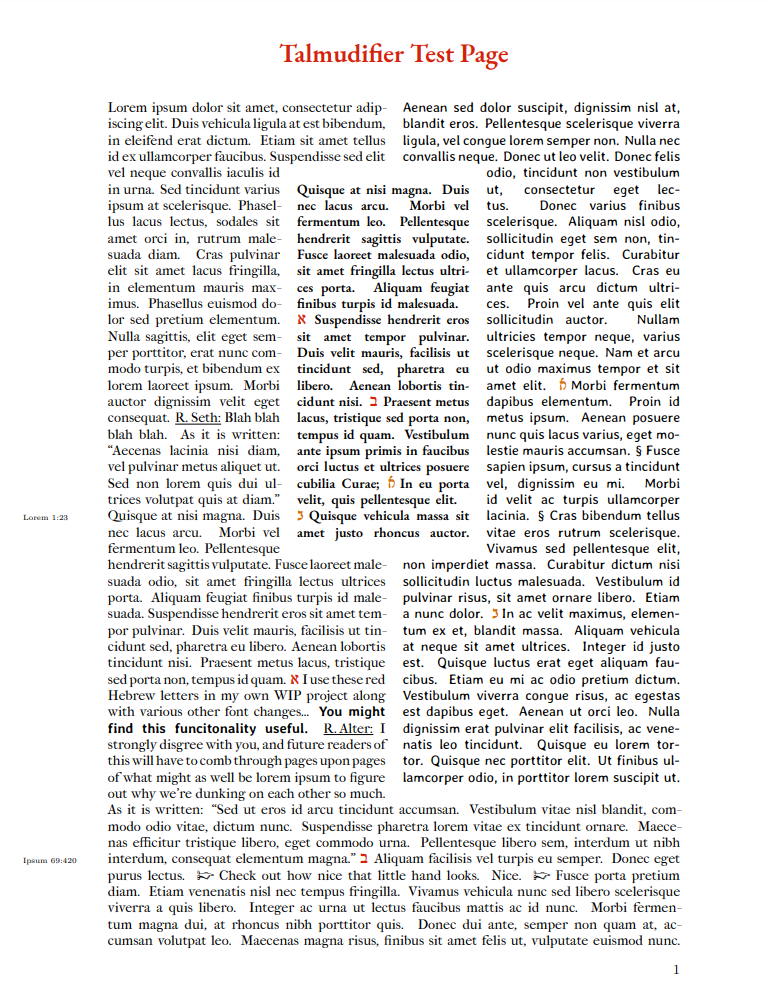
That .PDF was generated from this input file.
1. Who is this for?
This is primarily for people familiar with Markdown, Python, LaTeX, and medieval typesetting. There might not be many of these people. You should at minimum:
- Have some experience with opening files and parsing strings in Python.
- Feel comfortable installing LaTeX packages. (You won't use LaTeX directly, so you don't need to learn any of its syntax.)
- Have at least a cursory understanding of why the Talmud is typeset the way it is.
If you don't want to code, that's OK! See "Non-Coders" 4. Usage.
Please help me improve this README. I wrote this README initially just so that I could remember how the program works. There's probably a lot missing, and a lot that is very misleading... So, please email me with suggestions for improving the documentation (or, better yet, create a GitHub Issue if you know how).
2. Requirements
- Windows, OS X, or Linux
- Python 3.6 or 3.7
- XeLaTeX
- marginnote
- sectsty
- ragged2e
- lineno
- xcolor
- paracol
- fontspec
- scrbook
If you're not sure how to install anything and Google isn't being helpful, you can email me.
3. Setup
- Open the terminal.
| Windows | OS X | Linux |
|---|---|---|
| Search for "powershell" in the start menu. Run it. | In Spotlight, search for "Terminal". Run it. | Depends; if you're not sure how to do this, email me. |
- In the terminal, type:
cd ~/<where this folder is>/talmudifier
For example, if this folder is in Downloads/RandomStuff:
cd ~/Downloads/RandomStuff/talmudifier
- In the terminal, type:
pip3 setup.py -e .
Don't forget the . at the end! This will install the Talmudifier Python module.
- In the terminal, try creating a test page.
| Windows | OS X | Linux |
|---|---|---|
py -3 test_input_reader.py | python3 test_input_reader.py | python3 test_input_reader.py |
If this test script works, then everything is set up OK. The script will generate:
- The test page PDF:
talmudifier/Output/test_page.pdf - The .tex file used to create the PDF:
talmudifier/Output/test_page.tex - A few other files in
Output/that you can ignore.
4. Usage
Coders:
Talmudifier requires three sources of markdown text. It doesn't care where the sources come from as long as they are imported correctly. (In other words, you're on your own providing the text and slotting it into this program.)
left = "This is one source of text."
center = "This is another source of text."
right = "To be honest, you'll need a lot more words per column for this to work right."
Or just pull the text from three files, e.g.:
import io

with io.open("left.txt", "rt", encoding="utf-8") as f:
    left = f.read()
Then import Talmudifier and generate a .pdf:
from talmudifier.talmudifier import Talmudifier

t = Talmudifier(left, center, right)
t.create_pdf()
Non-coders:
- Edit the test input file
talmudifier/test/test_input.md - Run
test_input_reader.py(see 3. Setup)
5. API
Talmudifier
Generate Talmud-esque page layouts, given markdown plaintext and a recipe JSON file.
from talmudifier.talmudifier import Talmudifier

t = Talmudifier(left, center, right)
__init__(self, text_left: str, text_center: str, text_right: str, recipe_filename="default.json")
| Parameter | Description |
|---|---|
| text_left | The markdown text of the left column. |
| text_center | The markdown text of the center column. |
| text_right | The markdown text of the right column. |
| recipe_filename | The filename of the recipe, located in recipes/ |
get_tex(self) -> str
Generate the body of text.
- Create 4 rows on the left and right (width = one half).
- Create 1 row on the left and right (width = one third).
- Until the columns are all done: Find the shortest column and add it. Add other columns up to that length.
get_chapter(self, title: str) -> str
Returns the chapter command.
| Parameter | Description |
|---|---|
| title | The title of the chapter. |
create_pdf(self, chapter="", output_filename="output", print_tex=False) -> str
Create a PDF. Generate the chapter and the body, and append them to the preamble. Returns the LaTeX string.
| Parameter | Description |
|---|---|
| chapter | If not empty, create the header here. |
| output_filename | The name of the output file. |
| print_tex | If true, print the LaTeX string to the console. |
PDFWriter
Given LaTeX text, write a PDF. A Talmudifier object has its own writer, but it might be useful for you to create .pdfs manually (especially if you want to stitch a lot of .tex files together).
from talmudifier.pdf_writer import PDFWriter

writer = PDFWriter(preamble)
__init__(self, preamble: str)
| Parameter | Description |
|---|---|
| preamble | The preamble text. |
write(self, text: str, filename: str) -> str
Create a PDF from LaTeX text. Returns the LaTeX text, including the preamble and the end command(s).
| Parameter | Description |
|---|---|
| text | The LaTeX text. |
| filename | The filename of the PDF. |
6. Recipes
A recipe is a JSON file that defines the fonts and other styling rules for your page. It is functionally the same as just writing your own TeX preamble, but probably a lot more user-friendly.
By default, talmudifier.py uses: recipes/default.json.
All custom recipes should be saved to the recipes/ directly as .json files.
fonts
Definitions for the font per column.
"fonts":
{
    "left":
    {

    }
}
Key = The name of the font (left, center, right). Don't change these.
| Field | Type | Description | Required? |
|---|---|---|---|
path | string | Path to the directory of fonts relative to talmudifier.py. | ✔ |
ligatures | string | How ligatures are handled. This should probably always be "TeX". There are other options, but the documentation for them is sparse. | ✔ |
regular_font | string | The regular font file. Must be a file located in the directory path. | ✔ |
italic_font | string | The italic font file. Must be a file located in the directory path. | ❌ |
bold_font | string | The bold font file. Must be a file located in the directory path. | ❌ |
bold_italic_font | string | The bold+italic font file. Must be a file located in the directory path. | ❌ |
size | integer | The font size. This will default to whatever the font size is in the header.txt preamble. If skip is not included, this is ignored. | ❌ |
skip | integer | The size of the spacing between two lines. Generally you want this to be 2 more than size. If size is not included, this is ignored. | ❌ |
substitutions | dictionary | Per word in this column, replace every key in the dictionary with the value. | ❌ |
citation | dictionary | The recipe for citations pointing to this column. See below. | ❌ |
citation
Citations are letters or words that direct the reader from column to column.
| Field | Type | Description | Required? |
|---|---|---|---|
path | string | Path to the directory of fonts relative to talmudifier.py. | ✔ |
font | string | The font file. Must be a file located in the directory path. | ✔ |
command | string | The command used in the TeX document body to start the citation font. This can be the same as font_command but you might want to define a custom version. default.json does have a custom version, that makes citations red-colored. | ✔ |
font_command | string | The command used to name the font family. You probably don't want to change this from default.json's values. | ✔ |
pattern | string (regex) | talmudifier.py will replace anything in the input string with this regex pattern with a properly-formatted citation letter. | ✔ |
character_counts
These are the average number of characters in a column across many trials, given different column configurations (e.g. left and right only), a target column (e.g. left), and a target number of rows (e.g. 1).
talmudifier.py will use these numbers to fill columns with a "best guess" number of words before adding and subtracting words to reach a given row number target (e.g. if there are only left and right columns and you want 1 row on the left, talmudifier.py will first try to fill the row with 47 characters). If there is no key present, talmudifier.py will first look for the "1" key and multiply the value by the number of rows (e.g. 47 * 4). If there are no keys at all, talmudifier.py will just add a word at a time to the column (which is much slower).
You can calculate these values yourself by running row_length_calculator.py.
  "character_counts":
  {
    "half":
    {
      "left":
      {
        "1": 47
      }
    }
  }
| Key | Description |
|---|---|
"half" | The expected width of the column. Can be "half", "one_third", or "two_thirds". |
"left" | The target column within the table. Can be "left", "center", or "right". |
"1" | The target number of rows. Must be an integer. Value=The average number of characters across many trials. |
row_length_calculator.py
Use this script to calculate the average number of characters per row given a recipe, a list of tables, and a target column.
| Argument | Type | Description | Default |
|---|---|---|---|
--columns | string | The columns in the table. Can be LCR, LR, etc. | LR |
--target | string | The target column. Can be "left", "center", or "right". | |
--rows | integer | The number of rows. | 1 |
--trials | integer | The number of trials to run and then average. | 100 |
--recipe | string | Filename of the recipe file in the recipes/ directory. | default.json |
chapter
Define the chapter header style.
| Field | Type | Description | Required? |
|---|---|---|---|
definition | string | The TeX definition of the command used to define the font. Sorry this is a bit of a mess. The parameter after \newcommand must match \command (see default.json). | ✔ |
command | string | The command used when creating a chapter. | ✔ |
numbering | boolean | If true, chapter headers will start with numbers. | ✔ |
colors
Define colors for the preamble. The key is the name of the color, and the value is the HTML hex code. This can be left empty if you don't need any extra colors.
misc_definitions
Anything else you'd like to include in the preamble. default.json includes the following:
- Definitions for left and right citation font commands; note how they include a color found in
colors. - Definition for
\flowerfont, referred to inrecipe["fonts"]["left"]["substitutions"].
7. How it works
Style
Talmudifier converts markdown text into LaTeX text and then outputs a PDF:
| Markdown | LaTeX | Output |
|---|---|---|
_**Rabbi Yonatan said to Rabbi Rivka**_ | \textit{\textbf{Rabbi Yonatan said to Rabbi Rivka}} | Rabbi Yonatan said to Rabbi Rivka |
You can apply different styles and options to each column with a recipe file (a default file is included in this repo).
Layout
Columns are generated using the following process:
- Create four rows of the left and right columns of half width in a
paracolenvironment. - Create an additional row on the left and right of one-third width.
- Find the shortest column. For each column that still has text, add it to the
paracolenvironment up to that number of rows.
How do we know how many rows a column will be? By repeatedly generating test pdfs. Talmudifier outputs a column pdf with line numbers (using the lineno package), and then extracts plaintext from the pdf. This is ponderous and very hacky. If you know a better way, let me know. Right now, I think the most obvious improvement would be to catch the bytestream of the pdf before it is written to disk and extract the plaintext from that, but as far as I know that's not possible either.
This script will take a while to run. Expect the entire process to require approximately 5 minutes per page.
8. Typesetting notes
Talmudifier is meant to generate Talmud-esque pages rather than Talmud pages. The actual traditional page layouts of the Talmud are far more varied and complicated. However, the algorithm is inspired by the actual layout "rules" and typesetting techniques. Because it took me a year to track down enough errant URLs and rare books to write this Python script, I'll summarize my notes for you here. Most of this information can be found in Printing the Talmud : a history of the earliest printed editions of the Talmud by Martin Heller.
- The left and right columns of a Talmud page always encapsulate the center column at the top. They are always (when possible) four rows, followed by one "gap" row to give the center column some breathing space:

- After this, the columns extend downward for a length equal to the shortest column. Whenever a column terminates, the remaining columns go on for another "gap" row.
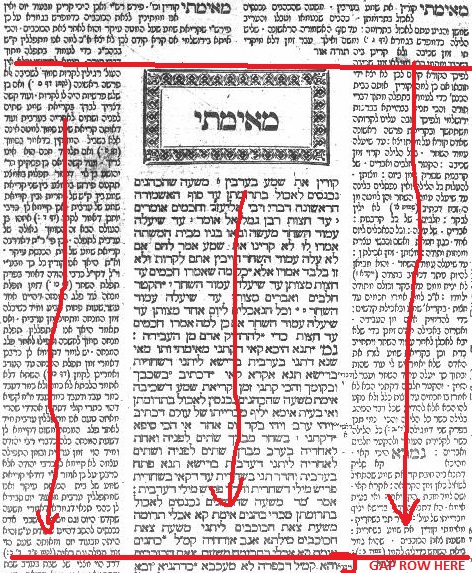
- Columns expand or contract to fill the page width depending on which columns still have text. The following options are possible:
████████ █████████████ █████ ██████████ ██████████████████████ ██████████████████████
(The Talmud will sometimes vary this formula. And, the columns don't have such uniforms widths; see the above image.)
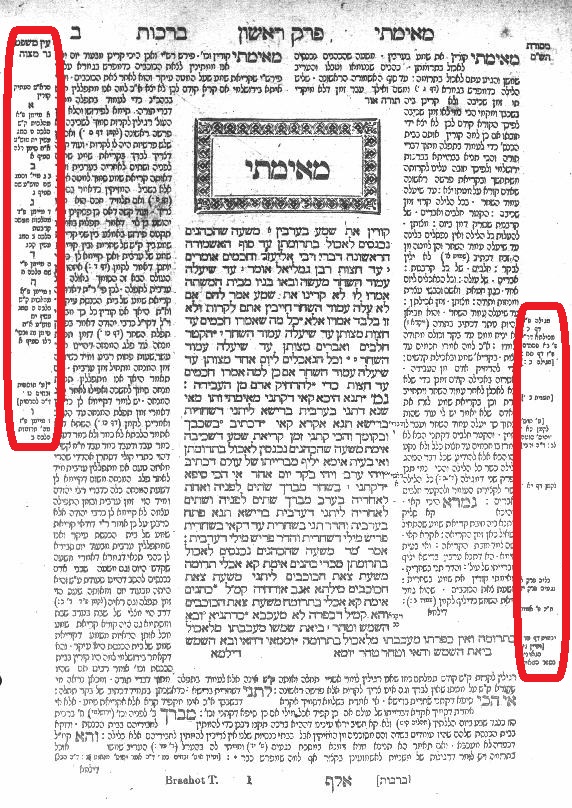
- Additional marginalia is always in-line with the text it comments on.
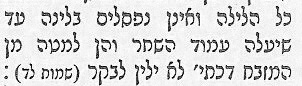
- The Talmud uses different typefaces to indicate the author, most famously Rashi (for this reason, I decided that XeLaTeX is a better tool than LaTeX for this project).
I found very little information on how typesetters knew how long any given column would be (information that Talmudifier requires) other than that it was hard to do. From this, I deduced that an experienced typesetter would simply have an eye for how to fit blocks of text on a page. I simulated this learned knowledge by adding expected row sizes to the recipe file derived from hundreds of simulated columns.
9. Known Limitations
- The algorithm really struggles with different font sizes. I'm not sure how to handle this, other than requiring all columns to be the same font size. If you have a suggestion, please email me.
- The regex used is probably sub-optimal. Style markers must be at the start and end of a word. Talmudifier is
ok with _this._But_not this_.
10. Changelog
v1.1.0
- Replaced
sys.platformwithplatform.system()inPDFWriter(the return value is more predictable). - Fixed: PDFWriter doesn't work on OS X.
- Fixed: The example code in this README has an error.
Contributors

54 commits

30 commits
Similar repos


Languages
Python
100.0%
README
Talmudifier
Talmudifier is a Python module that will procedurally generate page layouts similar to the Talmud.
That .PDF was generated from this input file.
1. Who is this for?
This is primarily for people familiar with Markdown, Python, LaTeX, and medieval typesetting. There might not be many of these people. You should at minimum:
- Have some experience with opening files and parsing strings in Python.
- Feel comfortable installing LaTeX packages. (You won't use LaTeX directly, so you don't need to learn any of its syntax.)
- Have at least a cursory understanding of why the Talmud is typeset the way it is.
If you don't want to code, that's OK! See "Non-Coders" 4. Usage.
Please help me improve this README. I wrote this README initially just so that I could remember how the program works. There's probably a lot missing, and a lot that is very misleading... So, please email me with suggestions for improving the documentation (or, better yet, create a GitHub Issue if you know how).
2. Requirements
- Windows, OS X, or Linux
- Python 3.6 or 3.7
- XeLaTeX
- marginnote
- sectsty
- ragged2e
- lineno
- xcolor
- paracol
- fontspec
- scrbook
If you're not sure how to install anything and Google isn't being helpful, you can email me.
3. Setup
- Open the terminal.
| Windows | OS X | Linux |
|---|---|---|
| Search for "powershell" in the start menu. Run it. | In Spotlight, search for "Terminal". Run it. | Depends; if you're not sure how to do this, email me. |
- In the terminal, type:
cd ~/<where this folder is>/talmudifier
For example, if this folder is in Downloads/RandomStuff:
cd ~/Downloads/RandomStuff/talmudifier
- In the terminal, type:
pip3 setup.py -e .
Don't forget the . at the end! This will install the Talmudifier Python module.
- In the terminal, try creating a test page.
| Windows | OS X | Linux |
|---|---|---|
py -3 test_input_reader.py | python3 test_input_reader.py | python3 test_input_reader.py |
If this test script works, then everything is set up OK. The script will generate:
- The test page PDF:
talmudifier/Output/test_page.pdf - The .tex file used to create the PDF:
talmudifier/Output/test_page.tex - A few other files in
Output/that you can ignore.
4. Usage
Coders:
Talmudifier requires three sources of markdown text. It doesn't care where the sources come from as long as they are imported correctly. (In other words, you're on your own providing the text and slotting it into this program.)
left = "This is one source of text."
center = "This is another source of text."
right = "To be honest, you'll need a lot more words per column for this to work right."
Or just pull the text from three files, e.g.:
import io

with io.open("left.txt", "rt", encoding="utf-8") as f:
    left = f.read()
Then import Talmudifier and generate a .pdf:
from talmudifier.talmudifier import Talmudifier

t = Talmudifier(left, center, right)
t.create_pdf()
Non-coders:
- Edit the test input file
talmudifier/test/test_input.md - Run
test_input_reader.py(see 3. Setup)
5. API
Talmudifier
Generate Talmud-esque page layouts, given markdown plaintext and a recipe JSON file.
from talmudifier.talmudifier import Talmudifier

t = Talmudifier(left, center, right)
__init__(self, text_left: str, text_center: str, text_right: str, recipe_filename="default.json")
| Parameter | Description |
|---|---|
| text_left | The markdown text of the left column. |
| text_center | The markdown text of the center column. |
| text_right | The markdown text of the right column. |
| recipe_filename | The filename of the recipe, located in recipes/ |
get_tex(self) -> str
Generate the body of text.
- Create 4 rows on the left and right (width = one half).
- Create 1 row on the left and right (width = one third).
- Until the columns are all done: Find the shortest column and add it. Add other columns up to that length.
get_chapter(self, title: str) -> str
Returns the chapter command.
| Parameter | Description |
|---|---|
| title | The title of the chapter. |
create_pdf(self, chapter="", output_filename="output", print_tex=False) -> str
Create a PDF. Generate the chapter and the body, and append them to the preamble. Returns the LaTeX string.
| Parameter | Description |
|---|---|
| chapter | If not empty, create the header here. |
| output_filename | The name of the output file. |
| print_tex | If true, print the LaTeX string to the console. |
PDFWriter
Given LaTeX text, write a PDF. A Talmudifier object has its own writer, but it might be useful for you to create .pdfs manually (especially if you want to stitch a lot of .tex files together).
from talmudifier.pdf_writer import PDFWriter

writer = PDFWriter(preamble)
__init__(self, preamble: str)
| Parameter | Description |
|---|---|
| preamble | The preamble text. |
write(self, text: str, filename: str) -> str
Create a PDF from LaTeX text. Returns the LaTeX text, including the preamble and the end command(s).
| Parameter | Description |
|---|---|
| text | The LaTeX text. |
| filename | The filename of the PDF. |
6. Recipes
A recipe is a JSON file that defines the fonts and other styling rules for your page. It is functionally the same as just writing your own TeX preamble, but probably a lot more user-friendly.
By default, talmudifier.py uses: recipes/default.json.
All custom recipes should be saved to the recipes/ directly as .json files.
fonts
Definitions for the font per column.
"fonts":
{
    "left":
    {

    }
}
Key = The name of the font (left, center, right). Don't change these.
| Field | Type | Description | Required? |
|---|---|---|---|
path | string | Path to the directory of fonts relative to talmudifier.py. | ✔ |
ligatures | string | How ligatures are handled. This should probably always be "TeX". There are other options, but the documentation for them is sparse. | ✔ |
regular_font | string | The regular font file. Must be a file located in the directory path. | ✔ |
italic_font | string | The italic font file. Must be a file located in the directory path. | ❌ |
bold_font | string | The bold font file. Must be a file located in the directory path. | ❌ |
bold_italic_font | string | The bold+italic font file. Must be a file located in the directory path. | ❌ |
size | integer | The font size. This will default to whatever the font size is in the header.txt preamble. If skip is not included, this is ignored. | ❌ |
skip | integer | The size of the spacing between two lines. Generally you want this to be 2 more than size. If size is not included, this is ignored. | ❌ |
substitutions | dictionary | Per word in this column, replace every key in the dictionary with the value. | ❌ |
citation | dictionary | The recipe for citations pointing to this column. See below. | ❌ |
citation
Citations are letters or words that direct the reader from column to column.
| Field | Type | Description | Required? |
|---|---|---|---|
path | string | Path to the directory of fonts relative to talmudifier.py. | ✔ |
font | string | The font file. Must be a file located in the directory path. | ✔ |
command | string | The command used in the TeX document body to start the citation font. This can be the same as font_command but you might want to define a custom version. default.json does have a custom version, that makes citations red-colored. | ✔ |
font_command | string | The command used to name the font family. You probably don't want to change this from default.json's values. | ✔ |
pattern | string (regex) | talmudifier.py will replace anything in the input string with this regex pattern with a properly-formatted citation letter. | ✔ |
character_counts
These are the average number of characters in a column across many trials, given different column configurations (e.g. left and right only), a target column (e.g. left), and a target number of rows (e.g. 1).
talmudifier.py will use these numbers to fill columns with a "best guess" number of words before adding and subtracting words to reach a given row number target (e.g. if there are only left and right columns and you want 1 row on the left, talmudifier.py will first try to fill the row with 47 characters). If there is no key present, talmudifier.py will first look for the "1" key and multiply the value by the number of rows (e.g. 47 * 4). If there are no keys at all, talmudifier.py will just add a word at a time to the column (which is much slower).
You can calculate these values yourself by running row_length_calculator.py.
  "character_counts":
  {
    "half":
    {
      "left":
      {
        "1": 47
      }
    }
  }
| Key | Description |
|---|---|
"half" | The expected width of the column. Can be "half", "one_third", or "two_thirds". |
"left" | The target column within the table. Can be "left", "center", or "right". |
"1" | The target number of rows. Must be an integer. Value=The average number of characters across many trials. |
row_length_calculator.py
Use this script to calculate the average number of characters per row given a recipe, a list of tables, and a target column.
| Argument | Type | Description | Default |
|---|---|---|---|
--columns | string | The columns in the table. Can be LCR, LR, etc. | LR |
--target | string | The target column. Can be "left", "center", or "right". | |
--rows | integer | The number of rows. | 1 |
--trials | integer | The number of trials to run and then average. | 100 |
--recipe | string | Filename of the recipe file in the recipes/ directory. | default.json |
chapter
Define the chapter header style.
| Field | Type | Description | Required? |
|---|---|---|---|
definition | string | The TeX definition of the command used to define the font. Sorry this is a bit of a mess. The parameter after \newcommand must match \command (see default.json). | ✔ |
command | string | The command used when creating a chapter. | ✔ |
numbering | boolean | If true, chapter headers will start with numbers. | ✔ |
colors
Define colors for the preamble. The key is the name of the color, and the value is the HTML hex code. This can be left empty if you don't need any extra colors.
misc_definitions
Anything else you'd like to include in the preamble. default.json includes the following:
- Definitions for left and right citation font commands; note how they include a color found in
colors. - Definition for
\flowerfont, referred to inrecipe["fonts"]["left"]["substitutions"].
7. How it works
Style
Talmudifier converts markdown text into LaTeX text and then outputs a PDF:
| Markdown | LaTeX | Output |
|---|---|---|
_**Rabbi Yonatan said to Rabbi Rivka**_ | \textit{\textbf{Rabbi Yonatan said to Rabbi Rivka}} | Rabbi Yonatan said to Rabbi Rivka |
You can apply different styles and options to each column with a recipe file (a default file is included in this repo).
Layout
Columns are generated using the following process:
- Create four rows of the left and right columns of half width in a
paracolenvironment. - Create an additional row on the left and right of one-third width.
- Find the shortest column. For each column that still has text, add it to the
paracolenvironment up to that number of rows.
How do we know how many rows a column will be? By repeatedly generating test pdfs. Talmudifier outputs a column pdf with line numbers (using the lineno package), and then extracts plaintext from the pdf. This is ponderous and very hacky. If you know a better way, let me know. Right now, I think the most obvious improvement would be to catch the bytestream of the pdf before it is written to disk and extract the plaintext from that, but as far as I know that's not possible either.
This script will take a while to run. Expect the entire process to require approximately 5 minutes per page.
8. Typesetting notes
Talmudifier is meant to generate Talmud-esque pages rather than Talmud pages. The actual traditional page layouts of the Talmud are far more varied and complicated. However, the algorithm is inspired by the actual layout "rules" and typesetting techniques. Because it took me a year to track down enough errant URLs and rare books to write this Python script, I'll summarize my notes for you here. Most of this information can be found in Printing the Talmud : a history of the earliest printed editions of the Talmud by Martin Heller.
- The left and right columns of a Talmud page always encapsulate the center column at the top. They are always (when possible) four rows, followed by one "gap" row to give the center column some breathing space:
- After this, the columns extend downward for a length equal to the shortest column. Whenever a column terminates, the remaining columns go on for another "gap" row.
- Columns expand or contract to fill the page width depending on which columns still have text. The following options are possible:
████████ █████████████ █████ ██████████ ██████████████████████ ██████████████████████
(The Talmud will sometimes vary this formula. And, the columns don't have such uniforms widths; see the above image.)
- Additional marginalia is always in-line with the text it comments on.
- The Talmud uses different typefaces to indicate the author, most famously Rashi (for this reason, I decided that XeLaTeX is a better tool than LaTeX for this project).
I found very little information on how typesetters knew how long any given column would be (information that Talmudifier requires) other than that it was hard to do. From this, I deduced that an experienced typesetter would simply have an eye for how to fit blocks of text on a page. I simulated this learned knowledge by adding expected row sizes to the recipe file derived from hundreds of simulated columns.
9. Known Limitations
- The algorithm really struggles with different font sizes. I'm not sure how to handle this, other than requiring all columns to be the same font size. If you have a suggestion, please email me.
- The regex used is probably sub-optimal. Style markers must be at the start and end of a word. Talmudifier is
ok with _this._But_not this_.
10. Changelog
v1.1.0
- Replaced
sys.platformwithplatform.system()inPDFWriter(the return value is more predictable). - Fixed: PDFWriter doesn't work on OS X.
- Fixed: The example code in this README has an error.
Similar repos
Contributors
54 commits
30 commits
Languages
Python
100.0%