Local RAG running models with Huggingface or LLama.cpp
Python
2
5 commits
updated Oct 14, 2024
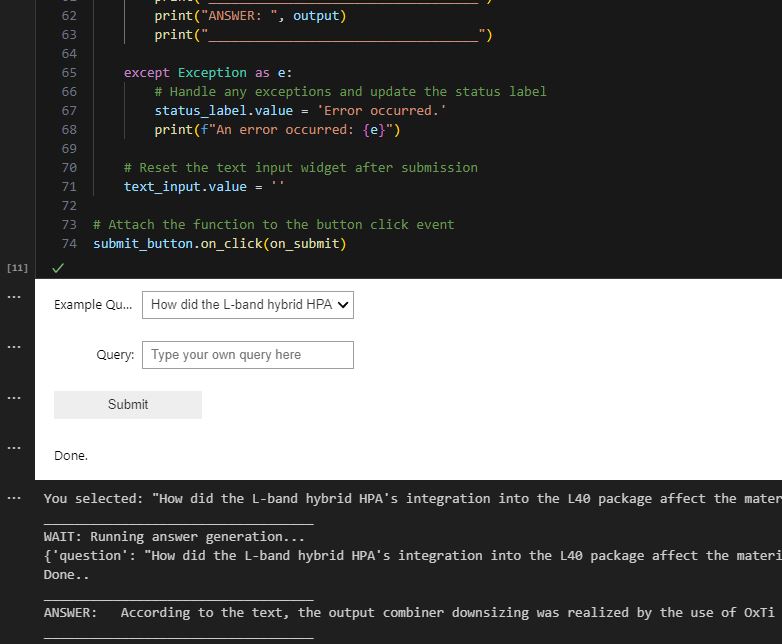
This project offers a lightweight implementation (no llama-index or langchain) for question-answering on PDF documents using local hardware and a Retrieval-Augmented-Generation (RAG) for Large Language Models (LLM) pipeline. It leverages llama.cpp Python bindings for CPU support and showcases a demo in a Jupyter Notebook. Key features include:
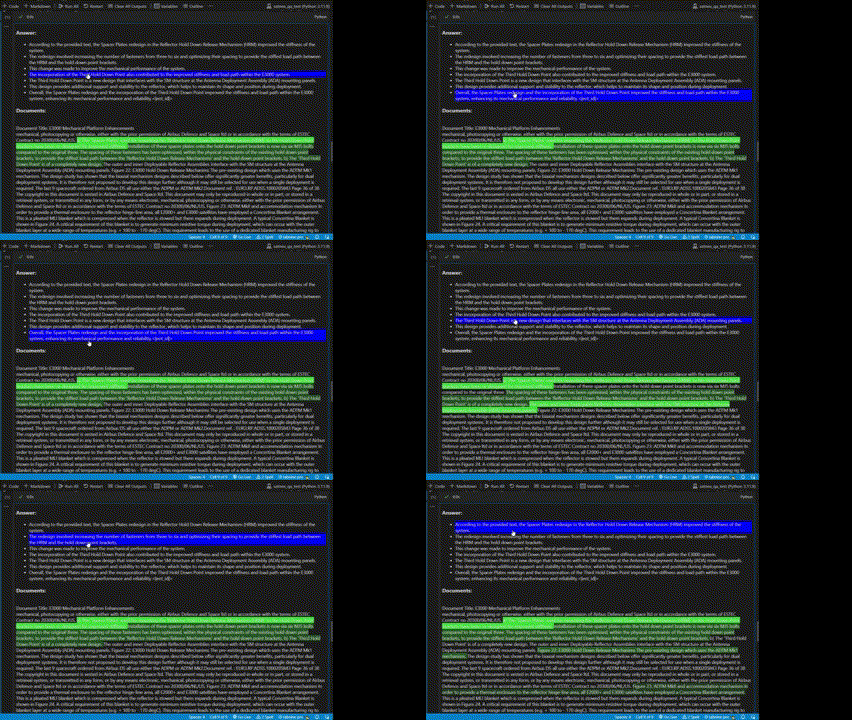
A preprocessing and chunking pipeline for PDF documents PDF extraction implemented with AllenAI's Papermage (https://github.com/allenai/papermage) A visualization plugin to compare generated responses with source documents, enabling model answer verification
The implementation demonstrates how to perform document-based question-answering without relying on cloud services, making it suitable for scenarios requiring data privacy or offline processing.
Clone the repository:
git clone https://github.com/strath-ace-labs/local_rag

cd local_rag
Install the required Python packages into new environment:
pip install -r requirements.txt
device as either 'cpu', 'cuda' (for GPU), or None for self-selection.model = rag_llm_classes.load_inference_model(model_name='QuantFactory/Meta-Llama-3.1-8B-Instruct-GGUF', file name="Meta-Llama-3.1-8B-Instruct.Q5_K_M.gguf", device='cpu')
model = rag_llm_classes.load_inference_model(model_name='Nexusflow/Starling-LM-7B-beta', device='cuda')
Local RAG running models with Huggingface or LLama.cpp
Python
2
5 commits
updated Oct 14, 2024
This project offers a lightweight implementation (no llama-index or langchain) for question-answering on PDF documents using local hardware and a Retrieval-Augmented-Generation (RAG) for Large Language Models (LLM) pipeline. It leverages llama.cpp Python bindings for CPU support and showcases a demo in a Jupyter Notebook. Key features include:
A preprocessing and chunking pipeline for PDF documents PDF extraction implemented with AllenAI's Papermage (https://github.com/allenai/papermage) A visualization plugin to compare generated responses with source documents, enabling model answer verification
The implementation demonstrates how to perform document-based question-answering without relying on cloud services, making it suitable for scenarios requiring data privacy or offline processing.
Clone the repository:
git clone https://github.com/strath-ace-labs/local_rag

cd local_rag
Install the required Python packages into new environment:
pip install -r requirements.txt
device as either 'cpu', 'cuda' (for GPU), or None for self-selection.model = rag_llm_classes.load_inference_model(model_name='QuantFactory/Meta-Llama-3.1-8B-Instruct-GGUF', file name="Meta-Llama-3.1-8B-Instruct.Q5_K_M.gguf", device='cpu')
model = rag_llm_classes.load_inference_model(model_name='Nexusflow/Starling-LM-7B-beta', device='cuda')



