stevenlei/spacingjs

A JavaScript utility for measuring the spacing between elements on webpage.

TypeScript

1,122

59 commits

updated Jun 18, 2025

See the code

README

Spacing JS

npm version GitHub Stars Github Forks GitHub Open Issues License

A lightweight JavaScript utility for measuring spacing between elements on webpages during development. Perfect for designers and developers who need pixel-perfect measurements. Try the demo.

SpacingJS Demo

🌍 Available in: English | 繁體中文 | 简体中文

Installation

Option 1: CDN

Add SpacingJS directly to your HTML:

<!-- Using UNPKG -->
<script src="//unpkg.com/spacingjs" defer></script>

<!-- Or using jsDelivr -->
<script src="//cdn.jsdelivr.net/npm/spacingjs" defer></script>

Option 2: NPM

npm install spacingjs

Then import and use it in your code:

import Spacing from 'spacingjs';

Spacing.start();

Usage

Basic Usage

  1. Hover over any element on your webpage
  2. Press Alt (Windows) or ⌥ Option (Mac)
  3. Move your cursor to another element to see the measurements

Chrome Extension Usage

  1. Click the SpacingJS extension icon to activate/deactivate
  2. Use keyboard shortcuts for quick access:
    • Ctrl+Shift+S (Windows) or ⌘+Shift+S (Mac) to activate
    • Alt+S to toggle on/off
  3. Visual indicator shows when SpacingJS is active (green dot on extension icon)

Pro Tips

  • Hold Shift to keep measurements visible longer (great for taking screenshots)
  • Works with all element types including SVG elements
  • Measurements show element tag, class, and font size for better context

Browser Extension

SpacingJS is available as a Chrome Extension with enhanced features:

✨ New in v1.1.0

  • Smart Toggle: Click extension icon to activate/deactivate with visual feedback
  • Keyboard Shortcuts: Quick access with hotkeys
  • Enhanced Measurements: Better precision and element information display
  • Error Handling: Robust support for all element types (HTML, SVG, etc.)
  • Professional UI: Clean, utility-focused design without animations

Installation

Extension Features

  • Visual Status: Green dot indicates when SpacingJS is active
  • Error Indicators: Red badge shows when extension can't run (e.g., on chrome:// pages)
  • Tab Management: Automatic cleanup when switching tabs or navigating

Contributing

The dist folder is intentionally included in the Git repository to ensure CDN reliability. To contribute:

  1. Make your changes in the src directory
  2. Run npm run build to rebuild the distribution files
  3. Commit both source changes and rebuilt dist files
  4. Submit a pull request

Get Involved

Changelog

v1.1.0 (Latest)

  • Enhanced Chrome Extension: Smart toggle functionality with visual feedback
  • ⌨Keyboard Shortcuts: Added Ctrl+Shift+S and Alt+S hotkeys for quick access
  • Improved UI: Better element information display with tag, class, and font size
  • Better Error Handling: Robust support for SVG elements and edge cases
  • Performance: Optimized measurement logic and reduced bundle size
  • Reliability: Enhanced error handling and fallback mechanisms

v1.0.9

  • Previous stable release with core spacing measurement functionality

License

SpacingJS is released under the MIT License.

stevenlei/spacingjs

A JavaScript utility for measuring the spacing between elements on webpage.

TypeScript

1,122

59 commits

updated Jun 18, 2025

See the code

README

Spacing JS

npm version GitHub Stars Github Forks GitHub Open Issues License

A lightweight JavaScript utility for measuring spacing between elements on webpages during development. Perfect for designers and developers who need pixel-perfect measurements. Try the demo.
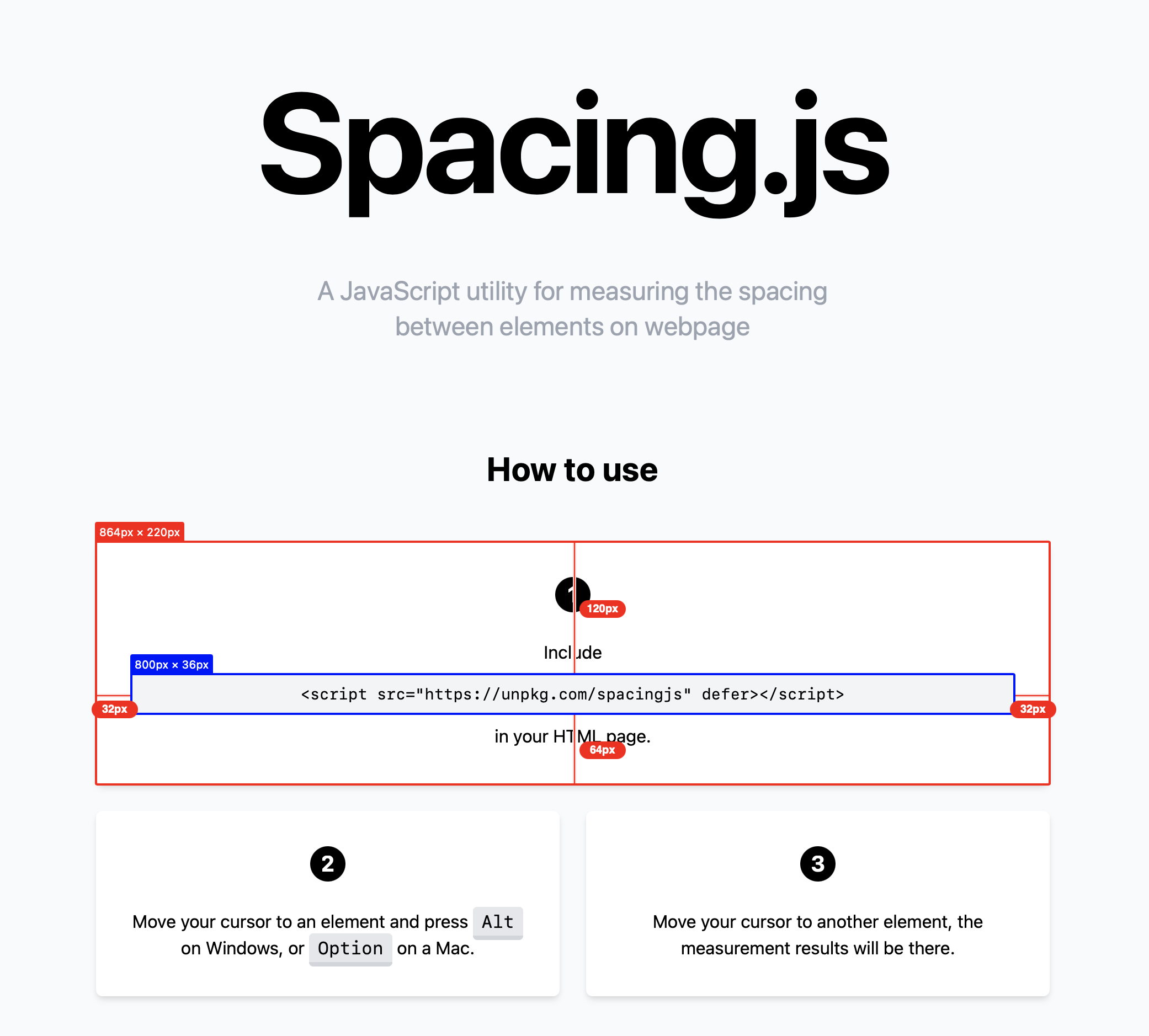
SpacingJS Demo

🌍 Available in: English | 繁體中文 | 简体中文

Installation

Option 1: CDN

Add SpacingJS directly to your HTML:

<!-- Using UNPKG -->
<script src="//unpkg.com/spacingjs" defer></script>

<!-- Or using jsDelivr -->
<script src="//cdn.jsdelivr.net/npm/spacingjs" defer></script>

Option 2: NPM

npm install spacingjs

Then import and use it in your code:

import Spacing from 'spacingjs';

Spacing.start();

Usage

Basic Usage

  1. Hover over any element on your webpage
  2. Press Alt (Windows) or ⌥ Option (Mac)
  3. Move your cursor to another element to see the measurements

Chrome Extension Usage

  1. Click the SpacingJS extension icon to activate/deactivate
  2. Use keyboard shortcuts for quick access:
    • Ctrl+Shift+S (Windows) or ⌘+Shift+S (Mac) to activate
    • Alt+S to toggle on/off
  3. Visual indicator shows when SpacingJS is active (green dot on extension icon)

Pro Tips

  • Hold Shift to keep measurements visible longer (great for taking screenshots)
  • Works with all element types including SVG elements
  • Measurements show element tag, class, and font size for better context

Browser Extension

SpacingJS is available as a Chrome Extension with enhanced features:

✨ New in v1.1.0

  • Smart Toggle: Click extension icon to activate/deactivate with visual feedback
  • Keyboard Shortcuts: Quick access with hotkeys
  • Enhanced Measurements: Better precision and element information display
  • Error Handling: Robust support for all element types (HTML, SVG, etc.)
  • Professional UI: Clean, utility-focused design without animations

Installation

Extension Features

  • Visual Status: Green dot indicates when SpacingJS is active
  • Error Indicators: Red badge shows when extension can't run (e.g., on chrome:// pages)
  • Tab Management: Automatic cleanup when switching tabs or navigating

Contributing

The dist folder is intentionally included in the Git repository to ensure CDN reliability. To contribute:

  1. Make your changes in the src directory
  2. Run npm run build to rebuild the distribution files
  3. Commit both source changes and rebuilt dist files
  4. Submit a pull request

Get Involved

Changelog

v1.1.0 (Latest)

  • Enhanced Chrome Extension: Smart toggle functionality with visual feedback
  • ⌨Keyboard Shortcuts: Added Ctrl+Shift+S and Alt+S hotkeys for quick access
  • Improved UI: Better element information display with tag, class, and font size
  • Better Error Handling: Robust support for SVG elements and edge cases
  • Performance: Optimized measurement logic and reduced bundle size
  • Reliability: Enhanced error handling and fallback mechanisms

v1.0.9

  • Previous stable release with core spacing measurement functionality

License

SpacingJS is released under the MIT License.

Project health

Latest release

1.0.9 · Dec 20, 2024

Releases this year

0

Significant stargazers

Jiaren Cai

224 followers · starred Nov 2021

Cheese

7 followers · starred Nov 2021

kiho

109 followers · starred Nov 2021

Cícero Santos

60 followers · starred Jul 2024
