
reims-vgpu is an experimental virtual GPU for macOS guests
See the codeREADME
reims-vgpu


Alpha. This project is early and under active development. The QEMU device ABI, boot scripts, crate layout, backend behavior, and supported host/guest pathways may change without a stable compatibility guarantee. Treat it as research-quality: useful for experimentation and bring-up, not a frozen virtualization product.
reims-vgpu is an experimental virtual GPU for macOS guests. It aims to let macOS running inside a VM use accelerated graphics instead of a basic framebuffer, while keeping the guest operating system unchanged.
macOS already includes a paravirtual GPU driver named AppleParavirtGPU.kext.
reims-vgpu provides the QEMU device that driver attaches to, then decodes the guest's GPU command
stream on the host and executes it through Metal (TODO) or Vulkan, with Vulkan translation handled
by metal2vulkan. There is no custom macOS kext and
no guest driver to install.
Contributions are welcome. I am especially interested in collaborating with developers who want to work on correctness, visual glitches, synchronization bugs, command-stream decoding, Metal/Vulkan translation, and making more host/guest combinations reliable.
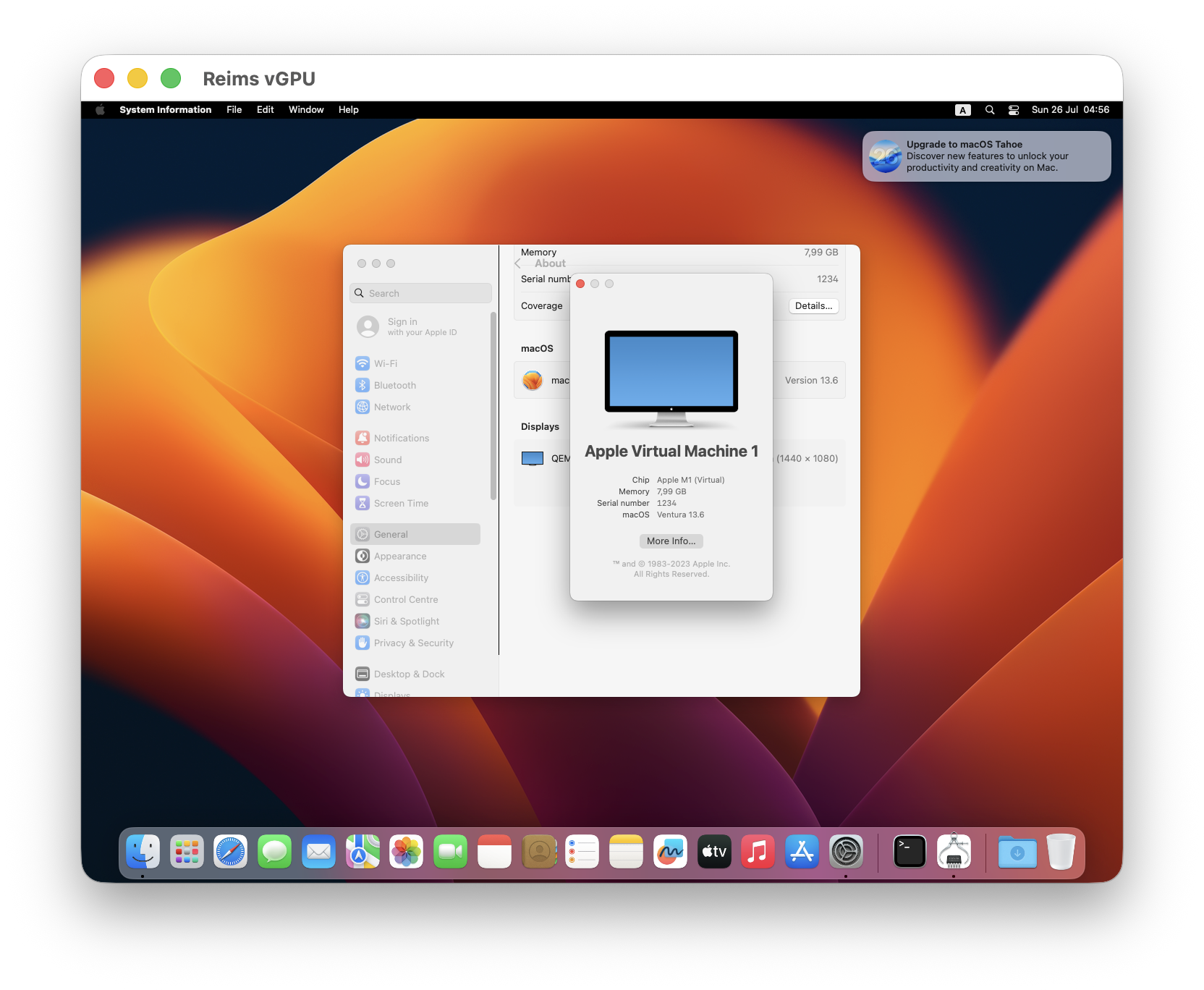
arm64 macOS 13 Ventura guest on an Apple Silicon host.
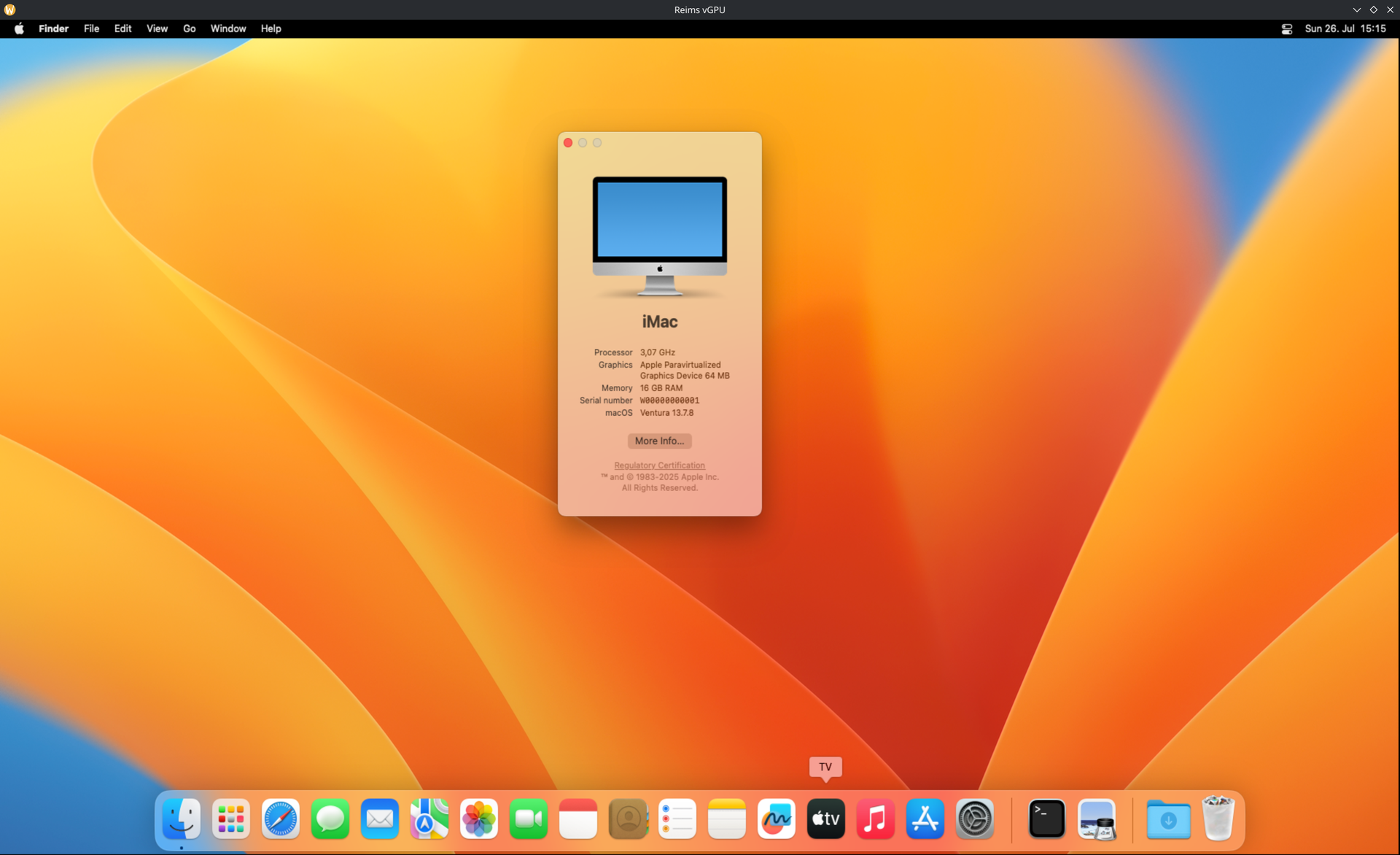
x86_64 macOS 13 Ventura guest on a Linux host.
Three pathways
crates/reims-vgpu targets the following host/guest/backend combinations. Agents pick the pathway
their unit of work is on.
| Pathway | Host | Guest | Device attach | Backend | Boot |
|---|---|---|---|---|---|
| x86 macOS / Linux Vulkan | Linux x86_64 (KVM) | x86_64 macOS Metal guest | PCI reims-vgpu-pci | host Vulkan via metal2vulkan | vm/boot-x86.sh |
| arm64 macOS / macOS Metal | Apple Silicon macOS (HVF) | arm64 macOS Metal guest (vmapple) | sysbus MMIO reims-vgpu-mmio | host Metal | vm/boot-arm64.sh |
| arm64 macOS / macOS Vulkan | Apple Silicon macOS (HVF) | arm64 macOS Metal guest (vmapple) | sysbus MMIO reims-vgpu-mmio | host Vulkan via metal2vulkan through MoltenVK | vm/boot-arm64.sh |
- QEMU device shims:
vendor/qemutrackssteelbrain/qemu-reims-vgpu@host-reims-vgpu-vmapple(thin C — QOM/MMIO/IRQ/console/HostOps only) - Product logic:
crates/reims-vgpu(decode + device model + Metal/Vulkan backends) - Wire layouts:
crates/reims-vgpu-wire(derived serializer views/parsers; decode uses these as the layout authority for covered records) - Vulkan translator dependency: public
steelbrain/metal2vulkanGit crate. On macOS, the Vulkan host backend runs through MoltenVK. - VM lifecycle:
vm/(snapshot-revert; arm and x86 guest boot scripts)
Getting started
This tree ships boot scripts and the device, not a ready-made macOS disk image. Guest disks,
firmware vars, and OpenCore blobs are private/gitignored under vm/. Pick a pathway, provision a
guest once, freeze a golden snapshot, then use the snapshot-revert boots for day-to-day work.
macOS 13 Ventura is the recommended guest release for bring-up.
x86_64 guest on Linux (KVM)
-
Host prep. You need KVM (
/dev/kvm), a working NVIDIA (or other) Vulkan stack for the product backend, and build deps for the in-tree QEMU (scripts/qemu-build/qemu-build.sh --target x86_64 --backend vulkan). -
Generate OpenCore, OVMF, and a guest disk with OSX-KVM. macOS 13 is recommended.Follow that project’s docs to fetch recovery media, build OpenCore, and install macOS under QEMU+KVM. The point of this step is only to produce a working, post-Setup-Assistant guest plus the usual OpenCore/OVMF pieces — not to stay on OSX-KVM’s long-term launcher.
-
Drop the artifacts where this repo expects them (paths are the defaults in
vm/boot-x86.sh; override with env if you prefer):Artifact Default location Guest system disk vm/disks/macos.imgOpenCore boot disk vm/disks/OpenCore.qcow2OVMF code vm/ovmf/OVMF_CODE_4M.fdOVMF vars template vm/ovmf/OVMF_VARS-1920x1080.fdFinish install in the guest: enable Remote Login, install your SSH key, turn off sleep/screensaver as you like. Host SSH is typically
localhost:2222→ guest:22(seevm/boot-x86.sh). -
Capture the first immutable snapshot. Guests are organised into rails — one rail per guest OS line (
macos-11…macos-26), each with a snapshot history of its own undervm/disks/rails/<rail>/snapshots/. Create the rail's directory, then from a clean guest state (logged in, network/SSH known-good) shut down cleanly while booting in capture mode:mkdir -p vm/disks/rails/macos-15 vm/boot-x86.sh --rail macos-15 --capture --device vmware-svga # clean shutdown from inside the guest → new label under # vm/disks/rails/macos-15/snapshots/, and that rail's snapshots/current points at itEvery later boot clones the selected rail's
snapshots/current(COW when possible) and throws the clone away on exit, so wedges and hard kills never poison the golden image.Importing a guest built elsewhere is the same shape without the boot — drop
{macos.img,OpenCore.qcow2,OVMF_VARS.fd}(plusOVMF_CODE.fdif that guest was installed under a different OVMF build) intovm/disks/rails/<rail>/snapshots/base/,chmod 444them, andln -sfn base vm/disks/rails/<rail>/snapshots/current. Usecp --reflink=autoon btrfs and the import costs no disk. -
Day-to-day boots.
vm/boot-x86.sh --list-rails                  # what guest lines exist (* = default)
vm/boot-x86.sh --rail macos-15 --list-snapshots

# Console only (mainstream OSX-KVM-style VGA) while you debug the host stack
vm/boot-x86.sh --testing --device vmware-svga

# Product Reims VGPU device (needs in-tree QEMU + reims-vgpu Vulkan)
REIMS_VGPU_BACKEND=vulkan scripts/qemu-build/qemu-build.sh --target x86_64
vm/boot-x86.sh --testing --device reims-vgpu-pci --rail macos-15

# Host-window screenshot (Linux/Plasma or macOS host)
scripts/screenshot/screenshot.sh -o /tmp/screen.png
Without
--raila boot followsvm/disks/rails/current; change it withln -sfn <rail> vm/disks/rails/current. Neither--railnor--snapshotrepoints anything.
arm64 guest on Apple Silicon (HVF / vmapple)
Arm bring-up is in-tree: Virtualization.framework via Homebrew macosvm, then QEMU’s
vmapple machine under HVF. There is no OSX-KVM step.
-
Install
macosvm, and build the vendored QEMU:scripts/qemu-build/qemu-build.sh --target aarch64 --backend metal -
Provision a guest from a UniversalMac IPSW with the project helpers in
scripts/vmapple-provision/. The live bundle lives undervm/guest/(disk, aux,vm.json/ ECID). -
Configure the guest once: enable Remote Login, run
scripts/vmapple-guest-config/for no-sleep settings, and optionally enable auto-login by hand in System Settings. Capture a golden undervm/guest/rails/<rail>/snapshots/with the snapshot helpers (scripts/vmapple-snapshot/, orvm/boot-arm64.sh --rail <rail> --captureonce the disk is ready). -
Boot:
vm/boot-arm64.sh --testing --device reims-vgpu-mmio    # product
vm/boot-arm64.sh --testing --device apple-gfx-mmio   # Apple ParavirtualizedGraphics A/B
scripts/screenshot/screenshot.sh /tmp/screen.png
Optional performance ceiling reference: the same guest under native VZ via
macosvm --gui.
After the first snapshot
- Prefer
--testingfor agent/measurement boots (time-bounded, always reverts). - Use
--interactivewhen you need an open-ended GUI session (still reverts unless you are in--capturemode). - Say which rail a result came from. A number from
macos-11and a number frommacos-26are two measurements, not one — that separation is the whole reason snapshots are per-rail. - Never commit disks, IPSWs, or OpenCore/OVMF runtime under
vm/. - Device/backend work lives in
crates/reims-vgpu+ the thin shims invendor/qemu; rebuild QEMU after product changes before claiming a live boot result.
The host window takes your keyboard shortcuts
On the reims-vgpu-pci / reims-vgpu-mmio device the guest is displayed in a window this project
owns, and while that window has keyboard focus it asks the host desktop to stop acting on its own
shortcuts so they reach the guest instead. Without that the desktop consumes them first: a stock
Plasma session claims 63 Meta/Alt/Ctrl combinations, and because a macOS guest reads host
Meta as Cmd, that covers most of what the guest expects — Cmd+A, Cmd+V, Cmd+Q, Cmd+W,
Cmd+1…Cmd+9, and Alt+Tab.
Press Ctrl+Alt+Esc to release the grab. While it is held your own Alt+Tab goes to the guest,
so this is how you get back to the host desktop. The chord is consumed rather than forwarded, and the
grab re-arms by itself the next time you focus the window — it is an escape hatch, not a mode you
have to remember you are in. The guest's own Cmd+Option+Esc (Force Quit) carries no Ctrl and is
forwarded to the guest untouched.
The window says so on stderr the first time it captures, and records it in the always-on log:
window_capture_engaged mechanism=wayland_shortcuts_inhibit release=Ctrl+Alt+Esc
How much can be captured depends on the host, and the log names which mechanism a boot got:
| Host | Mechanism | Coverage |
|---|---|---|
| Wayland | zwp_keyboard_shortcuts_inhibit_v1 | full, when the compositor implements it |
| X11 | XGrabKeyboard | full, unless another client holds the keyboard |
| macOS | NSApplicationPresentationDisableProcessSwitching | partial — Cmd+Tab and Cmd+H only; the window server keeps its reserved chords |
A host that cannot capture at all still runs; it emits a window_capture_* reason on
/tmp/reims-vgpu-fail.log rather than silently dropping the keys.
Environment overrides
Set on the boot command; every one is optional and every default is "let the device decide". The
full list, with the parse, is crates/reims-vgpu/src/env.rs. Each accepts 1/on/true/yes and
0/off/false/no, case-insensitively.
| Variable | Effect |
|---|---|
REIMS_VGPU_DMABUF=off | Stop reaching guest pages through a dma-buf, even where the host can. Every guest-memory rail takes the copying path instead — which is what runs on any host without VK_EXT_external_memory_dma_buf, so this is how that half is exercised on a machine that has it. |
REIMS_VGPU_DRAW_LOG=on | Verbose per-draw detail on top of the always-on failure log. |
An override can only narrow what the device does. There is no way to switch a rail on that the
host reported it cannot run: capability is measured from the device at startup, and asking a driver
for an extension it does not advertise fails device creation rather than degrading. REIMS_VGPU_DMABUF
has no on direction for that reason — on a host without the extension it is already off, and the
vk_caps line in /tmp/reims-vgpu-fail.log names which check said so.
Repo layout
AGENTS.md           - repo operating guide for agents
crates/             - Rust crates (`reims-vgpu`, `reims-vgpu-wire`, `reims-vgpu-efi`)
scripts/            - host setup, VM lifecycle, screenshot, and diagnostic helpers
vendor/             - vendored QEMU submodule and patch record
vm/                 - VM launch/configuration glue; images are private/untracked
crates/reims-vgpu-wire holds zero-copy views and parsers for the Apple
paravirtualized GPU serializer format, derived from Apple's own encoder rather
than inferred from captures. crates/reims-vgpu's runtime::decode uses those
exports for opcodes, record framing, and field layouts on wire-covered
families (encoder blit/compute/render binds and state, and the create records
above); decode remains the mapping layer into the device's Command / Kind
model and decline naming. Gaps without a wire export (FIFO, event opcodes,
unobserved compute residency, pipeline TLV) stay local to decode.
License
Licensed under the GNU Lesser General Public License v3.0 or later
(LGPL-3.0-or-later).
Metal, macOS are trademarks of Apple Inc. reims-vgpu is an independent project and is not affiliated with, sponsored by, or endorsed by Apple Inc.
Significant stargazers

987 followers · starred Jul 2026

220 followers · starred Jul 2026

223 followers · starred Jul 2026

249 followers · starred Aug 2026
Similar repos


Languages
Rust
93.4%
Shell
2.3%
Objective-C
1.8%
Swift
1.4%
reims-vgpu is an experimental virtual GPU for macOS guests
See the codeREADME
reims-vgpu
Alpha. This project is early and under active development. The QEMU device ABI, boot scripts, crate layout, backend behavior, and supported host/guest pathways may change without a stable compatibility guarantee. Treat it as research-quality: useful for experimentation and bring-up, not a frozen virtualization product.
reims-vgpu is an experimental virtual GPU for macOS guests. It aims to let macOS running inside a VM use accelerated graphics instead of a basic framebuffer, while keeping the guest operating system unchanged.
macOS already includes a paravirtual GPU driver named AppleParavirtGPU.kext.
reims-vgpu provides the QEMU device that driver attaches to, then decodes the guest's GPU command
stream on the host and executes it through Metal (TODO) or Vulkan, with Vulkan translation handled
by metal2vulkan. There is no custom macOS kext and
no guest driver to install.
Contributions are welcome. I am especially interested in collaborating with developers who want to work on correctness, visual glitches, synchronization bugs, command-stream decoding, Metal/Vulkan translation, and making more host/guest combinations reliable.
arm64 macOS 13 Ventura guest on an Apple Silicon host.
x86_64 macOS 13 Ventura guest on a Linux host.
Three pathways
crates/reims-vgpu targets the following host/guest/backend combinations. Agents pick the pathway
their unit of work is on.
| Pathway | Host | Guest | Device attach | Backend | Boot |
|---|---|---|---|---|---|
| x86 macOS / Linux Vulkan | Linux x86_64 (KVM) | x86_64 macOS Metal guest | PCI reims-vgpu-pci | host Vulkan via metal2vulkan | vm/boot-x86.sh |
| arm64 macOS / macOS Metal | Apple Silicon macOS (HVF) | arm64 macOS Metal guest (vmapple) | sysbus MMIO reims-vgpu-mmio | host Metal | vm/boot-arm64.sh |
| arm64 macOS / macOS Vulkan | Apple Silicon macOS (HVF) | arm64 macOS Metal guest (vmapple) | sysbus MMIO reims-vgpu-mmio | host Vulkan via metal2vulkan through MoltenVK | vm/boot-arm64.sh |
- QEMU device shims:
vendor/qemutrackssteelbrain/qemu-reims-vgpu@host-reims-vgpu-vmapple(thin C — QOM/MMIO/IRQ/console/HostOps only) - Product logic:
crates/reims-vgpu(decode + device model + Metal/Vulkan backends) - Wire layouts:
crates/reims-vgpu-wire(derived serializer views/parsers; decode uses these as the layout authority for covered records) - Vulkan translator dependency: public
steelbrain/metal2vulkanGit crate. On macOS, the Vulkan host backend runs through MoltenVK. - VM lifecycle:
vm/(snapshot-revert; arm and x86 guest boot scripts)
Getting started
This tree ships boot scripts and the device, not a ready-made macOS disk image. Guest disks,
firmware vars, and OpenCore blobs are private/gitignored under vm/. Pick a pathway, provision a
guest once, freeze a golden snapshot, then use the snapshot-revert boots for day-to-day work.
macOS 13 Ventura is the recommended guest release for bring-up.
x86_64 guest on Linux (KVM)
-
Host prep. You need KVM (
/dev/kvm), a working NVIDIA (or other) Vulkan stack for the product backend, and build deps for the in-tree QEMU (scripts/qemu-build/qemu-build.sh --target x86_64 --backend vulkan). -
Generate OpenCore, OVMF, and a guest disk with OSX-KVM. macOS 13 is recommended.Follow that project’s docs to fetch recovery media, build OpenCore, and install macOS under QEMU+KVM. The point of this step is only to produce a working, post-Setup-Assistant guest plus the usual OpenCore/OVMF pieces — not to stay on OSX-KVM’s long-term launcher.
-
Drop the artifacts where this repo expects them (paths are the defaults in
vm/boot-x86.sh; override with env if you prefer):Artifact Default location Guest system disk vm/disks/macos.imgOpenCore boot disk vm/disks/OpenCore.qcow2OVMF code vm/ovmf/OVMF_CODE_4M.fdOVMF vars template vm/ovmf/OVMF_VARS-1920x1080.fdFinish install in the guest: enable Remote Login, install your SSH key, turn off sleep/screensaver as you like. Host SSH is typically
localhost:2222→ guest:22(seevm/boot-x86.sh). -
Capture the first immutable snapshot. Guests are organised into rails — one rail per guest OS line (
macos-11…macos-26), each with a snapshot history of its own undervm/disks/rails/<rail>/snapshots/. Create the rail's directory, then from a clean guest state (logged in, network/SSH known-good) shut down cleanly while booting in capture mode:mkdir -p vm/disks/rails/macos-15 vm/boot-x86.sh --rail macos-15 --capture --device vmware-svga # clean shutdown from inside the guest → new label under # vm/disks/rails/macos-15/snapshots/, and that rail's snapshots/current points at itEvery later boot clones the selected rail's
snapshots/current(COW when possible) and throws the clone away on exit, so wedges and hard kills never poison the golden image.Importing a guest built elsewhere is the same shape without the boot — drop
{macos.img,OpenCore.qcow2,OVMF_VARS.fd}(plusOVMF_CODE.fdif that guest was installed under a different OVMF build) intovm/disks/rails/<rail>/snapshots/base/,chmod 444them, andln -sfn base vm/disks/rails/<rail>/snapshots/current. Usecp --reflink=autoon btrfs and the import costs no disk. -
Day-to-day boots.
vm/boot-x86.sh --list-rails                  # what guest lines exist (* = default)
vm/boot-x86.sh --rail macos-15 --list-snapshots

# Console only (mainstream OSX-KVM-style VGA) while you debug the host stack
vm/boot-x86.sh --testing --device vmware-svga

# Product Reims VGPU device (needs in-tree QEMU + reims-vgpu Vulkan)
REIMS_VGPU_BACKEND=vulkan scripts/qemu-build/qemu-build.sh --target x86_64
vm/boot-x86.sh --testing --device reims-vgpu-pci --rail macos-15

# Host-window screenshot (Linux/Plasma or macOS host)
scripts/screenshot/screenshot.sh -o /tmp/screen.png
Without
--raila boot followsvm/disks/rails/current; change it withln -sfn <rail> vm/disks/rails/current. Neither--railnor--snapshotrepoints anything.
arm64 guest on Apple Silicon (HVF / vmapple)
Arm bring-up is in-tree: Virtualization.framework via Homebrew macosvm, then QEMU’s
vmapple machine under HVF. There is no OSX-KVM step.
-
Install
macosvm, and build the vendored QEMU:scripts/qemu-build/qemu-build.sh --target aarch64 --backend metal -
Provision a guest from a UniversalMac IPSW with the project helpers in
scripts/vmapple-provision/. The live bundle lives undervm/guest/(disk, aux,vm.json/ ECID). -
Configure the guest once: enable Remote Login, run
scripts/vmapple-guest-config/for no-sleep settings, and optionally enable auto-login by hand in System Settings. Capture a golden undervm/guest/rails/<rail>/snapshots/with the snapshot helpers (scripts/vmapple-snapshot/, orvm/boot-arm64.sh --rail <rail> --captureonce the disk is ready). -
Boot:
vm/boot-arm64.sh --testing --device reims-vgpu-mmio    # product
vm/boot-arm64.sh --testing --device apple-gfx-mmio   # Apple ParavirtualizedGraphics A/B
scripts/screenshot/screenshot.sh /tmp/screen.png
Optional performance ceiling reference: the same guest under native VZ via
macosvm --gui.
After the first snapshot
- Prefer
--testingfor agent/measurement boots (time-bounded, always reverts). - Use
--interactivewhen you need an open-ended GUI session (still reverts unless you are in--capturemode). - Say which rail a result came from. A number from
macos-11and a number frommacos-26are two measurements, not one — that separation is the whole reason snapshots are per-rail. - Never commit disks, IPSWs, or OpenCore/OVMF runtime under
vm/. - Device/backend work lives in
crates/reims-vgpu+ the thin shims invendor/qemu; rebuild QEMU after product changes before claiming a live boot result.
The host window takes your keyboard shortcuts
On the reims-vgpu-pci / reims-vgpu-mmio device the guest is displayed in a window this project
owns, and while that window has keyboard focus it asks the host desktop to stop acting on its own
shortcuts so they reach the guest instead. Without that the desktop consumes them first: a stock
Plasma session claims 63 Meta/Alt/Ctrl combinations, and because a macOS guest reads host
Meta as Cmd, that covers most of what the guest expects — Cmd+A, Cmd+V, Cmd+Q, Cmd+W,
Cmd+1…Cmd+9, and Alt+Tab.
Press Ctrl+Alt+Esc to release the grab. While it is held your own Alt+Tab goes to the guest,
so this is how you get back to the host desktop. The chord is consumed rather than forwarded, and the
grab re-arms by itself the next time you focus the window — it is an escape hatch, not a mode you
have to remember you are in. The guest's own Cmd+Option+Esc (Force Quit) carries no Ctrl and is
forwarded to the guest untouched.
The window says so on stderr the first time it captures, and records it in the always-on log:
window_capture_engaged mechanism=wayland_shortcuts_inhibit release=Ctrl+Alt+Esc
How much can be captured depends on the host, and the log names which mechanism a boot got:
| Host | Mechanism | Coverage |
|---|---|---|
| Wayland | zwp_keyboard_shortcuts_inhibit_v1 | full, when the compositor implements it |
| X11 | XGrabKeyboard | full, unless another client holds the keyboard |
| macOS | NSApplicationPresentationDisableProcessSwitching | partial — Cmd+Tab and Cmd+H only; the window server keeps its reserved chords |
A host that cannot capture at all still runs; it emits a window_capture_* reason on
/tmp/reims-vgpu-fail.log rather than silently dropping the keys.
Environment overrides
Set on the boot command; every one is optional and every default is "let the device decide". The
full list, with the parse, is crates/reims-vgpu/src/env.rs. Each accepts 1/on/true/yes and
0/off/false/no, case-insensitively.
| Variable | Effect |
|---|---|
REIMS_VGPU_DMABUF=off | Stop reaching guest pages through a dma-buf, even where the host can. Every guest-memory rail takes the copying path instead — which is what runs on any host without VK_EXT_external_memory_dma_buf, so this is how that half is exercised on a machine that has it. |
REIMS_VGPU_DRAW_LOG=on | Verbose per-draw detail on top of the always-on failure log. |
An override can only narrow what the device does. There is no way to switch a rail on that the
host reported it cannot run: capability is measured from the device at startup, and asking a driver
for an extension it does not advertise fails device creation rather than degrading. REIMS_VGPU_DMABUF
has no on direction for that reason — on a host without the extension it is already off, and the
vk_caps line in /tmp/reims-vgpu-fail.log names which check said so.
Repo layout
AGENTS.md           - repo operating guide for agents
crates/             - Rust crates (`reims-vgpu`, `reims-vgpu-wire`, `reims-vgpu-efi`)
scripts/            - host setup, VM lifecycle, screenshot, and diagnostic helpers
vendor/             - vendored QEMU submodule and patch record
vm/                 - VM launch/configuration glue; images are private/untracked
crates/reims-vgpu-wire holds zero-copy views and parsers for the Apple
paravirtualized GPU serializer format, derived from Apple's own encoder rather
than inferred from captures. crates/reims-vgpu's runtime::decode uses those
exports for opcodes, record framing, and field layouts on wire-covered
families (encoder blit/compute/render binds and state, and the create records
above); decode remains the mapping layer into the device's Command / Kind
model and decline naming. Gaps without a wire export (FIFO, event opcodes,
unobserved compute residency, pipeline TLV) stay local to decode.
License
Licensed under the GNU Lesser General Public License v3.0 or later
(LGPL-3.0-or-later).
Metal, macOS are trademarks of Apple Inc. reims-vgpu is an independent project and is not affiliated with, sponsored by, or endorsed by Apple Inc.
Similar repos
Significant stargazers
987 followers · starred Jul 2026
220 followers · starred Jul 2026
223 followers · starred Jul 2026
249 followers · starred Aug 2026
Languages
Rust
93.4%
Shell
2.3%
Objective-C
1.8%
Swift
1.4%