Curator for Spotify: a local web app that analyses your Spotify library, proposes playlists with your AI agent, prunes unused playlists and builds DJ sets with a Spotify Mix transition sheet. Not affiliated with Spotify.
TypeScript
0
16 commits
updated Oct 14, 2026


A local web app for your own Spotify account. It analyses your library, proposes new playlists (written by your AI agent or by simple rules), finds playlists you no longer use and removes them safely, and builds DJ sets ordered by BPM, key and energy, with a transition sheet for Spotify Mix.
Everything runs on your machine. Your library stays in a local SQLite file.

A 25-second tour, recorded in demo mode with a fake library.
| Feature | How | |
|---|---|---|
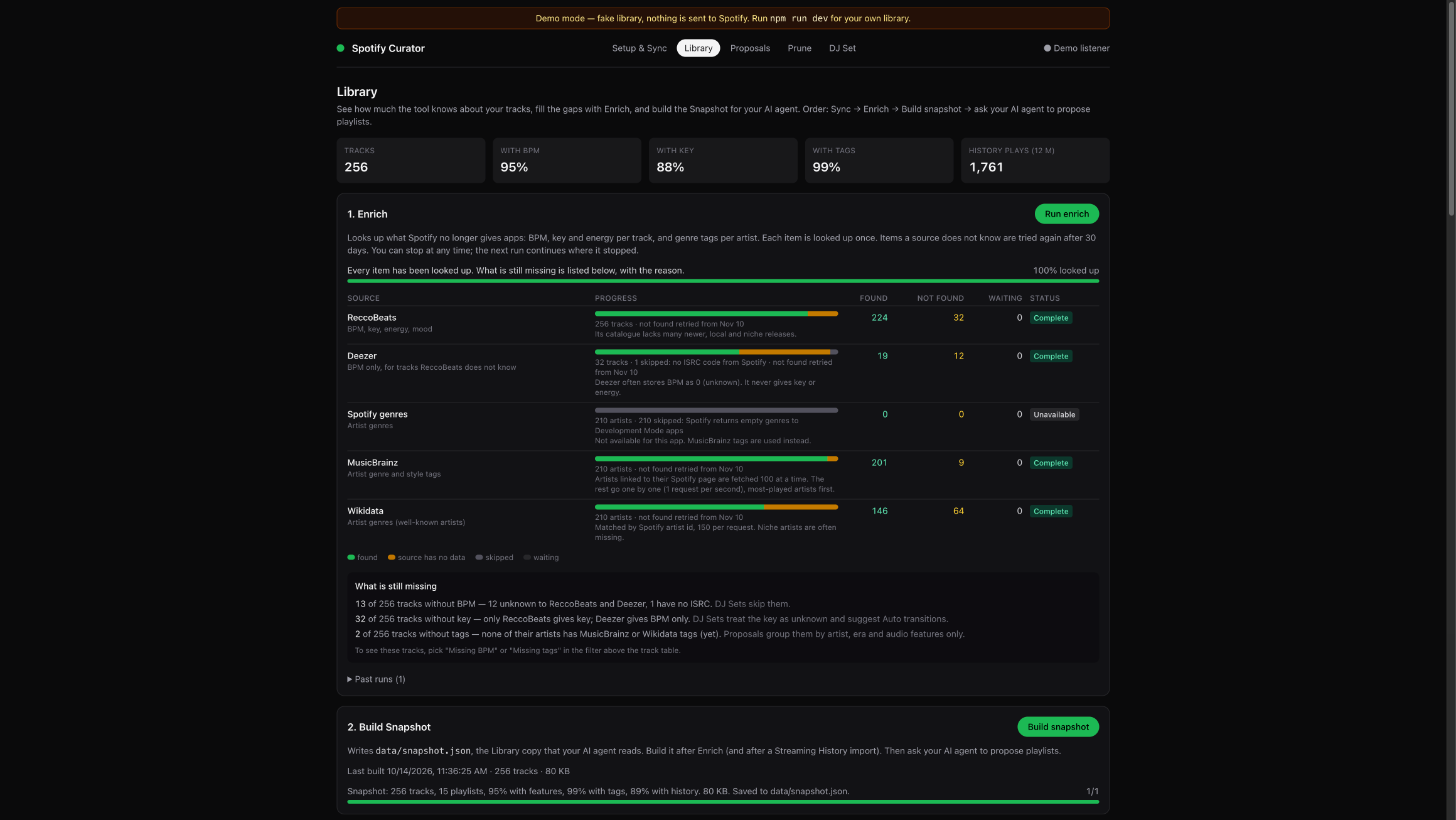
| 1 | Analyse | Syncs Liked Songs, your own playlists, top tracks/artists and recent plays. Adds BPM, key and energy from ReccoBeats and Deezer, and genre tags from MusicBrainz and Wikidata. |
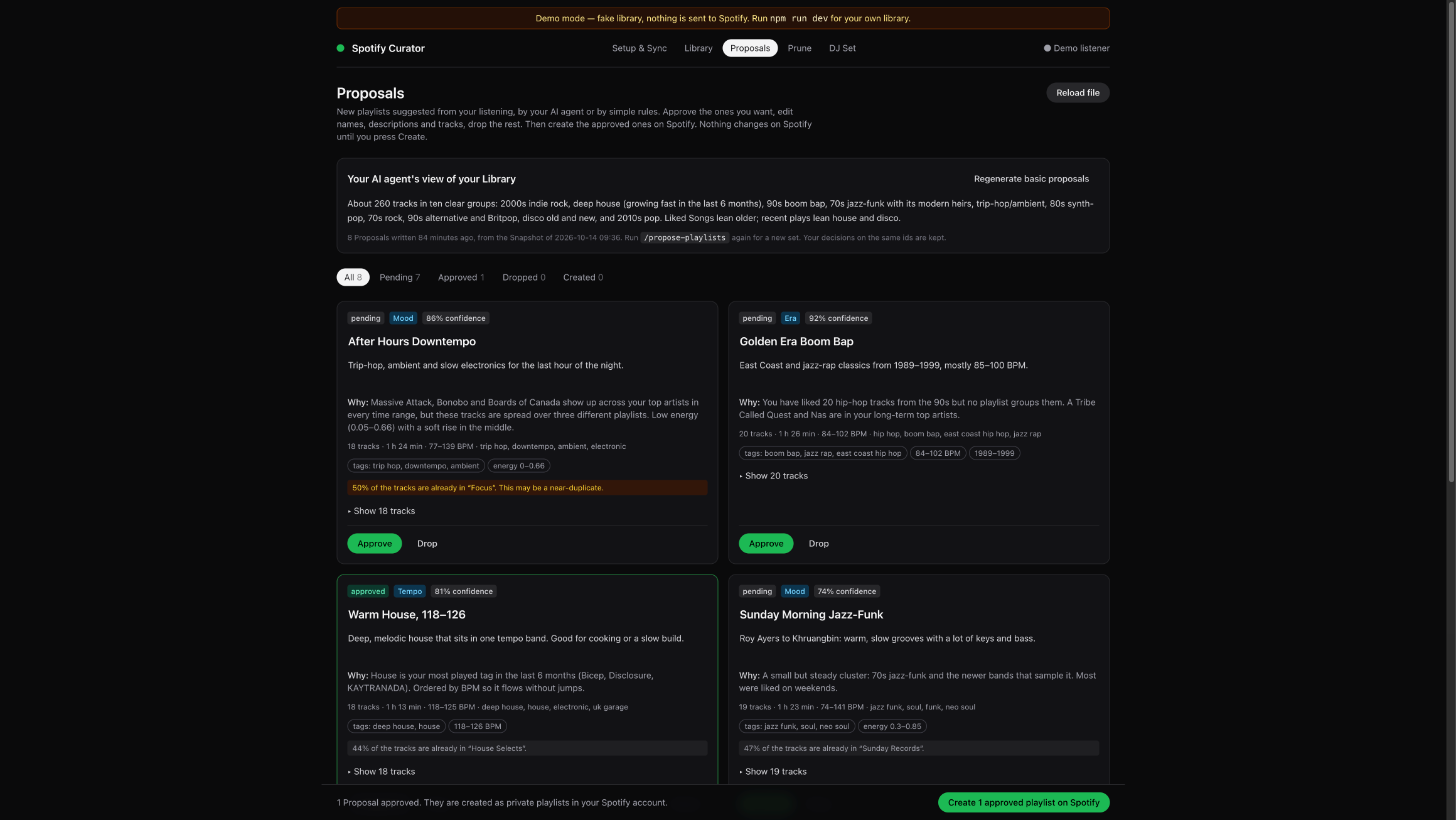
| 2 | Propose | Your AI agent reads a compact Snapshot of your library and writes named playlist proposals with reasons. No agent? Press Generate basic proposals. You approve, edit or drop each one; the app creates the approved ones on Spotify. |
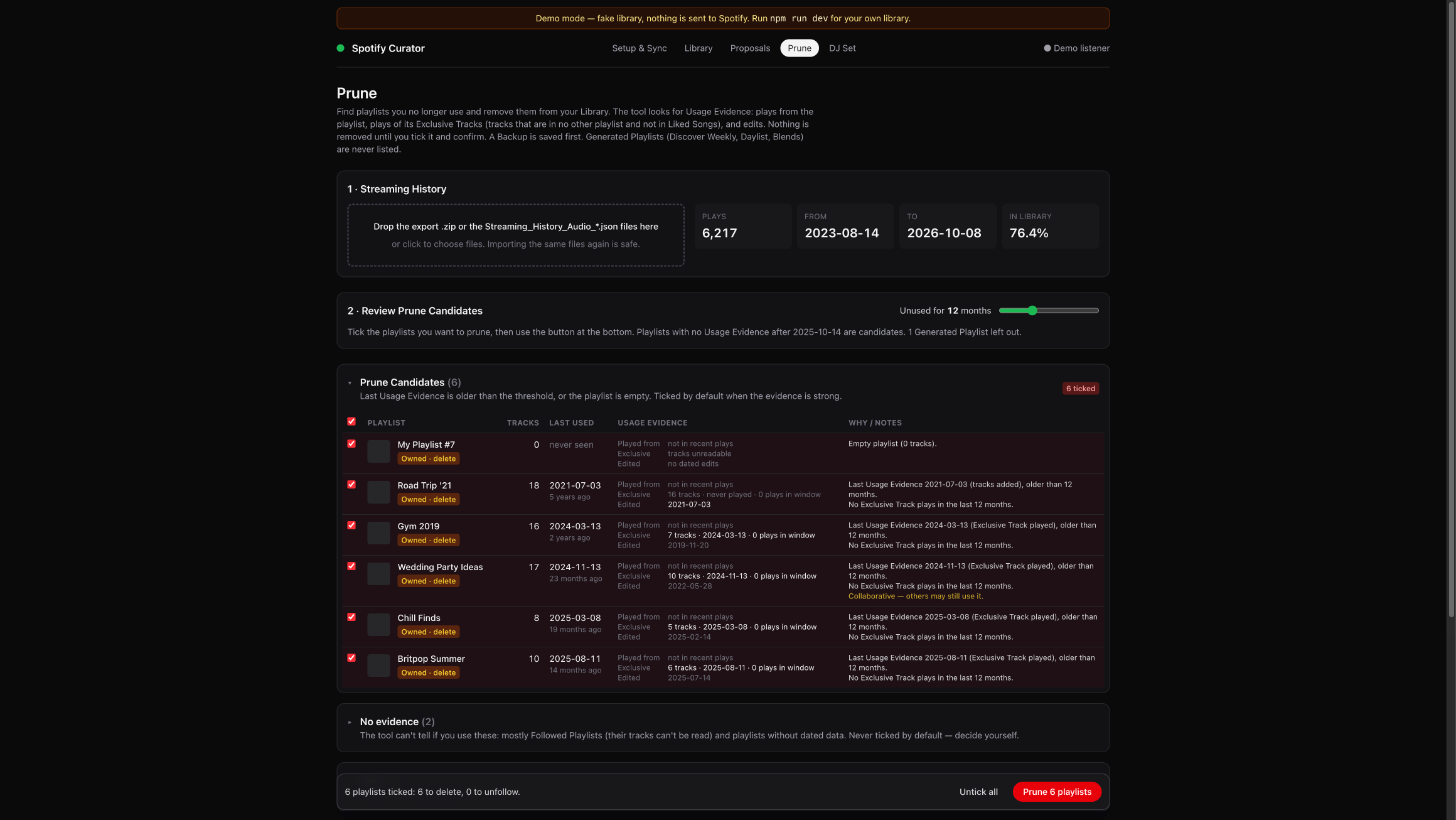
| 3 | Prune | Finds playlists with no recent use, based on your Streaming History export, plays of tracks that only that playlist has, and edit dates. You confirm each one. A backup is saved first and can be restored from the app; Spotify also keeps deleted playlists recoverable for 90 days. |
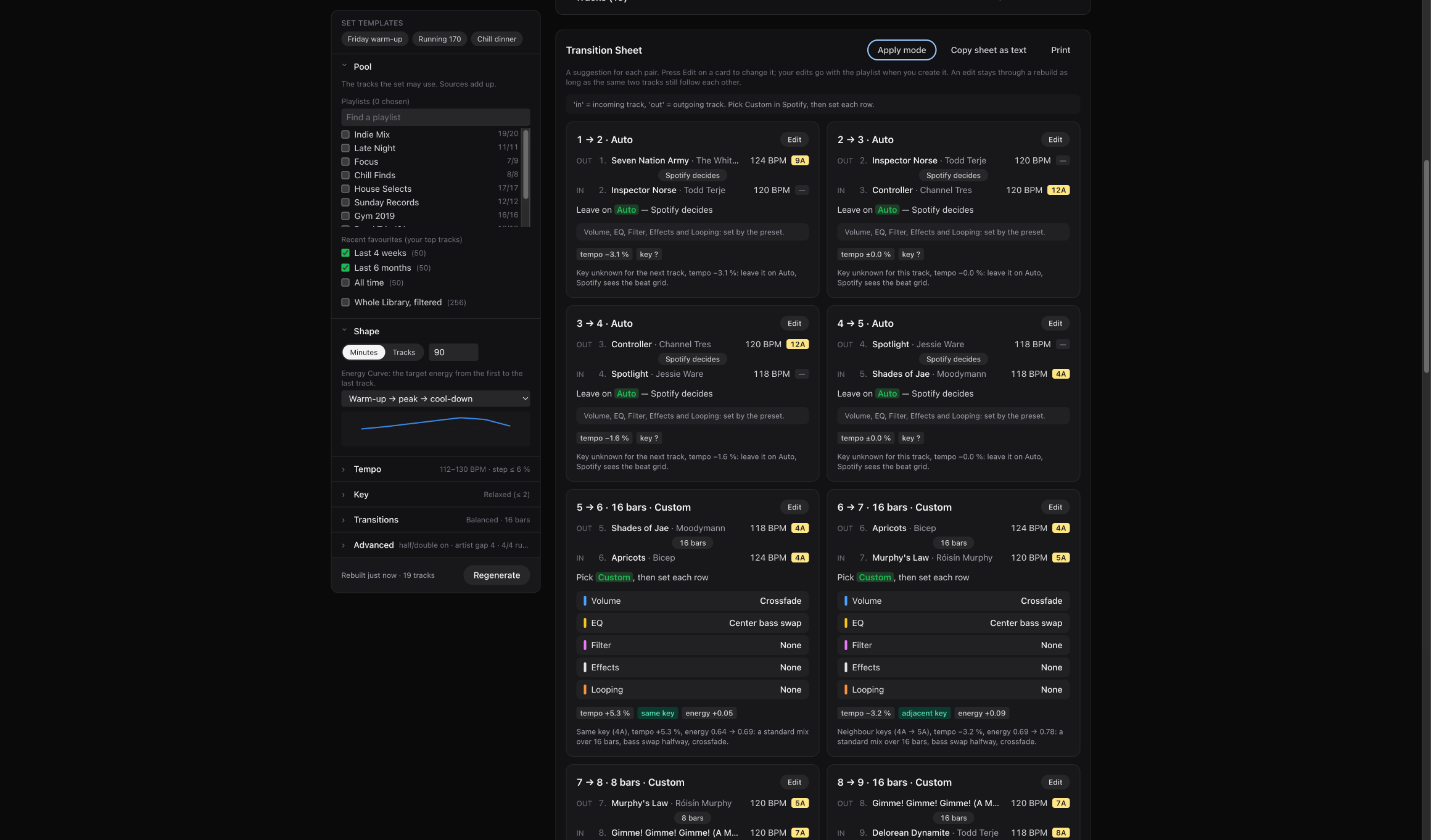
| 4 | DJ Set | Picks tracks from a pool and orders them by BPM, Camelot key and an energy curve you choose, then creates the playlist. The set rebuilds live as you change settings. A Transition Sheet card per pair mirrors Spotify's Edit transition panel: preset, bars, and the exact Volume / EQ / Filter / Effects / Looping values to pick. Suggestions come from a rule engine that uses key, tempo, energy, vocals/instrumental, acousticness and position in the set, with a Colour setting (subtle / medium / bold). Press ✦ AI pass to have your own AI agent review the sheet. You can edit each card, tick it off as applied, and step through them in a full-screen Apply mode. Save your own Set Templates, and keep sets as drafts before creating them on Spotify. |
| 5 | Full Backup | Download one file with your templates, DJ Sets (drafts included), Proposal decisions, playlist backups and settings, optionally with the synced library and enrichment cache. Import it on another device; conflicts are shown first, and you choose for each one. Spotify login tokens are never included. |
[!IMPORTANT]
- Spotify Premium is required. Since February 2026, Spotify only lets Premium accounts own a Web API app in Development Mode.
- You create your own Spotify app (about 5 minutes, free) at developer.spotify.com/dashboard. Development Mode allows at most 5 users per app, so each person runs the tool with their own app.
- Node.js 22.12 or newer, and macOS, Linux or Windows.
- Spotify no longer gives apps audio features (BPM, key, energy) or genres. This tool gets them from third-party services instead, so some tracks will have gaps.
- Spotify Mix transitions have no API. The app sets the track order and gives you a Transition Sheet with the exact values to set. You apply them yourself in the Spotify app (Mix › Edit transition).
- Optional, but best for Prune: request your Extended streaming history at spotify.com/account/privacy. It can take up to 30 days to arrive.
No Spotify app needed. The demo uses a fake library and never contacts Spotify.
git clone https://github.com/stanislavSav/curator-for-spotify.git
cd curator-for-spotify
npm install
npm run demo
Open http://127.0.0.1:5173. Use 127.0.0.1, not localhost.
http://127.0.0.1:8787/auth/callback.env.example to .env and set SPOTIFY_CLIENT_ID. No client secret is needed; the app uses PKCE.npm install and npm run dev, then open http://127.0.0.1:5173.SETUP.md has every step in detail, plus troubleshooting.
The proposal workflow is written once in .agents/skills/propose-playlists/SKILL.md, and AGENTS.md points every agent to it. Start your agent in the repository folder:
| Agent | Run |
|---|---|
| Claude Code | /propose-playlists (optionally with a focus: /propose-playlists only 90s) |
| OpenAI Codex | $propose-playlists, or ask "propose playlists" |
| Gemini CLI | /propose-playlists, or ask "propose playlists" |
| Cursor | /propose-playlists in the agent chat, or ask "propose playlists" |
| GitHub Copilot | /propose-playlists in VS Code chat, or ask "propose playlists" |
Any agent that reads AGENTS.md | Ask "propose playlists" |
The agent runs a digest script, reads the Snapshot selectively, writes data/proposals.json, and runs npm run validate-proposals until it passes. It never calls Spotify. You create the playlists in the app.
| File | Read by |
|---|---|
AGENTS.md | Codex, Cursor, Copilot, Gemini CLI (via .gemini/settings.json), and most other agents |
CLAUDE.md | Claude Code (it imports AGENTS.md) |
.agents/skills/ | Codex, Gemini CLI, Cursor, Copilot |
.claude/skills/ | Claude Code (a thin wrapper around the shared skill) |
.gemini/commands/ | Gemini CLI slash command |
Spotify Web API ──sync──▶ SQLite (data/curator.sqlite) ◀──enrich── ReccoBeats · Deezer · MusicBrainz · Wikidata
                                │
                                ├─▶ Snapshot (data/snapshot.json) ──▶ your AI agent ──▶ data/proposals.json ─┐
                                │                                     (or Basic Proposals, by rules)         │
                                ├─▶ Prune: Usage Evidence + Streaming History import                          │
                                └─▶ DJ Set: pool → order (BPM, key, energy curve) → Transition Sheet          │
                                                                                                              ▼
                                         Web app (review, edit, confirm) ──▶ Spotify: create / remove playlists
| Part | Tech |
|---|---|
apps/web | Vite, React 19, TanStack Query, Tailwind CSS v4 |
apps/server | Hono on Node 22, better-sqlite3, background jobs |
packages/shared | Types, Camelot helpers, Snapshot and Proposal contracts (zod) |
Proposals
Library and enrichment
Prune
DJ Set and Transition Sheet
Your data stays in data/ on your machine: the database, Snapshot, Proposals and Backups. It is git-ignored.
Spotify login uses PKCE. Tokens are stored only in the local database.
To fill in what Spotify no longer provides, the enrich step sends only identifiers to these services:
| Service | Receives |
|---|---|
| ReccoBeats | Spotify track IDs |
| Deezer | ISRC codes |
| MusicBrainz | ISRC codes, Spotify artist page URLs, artist names |
| Wikidata | Spotify artist IDs |
Your AI agent reads data/snapshot.json on your machine. The ✦ AI pass on the DJ page runs your installed agent CLI (Claude Code, Codex or Gemini CLI) with the set's track names, artists and audio features as text, without tools. What your agent's provider does with that data depends on the agent you use.
A Full Backup file holds your library data (tracks, playlists, listening history if imported). Keep it private. It never contains Spotify login tokens, and git ignores files named curator-for-spotify-backup*.json (and the older spotify-curator-backup*.json).
npm run check:public and a pre-commit hook block commits of data/, .env, snapshots, proposals, databases and likely secrets. Put your own names, emails or playlist names in .private-markers (git-ignored) to block those too.
| Command | What it does |
|---|---|
npm run dev | Starts the server (:8787) and the web app (:5173) |
npm run demo | Same, with a fake library in data/demo/; Spotify writes are blocked |
npm test | All tests (Vitest + privacy guard) |
npm run typecheck | Type-checks all packages |
npm run check:public | Privacy scan of everything git would publish |
npm run snapshot | Writes data/snapshot.json from the command line |
npm run validate-proposals | Checks data/proposals.json against the schema and the database |
The DJ page's ✦ AI pass uses the first agent CLI it finds (claude, codex, gemini); set AGENT_CLI in .env to choose. Ports can be changed with PORT and WEB_PORT. For example, PORT=8797 WEB_PORT=5183 npm run demo runs the demo next to your real app. If you change PORT, update the redirect URI in your Spotify app too.
This repository does not accept pull requests. To change it, fork it; CONTRIBUTING.md explains the layout, checks and docs workflow. Bug reports are welcome as issues.
MIT. This project is not affiliated with or endorsed by Spotify. Spotify is a trademark of Spotify AB.
Curator for Spotify: a local web app that analyses your Spotify library, proposes playlists with your AI agent, prunes unused playlists and builds DJ sets with a Spotify Mix transition sheet. Not affiliated with Spotify.
TypeScript
0
16 commits
updated Oct 14, 2026
A local web app for your own Spotify account. It analyses your library, proposes new playlists (written by your AI agent or by simple rules), finds playlists you no longer use and removes them safely, and builds DJ sets ordered by BPM, key and energy, with a transition sheet for Spotify Mix.
Everything runs on your machine. Your library stays in a local SQLite file.
A 25-second tour, recorded in demo mode with a fake library.
| Feature | How | |
|---|---|---|
| 1 | Analyse | Syncs Liked Songs, your own playlists, top tracks/artists and recent plays. Adds BPM, key and energy from ReccoBeats and Deezer, and genre tags from MusicBrainz and Wikidata. |
| 2 | Propose | Your AI agent reads a compact Snapshot of your library and writes named playlist proposals with reasons. No agent? Press Generate basic proposals. You approve, edit or drop each one; the app creates the approved ones on Spotify. |
| 3 | Prune | Finds playlists with no recent use, based on your Streaming History export, plays of tracks that only that playlist has, and edit dates. You confirm each one. A backup is saved first and can be restored from the app; Spotify also keeps deleted playlists recoverable for 90 days. |
| 4 | DJ Set | Picks tracks from a pool and orders them by BPM, Camelot key and an energy curve you choose, then creates the playlist. The set rebuilds live as you change settings. A Transition Sheet card per pair mirrors Spotify's Edit transition panel: preset, bars, and the exact Volume / EQ / Filter / Effects / Looping values to pick. Suggestions come from a rule engine that uses key, tempo, energy, vocals/instrumental, acousticness and position in the set, with a Colour setting (subtle / medium / bold). Press ✦ AI pass to have your own AI agent review the sheet. You can edit each card, tick it off as applied, and step through them in a full-screen Apply mode. Save your own Set Templates, and keep sets as drafts before creating them on Spotify. |
| 5 | Full Backup | Download one file with your templates, DJ Sets (drafts included), Proposal decisions, playlist backups and settings, optionally with the synced library and enrichment cache. Import it on another device; conflicts are shown first, and you choose for each one. Spotify login tokens are never included. |
[!IMPORTANT]
- Spotify Premium is required. Since February 2026, Spotify only lets Premium accounts own a Web API app in Development Mode.
- You create your own Spotify app (about 5 minutes, free) at developer.spotify.com/dashboard. Development Mode allows at most 5 users per app, so each person runs the tool with their own app.
- Node.js 22.12 or newer, and macOS, Linux or Windows.
- Spotify no longer gives apps audio features (BPM, key, energy) or genres. This tool gets them from third-party services instead, so some tracks will have gaps.
- Spotify Mix transitions have no API. The app sets the track order and gives you a Transition Sheet with the exact values to set. You apply them yourself in the Spotify app (Mix › Edit transition).
- Optional, but best for Prune: request your Extended streaming history at spotify.com/account/privacy. It can take up to 30 days to arrive.
No Spotify app needed. The demo uses a fake library and never contacts Spotify.
git clone https://github.com/stanislavSav/curator-for-spotify.git
cd curator-for-spotify
npm install
npm run demo
Open http://127.0.0.1:5173. Use 127.0.0.1, not localhost.
http://127.0.0.1:8787/auth/callback.env.example to .env and set SPOTIFY_CLIENT_ID. No client secret is needed; the app uses PKCE.npm install and npm run dev, then open http://127.0.0.1:5173.SETUP.md has every step in detail, plus troubleshooting.
The proposal workflow is written once in .agents/skills/propose-playlists/SKILL.md, and AGENTS.md points every agent to it. Start your agent in the repository folder:
| Agent | Run |
|---|---|
| Claude Code | /propose-playlists (optionally with a focus: /propose-playlists only 90s) |
| OpenAI Codex | $propose-playlists, or ask "propose playlists" |
| Gemini CLI | /propose-playlists, or ask "propose playlists" |
| Cursor | /propose-playlists in the agent chat, or ask "propose playlists" |
| GitHub Copilot | /propose-playlists in VS Code chat, or ask "propose playlists" |
Any agent that reads AGENTS.md | Ask "propose playlists" |
The agent runs a digest script, reads the Snapshot selectively, writes data/proposals.json, and runs npm run validate-proposals until it passes. It never calls Spotify. You create the playlists in the app.
| File | Read by |
|---|---|
AGENTS.md | Codex, Cursor, Copilot, Gemini CLI (via .gemini/settings.json), and most other agents |
CLAUDE.md | Claude Code (it imports AGENTS.md) |
.agents/skills/ | Codex, Gemini CLI, Cursor, Copilot |
.claude/skills/ | Claude Code (a thin wrapper around the shared skill) |
.gemini/commands/ | Gemini CLI slash command |
Spotify Web API ──sync──▶ SQLite (data/curator.sqlite) ◀──enrich── ReccoBeats · Deezer · MusicBrainz · Wikidata
                                │
                                ├─▶ Snapshot (data/snapshot.json) ──▶ your AI agent ──▶ data/proposals.json ─┐
                                │                                     (or Basic Proposals, by rules)         │
                                ├─▶ Prune: Usage Evidence + Streaming History import                          │
                                └─▶ DJ Set: pool → order (BPM, key, energy curve) → Transition Sheet          │
                                                                                                              ▼
                                         Web app (review, edit, confirm) ──▶ Spotify: create / remove playlists
| Part | Tech |
|---|---|
apps/web | Vite, React 19, TanStack Query, Tailwind CSS v4 |
apps/server | Hono on Node 22, better-sqlite3, background jobs |
packages/shared | Types, Camelot helpers, Snapshot and Proposal contracts (zod) |
Proposals
Library and enrichment
Prune
DJ Set and Transition Sheet
Your data stays in data/ on your machine: the database, Snapshot, Proposals and Backups. It is git-ignored.
Spotify login uses PKCE. Tokens are stored only in the local database.
To fill in what Spotify no longer provides, the enrich step sends only identifiers to these services:
| Service | Receives |
|---|---|
| ReccoBeats | Spotify track IDs |
| Deezer | ISRC codes |
| MusicBrainz | ISRC codes, Spotify artist page URLs, artist names |
| Wikidata | Spotify artist IDs |
Your AI agent reads data/snapshot.json on your machine. The ✦ AI pass on the DJ page runs your installed agent CLI (Claude Code, Codex or Gemini CLI) with the set's track names, artists and audio features as text, without tools. What your agent's provider does with that data depends on the agent you use.
A Full Backup file holds your library data (tracks, playlists, listening history if imported). Keep it private. It never contains Spotify login tokens, and git ignores files named curator-for-spotify-backup*.json (and the older spotify-curator-backup*.json).
npm run check:public and a pre-commit hook block commits of data/, .env, snapshots, proposals, databases and likely secrets. Put your own names, emails or playlist names in .private-markers (git-ignored) to block those too.
| Command | What it does |
|---|---|
npm run dev | Starts the server (:8787) and the web app (:5173) |
npm run demo | Same, with a fake library in data/demo/; Spotify writes are blocked |
npm test | All tests (Vitest + privacy guard) |
npm run typecheck | Type-checks all packages |
npm run check:public | Privacy scan of everything git would publish |
npm run snapshot | Writes data/snapshot.json from the command line |
npm run validate-proposals | Checks data/proposals.json against the schema and the database |
The DJ page's ✦ AI pass uses the first agent CLI it finds (claude, codex, gemini); set AGENT_CLI in .env to choose. Ports can be changed with PORT and WEB_PORT. For example, PORT=8797 WEB_PORT=5183 npm run demo runs the demo next to your real app. If you change PORT, update the redirect URI in your Spotify app too.
This repository does not accept pull requests. To change it, fork it; CONTRIBUTING.md explains the layout, checks and docs workflow. Bug reports are welcome as issues.
MIT. This project is not affiliated with or endorsed by Spotify. Spotify is a trademark of Spotify AB.



