A tool to convert Powerpoint pptx file into markdown.
Preserved formats:
Supported output:
Please star this repo if you like it!
You need to have Python with version later than 3.10 and pip installed on your system, then run in the terminal:
pip install pptx2md
Once you have installed it, use the command pptx2md [pptx filename] to convert pptx file into markdown.
The default output filename is out.md, and any pictures extracted (and inserted into .md) will be placed in /img/ folder.
Note: older .ppt files are not supported, convert them to the new .pptx version first.
Upgrade & Remove:
pip install --upgrade pptx2md

pip uninstall pptx2md
By default, this tool parse all the pptx titles into level 1 markdown titles, in order to get a hierarchical table of contents, provide your predefined title list in a file and provide it with -t argument.
This is a sample title file (titles.txt):
Heading 1
  Heading 1.1
    Heading 1.1.1
  Heading 1.2
  Heading 1.3
Heading 2
  Heading 2.1
  Heading 2.2
    Heading 2.1.1
    Heading 2.1.2
  Heading 2.3
Heading 3
The first line with spaces in the begining is considered a second level heading and the number of spaces is the unit of indents. In this case, Heading 1.1 will be outputted as ## Heading 1.1 . As it has two spaces at the begining, 2 is the unit of heading indent, so Heading 1.1.1 with 4 spaces will be outputted as ### Heading 1.1.1. Header texts are matched with fuzzy matching, unmatched pptx titles will be regarded as the deepest header.
Use it with pptx2md [filename] -t titles.txt.
-t [filename] provide the title file-o [filename] path of the output file-i [path] directory of the extracted pictures--image-width [width] the maximum width of the pictures, in px. If set, images are put as html img tag.--disable-image disable the image extraction--disable-escaping do not attempt to escape special characters--disable-notes do not add presenter notes--disable-wmf keep wmf formatted image untouched (avoid exceptions under linux)--disable-color disable color tags in HTML--enable-slides deliniate slides \n---\n, this can help if you want to convert pptx slides to markdown slides--try-multi-column try to detect multi-column slides (very slow)--min-block-size [size] the minimum number of characters for a text block to be outputted--wiki / --mdk if you happen to be using tiddlywiki or madoko, this argument outputs the corresponding markup language--qmd outputs to the qmd markup language used for quarto powered presentations--page [number] only convert the specified page--keep-similar-titles keep similar titles and add "(cont.)" to repeated slide titlesNote: install wand for better chance of successfully converting wmf images, if needed.
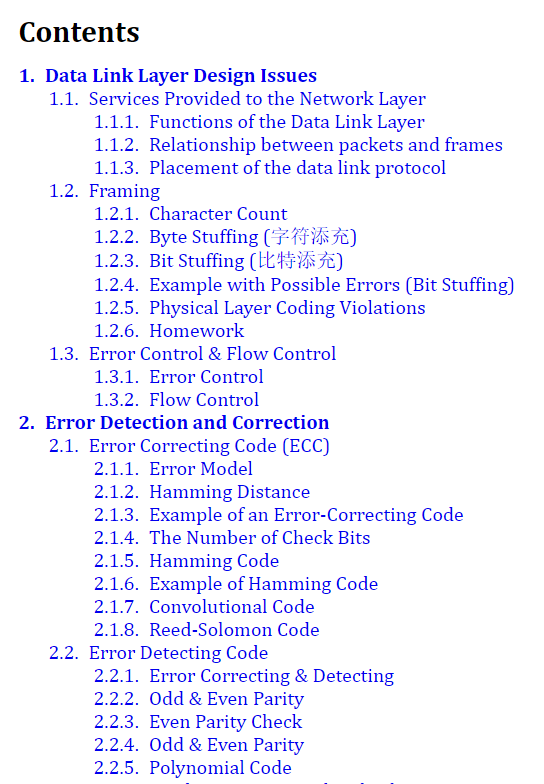
Data Link Layer Design Issues
  Services Provided to the Network Layer
  Framing
  Error Control & Flow Control
Error Detection and Correction
  Error Correcting Code (ECC)
  Error Detecting Code
Elementary Data Link Protocols
Sliding Window Protocols
  One-Bit Sliding Window Protocol
  Protocol Using Go Back N
  Using Selective Repeat
Performance of Sliding Window Protocols
Example Data Link Protocols
  PPP
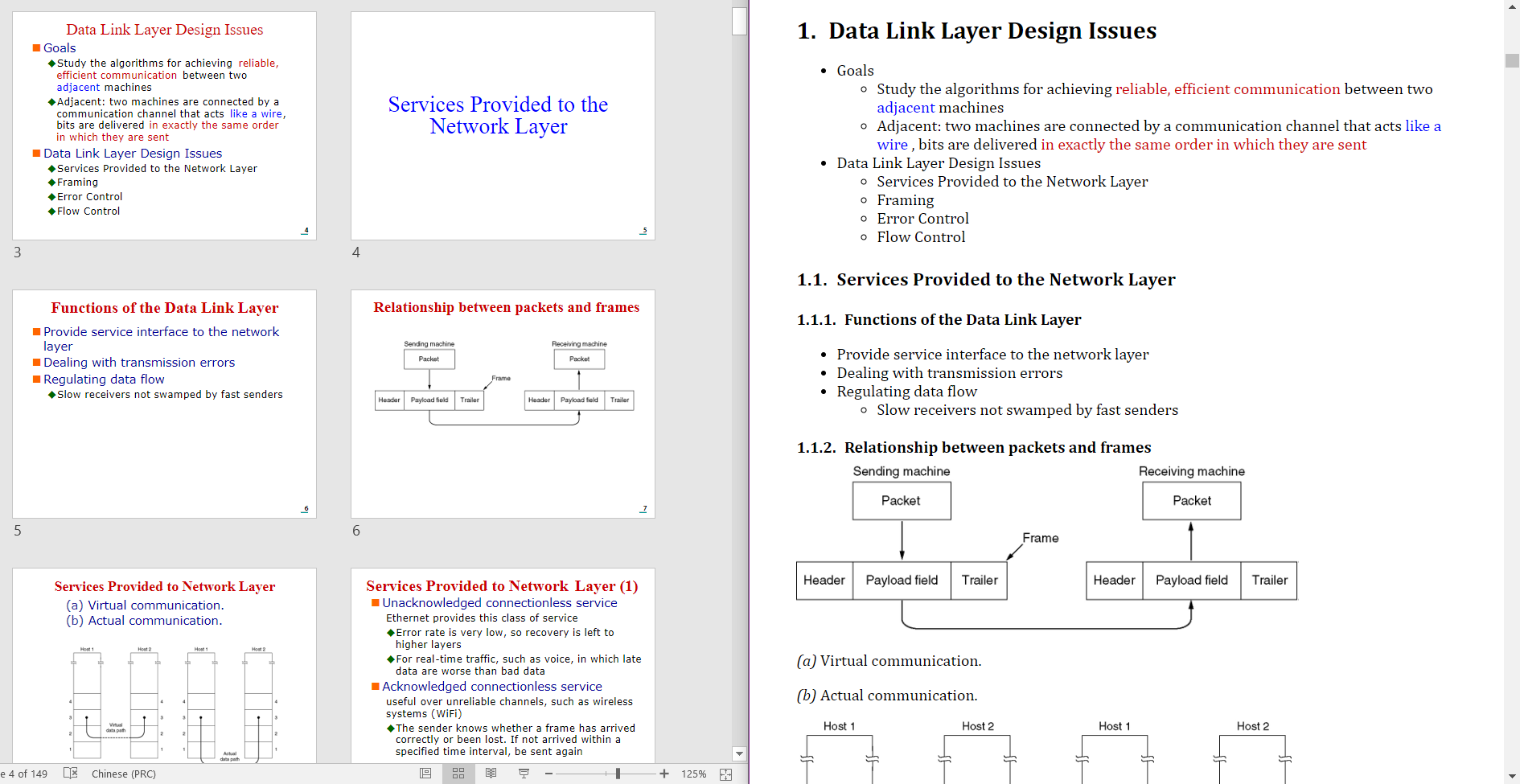
You can also use pptx2md programmatically in your Python code:
from pptx2md import convert, ConversionConfig
from pathlib import Path

# Basic usage
convert(
    ConversionConfig(
        pptx_path=Path('presentation.pptx'),
        output_path=Path('output.md'),
        image_dir=Path('img'),
        disable_notes=True
    )
)
The ConversionConfig class accepts the same parameters as the command line arguments:
pptx_path: Path to the input PPTX file (required)output_path: Path for the output markdown file (required)image_dir: Directory for extracted images (required)title_path: Path to custom titles fileimage_width: Maximum width for images in pxdisable_image: Skip image extractiondisable_escaping: Skip escaping special charactersdisable_notes: Skip presenter notesdisable_wmf: Skip WMF image conversiondisable_color: Skip color tags in HTMLenable_slides: Add slide delimiterstry_multi_column: Attempt to detect multi-column slidesmin_block_size: Minimum text block sizewiki: Output in TiddlyWiki formatmdk: Output in Madoko formatqmd: Output in Quarto formatpage: Convert only specified page numberkeep_similar_titles: Keep similar titles with "(cont.)" suffix--try-multi-column flag--keep-similar-titles is used**bold**_italic_[text](url)--disable-color--image-width--disable-escaping)--disable-notesOverall
Maintained
Code review
PyPI
Latest release
Releases this year
324 followers · starred Jul 2024
34 followers · starred Jan 2021
51 followers · starred Apr 2023
13 followers · starred Feb 2025
A tool to convert Powerpoint pptx file into markdown.
Preserved formats:
Supported output:
Please star this repo if you like it!
You need to have Python with version later than 3.10 and pip installed on your system, then run in the terminal:
pip install pptx2md
Once you have installed it, use the command pptx2md [pptx filename] to convert pptx file into markdown.
The default output filename is out.md, and any pictures extracted (and inserted into .md) will be placed in /img/ folder.
Note: older .ppt files are not supported, convert them to the new .pptx version first.
Upgrade & Remove:
pip install --upgrade pptx2md

pip uninstall pptx2md
By default, this tool parse all the pptx titles into level 1 markdown titles, in order to get a hierarchical table of contents, provide your predefined title list in a file and provide it with -t argument.
This is a sample title file (titles.txt):
Heading 1
  Heading 1.1
    Heading 1.1.1
  Heading 1.2
  Heading 1.3
Heading 2
  Heading 2.1
  Heading 2.2
    Heading 2.1.1
    Heading 2.1.2
  Heading 2.3
Heading 3
The first line with spaces in the begining is considered a second level heading and the number of spaces is the unit of indents. In this case, Heading 1.1 will be outputted as ## Heading 1.1 . As it has two spaces at the begining, 2 is the unit of heading indent, so Heading 1.1.1 with 4 spaces will be outputted as ### Heading 1.1.1. Header texts are matched with fuzzy matching, unmatched pptx titles will be regarded as the deepest header.
Use it with pptx2md [filename] -t titles.txt.
-t [filename] provide the title file-o [filename] path of the output file-i [path] directory of the extracted pictures--image-width [width] the maximum width of the pictures, in px. If set, images are put as html img tag.--disable-image disable the image extraction--disable-escaping do not attempt to escape special characters--disable-notes do not add presenter notes--disable-wmf keep wmf formatted image untouched (avoid exceptions under linux)--disable-color disable color tags in HTML--enable-slides deliniate slides \n---\n, this can help if you want to convert pptx slides to markdown slides--try-multi-column try to detect multi-column slides (very slow)--min-block-size [size] the minimum number of characters for a text block to be outputted--wiki / --mdk if you happen to be using tiddlywiki or madoko, this argument outputs the corresponding markup language--qmd outputs to the qmd markup language used for quarto powered presentations--page [number] only convert the specified page--keep-similar-titles keep similar titles and add "(cont.)" to repeated slide titlesNote: install wand for better chance of successfully converting wmf images, if needed.
Data Link Layer Design Issues
  Services Provided to the Network Layer
  Framing
  Error Control & Flow Control
Error Detection and Correction
  Error Correcting Code (ECC)
  Error Detecting Code
Elementary Data Link Protocols
Sliding Window Protocols
  One-Bit Sliding Window Protocol
  Protocol Using Go Back N
  Using Selective Repeat
Performance of Sliding Window Protocols
Example Data Link Protocols
  PPP
You can also use pptx2md programmatically in your Python code:
from pptx2md import convert, ConversionConfig
from pathlib import Path

# Basic usage
convert(
    ConversionConfig(
        pptx_path=Path('presentation.pptx'),
        output_path=Path('output.md'),
        image_dir=Path('img'),
        disable_notes=True
    )
)
The ConversionConfig class accepts the same parameters as the command line arguments:
pptx_path: Path to the input PPTX file (required)output_path: Path for the output markdown file (required)image_dir: Directory for extracted images (required)title_path: Path to custom titles fileimage_width: Maximum width for images in pxdisable_image: Skip image extractiondisable_escaping: Skip escaping special charactersdisable_notes: Skip presenter notesdisable_wmf: Skip WMF image conversiondisable_color: Skip color tags in HTMLenable_slides: Add slide delimiterstry_multi_column: Attempt to detect multi-column slidesmin_block_size: Minimum text block sizewiki: Output in TiddlyWiki formatmdk: Output in Madoko formatqmd: Output in Quarto formatpage: Convert only specified page numberkeep_similar_titles: Keep similar titles with "(cont.)" suffix--try-multi-column flag--keep-similar-titles is used**bold**_italic_[text](url)--disable-color--image-width--disable-escaping)--disable-notesOverall
Maintained
Code review
PyPI
Latest release
Releases this year
324 followers · starred Jul 2024
34 followers · starred Jan 2021
51 followers · starred Apr 2023
13 followers · starred Feb 2025