
Fuzz go code using LibAFL's capabilities with Go’s native instrumentation.
Go
74
40 commits
updated Feb 19, 2026
README
GoLibAFL
Introduction
This project provides a setup for fuzzing golang binaries using LibAFL.
By leveraging Go’s native libFuzzer-compatible instrumentation (sancov_8bit), we enable advanced fuzzing capabilities beyond Go’s built-in fuzzing support.
- In-process fuzzing for maximum performance.
- Coverage-guided fuzzing with comparison tracing support for guided mutation.
- Interoperability with Go via Foreign Function Interface (FFI).
Performance
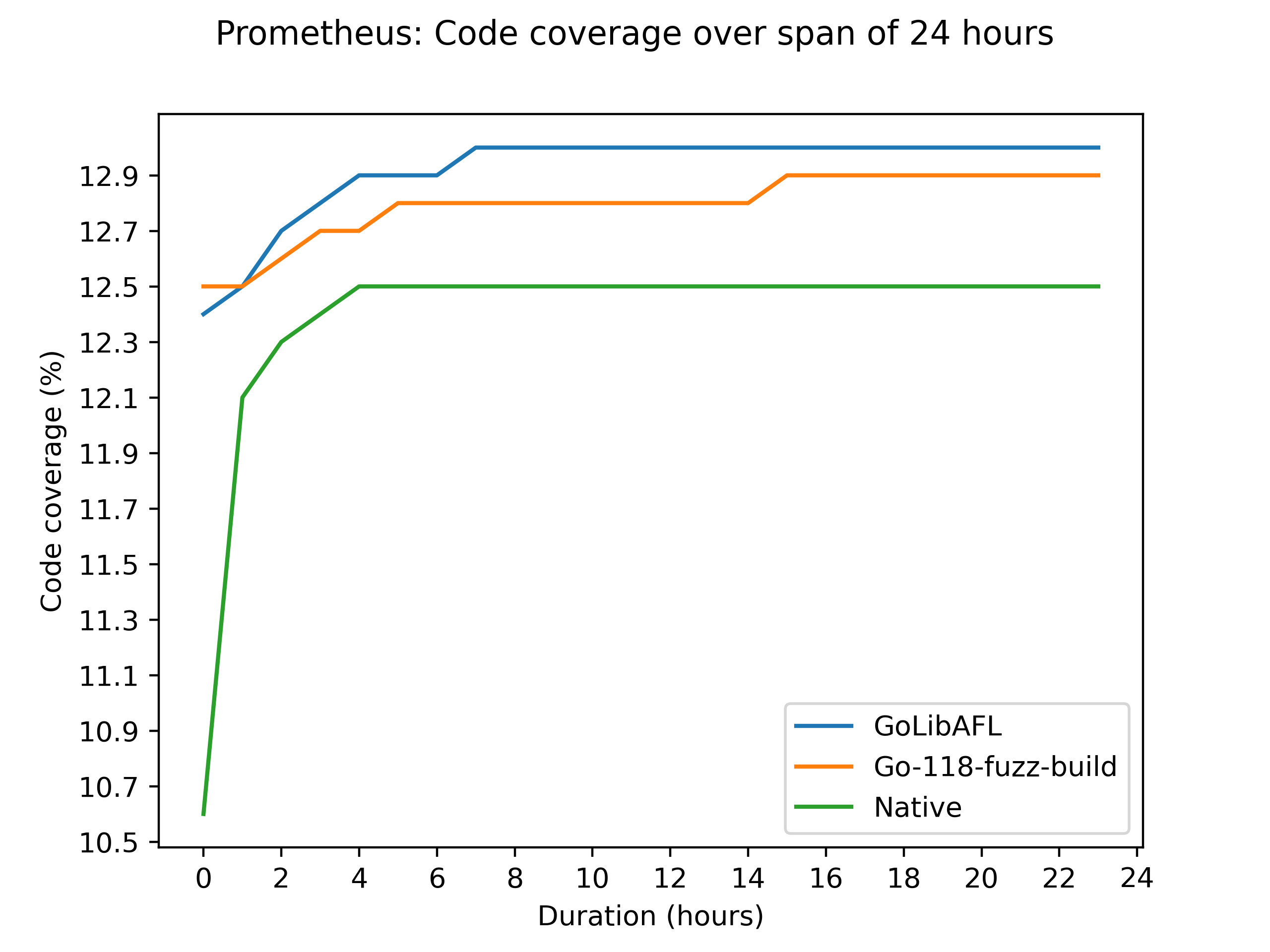
Across all our 24-hour benchmarks, GoLibAFL consistently achieved higher code coverage than existing Go fuzzing solutions. Below is the result for the prometheus target. For the results of the other two targets refer to the images directory.
Installation
Requirements
- Go 1.18 or later (recommended: latest version)
- Rust (nightly toolchain recommended for optimizations)
- Cargo and Rust toolchain installed
Building and running a fuzzer
-
Clone the repository:
git clone <repo-url> cd <repo-name> -
Define your golang harness (see below)
-
Define the harness location with the environement variable
HARNESS:export "HARNESS=harnesses/prometheus" -
Optionally, define the location of the go binary with the
GO_PATHenvironment variable:export "GO_PATH=path/to/go/binary" -
Build and run the Rust-based LibAFL fuzzer:
cargo run --release -- fuzzor
docker build --build-arg HARNESS="harnesses/prometheus" -t golibafl .
docker run -v ./output:/golibafl/output golibafl
For an elaborate description of how to fuzz one of the example targets, refer to the README
Usage
Defining a harness in Go
To define a harness, create a function named harness within the main package that accepts a byte slice as input:
package main

func harness(data []byte) {
}
Next, initialize a Go module and download its dependencies:
go mod init fuzz
go mod tidy
Running a specific input
To execute the harness with a specific input, run:
cargo run -- run -i <path_to_input>
If no input path is provided, the default input directory is ./input.
Available options
To see the available command-line options for a subcommand, use:
cargo run -- fuzz --help
cargo run -- run --help
Troubleshoot
Issues on macOS
Undefined symbols for architecture arm64
While fuzzing on macOS, you might encounter issues like:
  = note: Undefined symbols for architecture arm64:
            "_CFArrayAppendValue", referenced from:
                _runtime.text in libharness.a[2](go.o)
If that is the case, update the build.rs and add the missing framework(s) missed within the #[cfg(target_os = "macos")] block, for example:
println!("cargo:rustc-link-lib=framework=CoreFoundation");
println!("cargo:rustc-link-lib=framework=Security");
println!("cargo:rustc-link-lib=framework=SystemConfiguration");
println!("cargo:rustc-link-lib=dylib=resolv");
You can find the missing frameworks by Googling the missing symbol. Here _CFArrayAppendValueis missing which is in CoreFoundation, thus the cargo:rustc-link-lib=framework=CoreFoundation.
Performance optimization
- Use Rust nightly toolchain for optimized memory mapping.
- Upgrade Go to at least version 1.23 to avoid
cgostack bound performance issues.
License
This project is licensed under the Apache 2.0 License.
Contributors


Similar repos




Languages
Go
43.6%
Rust
39.4%
Shell
14.2%
Nix
1.6%
Dockerfile
1.2%
Fuzz go code using LibAFL's capabilities with Go’s native instrumentation.
Go
74
40 commits
updated Feb 19, 2026
README
GoLibAFL
Introduction
This project provides a setup for fuzzing golang binaries using LibAFL.
By leveraging Go’s native libFuzzer-compatible instrumentation (sancov_8bit), we enable advanced fuzzing capabilities beyond Go’s built-in fuzzing support.
- In-process fuzzing for maximum performance.
- Coverage-guided fuzzing with comparison tracing support for guided mutation.
- Interoperability with Go via Foreign Function Interface (FFI).
Performance
Across all our 24-hour benchmarks, GoLibAFL consistently achieved higher code coverage than existing Go fuzzing solutions. Below is the result for the prometheus target. For the results of the other two targets refer to the images directory.
Installation
Requirements
- Go 1.18 or later (recommended: latest version)
- Rust (nightly toolchain recommended for optimizations)
- Cargo and Rust toolchain installed
Building and running a fuzzer
-
Clone the repository:
git clone <repo-url> cd <repo-name> -
Define your golang harness (see below)
-
Define the harness location with the environement variable
HARNESS:export "HARNESS=harnesses/prometheus" -
Optionally, define the location of the go binary with the
GO_PATHenvironment variable:export "GO_PATH=path/to/go/binary" -
Build and run the Rust-based LibAFL fuzzer:
cargo run --release -- fuzzor
docker build --build-arg HARNESS="harnesses/prometheus" -t golibafl .
docker run -v ./output:/golibafl/output golibafl
For an elaborate description of how to fuzz one of the example targets, refer to the README
Usage
Defining a harness in Go
To define a harness, create a function named harness within the main package that accepts a byte slice as input:
package main

func harness(data []byte) {
}
Next, initialize a Go module and download its dependencies:
go mod init fuzz
go mod tidy
Running a specific input
To execute the harness with a specific input, run:
cargo run -- run -i <path_to_input>
If no input path is provided, the default input directory is ./input.
Available options
To see the available command-line options for a subcommand, use:
cargo run -- fuzz --help
cargo run -- run --help
Troubleshoot
Issues on macOS
Undefined symbols for architecture arm64
While fuzzing on macOS, you might encounter issues like:
  = note: Undefined symbols for architecture arm64:
            "_CFArrayAppendValue", referenced from:
                _runtime.text in libharness.a[2](go.o)
If that is the case, update the build.rs and add the missing framework(s) missed within the #[cfg(target_os = "macos")] block, for example:
println!("cargo:rustc-link-lib=framework=CoreFoundation");
println!("cargo:rustc-link-lib=framework=Security");
println!("cargo:rustc-link-lib=framework=SystemConfiguration");
println!("cargo:rustc-link-lib=dylib=resolv");
You can find the missing frameworks by Googling the missing symbol. Here _CFArrayAppendValueis missing which is in CoreFoundation, thus the cargo:rustc-link-lib=framework=CoreFoundation.
Performance optimization
- Use Rust nightly toolchain for optimized memory mapping.
- Upgrade Go to at least version 1.23 to avoid
cgostack bound performance issues.
License
This project is licensed under the Apache 2.0 License.
Similar repos
Contributors
Languages
Go
43.6%
Rust
39.4%
Shell
14.2%
Nix
1.6%
Dockerfile
1.2%