
Terminal-native Rust coding agent. Local-first: your code stays on your machine, and the model is yours to point at — Ollama, llama.cpp, a rented Colab GPU, or any OpenAI-compatible endpoint.
Rust
6
930 commits
updated Oct 3, 2026
See what people are saying
README

Xencode
The local-first AI coding agent. Bring your own model.
A Rust terminal-native AI coding assistant that routes requests across local and cloud models with a sequential provider fallback chain, runs an approval-gated agentic tool loop, and has deep terminal ergonomics.





Local-first: your machine, your model. Online only when you point it somewhere. Your code never has to leave your machine.
Xencode is an AI-powered development assistant built for engineers who care about privacy, control, and speed. It runs local models through Ollama and llama.cpp out of the box, talks to cloud providers (Gemini, Qwen, and any OpenAI-compatible model through OpenRouter) when you opt in, and keeps a chat turn alive by walking a sequential provider fallback chain — primary model first, then the configured alternates — when a provider is down, without ever using that recovery to move a conversation somewhere the model you chose would not have sent it.
At its core is a fast, single-file Rust binary (16 crates, 2166 tests, zero warnings) wrapped around an agentic coding loop that can plan, edit, test, and fix your code — driven entirely from your terminal.
✨ Highlights
- 🧠 Local-first, your model — Ollama and llama.cpp serve from your own machine with your code never leaving it; cloud providers, a Colab GPU you rent, or any OpenAI-compatible endpoint are opt-in choices, not a service you depend on. The opt-in is a switch, not a promise:
allow_cloud_modelsstarts off, and a request that would reach an internet service is refused before it is dialled. A llama.cpp model that is not on disk yet can be brought down by one command: pointllama_cpp_model_urlat the GGUF andllamacpp startfetches it — after checking the disk can hold it, resuming across interruptions, and showing progress in the TUI.xencode models advicesays which model this machine's memory can hold and hands over the address and checksum to fetch it by; with a checksum pinned, a file whose bytes disagree is refused out loud instead of being served as if it were the model. - 🤖 Agentic coding loop — the model reads, edits and runs your workspace through approval-gated tools, bounded by
agent_max_rounds, with per-turn checkpoints you can/rewind. A call whose arguments do not match the description that tool was offered with is answered back to the model instead of being run — including one whose arguments arrived as text that stopped halfway, which used to look like a call that asked for nothing. When a turn edited files, the model's claim of completion is not the gate: the workspace's owncargo testandcargo clippyrun over the same approval gate and only exit0finishes the turn; failures come back to the model for up toagent_repair_max_itersrepair rounds and past that the turn reports the task incomplete. A non-Rust workspace is not left unchecked: when there is noCargo.tomlbut the turn edited files a language server covers, real diagnostics are pulled from that server (clangdfor C and C++) and gate the turn the same way — an error feeds back for a repair round, a clean answer verifies it, and a workspace with no supported server is left untouched rather than given an unearned pass. - 🔀 Provider fallback chain — when the primary model fails before streaming a token, the turn walks your ordered
agent_fallback_modelslist. Sequential, not fused: no multi-model ensemble exists. A candidate that would send the conversation somewhere the primary would not — a cloud API standing in for a local model, or the other way round — is skipped by design and named in the transcript. - 🖥️ Immersive TUI — a modern Rust/ratatui interface over 25 focus areas (body layouts via
Ctrl+U— the three shipped presets plus any you declare inlayout_templates— with 17 panels reachable from theCtrl+Ffeature navigator): agent, collaboration, git, models, and more. - 🔍 Nothing scripted — every panel shows data that came from the machine, the provider or the repo, and says so in its own words when it cannot get it. No list in this UI is seeded with samples, and no gauge renders a zero for a measurement that never happened.
- 🔒 Secure by design — token-authenticated collaboration server and a pattern-based OWASP Top 10 scanner (
xencode analyze). - 🔌 Plugin runtime —
xencode-plugin-rsdiscoversplugin.jsonmanifests, registers each compatible one with the host, and routes what it declares into every agent turn: a prompt prefix ahead of the system prompt andbefore/aftertool hooks (config.json wins any conflict). What a manifest declares is checked, not ignored: adding a prompt prefix requires thepromptpermission and registering a shell-running hook requireshooks, so a plugin that uses a capability it did not ask for — or names one the host does not recognise — is refused and contributes nothing to the loop. No dynamic linking: a manifest is the whole plugin, andxencode plugin list/ the TUI's/pluginreport which ones actually took hold and why the rest did not — including the exact lines of prompt text each one puts ahead of the system prompt, and the git commit an installed plugin is pinned to.xencode plugin install <git-url>clones, verifies the manifest, and prints that declaration before anything is copied into the plugin directory;xencode plugin update <name>fetches the repository again and shows a diff, refusing to apply an update that changes the prompt text or hooks until it is acknowledged with--yes. - 📚 Skills, listed always and read on request — a skill is one directory holding a
SKILL.md: a name and a one-line description of when to use it at the top, the instructions below it. Xencode scansskills/in the settings directory (or$XCODE_SKILLS_DIR) and.xencode/skillsinside your workspace — a project skill replaces a user skill of the same name — and puts only the list (a heading plus one line per skill) ahead of the system prompt. The instructions themselves stay on disk until the model asks for one, by name, through the read-onlyload_skilltool. So thirty installed skills cost a turn a short list rather than thirty documents: measured here on a local model, 30 skills added 736 tokens to the prompt while their 22,380 tokens of instructions were never sent./skillsreports what loaded, what was refused and what the list costs;/skills reloadre-scans both directories. - ☁️ Rented GPUs, no infrastructure —
xencode colab upbrings a Google Colab VM up with llama.cpp or Ollama serving an OpenAI endpoint and tunnels it to127.0.0.1over the officialcolab sshbridge; the model picker,remote:…routing and Provider Health treat it like any other provider. No public URL, nothing exposed. - 🛰️ Built for teams — HTTP/WebSocket collaboration server with bearer-token auth, role-based relay and an append-only audit trail, plus a Dockerfile and Compose setup for the API server.
- 🐎 Performance first — zero duplicate tokens on retry (token-delivery tracking), memory+disk cache, streaming with exponential backoff.
🧠 Why Xencode?
| Problem | Xencode |
|---|---|
| Privacy | Local by default: code, context and models stay on your machine. A remote backend is a choice you make, never a dependency you inherit. |
| Lock-in | Bring your own models — Ollama and llama.cpp locally; Gemini, Qwen, and OpenRouter (any OpenAI-compatible model id, including vendor/model Claude ids) in the cloud. |
| Provider outages | A sequential fallback chain re-runs the turn on your alternate models when a provider fails before its first token. |
| Context loss | Persistent conversation memory, memory+disk cache, and a lexical (BM25) workspace context index. |
| Slow terminal tools | Native Rust core for a snappy, instantly responsive TUI/CLI. |
📸 Screenshots
Interactive TUI panels and workflows live in the images/ directory:
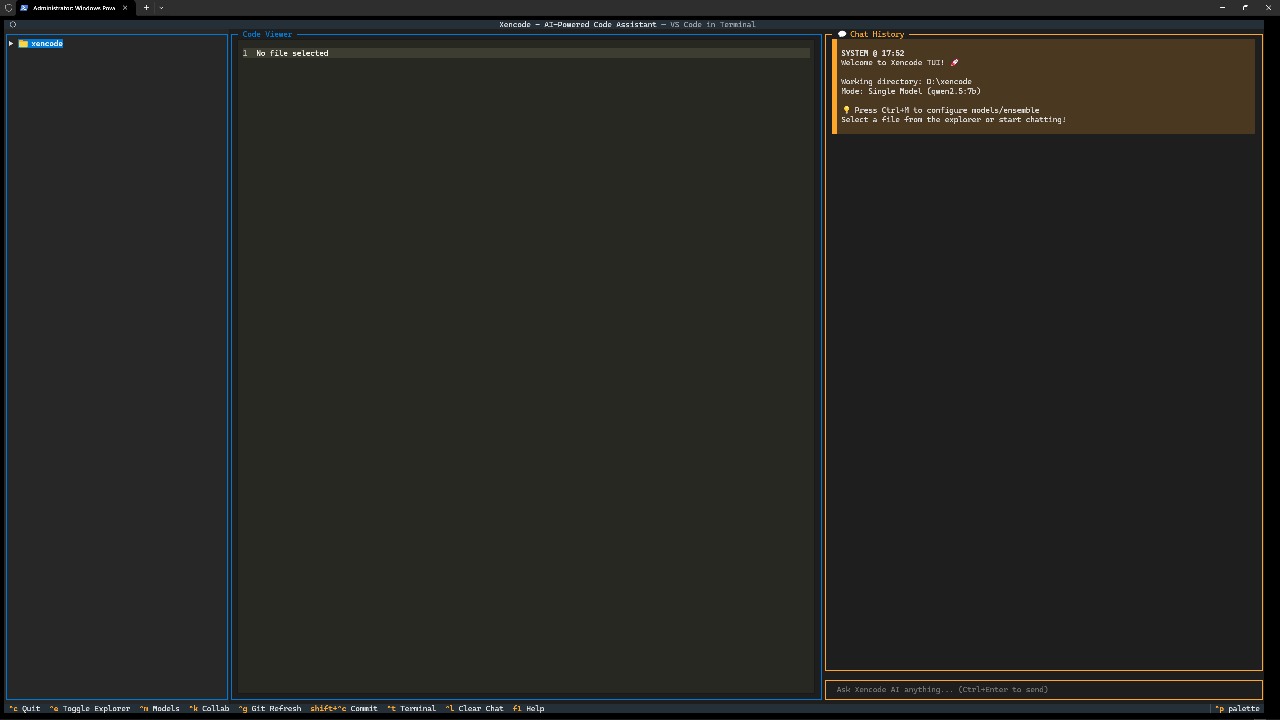
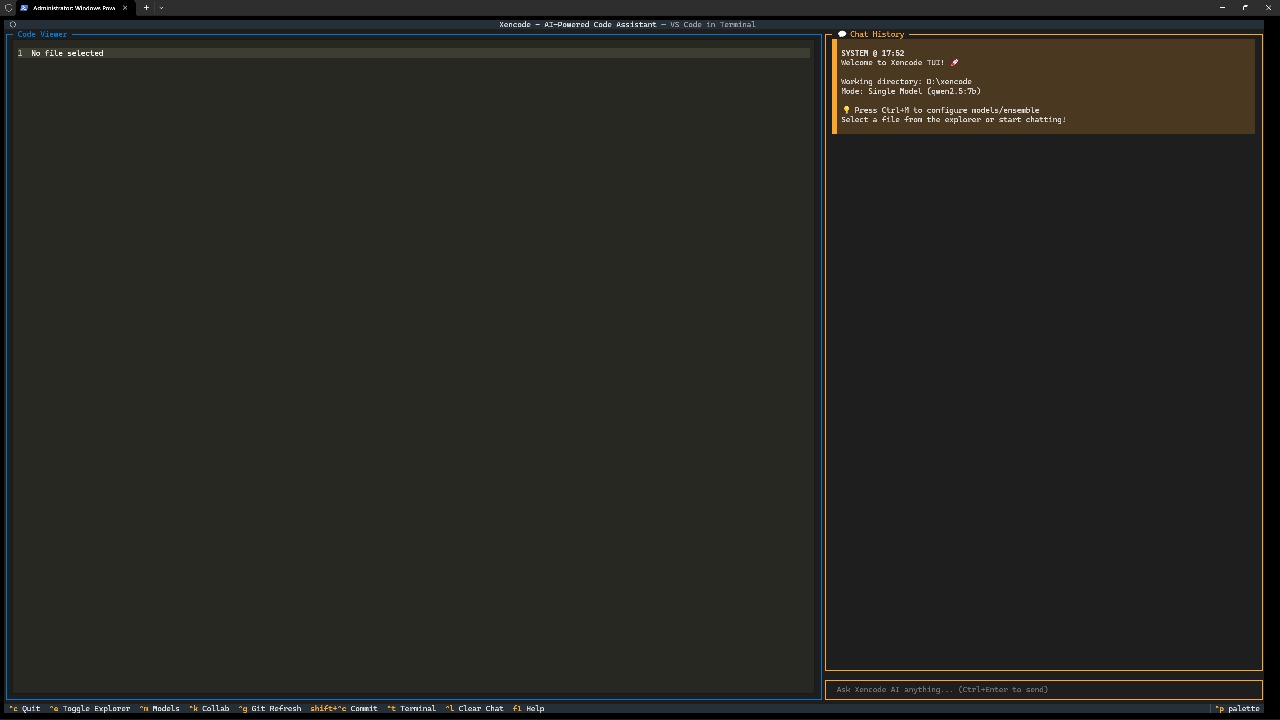
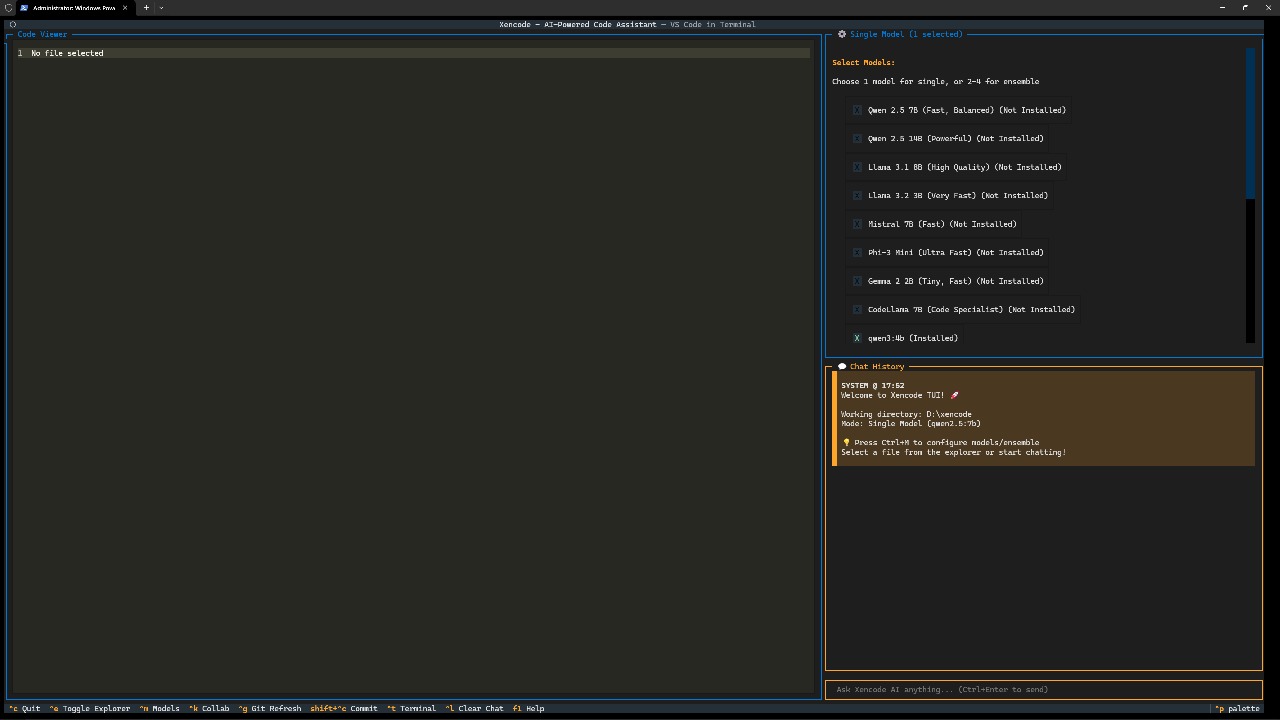
📋 Table of Contents
- Features
- Installation
- Quick Start
- Usage
- Command Reference
- Architecture
- Configuration & Model Routing
- Testing & Quality
- Deployment
- Repository Structure
- Documentation
- Troubleshooting
- Security
- Roadmap
- Contributing
- License
✨ Features
AI + Agentic
- Local-first model routing through Ollama and llama.cpp, with cloud providers (Gemini, Qwen, OpenRouter / any OpenAI-compatible model) on opt-in.
- Sequential provider fallback across those models (
agent_fallback_models) when a provider fails before streaming. Only candidates that keep the conversation on the same kind of provider as the model you picked are tried. - Agentic orchestrator for multi-step coding tasks with bounded retries.
- Zero-duplicate-token streaming retry middleware with token-delivery tracking.
- Tool and shell failures reach the model as
error:-prefixed orexit <code>results, and the agent's instructions make it name the failure and change approach instead of retrying it unchanged. There is no automatic error classifier — nothing parses a compiler or test message into a category and a suggested fix; that is a planned item, not current behavior. - Canonical transcript persisted under
.xencode/cache/transcript/, with a raw snapshot copied before any rewrite.
Developer Experience
- Rust ratatui TUI (primary) — 25 focus areas: chat, explorer, editor, model selector, settings, code review, PR review, git commit, ByteBot agent, collaboration hub, background tasks, worktrees, insights, provider health, performance dashboard, project analyzer, feature navigator and more.
- The seven panels that used to play recordings are real (Milestone J):
- Security auditor —
Enterwalks the workspace with the same file listxencode analyzeuses and runs the pattern scanner per file, streaming findings and finishing with real totals; unreadable files and a failed walk surface as their own log lines. - Performance profiler — this process's CPU (two
/proc/self/statreads 250 ms apart) and resident memory, the session's own average turn latency and tokens/s, per-provider health latency, and the last rows of.xencode/cache/metrics.jsonl(a row cut off by a crash is skipped, the rows before it still count). A gauge with no data rendersn/a. - Terminal assistant — asks the configured model for commands and runs the one you pick through the agent's approval gate, never around it.
- Multi-language — tabulates a real
scan_treewalk (files, lines, share per language; secret and binary files counted, never read) and translates your text with one model call. - Custom models — edits real
model_profilesinconfig.json:Enterapplies to the next turn,ssaves,tshows the provider's real reply or its real error,fmarks the profile for a kind of turn (bugfix,general, or by hand only). Withmodel_routingset totrue, a marked profile takes matching turns on its own model — Ollama models only, since a running llama.cpp server holds one model at a time and such a swap is refused and said out loud instead.xencode queryfollows the same rule unless-mnames a model. - Learning mode — queues the files the project index says declare something and asks the model to teach that file and quiz you on it.
- Voice — opens the microphone through the first of
arecord/pw-record/pareconPATH.Enterrecords,Enteragain stops; the level bar, peak and clip length are RMS over the PCM the recorder actually sent, and the clip lands in.xencode/voice/clip-<unix>.wav. Text appears only from a whisper CLI's stdout — with none installed the panel names the clip and says there is no speech engine.
- Security auditor —
- Approval-gated agent tool loop — the chat model can call 17 tools (
read_file,list_dir,search_files,read_docs,lookup_advisory,write_file,edit_file,edit_symbol,ast_edit,codemod,what_breaks,run_command,update_plan,background_start/poll/stop,repo_advise) — an 18th,load_skill, is offered with them exactly when at least one skill is installed, so a machine with no skills sends the model the same tool list it sent before; file changes and shell commands stop at a modal prompt showing the exact diff or command line (yallow ·aallow for the session ·n/Escdeny), paths outside the workspace are refused in every mode, the three read tools (read_file,list_dir,search_files) can additionally reach a dependency's own upstream source — the exact versionCargo.lockpins, already unpacked by cargo — by addressing it ascrate:<name>[/<path>], which is read-only in every mode, resolved through the lock file rather than "whatever version is on disk", and labels every answer with the version it came from,read_docsanswers how a crate documents itself — its own readme, chosen by its manifest, with the other documents in it named so the next call can ask for one — and stays on cargo's local copy unlessallow_online_docsis on,lookup_advisoryanswers what the security advisories downloaded onto this machine say about a crate and judges the version this project's lock file pins when the model does not name one — saying that the advisory state is unknown rather than that a crate is safe on a machine that has never synced, and making no request of its own, every answer is logged in the transcript, the model's todo list renders above the chat (/plan), and/rewindputs the files back.edit_symbolis the one edit that finds its target by reading the code rather than matching text: it takes a path, a Rust declaration name and a braced body, and replaces that declaration's body — refusing, and leaving every byte as it was, when the name is absent or declared twice in the file, when the named thing has no body in that file, when the text offered is not a whole braced block, or when either the file as it stands or the file as edited would not parse as valid Rust.ast_editis the other edit that reads the code instead of matching it: it hands a shape with metavariables (let $A = $B;,foo($A, $B)) to theast-grepbinary, lists the sites when given no replacement, and rewrites every site in one atomic change when given one — refusing, and changing nothing, if the pattern matches no sites, because a pattern that matches nothing and a pattern that is wrong look identical from outside and only one of them is a fact about your code. It needsast-greponPATH, and says so plainly when it is missing instead of reporting an empty search.codemodis that same structural search run as a rule instead of a pattern: the agent writes one ast-grep YAML rule — anid, alanguage, arule:pattern and afix:— and every site it matches across the tree is rewritten in one change, which is how a twenty-call rename becomes one call. Narrow it with a path when the whole tree is too broad, and leave out thefix:to have it report where the rule would land without touching anything. Applying a rule across a tree that is already dirty is the case worth naming: the diff it shows is the rule's own change and nothing else, and every touched file that git already reports as modified is called out by name, so the change the rule made is never confused with the edits that were already there.what_breaksis asked before an edit rather than after: it walks the project index backwards from a file and lists what links to it — ausepath, amoddeclaration or animpl Trait for Typethat resolves there, up to three steps back — and an optional symbol name marks, on each line, whether that consumer's ownusestatements write the name being edited. Each answer states what an edge is and is not (a module path that resolves, not a type-checked call site) and how big the index it read was, and a file name matching more than one indexed path is refused with both paths named instead of guessed./bytebot <task>delegates the same loop — its panel's steps are the real calls and their real outcomes.agent_hooksconfig runs your own shell commands before/after approved calls (per tool or*); a failingbeforehook vetoes the call entirely. Each hook is handed the event as JSON on its stdin —{hook_event_name, tool_name, tool_input, cwd, session_id}— so a script can read the target out oftool_inputand decide per call (veto onewrite_fileby its path, say) without anything about the call ever appearing in the command line, where/procwould expose it./spawn <task> [#branch]runs the same delegated loop in a fresh sibling git worktree (proj-spawn-1on branchxencode/spawn-1), streams its live steps, posts its final answer back as(spawn #<id> · <task>), and/spawn statuslists the registered runs. - Semantic tools cover Rust, and say so.
/initcounts files in every language the scanner can name and reads code in one: the symbol tier, the dependency graphwhat_breakswalks, andedit_symbolall work on Rust, by one predicate rather than four separate comparisons. A file of another language is refused as the language it is —Symbol-level editing covers Rust only — helpers/main.py is a python file.— before anything is parsed, and pointed at the text tools that do cover it, rather than being reported as code that fails to parse. A per-language adapter registry is the thing deliberately not built: every consumer of the tier reads Rust module paths, so a second grammar would bring a second resolver with nothing to check it against. - MCP tool servers — declare servers under
mcp_serversin config — acommandto spawn, or aurl(+headers, where a bearer token goes) for a hosted endpoint — and/mcpstarts them on request; their tools reach the model asmcp__<server>__<tool>behind the same approval gate (Externalclass — always ay/n, never waved through by autonomy), withmcp_timeoutbounding each call and a broken server failing in its own words. A server's listed resources and prompts are readable from the TUI (/mcp read <server> <uri>,/mcp prompt <server> <name>); a token written into a URL is shown masked and header values are never printed. - xencode as an MCP server —
xencode mcp serveputs the same six tools an agent uses here (read_file,list_dir,search_files,write_file,edit_file,run_command) behind the official Rust MCP SDK on standard input and output, so an editor, a script or another agent can drive xencode's real executor instead of reimplementing it. A caller on a pipe has no approval prompt to answer, so the server starts read-only: the three reads run, and a file-changing or shell tool is refused with the one flag that would have permitted that tool (--allow write_file). Permitting one tool does not permit its class, and apathorcwdthat leaves--workspace— or enters.gitor your xencode config directory — is refused even for a tool you allowed, by the same boundary check the interactive gate uses. What that check cannot see is the text inside a command the caller was allowed to run, so--allow run_commandhands over a shell, and the launch says so. - Code analysis with per-language heuristics for Python, JavaScript/TypeScript, and Rust.
- Per-file diff review in the TUI (
Ctrl+Y, base toggle HEAD ↔ main) and rename-aware triage on the CLI (xencode review). - CLI with 46 subcommands, among them:
scan,config,models,cache,audit,query,memory,tasks,worktree,colab,advise,server,analyze,fetch,review,replay,runs,run,eval,plugin,mcp,llamacpp,hw,history,perf,prices,release-notes,test,tui.
Reliability + Ops
- Two-tier cache (memory + disk) with LRU eviction.
- Structured provider transport with status-code-driven retries, retry budgets, timeouts, and a provider-health panel.
- Per-request context metrics appended to
.xencode/cache/metrics.jsonl, each row naming the conversation, the model id, the server that served it, whether the prompt left this machine, and the version of the instructions the turn was asked to obey. - Those rows are folded once into
.xencode/cache/metrics-rollup.json— totals, per-session and per-model tokens, KV-reuse share, and p50/p95 speeds over the newest 512 samples — so the panels that report them read a small sidecar instead of the whole log./costturns the rollup into spend using.xencode/pricing.json, and — withprice_lookupon — a model that file does not name from a listing fetched off a public catalogue; a model with no rate in either is reported as unpriced rather than as free. - A local turn also prints what it drew at the wall. When a chat answer from a local model finishes, the transcript gets one line —
⚡ ≈ 0.03 Wh · ≈ $0.000004 · 15 s — CPU package only; no graphics power was reported · estimated, this machine only— built from the kernel's own energy counter (/sys/class/powercap/intel-rapl:*) read at the start of the turn and again at the end, so the number is the joules between two readings rather than a guess about what the turn should have cost. It is package-wide, so a browser tab is in it; a discrete GPU is polled at both ends and averaged wherenvidia-smiwill answerpower.draw, and is named as missing on the line where it answers[N/A]; a machine with no package domain getsenergy unknownand no price, even when a tariff is set. The same four numbers are written to the metrics row (energy_uj,elapsed_ms,power_w,est_cost_micros) for turns whose prompt stayed on this machine — a cloud turn's electricity is on the provider's meter, and pricing both would bill the same seconds twice. The price needspower_cents_per_kwhfrom your own bill; without it you get the watt-hours andno $/kWh set./costprices those same turns by tokens: that is the provider's bill, this is yours, and the two are never added. - Budgets that act, and never stop you. Four settings cap one calendar day's usage in the four units xencode can measure it in —
budget_tokens_per_day,budget_energy_wh_per_day,budget_usd_micros_per_day,budget_minutes_per_day— and a cap that is passed buys the next turn down one rung of the hardware profile (HIGH → BALANCED → LOW): less context, fewer retrieved files, less of each one. Nothing is ever refused over a cap, and the check happens only at the boundary before a turn is built, never between an edit and the verification that was supposed to catch it. AtLOWthere is nothing left to give up, so xencode says that once and the day keeps being spent./costprints today's figures against every cap set, and says plainly when a cap has nothing to be weighed against — a machine publishing no energy counter, or a model with no rate in either price document — rather than passing a day it cannot price. - A price is either yours or it is dated. There is no price list baked into this binary, because a list compiled in goes stale without anybody noticing and keeps being printed as fact. Rates come from
.xencode/pricing.json, which you write. For a model that file does not name,xencode prices fetchcan read a public catalogue — OpenRouter's model listing, no key sent, nothing about this project sent, 459 prices in the copy read here — and cache it as.xencode/cache/price-lookup.jsonwith the moment it was read.price_lookup(off by default, and only ever your decision) decides whether a cost report consults that copy at all, and a rate you wrote always outranks one that was looked up. The cached copy is read for 7 days and then stops being read: after that a report prices nothing from it, so the figure becomes unknown rather than quietly becoming last month's number — or zero. Nothing re-fetches behind your back;xencode prices fetchis the only thing in xencode that dials out for a price and it is asked for. Every cost line built from the listing names which listing, which day it was read, and how old that copy is now (• 1 price read off the openrouter catalogue on 2026-10-03, 0 days ago), and a local tag likellamacpp:qwen3-0.6bis never priced off a catalogue at all — guessing that a local model is a distant one with a similar name is how a wrong price gets believed.xencode prices showprints both documents and which of the models this project actually ran have no rate in either. - A performance claim is a number with a p-value, or it is not made.
xencode perfruns seven benchmarks over this repository's own hot paths — the index scan, symbol extraction over every Rust file, the dependency-graph build, BM25 scoring, hybrid retrieval, transcript compaction, the token trimmer — ten samples each, against a baseline stored in.xencode/perf/baseline.json.xencode perf checkcompares each path by Mann-Whitney and prints the p-value, which method produced it, and how far the path moved;xencode perf recordstores the baseline, and refuses to store one measured on a busy machine. Past a 5% spread inside a run the path printsNO VERDICTrather than a verdict, so a directory walk that contention made 80% slower is reported as a refused measurement, not as a regression. - Release notes are drafted from what the repository already says, and the disagreements are the point.
xencode release-notesreads the commits since the newest tag together with the## [Unreleased]block ofCHANGELOG.md, keeps the changelog's ownAdded/Changed/Fixedheadings as the categories, and prints a draft with both coverage gaps attached: the commits no entry accounts for, and the entries naming no commit in the range. On this repository today it drafts 903 commits against 131 unreleased entries and reports 870 commits with nothing written about them and 3 entries whose commit sits below the range. Nothing is parsed out of the commit subjects — this project's 900-odd messages are already sentences, and afeat:prefix would label a subject that already says what it is. The draft goes to standard output, or to--out <path>, which refuses a file that already exists unless you pass--force, because the next edit to that file is meant to be a person's. - When something is not working,
xencode doctorwrites the bug report. One list of rows covering the configuration (does it parse, is it a version this binary can read — aconfig.jsonwritten by a newer xencode is refused rather than rewritten — and can anyone other than you read it), free space on the volume holding your state, how much disk the response cache has taken, the project's index and git repository,metrics.jsonl, whether the cache directory is proved writable by writing to it, every endpoint the config would dial, whether the server behind your default model actually knows that model by name, each declared MCP server, and the Colab bridge — which is asked through the same preflightxencode colab upruns through, so the report and the gate cannot hold two different opinions about what version is acceptable. Every row isPASS,FAILorABSENTwith a sentence naming what was found and, where there is one, the command that fixes it: a refused port names the server that would answer on it, a world-readableconfig.jsonnames thechmod, a default model Ollama has never heard of names the model id that would work.ABSENTis not failure — a machine that never recorded metrics, or never installed the Colab bridge, is not a broken machine, and the bridge's network probes are skipped entirely where the bridge has never existed.--format jsonserialises those exact rows undercheckswithok,failing,doctorandversionalongside, and the text listing above is a rendering of the same list, so the file you attach to an issue says what the screen said. Nothing is written by a report: it reads the machine and generates no keys.xencode doctor --selfcheckis the narrower slice for when xencode itself looks broken — index, git, providers, the default model, MCP servers, metrics, cache. The exit code stays zero either way, because a laptop with no local server running is normal; theFAILrows are the signal. - Per-turn trace appended to
.xencode/cache/turns.jsonland read back by/trace: how long the turn took, how many rounds it ran, which tools it called and with what arguments, how each one ended, which workspace files the context put in front of the model, whether the turn carried the[d]decision marker, and the token count when a server reported one. It stores no prompt text and no tool output beyond a short redacted tail of each. Arguments are kept only as far as they explain the call — a path, a pattern or a command line survives, while the body of a file being written, the text an edit replaces and a plan's steps are recorded as their size — and credentials are stripped from both arguments and output before anything is written. - A run can be written down and lived through again. With
session_recordingon, every model call of an agent turn appends to.xencode/cache/sessions/<run-id>.jsonl: the request, the response bytes as they arrived on the socket, and what each tool actually returned.xencode replay <run-id>serves those bytes again on a loopback port while the real agent loop, the real stream reader, the real permission gate and the real tools run against them — so a tool call that came in fifteen fragments is reassembled by the same code that reads a live server, and nothing answers from a model. Two replays of one recording write the sametool_calls.jsonldown to the byte, because every time in it comes from the recording rather than the clock. Tools stay gated: without--run-toolsa call that needed approval comes backdeniedand the report says where it stopped matching. - The instructions a model is given are files, not strings buried in code. The agent system prompt, the tool vocabulary, the transcript-folding prompt, the two subagent briefs and the instruction the eval judge is asked under live in
rust/crates/xencode-context-rs/prompts/*.mdand are compiled in, each carrying a version that is a hash of its own text./ctx promptslists them;/ctx evalrecords retrieval scores against that set, so a score is only ever compared with a run measured under the same instructions. - Collaboration server exposing sessions, a WebSocket relay, auth, model/provider status, and llama.cpp load/unload routes — bearer-token gated except the public ones.
- The agent's own quality is measured, on this machine, with no provider account. Eight defects are seeded on purpose — a loop one short, a lost update between two workers, a cached value that outlives what it came from, and five more — each unpacked into its own fresh git repository with a
task.mddescribing the bug.xencode eval runhands each one to the real agent loop with the real permission gate in force (edit-allow: edits pre-approved, a shell refused unless you pass--allow-shell) and then grades what the run left on disk: the case's owncargo test --offlinehas to go green and the changed set has to be exactly the file the reference fix touches. A green test suite bought by editing the test is reported aschanged its own test, never as a pass. Verdicts, model, prompt digest, sampling pins and per-case outcomes append to.xencode/cache/task_eval.jsonl, so today's rate is only ever printed beside a previous one taken under identical rules. First run, on a 1.5B model off a localllama-server: 0/8 — every case answered in prose, asked for no tool, and left the defect in place. That is the number this harness exists to produce, and it produces it whether or not it flatters the product.--judgethen asks a model, afterwards, which of the attempts that failed came closest: it is shown only the near misses and only their changes, it is asked twice with the list in the opposite order so that a ranking which moves with the listing is discarded rather than reported, and it has no field in which to call anything a pass — the rate above is computed exactly the same whether or not a judge was consulted.
📥 Installation
Prerequisites
| Requirement | Used for | Get it |
|---|---|---|
| Ollama | Local models — the default path, so this is the one to install | ollama.ai |
| Rust stable | Building the binary — no MSRV is pinned; CI builds on stable | rustup.rs |
| A C compiler | The Rust symbol index builds its grammar (tree-sitter and its Rust grammar) from C at compile time; any cc on PATH works | ships with the system command-line toolchain |
Ollama is what the binary talks to out of the box, not the only option: a local
llama-server (llamacpp:…, managed by xencode llamacpp), Gemini, Qwen and
any OpenAI-compatible endpoint through OpenRouter work instead — those need a
key in the settings directory's config.json and nothing local has to be running.
Option A: Rust binary (recommended)
A single-file executable with no runtime dependencies — the fastest, cleanest path.
git clone https://github.com/sreevarshan-xenoz/xencode
cd xencode/rust
cargo build --release -p xencode-cli

# Linux/macOS
cp target/release/xencode /usr/local/bin/xencode
# Windows
copy target\release\xencode.exe C:\Windows\System32\xencode.exe

xencode --help
Option B: One-liner installers
install.sh (Linux/macOS) and install.ps1
(Windows) do Option A for you, from a clone of this repository: they check for a
Rust toolchain (installing one via rustup if it is missing), run
cargo build --release -p xencode-cli, and on macOS/Linux also set Ollama up and
start it if you do not have it. install.sh then smoke-tests the fresh binary and
copies it to /usr/local/bin when that directory is writable, $HOME/.local/bin
otherwise (adding it to your PATH); install.ps1 puts the exe in
%LOCALAPPDATA%\xencode and adds that directory to your user PATH. Review the
script before running it.
# Linux/macOS
./install.sh
# Windows (PowerShell)
.\install.ps1
✨ Tip: pull a small model first so you can validate the whole path:
ollama pull qwen3:4b
🚀 Quick Start
# 1) Verify the CLI
xencode --help

# 2) Check your local model health
xencode models list

# 3) Launch the immersive terminal UI (the default experience)
xencode tui

# 4) Run a quick query without leaving your shell
xencode query "Explain clean architecture briefly"

# 5) Analyze code for issues and vulnerabilities
xencode analyze src/

# 6) Collaborate with your team
xencode server           # local-first: http://127.0.0.1:8765, ws://
# then in the TUI: Ctrl+F → Collaboration Hub → c to create, j to join

# 7) Install a plugin from a git repository, then see what it contributes
xencode plugin install <git-url>   # shows what it declares, and the commit it pinned
xencode plugin list                # the TUI's /plugin reports the same load
TUI shortcuts: Tab cycles panels · ? opens the keybinding help overlay · Ctrl+F opens the Feature Navigator.
⚙️ Usage
xencode                          # Launch the Rust TUI (default experience)
xencode query "explain async"    # One-shot query without leaving your shell
xencode analyze ./src            # Code analysis + image inventory
xencode models list              # Model health
xencode --version                # Show version
In-chat commands
These sixteen are the only strings the chat input intercepts (SLASH_COMMANDS in
xencode-tui-rs/src/app.rs) — anything else is sent to the model as a prompt.
/init [abort|status]        Index the repo / stop / inspect an index run
/ctx [status|track|compact|eval|kv|archive|prompts]
                            Context bundle: state, tracking, compaction, retrieval eval,
                            and the prompt files this build sends
/advise [filter]            Live refactor insights (same report as Ctrl+L)
/impact <file>              Blast radius of one file — crates, files, churn (fan-out panel)
/bytebot <task>             Delegate the task to the agent loop and watch its real calls
/spawn <task> [#branch]     Run the delegated loop in a fresh git worktree
/spawn status               List registered spawn runs and where they live
/plan [clear]               Pin the model's todo list (or drop it)
/rewind [turns]             Undo agent file writes for recent turns
/mcp [status|stop]          Start the configured MCP servers / report / withdraw them
/mcp read <srv> <uri>       Read one resource a running MCP server listed
/mcp prompt <s> <name>      Ask a running MCP server for one of its prompts
/plugin [reload]            Show which plugins took effect / re-scan the plugin dir
/skills [reload]            Show which SKILL.md skills loaded, what they refuse and what the
                            prompt pays for them / re-scan both skill directories
/trace [turns]              What the recent agent turns did: rounds, tools, tokens
/cost                       Tokens, speed and spend from the records on disk, naming where each price came from
/doctor [env|deps]          Probe machine resources, GPUs, memory and environment facts
/verify [skip...]           Run the machine-checkable checklist — fmt, lint, test
/hotspots [limit]           Rank files by churn, size and bus factor
/agents                     Inventory the coding-agent CLIs installed on PATH
Press ? in the TUI for the live keybinding and command overlay.
📚 Command Reference
| Area | Command | Purpose |
|---|---|---|
| General | xencode | Launch Rust TUI (default experience) |
| General | xencode --version | Show installed version |
| Query | xencode query "…" | Run a one-shot query |
| Query | xencode query "…" --temperature 0.2 --max-tokens 512 | llama.cpp sampling per call: also --top-k, --min-p, --mirostat, --seed, --grammar, --json-schema, --no-cache, --session, --model |
| Query | xencode query "…" --format ndjson | jq -r .type | One JSON event per line for scripts: start, token, then done or error — every field in the CLI guide |
| Scan | xencode scan . --max-depth 2 | Scan workspace |
| Config | xencode config show | Show runtime config |
| Models | xencode models list | List installed Ollama models (health <name> checks one) |
| Memory | xencode memory list | List conversation sessions |
| Advise | xencode advise [FILTER] [--json] [--limit 40] | Repo insights from the .xencode snapshot |
| Tasks | xencode tasks list | File-backed background tasks (start/poll/stop/rm) |
| Worktree | xencode worktree list | List/add/remove git worktrees |
| Cache | xencode cache stats | Show cache statistics |
| Audit | xencode audit verify [PATH] | Check the server's audit log was not edited afterwards |
| Server | xencode server | Start collaboration server (local-first: 127.0.0.1:8765; TLS opt-in) |
| Analyze | xencode analyze <path> | Code analysis + security scan + image inventory |
| Fetch | xencode fetch <url> | Web extraction to research-ready text |
| Review | xencode review [--base main] | PR-level diff triage with per-file analysis |
| Advisories | xencode advisories check --path rust | Judge every package in Cargo.lock against the RustSec and OSV corpora downloaded once by xencode advisories sync; show/status read the same files offline |
| Replay | xencode replay <run-id> [--run-tools] | Run a recorded agent turn again from the bytes it was made of, with no model answering |
| Eval | xencode eval run [-c off-by-one] [-m MODEL] [--judge] | Score the agent on defects seeded on purpose, graded by the diff and an exit code, with an optional ranking of the attempts that came closest |
| LlamaCpp | xencode llamacpp status | Local llama-server status and timings |
| Hw | xencode hw probe | What this machine can serve: RAM, cores and the server's own compute devices, then the launch flags that fit |
| History | xencode history status | Which git history indexes exist here, and the timings of the queries that use them — history setup writes them and re-times |
| Colab | xencode colab preflight | Is the bridge usable? (CLI version, auth, ssh key) |
| Colab | xencode colab up | Bring up a VM + inference server and tunnel it to localhost (--reconnect repairs a broken bridge) |
| Colab | xencode colab status / down | Forward/session/endpoint health, then kill the forward and release the VM |
| Plugin | xencode plugin list | Report each plugin, whether it loads, what it contributes, and the commit a git install is pinned to |
| Plugin | xencode plugin install <git-url> | <path> | Install from a git URL or a local path — shows what the plugin declares before copying it in, and names the commit a git install was pinned to (--rev picks the branch, tag or commit) |
| Plugin | xencode plugin update <name> | Fetch the plugin's own repository again and show a diff of what changed; an update that alters the prompt or hooks is only applied with --yes |
| Plugin | xencode plugin remove <name> | Remove a plugin by name, after listing the prompt lines it was contributing |
For the full CLI reference run
xencode --help.
🏗️ Architecture
Xencode is organized as a layered runtime:
- Interface layer — CLI (
xencode-cli) and ratatui TUI - Orchestration layer — agentic tool loop, approval gate, checkpoints, background tasks
- Policy layer — permission classification, hook veto, retry/fallback eligibility, context budgeting
- Execution layer — model providers (Ollama, llama.cpp, Gemini, Qwen, OpenRouter-compatible)
- Data layer — context index, conversation memory, cache, transcripts under
.xencode/ - Collaboration layer — axum server: bearer tokens, RBAC relay, JSONL audit; the
xencode-collaboration-rs/-server-rscrates
Routing
flowchart TD
    U[User]
    CLI[xencode CLI]
    TUI[ratatui TUI]
    API[axum server\nsessions + WS relay]

    ORCH[TUI agent loop\nplan -> approve -> tool -> fix]
    CTX[Context + Memory + Cache]
    SAFE[Approval gate + hooks + scanner]
    RES[Providers + retry/fallback]
    LOCAL[Ollama / llama.cpp]
    CLOUD[Cloud Providers]
    OUT[Response + Diff + Transcript]

    U --> CLI
    U --> TUI
    U --> API

    CLI --> RES
    CLI --> SAFE
    TUI --> ORCH
    ORCH --> CTX
    ORCH --> SAFE
    ORCH --> RES
    API --> RES
    RES --> LOCAL
    RES --> CLOUD
    LOCAL --> OUT
    CLOUD --> OUT
Agentic loop
What actually runs per chat turn in the TUI (agent_rounds in
xencode-tui-rs/src/app.rs):
flowchart TD
    A[Prompt + assembled context] --> B[Model turn with tool schemas]
    B --> C{Tool calls?}
    C -- No --> H[Final answer streamed]
    C -- Yes --> D[classify: ReadOnly / Edit / Shell / External]
    D --> E{Approval mode}
    E -- denied --> F[error: result, model told not to retry]
    E -- allowed --> G[execute behind hooks + checkpoint]
    G --> I{Rounds left under agent_max_rounds?}
    F --> I
    I -- Yes --> B
    I -- No --> H
Connectivity: the agent's file and shell tools are confined to the workspace root (paths outside it are refused in every approval mode) and every mutation stops at the approval gate — see Approval-gated agent tool loop.
🔧 Configuration & Model Routing
- One JSON file:
config.jsonin the settings directory —$XDG_CONFIG_HOME/xencode, or~/.xencodefor an installation that has never been moved. Settings, session state, cache and downloaded models each have their own directory ($XDG_CONFIG_HOME,$XDG_STATE_HOME,$XDG_CACHE_HOME,$XDG_DATA_HOME), so clearing the cache cannot touch a config or a model weight;xencode pathsprints where the four are read from, andxencode migratemoves an old~/.xencodeinto them. Point Xencode elsewhere withXCODE_CONFIG_DIR— every kind then resolves inside that one directory. XCODE_HYBRID=0ranks the workspace files for a turn by name, symbol and dependency distance alone, skipping the BM25 pass over each file's documentation. On by default; the/ctx evalcommand prints both numbers.- A tight window gets a map of the rest. When a turn's budget is the one a
4096-token model leaves — 2 457 tokens — the prompt carries a symbol-only repo
map just before the retrieved file bodies: files that declare names, nearest
the work the turn is already about and most depended-on first, three names
each, twelve rows at the very most. It never costs more than 300 tokens — on
this repository the ceiling stops it at eight rows, with a line saying how
many named files went unlisted — a row is added whole or not at all, so a path
is never cut in half, and it names files rather than sending their contents:
the model can then ask for one by name. A wider budget skips the tier, because
there the file bodies themselves orient. A
/ctx <query>preview in the TUI prints it as🗺 repo map tier: 8 files named in 283 tokens. - A turn that says something is broken is read as such. The prompt is
scanned for words for broken code; on a match, a file carrying a test whose
name shares the prompt's words is favoured in the ranking.
/ctx findandxencode querysay which reading they took and why. Only that one bias ships — the other two candidates scored 0.000 on their own queries and were removed. - Manage it with
xencode config show | set <KEY> <VALUE> | reset, or the TUI Settings panel. Only the keys in the struct are read; unknown keys are ignored. - The body layout is a tree you can write yourself.
layoutnames the arrangement: the shippedclassic,chat-firstorzen, or a name declared inlayout_templates, which holds the shape as data — a leaf naming a slot (explorer,editor,chat,input,terminal) and the focus it carries, or a split naming each child's share as{"percent": 70},{"min": 6}or{"length": 8}. Adding one takes no code: aneditor-firstarrangement is a handful of lines of JSON underlayout_templates, then"layout": "editor-first".Ctrl+Uand the Settings Layout row cycle the shipped presets and your names together, the header chip names whichever is in force, and a name that is neither — or a template that cannot be built, such as one naming a mistyped slot or giving a child a zero share — rendersclassicand says why in a toast rather than quietly behaving like a preference that was ignored.xencode config set layout <name>prints the same sentence instead of leaving you to wonder. Templates live in the config file and inherit its versioning; alayouts/directory beside the config would be a file format, and this project has no reason to promise one yet. - A layout you resized comes back.
Alt+Left/Alt+Rightgrows or shrinks the focused pane, and that arrangement — tree, ratios, focused pane — is written tolayout.jsonin the settings directory (owner-only, atomic, versioned) when you resize and when you quit, and restored at the next start.Ctrl+Uclears it along with the tree on screen, a layout name you changed in the config wins over a stored tree, and a file written by a newer xencode is refused by version with the reason shown on the first frame. The file records the arrangement only — never the transcript, model state, or anything a worker owns — and is written in the same words aslayout_templates, so there is one layout vocabulary, not a hidden second one. - A screen you arranged has a key on it.
Ctrl+1…Ctrl+9recall a view — a saved arrangement with its focused pane — andCtrl+Shift+<digit>stores whatever is on screen into that slot. Six of the nine slots ship filled: Code (files, code, conversation), Chat (code squeezed to the side), Terminal (the same with the terminal strip in it), Focus (the conversation across the whole body), Review (files and code up top, the transcript along the bottom) and Split (half code, half conversation); slots 7–9 are yours. A stored view is aname → treeentry underlayout_viewsinconfig.json, written in the same vocabulary aslayout_templates, so one bad entry is refused by name with its reason and the rest of your config still loads — and no new file format. Views are a shortcut, never a gate:Ctrl+T,Ctrl+UandAlt+Left/Alt+Rightkeep working on top of one, and every panel a view shows is reachable without naming the view at all. - A divider you can see is a divider you can drag. Pressing the line between
two side-by-side panes takes it — the line lights under the pointer, and the
press does not steal focus from either pane — and dragging it resizes that
pair by the same ratios and the same minimum-pane clamp the
Alt+LeftandAlt+Rightchords use. Nothing moves until the pointer has left the line's own two cells, so a click that juddered resizes nothing, and a line already at its minimum stops while the pointer keeps going rather than running away from it. Stacked panes are not handles: the row under a horizontal border is the chat input or the terminal, and a drag has no business squeezing those. Reading the mouse is a trade — while xencode asks for it, the terminal stops selecting text on a plain drag — so Settings →Mouse Capture(mouse_capture, on by default) hands it back on the next frame and keeps the refusal for next time;xencode config set mouse_capture offsays the same thing from the shell. - Why the screen is arranged this way, on one chord.
Ctrl+0lists every change the arrangement has been through since this session opened, oldest first, each named by the ask behind it —Ctrl+U cycled to chat-first,dragged the Code / Chat divider 6 cells, took 5,Ctrl+T put the terminal strip on the screen.Enteropens a row into the pane widths before and after it, and the newest row is the screen in front of you. Two things are not on it: a keystroke that moved nothing (Alt+Leftpast a pane's minimum adds no row), and an overlay — the agent stack, a permission prompt — which covers the arrangement instead of changing it. The list is session memory; nothing of it reaches the disk, becauselayout.jsonrecords geometry and focus only. - What a local server can afford is read off the machine, not guessed.
xencode hw probeprints the memory and cores, the compute devices asllama-serveritself reports them (PCI config space cannot see video memory: this box's card shows a 256 MiB window and holds 2048 MiB), the model file's own geometry and what its cache costs per token, and then the flags to start with. It writes nothing; the line to keep them with is printed for you to paste. A server xencode starts itself consults the same three readings first: a model no memory here could hold is refused in the second before anything launches, a window no device can hold is started shorter and says so, and a server that dies during its own load is reported as having died — with the lines it printed, and restarted once at half the window when what it said was about memory. - Git history is measured, not assumed slow.
xencode history statusprints whether this repository has a commit-graph and a multi-pack-index, how many commits are reachable, and the times of the history queries that use them — each one from agitprocess that just ran, so a number is never carried over from a document.xencode history setupwrites the two indexes and times them again. On this repository (813 commits, 2 packs) that comparison moved only the commit count, from 2.7 ms to 2.0 ms, and the command says so rather than claiming the rest got faster; what it does report as expensive is a full-history--numstatat 11.3 s and agit log -Sat 12.9 s, which no index here fixes.historyis read-only apart from those two writes, and both are idempotent. - A failing build answers with rustc's own diagnosis. A plain
cargo buildorcargo checkthat the model asks for is run with--message-format=jsonand rebuilt from what the compiler reports about itself: the error code, the file and line, the fix rustc offers with the exact replacement text, and the entry for that code from the error index, which ships inside the compiler. The previous path kept the last 8 KiB of a text dump, so on a large build the explanation of the first error was the part that got cut. The account is bounded and says what it left out — twenty diagnostics, three codes explained, 6 KiB — and only a single, plain build or check is rewritten: composed commands,cargo test,---pass-through arguments and a build started withbackground_startare untouched. - Co-change history is mined once, and priced.
/initreads the wholegit logonce — 93 ms here, over the 782 commits that counted — and stores, per file, the files it is committed alongside in.xencode/index/history.json; a rebuild at an unchanged commit reuses that file instead of re-reading it. Commits that touch 25 or more files are dropped, and a file edited alongside everything —README.md, in 163 of those 782 — is treated as background rather than as a companion. Ranking retrieval by this history was then measured against the 25-question retrieval test: it cost 0.002 of mean reciprocal rank at a weight strong enough to move a ranking, and changed nothing at a weight weak enough to only reorder what retrieval had already found, because the text search reaches every file the history could name. The two scoring options therefore ship switched off, and the comparison stays runnable as two arms of that same test. - Routing is by model prefix on
default_model(and each fallback entry):qwen:…,google_gemini:…, an OpenRouter-stylevendor/model,llamacpp:…for a local llama-server,remote:…for any OpenAI-compatible server atremote_base_url, anything else goes to Ollama onollama_url. - A prompt leaves this machine only if you say so.
allow_cloud_models(defaultfalse) is the permission for any request to reach an internet service; a key inapi_keyssays who you are to a provider and does not grant it. Open it withxencode config set allow_cloud_models true, the Cloud Models row of the Settings panel, or the key in config.json. While it is off, aqwen:…,google_gemini:…,vendor/modelorremote:…-at-a-remote-host model is refused before a connection is opened, and the refusal names the setting to change. The status bar reports which rule is in force —🔒 local onlyor🌐 cloud allowed— and the model list's[cloud]label is the same calculation as the router's, so neither can describe a destination the other disagrees with. One boundary is worth stating exactly: the rule classifies the server this binary talks to, and aremote:endpoint is judged by the host in its URL.xencode colab upforwards a rented GPU VM tohttp://127.0.0.1:18000/v1, so that route counts as local — the prompt still travels to Google's machine through a tunnel you hold.xencode colab downis what ends that. - A text file arrives only if you say so, too.
allow_online_docs(defaultfalse) is a separate permission from the one above: it is the agent'sread_docstool asking crates.io or docs.rs for a crate's documentation, and it happens only when cargo has not unpacked that version here. With it off the tool reads cargo's own copy and says what would be needed to get more; a crate can also be unpacked on this machine withcargo fetch, which needs no setting at all. Neither switch opens the other. - Security advisories are downloaded once, then read.
xencode advisories synctakes the RustSec advisory repository and OSV's crates.io archive — about 10 MB in, 20 MB on disk, 3.4 s measured here — and after that both the CLI and the agent'slookup_advisorytool read only those files. The tool has no request in it, so a dependency question inside an agent turn cannot become network traffic; and on a machine that has never synced, the answer is that the advisory state is unknown, which is not the same claim as saying a crate is safe. - Google Colab as a GPU you don't configure.
xencode colab uprents a Colab VM, installs a pinned llama.cpp (CUDA when the VM has a GPU) or Ollama on it, and holds an SSH forward so the VM's OpenAI endpoint appears athttp://127.0.0.1:18000/v1— then it writes that intoremote_base_urland the runtime URL, soremote:…models, the model picker and Provider Health all use it with no other change. The tunnel is the officialcolab sshbridge: no public URL, nothing listenable from outside your machine. Free-tier VMs are reaped after 12 hours —xencode colab statussays so andxencode colab up --reconnectrebuilds the bridge;xencode colab downreleases the VM, which you should always run when finished. - No Anthropic key field exists yet.
xencode-providers-rshas an Anthropic client, but neitherApiKeysnor the app passes an Anthropic key, so ananthropic:…model always fails with "Anthropic API key not configured". Reach Claude models through OpenRouter (anthropic/…) instead. - A failing provider walks
agent_fallback_modelsin order — one attempt each, only while nothing has streamed yet, and only to a provider that sends the conversation where the primary would have. A local model that is down does not hand your code to a cloud API. - A provider credential comes from one of three places, read in that order: the
value in that JSON file, a
command:reference naming a program that prints the key (command:pass show xencode/openai,command:secret-tool lookup …), or the environment variable named for the provider (API_KEY_OPENAI,API_KEY_OPENROUTER,API_KEY_GEMINI,API_KEY_QWEN,API_KEY_REMOTE/XENCODE_API_KEY,API_KEY_NVIDIA/NVIDIA_NIM_API_KEY). A reference is run directly — no shell, so nothing in it expands — with no terminal and ten seconds to answer, and its error output is dropped rather than printed. There is no encrypted vault in the Rust implementation; a desktop keyring is reachable only as a reference, which keeps the secret out of a file that gets backed up or synced and does nothing against a process running as your own user.xencode config shownames which of the three a credential came from and never prints the value. Xencode writes the file owner-only (0600) and atomically, so a crash mid-save cannot leave a torn config; a config that an older version left readable by others is tightened the next time a setting is saved (xencode config set). Every save that changes the file keeps the copy it replaced asconfig.json.bak.<UTC time>next to it, also owner-only, newest five — a saving gone wrong is recoverable without a backup tool. Keep it out of git regardless — file permissions are the only layer.
Start from the annotated example (it lists every real key):
mkdir -p "${XDG_CONFIG_HOME:-$HOME/.config}/xencode"
cp .xencode.example.json "${XDG_CONFIG_HOME:-$HOME/.config}/xencode/config.json"
xencode config show        # confirm the loader accepted it
An installation that already has a ~/.xencode keeps using it until you move it —
xencode paths says which directory each kind of file is read from, and
xencode migrate --dry-run prints what the move would do without doing it.
Then point xencode at your Ollama server (http://localhost:11434 by default)
and open cloud access only if you want it — a key identifies you to a provider,
the switch is what permits the request:
xencode config set default_model qwen3:4b
xencode config set agent_fallback_models qwen2.5:14b,llama3.2:3b
xencode config set allow_cloud_models true   # cloud models are refused without this
See also: docs/INSTALL_MANUAL.md · docs/api_documentation.md
🧪 Testing & Quality
Rust
cd rust
cargo test                          # Full workspace suite (2128 passing)
cargo test -p xencode-analysis-rs   # Single crate
cargo test -p xencode-tui-rs        # TUI widgets and panels
cargo test -p xencode-server-rs     # Axum HTTP/WS server & auth
cargo fmt --check                   # Format gate (CI)
cargo clippy --workspace --all-targets -- -D warnings -A clippy::format-in-format-args
CI runs fmt + clippy + the full suite on every push — see .github/workflows/.
🐳 Deployment
- Docker —
Dockerfile+docker-compose.yml: Rust builder → slim runtime runningxencode server --port 8765, health-checked against/api/status. This path is real. - CI/CD —
.github/workflows/ci.ymlruns fmt → clippy →cargo test --workspaceon every push and PR..github/workflows/ci-cd.ymlruns the same gate, then builds and pushes the image toghcr.ioand Trivy-scans it. There is no deploy stage: the server is a stateless single binary, so nothing applies Kubernetes manifests, and thek8s/andmonitoring/directories that implied otherwise have been removed. - Releases —
.github/workflows/release.ymlfires on av*tag (or by hand): release build →scripts/smoke-test.shagainst the built binary → a GitHub Release with that binary attached.cargo build --releaselocally is still the documented install path above; nothing in the manuals claims a package-manager channel that does not exist.
📂 Repository Structure
xencode/
├── rust/                    # Rust workspace — the whole product, 16 crates
│   └── crates/
│       ├── xencode-cli      # CLI entry point (xencode binary)
│       ├── xencode-tui-rs   # Ratatui TUI + agent loop + `mcp serve` tool server
│       ├── xencode-providers-rs # Providers, retry, fallback, tool schemas
│       ├── xencode-context-rs   # Index, retrieval, budget, watcher, advise
│       ├── xencode-mcp-rs       # MCP stdio client
│       ├── xencode-colab-rs     # Google Colab bridge: preflight + VM lifecycle
│       ├── xencode-server-rs    # Axum HTTP/WebSocket collaboration server
│       ├── xencode-analysis-rs  # Code analysis + pattern scanner + image intake
│       └── ...              # core, config, cache, memory, models, colab, collaboration, plugin
├── docs/                    # User manual, install manual, server API, long-term roadmap
├── scripts/                 # Shell/PowerShell build + smoke-test helpers
├── images/                  # Screenshots
├── install.sh / install.ps1 # One-liner installers (Linux/macOS, Windows)
├── Dockerfile / docker-compose.yml
└── .xencode.example.json    # Example of the settings directory's config.json
📖 Documentation
Current, and kept in step with the Rust implementation:
| Topic | Where |
|---|---|
| Getting started | QUICK_START.md |
| User manual | docs/USER_MANUAL.md |
| CLI guide | CLI_GUIDE.md |
| Active task list | NEXT_PLAN_TASKS.md · NEXT_PLAN.md |
| Route + auth reference | docs/api_documentation.md (the collaboration server's HTTP/WebSocket surface) |
| Installation and troubleshooting | docs/INSTALL_MANUAL.md |
| Long-term direction | docs/ROADMAP.md (what is shipped, what is icebox, and what is deliberately parked) |
The Python-era archives that used to be listed here — DOCUMENTATION.md,
PRD.md, project details.md, docs/FEATURES.md,
docs/ARCHITECTURE_DIAGRAMS.md, BROWSER_LOGIN_PLAN.md — have been deleted.
They described a dual-stack product, an xencode.core.* API, a distributed
cache and per-panel architecture diagrams for code that is not in this tree,
and nothing in the current docs links them.
🛠️ Troubleshooting
Ollama not running
ollama serve                       # run in a terminal, or
systemctl start ollama             # Linux systemd
curl -s http://localhost:11434/api/tags   # verify reachability
No models available
ollama pull qwen3:4b # small, fast starter model
Slow responses
xencode config set default_model phi3:mini— switch to a faster local model (restart the TUI to pick it up).xencode models health <name>— check one model answers; in the TUI,Ctrl+Hruns a health check andCtrl+F→ Provider Health opens the panel.
Rust build errors
rustup update
cd rust && cargo build -p xencode-cli 2>&1
The interface crashed
If the TUI panics, your terminal comes back normal — readable and scrollable,
mouse and cursor as your shell expects — and the crash is written to
last_panic.log in the state directory (owner-only) with the message, the source location,
and a backtrace when you ask for one:
RUST_BACKTRACE=1 xencode tui
🔒 Security
- A provider credential lives in
api_keysinside the settings directory'sconfig.json, andxencode config set openai_api_key …writes it there — the value is stored and never printed back, andconfig showsays only where the credential came from. To keep the secret out of the file, store a reference instead (xencode config set qwen_api_key "command:pass show xencode/qwen") or leave the key unset and exportAPI_KEY_QWEN. Xencode saves the file as0600, so there is no encryption layer to rely on and no need tochmodit by hand — but anything that can read your user can read your keys, and a keyring reached through acommand:reference answers anything running in your own desktop session. xencode analyzeruns a pattern-based scanner over OWASP Top 10 categories (hardcoded secrets, injection, weak crypto, path traversal, SSRF). It matches source text — it does not consult a CVE database or your dependency tree.- The collaboration server authenticates every mutation with bearer tokens, gates the relay by role, and appends joins, mutations and denials to an audit log.
- Never commit plaintext credentials — use environment-specific secrets management and least-privilege access.
Vulnerabilities can be reported privately to security@xenoz.com — see CONTRIBUTING.md for details.
🗺️ Roadmap
The Rust migration (all 8 phases, 16 crates) is complete, and so is Milestone J (2026-09-21) — the pass that made every TUI panel tell the truth and gave the plugin surface a runtime — followed by Milestone K (2026-09-23), the remote-provider and Colab GPU-bridge pass, verified against a live free-tier T4 rather than a mock.
Nothing is currently committed to build next. What exists instead is planning: two planned tracks (L — remote backends and a self-finishing agent; M — ecosystem compatibility) and five research option spaces (N, O, P, Q, S) recorded in NEXT_PLAN_TASKS.md, 208 candidates from the first four and 26 tasks from the fifth. The candidates were never ranked by worth, and still are not; what was added afterwards is an order — eighteen dependency waves (Milestone R), starting with the defects that make today's output untrustworthy and ending with the product surface, with the three newest waves reserved for measuring and then coordinating other vendors' coding agents (Milestone S). So the open question is no longer what comes first but which of a wave is worth doing. Those passes also turned up live gaps between promise and code, which they list as defects rather than features, including this manual's own habit of overstating the security scanner and error handling.
Under consideration, in docs/ROADMAP.md:
- Text-to-speech output for the voice panel (input has been real since J-07)
- Multi-model arena mode — the same prompt to several models side by side. Nothing fuses or votes across models today: the fallback chain is strictly sequential, and calling it "ensemble reasoning" would be a lie
- Coordinating several agent runs —
/spawnalready runs one delegated loop in its own worktree; nothing schedules or merges many - AI-generated commit messages — the
Ctrl+Spanel takes text you type and runsgit commit -am; nothing proposes the message from the diff - Session replay, a git autopilot, a VS Code extension, a web interface
Deliberately parked, not gaps to "fix": an anthropic_api_key field (see
Configuration) and wiring crdt.rs into the
collaboration server — each is a decision to make, not an oversight.
🤝 Contributing
We welcome contributions of all kinds — bug reports, docs, features, and plugins.
- Fork the repo and create a branch.
- Set up the dev environment:
cargo test --workspaceunderrust/(pluscargo fmt --checkand clippy per above). - Follow the standards in CONTRIBUTING.md and AGENTS.md (rustfmt, clippy
-D warnings, atomic commits, Conventional Commits). - Open a PR — CI runs fmt, clippy, and the full workspace suite automatically.
Please read our Code of Conduct and see the Contributing Guide to get started.
📜 License
Distributed under the MIT License. See LICENSE for details.
Built with ❤️ by Sreevarshan and contributors · For an always-on companion to this README, read the user manual.
Similar repos


Languages
Rust
99.6%
Terminal-native Rust coding agent. Local-first: your code stays on your machine, and the model is yours to point at — Ollama, llama.cpp, a rented Colab GPU, or any OpenAI-compatible endpoint.
Rust
6
930 commits
updated Oct 3, 2026
See what people are saying
README
Xencode
The local-first AI coding agent. Bring your own model.
A Rust terminal-native AI coding assistant that routes requests across local and cloud models with a sequential provider fallback chain, runs an approval-gated agentic tool loop, and has deep terminal ergonomics.
Local-first: your machine, your model. Online only when you point it somewhere. Your code never has to leave your machine.
Xencode is an AI-powered development assistant built for engineers who care about privacy, control, and speed. It runs local models through Ollama and llama.cpp out of the box, talks to cloud providers (Gemini, Qwen, and any OpenAI-compatible model through OpenRouter) when you opt in, and keeps a chat turn alive by walking a sequential provider fallback chain — primary model first, then the configured alternates — when a provider is down, without ever using that recovery to move a conversation somewhere the model you chose would not have sent it.
At its core is a fast, single-file Rust binary (16 crates, 2166 tests, zero warnings) wrapped around an agentic coding loop that can plan, edit, test, and fix your code — driven entirely from your terminal.
✨ Highlights
- 🧠 Local-first, your model — Ollama and llama.cpp serve from your own machine with your code never leaving it; cloud providers, a Colab GPU you rent, or any OpenAI-compatible endpoint are opt-in choices, not a service you depend on. The opt-in is a switch, not a promise:
allow_cloud_modelsstarts off, and a request that would reach an internet service is refused before it is dialled. A llama.cpp model that is not on disk yet can be brought down by one command: pointllama_cpp_model_urlat the GGUF andllamacpp startfetches it — after checking the disk can hold it, resuming across interruptions, and showing progress in the TUI.xencode models advicesays which model this machine's memory can hold and hands over the address and checksum to fetch it by; with a checksum pinned, a file whose bytes disagree is refused out loud instead of being served as if it were the model. - 🤖 Agentic coding loop — the model reads, edits and runs your workspace through approval-gated tools, bounded by
agent_max_rounds, with per-turn checkpoints you can/rewind. A call whose arguments do not match the description that tool was offered with is answered back to the model instead of being run — including one whose arguments arrived as text that stopped halfway, which used to look like a call that asked for nothing. When a turn edited files, the model's claim of completion is not the gate: the workspace's owncargo testandcargo clippyrun over the same approval gate and only exit0finishes the turn; failures come back to the model for up toagent_repair_max_itersrepair rounds and past that the turn reports the task incomplete. A non-Rust workspace is not left unchecked: when there is noCargo.tomlbut the turn edited files a language server covers, real diagnostics are pulled from that server (clangdfor C and C++) and gate the turn the same way — an error feeds back for a repair round, a clean answer verifies it, and a workspace with no supported server is left untouched rather than given an unearned pass. - 🔀 Provider fallback chain — when the primary model fails before streaming a token, the turn walks your ordered
agent_fallback_modelslist. Sequential, not fused: no multi-model ensemble exists. A candidate that would send the conversation somewhere the primary would not — a cloud API standing in for a local model, or the other way round — is skipped by design and named in the transcript. - 🖥️ Immersive TUI — a modern Rust/ratatui interface over 25 focus areas (body layouts via
Ctrl+U— the three shipped presets plus any you declare inlayout_templates— with 17 panels reachable from theCtrl+Ffeature navigator): agent, collaboration, git, models, and more. - 🔍 Nothing scripted — every panel shows data that came from the machine, the provider or the repo, and says so in its own words when it cannot get it. No list in this UI is seeded with samples, and no gauge renders a zero for a measurement that never happened.
- 🔒 Secure by design — token-authenticated collaboration server and a pattern-based OWASP Top 10 scanner (
xencode analyze). - 🔌 Plugin runtime —
xencode-plugin-rsdiscoversplugin.jsonmanifests, registers each compatible one with the host, and routes what it declares into every agent turn: a prompt prefix ahead of the system prompt andbefore/aftertool hooks (config.json wins any conflict). What a manifest declares is checked, not ignored: adding a prompt prefix requires thepromptpermission and registering a shell-running hook requireshooks, so a plugin that uses a capability it did not ask for — or names one the host does not recognise — is refused and contributes nothing to the loop. No dynamic linking: a manifest is the whole plugin, andxencode plugin list/ the TUI's/pluginreport which ones actually took hold and why the rest did not — including the exact lines of prompt text each one puts ahead of the system prompt, and the git commit an installed plugin is pinned to.xencode plugin install <git-url>clones, verifies the manifest, and prints that declaration before anything is copied into the plugin directory;xencode plugin update <name>fetches the repository again and shows a diff, refusing to apply an update that changes the prompt text or hooks until it is acknowledged with--yes. - 📚 Skills, listed always and read on request — a skill is one directory holding a
SKILL.md: a name and a one-line description of when to use it at the top, the instructions below it. Xencode scansskills/in the settings directory (or$XCODE_SKILLS_DIR) and.xencode/skillsinside your workspace — a project skill replaces a user skill of the same name — and puts only the list (a heading plus one line per skill) ahead of the system prompt. The instructions themselves stay on disk until the model asks for one, by name, through the read-onlyload_skilltool. So thirty installed skills cost a turn a short list rather than thirty documents: measured here on a local model, 30 skills added 736 tokens to the prompt while their 22,380 tokens of instructions were never sent./skillsreports what loaded, what was refused and what the list costs;/skills reloadre-scans both directories. - ☁️ Rented GPUs, no infrastructure —
xencode colab upbrings a Google Colab VM up with llama.cpp or Ollama serving an OpenAI endpoint and tunnels it to127.0.0.1over the officialcolab sshbridge; the model picker,remote:…routing and Provider Health treat it like any other provider. No public URL, nothing exposed. - 🛰️ Built for teams — HTTP/WebSocket collaboration server with bearer-token auth, role-based relay and an append-only audit trail, plus a Dockerfile and Compose setup for the API server.
- 🐎 Performance first — zero duplicate tokens on retry (token-delivery tracking), memory+disk cache, streaming with exponential backoff.
🧠 Why Xencode?
| Problem | Xencode |
|---|---|
| Privacy | Local by default: code, context and models stay on your machine. A remote backend is a choice you make, never a dependency you inherit. |
| Lock-in | Bring your own models — Ollama and llama.cpp locally; Gemini, Qwen, and OpenRouter (any OpenAI-compatible model id, including vendor/model Claude ids) in the cloud. |
| Provider outages | A sequential fallback chain re-runs the turn on your alternate models when a provider fails before its first token. |
| Context loss | Persistent conversation memory, memory+disk cache, and a lexical (BM25) workspace context index. |
| Slow terminal tools | Native Rust core for a snappy, instantly responsive TUI/CLI. |
📸 Screenshots
Interactive TUI panels and workflows live in the images/ directory:
📋 Table of Contents
- Features
- Installation
- Quick Start
- Usage
- Command Reference
- Architecture
- Configuration & Model Routing
- Testing & Quality
- Deployment
- Repository Structure
- Documentation
- Troubleshooting
- Security
- Roadmap
- Contributing
- License
✨ Features
AI + Agentic
- Local-first model routing through Ollama and llama.cpp, with cloud providers (Gemini, Qwen, OpenRouter / any OpenAI-compatible model) on opt-in.
- Sequential provider fallback across those models (
agent_fallback_models) when a provider fails before streaming. Only candidates that keep the conversation on the same kind of provider as the model you picked are tried. - Agentic orchestrator for multi-step coding tasks with bounded retries.
- Zero-duplicate-token streaming retry middleware with token-delivery tracking.
- Tool and shell failures reach the model as
error:-prefixed orexit <code>results, and the agent's instructions make it name the failure and change approach instead of retrying it unchanged. There is no automatic error classifier — nothing parses a compiler or test message into a category and a suggested fix; that is a planned item, not current behavior. - Canonical transcript persisted under
.xencode/cache/transcript/, with a raw snapshot copied before any rewrite.
Developer Experience
- Rust ratatui TUI (primary) — 25 focus areas: chat, explorer, editor, model selector, settings, code review, PR review, git commit, ByteBot agent, collaboration hub, background tasks, worktrees, insights, provider health, performance dashboard, project analyzer, feature navigator and more.
- The seven panels that used to play recordings are real (Milestone J):
- Security auditor —
Enterwalks the workspace with the same file listxencode analyzeuses and runs the pattern scanner per file, streaming findings and finishing with real totals; unreadable files and a failed walk surface as their own log lines. - Performance profiler — this process's CPU (two
/proc/self/statreads 250 ms apart) and resident memory, the session's own average turn latency and tokens/s, per-provider health latency, and the last rows of.xencode/cache/metrics.jsonl(a row cut off by a crash is skipped, the rows before it still count). A gauge with no data rendersn/a. - Terminal assistant — asks the configured model for commands and runs the one you pick through the agent's approval gate, never around it.
- Multi-language — tabulates a real
scan_treewalk (files, lines, share per language; secret and binary files counted, never read) and translates your text with one model call. - Custom models — edits real
model_profilesinconfig.json:Enterapplies to the next turn,ssaves,tshows the provider's real reply or its real error,fmarks the profile for a kind of turn (bugfix,general, or by hand only). Withmodel_routingset totrue, a marked profile takes matching turns on its own model — Ollama models only, since a running llama.cpp server holds one model at a time and such a swap is refused and said out loud instead.xencode queryfollows the same rule unless-mnames a model. - Learning mode — queues the files the project index says declare something and asks the model to teach that file and quiz you on it.
- Voice — opens the microphone through the first of
arecord/pw-record/pareconPATH.Enterrecords,Enteragain stops; the level bar, peak and clip length are RMS over the PCM the recorder actually sent, and the clip lands in.xencode/voice/clip-<unix>.wav. Text appears only from a whisper CLI's stdout — with none installed the panel names the clip and says there is no speech engine.
- Security auditor —
- Approval-gated agent tool loop — the chat model can call 17 tools (
read_file,list_dir,search_files,read_docs,lookup_advisory,write_file,edit_file,edit_symbol,ast_edit,codemod,what_breaks,run_command,update_plan,background_start/poll/stop,repo_advise) — an 18th,load_skill, is offered with them exactly when at least one skill is installed, so a machine with no skills sends the model the same tool list it sent before; file changes and shell commands stop at a modal prompt showing the exact diff or command line (yallow ·aallow for the session ·n/Escdeny), paths outside the workspace are refused in every mode, the three read tools (read_file,list_dir,search_files) can additionally reach a dependency's own upstream source — the exact versionCargo.lockpins, already unpacked by cargo — by addressing it ascrate:<name>[/<path>], which is read-only in every mode, resolved through the lock file rather than "whatever version is on disk", and labels every answer with the version it came from,read_docsanswers how a crate documents itself — its own readme, chosen by its manifest, with the other documents in it named so the next call can ask for one — and stays on cargo's local copy unlessallow_online_docsis on,lookup_advisoryanswers what the security advisories downloaded onto this machine say about a crate and judges the version this project's lock file pins when the model does not name one — saying that the advisory state is unknown rather than that a crate is safe on a machine that has never synced, and making no request of its own, every answer is logged in the transcript, the model's todo list renders above the chat (/plan), and/rewindputs the files back.edit_symbolis the one edit that finds its target by reading the code rather than matching text: it takes a path, a Rust declaration name and a braced body, and replaces that declaration's body — refusing, and leaving every byte as it was, when the name is absent or declared twice in the file, when the named thing has no body in that file, when the text offered is not a whole braced block, or when either the file as it stands or the file as edited would not parse as valid Rust.ast_editis the other edit that reads the code instead of matching it: it hands a shape with metavariables (let $A = $B;,foo($A, $B)) to theast-grepbinary, lists the sites when given no replacement, and rewrites every site in one atomic change when given one — refusing, and changing nothing, if the pattern matches no sites, because a pattern that matches nothing and a pattern that is wrong look identical from outside and only one of them is a fact about your code. It needsast-greponPATH, and says so plainly when it is missing instead of reporting an empty search.codemodis that same structural search run as a rule instead of a pattern: the agent writes one ast-grep YAML rule — anid, alanguage, arule:pattern and afix:— and every site it matches across the tree is rewritten in one change, which is how a twenty-call rename becomes one call. Narrow it with a path when the whole tree is too broad, and leave out thefix:to have it report where the rule would land without touching anything. Applying a rule across a tree that is already dirty is the case worth naming: the diff it shows is the rule's own change and nothing else, and every touched file that git already reports as modified is called out by name, so the change the rule made is never confused with the edits that were already there.what_breaksis asked before an edit rather than after: it walks the project index backwards from a file and lists what links to it — ausepath, amoddeclaration or animpl Trait for Typethat resolves there, up to three steps back — and an optional symbol name marks, on each line, whether that consumer's ownusestatements write the name being edited. Each answer states what an edge is and is not (a module path that resolves, not a type-checked call site) and how big the index it read was, and a file name matching more than one indexed path is refused with both paths named instead of guessed./bytebot <task>delegates the same loop — its panel's steps are the real calls and their real outcomes.agent_hooksconfig runs your own shell commands before/after approved calls (per tool or*); a failingbeforehook vetoes the call entirely. Each hook is handed the event as JSON on its stdin —{hook_event_name, tool_name, tool_input, cwd, session_id}— so a script can read the target out oftool_inputand decide per call (veto onewrite_fileby its path, say) without anything about the call ever appearing in the command line, where/procwould expose it./spawn <task> [#branch]runs the same delegated loop in a fresh sibling git worktree (proj-spawn-1on branchxencode/spawn-1), streams its live steps, posts its final answer back as(spawn #<id> · <task>), and/spawn statuslists the registered runs. - Semantic tools cover Rust, and say so.
/initcounts files in every language the scanner can name and reads code in one: the symbol tier, the dependency graphwhat_breakswalks, andedit_symbolall work on Rust, by one predicate rather than four separate comparisons. A file of another language is refused as the language it is —Symbol-level editing covers Rust only — helpers/main.py is a python file.— before anything is parsed, and pointed at the text tools that do cover it, rather than being reported as code that fails to parse. A per-language adapter registry is the thing deliberately not built: every consumer of the tier reads Rust module paths, so a second grammar would bring a second resolver with nothing to check it against. - MCP tool servers — declare servers under
mcp_serversin config — acommandto spawn, or aurl(+headers, where a bearer token goes) for a hosted endpoint — and/mcpstarts them on request; their tools reach the model asmcp__<server>__<tool>behind the same approval gate (Externalclass — always ay/n, never waved through by autonomy), withmcp_timeoutbounding each call and a broken server failing in its own words. A server's listed resources and prompts are readable from the TUI (/mcp read <server> <uri>,/mcp prompt <server> <name>); a token written into a URL is shown masked and header values are never printed. - xencode as an MCP server —
xencode mcp serveputs the same six tools an agent uses here (read_file,list_dir,search_files,write_file,edit_file,run_command) behind the official Rust MCP SDK on standard input and output, so an editor, a script or another agent can drive xencode's real executor instead of reimplementing it. A caller on a pipe has no approval prompt to answer, so the server starts read-only: the three reads run, and a file-changing or shell tool is refused with the one flag that would have permitted that tool (--allow write_file). Permitting one tool does not permit its class, and apathorcwdthat leaves--workspace— or enters.gitor your xencode config directory — is refused even for a tool you allowed, by the same boundary check the interactive gate uses. What that check cannot see is the text inside a command the caller was allowed to run, so--allow run_commandhands over a shell, and the launch says so. - Code analysis with per-language heuristics for Python, JavaScript/TypeScript, and Rust.
- Per-file diff review in the TUI (
Ctrl+Y, base toggle HEAD ↔ main) and rename-aware triage on the CLI (xencode review). - CLI with 46 subcommands, among them:
scan,config,models,cache,audit,query,memory,tasks,worktree,colab,advise,server,analyze,fetch,review,replay,runs,run,eval,plugin,mcp,llamacpp,hw,history,perf,prices,release-notes,test,tui.
Reliability + Ops
- Two-tier cache (memory + disk) with LRU eviction.
- Structured provider transport with status-code-driven retries, retry budgets, timeouts, and a provider-health panel.
- Per-request context metrics appended to
.xencode/cache/metrics.jsonl, each row naming the conversation, the model id, the server that served it, whether the prompt left this machine, and the version of the instructions the turn was asked to obey. - Those rows are folded once into
.xencode/cache/metrics-rollup.json— totals, per-session and per-model tokens, KV-reuse share, and p50/p95 speeds over the newest 512 samples — so the panels that report them read a small sidecar instead of the whole log./costturns the rollup into spend using.xencode/pricing.json, and — withprice_lookupon — a model that file does not name from a listing fetched off a public catalogue; a model with no rate in either is reported as unpriced rather than as free. - A local turn also prints what it drew at the wall. When a chat answer from a local model finishes, the transcript gets one line —
⚡ ≈ 0.03 Wh · ≈ $0.000004 · 15 s — CPU package only; no graphics power was reported · estimated, this machine only— built from the kernel's own energy counter (/sys/class/powercap/intel-rapl:*) read at the start of the turn and again at the end, so the number is the joules between two readings rather than a guess about what the turn should have cost. It is package-wide, so a browser tab is in it; a discrete GPU is polled at both ends and averaged wherenvidia-smiwill answerpower.draw, and is named as missing on the line where it answers[N/A]; a machine with no package domain getsenergy unknownand no price, even when a tariff is set. The same four numbers are written to the metrics row (energy_uj,elapsed_ms,power_w,est_cost_micros) for turns whose prompt stayed on this machine — a cloud turn's electricity is on the provider's meter, and pricing both would bill the same seconds twice. The price needspower_cents_per_kwhfrom your own bill; without it you get the watt-hours andno $/kWh set./costprices those same turns by tokens: that is the provider's bill, this is yours, and the two are never added. - Budgets that act, and never stop you. Four settings cap one calendar day's usage in the four units xencode can measure it in —
budget_tokens_per_day,budget_energy_wh_per_day,budget_usd_micros_per_day,budget_minutes_per_day— and a cap that is passed buys the next turn down one rung of the hardware profile (HIGH → BALANCED → LOW): less context, fewer retrieved files, less of each one. Nothing is ever refused over a cap, and the check happens only at the boundary before a turn is built, never between an edit and the verification that was supposed to catch it. AtLOWthere is nothing left to give up, so xencode says that once and the day keeps being spent./costprints today's figures against every cap set, and says plainly when a cap has nothing to be weighed against — a machine publishing no energy counter, or a model with no rate in either price document — rather than passing a day it cannot price. - A price is either yours or it is dated. There is no price list baked into this binary, because a list compiled in goes stale without anybody noticing and keeps being printed as fact. Rates come from
.xencode/pricing.json, which you write. For a model that file does not name,xencode prices fetchcan read a public catalogue — OpenRouter's model listing, no key sent, nothing about this project sent, 459 prices in the copy read here — and cache it as.xencode/cache/price-lookup.jsonwith the moment it was read.price_lookup(off by default, and only ever your decision) decides whether a cost report consults that copy at all, and a rate you wrote always outranks one that was looked up. The cached copy is read for 7 days and then stops being read: after that a report prices nothing from it, so the figure becomes unknown rather than quietly becoming last month's number — or zero. Nothing re-fetches behind your back;xencode prices fetchis the only thing in xencode that dials out for a price and it is asked for. Every cost line built from the listing names which listing, which day it was read, and how old that copy is now (• 1 price read off the openrouter catalogue on 2026-10-03, 0 days ago), and a local tag likellamacpp:qwen3-0.6bis never priced off a catalogue at all — guessing that a local model is a distant one with a similar name is how a wrong price gets believed.xencode prices showprints both documents and which of the models this project actually ran have no rate in either. - A performance claim is a number with a p-value, or it is not made.
xencode perfruns seven benchmarks over this repository's own hot paths — the index scan, symbol extraction over every Rust file, the dependency-graph build, BM25 scoring, hybrid retrieval, transcript compaction, the token trimmer — ten samples each, against a baseline stored in.xencode/perf/baseline.json.xencode perf checkcompares each path by Mann-Whitney and prints the p-value, which method produced it, and how far the path moved;xencode perf recordstores the baseline, and refuses to store one measured on a busy machine. Past a 5% spread inside a run the path printsNO VERDICTrather than a verdict, so a directory walk that contention made 80% slower is reported as a refused measurement, not as a regression. - Release notes are drafted from what the repository already says, and the disagreements are the point.
xencode release-notesreads the commits since the newest tag together with the## [Unreleased]block ofCHANGELOG.md, keeps the changelog's ownAdded/Changed/Fixedheadings as the categories, and prints a draft with both coverage gaps attached: the commits no entry accounts for, and the entries naming no commit in the range. On this repository today it drafts 903 commits against 131 unreleased entries and reports 870 commits with nothing written about them and 3 entries whose commit sits below the range. Nothing is parsed out of the commit subjects — this project's 900-odd messages are already sentences, and afeat:prefix would label a subject that already says what it is. The draft goes to standard output, or to--out <path>, which refuses a file that already exists unless you pass--force, because the next edit to that file is meant to be a person's. - When something is not working,
xencode doctorwrites the bug report. One list of rows covering the configuration (does it parse, is it a version this binary can read — aconfig.jsonwritten by a newer xencode is refused rather than rewritten — and can anyone other than you read it), free space on the volume holding your state, how much disk the response cache has taken, the project's index and git repository,metrics.jsonl, whether the cache directory is proved writable by writing to it, every endpoint the config would dial, whether the server behind your default model actually knows that model by name, each declared MCP server, and the Colab bridge — which is asked through the same preflightxencode colab upruns through, so the report and the gate cannot hold two different opinions about what version is acceptable. Every row isPASS,FAILorABSENTwith a sentence naming what was found and, where there is one, the command that fixes it: a refused port names the server that would answer on it, a world-readableconfig.jsonnames thechmod, a default model Ollama has never heard of names the model id that would work.ABSENTis not failure — a machine that never recorded metrics, or never installed the Colab bridge, is not a broken machine, and the bridge's network probes are skipped entirely where the bridge has never existed.--format jsonserialises those exact rows undercheckswithok,failing,doctorandversionalongside, and the text listing above is a rendering of the same list, so the file you attach to an issue says what the screen said. Nothing is written by a report: it reads the machine and generates no keys.xencode doctor --selfcheckis the narrower slice for when xencode itself looks broken — index, git, providers, the default model, MCP servers, metrics, cache. The exit code stays zero either way, because a laptop with no local server running is normal; theFAILrows are the signal. - Per-turn trace appended to
.xencode/cache/turns.jsonland read back by/trace: how long the turn took, how many rounds it ran, which tools it called and with what arguments, how each one ended, which workspace files the context put in front of the model, whether the turn carried the[d]decision marker, and the token count when a server reported one. It stores no prompt text and no tool output beyond a short redacted tail of each. Arguments are kept only as far as they explain the call — a path, a pattern or a command line survives, while the body of a file being written, the text an edit replaces and a plan's steps are recorded as their size — and credentials are stripped from both arguments and output before anything is written. - A run can be written down and lived through again. With
session_recordingon, every model call of an agent turn appends to.xencode/cache/sessions/<run-id>.jsonl: the request, the response bytes as they arrived on the socket, and what each tool actually returned.xencode replay <run-id>serves those bytes again on a loopback port while the real agent loop, the real stream reader, the real permission gate and the real tools run against them — so a tool call that came in fifteen fragments is reassembled by the same code that reads a live server, and nothing answers from a model. Two replays of one recording write the sametool_calls.jsonldown to the byte, because every time in it comes from the recording rather than the clock. Tools stay gated: without--run-toolsa call that needed approval comes backdeniedand the report says where it stopped matching. - The instructions a model is given are files, not strings buried in code. The agent system prompt, the tool vocabulary, the transcript-folding prompt, the two subagent briefs and the instruction the eval judge is asked under live in
rust/crates/xencode-context-rs/prompts/*.mdand are compiled in, each carrying a version that is a hash of its own text./ctx promptslists them;/ctx evalrecords retrieval scores against that set, so a score is only ever compared with a run measured under the same instructions. - Collaboration server exposing sessions, a WebSocket relay, auth, model/provider status, and llama.cpp load/unload routes — bearer-token gated except the public ones.
- The agent's own quality is measured, on this machine, with no provider account. Eight defects are seeded on purpose — a loop one short, a lost update between two workers, a cached value that outlives what it came from, and five more — each unpacked into its own fresh git repository with a
task.mddescribing the bug.xencode eval runhands each one to the real agent loop with the real permission gate in force (edit-allow: edits pre-approved, a shell refused unless you pass--allow-shell) and then grades what the run left on disk: the case's owncargo test --offlinehas to go green and the changed set has to be exactly the file the reference fix touches. A green test suite bought by editing the test is reported aschanged its own test, never as a pass. Verdicts, model, prompt digest, sampling pins and per-case outcomes append to.xencode/cache/task_eval.jsonl, so today's rate is only ever printed beside a previous one taken under identical rules. First run, on a 1.5B model off a localllama-server: 0/8 — every case answered in prose, asked for no tool, and left the defect in place. That is the number this harness exists to produce, and it produces it whether or not it flatters the product.--judgethen asks a model, afterwards, which of the attempts that failed came closest: it is shown only the near misses and only their changes, it is asked twice with the list in the opposite order so that a ranking which moves with the listing is discarded rather than reported, and it has no field in which to call anything a pass — the rate above is computed exactly the same whether or not a judge was consulted.
📥 Installation
Prerequisites
| Requirement | Used for | Get it |
|---|---|---|
| Ollama | Local models — the default path, so this is the one to install | ollama.ai |
| Rust stable | Building the binary — no MSRV is pinned; CI builds on stable | rustup.rs |
| A C compiler | The Rust symbol index builds its grammar (tree-sitter and its Rust grammar) from C at compile time; any cc on PATH works | ships with the system command-line toolchain |
Ollama is what the binary talks to out of the box, not the only option: a local
llama-server (llamacpp:…, managed by xencode llamacpp), Gemini, Qwen and
any OpenAI-compatible endpoint through OpenRouter work instead — those need a
key in the settings directory's config.json and nothing local has to be running.
Option A: Rust binary (recommended)
A single-file executable with no runtime dependencies — the fastest, cleanest path.
git clone https://github.com/sreevarshan-xenoz/xencode
cd xencode/rust
cargo build --release -p xencode-cli

# Linux/macOS
cp target/release/xencode /usr/local/bin/xencode
# Windows
copy target\release\xencode.exe C:\Windows\System32\xencode.exe

xencode --help
Option B: One-liner installers
install.sh (Linux/macOS) and install.ps1
(Windows) do Option A for you, from a clone of this repository: they check for a
Rust toolchain (installing one via rustup if it is missing), run
cargo build --release -p xencode-cli, and on macOS/Linux also set Ollama up and
start it if you do not have it. install.sh then smoke-tests the fresh binary and
copies it to /usr/local/bin when that directory is writable, $HOME/.local/bin
otherwise (adding it to your PATH); install.ps1 puts the exe in
%LOCALAPPDATA%\xencode and adds that directory to your user PATH. Review the
script before running it.
# Linux/macOS
./install.sh
# Windows (PowerShell)
.\install.ps1
✨ Tip: pull a small model first so you can validate the whole path:
ollama pull qwen3:4b
🚀 Quick Start
# 1) Verify the CLI
xencode --help

# 2) Check your local model health
xencode models list

# 3) Launch the immersive terminal UI (the default experience)
xencode tui

# 4) Run a quick query without leaving your shell
xencode query "Explain clean architecture briefly"

# 5) Analyze code for issues and vulnerabilities
xencode analyze src/

# 6) Collaborate with your team
xencode server           # local-first: http://127.0.0.1:8765, ws://
# then in the TUI: Ctrl+F → Collaboration Hub → c to create, j to join

# 7) Install a plugin from a git repository, then see what it contributes
xencode plugin install <git-url>   # shows what it declares, and the commit it pinned
xencode plugin list                # the TUI's /plugin reports the same load
TUI shortcuts: Tab cycles panels · ? opens the keybinding help overlay · Ctrl+F opens the Feature Navigator.
⚙️ Usage
xencode                          # Launch the Rust TUI (default experience)
xencode query "explain async"    # One-shot query without leaving your shell
xencode analyze ./src            # Code analysis + image inventory
xencode models list              # Model health
xencode --version                # Show version
In-chat commands
These sixteen are the only strings the chat input intercepts (SLASH_COMMANDS in
xencode-tui-rs/src/app.rs) — anything else is sent to the model as a prompt.
/init [abort|status]        Index the repo / stop / inspect an index run
/ctx [status|track|compact|eval|kv|archive|prompts]
                            Context bundle: state, tracking, compaction, retrieval eval,
                            and the prompt files this build sends
/advise [filter]            Live refactor insights (same report as Ctrl+L)
/impact <file>              Blast radius of one file — crates, files, churn (fan-out panel)
/bytebot <task>             Delegate the task to the agent loop and watch its real calls
/spawn <task> [#branch]     Run the delegated loop in a fresh git worktree
/spawn status               List registered spawn runs and where they live
/plan [clear]               Pin the model's todo list (or drop it)
/rewind [turns]             Undo agent file writes for recent turns
/mcp [status|stop]          Start the configured MCP servers / report / withdraw them
/mcp read <srv> <uri>       Read one resource a running MCP server listed
/mcp prompt <s> <name>      Ask a running MCP server for one of its prompts
/plugin [reload]            Show which plugins took effect / re-scan the plugin dir
/skills [reload]            Show which SKILL.md skills loaded, what they refuse and what the
                            prompt pays for them / re-scan both skill directories
/trace [turns]              What the recent agent turns did: rounds, tools, tokens
/cost                       Tokens, speed and spend from the records on disk, naming where each price came from
/doctor [env|deps]          Probe machine resources, GPUs, memory and environment facts
/verify [skip...]           Run the machine-checkable checklist — fmt, lint, test
/hotspots [limit]           Rank files by churn, size and bus factor
/agents                     Inventory the coding-agent CLIs installed on PATH
Press ? in the TUI for the live keybinding and command overlay.
📚 Command Reference
| Area | Command | Purpose |
|---|---|---|
| General | xencode | Launch Rust TUI (default experience) |
| General | xencode --version | Show installed version |
| Query | xencode query "…" | Run a one-shot query |
| Query | xencode query "…" --temperature 0.2 --max-tokens 512 | llama.cpp sampling per call: also --top-k, --min-p, --mirostat, --seed, --grammar, --json-schema, --no-cache, --session, --model |
| Query | xencode query "…" --format ndjson | jq -r .type | One JSON event per line for scripts: start, token, then done or error — every field in the CLI guide |
| Scan | xencode scan . --max-depth 2 | Scan workspace |
| Config | xencode config show | Show runtime config |
| Models | xencode models list | List installed Ollama models (health <name> checks one) |
| Memory | xencode memory list | List conversation sessions |
| Advise | xencode advise [FILTER] [--json] [--limit 40] | Repo insights from the .xencode snapshot |
| Tasks | xencode tasks list | File-backed background tasks (start/poll/stop/rm) |
| Worktree | xencode worktree list | List/add/remove git worktrees |
| Cache | xencode cache stats | Show cache statistics |
| Audit | xencode audit verify [PATH] | Check the server's audit log was not edited afterwards |
| Server | xencode server | Start collaboration server (local-first: 127.0.0.1:8765; TLS opt-in) |
| Analyze | xencode analyze <path> | Code analysis + security scan + image inventory |
| Fetch | xencode fetch <url> | Web extraction to research-ready text |
| Review | xencode review [--base main] | PR-level diff triage with per-file analysis |
| Advisories | xencode advisories check --path rust | Judge every package in Cargo.lock against the RustSec and OSV corpora downloaded once by xencode advisories sync; show/status read the same files offline |
| Replay | xencode replay <run-id> [--run-tools] | Run a recorded agent turn again from the bytes it was made of, with no model answering |
| Eval | xencode eval run [-c off-by-one] [-m MODEL] [--judge] | Score the agent on defects seeded on purpose, graded by the diff and an exit code, with an optional ranking of the attempts that came closest |
| LlamaCpp | xencode llamacpp status | Local llama-server status and timings |
| Hw | xencode hw probe | What this machine can serve: RAM, cores and the server's own compute devices, then the launch flags that fit |
| History | xencode history status | Which git history indexes exist here, and the timings of the queries that use them — history setup writes them and re-times |
| Colab | xencode colab preflight | Is the bridge usable? (CLI version, auth, ssh key) |
| Colab | xencode colab up | Bring up a VM + inference server and tunnel it to localhost (--reconnect repairs a broken bridge) |
| Colab | xencode colab status / down | Forward/session/endpoint health, then kill the forward and release the VM |
| Plugin | xencode plugin list | Report each plugin, whether it loads, what it contributes, and the commit a git install is pinned to |
| Plugin | xencode plugin install <git-url> | <path> | Install from a git URL or a local path — shows what the plugin declares before copying it in, and names the commit a git install was pinned to (--rev picks the branch, tag or commit) |
| Plugin | xencode plugin update <name> | Fetch the plugin's own repository again and show a diff of what changed; an update that alters the prompt or hooks is only applied with --yes |
| Plugin | xencode plugin remove <name> | Remove a plugin by name, after listing the prompt lines it was contributing |
For the full CLI reference run
xencode --help.
🏗️ Architecture
Xencode is organized as a layered runtime:
- Interface layer — CLI (
xencode-cli) and ratatui TUI - Orchestration layer — agentic tool loop, approval gate, checkpoints, background tasks
- Policy layer — permission classification, hook veto, retry/fallback eligibility, context budgeting
- Execution layer — model providers (Ollama, llama.cpp, Gemini, Qwen, OpenRouter-compatible)
- Data layer — context index, conversation memory, cache, transcripts under
.xencode/ - Collaboration layer — axum server: bearer tokens, RBAC relay, JSONL audit; the
xencode-collaboration-rs/-server-rscrates
Routing
flowchart TD
    U[User]
    CLI[xencode CLI]
    TUI[ratatui TUI]
    API[axum server\nsessions + WS relay]

    ORCH[TUI agent loop\nplan -> approve -> tool -> fix]
    CTX[Context + Memory + Cache]
    SAFE[Approval gate + hooks + scanner]
    RES[Providers + retry/fallback]
    LOCAL[Ollama / llama.cpp]
    CLOUD[Cloud Providers]
    OUT[Response + Diff + Transcript]

    U --> CLI
    U --> TUI
    U --> API

    CLI --> RES
    CLI --> SAFE
    TUI --> ORCH
    ORCH --> CTX
    ORCH --> SAFE
    ORCH --> RES
    API --> RES
    RES --> LOCAL
    RES --> CLOUD
    LOCAL --> OUT
    CLOUD --> OUT
Agentic loop
What actually runs per chat turn in the TUI (agent_rounds in
xencode-tui-rs/src/app.rs):
flowchart TD
    A[Prompt + assembled context] --> B[Model turn with tool schemas]
    B --> C{Tool calls?}
    C -- No --> H[Final answer streamed]
    C -- Yes --> D[classify: ReadOnly / Edit / Shell / External]
    D --> E{Approval mode}
    E -- denied --> F[error: result, model told not to retry]
    E -- allowed --> G[execute behind hooks + checkpoint]
    G --> I{Rounds left under agent_max_rounds?}
    F --> I
    I -- Yes --> B
    I -- No --> H
Connectivity: the agent's file and shell tools are confined to the workspace root (paths outside it are refused in every approval mode) and every mutation stops at the approval gate — see Approval-gated agent tool loop.
🔧 Configuration & Model Routing
- One JSON file:
config.jsonin the settings directory —$XDG_CONFIG_HOME/xencode, or~/.xencodefor an installation that has never been moved. Settings, session state, cache and downloaded models each have their own directory ($XDG_CONFIG_HOME,$XDG_STATE_HOME,$XDG_CACHE_HOME,$XDG_DATA_HOME), so clearing the cache cannot touch a config or a model weight;xencode pathsprints where the four are read from, andxencode migratemoves an old~/.xencodeinto them. Point Xencode elsewhere withXCODE_CONFIG_DIR— every kind then resolves inside that one directory. XCODE_HYBRID=0ranks the workspace files for a turn by name, symbol and dependency distance alone, skipping the BM25 pass over each file's documentation. On by default; the/ctx evalcommand prints both numbers.- A tight window gets a map of the rest. When a turn's budget is the one a
4096-token model leaves — 2 457 tokens — the prompt carries a symbol-only repo
map just before the retrieved file bodies: files that declare names, nearest
the work the turn is already about and most depended-on first, three names
each, twelve rows at the very most. It never costs more than 300 tokens — on
this repository the ceiling stops it at eight rows, with a line saying how
many named files went unlisted — a row is added whole or not at all, so a path
is never cut in half, and it names files rather than sending their contents:
the model can then ask for one by name. A wider budget skips the tier, because
there the file bodies themselves orient. A
/ctx <query>preview in the TUI prints it as🗺 repo map tier: 8 files named in 283 tokens. - A turn that says something is broken is read as such. The prompt is
scanned for words for broken code; on a match, a file carrying a test whose
name shares the prompt's words is favoured in the ranking.
/ctx findandxencode querysay which reading they took and why. Only that one bias ships — the other two candidates scored 0.000 on their own queries and were removed. - Manage it with
xencode config show | set <KEY> <VALUE> | reset, or the TUI Settings panel. Only the keys in the struct are read; unknown keys are ignored. - The body layout is a tree you can write yourself.
layoutnames the arrangement: the shippedclassic,chat-firstorzen, or a name declared inlayout_templates, which holds the shape as data — a leaf naming a slot (explorer,editor,chat,input,terminal) and the focus it carries, or a split naming each child's share as{"percent": 70},{"min": 6}or{"length": 8}. Adding one takes no code: aneditor-firstarrangement is a handful of lines of JSON underlayout_templates, then"layout": "editor-first".Ctrl+Uand the Settings Layout row cycle the shipped presets and your names together, the header chip names whichever is in force, and a name that is neither — or a template that cannot be built, such as one naming a mistyped slot or giving a child a zero share — rendersclassicand says why in a toast rather than quietly behaving like a preference that was ignored.xencode config set layout <name>prints the same sentence instead of leaving you to wonder. Templates live in the config file and inherit its versioning; alayouts/directory beside the config would be a file format, and this project has no reason to promise one yet. - A layout you resized comes back.
Alt+Left/Alt+Rightgrows or shrinks the focused pane, and that arrangement — tree, ratios, focused pane — is written tolayout.jsonin the settings directory (owner-only, atomic, versioned) when you resize and when you quit, and restored at the next start.Ctrl+Uclears it along with the tree on screen, a layout name you changed in the config wins over a stored tree, and a file written by a newer xencode is refused by version with the reason shown on the first frame. The file records the arrangement only — never the transcript, model state, or anything a worker owns — and is written in the same words aslayout_templates, so there is one layout vocabulary, not a hidden second one. - A screen you arranged has a key on it.
Ctrl+1…Ctrl+9recall a view — a saved arrangement with its focused pane — andCtrl+Shift+<digit>stores whatever is on screen into that slot. Six of the nine slots ship filled: Code (files, code, conversation), Chat (code squeezed to the side), Terminal (the same with the terminal strip in it), Focus (the conversation across the whole body), Review (files and code up top, the transcript along the bottom) and Split (half code, half conversation); slots 7–9 are yours. A stored view is aname → treeentry underlayout_viewsinconfig.json, written in the same vocabulary aslayout_templates, so one bad entry is refused by name with its reason and the rest of your config still loads — and no new file format. Views are a shortcut, never a gate:Ctrl+T,Ctrl+UandAlt+Left/Alt+Rightkeep working on top of one, and every panel a view shows is reachable without naming the view at all. - A divider you can see is a divider you can drag. Pressing the line between
two side-by-side panes takes it — the line lights under the pointer, and the
press does not steal focus from either pane — and dragging it resizes that
pair by the same ratios and the same minimum-pane clamp the
Alt+LeftandAlt+Rightchords use. Nothing moves until the pointer has left the line's own two cells, so a click that juddered resizes nothing, and a line already at its minimum stops while the pointer keeps going rather than running away from it. Stacked panes are not handles: the row under a horizontal border is the chat input or the terminal, and a drag has no business squeezing those. Reading the mouse is a trade — while xencode asks for it, the terminal stops selecting text on a plain drag — so Settings →Mouse Capture(mouse_capture, on by default) hands it back on the next frame and keeps the refusal for next time;xencode config set mouse_capture offsays the same thing from the shell. - Why the screen is arranged this way, on one chord.
Ctrl+0lists every change the arrangement has been through since this session opened, oldest first, each named by the ask behind it —Ctrl+U cycled to chat-first,dragged the Code / Chat divider 6 cells, took 5,Ctrl+T put the terminal strip on the screen.Enteropens a row into the pane widths before and after it, and the newest row is the screen in front of you. Two things are not on it: a keystroke that moved nothing (Alt+Leftpast a pane's minimum adds no row), and an overlay — the agent stack, a permission prompt — which covers the arrangement instead of changing it. The list is session memory; nothing of it reaches the disk, becauselayout.jsonrecords geometry and focus only. - What a local server can afford is read off the machine, not guessed.
xencode hw probeprints the memory and cores, the compute devices asllama-serveritself reports them (PCI config space cannot see video memory: this box's card shows a 256 MiB window and holds 2048 MiB), the model file's own geometry and what its cache costs per token, and then the flags to start with. It writes nothing; the line to keep them with is printed for you to paste. A server xencode starts itself consults the same three readings first: a model no memory here could hold is refused in the second before anything launches, a window no device can hold is started shorter and says so, and a server that dies during its own load is reported as having died — with the lines it printed, and restarted once at half the window when what it said was about memory. - Git history is measured, not assumed slow.
xencode history statusprints whether this repository has a commit-graph and a multi-pack-index, how many commits are reachable, and the times of the history queries that use them — each one from agitprocess that just ran, so a number is never carried over from a document.xencode history setupwrites the two indexes and times them again. On this repository (813 commits, 2 packs) that comparison moved only the commit count, from 2.7 ms to 2.0 ms, and the command says so rather than claiming the rest got faster; what it does report as expensive is a full-history--numstatat 11.3 s and agit log -Sat 12.9 s, which no index here fixes.historyis read-only apart from those two writes, and both are idempotent. - A failing build answers with rustc's own diagnosis. A plain
cargo buildorcargo checkthat the model asks for is run with--message-format=jsonand rebuilt from what the compiler reports about itself: the error code, the file and line, the fix rustc offers with the exact replacement text, and the entry for that code from the error index, which ships inside the compiler. The previous path kept the last 8 KiB of a text dump, so on a large build the explanation of the first error was the part that got cut. The account is bounded and says what it left out — twenty diagnostics, three codes explained, 6 KiB — and only a single, plain build or check is rewritten: composed commands,cargo test,---pass-through arguments and a build started withbackground_startare untouched. - Co-change history is mined once, and priced.
/initreads the wholegit logonce — 93 ms here, over the 782 commits that counted — and stores, per file, the files it is committed alongside in.xencode/index/history.json; a rebuild at an unchanged commit reuses that file instead of re-reading it. Commits that touch 25 or more files are dropped, and a file edited alongside everything —README.md, in 163 of those 782 — is treated as background rather than as a companion. Ranking retrieval by this history was then measured against the 25-question retrieval test: it cost 0.002 of mean reciprocal rank at a weight strong enough to move a ranking, and changed nothing at a weight weak enough to only reorder what retrieval had already found, because the text search reaches every file the history could name. The two scoring options therefore ship switched off, and the comparison stays runnable as two arms of that same test. - Routing is by model prefix on
default_model(and each fallback entry):qwen:…,google_gemini:…, an OpenRouter-stylevendor/model,llamacpp:…for a local llama-server,remote:…for any OpenAI-compatible server atremote_base_url, anything else goes to Ollama onollama_url. - A prompt leaves this machine only if you say so.
allow_cloud_models(defaultfalse) is the permission for any request to reach an internet service; a key inapi_keyssays who you are to a provider and does not grant it. Open it withxencode config set allow_cloud_models true, the Cloud Models row of the Settings panel, or the key in config.json. While it is off, aqwen:…,google_gemini:…,vendor/modelorremote:…-at-a-remote-host model is refused before a connection is opened, and the refusal names the setting to change. The status bar reports which rule is in force —🔒 local onlyor🌐 cloud allowed— and the model list's[cloud]label is the same calculation as the router's, so neither can describe a destination the other disagrees with. One boundary is worth stating exactly: the rule classifies the server this binary talks to, and aremote:endpoint is judged by the host in its URL.xencode colab upforwards a rented GPU VM tohttp://127.0.0.1:18000/v1, so that route counts as local — the prompt still travels to Google's machine through a tunnel you hold.xencode colab downis what ends that. - A text file arrives only if you say so, too.
allow_online_docs(defaultfalse) is a separate permission from the one above: it is the agent'sread_docstool asking crates.io or docs.rs for a crate's documentation, and it happens only when cargo has not unpacked that version here. With it off the tool reads cargo's own copy and says what would be needed to get more; a crate can also be unpacked on this machine withcargo fetch, which needs no setting at all. Neither switch opens the other. - Security advisories are downloaded once, then read.
xencode advisories synctakes the RustSec advisory repository and OSV's crates.io archive — about 10 MB in, 20 MB on disk, 3.4 s measured here — and after that both the CLI and the agent'slookup_advisorytool read only those files. The tool has no request in it, so a dependency question inside an agent turn cannot become network traffic; and on a machine that has never synced, the answer is that the advisory state is unknown, which is not the same claim as saying a crate is safe. - Google Colab as a GPU you don't configure.
xencode colab uprents a Colab VM, installs a pinned llama.cpp (CUDA when the VM has a GPU) or Ollama on it, and holds an SSH forward so the VM's OpenAI endpoint appears athttp://127.0.0.1:18000/v1— then it writes that intoremote_base_urland the runtime URL, soremote:…models, the model picker and Provider Health all use it with no other change. The tunnel is the officialcolab sshbridge: no public URL, nothing listenable from outside your machine. Free-tier VMs are reaped after 12 hours —xencode colab statussays so andxencode colab up --reconnectrebuilds the bridge;xencode colab downreleases the VM, which you should always run when finished. - No Anthropic key field exists yet.
xencode-providers-rshas an Anthropic client, but neitherApiKeysnor the app passes an Anthropic key, so ananthropic:…model always fails with "Anthropic API key not configured". Reach Claude models through OpenRouter (anthropic/…) instead. - A failing provider walks
agent_fallback_modelsin order — one attempt each, only while nothing has streamed yet, and only to a provider that sends the conversation where the primary would have. A local model that is down does not hand your code to a cloud API. - A provider credential comes from one of three places, read in that order: the
value in that JSON file, a
command:reference naming a program that prints the key (command:pass show xencode/openai,command:secret-tool lookup …), or the environment variable named for the provider (API_KEY_OPENAI,API_KEY_OPENROUTER,API_KEY_GEMINI,API_KEY_QWEN,API_KEY_REMOTE/XENCODE_API_KEY,API_KEY_NVIDIA/NVIDIA_NIM_API_KEY). A reference is run directly — no shell, so nothing in it expands — with no terminal and ten seconds to answer, and its error output is dropped rather than printed. There is no encrypted vault in the Rust implementation; a desktop keyring is reachable only as a reference, which keeps the secret out of a file that gets backed up or synced and does nothing against a process running as your own user.xencode config shownames which of the three a credential came from and never prints the value. Xencode writes the file owner-only (0600) and atomically, so a crash mid-save cannot leave a torn config; a config that an older version left readable by others is tightened the next time a setting is saved (xencode config set). Every save that changes the file keeps the copy it replaced asconfig.json.bak.<UTC time>next to it, also owner-only, newest five — a saving gone wrong is recoverable without a backup tool. Keep it out of git regardless — file permissions are the only layer.
Start from the annotated example (it lists every real key):
mkdir -p "${XDG_CONFIG_HOME:-$HOME/.config}/xencode"
cp .xencode.example.json "${XDG_CONFIG_HOME:-$HOME/.config}/xencode/config.json"
xencode config show        # confirm the loader accepted it
An installation that already has a ~/.xencode keeps using it until you move it —
xencode paths says which directory each kind of file is read from, and
xencode migrate --dry-run prints what the move would do without doing it.
Then point xencode at your Ollama server (http://localhost:11434 by default)
and open cloud access only if you want it — a key identifies you to a provider,
the switch is what permits the request:
xencode config set default_model qwen3:4b
xencode config set agent_fallback_models qwen2.5:14b,llama3.2:3b
xencode config set allow_cloud_models true   # cloud models are refused without this
See also: docs/INSTALL_MANUAL.md · docs/api_documentation.md
🧪 Testing & Quality
Rust
cd rust
cargo test                          # Full workspace suite (2128 passing)
cargo test -p xencode-analysis-rs   # Single crate
cargo test -p xencode-tui-rs        # TUI widgets and panels
cargo test -p xencode-server-rs     # Axum HTTP/WS server & auth
cargo fmt --check                   # Format gate (CI)
cargo clippy --workspace --all-targets -- -D warnings -A clippy::format-in-format-args
CI runs fmt + clippy + the full suite on every push — see .github/workflows/.
🐳 Deployment
- Docker —
Dockerfile+docker-compose.yml: Rust builder → slim runtime runningxencode server --port 8765, health-checked against/api/status. This path is real. - CI/CD —
.github/workflows/ci.ymlruns fmt → clippy →cargo test --workspaceon every push and PR..github/workflows/ci-cd.ymlruns the same gate, then builds and pushes the image toghcr.ioand Trivy-scans it. There is no deploy stage: the server is a stateless single binary, so nothing applies Kubernetes manifests, and thek8s/andmonitoring/directories that implied otherwise have been removed. - Releases —
.github/workflows/release.ymlfires on av*tag (or by hand): release build →scripts/smoke-test.shagainst the built binary → a GitHub Release with that binary attached.cargo build --releaselocally is still the documented install path above; nothing in the manuals claims a package-manager channel that does not exist.
📂 Repository Structure
xencode/
├── rust/                    # Rust workspace — the whole product, 16 crates
│   └── crates/
│       ├── xencode-cli      # CLI entry point (xencode binary)
│       ├── xencode-tui-rs   # Ratatui TUI + agent loop + `mcp serve` tool server
│       ├── xencode-providers-rs # Providers, retry, fallback, tool schemas
│       ├── xencode-context-rs   # Index, retrieval, budget, watcher, advise
│       ├── xencode-mcp-rs       # MCP stdio client
│       ├── xencode-colab-rs     # Google Colab bridge: preflight + VM lifecycle
│       ├── xencode-server-rs    # Axum HTTP/WebSocket collaboration server
│       ├── xencode-analysis-rs  # Code analysis + pattern scanner + image intake
│       └── ...              # core, config, cache, memory, models, colab, collaboration, plugin
├── docs/                    # User manual, install manual, server API, long-term roadmap
├── scripts/                 # Shell/PowerShell build + smoke-test helpers
├── images/                  # Screenshots
├── install.sh / install.ps1 # One-liner installers (Linux/macOS, Windows)
├── Dockerfile / docker-compose.yml
└── .xencode.example.json    # Example of the settings directory's config.json
📖 Documentation
Current, and kept in step with the Rust implementation:
| Topic | Where |
|---|---|
| Getting started | QUICK_START.md |
| User manual | docs/USER_MANUAL.md |
| CLI guide | CLI_GUIDE.md |
| Active task list | NEXT_PLAN_TASKS.md · NEXT_PLAN.md |
| Route + auth reference | docs/api_documentation.md (the collaboration server's HTTP/WebSocket surface) |
| Installation and troubleshooting | docs/INSTALL_MANUAL.md |
| Long-term direction | docs/ROADMAP.md (what is shipped, what is icebox, and what is deliberately parked) |
The Python-era archives that used to be listed here — DOCUMENTATION.md,
PRD.md, project details.md, docs/FEATURES.md,
docs/ARCHITECTURE_DIAGRAMS.md, BROWSER_LOGIN_PLAN.md — have been deleted.
They described a dual-stack product, an xencode.core.* API, a distributed
cache and per-panel architecture diagrams for code that is not in this tree,
and nothing in the current docs links them.
🛠️ Troubleshooting
Ollama not running
ollama serve                       # run in a terminal, or
systemctl start ollama             # Linux systemd
curl -s http://localhost:11434/api/tags   # verify reachability
No models available
ollama pull qwen3:4b # small, fast starter model
Slow responses
xencode config set default_model phi3:mini— switch to a faster local model (restart the TUI to pick it up).xencode models health <name>— check one model answers; in the TUI,Ctrl+Hruns a health check andCtrl+F→ Provider Health opens the panel.
Rust build errors
rustup update
cd rust && cargo build -p xencode-cli 2>&1
The interface crashed
If the TUI panics, your terminal comes back normal — readable and scrollable,
mouse and cursor as your shell expects — and the crash is written to
last_panic.log in the state directory (owner-only) with the message, the source location,
and a backtrace when you ask for one:
RUST_BACKTRACE=1 xencode tui
🔒 Security
- A provider credential lives in
api_keysinside the settings directory'sconfig.json, andxencode config set openai_api_key …writes it there — the value is stored and never printed back, andconfig showsays only where the credential came from. To keep the secret out of the file, store a reference instead (xencode config set qwen_api_key "command:pass show xencode/qwen") or leave the key unset and exportAPI_KEY_QWEN. Xencode saves the file as0600, so there is no encryption layer to rely on and no need tochmodit by hand — but anything that can read your user can read your keys, and a keyring reached through acommand:reference answers anything running in your own desktop session. xencode analyzeruns a pattern-based scanner over OWASP Top 10 categories (hardcoded secrets, injection, weak crypto, path traversal, SSRF). It matches source text — it does not consult a CVE database or your dependency tree.- The collaboration server authenticates every mutation with bearer tokens, gates the relay by role, and appends joins, mutations and denials to an audit log.
- Never commit plaintext credentials — use environment-specific secrets management and least-privilege access.
Vulnerabilities can be reported privately to security@xenoz.com — see CONTRIBUTING.md for details.
🗺️ Roadmap
The Rust migration (all 8 phases, 16 crates) is complete, and so is Milestone J (2026-09-21) — the pass that made every TUI panel tell the truth and gave the plugin surface a runtime — followed by Milestone K (2026-09-23), the remote-provider and Colab GPU-bridge pass, verified against a live free-tier T4 rather than a mock.
Nothing is currently committed to build next. What exists instead is planning: two planned tracks (L — remote backends and a self-finishing agent; M — ecosystem compatibility) and five research option spaces (N, O, P, Q, S) recorded in NEXT_PLAN_TASKS.md, 208 candidates from the first four and 26 tasks from the fifth. The candidates were never ranked by worth, and still are not; what was added afterwards is an order — eighteen dependency waves (Milestone R), starting with the defects that make today's output untrustworthy and ending with the product surface, with the three newest waves reserved for measuring and then coordinating other vendors' coding agents (Milestone S). So the open question is no longer what comes first but which of a wave is worth doing. Those passes also turned up live gaps between promise and code, which they list as defects rather than features, including this manual's own habit of overstating the security scanner and error handling.
Under consideration, in docs/ROADMAP.md:
- Text-to-speech output for the voice panel (input has been real since J-07)
- Multi-model arena mode — the same prompt to several models side by side. Nothing fuses or votes across models today: the fallback chain is strictly sequential, and calling it "ensemble reasoning" would be a lie
- Coordinating several agent runs —
/spawnalready runs one delegated loop in its own worktree; nothing schedules or merges many - AI-generated commit messages — the
Ctrl+Spanel takes text you type and runsgit commit -am; nothing proposes the message from the diff - Session replay, a git autopilot, a VS Code extension, a web interface
Deliberately parked, not gaps to "fix": an anthropic_api_key field (see
Configuration) and wiring crdt.rs into the
collaboration server — each is a decision to make, not an oversight.
🤝 Contributing
We welcome contributions of all kinds — bug reports, docs, features, and plugins.
- Fork the repo and create a branch.
- Set up the dev environment:
cargo test --workspaceunderrust/(pluscargo fmt --checkand clippy per above). - Follow the standards in CONTRIBUTING.md and AGENTS.md (rustfmt, clippy
-D warnings, atomic commits, Conventional Commits). - Open a PR — CI runs fmt, clippy, and the full workspace suite automatically.
Please read our Code of Conduct and see the Contributing Guide to get started.
📜 License
Distributed under the MIT License. See LICENSE for details.
Built with ❤️ by Sreevarshan and contributors · For an always-on companion to this README, read the user manual.
Similar repos
Languages
Rust
99.6%