Standalone Android widget for picking a single date from a calendar view.
Java
4,402
250 commits
updated May 28, 2023
Standalone Android widget for picking a single date from a calendar view.
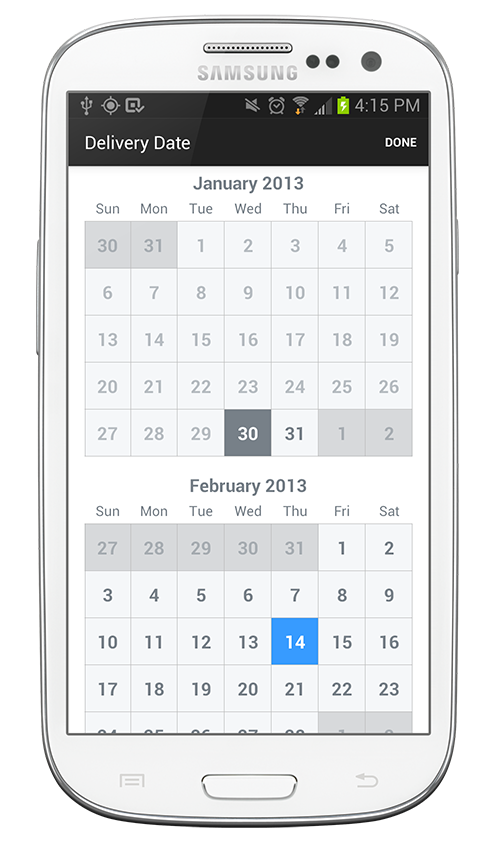
Include CalendarPickerView in your layout XML.
<com.squareup.timessquare.CalendarPickerView
    android:id="@+id/calendar_view"
    android:layout_width="match_parent"
    android:layout_height="match_parent"
    />
This is a fairly large control so it is wise to give it ample space in your layout. On small devices it is recommended to use a dialog, full-screen fragment, or dedicated activity. On larger devices like tablets, displaying full-screen is not recommended. A fragment occupying part of the layout or a dialog is a better choice.
In the onCreate of your activity/dialog or the onCreateView of your fragment, initialize the
view with a range of valid dates as well as the currently selected date.
Calendar nextYear = Calendar.getInstance();
nextYear.add(Calendar.YEAR, 1);

CalendarPickerView calendar = (CalendarPickerView) findViewById(R.id.calendar_view);
Date today = new Date();
calendar.init(today, nextYear.getTime())
    .withSelectedDate(today);
The default mode of the view is to have one selectable date. If you want the user to be able to select multiple dates or a date range, use the inMode() method:
calendar.init(today, nextYear.getTime())
    .inMode(RANGE);
The latest version can be downloaded in zip and referenced by your application as a library project.
You can also depend on the library through Maven:
<dependency>
  <groupId>com.squareup</groupId>
  <artifactId>android-times-square</artifactId>
  <version>1.6.5</version>
  <type>apklib</type>
</dependency>
or Gradle:
compile 'com.squareup:android-times-square:1.6.5@aar'
Snapshots of the development version are available in Sonatype's snapshots repository.
Copyright 2012 Square, Inc.

Licensed under the Apache License, Version 2.0 (the "License");
you may not use this file except in compliance with the License.
You may obtain a copy of the License at

   http://www.apache.org/licenses/LICENSE-2.0

Unless required by applicable law or agreed to in writing, software
distributed under the License is distributed on an "AS IS" BASIS,
WITHOUT WARRANTIES OR CONDITIONS OF ANY KIND, either express or implied.
See the License for the specific language governing permissions and
limitations under the License.
Overall
Maintained
Code review
Latest release
Releases this year
156 followers · starred Jan 2013
315 followers · starred Aug 2014
340 followers · starred Jul 2017
232 followers · starred Mar 2014
Standalone Android widget for picking a single date from a calendar view.
Java
4,402
250 commits
updated May 28, 2023
Standalone Android widget for picking a single date from a calendar view.
Include CalendarPickerView in your layout XML.
<com.squareup.timessquare.CalendarPickerView
    android:id="@+id/calendar_view"
    android:layout_width="match_parent"
    android:layout_height="match_parent"
    />
This is a fairly large control so it is wise to give it ample space in your layout. On small devices it is recommended to use a dialog, full-screen fragment, or dedicated activity. On larger devices like tablets, displaying full-screen is not recommended. A fragment occupying part of the layout or a dialog is a better choice.
In the onCreate of your activity/dialog or the onCreateView of your fragment, initialize the
view with a range of valid dates as well as the currently selected date.
Calendar nextYear = Calendar.getInstance();
nextYear.add(Calendar.YEAR, 1);

CalendarPickerView calendar = (CalendarPickerView) findViewById(R.id.calendar_view);
Date today = new Date();
calendar.init(today, nextYear.getTime())
    .withSelectedDate(today);
The default mode of the view is to have one selectable date. If you want the user to be able to select multiple dates or a date range, use the inMode() method:
calendar.init(today, nextYear.getTime())
    .inMode(RANGE);
The latest version can be downloaded in zip and referenced by your application as a library project.
You can also depend on the library through Maven:
<dependency>
  <groupId>com.squareup</groupId>
  <artifactId>android-times-square</artifactId>
  <version>1.6.5</version>
  <type>apklib</type>
</dependency>
or Gradle:
compile 'com.squareup:android-times-square:1.6.5@aar'
Snapshots of the development version are available in Sonatype's snapshots repository.
Copyright 2012 Square, Inc.

Licensed under the Apache License, Version 2.0 (the "License");
you may not use this file except in compliance with the License.
You may obtain a copy of the License at

   http://www.apache.org/licenses/LICENSE-2.0

Unless required by applicable law or agreed to in writing, software
distributed under the License is distributed on an "AS IS" BASIS,
WITHOUT WARRANTIES OR CONDITIONS OF ANY KIND, either express or implied.
See the License for the specific language governing permissions and
limitations under the License.
Overall
Maintained
Code review
Latest release
Releases this year
156 followers · starred Jan 2013
315 followers · starred Aug 2014
340 followers · starred Jul 2017
232 followers · starred Mar 2014