Files and instructions for manufacturing NP1.0, NP2.0alpha, and NP2.0 Neuropixels chronic recording fixtures.
31
86 commits
updated Jul 31, 2026
Please check out our preprint for more details on the approach!
Design files and instructions for manufacturing NP1.0, NP2.0alpha, and NP2.0 Neuropixels chronic recording enclosures.
Please reach out to us if you want to try this approach, we need your input. We are actively working on the instructions.
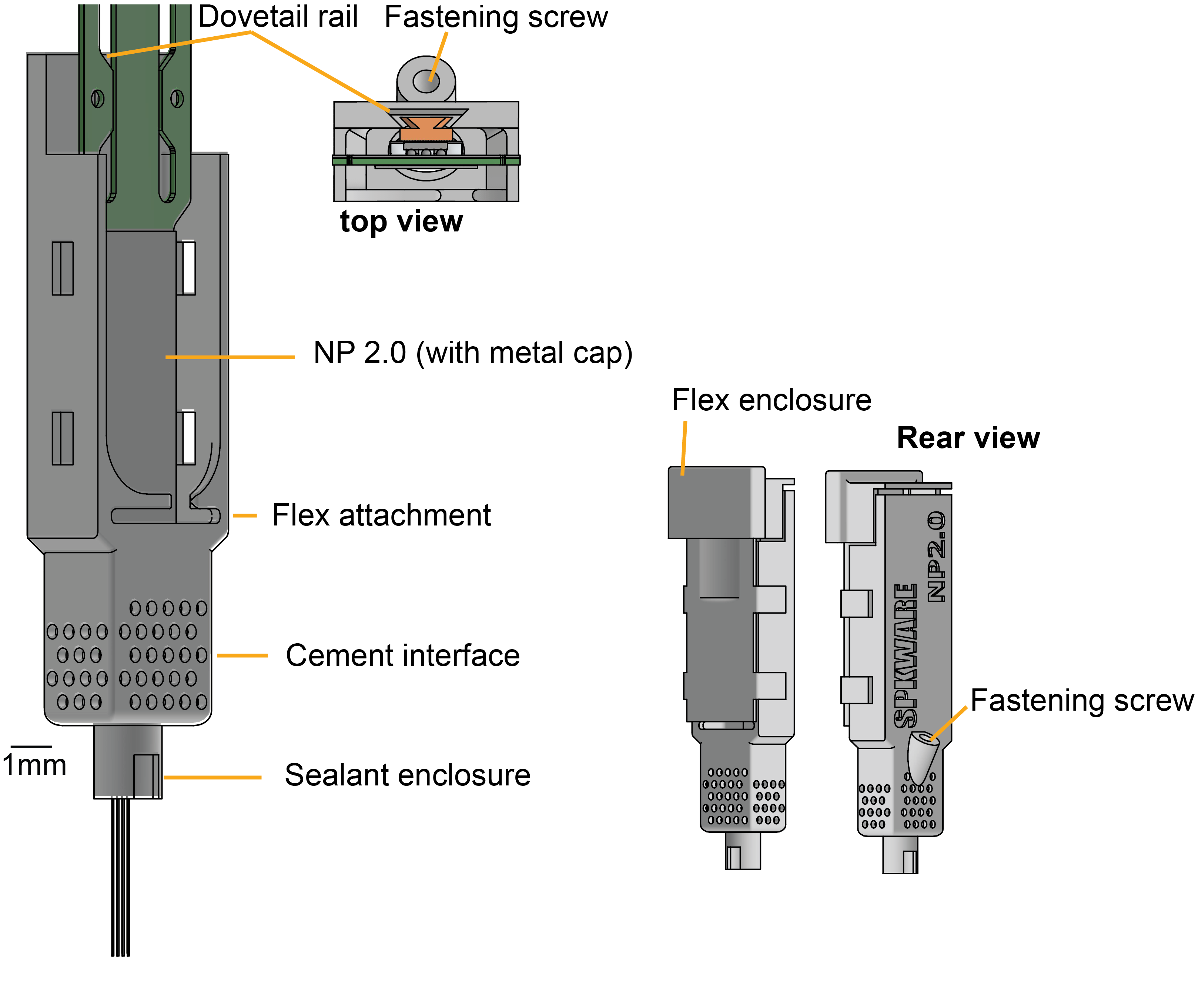
These probe enclosures use the dovetail to secure the probes, the design is at the current limit of the printing resolution of the SLA technology and for that reason, it is sensitive to the material, and to the washing and curing steps. After printing, the screw hole has to be tapped using a standard 1mm thread tapper.
The NP1.0 holder weights 1.2g, the NP2.0 holder weights 0.57g. All weights include the respective probe, chassis and cap, but no headstage.
The following lab tools and supplies are required:
| Name | Usage | Vendor |
|---|---|---|
| Solder station | Solder wire to probes (if using external ground) | any |
| Fine tipped forceps | Handling probes | any (example here) |
| Small phillips screwdriver (M1) | Secure probe in holder | any |
| Tap wrench | Tap the plastic holder | any |
| M1 tap | Tap the plastic holder | any |
| Allen wrench | secure holder to stereotax | any |
| Stoelting surgical stereotax | stereotaxic surgery | Stoelting (we will soon make stereotax arm attachments for other manufactures) |
| Standard rodent surgical toolset | rodent surgery | any |
| Narshige grinder (optional, but recommended) | probe sharpening | Narshige |
| (Optional) Metal cap holder | Hold the probes for cleaning | IMEC (There are different versions for the 1.0 and 2.0 probes, get the correct one for the probes you have) |
| (Optional) Thorlabs breadboard, posts and rotating post clamps | Hold probes for washing. (It can be nice to use Thorlabs parts to build a dedicated washing setup to keep surgical rigs unoccupied, but you can also just use your stereotax) | Thorlabs |
The following parts are required, not including the 3D printed parts.
| Name | Usage | Vendor |
|---|---|---|
| Neuropixels probe (1.0/2.0alpha/2.0) with metal cap | record neural activity | IMEC |
| Putty | Temporarily store assembled holders | any |
| M1x4 (NP2) or M1x5 (NP1) phillips head screw | secure probe to holder | any |
| Bolt (M2, allen key) | stereotax holder, 1x per stereotax arm you plan to use | Amazon |
| Nut (M2) | stereotax holder, 1x per stereotax arm you plan to use | Amazon |
| Fine grit sandpaper (>1000) | Sanding down support attachment points | any |
| (Optional) Kapton tape | secure probe and silver wire for soldering | ULine |
| Kwik Sil | cover probes and craniotomy during surgery | WPI |
| Silver Epoxy | coat grounding wire and ground screw | MG Chemicals 8331D Silver Conductive Epoxy |
| Bare silver wire, 0.010 in diameter | grounding, if external grounding is desired | AM Sytems (Cat. no 782500) |
There are 7 total steps to using this design for your experiments:
You may have to adjust the tolerances depending on the printing and washing protocol you use, we provide scripts - iLogic - to do this programatically from Autodesk Inventor 2025 - unfortunately backwards compatibility is not supported. You can get an academic license for Inventor if you work in an academic institution at zero cost.
Do not implant probes without testing the tolerances. We tipically print an array of differenet tolerance values to find out the one that fits best, then use that tolerance for all holders.
| name | usage | vendor | cost estimate |
|---|---|---|---|
| Form 3+ | SLA printer | Formlabs | around 3k (2023) |
| Form Wash | wash parts | Formlabs | around 650 (2023) |
| Form Cure | cure parts | Formlabs | around 750 (2023) |
| Resin tank | 3d printer tank (needs to be replaced from time to time) | Formlabs | around 150 (2023) |
| Grey Pro resin | resin to print the holders (needs to be replaced from time to time) | Formlabs | around 200 (2023) |
| Isopropyl 99% | wash parts | multiple vendors | 150 per gallon |
Read the printer instructions for tricks on how to print, wash and cure. Washing times depend on how clean the isopropyl is and strongly affect the tolerances.
We used a FormLabs Form 3+ printer and GreyPro resin to develop these protocols, please let us know if you use another printer or resin. Clear, and Rigid 10k, will NOT work (too brittle). Black V2 also worked in our hands but was not as good. Check #2 for an alternative material using a commercial vendor ( thanks @wangxuanyu0419 ).
Each version NP1.0, NP2.0 and NP2.0alpha has a folder in the repository. Print using the files in the stl_exports folder and using PreForm .
Under the Releases Page we have provided PreForm files with these support structures already defined. We highly recommend printing from these files if you can. Just adjust the numbers of each part as needed, but keep the support structures. However, if you need to adjust the designs and print your own, we provide instructions below.
Tested on PreForm 3.32.0. Layer tickness 0.050mm with GreyPro resin.
Printing should take <7 h depending on how many parts are being printed. After printing, wash for 15-20 min depending on how clean is the isopropyl is, and let dry for at least 4 h (avoid sun light). If the parts feel "sticky" after this drying period, wash for 2 additional minutes. Cure the parts in Form Cure with the default settings for Grey Pro.
Once the plastic parts are printed, a few key steps need to be taken to prepare them for use.
When setting up the stereotax holder attachment, remove the screw from the end of the Stoelting stereotax arm. Attach the base stereotax arm part (stereotax_holder_part_1) with this same screw. Then attach stereotax_holder_part_2 to part 1 with an M2 nut/bolt. The M2 bolt is loosened and tightened in order to secure and release the chassis during implantation.
Sharpen the probes, this reduces resistance when inserting and on mice is often sufficient to puncture the dura, meaning a durotomy is not needed. To sharpen, we use a Narshige grinder set to 70 and sharpen for 5 minutes. Be sure to sharpen the side that does not have the contacts.
Soldering. We have found that it works best to solder the ground and reference together for each probe and then connect these all to one ground screw. The ground screw should not be next to any muscles to minimize artifacts. We have tried using internal reference (where no ground screw is used and instead the tip of the probe is ground) and recordings were lower quality. We recommend using a ground screw. After wrapping the silver wire around the ground screw, we cover it with silver epoxy to ensure solid conduction.
The design uses the "metal cap" (aka dovetail) to guide and secure the probe (through a screw in the rear of the holder). To use this implant design, we recommend you order the probes denoted "with metal cap" on the IMEC website. If you already have probes without the metal cap and want to use this design, you can have the metal dovetail machined yourself and then glue it to the probe. We will provide the design files for that part and instructions on how to glue it soon.
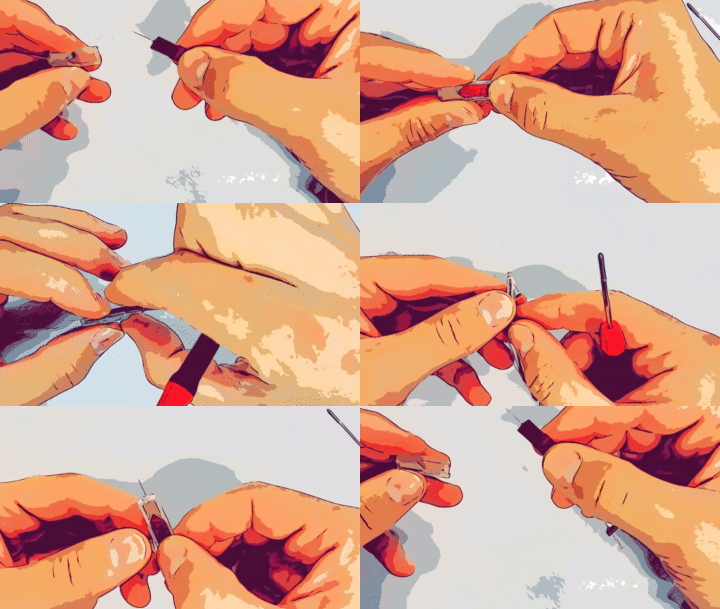
To mount probes, insert the probe with the shank first throught the dovetail, drive it all the way with the help of forceps.
Critical:
To "recover" do the oposite:
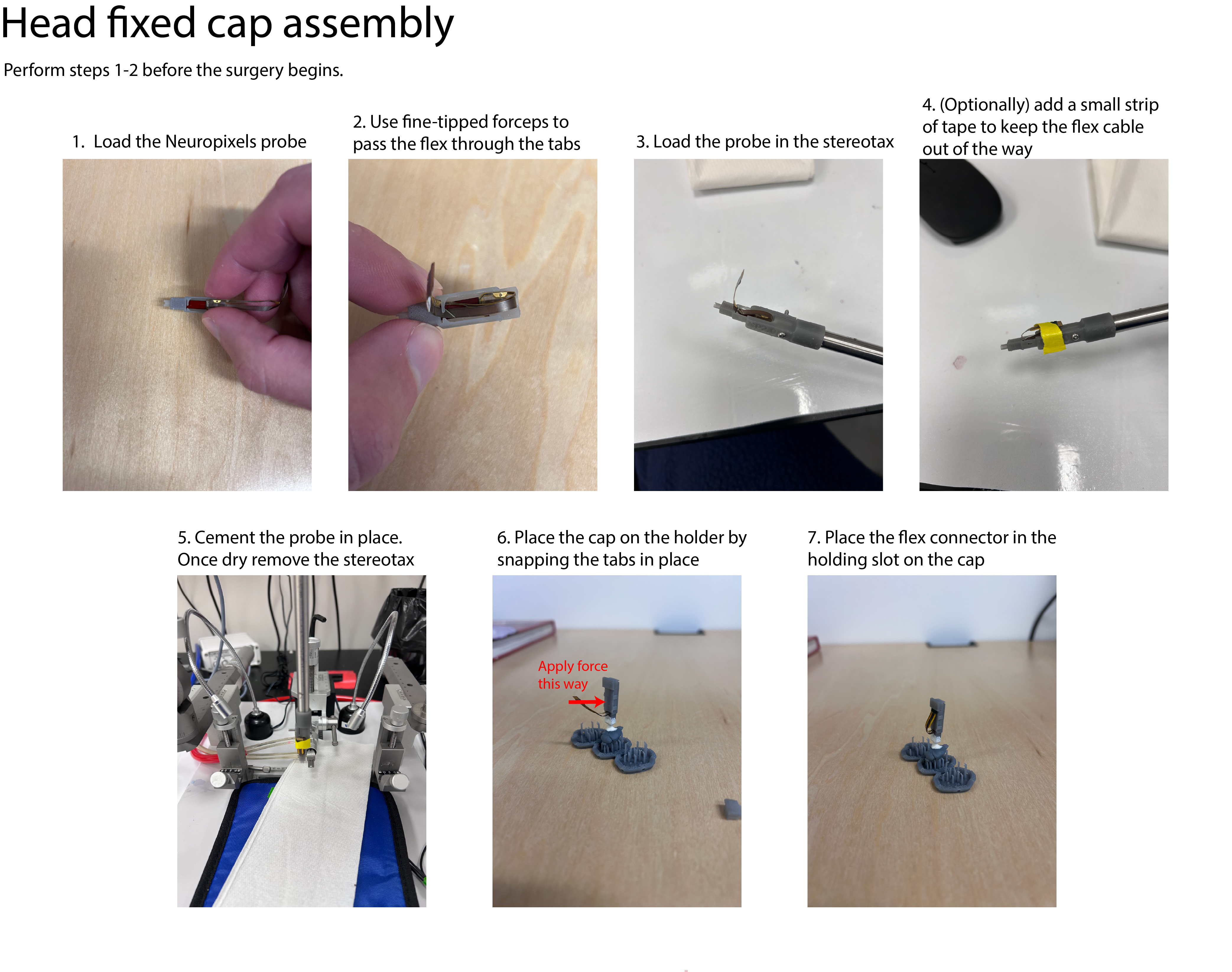
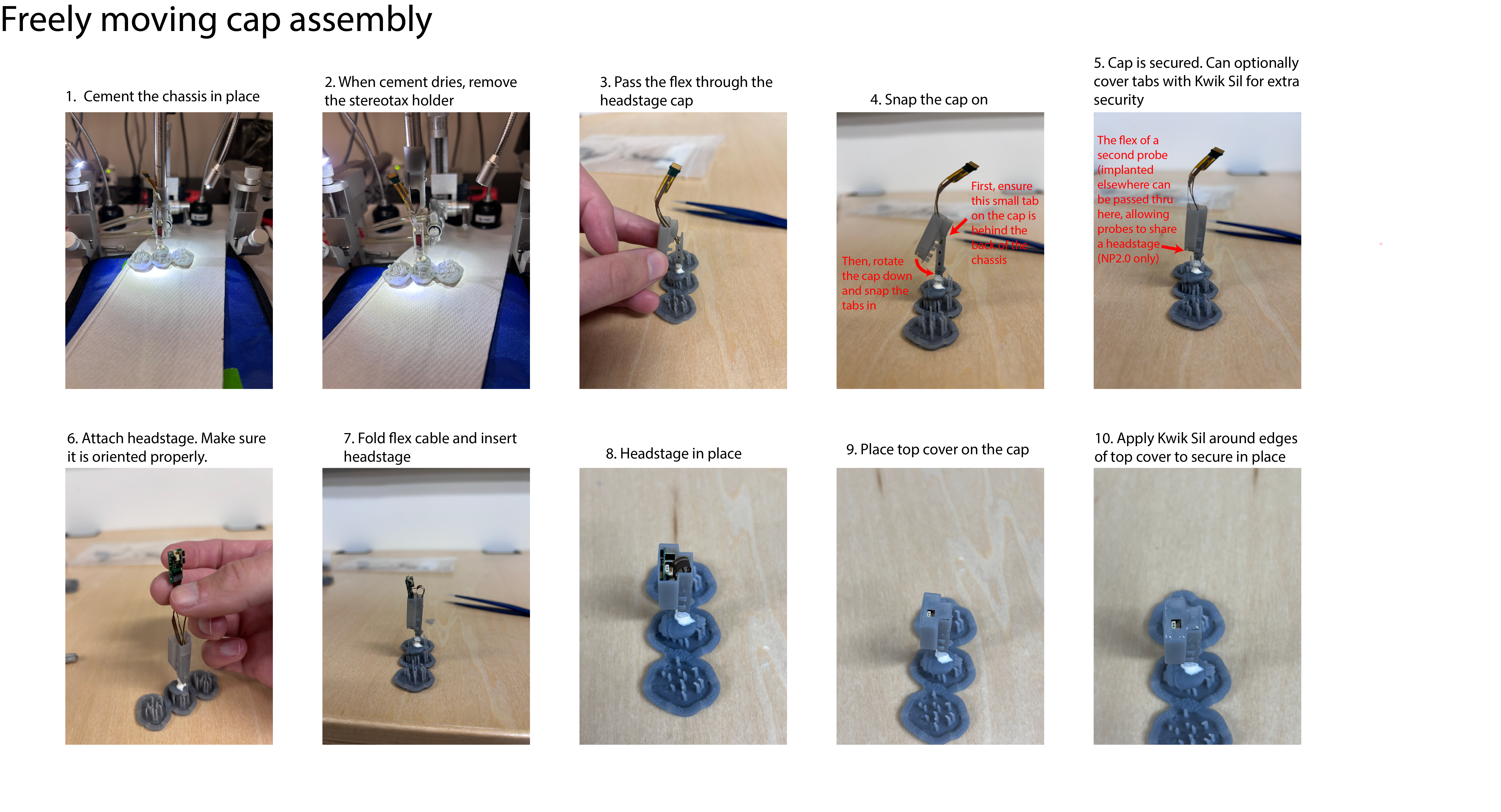
The indie can be used for both freely moving and head-fixed experiments. We have designed two different caps to facilitate this.
Both caps should be applied after the surgery is complete. We recommend removing the animal from the stereotax and then putting the caps on. Instructions for assembling both caps are shown below.
These designs are not intended for commercial use or distribution.
Please reach out for feedback. Max Melin ([email protected]) and Joao Couto ([email protected])
Files and instructions for manufacturing NP1.0, NP2.0alpha, and NP2.0 Neuropixels chronic recording fixtures.
31
86 commits
updated Jul 31, 2026
Please check out our preprint for more details on the approach!
Design files and instructions for manufacturing NP1.0, NP2.0alpha, and NP2.0 Neuropixels chronic recording enclosures.
Please reach out to us if you want to try this approach, we need your input. We are actively working on the instructions.
These probe enclosures use the dovetail to secure the probes, the design is at the current limit of the printing resolution of the SLA technology and for that reason, it is sensitive to the material, and to the washing and curing steps. After printing, the screw hole has to be tapped using a standard 1mm thread tapper.
The NP1.0 holder weights 1.2g, the NP2.0 holder weights 0.57g. All weights include the respective probe, chassis and cap, but no headstage.
The following lab tools and supplies are required:
| Name | Usage | Vendor |
|---|---|---|
| Solder station | Solder wire to probes (if using external ground) | any |
| Fine tipped forceps | Handling probes | any (example here) |
| Small phillips screwdriver (M1) | Secure probe in holder | any |
| Tap wrench | Tap the plastic holder | any |
| M1 tap | Tap the plastic holder | any |
| Allen wrench | secure holder to stereotax | any |
| Stoelting surgical stereotax | stereotaxic surgery | Stoelting (we will soon make stereotax arm attachments for other manufactures) |
| Standard rodent surgical toolset | rodent surgery | any |
| Narshige grinder (optional, but recommended) | probe sharpening | Narshige |
| (Optional) Metal cap holder | Hold the probes for cleaning | IMEC (There are different versions for the 1.0 and 2.0 probes, get the correct one for the probes you have) |
| (Optional) Thorlabs breadboard, posts and rotating post clamps | Hold probes for washing. (It can be nice to use Thorlabs parts to build a dedicated washing setup to keep surgical rigs unoccupied, but you can also just use your stereotax) | Thorlabs |
The following parts are required, not including the 3D printed parts.
| Name | Usage | Vendor |
|---|---|---|
| Neuropixels probe (1.0/2.0alpha/2.0) with metal cap | record neural activity | IMEC |
| Putty | Temporarily store assembled holders | any |
| M1x4 (NP2) or M1x5 (NP1) phillips head screw | secure probe to holder | any |
| Bolt (M2, allen key) | stereotax holder, 1x per stereotax arm you plan to use | Amazon |
| Nut (M2) | stereotax holder, 1x per stereotax arm you plan to use | Amazon |
| Fine grit sandpaper (>1000) | Sanding down support attachment points | any |
| (Optional) Kapton tape | secure probe and silver wire for soldering | ULine |
| Kwik Sil | cover probes and craniotomy during surgery | WPI |
| Silver Epoxy | coat grounding wire and ground screw | MG Chemicals 8331D Silver Conductive Epoxy |
| Bare silver wire, 0.010 in diameter | grounding, if external grounding is desired | AM Sytems (Cat. no 782500) |
There are 7 total steps to using this design for your experiments:
You may have to adjust the tolerances depending on the printing and washing protocol you use, we provide scripts - iLogic - to do this programatically from Autodesk Inventor 2025 - unfortunately backwards compatibility is not supported. You can get an academic license for Inventor if you work in an academic institution at zero cost.
Do not implant probes without testing the tolerances. We tipically print an array of differenet tolerance values to find out the one that fits best, then use that tolerance for all holders.
| name | usage | vendor | cost estimate |
|---|---|---|---|
| Form 3+ | SLA printer | Formlabs | around 3k (2023) |
| Form Wash | wash parts | Formlabs | around 650 (2023) |
| Form Cure | cure parts | Formlabs | around 750 (2023) |
| Resin tank | 3d printer tank (needs to be replaced from time to time) | Formlabs | around 150 (2023) |
| Grey Pro resin | resin to print the holders (needs to be replaced from time to time) | Formlabs | around 200 (2023) |
| Isopropyl 99% | wash parts | multiple vendors | 150 per gallon |
Read the printer instructions for tricks on how to print, wash and cure. Washing times depend on how clean the isopropyl is and strongly affect the tolerances.
We used a FormLabs Form 3+ printer and GreyPro resin to develop these protocols, please let us know if you use another printer or resin. Clear, and Rigid 10k, will NOT work (too brittle). Black V2 also worked in our hands but was not as good. Check #2 for an alternative material using a commercial vendor ( thanks @wangxuanyu0419 ).
Each version NP1.0, NP2.0 and NP2.0alpha has a folder in the repository. Print using the files in the stl_exports folder and using PreForm .
Under the Releases Page we have provided PreForm files with these support structures already defined. We highly recommend printing from these files if you can. Just adjust the numbers of each part as needed, but keep the support structures. However, if you need to adjust the designs and print your own, we provide instructions below.
Tested on PreForm 3.32.0. Layer tickness 0.050mm with GreyPro resin.
Printing should take <7 h depending on how many parts are being printed. After printing, wash for 15-20 min depending on how clean is the isopropyl is, and let dry for at least 4 h (avoid sun light). If the parts feel "sticky" after this drying period, wash for 2 additional minutes. Cure the parts in Form Cure with the default settings for Grey Pro.
Once the plastic parts are printed, a few key steps need to be taken to prepare them for use.
When setting up the stereotax holder attachment, remove the screw from the end of the Stoelting stereotax arm. Attach the base stereotax arm part (stereotax_holder_part_1) with this same screw. Then attach stereotax_holder_part_2 to part 1 with an M2 nut/bolt. The M2 bolt is loosened and tightened in order to secure and release the chassis during implantation.
Sharpen the probes, this reduces resistance when inserting and on mice is often sufficient to puncture the dura, meaning a durotomy is not needed. To sharpen, we use a Narshige grinder set to 70 and sharpen for 5 minutes. Be sure to sharpen the side that does not have the contacts.
Soldering. We have found that it works best to solder the ground and reference together for each probe and then connect these all to one ground screw. The ground screw should not be next to any muscles to minimize artifacts. We have tried using internal reference (where no ground screw is used and instead the tip of the probe is ground) and recordings were lower quality. We recommend using a ground screw. After wrapping the silver wire around the ground screw, we cover it with silver epoxy to ensure solid conduction.
The design uses the "metal cap" (aka dovetail) to guide and secure the probe (through a screw in the rear of the holder). To use this implant design, we recommend you order the probes denoted "with metal cap" on the IMEC website. If you already have probes without the metal cap and want to use this design, you can have the metal dovetail machined yourself and then glue it to the probe. We will provide the design files for that part and instructions on how to glue it soon.
To mount probes, insert the probe with the shank first throught the dovetail, drive it all the way with the help of forceps.
Critical:
To "recover" do the oposite:
The indie can be used for both freely moving and head-fixed experiments. We have designed two different caps to facilitate this.
Both caps should be applied after the surgery is complete. We recommend removing the animal from the stereotax and then putting the caps on. Instructions for assembling both caps are shown below.
These designs are not intended for commercial use or distribution.
Please reach out for feedback. Max Melin ([email protected]) and Joao Couto ([email protected])



