
README
auckland-stop-display-simple
Display information the next buses due at an Auckland bus stop
A series of scripts to get the next buses due at a bus stop in Auckland, New Zealand, using the Auckland Transport API. The scripts can be run from a cron job or similar scheduler to update a display with the next buses due at a bus stop.
API setup using Auckland Transport Developer site
You will need an API key to access the Auckland Transport API. You can get one from the Auckland Transport Developer Portal.
- Create an account on the portal and log in.
- Got to the "Products" section and selection "Public Transport Dev"
- Create a subscription (the limit seems to be just one)
- You can go to the "Profile" page see see you API Key. Copy it to your clipboard.
Once you have your key, export it as an environment variable:
export AT_API_KEY="your-api-key-here"
Docs
- README.md - This file
- Design Notes - Design notes for the scripts
- Sample API Queries and Responses - Sample API queries and responses
- Sample Script runs
- Notes - Some testing command lines and the like. Maybe will add notes later on the scripts and how they work, but for now just some notes on the API and testing.
- Infodump - Some notes I copied from the docs and AI investigation of other apps.
Bash/Curl Examples for using the API
This application and the curl examples uses Auckland Transport's General Transit Feed V3 APIs (gtfs v3) to get static information. Relatime information is from their "Realtime compat" API. See the URLs paths. These were the APIs live in Sept 2026 when this was written.
See also Sample API Queries and Responses
# Export you key for later queries
export AT_API_KEY="your-api-key-here"

# Get your stop id for a bus stop from the stop code ( 8313 -> 8313-ec0c55f5 )
curl "https://api.at.govt.nz/gtfs/v3/stops" \
  -H "Ocp-Apim-Subscription-Key: $AT_API_KEY" \
  | jq '.data[] | select(.attributes.stop_code == "8313") | .attributes | {stop_code, stop_id, stop_name}'

# Get info about the stop using the stop ID ( 8313-ec0c55f5 )
curl "https://api.at.govt.nz/gtfs/v3/stops/8313-ec0c55f5" \
  -H "Ocp-Apim-Subscription-Key: $AT_API_KEY" | jq .

# Get the trips due at a bus stop in two hour window using the stop id ( 8313-ec0c55f5 )
# Note that API does not accept 0, 00 or 24 for the hour. Use 23 instead
curl 'https://api.at.govt.nz/gtfs/v3/stops/8313-ec0c55f5/stoptrips?filter\[date\]=2026-09-02&filter\[start_hour\]=16&filter\[hour_range\]=2'  -H "Ocp-Apim-Subscription-Key: $AT_API_KEY" | jq .

# Or in a more readable format
curl -G "https://api.at.govt.nz/gtfs/v3/stops/8313-ec0c55f5/stoptrips" \
  -H "Ocp-Apim-Subscription-Key: $AT_API_KEY" \
  --data-urlencode "filter[date]=$(date +%F)" \
  --data-urlencode "filter[start_hour]=$(date +%H" \
  --data-urlencode "filter[hour_range]=2" | jq .

# Get the status of two trips using the trip id
# Note a query for a trip not yet running will return a empty result, so you may need to query for a trip that is currently running or has already run
curl -G "https://api.at.govt.nz/realtime/legacy/tripupdates?tripid=24-02403-56100-2-0705c91b,24-02403-59700-2-916eceb7" -H "Ocp-Apim-Subscription-Key: $AT_API_KEY" | jq .
Scripts
- stop-id.py - Get the stop_id for a bus stop from the stop code ( 8313 -> 8313-ec0c55f5 )
- get-stop-trips.py - Get the next buses due at a bus stop using the stop_id
- display-info.py - Display the approaching bus information in a simple format
- pico7s/tell-pico.py - Filter the display CSV and send the next three times to a Pico
See Pico 7-segment display setup for host and MicroPython setup instructions.
TLDR
# Export your key for later queries
export AT_API_KEY="your-api-key-here"
# Get the stop id for a bus stop from the stop code ( 8313 -> 8313-ec0c55f5 )
python3 stop-id.py 8313
# Get the next buses due at a bus stop using the stop_id
python3 get-stop-trips.py 8313-ec0c55f5 --output trips.txt
# Display the approaching bus information in a simple format
python3 display-info.py --input trips.txt --pretty
stop-id.py
This script converts a public Auckland Transport stop code into the full stop ID used by the API. Should be only need to be run ocassionally, as the stop ID is static for a given stop code.
Example usage:
export AT_API_KEY="your-api-key-here"
python3 stop-id.py 8313
This resolves the Sandringham Road example stop code to:
8313-ec0c55f5
This is useful because the AT API uses the longer stop_id value for timetable and realtime lookups, while the public stop sign on the street shows only the shorter stop code.
get-stop-trips.py
This script fetches the upcoming stop trips for a stop ID and prints the next departures in a compact format by default. Should run every 30 minutes or so.
Example usage:
export AT_API_KEY="your-api-key-here"
python3 get-stop-trips.py 8313-ec0c55f5
This returns the next trips in a simple CSV-like format using the trip ID, shortened route ID, arrival time, and stop sequence:
# stop_id=8313-ec0c55f5
# stop_name=Edendale Reserve
24-02403-74400-2-fb29cf95,24B,21:01:03,26
1279-02401-75480-2-cc67cdfd,1279,21:16:00,22
The output also includes the stop ID and stop name as metadata so display-info.py can apply a stop-specific
realtime delay only when the feed is reporting that same stop. The display stage reads this file
and writes display.csv with route_id,time,minutes,stops_away. With --pretty, the display header
includes the short stop ID and stop name. stops_away is calculated separately for each trip from
its requested stop sequence and the realtime next-stop sequence. It is blank when realtime sequence
data is unavailable.
The display stage checks trips scheduled from 15 minutes ago through 45 minutes ahead. Realtime delays are signed seconds: a negative delay moves the estimated arrival earlier than scheduled.
If you want the full AT API JSON payload instead, use the --json flag:
python3 get-stop-trips.py 8313-ec0c55f5 --json
You can also write the output to a file:
python3 get-stop-trips.py 8313-ec0c55f5 --output trips.txt
python3 get-stop-trips.py 8313-ec0c55f5 --json --output trips.json
This is useful when you want a compact list for downstream display scripts, while still being able to inspect the complete stop trip metadata when needed.
display-info.py
This script reads the trip list produced by get-stop-trips.py, applies realtime trip delays when AT_API_KEY is set, and produces the next departures in a display-friendly format. It keeps trip and delay state in a SQLite database so repeated runs can update the display without losing the last known delay.
For a normal run, invoke these commands as often as needed from a scheduler or shell:
export AT_API_KEY="your-api-key-here"
python3 get-stop-trips.py 8313-ec0c55f5 --output trips.txt
python3 display-info.py
The default output is written to display.csv and is also printed to standard output:
route_id,time,minutes,stops_away
24B,21:01,12,
1279,21:16,27,
The default files are trips.txt, display-info.db, and display.csv. Use the options below when running more than one stop or when using different file locations:
python3 display-info.py \
  --input temp/trips-sandringham.txt \
  --database temp/display-info-sandringham.db \
  --output temp/display-sandringham.csv
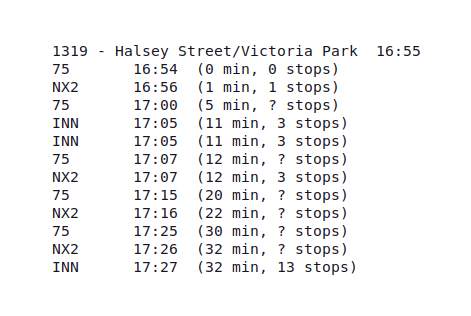
For a human-readable board printed to the terminal, use --pretty. This does not write the CSV output file:
python3 display-info.py --input trips.txt --pretty
Use --once when the input file should be checked in full, such as for a one-off test. Without it, only trips scheduled from 15 minutes ago through 45 minutes ahead are checked:
python3 display-info.py --input trips.txt --once --pretty
The trip file normally includes the stop ID and stop name as metadata, so the script can identify the requested stop and show it in pretty output. These can also be supplied explicitly:
python3 display-info.py --stop-id 8313-ec0c55f5 --stop-name "Edendale Reserve" --pretty
Add --debug to print candidate selection, realtime requests, delay calculations, and display decisions to standard error. Realtime requests are skipped when AT_API_KEY is not set; the script then uses delays already stored in its database.
Todo
- Fix up the outputs for scripts, some going to both stdout and files
- Add the output to a small display device (Raspberry Pi Pico or similar) for a bus stop display
- do some sample outputs in the docs folder for the scripts, maybe a few sample runs with the output files and pretty output
- create and publish container (with cron etc) so it can be run easily ( with some instructions )
Links
Auckland Transport
Other Projects
- Auckland Transport Card - Uptodate and helped me (and AI) figure out the flow of the AT API
- Auckland Live LED Train Map
- A simplified interface for the Auckland Transport API - Probably out of date
- bus-stop-display - Also using old API, outputs to small hardware display via Arduino
Contributors

27 commits
See what people are saying
Similar repos


Languages
Python
100.0%
README
auckland-stop-display-simple
Display information the next buses due at an Auckland bus stop
A series of scripts to get the next buses due at a bus stop in Auckland, New Zealand, using the Auckland Transport API. The scripts can be run from a cron job or similar scheduler to update a display with the next buses due at a bus stop.
API setup using Auckland Transport Developer site
You will need an API key to access the Auckland Transport API. You can get one from the Auckland Transport Developer Portal.
- Create an account on the portal and log in.
- Got to the "Products" section and selection "Public Transport Dev"
- Create a subscription (the limit seems to be just one)
- You can go to the "Profile" page see see you API Key. Copy it to your clipboard.
Once you have your key, export it as an environment variable:
export AT_API_KEY="your-api-key-here"
Docs
- README.md - This file
- Design Notes - Design notes for the scripts
- Sample API Queries and Responses - Sample API queries and responses
- Sample Script runs
- Notes - Some testing command lines and the like. Maybe will add notes later on the scripts and how they work, but for now just some notes on the API and testing.
- Infodump - Some notes I copied from the docs and AI investigation of other apps.
Bash/Curl Examples for using the API
This application and the curl examples uses Auckland Transport's General Transit Feed V3 APIs (gtfs v3) to get static information. Relatime information is from their "Realtime compat" API. See the URLs paths. These were the APIs live in Sept 2026 when this was written.
See also Sample API Queries and Responses
# Export you key for later queries
export AT_API_KEY="your-api-key-here"

# Get your stop id for a bus stop from the stop code ( 8313 -> 8313-ec0c55f5 )
curl "https://api.at.govt.nz/gtfs/v3/stops" \
  -H "Ocp-Apim-Subscription-Key: $AT_API_KEY" \
  | jq '.data[] | select(.attributes.stop_code == "8313") | .attributes | {stop_code, stop_id, stop_name}'

# Get info about the stop using the stop ID ( 8313-ec0c55f5 )
curl "https://api.at.govt.nz/gtfs/v3/stops/8313-ec0c55f5" \
  -H "Ocp-Apim-Subscription-Key: $AT_API_KEY" | jq .

# Get the trips due at a bus stop in two hour window using the stop id ( 8313-ec0c55f5 )
# Note that API does not accept 0, 00 or 24 for the hour. Use 23 instead
curl 'https://api.at.govt.nz/gtfs/v3/stops/8313-ec0c55f5/stoptrips?filter\[date\]=2026-09-02&filter\[start_hour\]=16&filter\[hour_range\]=2'  -H "Ocp-Apim-Subscription-Key: $AT_API_KEY" | jq .

# Or in a more readable format
curl -G "https://api.at.govt.nz/gtfs/v3/stops/8313-ec0c55f5/stoptrips" \
  -H "Ocp-Apim-Subscription-Key: $AT_API_KEY" \
  --data-urlencode "filter[date]=$(date +%F)" \
  --data-urlencode "filter[start_hour]=$(date +%H" \
  --data-urlencode "filter[hour_range]=2" | jq .

# Get the status of two trips using the trip id
# Note a query for a trip not yet running will return a empty result, so you may need to query for a trip that is currently running or has already run
curl -G "https://api.at.govt.nz/realtime/legacy/tripupdates?tripid=24-02403-56100-2-0705c91b,24-02403-59700-2-916eceb7" -H "Ocp-Apim-Subscription-Key: $AT_API_KEY" | jq .
Scripts
- stop-id.py - Get the stop_id for a bus stop from the stop code ( 8313 -> 8313-ec0c55f5 )
- get-stop-trips.py - Get the next buses due at a bus stop using the stop_id
- display-info.py - Display the approaching bus information in a simple format
- pico7s/tell-pico.py - Filter the display CSV and send the next three times to a Pico
See Pico 7-segment display setup for host and MicroPython setup instructions.
TLDR
# Export your key for later queries
export AT_API_KEY="your-api-key-here"
# Get the stop id for a bus stop from the stop code ( 8313 -> 8313-ec0c55f5 )
python3 stop-id.py 8313
# Get the next buses due at a bus stop using the stop_id
python3 get-stop-trips.py 8313-ec0c55f5 --output trips.txt
# Display the approaching bus information in a simple format
python3 display-info.py --input trips.txt --pretty
stop-id.py
This script converts a public Auckland Transport stop code into the full stop ID used by the API. Should be only need to be run ocassionally, as the stop ID is static for a given stop code.
Example usage:
export AT_API_KEY="your-api-key-here"
python3 stop-id.py 8313
This resolves the Sandringham Road example stop code to:
8313-ec0c55f5
This is useful because the AT API uses the longer stop_id value for timetable and realtime lookups, while the public stop sign on the street shows only the shorter stop code.
get-stop-trips.py
This script fetches the upcoming stop trips for a stop ID and prints the next departures in a compact format by default. Should run every 30 minutes or so.
Example usage:
export AT_API_KEY="your-api-key-here"
python3 get-stop-trips.py 8313-ec0c55f5
This returns the next trips in a simple CSV-like format using the trip ID, shortened route ID, arrival time, and stop sequence:
# stop_id=8313-ec0c55f5
# stop_name=Edendale Reserve
24-02403-74400-2-fb29cf95,24B,21:01:03,26
1279-02401-75480-2-cc67cdfd,1279,21:16:00,22
The output also includes the stop ID and stop name as metadata so display-info.py can apply a stop-specific
realtime delay only when the feed is reporting that same stop. The display stage reads this file
and writes display.csv with route_id,time,minutes,stops_away. With --pretty, the display header
includes the short stop ID and stop name. stops_away is calculated separately for each trip from
its requested stop sequence and the realtime next-stop sequence. It is blank when realtime sequence
data is unavailable.
The display stage checks trips scheduled from 15 minutes ago through 45 minutes ahead. Realtime delays are signed seconds: a negative delay moves the estimated arrival earlier than scheduled.
If you want the full AT API JSON payload instead, use the --json flag:
python3 get-stop-trips.py 8313-ec0c55f5 --json
You can also write the output to a file:
python3 get-stop-trips.py 8313-ec0c55f5 --output trips.txt
python3 get-stop-trips.py 8313-ec0c55f5 --json --output trips.json
This is useful when you want a compact list for downstream display scripts, while still being able to inspect the complete stop trip metadata when needed.
display-info.py
This script reads the trip list produced by get-stop-trips.py, applies realtime trip delays when AT_API_KEY is set, and produces the next departures in a display-friendly format. It keeps trip and delay state in a SQLite database so repeated runs can update the display without losing the last known delay.
For a normal run, invoke these commands as often as needed from a scheduler or shell:
export AT_API_KEY="your-api-key-here"
python3 get-stop-trips.py 8313-ec0c55f5 --output trips.txt
python3 display-info.py
The default output is written to display.csv and is also printed to standard output:
route_id,time,minutes,stops_away
24B,21:01,12,
1279,21:16,27,
The default files are trips.txt, display-info.db, and display.csv. Use the options below when running more than one stop or when using different file locations:
python3 display-info.py \
  --input temp/trips-sandringham.txt \
  --database temp/display-info-sandringham.db \
  --output temp/display-sandringham.csv
For a human-readable board printed to the terminal, use --pretty. This does not write the CSV output file:
python3 display-info.py --input trips.txt --pretty
Use --once when the input file should be checked in full, such as for a one-off test. Without it, only trips scheduled from 15 minutes ago through 45 minutes ahead are checked:
python3 display-info.py --input trips.txt --once --pretty
The trip file normally includes the stop ID and stop name as metadata, so the script can identify the requested stop and show it in pretty output. These can also be supplied explicitly:
python3 display-info.py --stop-id 8313-ec0c55f5 --stop-name "Edendale Reserve" --pretty
Add --debug to print candidate selection, realtime requests, delay calculations, and display decisions to standard error. Realtime requests are skipped when AT_API_KEY is not set; the script then uses delays already stored in its database.
Todo
- Fix up the outputs for scripts, some going to both stdout and files
- Add the output to a small display device (Raspberry Pi Pico or similar) for a bus stop display
- do some sample outputs in the docs folder for the scripts, maybe a few sample runs with the output files and pretty output
- create and publish container (with cron etc) so it can be run easily ( with some instructions )
Links
Auckland Transport
Other Projects
- Auckland Transport Card - Uptodate and helped me (and AI) figure out the flow of the AT API
- Auckland Live LED Train Map
- A simplified interface for the Auckland Transport API - Probably out of date
- bus-stop-display - Also using old API, outputs to small hardware display via Arduino
See what people are saying
Similar repos
Contributors
27 commits
Languages
Python
100.0%