
See what people are saying
README
Araqlo
A spider that lives on your spreadsheet.

Araqlo is a small animated Windows companion for Microsoft Excel that notices potentially important spreadsheet problems and physically moves to the relevant cell.
It walks across your worksheet, outlines the cell it is concerned about, and tells you in a short bubble what looks wrong and how you might fix it. You keep working in Excel as normal; the spider floats on top and every click passes straight through it.
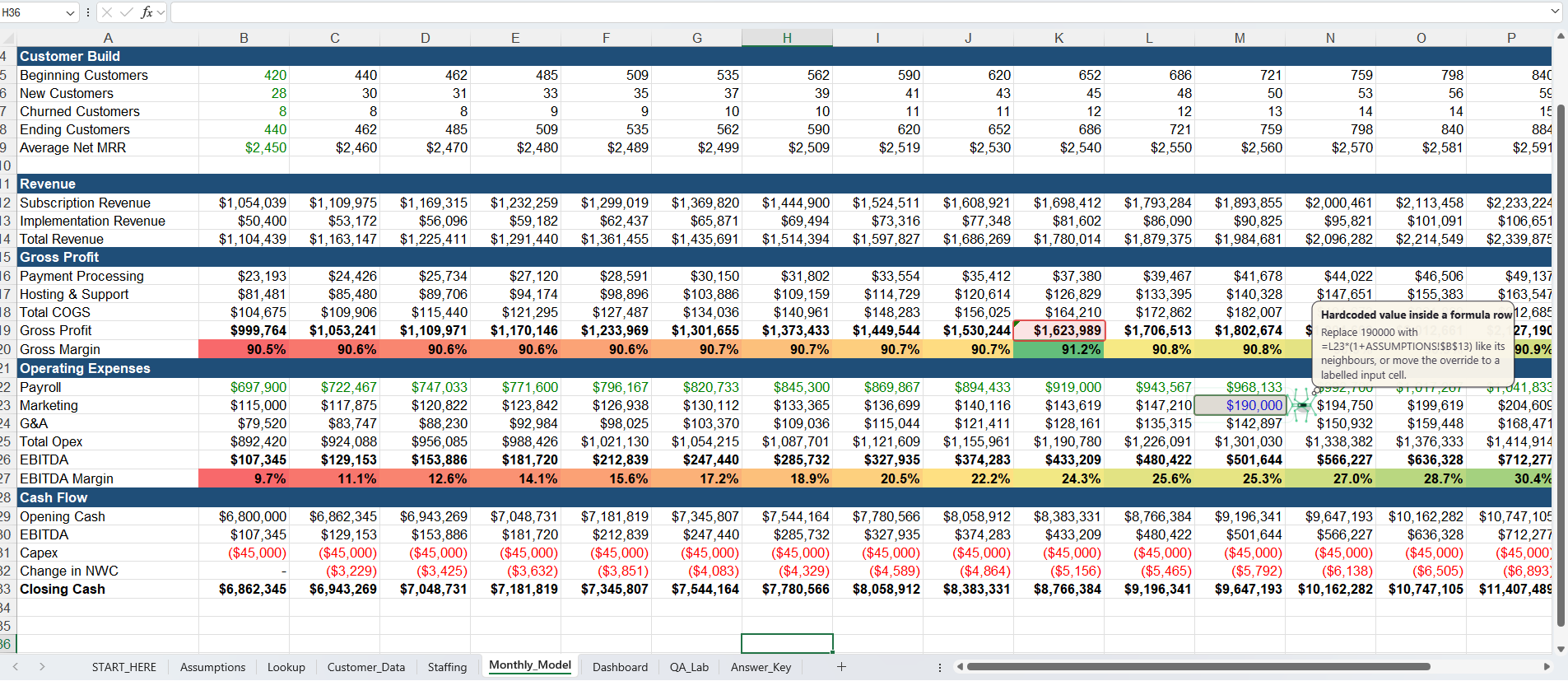
Araqlo on a sample workbook: it has outlined cells that look wrong and the spider is explaining a hardcoded value inside a formula row, with a suggested fix.
Download Araqlo for Windows
Get Araqlo-Setup-0.1.0.exe (installer) or Araqlo-0.1.0-win64.zip (portable) from the latest release.
Windows may warn you. Version 0.1 is not yet code-signed, so Windows SmartScreen can show "Windows protected your PC". Click More info → Run anyway if you are happy to proceed. Only download Araqlo from this page.
What it notices
- Formula-pattern breaks - one formula in a row or column that stops following the pattern of its neighbours
- Hardcodes inside formula regions - a typed number where the surrounding cells are formulas
- Excel errors -
#REF!,#DIV/0!,#NAME?and friends - Numerical outliers - a value far from the rest of its row or column
- Unusual jumps - a sudden change in a time series
- Unexpected gaps - a blank in the middle of a filled block
Each finding comes with a short explanation and a suggested fix. The suggestions are automatic hints, not guaranteed corrections, and Araqlo can miss things or flag things that are fine.
Good to know
| Works on | Windows 10 / 11 (64-bit) with desktop Microsoft Excel |
| Not supported yet | Mac, Excel for the web |
| Account | None needed |
| Your data | Processed locally on your computer. Version 0.1 has no telemetry and no network functionality |
| Your workbooks | Read-only: Araqlo never edits, saves, scrolls or formats them |
| Status | Early prototype (v0.1), tested on a limited set of machines |
Using it
- Install and start Araqlo (a small spider icon appears in the system tray).
- Open a workbook in Excel. If it opens in Protected View, click Enable Editing (Araqlo cannot see Protected View windows).
- Click on the Excel window and the spider appears over your sheet. It looks at the cells currently on screen.
On the spider: drag it to have it check findings near where you drop it; right-click it to ignore a finding, highlight everything at once, or change its colour theme, size, chattiness and sensitivity. Ctrl+Alt+S hides/shows it and Ctrl+Alt+H highlights all findings.
Documents
Feedback
Please open an issue for bugs or ideas. If something goes wrong, the tray menu has Open log folder; the log can contain cell addresses and short snippets of formulas, so look it over before attaching it.
Araqlo is proprietary freeware. Copyright (c) 2026 Samuel Lee. All rights reserved.
Similar repos


See what people are saying
README
Araqlo
A spider that lives on your spreadsheet.
Araqlo is a small animated Windows companion for Microsoft Excel that notices potentially important spreadsheet problems and physically moves to the relevant cell.
It walks across your worksheet, outlines the cell it is concerned about, and tells you in a short bubble what looks wrong and how you might fix it. You keep working in Excel as normal; the spider floats on top and every click passes straight through it.
Araqlo on a sample workbook: it has outlined cells that look wrong and the spider is explaining a hardcoded value inside a formula row, with a suggested fix.
Download Araqlo for Windows
Get Araqlo-Setup-0.1.0.exe (installer) or Araqlo-0.1.0-win64.zip (portable) from the latest release.
Windows may warn you. Version 0.1 is not yet code-signed, so Windows SmartScreen can show "Windows protected your PC". Click More info → Run anyway if you are happy to proceed. Only download Araqlo from this page.
What it notices
- Formula-pattern breaks - one formula in a row or column that stops following the pattern of its neighbours
- Hardcodes inside formula regions - a typed number where the surrounding cells are formulas
- Excel errors -
#REF!,#DIV/0!,#NAME?and friends - Numerical outliers - a value far from the rest of its row or column
- Unusual jumps - a sudden change in a time series
- Unexpected gaps - a blank in the middle of a filled block
Each finding comes with a short explanation and a suggested fix. The suggestions are automatic hints, not guaranteed corrections, and Araqlo can miss things or flag things that are fine.
Good to know
| Works on | Windows 10 / 11 (64-bit) with desktop Microsoft Excel |
| Not supported yet | Mac, Excel for the web |
| Account | None needed |
| Your data | Processed locally on your computer. Version 0.1 has no telemetry and no network functionality |
| Your workbooks | Read-only: Araqlo never edits, saves, scrolls or formats them |
| Status | Early prototype (v0.1), tested on a limited set of machines |
Using it
- Install and start Araqlo (a small spider icon appears in the system tray).
- Open a workbook in Excel. If it opens in Protected View, click Enable Editing (Araqlo cannot see Protected View windows).
- Click on the Excel window and the spider appears over your sheet. It looks at the cells currently on screen.
On the spider: drag it to have it check findings near where you drop it; right-click it to ignore a finding, highlight everything at once, or change its colour theme, size, chattiness and sensitivity. Ctrl+Alt+S hides/shows it and Ctrl+Alt+H highlights all findings.
Documents
Feedback
Please open an issue for bugs or ideas. If something goes wrong, the tray menu has Open log folder; the log can contain cell addresses and short snippets of formulas, so look it over before attaching it.
Araqlo is proprietary freeware. Copyright (c) 2026 Samuel Lee. All rights reserved.