
An implementation of OpenAI's symphony with OpenCode and Linear.
Python
17
109 commits
updated Sep 29, 2026
See what people are saying
README
Symphony
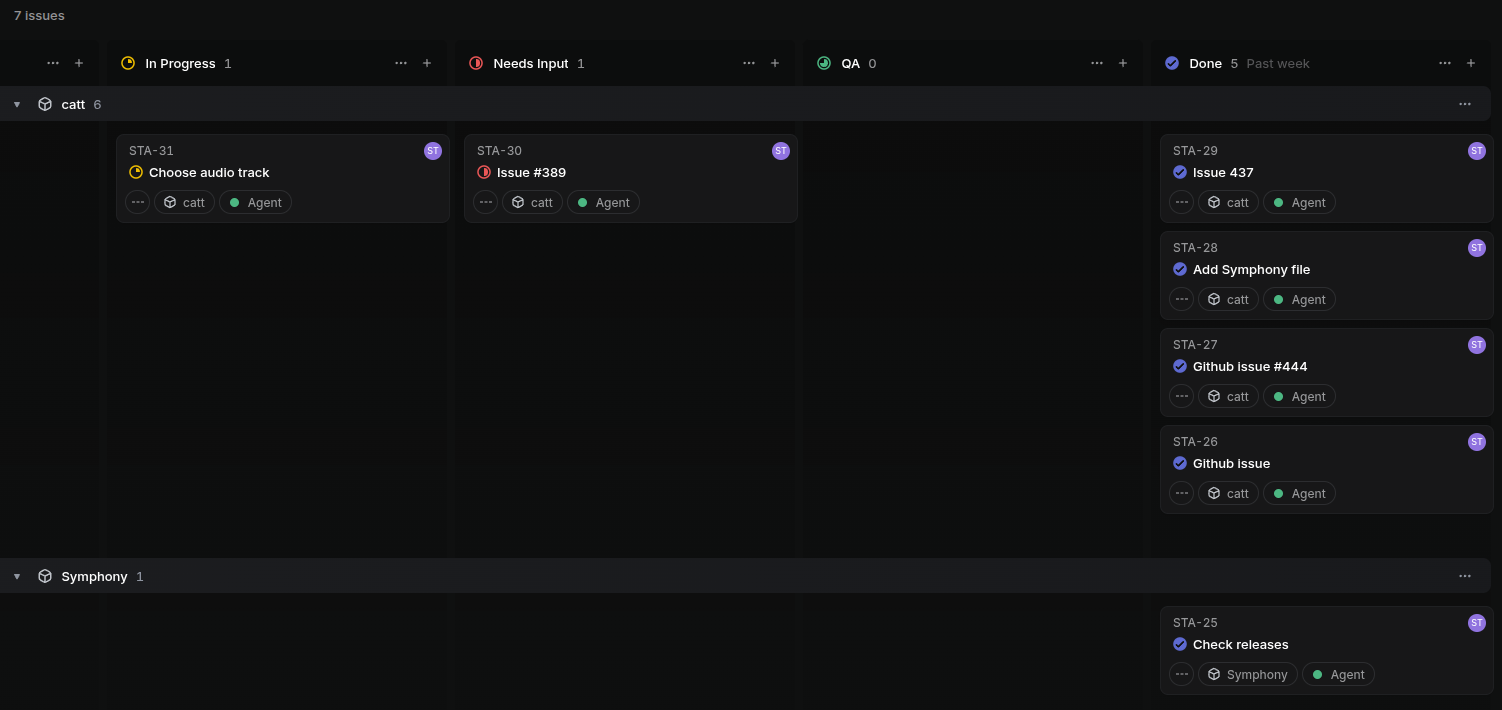
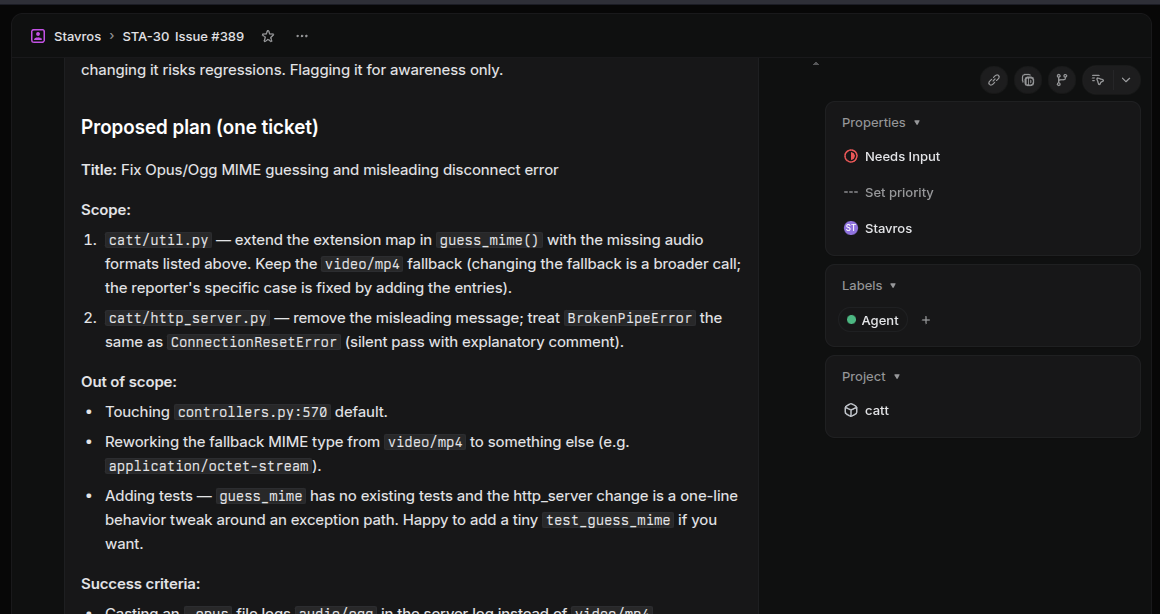
Symphony turns Linear or GitHub Projects into the front end for a fleet of AI coding agents. Label a ticket (or toggle a project field), walk away, and read the agent's reply when you have a moment; when you reply, the agent picks the thread back up. It runs as a single daemon on your own machine, clones each ticket's repo into its own sandbox, hands the work to OpenCode by default (or OMP if selected), and posts the result back as a comment. Several tickets can be in flight at once, so you can keep planning while the agents type.
The daemon is small, self-hosted, and has no UI of its own. Your issue tracker is the UI.
Screenshots
Quickstart
You need Python 3.11+, git, bwrap (bubblewrap), and OpenCode (the default)
or OMP installed and authenticated. Then:
# 1. Install
uvx symphony-linear --help

# 2. Create a workspace directory and a minimal config inside it
mkdir ~/symphony && cd ~/symphony
# For Linear:
cat > config.yaml <<'YAML'
linear:
  api_key: ${LINEAR_API_KEY}
YAML
# Or for GitHub Projects v2 (everything else has sensible defaults):
cat > config.yaml <<'YAML'
github:
  token: ${GITHUB_TOKEN}
  project: users/your-username/projects/1
YAML

# 3. Provide the bot's API key and run
export LINEAR_API_KEY=lin_api_...   # or GITHUB_TOKEN=ghp_...
uvx symphony-linear
That gets you a running daemon. To actually trigger work you still need to set up your tracker: see Linear setup or GitHub setup.
Installation
Symphony is published on PyPI as symphony-linear, and that is also the
name of the command it installs.
With uvx (recommended)
uvx runs Symphony in a managed virtual environment without touching your
system Python:
uvx symphony-linear --help
This is convenient for casual use and for --validate-config. For a
long-running daemon you may prefer to install it once rather than have
uvx resolve the environment on every start:
uv tool install symphony-linear
symphony-linear --help
With pip
If you don't have uv, plain pip works:
pip install symphony-linear
symphony-linear --help
Use pipx or a virtualenv if you'd rather not install into your system
Python.
From source
git clone https://github.com/skorokithakis/symphony.git
cd symphony
uv sync
.venv/bin/symphony-linear --help
Runtime dependencies
These are not Python packages and won't be installed for you:
- bwrap (bubblewrap):
apt install bubblewrap,dnf install bubblewrap, orpacman -S bubblewrap. - git, configured well enough to clone the repos you want the agent to work on.
- OpenCode (the default) or OMP, installed and authenticated. The
daemon invokes the selected
opencodeorompbinary inside the sandbox; it must be on the sandbox's$PATH. By default the sandbox uses the daemon's$PATH; setSYMPHONY_SANDBOX_PATHto use a different one, for example undersystemd.
Linear setup
This is the one-off plumbing that connects Symphony to your Linear workspace. You do it once per workspace, plus a small per-repo step for each project you want the agent to touch.
Generate a Personal API key
Sign into Linear with the account you want the daemon to use. This can be
your own user account or a dedicated bot account — the daemon recognises its
own comments by a hidden sentinel, not by user identity, so a separate bot
user is optional. Open Settings → API → Personal API keys,
create a key, and keep it somewhere safe; this is the value you'll supply
as LINEAR_API_KEY.
Add a "Needs Input" workflow state
In your team's workflow settings, add a state called Needs Input.
Symphony moves tickets here when it finishes a turn and is waiting for you
to reply. You can rename this state later; the name lives in config.yaml.
Create the trigger label
By default, add a label called Agent to the team. Any ticket carrying this label becomes eligible for the agent, and the label name is configurable.
This is optional: set linear.trigger_label: null to skip creating a trigger
label. In that mode, a ticket is eligible when it is in a configured active
state and its project has a Repo external link.
Optional: a QA workflow state
If you'd like to manually exercise the agent's work, for instance by
clicking around a running web app, add a workflow state called QA, point
linear.qa_state at it in your config, and add a .symphony/serve script
to your repo. When you drop a ticket into that state the daemon runs your
serve script inside the sandbox. Details under Manual QA.
Per-repo: attach a Repo link
For each repository you want Symphony to work on:
- Create a Linear project. Any team project will do; Symphony only uses it to find the repo URL.
- In that project, open Resources and add a link with title
Repo(case-insensitive) and the GitHub URL as the URL, for examplehttps://github.com/you/your-project.
That link is how the daemon discovers which repo belongs to which ticket.
GitHub setup
This is the one-off plumbing to connect Symphony to a GitHub project. You do it once per project. The daemon uses the GitHub Projects v2 (beta) API; the older Projects v1 is not supported.
Token
The daemon needs a token with read/write access to Issues, Projects, and read access to repository Contents. This token can belong to your own GitHub account or to a dedicated bot account — the daemon recognises its own comments by a hidden sentinel, so a separate bot user is optional. Add the token owner as a collaborator (with at least read access) to every repository the daemon should clone.
- Classic personal access token. Enable the
repoandprojectscopes. - Fine-grained personal access token. Grant read/write on Issues, read/write on Projects, and read on Contents for the repositories.
- GitHub App with equivalent permissions.
Supply the token as GITHUB_TOKEN in the environment, or put it directly
under github.token in your config. When the config field is empty or
absent the daemon falls back to the GITHUB_TOKEN environment variable.
Create a project
Create a GitHub Projects v2 project on your user or organization account.
Note its reference in the format orgs/<org>/projects/<number> or
users/<user>/projects/<number>. That string goes into github.project
in your config — for example:
github:
  project: users/my-username/projects/1
  # or: orgs/my-org/projects/1
Configure Status
Every GitHub project starts with a built-in single-select field called
Status. The daemon expects this field to exist (it does by default on
every new project) and will auto-create any missing options on it at
startup — just set the option names you want in github.in_progress_status,
github.needs_input_status, and optionally github.qa_status, and the
daemon handles the rest.
If your project uses a custom Status field with a different name, set
github.status_field to that name.
The Symphony trigger field
On startup the daemon auto-creates a single-select field called Symphony
on the project (configurable via github.trigger_field). It comes with
one option, on.
- To trigger an issue: set its
Symphonyfield toon. The daemon picks it up on the next poll and starts working. - To untick an issue: set the field to empty, or remove the item from the project entirely.
Untriggering or moving the issue out of an active Status causes Symphony to cancel any in-flight subprocesses, delete the workspace, and remove the issue from its internal state on the next poll tick — just like removing the trigger label on Linear. If the workspace has uncommitted or unpushed work, Symphony refuses to delete it: it posts a comment and moves the ticket back to Needs Input, and only deletes the workspace if you move the ticket out a second time (or once the workspace is clean).
Multi-repo projects
GitHub Projects v2 can contain items from any repository that the project
references. Each issue remembers its own repository; Symphony clones from
that repo's URL. By default it uses the SSH URL (git@github.com:...).
Clone protocol
Set github.clone_protocol to https to clone via HTTPS instead of SSH.
This is useful when your organisation enforces MFA and SSH is not practical.
github:
  token: ${GITHUB_TOKEN}
  project: orgs/my-org/projects/1
  clone_protocol: https
HTTPS cloning requires the operator to have git credentials set up on the
host (e.g. via gh auth login or a credential helper), because clone runs
outside the sandbox with the daemon user's identity.
The default is ssh; omit the field to keep the current behaviour.
Identifier convention
Symphony uses <owner>-<repo>-<number>-<hash> as the identifier for GitHub
issues — for example my-org-my-repo-42-bcc89b7f. This appears in workspace
directory names and metadata comments, and is used to derive the branch
name when auto_branch is enabled.
The trailing hash is a short digest of owner/repo. It is there because
flattening the slash would otherwise let two different repositories collide:
foo-bar/baz and foo/bar-baz both shorten to foo-bar-baz, and since a
project can span repositories, both issues could be live at once and would
then share a workspace directory.
Configuration
Symphony reads config.yaml from its workspace directory, which defaults to
the current working directory and can be overridden with --workspace. The
daemon refuses to start without a valid config; validate it any time with
symphony-linear --validate-config.
Minimal config
For Linear:
linear:
  api_key: ${LINEAR_API_KEY}
For GitHub:
github:
  token: ${GITHUB_TOKEN}
  project: users/your-username/projects/1
  # Optional: enable manual QA by uncommenting.
  # qa_status: QA
You can omit the credential entirely and let the daemon read the
appropriate environment variable (LINEAR_API_KEY or GITHUB_TOKEN)
directly; that is often nicer for systemd or secret managers.
Coding agent
The optional top-level agent key selects the coding-agent CLI for the
daemon. It accepts opencode (the default), omp, or pi:
agent: omp
The selected binary (opencode, omp, or pi) must be on the sandbox's
$PATH. The sandbox uses SYMPHONY_SANDBOX_PATH when it is set, otherwise it
uses the daemon's $PATH. Agents do not share sessions: changing agent makes
a ticket with a session from a different agent start a fresh session on its next
turn instead of resuming the old one.
pi keeps credentials in ~/.pi/agent/auth.json, a separate vault from OMP's:
authenticating OMP does not authenticate pi.
Full annotated config
The annotated config below shows the Linear backend. For the GitHub
version see config.yaml.example in the repo root — both blocks are
documented there side by side.
# config.yaml (placed in the workspace directory)

# Coding-agent CLI to run (default: opencode). Must be `opencode`, `omp`, or `pi`.
agent: opencode

# Choose exactly one backend — linear or github.
linear:
  # REQUIRED. Linear Personal API key.
  # Use ${LINEAR_API_KEY} to read from the environment, or omit this field
  # entirely and the daemon will fall back to the LINEAR_API_KEY env var.
  # The key can belong to your own account or a dedicated bot account.
  api_key: ${LINEAR_API_KEY}

  # Name of the label that triggers the bot (default: Agent). Set to null to
  # use active workflow states plus a project's Repo external link instead.
  trigger_label: Agent

  # Workflow state set while the AI is working (default: In Progress).
  in_progress_state: In Progress

  # Workflow state set while waiting for human reply (default: Needs Input).
  needs_input_state: Needs Input

  # Optional. Workflow state that enables manual QA. When a ticket enters
  # this state the daemon runs the repo's .symphony/serve script inside the
  # sandbox. Only one serve runs globally; the newest entrant wins. Omit to
  # disable the feature entirely.
  # qa_state: QA

# Optional. Model overrides for the primary agent, keyed by alias. See
# "Model override" below.
# models:
#   Strong: anthropic/claude-opus-5
#   Cheap: openai/gpt-5-mini

sandbox:
  # Paths to conceal from the agent inside the sandbox. Directories become
  # an empty tmpfs; files and sockets are replaced with /dev/null. ~ and
  # symlinks are expanded.
  hide_paths:
    - ~/.ssh
    - ~/.gnupg
    - ~/.aws
    - ~/.config/gcloud
    - ~/.netrc
    - ~/.docker
    - /run/docker.sock

  # Optional. Extra host paths bound read-write into the sandbox.
  # Missing paths cause a fatal error. Applied before hide_paths, so hiding
  # still wins in case of collision.
  # WARNING: these bypass the read-only host root mount.
  # extra_rw_paths:
  #   - ~/projects/shared-tools

  # Optional. Map a path inside the sandbox to a host directory (key =
  # sandbox path, value = host source). Relative values resolve under the
  # ticket's mounts/ directory and are deleted with the ticket; absolute
  # values are shared host directories that survive ticket cleanup. Both
  # sides are created on the host. Binds apply after hide_paths, so an
  # explicit mapping can punch through a broad hide. That includes the
  # masking of the daemon's own workspace directory: if an absolute value
  # is the workspace root, or any parent of it such as your home directory,
  # config.yaml becomes readable inside the sandbox. The daemon warns at
  # startup when that happens but does not stop you, because there are
  # legitimate reasons to want it.
  # CAUTION: a shared absolute directory is used by up to 5 concurrent
  # ticket workers — not every tool tolerates that.
  # dir_map:
  #   ~/.config/npm: npm
  #   ~/.npm: ~/sandboxes/caches/.npm

  # Optional. Directory of per-repo secrets files, one KEY=value file per
  # repo at <secrets_dir>/<host>/<owner>/<name>.env. Defaults to
  # <workspace>/secrets. See "Secrets" below.
  # secrets_dir: ~/symphony-secrets

# Seconds between poll cycles (default: 30, minimum: 1).
poll_interval_seconds: 30

# Max seconds per AI turn before the process is killed (default: 1800).
turn_timeout_seconds: 1800

# Max seconds an AI turn may go without producing any output on stdout or
# stderr before the process is killed (default: 1200). This is the idle
# watchdog: a stalled turn is killed long before the absolute cap above, and
# the failure comment says which limit fired ('produced no output for Ns'
# vs 'exceeded Ns in total'). Global only — there is no per-project override.
turn_idle_timeout_seconds: 1200
A copy of this example lives at config.yaml.example in the repo root.
Model override
A Model: <value> label picks the model for a ticket's primary agent. The
daemon passes --model to the selected coding agent on every turn for that
ticket, first turn and resumes alike. Subagents keep their own models.
The label is read from the issue first, then from the issue's Linear project,
so the precedence is issue label > project label > the agent's own
default. A Model: label on a project is therefore a default for every
issue in it, and an issue label overrides that default one ticket at a time.
The value is looked up case-insensitively in the top-level models map:
models:
  Strong: anthropic/claude-opus-5
  Cheap: openai/gpt-5-mini
Each entry must be a full provider/model id. A bare model name is
rejected at startup, since OpenCode reads everything before the first /
as the provider.
A value that is not in the map is used verbatim, so a raw provider/model id works with no config change:
Model: Strong→--model anthropic/claude-opus-5Model: anthropic/claude-sonnet-4-6→--model anthropic/claude-sonnet-4-6
On Linear each alias is created for you at startup — once as an issue label
and once as a project label. In label-triggered configurations, this happens
alongside the trigger label, which is only ever an issue label. Linear keeps
issue labels and project labels in two unrelated namespaces (IssueLabel and
ProjectLabel), and neither can be applied where the other belongs. Nothing
records what was already created, so the
daemon re-checks both namespaces on every start — two API calls per
configured alias.
The labels must be flat and named exactly Model: <alias>. A Linear label
group named Model with children such as Strong does not work: the API
reports only the child's own name, which carries no Model: prefix. The
provisioned labels are flat, so this only comes up if you hand-create a
group.
On GitHub there is no project tier. GitHub Projects v2 has no project labels
at all — ProjectV2 has no labels field and does not implement
Labelable — so a GitHub deployment has the per-issue label and the agent's
own default, with nothing in between. GitHub issue labels are also
per-repository, so create them yourself in each repo.
Nothing is persisted. The model is resolved fresh from the polled issue on
every turn, so changing or removing either label takes effect on the next
turn. The final comment's footer reports the effective model as
· model: <id>; it does not say which tier it came from. Model ids are not
validated: a bad value makes the selected agent exit at once, and the ticket
lands in Needs Input with the error.
Webhook (optional)
A webhook receiver cuts poll latency from up to poll_interval_seconds to
~1 second; polling continues as a safety net. The feature is opt-in — omit the
webhook: block to stay on polling only.
webhook:
  port: 8080
  linear_secret: ${WEBHOOK_SECRET}
linear_secret is the HMAC-SHA256 signing secret. If the field is absent or
empty the daemon falls back to the SYMPHONY_LINEAR_WEBHOOK_SECRET environment
variable.
In Linear's UI: Settings → API → Webhooks → Create webhook.
Set the URL to http://<your-host>:<port>/webhooks/linear/, paste the same
signing secret, and subscribe to Issue and Comment events.
Symphony does not do TLS. Terminate TLS upstream (nginx, Caddy, Cloudflare) if exposing the port publicly. Linear can deliver to either plain HTTP or HTTPS, but production deployments should use HTTPS.
Running
symphony-linear
Symphony runs in the foreground and logs to stderr. For interactive use it
is fine to start it in tmux or screen; for anything more permanent a
systemd --user unit is the obvious home.
A starting point for ~/.config/systemd/user/symphony.service:
[Unit]
Description=Symphony Linear daemon
After=network-online.target

[Service]
Type=simple
WorkingDirectory=%h/symphony
# No API key here. Keep it in config.yaml in the WorkingDirectory above —
# see "Where to keep credentials" below for why.
# systemd strips PATH. SYMPHONY_SANDBOX_PATH tells the sandbox (and startup
# validation) where to find the selected coding agent and anything your
# .symphony/setup script calls. Include %h/.local/bin if your setup script uses
# tools installed there, such as uv or uvx.
Environment=SYMPHONY_SANDBOX_PATH=%h/.local/bin:%h/.opencode/bin:/usr/local/bin:/usr/bin:/bin
# The daemon itself runs bwrap and git outside the sandbox, so those must be on
# the daemon's own PATH. Add a plain Environment=PATH= line if they live
# somewhere systemd's default does not cover.
# Point at your SSH agent, or every clone of a private repo over SSH fails
# with "Permission denied (publickey)". A systemd unit inherits nothing from
# your shell. Use %t/gcr/ssh for gnome-keyring, %t/openssh_agent for a plain
# ssh-agent. Drop this line if you clone over HTTPS with a token.
Environment=SSH_AUTH_SOCK=%t/gcr/ssh
ExecStart=%h/.local/bin/symphony-linear
Restart=on-failure

[Install]
WantedBy=default.target
Then systemctl --user daemon-reload && systemctl --user enable --now symphony.
Where to keep credentials
The rule: the literal key should only ever be written into a file the agent
cannot read. Earlier versions of this file suggested
Environment=LINEAR_API_KEY=lin_api_... in the unit. Don't do that.
The coding agent reads files as you, and the sandbox masks the workspace
directory but not ~/.config, which it should be able to read for other
reasons. So the same key is unreadable in config.yaml and readable in a
systemd unit.
Two options that satisfy the rule. Put the value in config.yaml in the
workspace directory, which is masked. Or keep using the environment
variables and load them with EnvironmentFile=, pointing at a file in the
workspace directory so the masking covers it too. The daemon's own
environment is never passed into the sandbox, so either is fine.
${LINEAR_API_KEY} in config.yaml, as used in the examples above, is a
reference rather than a value, so it is safe wherever it appears. What
matters is where the value it resolves to is stored.
Two variables in that sample cause most deployment failures, because both work by accident when you launch Symphony from a terminal and stop working under systemd:
SYMPHONY_SANDBOX_PATHis thePATHinside the sandbox, and the one the startup check searches for the selected coding agent. If it omits that agent, the daemon refuses to start. If it omits a directory that.symphony/setupneeds, the setup step exits with code 127 and acommand not foundmessage. It does not affectbwraporgit, which the daemon runs outside the sandbox using its ownPATH.SSH_AUTH_SOCKis needed because Symphony clones project repos outside the sandbox with your credentials.
Other setup and SSH-agent failures appear later, on the first ticket.
By default the unit starts when you log in. To start it at boot instead,
run loginctl enable-linger $USER. Note that a lingering service starts
before you unlock your keyring, so an agent-based SSH_AUTH_SOCK is not
ready yet at that point.
Auto-restart on checkout changes
When the daemon runs from a git checkout — an editable install or
uv run symphony-linear — it notices when that checkout's HEAD moves
(git pull, jj new, jj rebase, ...) and restarts itself in place so new
work runs the new code. It checks only between poll ticks and waits until no
ticket is being worked on, so a running turn is never cut short. Before
re-execing it runs --validate-config in a fresh interpreter; if that fails it
logs the error and keeps running the old code until HEAD moves again.
Uncommitted edits do not trigger a restart: they do not move HEAD, by
design. This is a development convenience, not a deployment mechanism. It
requires running from a git checkout where the package itself is tracked (an
editable install or uv run). A wheel/site-packages install is not a tracked
checkout — including one installed into the repository's own .venv — so the
feature is off.
The restart uses os.execv, so it keeps the same PID — systemd (and anything
else supervising the process) needs no changes.
Flags
| Flag | Effect |
|---|---|
--debug | Enable DEBUG-level logging. |
--workspace <path> | Override workspace directory (default: current working directory). |
--validate-config | Load and validate the config, then exit. |
Startup behaviour
On launch the daemon recovers any orphan tickets it was working on when it
last stopped. It posts a recovery comment and parks the ticket in the
needs-input state so you can decide whether to retry. State is persisted at
<workspace>/state.json and rewritten atomically.
Graceful shutdown
SIGINT (Ctrl+C) or SIGTERM triggers a clean shutdown: in-flight
subprocesses are killed, state is persisted, and the daemon exits.
How it works
Every poll_interval_seconds, Symphony queries the tracker (Linear or
GitHub) for tickets that carry the trigger signal and live in one of the
active workflow states. New tickets enter the initial pipeline:
- Find the project's
Repolink to discover the git URL. - Clone or update the repo into
<workspace>/<sanitised-identifier>/repo. - Switch to the ticket's branch, creating one if needed. If
auto_branch: falseis set, the workspace stays on whatevergit cloneproduced (typically the remote default branch). - Run
.symphony/setupinside the sandbox, if your repo has one. - Launch the configured coding agent inside the sandbox with the ticket's title and description as the prompt.
- Post the agent's final message as a comment, plus a small metadata comment with the workspace path and agent session id.
- Transition the ticket to the configured needs-input state.
Tickets you've already replied to enter the resume pipeline instead: the daemon picks up the new human comments, resumes the configured agent's session, and posts the result.
Up to five turns run in parallel across different tickets, with per-ticket serialisation so a single ticket never has two turns in flight. The agent and you only ever communicate through tracker comments; the daemon has no other channel.
Sandbox
Each coding-agent turn runs inside a bubblewrap sandbox. The ticket's workspace
is mounted read-write; the rest of the host root is read-only. Credential
directories such as ~/.ssh, ~/.gnupg, ~/.aws, the Docker socket and a
handful of others are concealed by overlaying empty tmpfs or /dev/null.
The network namespace is shared so the agent can reach the internet, but
user, PID, IPC and UTS namespaces are isolated. Environment is wiped down;
its PATH comes from a caller-supplied value when present, otherwise from
SYMPHONY_SANDBOX_PATH or the daemon's PATH.
The daemon's own workspace directory is masked as well, apart from the
ticket being worked on. Without that, config.yaml and state.json sit two
levels above the agent's working directory and would be plain reads, and so
would every other ticket's checkout. This masking is computed rather than
configured, so a file you later add to that directory is hidden by default.
/tmp inside the sandbox is not the host's shared /tmp: it is bound to
the ticket's own tmp/ directory on disk, so scratch files are per-ticket,
survive the sandbox process, and are deleted along with the ticket's
directory when the ticket is cleaned up.
Git operations run outside the sandbox using the daemon's own credentials,
so cloning private repositories works without your SSH private key files
being readable by the agent. Note the narrowness of that: HTTPS credential
stores such as ~/.config/gh stay readable on purpose, because the agent is
meant to use the gh binary and check repositories out. Pushing is left to
you, after reviewing.
Be clear about how strong that last part is. It is a convention, not a
barrier. The sandbox runs as your own user, and a read-only mount does not
stop a process connecting to a socket, so your SSH agent is still reachable
from inside. Hiding ~/.ssh stops the key files being read; it does not
stop the agent asking the SSH agent to sign for it. Treat the sandbox as
protection against an agent that blunders, not against one that is trying
to get out.
Secrets
Each repo can have one secrets file, in normal .env format (KEY=value
lines). Symphony looks for it at:
<workspace>/secrets/<host>/<owner>/<name>.env
For example, the repo git@github.com:acme/api.git uses
<workspace>/secrets/github.com/acme/api.env. The SSH and HTTPS forms of a
URL find the same file, and GitLab subgroups become extra directories. Set
sandbox.secrets_dir to keep the files somewhere other than
<workspace>/secrets.
Before each sandbox launch (setup, every agent turn, and QA serve), Symphony
copies the file to secrets.env in the ticket's directory, outside the git
checkout, and sets SYMPHONY_SECRETS_FILE to its path. Symphony does not
load the values into the environment itself. Your scripts do that; see
.symphony/setup. If there is no file, the variable is
not set. Changes take effect on the next launch, so you do not need to
restart the daemon.
The source directory is hidden from the sandbox, so one repo cannot see another repo's secrets. However, the agent can read its own repo's secrets file, and it can put what it reads into a ticket comment. Use development credentials only.
Manual QA
If you set linear.qa_state (or github.qa_status) and add an executable
.symphony/serve script to your repo, moving a ticket into that workflow
state launches the script inside the sandbox. Use it to run a dev server, a
worker, or anything else you want to exercise by hand.
Only one serve runs across the whole daemon. Dropping a second ticket into QA bumps the first back to the needs-input state and starts the new one. Commenting on a ticket that is currently in QA pulls it back out into the in-progress state: on the next poll tick the serve is killed, the agent runs another turn on your comment, and the ticket lands in the needs-input state. Move it back to QA to test again.
The script is given no time limit and the daemon does not interpret its output. If it exits non-zero within ten seconds, or exits later for any reason, the daemon posts a comment containing the exit code and a thousand characters of stdout/stderr, and the ticket goes back to the needs-input state. Clean exits within ten seconds are treated as a parent that has daemonised a child, and are silent.
Repo conventions
Three optional files in a repo change how Symphony treats it. All three
live under .symphony/ at the repo root.
.symphony/setup
An executable script run inside the sandbox once, right after each fresh clone, before the agent starts. Use it to install dependencies, prepare caches, or whatever else the project needs. Non-zero exit aborts the ticket with an error comment. The script has a five-minute timeout.
If the repo has a secrets file, load it with:
[ -n "$SYMPHONY_SECRETS_FILE" ] && { set -a; . "$SYMPHONY_SECRETS_FILE"; set +a; }
.symphony/serve
An executable script run inside the sandbox when the ticket enters the
configured qa_state. See Manual QA for the details.
If the repo has a secrets file, load it with:
[ -n "$SYMPHONY_SECRETS_FILE" ] && { set -a; . "$SYMPHONY_SECRETS_FILE"; set +a; }
.symphony/config.yaml
Optional per-project overrides for a small set of global settings. Currently supported keys:
| Key | Type | Default | Notes |
|---|---|---|---|
auto_branch | bool | inherits global | Applied on first clone, not on resume. |
turn_timeout_seconds | int (> 0) | inherits global | Re-read on every turn (initial and resume). |
# .symphony/config.yaml (committed in your project repo)
auto_branch: false
turn_timeout_seconds: 600
Unknown keys, invalid YAML or out-of-range values cause Symphony to post an error comment on the ticket and block the run until you fix the file and comment to retry. Per-project values win over the global config; missing keys fall back to the global value.
Troubleshooting
Find the workspace and session id
For every ticket it processes, Symphony posts a small metadata comment in this shape:
**Symphony**
- workspace: `<workspace>/TEAM-42/repo`
- session: `ses_abc123`
The workspace path is where the repo was cloned (Linear tickets use the
team key + number like TEAM-42; GitHub issues use
<owner>-<repo>-<number>-<hash>; the clone itself lives in the repo/
subdirectory of the ticket's directory). The session id belongs to the
configured coding agent. Sessions are keyed by the workspace path, so moving
the repo path prevents either agent from resuming its session.
Resume a session by hand
For an OpenCode session:
cd <workspace>/TEAM-42/repo
opencode run --session ses_abc123 -- "Hello, what's the status?"
OpenCode session state lives under ~/.opencode/ and
~/.local/share/opencode/. These are bind-mounted into the sandbox so
session resumes work both from inside the daemon and from your shell. OMP
sessions live under ~/.omp/agent/sessions/<slugified-cwd>/; use OMP's resume
command from the same workspace path. ~/.omp is likewise bind-mounted into
the sandbox for OMP's session, authentication, and run state.
Check daemon state
cat <workspace>/state.json | python -m json.tool
This shows every tracked ticket, its status, workspace path, branch, and session id.
Limitations
- No
git pushfrom inside the agent, by convention rather than by enforcement. Pushing is a deliberate human step, and the agent is told not to do it. The sandbox hides your SSH private keys, but it does not and cannot prevent a determined agent from pushing. See the Sandbox section. - No mid-turn steering. You cannot interrupt or redirect a turn while it is running. Comments you post mid-turn are not read: the daemon posts a short notice saying so, and you can comment again once the turn finishes.
- No auto-retry. A failed turn moves the ticket to
failedand stays there. Comment on the ticket to re-trigger. - Single workspace per ticket. A ticket's workspace is reused across turns; the agent works in the same clone every time.
- Trigger-only enrolment. The Linear trigger condition (a label by default,
or active state plus a project Repo link with
linear.trigger_label: null) or trigger field (GitHub) is the only way to enrol a ticket. There is no manual nudge, slash command, or webhook. - No priority. Tickets are picked in whatever order the tracker returns them. There is no queue.
- One QA serve at a time. A single
.symphony/serveruns globally with no port allocation. Your script is responsible for binding to whichever port you (or your reverse proxy) expect. - Linear free plan caps. Free Linear workspaces are capped at 10 members and 250 issues; the bot counts against the member cap.
Development
git clone https://github.com/skorokithakis/symphony.git
cd symphony
uv sync
.venv/bin/pytest                              # full suite
.venv/bin/pytest -m "not integration"         # unit only
Integration tests shell out to bwrap and git but never to the real
opencode or omp binary or any LLM. See AGENTS.md for an orientation to
the codebase.
License
MIT. See LICENSE.
Significant stargazers

37 followers · starred Jul 2026
Similar repos


Languages
Python
100.0%
An implementation of OpenAI's symphony with OpenCode and Linear.
Python
17
109 commits
updated Sep 29, 2026
See what people are saying
README
Symphony
Symphony turns Linear or GitHub Projects into the front end for a fleet of AI coding agents. Label a ticket (or toggle a project field), walk away, and read the agent's reply when you have a moment; when you reply, the agent picks the thread back up. It runs as a single daemon on your own machine, clones each ticket's repo into its own sandbox, hands the work to OpenCode by default (or OMP if selected), and posts the result back as a comment. Several tickets can be in flight at once, so you can keep planning while the agents type.
The daemon is small, self-hosted, and has no UI of its own. Your issue tracker is the UI.
Screenshots
Quickstart
You need Python 3.11+, git, bwrap (bubblewrap), and OpenCode (the default)
or OMP installed and authenticated. Then:
# 1. Install
uvx symphony-linear --help

# 2. Create a workspace directory and a minimal config inside it
mkdir ~/symphony && cd ~/symphony
# For Linear:
cat > config.yaml <<'YAML'
linear:
  api_key: ${LINEAR_API_KEY}
YAML
# Or for GitHub Projects v2 (everything else has sensible defaults):
cat > config.yaml <<'YAML'
github:
  token: ${GITHUB_TOKEN}
  project: users/your-username/projects/1
YAML

# 3. Provide the bot's API key and run
export LINEAR_API_KEY=lin_api_...   # or GITHUB_TOKEN=ghp_...
uvx symphony-linear
That gets you a running daemon. To actually trigger work you still need to set up your tracker: see Linear setup or GitHub setup.
Installation
Symphony is published on PyPI as symphony-linear, and that is also the
name of the command it installs.
With uvx (recommended)
uvx runs Symphony in a managed virtual environment without touching your
system Python:
uvx symphony-linear --help
This is convenient for casual use and for --validate-config. For a
long-running daemon you may prefer to install it once rather than have
uvx resolve the environment on every start:
uv tool install symphony-linear
symphony-linear --help
With pip
If you don't have uv, plain pip works:
pip install symphony-linear
symphony-linear --help
Use pipx or a virtualenv if you'd rather not install into your system
Python.
From source
git clone https://github.com/skorokithakis/symphony.git
cd symphony
uv sync
.venv/bin/symphony-linear --help
Runtime dependencies
These are not Python packages and won't be installed for you:
- bwrap (bubblewrap):
apt install bubblewrap,dnf install bubblewrap, orpacman -S bubblewrap. - git, configured well enough to clone the repos you want the agent to work on.
- OpenCode (the default) or OMP, installed and authenticated. The
daemon invokes the selected
opencodeorompbinary inside the sandbox; it must be on the sandbox's$PATH. By default the sandbox uses the daemon's$PATH; setSYMPHONY_SANDBOX_PATHto use a different one, for example undersystemd.
Linear setup
This is the one-off plumbing that connects Symphony to your Linear workspace. You do it once per workspace, plus a small per-repo step for each project you want the agent to touch.
Generate a Personal API key
Sign into Linear with the account you want the daemon to use. This can be
your own user account or a dedicated bot account — the daemon recognises its
own comments by a hidden sentinel, not by user identity, so a separate bot
user is optional. Open Settings → API → Personal API keys,
create a key, and keep it somewhere safe; this is the value you'll supply
as LINEAR_API_KEY.
Add a "Needs Input" workflow state
In your team's workflow settings, add a state called Needs Input.
Symphony moves tickets here when it finishes a turn and is waiting for you
to reply. You can rename this state later; the name lives in config.yaml.
Create the trigger label
By default, add a label called Agent to the team. Any ticket carrying this label becomes eligible for the agent, and the label name is configurable.
This is optional: set linear.trigger_label: null to skip creating a trigger
label. In that mode, a ticket is eligible when it is in a configured active
state and its project has a Repo external link.
Optional: a QA workflow state
If you'd like to manually exercise the agent's work, for instance by
clicking around a running web app, add a workflow state called QA, point
linear.qa_state at it in your config, and add a .symphony/serve script
to your repo. When you drop a ticket into that state the daemon runs your
serve script inside the sandbox. Details under Manual QA.
Per-repo: attach a Repo link
For each repository you want Symphony to work on:
- Create a Linear project. Any team project will do; Symphony only uses it to find the repo URL.
- In that project, open Resources and add a link with title
Repo(case-insensitive) and the GitHub URL as the URL, for examplehttps://github.com/you/your-project.
That link is how the daemon discovers which repo belongs to which ticket.
GitHub setup
This is the one-off plumbing to connect Symphony to a GitHub project. You do it once per project. The daemon uses the GitHub Projects v2 (beta) API; the older Projects v1 is not supported.
Token
The daemon needs a token with read/write access to Issues, Projects, and read access to repository Contents. This token can belong to your own GitHub account or to a dedicated bot account — the daemon recognises its own comments by a hidden sentinel, so a separate bot user is optional. Add the token owner as a collaborator (with at least read access) to every repository the daemon should clone.
- Classic personal access token. Enable the
repoandprojectscopes. - Fine-grained personal access token. Grant read/write on Issues, read/write on Projects, and read on Contents for the repositories.
- GitHub App with equivalent permissions.
Supply the token as GITHUB_TOKEN in the environment, or put it directly
under github.token in your config. When the config field is empty or
absent the daemon falls back to the GITHUB_TOKEN environment variable.
Create a project
Create a GitHub Projects v2 project on your user or organization account.
Note its reference in the format orgs/<org>/projects/<number> or
users/<user>/projects/<number>. That string goes into github.project
in your config — for example:
github:
  project: users/my-username/projects/1
  # or: orgs/my-org/projects/1
Configure Status
Every GitHub project starts with a built-in single-select field called
Status. The daemon expects this field to exist (it does by default on
every new project) and will auto-create any missing options on it at
startup — just set the option names you want in github.in_progress_status,
github.needs_input_status, and optionally github.qa_status, and the
daemon handles the rest.
If your project uses a custom Status field with a different name, set
github.status_field to that name.
The Symphony trigger field
On startup the daemon auto-creates a single-select field called Symphony
on the project (configurable via github.trigger_field). It comes with
one option, on.
- To trigger an issue: set its
Symphonyfield toon. The daemon picks it up on the next poll and starts working. - To untick an issue: set the field to empty, or remove the item from the project entirely.
Untriggering or moving the issue out of an active Status causes Symphony to cancel any in-flight subprocesses, delete the workspace, and remove the issue from its internal state on the next poll tick — just like removing the trigger label on Linear. If the workspace has uncommitted or unpushed work, Symphony refuses to delete it: it posts a comment and moves the ticket back to Needs Input, and only deletes the workspace if you move the ticket out a second time (or once the workspace is clean).
Multi-repo projects
GitHub Projects v2 can contain items from any repository that the project
references. Each issue remembers its own repository; Symphony clones from
that repo's URL. By default it uses the SSH URL (git@github.com:...).
Clone protocol
Set github.clone_protocol to https to clone via HTTPS instead of SSH.
This is useful when your organisation enforces MFA and SSH is not practical.
github:
  token: ${GITHUB_TOKEN}
  project: orgs/my-org/projects/1
  clone_protocol: https
HTTPS cloning requires the operator to have git credentials set up on the
host (e.g. via gh auth login or a credential helper), because clone runs
outside the sandbox with the daemon user's identity.
The default is ssh; omit the field to keep the current behaviour.
Identifier convention
Symphony uses <owner>-<repo>-<number>-<hash> as the identifier for GitHub
issues — for example my-org-my-repo-42-bcc89b7f. This appears in workspace
directory names and metadata comments, and is used to derive the branch
name when auto_branch is enabled.
The trailing hash is a short digest of owner/repo. It is there because
flattening the slash would otherwise let two different repositories collide:
foo-bar/baz and foo/bar-baz both shorten to foo-bar-baz, and since a
project can span repositories, both issues could be live at once and would
then share a workspace directory.
Configuration
Symphony reads config.yaml from its workspace directory, which defaults to
the current working directory and can be overridden with --workspace. The
daemon refuses to start without a valid config; validate it any time with
symphony-linear --validate-config.
Minimal config
For Linear:
linear:
  api_key: ${LINEAR_API_KEY}
For GitHub:
github:
  token: ${GITHUB_TOKEN}
  project: users/your-username/projects/1
  # Optional: enable manual QA by uncommenting.
  # qa_status: QA
You can omit the credential entirely and let the daemon read the
appropriate environment variable (LINEAR_API_KEY or GITHUB_TOKEN)
directly; that is often nicer for systemd or secret managers.
Coding agent
The optional top-level agent key selects the coding-agent CLI for the
daemon. It accepts opencode (the default), omp, or pi:
agent: omp
The selected binary (opencode, omp, or pi) must be on the sandbox's
$PATH. The sandbox uses SYMPHONY_SANDBOX_PATH when it is set, otherwise it
uses the daemon's $PATH. Agents do not share sessions: changing agent makes
a ticket with a session from a different agent start a fresh session on its next
turn instead of resuming the old one.
pi keeps credentials in ~/.pi/agent/auth.json, a separate vault from OMP's:
authenticating OMP does not authenticate pi.
Full annotated config
The annotated config below shows the Linear backend. For the GitHub
version see config.yaml.example in the repo root — both blocks are
documented there side by side.
# config.yaml (placed in the workspace directory)

# Coding-agent CLI to run (default: opencode). Must be `opencode`, `omp`, or `pi`.
agent: opencode

# Choose exactly one backend — linear or github.
linear:
  # REQUIRED. Linear Personal API key.
  # Use ${LINEAR_API_KEY} to read from the environment, or omit this field
  # entirely and the daemon will fall back to the LINEAR_API_KEY env var.
  # The key can belong to your own account or a dedicated bot account.
  api_key: ${LINEAR_API_KEY}

  # Name of the label that triggers the bot (default: Agent). Set to null to
  # use active workflow states plus a project's Repo external link instead.
  trigger_label: Agent

  # Workflow state set while the AI is working (default: In Progress).
  in_progress_state: In Progress

  # Workflow state set while waiting for human reply (default: Needs Input).
  needs_input_state: Needs Input

  # Optional. Workflow state that enables manual QA. When a ticket enters
  # this state the daemon runs the repo's .symphony/serve script inside the
  # sandbox. Only one serve runs globally; the newest entrant wins. Omit to
  # disable the feature entirely.
  # qa_state: QA

# Optional. Model overrides for the primary agent, keyed by alias. See
# "Model override" below.
# models:
#   Strong: anthropic/claude-opus-5
#   Cheap: openai/gpt-5-mini

sandbox:
  # Paths to conceal from the agent inside the sandbox. Directories become
  # an empty tmpfs; files and sockets are replaced with /dev/null. ~ and
  # symlinks are expanded.
  hide_paths:
    - ~/.ssh
    - ~/.gnupg
    - ~/.aws
    - ~/.config/gcloud
    - ~/.netrc
    - ~/.docker
    - /run/docker.sock

  # Optional. Extra host paths bound read-write into the sandbox.
  # Missing paths cause a fatal error. Applied before hide_paths, so hiding
  # still wins in case of collision.
  # WARNING: these bypass the read-only host root mount.
  # extra_rw_paths:
  #   - ~/projects/shared-tools

  # Optional. Map a path inside the sandbox to a host directory (key =
  # sandbox path, value = host source). Relative values resolve under the
  # ticket's mounts/ directory and are deleted with the ticket; absolute
  # values are shared host directories that survive ticket cleanup. Both
  # sides are created on the host. Binds apply after hide_paths, so an
  # explicit mapping can punch through a broad hide. That includes the
  # masking of the daemon's own workspace directory: if an absolute value
  # is the workspace root, or any parent of it such as your home directory,
  # config.yaml becomes readable inside the sandbox. The daemon warns at
  # startup when that happens but does not stop you, because there are
  # legitimate reasons to want it.
  # CAUTION: a shared absolute directory is used by up to 5 concurrent
  # ticket workers — not every tool tolerates that.
  # dir_map:
  #   ~/.config/npm: npm
  #   ~/.npm: ~/sandboxes/caches/.npm

  # Optional. Directory of per-repo secrets files, one KEY=value file per
  # repo at <secrets_dir>/<host>/<owner>/<name>.env. Defaults to
  # <workspace>/secrets. See "Secrets" below.
  # secrets_dir: ~/symphony-secrets

# Seconds between poll cycles (default: 30, minimum: 1).
poll_interval_seconds: 30

# Max seconds per AI turn before the process is killed (default: 1800).
turn_timeout_seconds: 1800

# Max seconds an AI turn may go without producing any output on stdout or
# stderr before the process is killed (default: 1200). This is the idle
# watchdog: a stalled turn is killed long before the absolute cap above, and
# the failure comment says which limit fired ('produced no output for Ns'
# vs 'exceeded Ns in total'). Global only — there is no per-project override.
turn_idle_timeout_seconds: 1200
A copy of this example lives at config.yaml.example in the repo root.
Model override
A Model: <value> label picks the model for a ticket's primary agent. The
daemon passes --model to the selected coding agent on every turn for that
ticket, first turn and resumes alike. Subagents keep their own models.
The label is read from the issue first, then from the issue's Linear project,
so the precedence is issue label > project label > the agent's own
default. A Model: label on a project is therefore a default for every
issue in it, and an issue label overrides that default one ticket at a time.
The value is looked up case-insensitively in the top-level models map:
models:
  Strong: anthropic/claude-opus-5
  Cheap: openai/gpt-5-mini
Each entry must be a full provider/model id. A bare model name is
rejected at startup, since OpenCode reads everything before the first /
as the provider.
A value that is not in the map is used verbatim, so a raw provider/model id works with no config change:
Model: Strong→--model anthropic/claude-opus-5Model: anthropic/claude-sonnet-4-6→--model anthropic/claude-sonnet-4-6
On Linear each alias is created for you at startup — once as an issue label
and once as a project label. In label-triggered configurations, this happens
alongside the trigger label, which is only ever an issue label. Linear keeps
issue labels and project labels in two unrelated namespaces (IssueLabel and
ProjectLabel), and neither can be applied where the other belongs. Nothing
records what was already created, so the
daemon re-checks both namespaces on every start — two API calls per
configured alias.
The labels must be flat and named exactly Model: <alias>. A Linear label
group named Model with children such as Strong does not work: the API
reports only the child's own name, which carries no Model: prefix. The
provisioned labels are flat, so this only comes up if you hand-create a
group.
On GitHub there is no project tier. GitHub Projects v2 has no project labels
at all — ProjectV2 has no labels field and does not implement
Labelable — so a GitHub deployment has the per-issue label and the agent's
own default, with nothing in between. GitHub issue labels are also
per-repository, so create them yourself in each repo.
Nothing is persisted. The model is resolved fresh from the polled issue on
every turn, so changing or removing either label takes effect on the next
turn. The final comment's footer reports the effective model as
· model: <id>; it does not say which tier it came from. Model ids are not
validated: a bad value makes the selected agent exit at once, and the ticket
lands in Needs Input with the error.
Webhook (optional)
A webhook receiver cuts poll latency from up to poll_interval_seconds to
~1 second; polling continues as a safety net. The feature is opt-in — omit the
webhook: block to stay on polling only.
webhook:
  port: 8080
  linear_secret: ${WEBHOOK_SECRET}
linear_secret is the HMAC-SHA256 signing secret. If the field is absent or
empty the daemon falls back to the SYMPHONY_LINEAR_WEBHOOK_SECRET environment
variable.
In Linear's UI: Settings → API → Webhooks → Create webhook.
Set the URL to http://<your-host>:<port>/webhooks/linear/, paste the same
signing secret, and subscribe to Issue and Comment events.
Symphony does not do TLS. Terminate TLS upstream (nginx, Caddy, Cloudflare) if exposing the port publicly. Linear can deliver to either plain HTTP or HTTPS, but production deployments should use HTTPS.
Running
symphony-linear
Symphony runs in the foreground and logs to stderr. For interactive use it
is fine to start it in tmux or screen; for anything more permanent a
systemd --user unit is the obvious home.
A starting point for ~/.config/systemd/user/symphony.service:
[Unit]
Description=Symphony Linear daemon
After=network-online.target

[Service]
Type=simple
WorkingDirectory=%h/symphony
# No API key here. Keep it in config.yaml in the WorkingDirectory above —
# see "Where to keep credentials" below for why.
# systemd strips PATH. SYMPHONY_SANDBOX_PATH tells the sandbox (and startup
# validation) where to find the selected coding agent and anything your
# .symphony/setup script calls. Include %h/.local/bin if your setup script uses
# tools installed there, such as uv or uvx.
Environment=SYMPHONY_SANDBOX_PATH=%h/.local/bin:%h/.opencode/bin:/usr/local/bin:/usr/bin:/bin
# The daemon itself runs bwrap and git outside the sandbox, so those must be on
# the daemon's own PATH. Add a plain Environment=PATH= line if they live
# somewhere systemd's default does not cover.
# Point at your SSH agent, or every clone of a private repo over SSH fails
# with "Permission denied (publickey)". A systemd unit inherits nothing from
# your shell. Use %t/gcr/ssh for gnome-keyring, %t/openssh_agent for a plain
# ssh-agent. Drop this line if you clone over HTTPS with a token.
Environment=SSH_AUTH_SOCK=%t/gcr/ssh
ExecStart=%h/.local/bin/symphony-linear
Restart=on-failure

[Install]
WantedBy=default.target
Then systemctl --user daemon-reload && systemctl --user enable --now symphony.
Where to keep credentials
The rule: the literal key should only ever be written into a file the agent
cannot read. Earlier versions of this file suggested
Environment=LINEAR_API_KEY=lin_api_... in the unit. Don't do that.
The coding agent reads files as you, and the sandbox masks the workspace
directory but not ~/.config, which it should be able to read for other
reasons. So the same key is unreadable in config.yaml and readable in a
systemd unit.
Two options that satisfy the rule. Put the value in config.yaml in the
workspace directory, which is masked. Or keep using the environment
variables and load them with EnvironmentFile=, pointing at a file in the
workspace directory so the masking covers it too. The daemon's own
environment is never passed into the sandbox, so either is fine.
${LINEAR_API_KEY} in config.yaml, as used in the examples above, is a
reference rather than a value, so it is safe wherever it appears. What
matters is where the value it resolves to is stored.
Two variables in that sample cause most deployment failures, because both work by accident when you launch Symphony from a terminal and stop working under systemd:
SYMPHONY_SANDBOX_PATHis thePATHinside the sandbox, and the one the startup check searches for the selected coding agent. If it omits that agent, the daemon refuses to start. If it omits a directory that.symphony/setupneeds, the setup step exits with code 127 and acommand not foundmessage. It does not affectbwraporgit, which the daemon runs outside the sandbox using its ownPATH.SSH_AUTH_SOCKis needed because Symphony clones project repos outside the sandbox with your credentials.
Other setup and SSH-agent failures appear later, on the first ticket.
By default the unit starts when you log in. To start it at boot instead,
run loginctl enable-linger $USER. Note that a lingering service starts
before you unlock your keyring, so an agent-based SSH_AUTH_SOCK is not
ready yet at that point.
Auto-restart on checkout changes
When the daemon runs from a git checkout — an editable install or
uv run symphony-linear — it notices when that checkout's HEAD moves
(git pull, jj new, jj rebase, ...) and restarts itself in place so new
work runs the new code. It checks only between poll ticks and waits until no
ticket is being worked on, so a running turn is never cut short. Before
re-execing it runs --validate-config in a fresh interpreter; if that fails it
logs the error and keeps running the old code until HEAD moves again.
Uncommitted edits do not trigger a restart: they do not move HEAD, by
design. This is a development convenience, not a deployment mechanism. It
requires running from a git checkout where the package itself is tracked (an
editable install or uv run). A wheel/site-packages install is not a tracked
checkout — including one installed into the repository's own .venv — so the
feature is off.
The restart uses os.execv, so it keeps the same PID — systemd (and anything
else supervising the process) needs no changes.
Flags
| Flag | Effect |
|---|---|
--debug | Enable DEBUG-level logging. |
--workspace <path> | Override workspace directory (default: current working directory). |
--validate-config | Load and validate the config, then exit. |
Startup behaviour
On launch the daemon recovers any orphan tickets it was working on when it
last stopped. It posts a recovery comment and parks the ticket in the
needs-input state so you can decide whether to retry. State is persisted at
<workspace>/state.json and rewritten atomically.
Graceful shutdown
SIGINT (Ctrl+C) or SIGTERM triggers a clean shutdown: in-flight
subprocesses are killed, state is persisted, and the daemon exits.
How it works
Every poll_interval_seconds, Symphony queries the tracker (Linear or
GitHub) for tickets that carry the trigger signal and live in one of the
active workflow states. New tickets enter the initial pipeline:
- Find the project's
Repolink to discover the git URL. - Clone or update the repo into
<workspace>/<sanitised-identifier>/repo. - Switch to the ticket's branch, creating one if needed. If
auto_branch: falseis set, the workspace stays on whatevergit cloneproduced (typically the remote default branch). - Run
.symphony/setupinside the sandbox, if your repo has one. - Launch the configured coding agent inside the sandbox with the ticket's title and description as the prompt.
- Post the agent's final message as a comment, plus a small metadata comment with the workspace path and agent session id.
- Transition the ticket to the configured needs-input state.
Tickets you've already replied to enter the resume pipeline instead: the daemon picks up the new human comments, resumes the configured agent's session, and posts the result.
Up to five turns run in parallel across different tickets, with per-ticket serialisation so a single ticket never has two turns in flight. The agent and you only ever communicate through tracker comments; the daemon has no other channel.
Sandbox
Each coding-agent turn runs inside a bubblewrap sandbox. The ticket's workspace
is mounted read-write; the rest of the host root is read-only. Credential
directories such as ~/.ssh, ~/.gnupg, ~/.aws, the Docker socket and a
handful of others are concealed by overlaying empty tmpfs or /dev/null.
The network namespace is shared so the agent can reach the internet, but
user, PID, IPC and UTS namespaces are isolated. Environment is wiped down;
its PATH comes from a caller-supplied value when present, otherwise from
SYMPHONY_SANDBOX_PATH or the daemon's PATH.
The daemon's own workspace directory is masked as well, apart from the
ticket being worked on. Without that, config.yaml and state.json sit two
levels above the agent's working directory and would be plain reads, and so
would every other ticket's checkout. This masking is computed rather than
configured, so a file you later add to that directory is hidden by default.
/tmp inside the sandbox is not the host's shared /tmp: it is bound to
the ticket's own tmp/ directory on disk, so scratch files are per-ticket,
survive the sandbox process, and are deleted along with the ticket's
directory when the ticket is cleaned up.
Git operations run outside the sandbox using the daemon's own credentials,
so cloning private repositories works without your SSH private key files
being readable by the agent. Note the narrowness of that: HTTPS credential
stores such as ~/.config/gh stay readable on purpose, because the agent is
meant to use the gh binary and check repositories out. Pushing is left to
you, after reviewing.
Be clear about how strong that last part is. It is a convention, not a
barrier. The sandbox runs as your own user, and a read-only mount does not
stop a process connecting to a socket, so your SSH agent is still reachable
from inside. Hiding ~/.ssh stops the key files being read; it does not
stop the agent asking the SSH agent to sign for it. Treat the sandbox as
protection against an agent that blunders, not against one that is trying
to get out.
Secrets
Each repo can have one secrets file, in normal .env format (KEY=value
lines). Symphony looks for it at:
<workspace>/secrets/<host>/<owner>/<name>.env
For example, the repo git@github.com:acme/api.git uses
<workspace>/secrets/github.com/acme/api.env. The SSH and HTTPS forms of a
URL find the same file, and GitLab subgroups become extra directories. Set
sandbox.secrets_dir to keep the files somewhere other than
<workspace>/secrets.
Before each sandbox launch (setup, every agent turn, and QA serve), Symphony
copies the file to secrets.env in the ticket's directory, outside the git
checkout, and sets SYMPHONY_SECRETS_FILE to its path. Symphony does not
load the values into the environment itself. Your scripts do that; see
.symphony/setup. If there is no file, the variable is
not set. Changes take effect on the next launch, so you do not need to
restart the daemon.
The source directory is hidden from the sandbox, so one repo cannot see another repo's secrets. However, the agent can read its own repo's secrets file, and it can put what it reads into a ticket comment. Use development credentials only.
Manual QA
If you set linear.qa_state (or github.qa_status) and add an executable
.symphony/serve script to your repo, moving a ticket into that workflow
state launches the script inside the sandbox. Use it to run a dev server, a
worker, or anything else you want to exercise by hand.
Only one serve runs across the whole daemon. Dropping a second ticket into QA bumps the first back to the needs-input state and starts the new one. Commenting on a ticket that is currently in QA pulls it back out into the in-progress state: on the next poll tick the serve is killed, the agent runs another turn on your comment, and the ticket lands in the needs-input state. Move it back to QA to test again.
The script is given no time limit and the daemon does not interpret its output. If it exits non-zero within ten seconds, or exits later for any reason, the daemon posts a comment containing the exit code and a thousand characters of stdout/stderr, and the ticket goes back to the needs-input state. Clean exits within ten seconds are treated as a parent that has daemonised a child, and are silent.
Repo conventions
Three optional files in a repo change how Symphony treats it. All three
live under .symphony/ at the repo root.
.symphony/setup
An executable script run inside the sandbox once, right after each fresh clone, before the agent starts. Use it to install dependencies, prepare caches, or whatever else the project needs. Non-zero exit aborts the ticket with an error comment. The script has a five-minute timeout.
If the repo has a secrets file, load it with:
[ -n "$SYMPHONY_SECRETS_FILE" ] && { set -a; . "$SYMPHONY_SECRETS_FILE"; set +a; }
.symphony/serve
An executable script run inside the sandbox when the ticket enters the
configured qa_state. See Manual QA for the details.
If the repo has a secrets file, load it with:
[ -n "$SYMPHONY_SECRETS_FILE" ] && { set -a; . "$SYMPHONY_SECRETS_FILE"; set +a; }
.symphony/config.yaml
Optional per-project overrides for a small set of global settings. Currently supported keys:
| Key | Type | Default | Notes |
|---|---|---|---|
auto_branch | bool | inherits global | Applied on first clone, not on resume. |
turn_timeout_seconds | int (> 0) | inherits global | Re-read on every turn (initial and resume). |
# .symphony/config.yaml (committed in your project repo)
auto_branch: false
turn_timeout_seconds: 600
Unknown keys, invalid YAML or out-of-range values cause Symphony to post an error comment on the ticket and block the run until you fix the file and comment to retry. Per-project values win over the global config; missing keys fall back to the global value.
Troubleshooting
Find the workspace and session id
For every ticket it processes, Symphony posts a small metadata comment in this shape:
**Symphony**
- workspace: `<workspace>/TEAM-42/repo`
- session: `ses_abc123`
The workspace path is where the repo was cloned (Linear tickets use the
team key + number like TEAM-42; GitHub issues use
<owner>-<repo>-<number>-<hash>; the clone itself lives in the repo/
subdirectory of the ticket's directory). The session id belongs to the
configured coding agent. Sessions are keyed by the workspace path, so moving
the repo path prevents either agent from resuming its session.
Resume a session by hand
For an OpenCode session:
cd <workspace>/TEAM-42/repo
opencode run --session ses_abc123 -- "Hello, what's the status?"
OpenCode session state lives under ~/.opencode/ and
~/.local/share/opencode/. These are bind-mounted into the sandbox so
session resumes work both from inside the daemon and from your shell. OMP
sessions live under ~/.omp/agent/sessions/<slugified-cwd>/; use OMP's resume
command from the same workspace path. ~/.omp is likewise bind-mounted into
the sandbox for OMP's session, authentication, and run state.
Check daemon state
cat <workspace>/state.json | python -m json.tool
This shows every tracked ticket, its status, workspace path, branch, and session id.
Limitations
- No
git pushfrom inside the agent, by convention rather than by enforcement. Pushing is a deliberate human step, and the agent is told not to do it. The sandbox hides your SSH private keys, but it does not and cannot prevent a determined agent from pushing. See the Sandbox section. - No mid-turn steering. You cannot interrupt or redirect a turn while it is running. Comments you post mid-turn are not read: the daemon posts a short notice saying so, and you can comment again once the turn finishes.
- No auto-retry. A failed turn moves the ticket to
failedand stays there. Comment on the ticket to re-trigger. - Single workspace per ticket. A ticket's workspace is reused across turns; the agent works in the same clone every time.
- Trigger-only enrolment. The Linear trigger condition (a label by default,
or active state plus a project Repo link with
linear.trigger_label: null) or trigger field (GitHub) is the only way to enrol a ticket. There is no manual nudge, slash command, or webhook. - No priority. Tickets are picked in whatever order the tracker returns them. There is no queue.
- One QA serve at a time. A single
.symphony/serveruns globally with no port allocation. Your script is responsible for binding to whichever port you (or your reverse proxy) expect. - Linear free plan caps. Free Linear workspaces are capped at 10 members and 250 issues; the bot counts against the member cap.
Development
git clone https://github.com/skorokithakis/symphony.git
cd symphony
uv sync
.venv/bin/pytest                              # full suite
.venv/bin/pytest -m "not integration"         # unit only
Integration tests shell out to bwrap and git but never to the real
opencode or omp binary or any LLM. See AGENTS.md for an orientation to
the codebase.
License
MIT. See LICENSE.
Similar repos
Significant stargazers
37 followers · starred Jul 2026
Languages
Python
100.0%