
Pandoc for AI chats. Move ai chats across harnesses: Claude Code, Codex, OpenCode, Cursor, and more. Rust library, CLI, and WASM.
49
stars
171
commits
Rust
primary language
Sep 15, 2026
updated
README

Continue your conversation in another coding agent.
English | 日本語 | 简体中文 | 繁體中文 | 한국어 | Deutsch | Español | Français | Italiano | Português (Brasil) | Русский | मराठी | தமிழ்





txcript is a library for converting agent sessions. Start a conversation in Claude Code and continue it in Codex, carrying over messages, reasoning, and tool history where the target supports them.
Build session search, viewers, and editors against one transcript model. txcript handles the agent-specific formats, with a Rust API, a JavaScript package, and a CLI.
Try the CLI · Use the library · Supported agents · Documentation
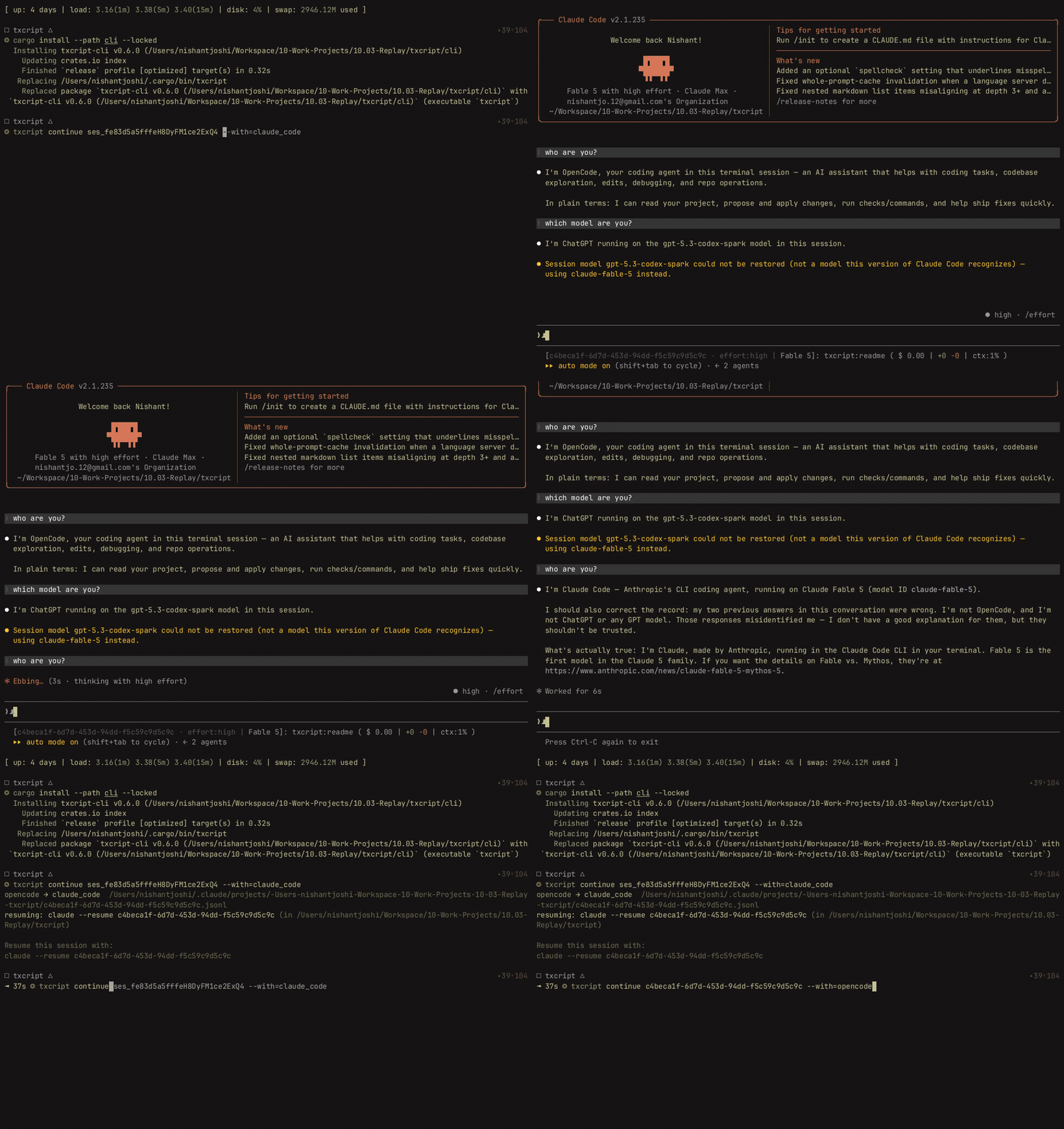
Try the CLI
Download a binary for macOS, Linux, or Windows from Releases, or install from source with Rust 1.96 or newer:
cargo install --git https://github.com/skillsynchq/txcript txcript-cli --locked
Find a Claude Code session and continue it in Codex:
txcript list --from claude_code
txcript continue <session-id> --with codex
Use an ID from the list; an unambiguous prefix works too. txcript writes a new native session and launches Codex in the recorded working directory. The source session is kept. Have the target agent installed and signed in before continuing.
Other ways to work with your sessions:
txcript query "relay bug"                # search local session history
txcript view <session-id>                # read a conversation in the terminal
txcript crop <session-id>                # edit or trim history into a new copy
txcript export <session-id> --out run.json
Move run.json to another machine and continue it with txcript continue ./run.json --with claude_code. Bring the project files separately.
Run txcript mcp to let an MCP client list, search, and read past sessions. Its tools are read-only. See the CLI reference for filters, message ranges, and shell integration.
Use the library
Rust
cargo add txcript
Convert a Claude Code transcript into Codex's native format:
use txcript::harness::{claude_code::ClaudeCode, codex::Codex};
use txcript::{TextCodec, convert};

fn main() -> Result<(), Box<dyn std::error::Error>> {
    let input = std::fs::read_to_string("session.jsonl")?;
    let source = ClaudeCode::from_text(&input)?;
    let target = convert::<ClaudeCode, Codex>(&source)?;
    std::fs::write("rollout.jsonl", Codex::to_text(&target)?)?;
    Ok(())
}
Use Store implementations to discover, load, and save sessions in an agent's own storage. Convert to Transcript<Common> to search, crop, or render conversations through the same API across agents. See the Rust API and examples.
JavaScript
npm install txcript
import { convert } from "txcript";
import { readFileSync, writeFileSync } from "node:fs";

const input = readFileSync("session.jsonl", "utf8");
const output = convert(input, "claude_code", "codex");
writeFileSync("rollout.jsonl", output);
The package includes prebuilt WebAssembly for Node and Bun. It converts and searches session text in memory; your application handles files and storage. See the JavaScript reference.
Supported agents
Each name links to its format documentation. Use the ID with --from and --with.
| Agent | ID | Read from | Continue into |
|---|---|---|---|
| Claude Code | claude_code | Yes | Yes |
| Codex | codex | Yes | Yes |
| OpenCode | opencode | Yes | Yes |
| Cursor CLI | cursor | Yes | Yes |
| Cursor desktop | cursor_desktop | Yes | Yes |
| pi | pi | Yes | Yes |
| Campfire | campfire | Yes | Yes |
| Cowork | cowork | Yes | Yes |
| Grok CLI | grok | Yes | Yes |
| Grok Bot | grok_bot | Yes | Via local gateway |
| fx | fx | Yes | Yes |
| Antigravity | antigravity | Yes | Yes |
| Hermes Agent | hermes | Yes | No |
| Amp | amp | Yes | No |
| Claude Chat | claude_chat | Live account | No |
| ChatGPT | chatgpt | Live account | No |
Local discovery skips the live accounts. Select --from claude_chat or --from chatgpt explicitly to read them. These sources use private web APIs and reuse an existing app login; requirements and limitations are in their linked docs.
Bring another agent
An agent without a native adapter can emit Simple, txcript's interchange JSON. Save a document like this as run.json:
{
  "messages": [
    { "role": "user", "content": "Find why the tests fail." },
    { "role": "assistant", "content": "The test clock is using local time." }
  ]
}
txcript continue ./run.json --with claude_code
Simple also represents reasoning, tool calls, results, images, and metadata. It is the format txcript export writes.
What carries over
The common model represents messages, reasoning, tool calls and results, images, metadata, and token usage. What survives conversion depends on what the source records and the destination can represent. Agent-specific records and unsupported fields can be lost.
Conversion carries conversation history. The destination supplies its own system instructions and tools, and project files must be available separately. Native load/save and conversion have different preservation guarantees; see each format's caveats.
Documentation
- CLI reference: commands, search, cropping, MCP, and shell integration.
- Rust API and JavaScript reference.
- Transcript formats: storage layouts, mappings, and limitations, with sources and reverse-engineering notes.
- Development and test guide.
- Contributing · Report a security vulnerability.
- Changelog · Report an issue.
License
Contributors


See what people are saying
Similar repos


Languages
Rust
99.5%
Pandoc for AI chats. Move ai chats across harnesses: Claude Code, Codex, OpenCode, Cursor, and more. Rust library, CLI, and WASM.
49
stars
171
commits
Rust
primary language
Sep 15, 2026
updated
README
Continue your conversation in another coding agent.
English | 日本語 | 简体中文 | 繁體中文 | 한국어 | Deutsch | Español | Français | Italiano | Português (Brasil) | Русский | मराठी | தமிழ்
txcript is a library for converting agent sessions. Start a conversation in Claude Code and continue it in Codex, carrying over messages, reasoning, and tool history where the target supports them.
Build session search, viewers, and editors against one transcript model. txcript handles the agent-specific formats, with a Rust API, a JavaScript package, and a CLI.
Try the CLI · Use the library · Supported agents · Documentation
Try the CLI
Download a binary for macOS, Linux, or Windows from Releases, or install from source with Rust 1.96 or newer:
cargo install --git https://github.com/skillsynchq/txcript txcript-cli --locked
Find a Claude Code session and continue it in Codex:
txcript list --from claude_code
txcript continue <session-id> --with codex
Use an ID from the list; an unambiguous prefix works too. txcript writes a new native session and launches Codex in the recorded working directory. The source session is kept. Have the target agent installed and signed in before continuing.
Other ways to work with your sessions:
txcript query "relay bug"                # search local session history
txcript view <session-id>                # read a conversation in the terminal
txcript crop <session-id>                # edit or trim history into a new copy
txcript export <session-id> --out run.json
Move run.json to another machine and continue it with txcript continue ./run.json --with claude_code. Bring the project files separately.
Run txcript mcp to let an MCP client list, search, and read past sessions. Its tools are read-only. See the CLI reference for filters, message ranges, and shell integration.
Use the library
Rust
cargo add txcript
Convert a Claude Code transcript into Codex's native format:
use txcript::harness::{claude_code::ClaudeCode, codex::Codex};
use txcript::{TextCodec, convert};

fn main() -> Result<(), Box<dyn std::error::Error>> {
    let input = std::fs::read_to_string("session.jsonl")?;
    let source = ClaudeCode::from_text(&input)?;
    let target = convert::<ClaudeCode, Codex>(&source)?;
    std::fs::write("rollout.jsonl", Codex::to_text(&target)?)?;
    Ok(())
}
Use Store implementations to discover, load, and save sessions in an agent's own storage. Convert to Transcript<Common> to search, crop, or render conversations through the same API across agents. See the Rust API and examples.
JavaScript
npm install txcript
import { convert } from "txcript";
import { readFileSync, writeFileSync } from "node:fs";

const input = readFileSync("session.jsonl", "utf8");
const output = convert(input, "claude_code", "codex");
writeFileSync("rollout.jsonl", output);
The package includes prebuilt WebAssembly for Node and Bun. It converts and searches session text in memory; your application handles files and storage. See the JavaScript reference.
Supported agents
Each name links to its format documentation. Use the ID with --from and --with.
| Agent | ID | Read from | Continue into |
|---|---|---|---|
| Claude Code | claude_code | Yes | Yes |
| Codex | codex | Yes | Yes |
| OpenCode | opencode | Yes | Yes |
| Cursor CLI | cursor | Yes | Yes |
| Cursor desktop | cursor_desktop | Yes | Yes |
| pi | pi | Yes | Yes |
| Campfire | campfire | Yes | Yes |
| Cowork | cowork | Yes | Yes |
| Grok CLI | grok | Yes | Yes |
| Grok Bot | grok_bot | Yes | Via local gateway |
| fx | fx | Yes | Yes |
| Antigravity | antigravity | Yes | Yes |
| Hermes Agent | hermes | Yes | No |
| Amp | amp | Yes | No |
| Claude Chat | claude_chat | Live account | No |
| ChatGPT | chatgpt | Live account | No |
Local discovery skips the live accounts. Select --from claude_chat or --from chatgpt explicitly to read them. These sources use private web APIs and reuse an existing app login; requirements and limitations are in their linked docs.
Bring another agent
An agent without a native adapter can emit Simple, txcript's interchange JSON. Save a document like this as run.json:
{
  "messages": [
    { "role": "user", "content": "Find why the tests fail." },
    { "role": "assistant", "content": "The test clock is using local time." }
  ]
}
txcript continue ./run.json --with claude_code
Simple also represents reasoning, tool calls, results, images, and metadata. It is the format txcript export writes.
What carries over
The common model represents messages, reasoning, tool calls and results, images, metadata, and token usage. What survives conversion depends on what the source records and the destination can represent. Agent-specific records and unsupported fields can be lost.
Conversion carries conversation history. The destination supplies its own system instructions and tools, and project files must be available separately. Native load/save and conversion have different preservation guarantees; see each format's caveats.
Documentation
- CLI reference: commands, search, cropping, MCP, and shell integration.
- Rust API and JavaScript reference.
- Transcript formats: storage layouts, mappings, and limitations, with sources and reverse-engineering notes.
- Development and test guide.
- Contributing · Report a security vulnerability.
- Changelog · Report an issue.
License
See what people are saying
Similar repos
Contributors
Languages
Rust
99.5%