

Provides a set of custom shaped android imageview components, and a framework to define more shapes. Implements both shader and bitmap mask based image views.


There are many projects online implementing such components, however one goal of this project is to provide a performant/smooth scrolling image view component framework to define different shapes for imageviews.
For use with recycling view such as ListView or GridView please use shader based implementations.
Gradle dependency:
compile 'com.github.siyamed:android-shape-imageview:0.9.+@aar'
###Shader Based ImageView's
####BubbleImageView
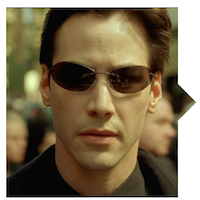
<com.github.siyamed.shapeimageview.BubbleImageView
    android:layout_width="match_parent"
    android:layout_height="match_parent"
    android:src="@drawable/neo"
    app:siArrowPosition="right"
    app:siSquare="true"/>
Attributes:
siTriangleHeight the height of the bubble pointer in dpsiArrowPosition where to point the arrow, currently left|rightsiSquare set width and height to the minimum of the given values true|false####RoundedImageView
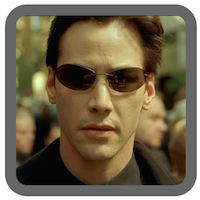
<com.github.siyamed.shapeimageview.RoundedImageView
    android:layout_width="match_parent"
    android:layout_height="match_parent"
    android:src="@drawable/neo"
    app:siRadius="6dp"
    app:siBorderWidth="6dp"
    app:siBorderColor="@color/darkgray"
    app:siSquare="true"/>
Attributes:
siBorderColor border colorsiBorderWidth border width in dpsiBorderAlpha alpha value of the border between 0.0-1.0siRadius corner radius in dpsiSquare set width and height to the minimum of the given values true|false####CircularImageView
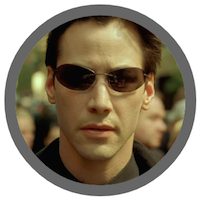
<com.github.siyamed.shapeimageview.CircularImageView
    android:layout_width="match_parent"
    android:layout_height="match_parent"
    android:src="@drawable/neo"
    app:siBorderWidth="6dp"
    app:siBorderColor="@color/darkgray"/>
Attributes:
siBorderColor border colorsiBorderWidth border width in dpsiBorderAlpha alpha value of the border between 0.0-1.0####ShapeImageView This view has the capability to process a provided SVG file (for a limited set of SVG elements), build a Path object and draw it on the shader. The library includes SVG files defining a set of basic shapes and ShapeImageView subclasses using those files. You can use whatever SVG you want to have a wonderful and creatively shaped images in your application. The included SVG files are under library/src/main/res/raw
| DiamondImageView | PentagonImageView | HexagonImageView |
|---|---|---|
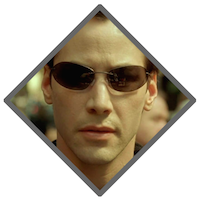 | 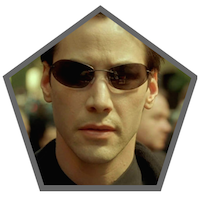 | 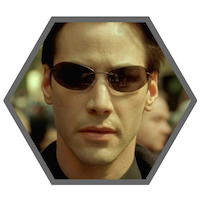 |
| OctogonImageView | StarImageView | HeartImageView |
|---|---|---|
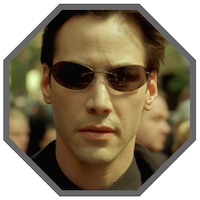 | 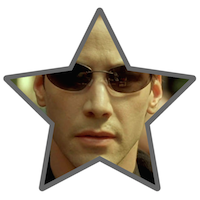 | 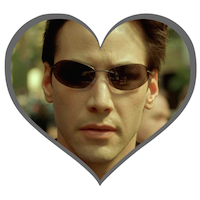 |
<com.github.siyamed.shapeimageview.{ClassName}
    android:layout_width="match_parent"
    android:layout_height="match_parent"
    android:layout_margin="8dp"
    android:src="@drawable/neo"
    app:siBorderWidth="8dp"
    app:siBorderColor="@color/darkgray"/>
Attributes:
siBorderColor border colorsiBorderWidth border width in dpsiBorderAlpha alpha value of the border between 0.0-1.0siStrokeCap border stroke cap type butt|round|squaresiStrokeJoin border stroke join type bevel|miter|roundsiSquare set width and height to the minimum of the given values true|falsesiShape a reference to an SVG. This is used by ShapeImageView, not the subclasses of it.SVG elements that are supported are: rectangle, circle, ellipse, polygon, path, group. Transformations on those elements are also supported.
The system converts an SVG file into a Path. For each element including the parent element <svg> a new Path is created, and all the children Path's are added to their parent path.
###Bitmap Mask Based ImageViews
This view uses extra bitmaps for bitmap masks. Therefore it would be good to use them for very custom shapes, possibly not in a recycling view.
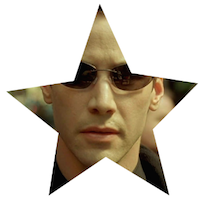
<com.github.siyamed.shapeimageview.mask.PorterShapeImageView
    android:layout_width="match_parent"
    android:layout_height="match_parent"
    app:siShape="@drawable/star"
    android:src="@drawable/neo"
    app:siSquare="true"/>
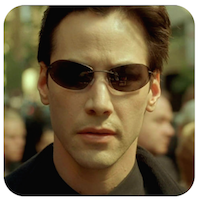
<com.github.siyamed.shapeimageview.mask.PorterShapeImageView
    android:layout_width="match_parent"
    android:layout_height="match_parent"
    app:siShape="@drawable/shape_rounded_rectangle"
    android:src="@drawable/neo"
    app:siSquare="true"/>
rounded rectangle shape definition in XML:
<shape android:shape="rectangle" xmlns:android="http://schemas.android.com/apk/res/android">
    <corners
        android:topLeftRadius="18dp"
        android:topRightRadius="18dp"
        android:bottomLeftRadius="18dp"
        android:bottomRightRadius="18dp" />
    <solid android:color="@color/black" />
</shape>
Attributes:
siShape the bitmap mask shape, either a shape drawable or a bitmapsiSquare set width and height to the minimum of the given values true|falseThis method reads a shape file (either bitmap or an android shape xml), creates a bitmap object using this shape, and finally combines the bitmap of the real image to be shown and the mast bitmap using xfermode.
See/execute the sample for a demonstration of the components.
If you are lazy check this youtube video demonstrating scrolling in the sample app
You can download the sample app from play store
-dontwarn android.support.v7.**
-keep class android.support.v7.** { ; }
-keep interface android.support.v7.* { ; }
-keepattributes *Annotation,Signature
-dontwarn com.github.siyamed.**
-keep class com.github.siyamed.shapeimageview.**{ *; }

Overall
Maintained
Code review
Latest release
Releases this year
49 followers · starred Mar 2017
96 followers · starred Apr 2015
Provides a set of custom shaped android imageview components, and a framework to define more shapes. Implements both shader and bitmap mask based image views.
There are many projects online implementing such components, however one goal of this project is to provide a performant/smooth scrolling image view component framework to define different shapes for imageviews.
For use with recycling view such as ListView or GridView please use shader based implementations.
Gradle dependency:
compile 'com.github.siyamed:android-shape-imageview:0.9.+@aar'
###Shader Based ImageView's
####BubbleImageView
<com.github.siyamed.shapeimageview.BubbleImageView
    android:layout_width="match_parent"
    android:layout_height="match_parent"
    android:src="@drawable/neo"
    app:siArrowPosition="right"
    app:siSquare="true"/>
Attributes:
siTriangleHeight the height of the bubble pointer in dpsiArrowPosition where to point the arrow, currently left|rightsiSquare set width and height to the minimum of the given values true|false####RoundedImageView
<com.github.siyamed.shapeimageview.RoundedImageView
    android:layout_width="match_parent"
    android:layout_height="match_parent"
    android:src="@drawable/neo"
    app:siRadius="6dp"
    app:siBorderWidth="6dp"
    app:siBorderColor="@color/darkgray"
    app:siSquare="true"/>
Attributes:
siBorderColor border colorsiBorderWidth border width in dpsiBorderAlpha alpha value of the border between 0.0-1.0siRadius corner radius in dpsiSquare set width and height to the minimum of the given values true|false####CircularImageView
<com.github.siyamed.shapeimageview.CircularImageView
    android:layout_width="match_parent"
    android:layout_height="match_parent"
    android:src="@drawable/neo"
    app:siBorderWidth="6dp"
    app:siBorderColor="@color/darkgray"/>
Attributes:
siBorderColor border colorsiBorderWidth border width in dpsiBorderAlpha alpha value of the border between 0.0-1.0####ShapeImageView This view has the capability to process a provided SVG file (for a limited set of SVG elements), build a Path object and draw it on the shader. The library includes SVG files defining a set of basic shapes and ShapeImageView subclasses using those files. You can use whatever SVG you want to have a wonderful and creatively shaped images in your application. The included SVG files are under library/src/main/res/raw
| DiamondImageView | PentagonImageView | HexagonImageView |
|---|---|---|
| | |
| OctogonImageView | StarImageView | HeartImageView |
|---|---|---|
| | |
<com.github.siyamed.shapeimageview.{ClassName}
    android:layout_width="match_parent"
    android:layout_height="match_parent"
    android:layout_margin="8dp"
    android:src="@drawable/neo"
    app:siBorderWidth="8dp"
    app:siBorderColor="@color/darkgray"/>
Attributes:
siBorderColor border colorsiBorderWidth border width in dpsiBorderAlpha alpha value of the border between 0.0-1.0siStrokeCap border stroke cap type butt|round|squaresiStrokeJoin border stroke join type bevel|miter|roundsiSquare set width and height to the minimum of the given values true|falsesiShape a reference to an SVG. This is used by ShapeImageView, not the subclasses of it.SVG elements that are supported are: rectangle, circle, ellipse, polygon, path, group. Transformations on those elements are also supported.
The system converts an SVG file into a Path. For each element including the parent element <svg> a new Path is created, and all the children Path's are added to their parent path.
###Bitmap Mask Based ImageViews
This view uses extra bitmaps for bitmap masks. Therefore it would be good to use them for very custom shapes, possibly not in a recycling view.
<com.github.siyamed.shapeimageview.mask.PorterShapeImageView
    android:layout_width="match_parent"
    android:layout_height="match_parent"
    app:siShape="@drawable/star"
    android:src="@drawable/neo"
    app:siSquare="true"/>
<com.github.siyamed.shapeimageview.mask.PorterShapeImageView
    android:layout_width="match_parent"
    android:layout_height="match_parent"
    app:siShape="@drawable/shape_rounded_rectangle"
    android:src="@drawable/neo"
    app:siSquare="true"/>
rounded rectangle shape definition in XML:
<shape android:shape="rectangle" xmlns:android="http://schemas.android.com/apk/res/android">
    <corners
        android:topLeftRadius="18dp"
        android:topRightRadius="18dp"
        android:bottomLeftRadius="18dp"
        android:bottomRightRadius="18dp" />
    <solid android:color="@color/black" />
</shape>
Attributes:
siShape the bitmap mask shape, either a shape drawable or a bitmapsiSquare set width and height to the minimum of the given values true|falseThis method reads a shape file (either bitmap or an android shape xml), creates a bitmap object using this shape, and finally combines the bitmap of the real image to be shown and the mast bitmap using xfermode.
See/execute the sample for a demonstration of the components.
If you are lazy check this youtube video demonstrating scrolling in the sample app
You can download the sample app from play store
-dontwarn android.support.v7.**
-keep class android.support.v7.** { ; }
-keep interface android.support.v7.* { ; }
-keepattributes *Annotation,Signature
-dontwarn com.github.siyamed.**
-keep class com.github.siyamed.shapeimageview.**{ *; }
Overall
Maintained
Code review
Latest release
Releases this year
49 followers · starred Mar 2017
96 followers · starred Apr 2015



