
README
VAMP-MR


Vector-Accelerated Motion Planning and Execution for Multi-Robot-Arms
Philip Huang*,
Chenrui Gao^,
Jiaoyang Li*
*Carnegie Mellon University, ^University of Michigan
Accepted to the IEEE/RSJ International Conference on Intelligent Robots and Systems (IROS) 2026
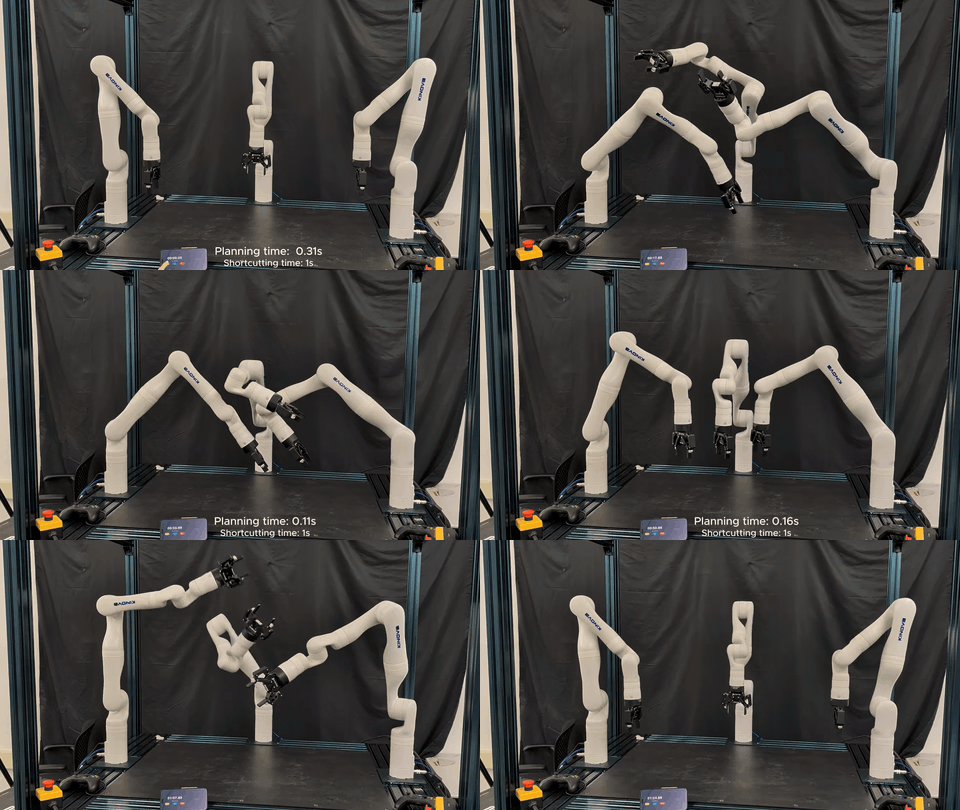
This codebase, VAMP-MR, is the collection of
- Our multi-robot-arm collision checker modified from VAMP,
- The core multi-robot planning and shortcutting algorithms implemented in
mr_planner_core - The dual-arm LEGO assmebly planner based on APEX-MR in
mr_planner_lego
TLDR: Building on the CPU SIMD accelerated single-robot motion planner VAMP, we accelerate the motion generation, postprocessing, and execution for multi-arm manipulation tasks by 10x-100x.
Installation
System dependencies (Ubuntu 20.04 / 22.04)
The step-by-step build below assumes the following system packages are installed
(this mirrors docker/Dockerfile):
sudo apt-get update && sudo apt-get install -y --no-install-recommends \
  build-essential ca-certificates cmake ninja-build pkg-config git \
  python3 python3-dev python3-pip \
  libboost-all-dev libeigen3-dev libjsoncpp-dev libompl-dev \
  libprotobuf-dev protobuf-compiler libtbb-dev libyaml-cpp-dev
For meshcat visualization you additionally need the Python packages:
pip3 install meshcat numpy
Local Install Script (VAMP + core + LEGO)
This installs to /usr/local by default (uses sudo if needed), and builds into:
vamp/buildmr_planner_core/buildmr_planner_lego/build
./scripts/setup/install_vamp_mr.sh --prefix /usr/local --with-vamp
Step by step instruction.
a) Build + install VAMP
mr_planner_core uses find_package(vamp CONFIG REQUIRED) when VAMP is enabled (default: ON), so you need a VAMP CMake package installed (e.g., vampConfig.cmake under your install prefix).
If you keep VAMP at ~/Code/vamp and install it to /usr/local:
cmake -S vamp -B vamp/build -DCMAKE_BUILD_TYPE=Release -DCMAKE_INSTALL_PREFIX=/usr/local \
    -DVAMP_INSTALL_CPP_LIBRARY=ON -DVAMP_BUILD_PYTHON_BINDINGS=OFF
cmake --build vamp/build -j
sudo cmake --install vamp/build
For more detail on the VAMP building and installation instructions, checkout VAMP's original README.
b) Build mr_planner_core
If your VAMP install prefix isn’t on CMake’s default search path, set CMAKE_PREFIX_PATH (or pass -Dvamp_DIR=...) when configuring mr_planner_core.
cmake -S mr_planner_core -B mr_planner_core/build -DCMAKE_BUILD_TYPE=Release -DMR_PLANNER_CORE_ENABLE_PYTHON=ON
cmake --build mr_planner_core/build -j
sudo cmake --install mr_planner_core/build
c) Build mr_planner_lego
cmake -S mr_planner_lego -B mr_planner_lego/build -DCMAKE_BUILD_TYPE=Release \
  -DMR_PLANNER_LEGO_USE_BUNDLED_CORE=OFF \
  -DCMAKE_PREFIX_PATH=/usr/local
cmake --build mr_planner_lego/build -j
sudo cmake --install mr_planner_lego/build
Build with Docker
docker build -f docker/Dockerfile -t vamp-mr:latest .
docker run --rm -it vamp-mr:latest bash
Inside the container, vamp, mr_planner_core, and mr_planner_lego are installed to /usr/local (binaries under /usr/local/bin).
Examples
Core planning (C++ CLI)
Plan a random, collision-free problem (writes solution.csv, skillplan.json, and tpg.pb):
mr_planner_core_plan \
  --vamp-environment dual_gp4 \
  --planner composite_rrt \
  --planning-time 5 \
  --output-dir outputs/core_plan
Plan + shortcut (enables postprocessing; writes shortcut_progress.csv as well):
mr_planner_core_plan \
  --vamp-environment dual_gp4 \
  --planner composite_rrt \
  --planning-time 5 \
  --shortcut-time 1 \
  --output-dir outputs/core_plan_shortcut
Plan + shortcut a specific start/goal (2 robots, 7-DOF each):
mr_planner_core_plan \
  --vamp-environment dual_gp4 \
  --start "0,0,0,0,0,0,0;0,0,0,0,0,0,0" \
  --goal  "0.2,0,0,0,0,0,0;0,0.2,0,0,0,0,0" \
  --planning-time 5 \
  --shortcut-time 1 \
  --output-dir outputs/core_plan_custom
LEGO assign + plan (C++ CLI)
From the repo root (or pass --root /path/to/vamp-mr):
mkdir -p outputs/lego_steps outputs/lego_out

mr_planner_lego_assign \
  --task test \
  --output-dir outputs/lego_steps \
  --vamp-environment dual_gp4

mr_planner_lego_plan \
  --task test \
  --steps-dir outputs/lego_steps \
  --output-dir outputs/lego_out/test \
  --vamp-environment dual_gp4 \
  --planning-time 5 \
  --shortcut-time 0 \
  --seed 1
Outputs:
outputs/lego_out/test/adg.pboutputs/lego_out/test/skillplan.json
Build a graph from a skillplan.json (with optional shortcutting)
mr_planner_core_skillplan_to_tpg \
  --skillplan outputs/lego_out/test/skillplan.json \
  --graph-type adg \
  --vamp-environment dual_gp4 \
  --shortcut-time 1 \
  --output-dir outputs/lego_out/test
Visualization
We use meshcat as a visualization server. Since our planning is kinematic-only, so we directly update the trajectories of the robot and any obstacles in the environment via the meshcat_bridge.py.
To view animation, start the meshcat_bridge.py in a new terminal window
python3 mr_planner_core/scripts/visualization/meshcat_bridge.py
and run our examples with the --meshcat flag.
The visualization can be viewed in your browser at http://127.0.0.1:7000/static/ or any another port.
How to reproduce experiments from the paper
Collision checking benchmark
mkdir -p outputs/reproduce/collision
python3 mr_planner_core/scripts/benchmarks/vamp_collision_benchmark.py \
  --vamp-environment panda_two_rod \
  --pose-queries 100000 \
  --motion-queries 100000 \
  --json-out outputs/reproduce/collision/panda_two_rod.json
Repeat with --vamp-environment panda_four and --vamp-environment panda_four_bins if desired.
Planning benchmark (Composite-RRT and CBS-MP)
python3 mr_planner_core/scripts/benchmarks/core_planning_benchmark.py \
  --pose-mode all_pairs \
  --max-poses 12 \
  --planning-time 60 \
  --output-dir outputs/reproduce/planning
Outputs:
outputs/reproduce/planning/composite_rrt/panda_two_rod_benchmark.csvoutputs/reproduce/planning/cbs_prm/panda_two_rod_benchmark.csv- (and
panda_four*equivalents)
Shortcutting benchmark (from RRT + CBS trajectories)
python3 mr_planner_core/scripts/benchmarks/core_shortcut_benchmark.py \
  --planning-dir outputs/reproduce/planning \
  --shortcut-time 10 \
  --output-dir outputs/reproduce/shortcut
Outputs:
outputs/reproduce/shortcut/composite_rrt/panda_two_rod_benchmark.csvoutputs/reproduce/shortcut/cbs_prm/panda_two_rod_benchmark.csv- (and
panda_four*equivalents)
LEGO assembly benchmark (cliff/vessel/big_chair/rss)
To run all four tasks
python3 mr_planner_lego/scripts/benchmarks/lego_cli_benchmark.py \
  --task cliff --task vessel --task big_chair --task rss \
  --seed 1 \
  --planning-time 5 \
  --output-dir outputs/reproduce/lego
Default shortcut times (when --shortcut-time is omitted):
cliff,vessel: 1srss,big_chair: 5s
Outputs:
outputs/reproduce/lego/lego_benchmark.csvoutputs/reproduce/lego/out/<task>/seed_<seed>/adg.pboutputs/reproduce/lego/out/<task>/seed_<seed>/skillplan.json
Repository Layout
docs/: project websitevamp/: modified VAMP codebase used by the papermr_planner_core/: multi-robot planner core packagemr_planner_lego/: LEGO-specific integration / examples
License
VAMP-MR is released under the Apache License 2.0.
It builds on and bundles third-party software:
- A modified version of VAMP (Apache-2.0), shipped as the
vamp/submodule, with an added multi-robot composite collision-checking layer. - LEGO assembly code under
mr_planner_lego/derived from APEX-MR (MIT).
See NOTICE and THIRD_PARTY_LICENSES.md for full attribution.
Citation
If you found the research useful, please consider citing us in your research.
@inproceedings{huang2026vampmr,
  title        = {VAMP-MR: Vector-Accelerated Motion Planning and Execution for Multi-Robot-Arms},
  author       = {Huang, Philip and Gao, Chenrui and Li, Jiaoyang},
  booktitle    = {IEEE/RSJ International Conference on Intelligent Robots and Systems (IROS)},
  year         = {2026}
}
Contributors

3 commits
Similar repos


Languages
C++
94.1%
Python
4.7%
README
VAMP-MR
Vector-Accelerated Motion Planning and Execution for Multi-Robot-Arms
Philip Huang*,
Chenrui Gao^,
Jiaoyang Li*
*Carnegie Mellon University, ^University of Michigan
Accepted to the IEEE/RSJ International Conference on Intelligent Robots and Systems (IROS) 2026
This codebase, VAMP-MR, is the collection of
- Our multi-robot-arm collision checker modified from VAMP,
- The core multi-robot planning and shortcutting algorithms implemented in
mr_planner_core - The dual-arm LEGO assmebly planner based on APEX-MR in
mr_planner_lego
TLDR: Building on the CPU SIMD accelerated single-robot motion planner VAMP, we accelerate the motion generation, postprocessing, and execution for multi-arm manipulation tasks by 10x-100x.
Installation
System dependencies (Ubuntu 20.04 / 22.04)
The step-by-step build below assumes the following system packages are installed
(this mirrors docker/Dockerfile):
sudo apt-get update && sudo apt-get install -y --no-install-recommends \
  build-essential ca-certificates cmake ninja-build pkg-config git \
  python3 python3-dev python3-pip \
  libboost-all-dev libeigen3-dev libjsoncpp-dev libompl-dev \
  libprotobuf-dev protobuf-compiler libtbb-dev libyaml-cpp-dev
For meshcat visualization you additionally need the Python packages:
pip3 install meshcat numpy
Local Install Script (VAMP + core + LEGO)
This installs to /usr/local by default (uses sudo if needed), and builds into:
vamp/buildmr_planner_core/buildmr_planner_lego/build
./scripts/setup/install_vamp_mr.sh --prefix /usr/local --with-vamp
Step by step instruction.
a) Build + install VAMP
mr_planner_core uses find_package(vamp CONFIG REQUIRED) when VAMP is enabled (default: ON), so you need a VAMP CMake package installed (e.g., vampConfig.cmake under your install prefix).
If you keep VAMP at ~/Code/vamp and install it to /usr/local:
cmake -S vamp -B vamp/build -DCMAKE_BUILD_TYPE=Release -DCMAKE_INSTALL_PREFIX=/usr/local \
    -DVAMP_INSTALL_CPP_LIBRARY=ON -DVAMP_BUILD_PYTHON_BINDINGS=OFF
cmake --build vamp/build -j
sudo cmake --install vamp/build
For more detail on the VAMP building and installation instructions, checkout VAMP's original README.
b) Build mr_planner_core
If your VAMP install prefix isn’t on CMake’s default search path, set CMAKE_PREFIX_PATH (or pass -Dvamp_DIR=...) when configuring mr_planner_core.
cmake -S mr_planner_core -B mr_planner_core/build -DCMAKE_BUILD_TYPE=Release -DMR_PLANNER_CORE_ENABLE_PYTHON=ON
cmake --build mr_planner_core/build -j
sudo cmake --install mr_planner_core/build
c) Build mr_planner_lego
cmake -S mr_planner_lego -B mr_planner_lego/build -DCMAKE_BUILD_TYPE=Release \
  -DMR_PLANNER_LEGO_USE_BUNDLED_CORE=OFF \
  -DCMAKE_PREFIX_PATH=/usr/local
cmake --build mr_planner_lego/build -j
sudo cmake --install mr_planner_lego/build
Build with Docker
docker build -f docker/Dockerfile -t vamp-mr:latest .
docker run --rm -it vamp-mr:latest bash
Inside the container, vamp, mr_planner_core, and mr_planner_lego are installed to /usr/local (binaries under /usr/local/bin).
Examples
Core planning (C++ CLI)
Plan a random, collision-free problem (writes solution.csv, skillplan.json, and tpg.pb):
mr_planner_core_plan \
  --vamp-environment dual_gp4 \
  --planner composite_rrt \
  --planning-time 5 \
  --output-dir outputs/core_plan
Plan + shortcut (enables postprocessing; writes shortcut_progress.csv as well):
mr_planner_core_plan \
  --vamp-environment dual_gp4 \
  --planner composite_rrt \
  --planning-time 5 \
  --shortcut-time 1 \
  --output-dir outputs/core_plan_shortcut
Plan + shortcut a specific start/goal (2 robots, 7-DOF each):
mr_planner_core_plan \
  --vamp-environment dual_gp4 \
  --start "0,0,0,0,0,0,0;0,0,0,0,0,0,0" \
  --goal  "0.2,0,0,0,0,0,0;0,0.2,0,0,0,0,0" \
  --planning-time 5 \
  --shortcut-time 1 \
  --output-dir outputs/core_plan_custom
LEGO assign + plan (C++ CLI)
From the repo root (or pass --root /path/to/vamp-mr):
mkdir -p outputs/lego_steps outputs/lego_out

mr_planner_lego_assign \
  --task test \
  --output-dir outputs/lego_steps \
  --vamp-environment dual_gp4

mr_planner_lego_plan \
  --task test \
  --steps-dir outputs/lego_steps \
  --output-dir outputs/lego_out/test \
  --vamp-environment dual_gp4 \
  --planning-time 5 \
  --shortcut-time 0 \
  --seed 1
Outputs:
outputs/lego_out/test/adg.pboutputs/lego_out/test/skillplan.json
Build a graph from a skillplan.json (with optional shortcutting)
mr_planner_core_skillplan_to_tpg \
  --skillplan outputs/lego_out/test/skillplan.json \
  --graph-type adg \
  --vamp-environment dual_gp4 \
  --shortcut-time 1 \
  --output-dir outputs/lego_out/test
Visualization
We use meshcat as a visualization server. Since our planning is kinematic-only, so we directly update the trajectories of the robot and any obstacles in the environment via the meshcat_bridge.py.
To view animation, start the meshcat_bridge.py in a new terminal window
python3 mr_planner_core/scripts/visualization/meshcat_bridge.py
and run our examples with the --meshcat flag.
The visualization can be viewed in your browser at http://127.0.0.1:7000/static/ or any another port.
How to reproduce experiments from the paper
Collision checking benchmark
mkdir -p outputs/reproduce/collision
python3 mr_planner_core/scripts/benchmarks/vamp_collision_benchmark.py \
  --vamp-environment panda_two_rod \
  --pose-queries 100000 \
  --motion-queries 100000 \
  --json-out outputs/reproduce/collision/panda_two_rod.json
Repeat with --vamp-environment panda_four and --vamp-environment panda_four_bins if desired.
Planning benchmark (Composite-RRT and CBS-MP)
python3 mr_planner_core/scripts/benchmarks/core_planning_benchmark.py \
  --pose-mode all_pairs \
  --max-poses 12 \
  --planning-time 60 \
  --output-dir outputs/reproduce/planning
Outputs:
outputs/reproduce/planning/composite_rrt/panda_two_rod_benchmark.csvoutputs/reproduce/planning/cbs_prm/panda_two_rod_benchmark.csv- (and
panda_four*equivalents)
Shortcutting benchmark (from RRT + CBS trajectories)
python3 mr_planner_core/scripts/benchmarks/core_shortcut_benchmark.py \
  --planning-dir outputs/reproduce/planning \
  --shortcut-time 10 \
  --output-dir outputs/reproduce/shortcut
Outputs:
outputs/reproduce/shortcut/composite_rrt/panda_two_rod_benchmark.csvoutputs/reproduce/shortcut/cbs_prm/panda_two_rod_benchmark.csv- (and
panda_four*equivalents)
LEGO assembly benchmark (cliff/vessel/big_chair/rss)
To run all four tasks
python3 mr_planner_lego/scripts/benchmarks/lego_cli_benchmark.py \
  --task cliff --task vessel --task big_chair --task rss \
  --seed 1 \
  --planning-time 5 \
  --output-dir outputs/reproduce/lego
Default shortcut times (when --shortcut-time is omitted):
cliff,vessel: 1srss,big_chair: 5s
Outputs:
outputs/reproduce/lego/lego_benchmark.csvoutputs/reproduce/lego/out/<task>/seed_<seed>/adg.pboutputs/reproduce/lego/out/<task>/seed_<seed>/skillplan.json
Repository Layout
docs/: project websitevamp/: modified VAMP codebase used by the papermr_planner_core/: multi-robot planner core packagemr_planner_lego/: LEGO-specific integration / examples
License
VAMP-MR is released under the Apache License 2.0.
It builds on and bundles third-party software:
- A modified version of VAMP (Apache-2.0), shipped as the
vamp/submodule, with an added multi-robot composite collision-checking layer. - LEGO assembly code under
mr_planner_lego/derived from APEX-MR (MIT).
See NOTICE and THIRD_PARTY_LICENSES.md for full attribution.
Citation
If you found the research useful, please consider citing us in your research.
@inproceedings{huang2026vampmr,
  title        = {VAMP-MR: Vector-Accelerated Motion Planning and Execution for Multi-Robot-Arms},
  author       = {Huang, Philip and Gao, Chenrui and Li, Jiaoyang},
  booktitle    = {IEEE/RSJ International Conference on Intelligent Robots and Systems (IROS)},
  year         = {2026}
}
Similar repos
Contributors
3 commits
Languages
C++
94.1%
Python
4.7%