A terminal-based Rails log viewer with real-time monitoring and filtering capabilities
Ruby
539
97 commits
updated Feb 17, 2026
A powerful TUI (Terminal User Interface) for analyzing Rails application logs in real-time. LogBench provides an intuitive interface to view HTTP requests, SQL queries, and performance metrics from your Rails logs.
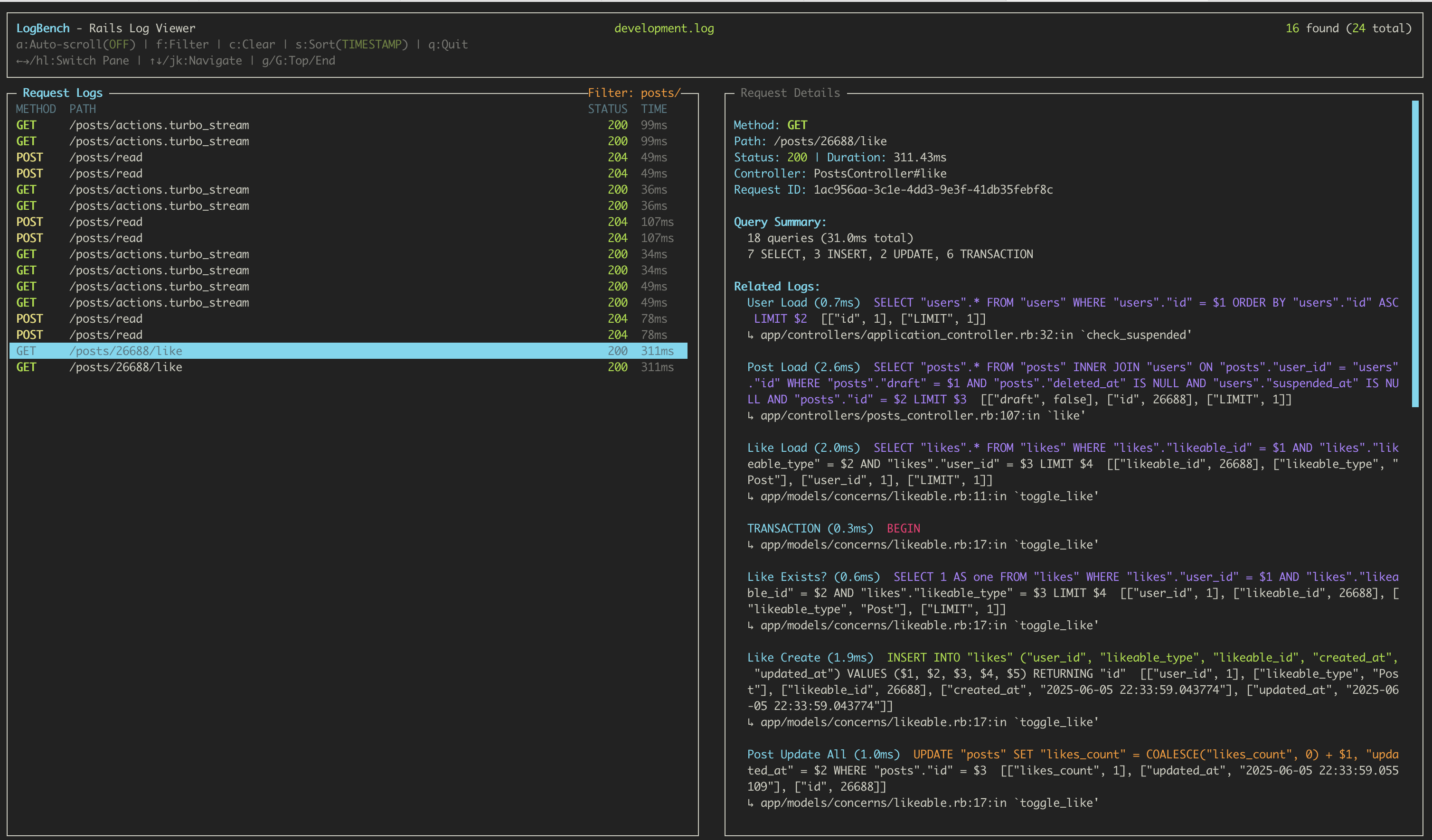
Add LogBench to your Rails application's Gemfile:
# Gemfile
group :development do
  gem 'log_bench'
end
Then run:
bundle install
LogBench is automatically enabled in development environment for backward compatibility. This gem heavily relies on lograge gem for request tracking, we add lograge to your Rails application and configure it automatically, but you can also configure lograge manually if you want.
LogBench works out of the box! Just add the gem and restart your Rails server.
It automatically configures:
No configuration needed in development!
To customize LogBench behavior, create config/initializers/log_bench.rb:
# config/initializers/log_bench.rb
if defined?(LogBench)
  LogBench.setup do |config|
    # Enable/disable LogBench (default: true in development, false elsewhere)
    config.enabled = Rails.env.development? # or any other condition

    # Disable automatic lograge configuration (if you want to configure lograge manually)
    # config.configure_lograge_automatically = false  # (default: true)

    # Customize initialization message
    # config.show_init_message = :min # :full, :min, or :none (default: :full)

    # Specify which controllers to inject request_id tracking
    # config.base_controller_classes = %w[CustomBaseController] # (default: %w[ApplicationController ActionController::Base])
  end
end
If you already have lograge configured or want to manage it manually:
# config/initializers/log_bench.rb
if defined?(LogBench)
  LogBench.setup do |config|
    # ... other config ...
    config.configure_lograge_automatically = false  # Don't touch my lograge config!
  end
end

# Then configure lograge yourself in config/environments/development.rb or an initializer,

Rails.application.configure do
  config.lograge.enabled = true
  config.lograge.formatter = Lograge::Formatters::Json.new
  config.lograge.custom_options = lambda do |event|
    # Your custom lograge configuration
    params = event.payload[:params]&.except("controller", "action")
    { params: params } if params.present?
  end
end
For more information about lograge configuration, see Lograge's documentation.
View your development logs:
bundle exec log_bench
# or explicitly for a specific log file
bundle exec log_bench log/development.log
↑↓ or jk to navigate requests←→ or hl to switch between request list and detailsf to open filter dialogc to clear an active filter (press escape or enter before pressing c to clear)s to cycle through sort options (timestamp, duration, status)a to toggle auto-scroll modey to copy the selected item to clipboard (request details or SQL query)t to toggle text selection mode (enables mouse text selection)Ctrl+L to clear all requests from memory (preserves current position)Ctrl+R to restore previously cleared requests + any new requests (restores exact position)q to exitPress f to open the filter dialog.
In the left pane you can filter by:
Examples:
GET/api/users500UsersControllercreateabcdef-b1n2mk ...In the right pane you can filter related log lines by text content to find specific SQL queries or anything else you want to find in the logs.
LogBench provides multiple ways to copy content:
Smart Copy with y key:
Text Selection Mode:
t to toggle text selection modeClipboard Support:
pbcopy (built-in)xclip or xsel (install with your package manager)/tmp/logbench_copy.txt if no clipboard tool availableLogBench works with JSON-formatted logs. Each log entry should include:
Required fields for HTTP requests:
method: HTTP method (GET, POST, etc.)path: Request pathstatus: HTTP status coderequest_id: Unique request identifierduration: Request duration in millisecondsOptional fields:
controller: Controller nameaction: Action nameallocations: Memory allocationsview: View rendering timedb: Database query timeOther query logs:
message: SQL query with timing informationrequest_id: Links query to HTTP requestLogBench provides enhanced logging for background jobs with colored job prefixes in the TUI. Job logs are automatically prefixed with [JobClass#job-id] in orange/yellow color for easy identification.
For ActiveJob classes, use the job's logger method (not Rails.logger) to ensure logs get proper job context:
class EmailDeliveryJob < ApplicationJob
  def perform(user_id)
    logger.info "Starting email delivery for user #{user_id}"  # ✅ Will have job prefix

    user = User.find(user_id)
    logger.info "Found user: #{user.email}"                    # ✅ Will have job prefix

    # SQL queries are automatically tagged
    user.update!(last_email_sent_at: Time.current)            # ✅ Will have job prefix

    logger.info "Email delivery completed"                     # ✅ Will have job prefix
  end
end
❌ Don't use Rails.logger in ActiveJob:
class EmailDeliveryJob < ApplicationJob
  def perform(user_id)
    Rails.logger.info "This won't have job prefix"  # ❌ No job context
  end
end
For plain Sidekiq jobs (not using ActiveJob), LogBench automatically captures job context:
class DataProcessingJob
  include Sidekiq::Job

  def perform(data_id)
    Rails.logger.info "Processing data #{data_id}"  # ✅ Will have job prefix

    # SQL queries are automatically tagged
    data = Data.find(data_id)                       # ✅ Will have job prefix
    data.process!

    Rails.logger.info "Data processing completed"   # ✅ Will have job prefix
  end
end
In the TUI, job-related logs appear with colored prefixes:
🟡[EmailDeliveryJob#email-job-123] Starting email delivery for user 456
🟡[EmailDeliveryJob#email-job-123] Found user: [email protected]
🟡[EmailDeliveryJob#email-job-123]   User Load (1.2ms)  SELECT "users".* FROM "users" WHERE "users"."id" = $1
🟡[EmailDeliveryJob#email-job-123] Email delivery completed
(🟡 represents yellow bold colored job name, consistent with Rails SQL query coloring)
LogBench automatically detects job context through:
No additional configuration is required - job logging works automatically once LogBench is installed.
LogBench includes a comprehensive test suite to ensure reliability and correctness.
# Run all tests
bundle exec rake test

# Run specific test files
bundle exec ruby test/test_log_entry.rb
bundle exec ruby test/test_request.rb
bundle exec ruby test/test_json_formatter.rb

# Run tests with verbose output
bundle exec rake test TESTOPTS="-v"
The test suite covers:
When contributing, please include tests for new features:
# test/test_new_feature.rb
require "test_helper"

class TestNewFeature < Minitest::Test
  def test_feature_works
    # Your test code here
    assert_equal expected, actual
  end
end
request_idCurrent.request_id is being set properlya) for better performance with actively growing log filesgit checkout -b feature/amazing-feature)git commit -m 'Add amazing feature')git push origin feature/amazing-feature)This gem is available as open source under the terms of the MIT License.
1,848 followers · starred Nov 2025
1,138 followers · starred Jun 2025
221 followers · starred Nov 2025
161 followers · starred Nov 2025
A terminal-based Rails log viewer with real-time monitoring and filtering capabilities
Ruby
539
97 commits
updated Feb 17, 2026
A powerful TUI (Terminal User Interface) for analyzing Rails application logs in real-time. LogBench provides an intuitive interface to view HTTP requests, SQL queries, and performance metrics from your Rails logs.
Add LogBench to your Rails application's Gemfile:
# Gemfile
group :development do
  gem 'log_bench'
end
Then run:
bundle install
LogBench is automatically enabled in development environment for backward compatibility. This gem heavily relies on lograge gem for request tracking, we add lograge to your Rails application and configure it automatically, but you can also configure lograge manually if you want.
LogBench works out of the box! Just add the gem and restart your Rails server.
It automatically configures:
No configuration needed in development!
To customize LogBench behavior, create config/initializers/log_bench.rb:
# config/initializers/log_bench.rb
if defined?(LogBench)
  LogBench.setup do |config|
    # Enable/disable LogBench (default: true in development, false elsewhere)
    config.enabled = Rails.env.development? # or any other condition

    # Disable automatic lograge configuration (if you want to configure lograge manually)
    # config.configure_lograge_automatically = false  # (default: true)

    # Customize initialization message
    # config.show_init_message = :min # :full, :min, or :none (default: :full)

    # Specify which controllers to inject request_id tracking
    # config.base_controller_classes = %w[CustomBaseController] # (default: %w[ApplicationController ActionController::Base])
  end
end
If you already have lograge configured or want to manage it manually:
# config/initializers/log_bench.rb
if defined?(LogBench)
  LogBench.setup do |config|
    # ... other config ...
    config.configure_lograge_automatically = false  # Don't touch my lograge config!
  end
end

# Then configure lograge yourself in config/environments/development.rb or an initializer,

Rails.application.configure do
  config.lograge.enabled = true
  config.lograge.formatter = Lograge::Formatters::Json.new
  config.lograge.custom_options = lambda do |event|
    # Your custom lograge configuration
    params = event.payload[:params]&.except("controller", "action")
    { params: params } if params.present?
  end
end
For more information about lograge configuration, see Lograge's documentation.
View your development logs:
bundle exec log_bench
# or explicitly for a specific log file
bundle exec log_bench log/development.log
↑↓ or jk to navigate requests←→ or hl to switch between request list and detailsf to open filter dialogc to clear an active filter (press escape or enter before pressing c to clear)s to cycle through sort options (timestamp, duration, status)a to toggle auto-scroll modey to copy the selected item to clipboard (request details or SQL query)t to toggle text selection mode (enables mouse text selection)Ctrl+L to clear all requests from memory (preserves current position)Ctrl+R to restore previously cleared requests + any new requests (restores exact position)q to exitPress f to open the filter dialog.
In the left pane you can filter by:
Examples:
GET/api/users500UsersControllercreateabcdef-b1n2mk ...In the right pane you can filter related log lines by text content to find specific SQL queries or anything else you want to find in the logs.
LogBench provides multiple ways to copy content:
Smart Copy with y key:
Text Selection Mode:
t to toggle text selection modeClipboard Support:
pbcopy (built-in)xclip or xsel (install with your package manager)/tmp/logbench_copy.txt if no clipboard tool availableLogBench works with JSON-formatted logs. Each log entry should include:
Required fields for HTTP requests:
method: HTTP method (GET, POST, etc.)path: Request pathstatus: HTTP status coderequest_id: Unique request identifierduration: Request duration in millisecondsOptional fields:
controller: Controller nameaction: Action nameallocations: Memory allocationsview: View rendering timedb: Database query timeOther query logs:
message: SQL query with timing informationrequest_id: Links query to HTTP requestLogBench provides enhanced logging for background jobs with colored job prefixes in the TUI. Job logs are automatically prefixed with [JobClass#job-id] in orange/yellow color for easy identification.
For ActiveJob classes, use the job's logger method (not Rails.logger) to ensure logs get proper job context:
class EmailDeliveryJob < ApplicationJob
  def perform(user_id)
    logger.info "Starting email delivery for user #{user_id}"  # ✅ Will have job prefix

    user = User.find(user_id)
    logger.info "Found user: #{user.email}"                    # ✅ Will have job prefix

    # SQL queries are automatically tagged
    user.update!(last_email_sent_at: Time.current)            # ✅ Will have job prefix

    logger.info "Email delivery completed"                     # ✅ Will have job prefix
  end
end
❌ Don't use Rails.logger in ActiveJob:
class EmailDeliveryJob < ApplicationJob
  def perform(user_id)
    Rails.logger.info "This won't have job prefix"  # ❌ No job context
  end
end
For plain Sidekiq jobs (not using ActiveJob), LogBench automatically captures job context:
class DataProcessingJob
  include Sidekiq::Job

  def perform(data_id)
    Rails.logger.info "Processing data #{data_id}"  # ✅ Will have job prefix

    # SQL queries are automatically tagged
    data = Data.find(data_id)                       # ✅ Will have job prefix
    data.process!

    Rails.logger.info "Data processing completed"   # ✅ Will have job prefix
  end
end
In the TUI, job-related logs appear with colored prefixes:
🟡[EmailDeliveryJob#email-job-123] Starting email delivery for user 456
🟡[EmailDeliveryJob#email-job-123] Found user: [email protected]
🟡[EmailDeliveryJob#email-job-123]   User Load (1.2ms)  SELECT "users".* FROM "users" WHERE "users"."id" = $1
🟡[EmailDeliveryJob#email-job-123] Email delivery completed
(🟡 represents yellow bold colored job name, consistent with Rails SQL query coloring)
LogBench automatically detects job context through:
No additional configuration is required - job logging works automatically once LogBench is installed.
LogBench includes a comprehensive test suite to ensure reliability and correctness.
# Run all tests
bundle exec rake test

# Run specific test files
bundle exec ruby test/test_log_entry.rb
bundle exec ruby test/test_request.rb
bundle exec ruby test/test_json_formatter.rb

# Run tests with verbose output
bundle exec rake test TESTOPTS="-v"
The test suite covers:
When contributing, please include tests for new features:
# test/test_new_feature.rb
require "test_helper"

class TestNewFeature < Minitest::Test
  def test_feature_works
    # Your test code here
    assert_equal expected, actual
  end
end
request_idCurrent.request_id is being set properlya) for better performance with actively growing log filesgit checkout -b feature/amazing-feature)git commit -m 'Add amazing feature')git push origin feature/amazing-feature)This gem is available as open source under the terms of the MIT License.
1,848 followers · starred Nov 2025
1,138 followers · starred Jun 2025
221 followers · starred Nov 2025
161 followers · starred Nov 2025



