
Keep your bundle size in check



npm install bundlesize --save-dev

# or

yarn add bundlesize --dev
Add it to your scripts in package.json
"scripts": {
  "test": "bundlesize"
}
Or you can use it with npx from NPM 5.2+.
npx bundlesize
bundlesize accepts an array of files to check.
[
  {
    "path": "./build/vendor.js",
    "maxSize": "30 kB"
  },
  {
    "path": "./build/chunk-*.js",
    "maxSize": "10 kB"
  }
]
You can keep this array either in
package.json
{
  "name": "your cool library",
  "version": "1.1.2",
  "bundlesize": [
    {
      "path": "./build/vendor.js",
      "maxSize": "3 kB"
    }
  ]
}
or in a separate file
bundlesize.config.json
Format:
{
  "files": [
    {
      "path": "./dist.js",
      "maxSize": "3 kB"
    }
  ]
}
You can give a different file by using the --config flag:
bundlesize --config configs/bundlesize.json
Fuzzy matching
If the names of your build files are not predictable, you can use the glob pattern to specify files.
This is common if you append a hash to the name or use a tool like create-react-app/nextjs.
{
  "files": [
    {
      "path": "build/**/main-*.js",
      "maxSize": "5 kB"
    },
    {
      "path": "build/**/*.chunk.js",
      "maxSize": "50 kB"
    }
  ]
}
It will match multiple files if necessary and create a new row for each file.
Compression options
By default, bundlesize gzips your build files before comparing.
If you are using brotli instead of gzip, you can specify that with each file:
{
  "files": [
    {
      "path": "./build/vendor.js",
      "maxSize": "5 kB",
      "compression": "brotli"
    }
  ]
}
If you do not use any compression before sending your files to the client, you can switch compression off:
{
  "files": [
    {
      "path": "./build/vendor.js",
      "maxSize": "5 kB",
      "compression": "none"
    }
  ]
}
If your repository is hosted on GitHub, you can set bundlesize up to create a "check" on every pull request.
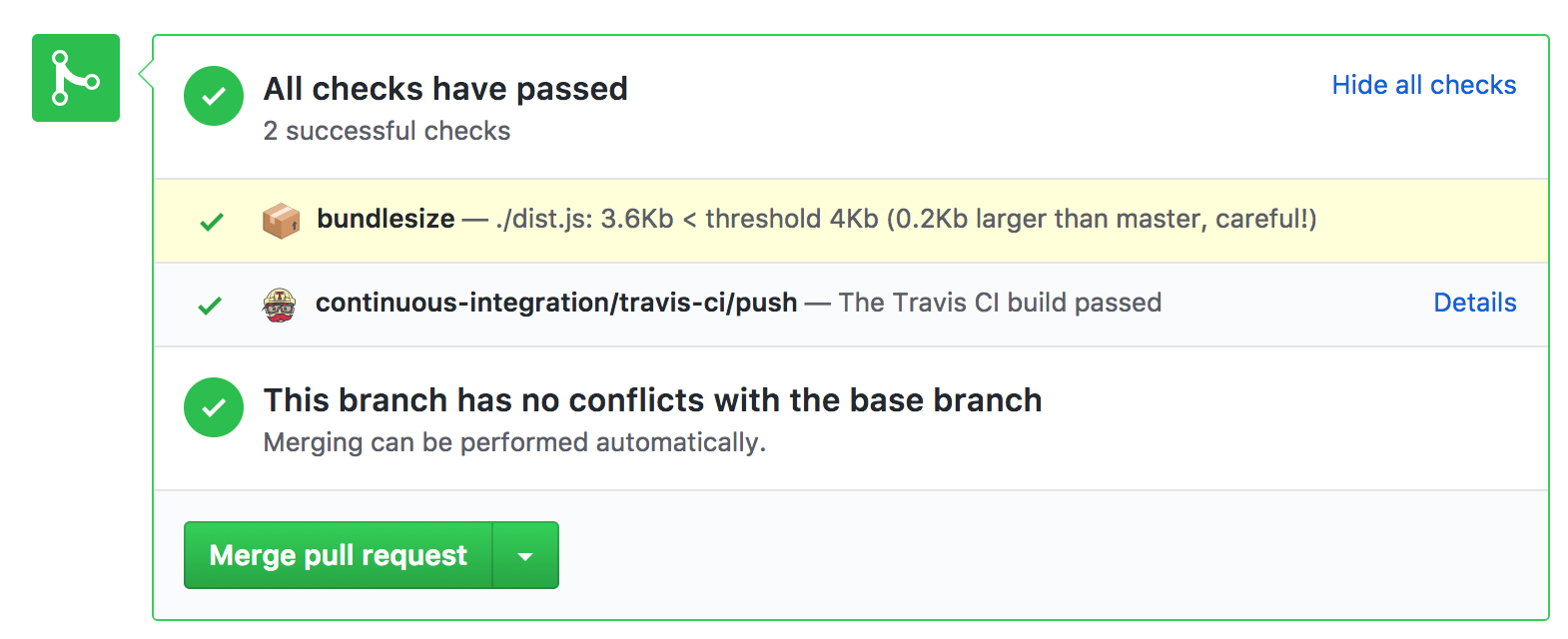
Currently works with Travis CI, CircleCI, Wercker, and Drone.
bundlesize for status access, copy the token provided.BUNDLESIZE_GITHUB_TOKEN as environment parameter in your CIs project settings.You will need to supply an additional 5 environment variables.
CI_REPO_OWNER given the repo https://github.com/myusername/myrepo would be myusernameCI_REPO_NAME given the repo https://github.com/myusername/myrepo would be myrepoCI_COMMIT_MESSAGE the commit messageCI_COMMIT_SHA the SHA of the CI commit, in Jenkins you would use ${env.GIT_COMMIT}CI=true usually set automatically in CI environments(Ask me for help if you're stuck)
bundlesize can also be used without creating a configuration file. We do not recommend this approach and it might be deprecated in a future version.
bundlesize -f "dist/*.js" -s 20kB
For more granular configuration, we recommend configuring it in the package.json (documented above).
⭐ this repo

This project exists thanks to all the people who contribute. [Contribute].

MIT © siddharthkp
Overall
Maintained
Code review
npm
Latest release
Releases this year
(top 24 of 66)
424 followers · starred Oct 2020
14,909 followers · starred Jul 2017
1,010 followers · starred Jul 2017
32,122 followers · starred Jul 2017
Keep your bundle size in check
npm install bundlesize --save-dev

# or

yarn add bundlesize --dev
Add it to your scripts in package.json
"scripts": {
  "test": "bundlesize"
}
Or you can use it with npx from NPM 5.2+.
npx bundlesize
bundlesize accepts an array of files to check.
[
  {
    "path": "./build/vendor.js",
    "maxSize": "30 kB"
  },
  {
    "path": "./build/chunk-*.js",
    "maxSize": "10 kB"
  }
]
You can keep this array either in
package.json
{
  "name": "your cool library",
  "version": "1.1.2",
  "bundlesize": [
    {
      "path": "./build/vendor.js",
      "maxSize": "3 kB"
    }
  ]
}
or in a separate file
bundlesize.config.json
Format:
{
  "files": [
    {
      "path": "./dist.js",
      "maxSize": "3 kB"
    }
  ]
}
You can give a different file by using the --config flag:
bundlesize --config configs/bundlesize.json
Fuzzy matching
If the names of your build files are not predictable, you can use the glob pattern to specify files.
This is common if you append a hash to the name or use a tool like create-react-app/nextjs.
{
  "files": [
    {
      "path": "build/**/main-*.js",
      "maxSize": "5 kB"
    },
    {
      "path": "build/**/*.chunk.js",
      "maxSize": "50 kB"
    }
  ]
}
It will match multiple files if necessary and create a new row for each file.
Compression options
By default, bundlesize gzips your build files before comparing.
If you are using brotli instead of gzip, you can specify that with each file:
{
  "files": [
    {
      "path": "./build/vendor.js",
      "maxSize": "5 kB",
      "compression": "brotli"
    }
  ]
}
If you do not use any compression before sending your files to the client, you can switch compression off:
{
  "files": [
    {
      "path": "./build/vendor.js",
      "maxSize": "5 kB",
      "compression": "none"
    }
  ]
}
If your repository is hosted on GitHub, you can set bundlesize up to create a "check" on every pull request.
Currently works with Travis CI, CircleCI, Wercker, and Drone.
bundlesize for status access, copy the token provided.BUNDLESIZE_GITHUB_TOKEN as environment parameter in your CIs project settings.You will need to supply an additional 5 environment variables.
CI_REPO_OWNER given the repo https://github.com/myusername/myrepo would be myusernameCI_REPO_NAME given the repo https://github.com/myusername/myrepo would be myrepoCI_COMMIT_MESSAGE the commit messageCI_COMMIT_SHA the SHA of the CI commit, in Jenkins you would use ${env.GIT_COMMIT}CI=true usually set automatically in CI environments(Ask me for help if you're stuck)
bundlesize can also be used without creating a configuration file. We do not recommend this approach and it might be deprecated in a future version.
bundlesize -f "dist/*.js" -s 20kB
For more granular configuration, we recommend configuring it in the package.json (documented above).
⭐ this repo
This project exists thanks to all the people who contribute. [Contribute].
MIT © siddharthkp
Overall
Maintained
Code review
npm
Latest release
Releases this year
(top 24 of 66)
424 followers · starred Oct 2020
14,909 followers · starred Jul 2017
1,010 followers · starred Jul 2017
32,122 followers · starred Jul 2017