A unified and fully open-source framework for instruction-guided and reference-guided video editing using natural language.
See the code Kiwi-Edit: Versatile Video Editing via Instruction and Reference Guidance
🌐 Project Page | 📑 Paper | 🤗 Models(🧨) | 🤗 Datasets | 🤗 Demo
Kiwi-Edit is a versatile video editing framework built on an MLLM encoder and a video DiT for:
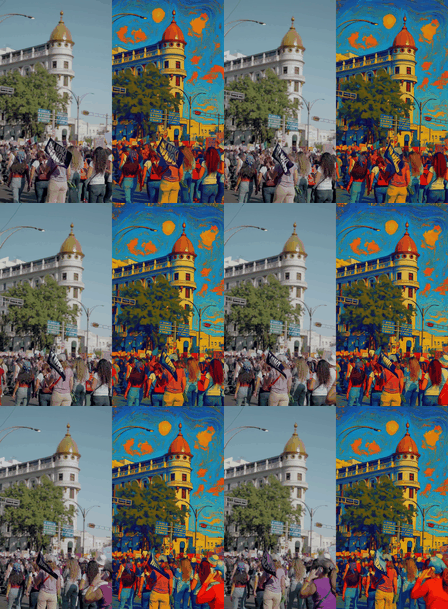
"Apply the dynamic aesthetic of abstract art to this video."
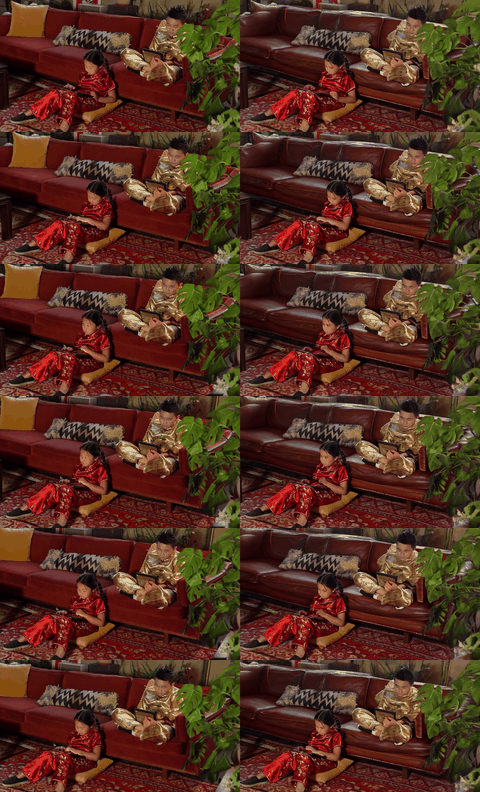
"Replace the sofa with a classic brown leather sofa with visible stitching."

"Add a classic brown fedora hat to the boy's head."
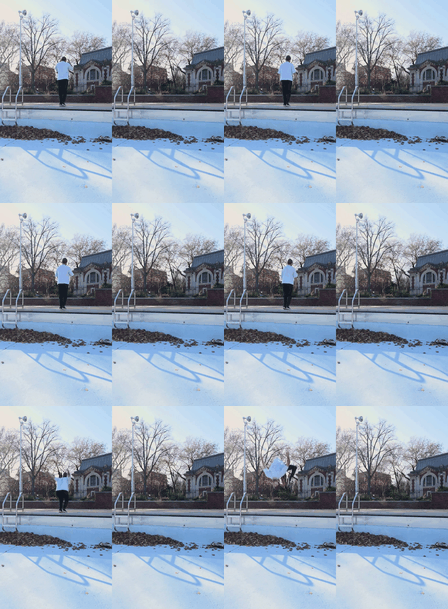
"Remove the person wearing a light blue shirt and dark pants from the entire video sequence."
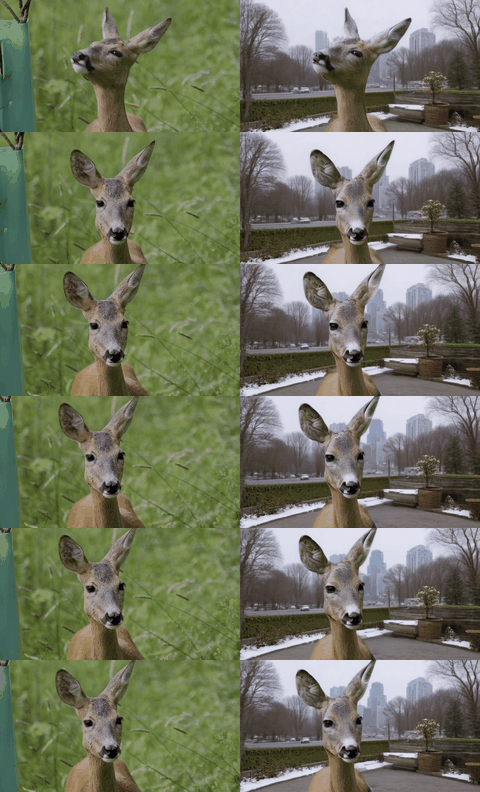
"Replace the background with a lively urban garden scene during winter."
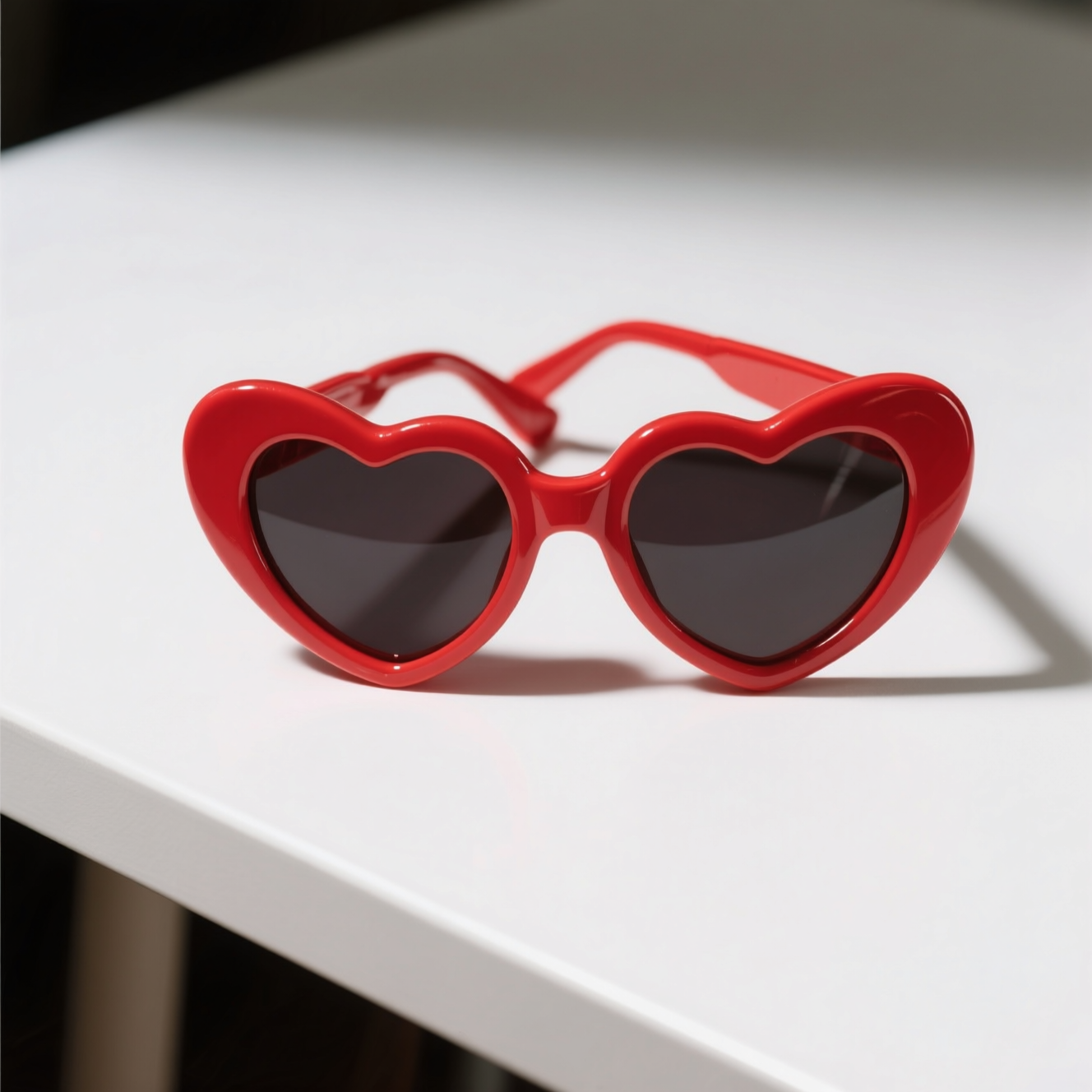 | 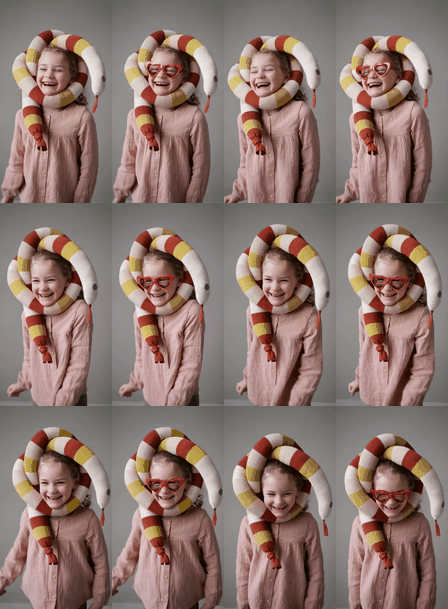 |
"Add a pair of iconic red heart-shaped sunglasses to the girl's face."
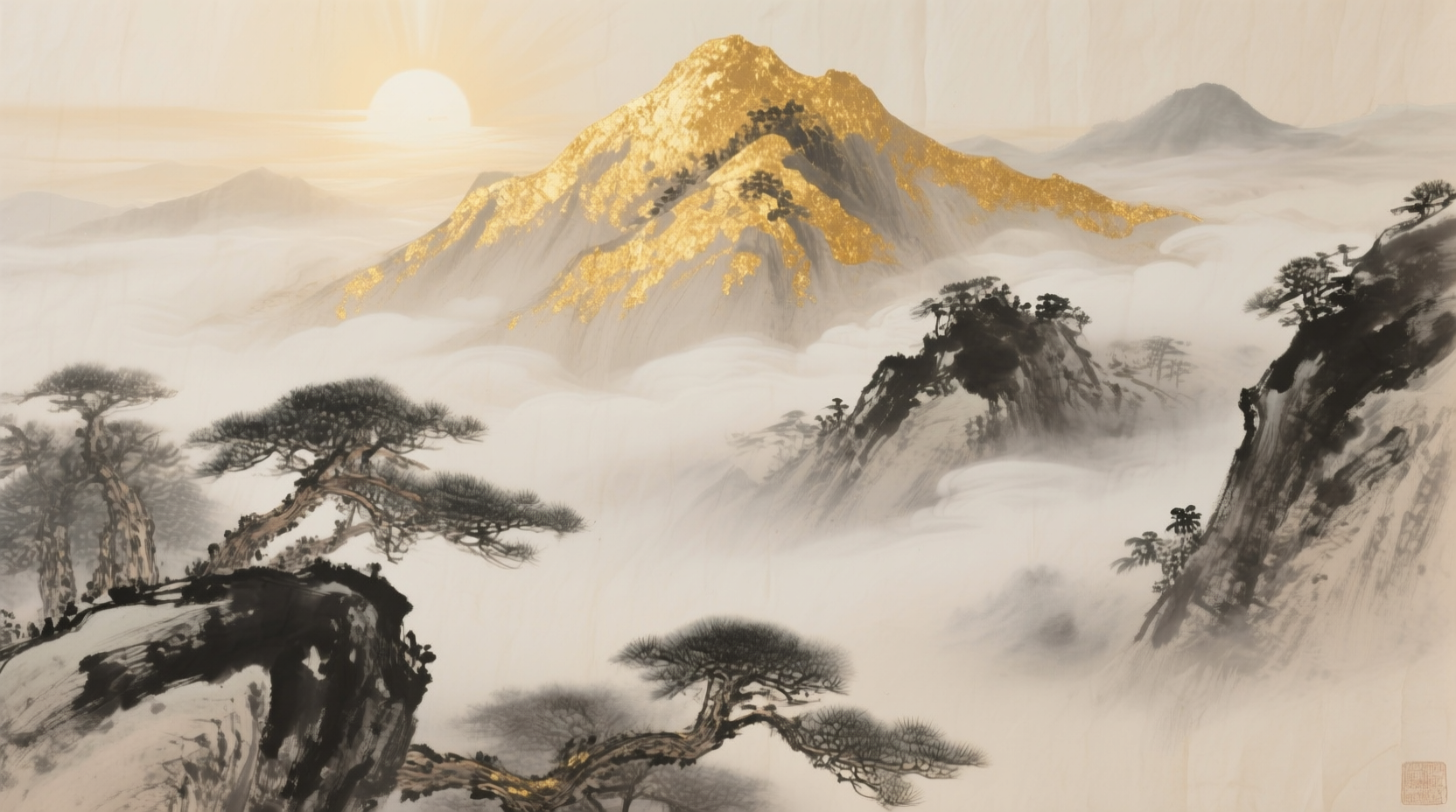 | 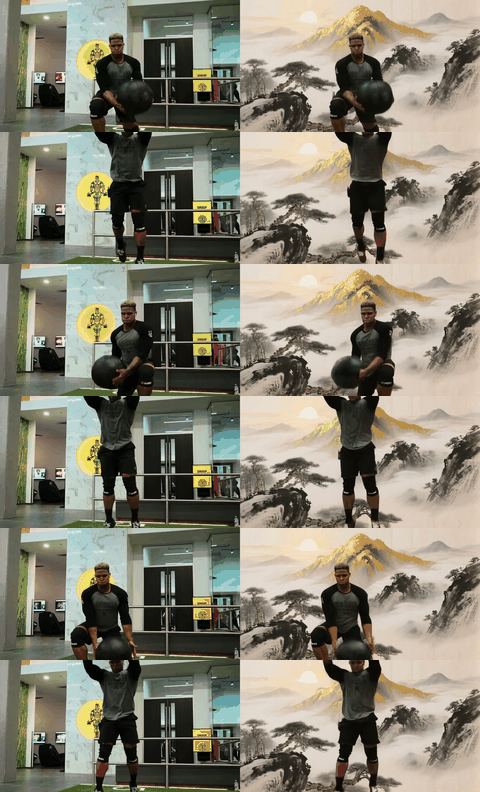 |
"Replace the background with a Chinese ink painting, featuring a large golden mountain peak rising above swirling clouds."
Environment Requirements
1) Prepare environment and base weights:
# Create conda environment
conda create -n diffsynth python=3.10 -y
conda activate diffsynth
# Install PyTorch 2.7 with CUDA
pip install torch==2.7.0 torchvision==0.22.0 torchaudio==2.7.0 --index-url https://download.pytorch.org/whl/cu128
pip install -e .
conda install mpi4py -y
pip install deepspeed
pip install https://github.com/Dao-AILab/flash-attention/releases/download/v2.8.3/flash_attn-2.8.3+cu12torch2.7cxx11abiFALSE-cp310-cp310-linux_x86_64.whl
pip install transformers==4.57.0 huggingface-hub==0.34 wandb
# Prepare the pretrained video dit
mkdir -p models/Wan-AI/
# Please login first
hf download Wan-AI/Wan2.2-TI2V-5B --local-dir ./models/Wan-AI/Wan2.2-TI2V-5B
or
bash install_full_env.sh
2) Run a quick test on demo video:
python demo.py \
  --ckpt_path path_to_checkpoint \
  --video_path ./demo_data/video/source/0005e4ad9f49814db1d3f2296b911abf.mp4 \
  --prompt "Remove the monkey." \
  --save_path ./output/demo_output.mp4
1) Prepare environment:
# Create conda environment
conda create -n diffusers python=3.10 -y
conda activate diffusers
# Install PyTorch 2.7 with CUDA
pip install torch==2.7.0 torchvision==0.22.0 torchaudio==2.7.0 --index-url https://download.pytorch.org/whl/cu128
pip install diffusers decord einops accelerate transformers==4.57.0 opencv-python av
or
bash install_diffusers_env.sh
Diffusers model zoo:
| Model | Type | Hugging Face |
|---|---|---|
kiwi-edit-5b-instruct-only-diffusers | Only Fintune on Instruction Data | linyq/kiwi-edit-5b-instruct-only-diffusers |
kiwi-edit-5b-reference-only-diffusers | Only Fintune on Reference Data | linyq/kiwi-edit-5b-reference-only-diffusers |
kiwi-edit-5b-instruct-reference-diffusers | Fintune on Instruction and Reference Data | linyq/kiwi-edit-5b-instruct-reference-diffusers |
2) Run a quick test on demo video:
python diffusers_demo.py \
    --video_path ./demo_data/video/source/0005e4ad9f49814db1d3f2296b911abf.mp4 \
    --prompt "Remove the monkey." \
    --save_path output.mp4 --model_path linyq/kiwi-edit-5b-instruct-only-diffusers
All training metadata uses CSV; we provide demo data in the repo:
src_video, tgt_video, promptdemo_data/image_demo_training_set.csvsrc_video, tgt_video, promptdemo_data/video_demo_training_set.csvsrc_video, tgt_video, ref_image, promptdemo_data/video_ref_demo_training_set.csvFor full data training, please refer to DATASET.md.
Use the provided scripts in scripts/. Example:
bash scripts/run_wan2.2_ti2v_5b_qwen25vl_3b_stage3_img_vid_refvid_720x1280_81f.sh
Training scripts, key parameters, and placeholder links:
| Script | Model Size | Training Stage (Data) | Max Pixels | Frames | LR | Steps | Model Weights |
|---|---|---|---|---|---|---|---|
| link | Qwen2.5-VL-3B+Wan2.2-TI2V-5B | Stage 1 (Image) | 1024x1024 | 1 | 1e-5 | 30K | link |
| link | Qwen2.5-VL-3B+Wan2.2-TI2V-5B | Stage 2 (Image + Video) | 600x600 | 81 | 1e-5 | 20K | link |
| link | Qwen2.5-VL-3B+Wan2.2-TI2V-5B | Stage 2 (Image + Video) | 720x1280 | 81 | 1e-5 | 20K | link |
| link | Qwen2.5-VL-3B+Wan2.2-TI2V-5B | Stage 3 (Image + Video + Ref-Video) | 720x1280 | 81 | 5e-6 | 15K | link |
| link | Qwen2.5-VL-3B+Wan2.2-TI2V-5B | Stage 3 (Ref-Video) | 720x1280 | 81 | 5e-6 | 30K | link |
Here are the download links for the evaluation benchmark datasets:
After downloading, the expected directory structure under ./benchmark/ is:
benchmark/
├── OpenVE-Bench/
│   ├── videos/
│   ├── benchmark_videos.csv
│   └── README.md
└── RefVIE-Bench/
    ├── ref_images/
    ├── source_videos/
    └── refvie_bench.yaml
For benchmark inference example:
python test_benchmark.py \
  --ckpt_path path_to_ckpt \
  --bench openve \  # or refvie
  --max_frame 81 \
  --max_pixels 921600 \
  --save_dir ./infer_results/exp_name/
For score evaluation, see eval_openve_gemini.py and eval_refvie_gemini.py.
Example:
python eval_openve_gemini.py --video_paths path_to_videos
utils/convert_diffusers/README.md../benchmark/....Kiwi-Edit builds on training framework ModelScope DiffSynth-Studio, open-sourced datasets Ditto-1M, OpenVE-3M, ReCo, GPT-Image-Edit-1.5M, NHR-Edit, reward model EditScore, foundation model Qwen2.5-VL, Wan and image generation model Qwen-Image-Edit.
If you use our code in your work, please cite our paper:
@misc{kiwiedit,
      title={Kiwi-Edit: Versatile Video Editing via Instruction and Reference Guidance},
      author={Yiqi Lin and Guoqiang Liang and Ziyun Zeng and Zechen Bai and Yanzhe Chen and Mike Zheng Shou},
      year={2026},
      eprint={2603.02175},
      archivePrefix={arXiv},
      primaryClass={cs.CV},
      url={https://arxiv.org/abs/2603.02175},
}
78 followers · starred Mar 2026
297 followers · starred Mar 2026
104 followers · starred Mar 2026
160 followers · starred Aug 2026
A unified and fully open-source framework for instruction-guided and reference-guided video editing using natural language.
See the code
Kiwi-Edit: Versatile Video Editing via Instruction and Reference Guidance
🌐 Project Page | 📑 Paper | 🤗 Models(🧨) | 🤗 Datasets | 🤗 Demo
Kiwi-Edit is a versatile video editing framework built on an MLLM encoder and a video DiT for:
"Apply the dynamic aesthetic of abstract art to this video."
"Replace the sofa with a classic brown leather sofa with visible stitching."
"Add a classic brown fedora hat to the boy's head."
"Remove the person wearing a light blue shirt and dark pants from the entire video sequence."
"Replace the background with a lively urban garden scene during winter."
| |
"Add a pair of iconic red heart-shaped sunglasses to the girl's face."
| |
"Replace the background with a Chinese ink painting, featuring a large golden mountain peak rising above swirling clouds."
Environment Requirements
1) Prepare environment and base weights:
# Create conda environment
conda create -n diffsynth python=3.10 -y
conda activate diffsynth
# Install PyTorch 2.7 with CUDA
pip install torch==2.7.0 torchvision==0.22.0 torchaudio==2.7.0 --index-url https://download.pytorch.org/whl/cu128
pip install -e .
conda install mpi4py -y
pip install deepspeed
pip install https://github.com/Dao-AILab/flash-attention/releases/download/v2.8.3/flash_attn-2.8.3+cu12torch2.7cxx11abiFALSE-cp310-cp310-linux_x86_64.whl
pip install transformers==4.57.0 huggingface-hub==0.34 wandb
# Prepare the pretrained video dit
mkdir -p models/Wan-AI/
# Please login first
hf download Wan-AI/Wan2.2-TI2V-5B --local-dir ./models/Wan-AI/Wan2.2-TI2V-5B
or
bash install_full_env.sh
2) Run a quick test on demo video:
python demo.py \
  --ckpt_path path_to_checkpoint \
  --video_path ./demo_data/video/source/0005e4ad9f49814db1d3f2296b911abf.mp4 \
  --prompt "Remove the monkey." \
  --save_path ./output/demo_output.mp4
1) Prepare environment:
# Create conda environment
conda create -n diffusers python=3.10 -y
conda activate diffusers
# Install PyTorch 2.7 with CUDA
pip install torch==2.7.0 torchvision==0.22.0 torchaudio==2.7.0 --index-url https://download.pytorch.org/whl/cu128
pip install diffusers decord einops accelerate transformers==4.57.0 opencv-python av
or
bash install_diffusers_env.sh
Diffusers model zoo:
| Model | Type | Hugging Face |
|---|---|---|
kiwi-edit-5b-instruct-only-diffusers | Only Fintune on Instruction Data | linyq/kiwi-edit-5b-instruct-only-diffusers |
kiwi-edit-5b-reference-only-diffusers | Only Fintune on Reference Data | linyq/kiwi-edit-5b-reference-only-diffusers |
kiwi-edit-5b-instruct-reference-diffusers | Fintune on Instruction and Reference Data | linyq/kiwi-edit-5b-instruct-reference-diffusers |
2) Run a quick test on demo video:
python diffusers_demo.py \
    --video_path ./demo_data/video/source/0005e4ad9f49814db1d3f2296b911abf.mp4 \
    --prompt "Remove the monkey." \
    --save_path output.mp4 --model_path linyq/kiwi-edit-5b-instruct-only-diffusers
All training metadata uses CSV; we provide demo data in the repo:
src_video, tgt_video, promptdemo_data/image_demo_training_set.csvsrc_video, tgt_video, promptdemo_data/video_demo_training_set.csvsrc_video, tgt_video, ref_image, promptdemo_data/video_ref_demo_training_set.csvFor full data training, please refer to DATASET.md.
Use the provided scripts in scripts/. Example:
bash scripts/run_wan2.2_ti2v_5b_qwen25vl_3b_stage3_img_vid_refvid_720x1280_81f.sh
Training scripts, key parameters, and placeholder links:
| Script | Model Size | Training Stage (Data) | Max Pixels | Frames | LR | Steps | Model Weights |
|---|---|---|---|---|---|---|---|
| link | Qwen2.5-VL-3B+Wan2.2-TI2V-5B | Stage 1 (Image) | 1024x1024 | 1 | 1e-5 | 30K | link |
| link | Qwen2.5-VL-3B+Wan2.2-TI2V-5B | Stage 2 (Image + Video) | 600x600 | 81 | 1e-5 | 20K | link |
| link | Qwen2.5-VL-3B+Wan2.2-TI2V-5B | Stage 2 (Image + Video) | 720x1280 | 81 | 1e-5 | 20K | link |
| link | Qwen2.5-VL-3B+Wan2.2-TI2V-5B | Stage 3 (Image + Video + Ref-Video) | 720x1280 | 81 | 5e-6 | 15K | link |
| link | Qwen2.5-VL-3B+Wan2.2-TI2V-5B | Stage 3 (Ref-Video) | 720x1280 | 81 | 5e-6 | 30K | link |
Here are the download links for the evaluation benchmark datasets:
After downloading, the expected directory structure under ./benchmark/ is:
benchmark/
├── OpenVE-Bench/
│   ├── videos/
│   ├── benchmark_videos.csv
│   └── README.md
└── RefVIE-Bench/
    ├── ref_images/
    ├── source_videos/
    └── refvie_bench.yaml
For benchmark inference example:
python test_benchmark.py \
  --ckpt_path path_to_ckpt \
  --bench openve \  # or refvie
  --max_frame 81 \
  --max_pixels 921600 \
  --save_dir ./infer_results/exp_name/
For score evaluation, see eval_openve_gemini.py and eval_refvie_gemini.py.
Example:
python eval_openve_gemini.py --video_paths path_to_videos
utils/convert_diffusers/README.md../benchmark/....Kiwi-Edit builds on training framework ModelScope DiffSynth-Studio, open-sourced datasets Ditto-1M, OpenVE-3M, ReCo, GPT-Image-Edit-1.5M, NHR-Edit, reward model EditScore, foundation model Qwen2.5-VL, Wan and image generation model Qwen-Image-Edit.
If you use our code in your work, please cite our paper:
@misc{kiwiedit,
      title={Kiwi-Edit: Versatile Video Editing via Instruction and Reference Guidance},
      author={Yiqi Lin and Guoqiang Liang and Ziyun Zeng and Zechen Bai and Yanzhe Chen and Mike Zheng Shou},
      year={2026},
      eprint={2603.02175},
      archivePrefix={arXiv},
      primaryClass={cs.CV},
      url={https://arxiv.org/abs/2603.02175},
}
78 followers · starred Mar 2026
297 followers · starred Mar 2026
104 followers · starred Mar 2026
160 followers · starred Aug 2026