[ICLR 2026] Follow-Your-Preference: Towards Preference-Aligned Image Inpainting
Python
11
14 commits
updated May 21, 2026
This repository contains the implementation code for paper:
Follow-Your-Preference: Towards Preference-Aligned Image Inpainting
International Conference on Learning Representations (ICLR 2026)
Yutao Shen✳, Junkun Yuan✳✉, Toru Aonishi, Hideki Nakayama, Yue Ma✉
We study image inpainting with preference alignment, giving insights into its effectiveness, scalability, challenges.
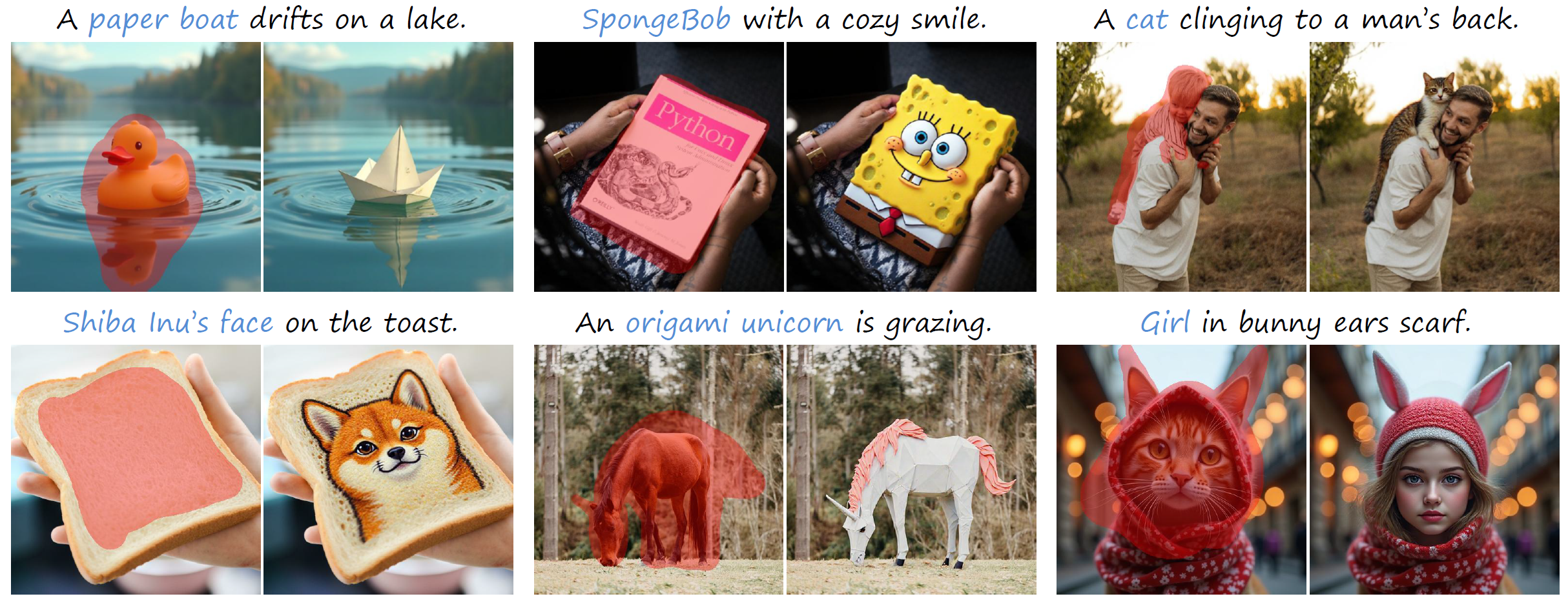
Our method has been implemented with python 3.12 and CUDA 12.1. Basically, you need to prepare two envs:
inference and trainingscoring and evaluationDownload BrushData
000279227.aesthetic_score (unused)000279227.caption (string)000279227.height (int)000279227.image (binary; can be read as PNG — we highly recommend saving images locally as .png)000279227.original_key (unused)000279227.segmentation (dict)000279227.url (unused)000279227.width (int)Extract and build JSON
[
  {
    "gt_image_path": "/your/path/to/000279227.png",
    "caption": "000279227.caption",
    "height": 000279227.height,
    "width": 000279227.width,
    "segmentation": 000279227.segmentation,
    "image_id": "00027_000279227"
  }
  // ...
]
git clone --recursive https://github.com/shenytzzz/Follow-Your-Preference.git
conda create -n train python=3.12
cd ./flux
pip install -e ".[all]"
cd ../diffusers
pip install -e ".[torch]"
pip install omegaconf transformers==4.52.0 accelerate==1.6.0 datasets==3.5.0 deepspeed==0.17.1
git clone --recursive https://github.com/shenytzzz/Follow-Your-Preference.git
conda create -n eval python=3.12
pip install image-reward
pip install hpsv2==1.2.0
pip install open-clip-torch==2.32.0
pip install clip
pip install torchmetrics==1.7.4
cd ./t2v_metrics
conda install pip -y
conda install ffmpeg -c conda-forge
pip install -e .
cd ..
pip install transformers==4.45.2
pip install hpsv3
pip install tensorboard
pip install wandb
Note
extra/bpe_simple_vocab_16e6.txt.gz into ~/miniconda3/envs/test_eval/lib/python3.12/site-packages/hpsv2/src/open_clip/~/miniconda3/envs/test_eval/lib/python3.12/site-packages/hpsv2/__init__.py and ~/miniconda3/envs/test_eval/lib/python3.12/site-packages/hpsv2/img_score.py for multi-gpu evaluation. Our modified versions are also provided under extra/diffusers 0.33.1. Following BrushNet, we:
brushnet under diffusers/src/diffusers/pipelines/brushnet.py under diffusers/src/diffusers/models/__init__.py accordingly.unet under diffusers/src/diffusers/models/ with the one from diffusers 0.27.0 to ensure the compatibility with BrushNet. (Other models that rely on the unet from diffusers 0.33.1 may not work as expected.)We released our models on the huggingface, feel free to have a try 😉.
BruPA
from diffusers import StableDiffusionBrushNetPipeline, BrushNetModel, UniPCMultistepScheduler
import torch
import cv2
import numpy as np
from PIL import Image

brushnet = BrushNetModel.from_pretrained(
    "shenyt/BruPA",
    subfolder="brushnet",
    torch_dtype=torch.float16
).to("cuda")
pipe = StableDiffusionBrushNetPipeline.from_pretrained(
    "runwayml/stable-diffusion-v1-5", brushnet=brushnet, torch_dtype=torch.float16
).to("cuda")
pipe.scheduler = UniPCMultistepScheduler.from_config(pipe.scheduler.config)

init_image = cv2.imread(...)[:,:,::-1]
mask_image = 1.*(cv2.imread(...).sum(-1)>255)[:,:,np.newaxis]
init_image = init_image * (1-mask_image)
init_image = Image.fromarray(init_image.astype(np.uint8)).convert("RGB")
mask_image = Image.fromarray(mask_image.astype(np.uint8).repeat(3,-1)*255).convert("RGB")

image = pipe(
    caption,
    init_image,
    mask_image,
    num_inference_steps=50,
    generator=generator,
    brushnet_conditioning_scale=brushnet_conditioning_scale
).images[0]
image.save(f"output.png")
FluPA
import torch
from diffusers import FluxFillPipeline, FluxTransformer2DModel
from PIL import Image

image = Image.open(...).convert("RGB")
mask = Image.open(...).convert("RGB")
ckpt_path = ...

transformer = FluxTransformer2DModel.from_pretrained(
    "shenyt/FluPA-fill",
    subfolder="transformer",
    torch_dtype=torch.bfloat16
).to("cuda")
pipe = FluxFillPipeline.from_pretrained(
    "black-forest-labs/FLUX.1-Fill-dev",
    torch_dtype=torch.bfloat16,
    transformer=transformer
).to("cuda")

image = pipe(
    prompt="...",
    image=image,
    mask_image=mask,
    height=512,
    width=512,
    guidance_scale=30,
    num_inference_steps=20,
    generator=torch.Generator("cpu").manual_seed(0)
).images[0]
image.save(f"output.png")
Configure paths and seed
Installation and the seed generator_seed in either:
/path/to/configs_flux.yaml/path/to/configs_brushnet.yamlRun the sampler
Use one of:
scripts/sample_flux.pyscripts/sample_brushnet.pyFor sampling, we use config files to manage everthing. Specify generator_seed in configs/configs_<model>.yaml to control diversity.
# BrushNet
accelerate launch \
  --config_file configs/accelerate_default.yaml \
  scripts/sample_brushnet.py
# FLUX.1 Fill
accelerate launch \
  --config_file configs/accelerate_default.yaml \
  scripts/sample_flux.py
Create annotation list
scripts/merge_score_jsons.ipynb to produce a list-style JSON for scoring.Start vLLM server
Following UnifiedReward to create the env for CodeGoat24/UnifiedReward-qwen-7b
conda activate vllm
bash scripts/vllm_server.sh
Run scoring
conda activate eval
accelerate launch
  --config_file configs/accelerate_default.yaml \
  scripts/score.py \
  --metric <ensemble> \
  --annotation_path /path/to/annotation_list \
  --output_dir /path/to/output \
python scripts/score_unifiedreward.py
  --annotation_path /path/to/annotation_list
  --output_dir /path/to/output
  --seed 0
  --port <port_you_specify_when_launching_vllm>
Merge scores into one json file
scripts/merge_score_jsons.ipynb to attach scores to annotations for training, or use tool.py for the same notebook-compatible processing as reusable CLI commands.tool.py commands:
# Merge per-image annotations from one seed folder.
python tool.py merge-annotations \
  --seed-dir /path/to/samples/local_seed_0 \
  --out-dir /path/to/samples/annotations

# Merge reward-model scores and add per-metric max/min seed fields.
python tool.py merge-scores \
  --score-base /path/to/scores \
  --score-types hps vqa_score clip_score pick_score aesthetic_score image_reward unified_reward pe_score hpsv3 \
  --out-dir /path/to/scores/result

# Build the ensemble score and rank fields.
python tool.py create-ensemble \
  --input-file /path/to/scores/result/new_results.json \
  --score-types hps vqa_score clip_score pick_score aesthetic_score image_reward unified_reward pe_score hpsv3 \
  --out-file /path/to/scores/result/new_results_with_ensemble.json

# Calculate CaEN with the default notebook weights.
python tool.py calculate-caen \
  --input-file /path/to/scores/result/new_results_with_ensemble.json \
  --score-types hps vqa_score clip_score pick_score aesthetic_score image_reward unified_reward pe_score hpsv3 \
  --out-file /path/to/scores/result/new_results_caen.json
tool.py follows the notebook behavior for max/min tie handling, seed-count checks, CaPO/CaEN calculation, and the default CaEN weights.image_id and contain the CaEN score for each candidate seed, for example:
{
  "00022_000227560": {
    "CaEN": {
      "seed_0": 0.172487,
      "seed_15": 0.712169
    }
  }
}
For training, we use a single config file configs/configs_dpo.yaml for both models. Set model_type: flux or model_type: brushnet at the top of the file to select which model to train. Per-model overrides live under train.flux / train.brushnet and are merged on top of the shared defaults at runtime.
FLUX.1 Fill
conda activate train
# set `model_type: flux` in configs/configs_dpo.yaml
accelerate launch \
  --config_file configs/accelerate_flux.yaml \
  scripts/train_dpo.py
BrushNet
conda activate train
# set `model_type: brushnet` in configs/configs_dpo.yaml
accelerate launch \
  --config_file configs/accelerate_default.yaml \
  scripts/train_dpo.py
CaEN/CaPO
train.loss: CaPO, train.metrics.metric: CaEN, and point train.metrics.score_file to the merged CaEN score JSON.train.train_json_dir to the annotation JSON that contains gt_image_path, caption, image_id, segmentation, and the local candidate seed folders used by the preference pairs.smoke_data/caen_train/ for checking that the training path runs and gradients flow:
conda activate train
CUDA_VISIBLE_DEVICES="" \
DPO_CONFIG=smoke_data/caen_train/configs_dpo_caen_smoke_cpu_tiny.yaml \
python scripts/train_dpo.py
Smoke test gradient check passed: single_transformer_blocks.37.attn.to_v.bias grad_norm=8.987527e-02
The original per-model scripts (scripts/train_flux_dpo.py, scripts/train_brushnet_dpo.py) and their configs (configs/configs_flux.yaml, configs/configs_brushnet.yaml) remain available as a reference.
Generate images for testing
conda activate train
accelerate launch \
  --num_processes 8 \
  --mixed_precision bf16 \
  scripts/gen.py \
  --ckpt_path /path/to/ckpt \
  --base_model_path [black-forest-labs/FLUX.1-Fill-dev|runwayml/stable-diffusion-v1-5] \
  --image_save_path /path/to/save/images \
  --mapping_file /path/to/BrushBench/mapping_file_list.json \
  --base_dir /path/to/BrushBench \
  --use_blended \
  --model flux \
  --benchmark brushbench \
  --num_steps 50 # To reproduce our results, 20 for FLUX.1 Fill and 10 for BrushNet
Evaluate images Remember to launch the vLLM server first
conda activate eval
accelerate launch
  --num_processes 8 \
  --mixed_precision bf16 \
  scripts/eval.py \
  --image_save_path /path/to/save/images \
  --benchmark brushbench \
  --mapping_file /path/to/BrushBench/mapping_file_list.json \
  --base_dir /path/to/BrushBench \
  --use_blend
Evaluate images with GPT4
python scripts/eval_gpt4.py \
  --save_path /path/to/save/results \
  --mapping_file /path/to/BrushBench/mapping_file_list.json \
  --mask_key inpainting_mask \
  --base_dir /path/to/bench \
  --image_dir /path/to/images/to/eval
@article{fyp2026,
  title={Follow-Your-Preference: Towards Preference-Aligned Image Inpainting},
  author={Yutao Shen, Junkun Yuan, Toru Aonishi, Hideki Nakayama, Yue Ma},
  journal={International Conference on Learning Representations},
  year={2026}
}
605 followers · starred Oct 2025
[ICLR 2026] Follow-Your-Preference: Towards Preference-Aligned Image Inpainting
Python
11
14 commits
updated May 21, 2026
This repository contains the implementation code for paper:
Follow-Your-Preference: Towards Preference-Aligned Image Inpainting
International Conference on Learning Representations (ICLR 2026)
Yutao Shen✳, Junkun Yuan✳✉, Toru Aonishi, Hideki Nakayama, Yue Ma✉
We study image inpainting with preference alignment, giving insights into its effectiveness, scalability, challenges.
Our method has been implemented with python 3.12 and CUDA 12.1. Basically, you need to prepare two envs:
inference and trainingscoring and evaluationDownload BrushData
000279227.aesthetic_score (unused)000279227.caption (string)000279227.height (int)000279227.image (binary; can be read as PNG — we highly recommend saving images locally as .png)000279227.original_key (unused)000279227.segmentation (dict)000279227.url (unused)000279227.width (int)Extract and build JSON
[
  {
    "gt_image_path": "/your/path/to/000279227.png",
    "caption": "000279227.caption",
    "height": 000279227.height,
    "width": 000279227.width,
    "segmentation": 000279227.segmentation,
    "image_id": "00027_000279227"
  }
  // ...
]
git clone --recursive https://github.com/shenytzzz/Follow-Your-Preference.git
conda create -n train python=3.12
cd ./flux
pip install -e ".[all]"
cd ../diffusers
pip install -e ".[torch]"
pip install omegaconf transformers==4.52.0 accelerate==1.6.0 datasets==3.5.0 deepspeed==0.17.1
git clone --recursive https://github.com/shenytzzz/Follow-Your-Preference.git
conda create -n eval python=3.12
pip install image-reward
pip install hpsv2==1.2.0
pip install open-clip-torch==2.32.0
pip install clip
pip install torchmetrics==1.7.4
cd ./t2v_metrics
conda install pip -y
conda install ffmpeg -c conda-forge
pip install -e .
cd ..
pip install transformers==4.45.2
pip install hpsv3
pip install tensorboard
pip install wandb
Note
extra/bpe_simple_vocab_16e6.txt.gz into ~/miniconda3/envs/test_eval/lib/python3.12/site-packages/hpsv2/src/open_clip/~/miniconda3/envs/test_eval/lib/python3.12/site-packages/hpsv2/__init__.py and ~/miniconda3/envs/test_eval/lib/python3.12/site-packages/hpsv2/img_score.py for multi-gpu evaluation. Our modified versions are also provided under extra/diffusers 0.33.1. Following BrushNet, we:
brushnet under diffusers/src/diffusers/pipelines/brushnet.py under diffusers/src/diffusers/models/__init__.py accordingly.unet under diffusers/src/diffusers/models/ with the one from diffusers 0.27.0 to ensure the compatibility with BrushNet. (Other models that rely on the unet from diffusers 0.33.1 may not work as expected.)We released our models on the huggingface, feel free to have a try 😉.
BruPA
from diffusers import StableDiffusionBrushNetPipeline, BrushNetModel, UniPCMultistepScheduler
import torch
import cv2
import numpy as np
from PIL import Image

brushnet = BrushNetModel.from_pretrained(
    "shenyt/BruPA",
    subfolder="brushnet",
    torch_dtype=torch.float16
).to("cuda")
pipe = StableDiffusionBrushNetPipeline.from_pretrained(
    "runwayml/stable-diffusion-v1-5", brushnet=brushnet, torch_dtype=torch.float16
).to("cuda")
pipe.scheduler = UniPCMultistepScheduler.from_config(pipe.scheduler.config)

init_image = cv2.imread(...)[:,:,::-1]
mask_image = 1.*(cv2.imread(...).sum(-1)>255)[:,:,np.newaxis]
init_image = init_image * (1-mask_image)
init_image = Image.fromarray(init_image.astype(np.uint8)).convert("RGB")
mask_image = Image.fromarray(mask_image.astype(np.uint8).repeat(3,-1)*255).convert("RGB")

image = pipe(
    caption,
    init_image,
    mask_image,
    num_inference_steps=50,
    generator=generator,
    brushnet_conditioning_scale=brushnet_conditioning_scale
).images[0]
image.save(f"output.png")
FluPA
import torch
from diffusers import FluxFillPipeline, FluxTransformer2DModel
from PIL import Image

image = Image.open(...).convert("RGB")
mask = Image.open(...).convert("RGB")
ckpt_path = ...

transformer = FluxTransformer2DModel.from_pretrained(
    "shenyt/FluPA-fill",
    subfolder="transformer",
    torch_dtype=torch.bfloat16
).to("cuda")
pipe = FluxFillPipeline.from_pretrained(
    "black-forest-labs/FLUX.1-Fill-dev",
    torch_dtype=torch.bfloat16,
    transformer=transformer
).to("cuda")

image = pipe(
    prompt="...",
    image=image,
    mask_image=mask,
    height=512,
    width=512,
    guidance_scale=30,
    num_inference_steps=20,
    generator=torch.Generator("cpu").manual_seed(0)
).images[0]
image.save(f"output.png")
Configure paths and seed
Installation and the seed generator_seed in either:
/path/to/configs_flux.yaml/path/to/configs_brushnet.yamlRun the sampler
Use one of:
scripts/sample_flux.pyscripts/sample_brushnet.pyFor sampling, we use config files to manage everthing. Specify generator_seed in configs/configs_<model>.yaml to control diversity.
# BrushNet
accelerate launch \
  --config_file configs/accelerate_default.yaml \
  scripts/sample_brushnet.py
# FLUX.1 Fill
accelerate launch \
  --config_file configs/accelerate_default.yaml \
  scripts/sample_flux.py
Create annotation list
scripts/merge_score_jsons.ipynb to produce a list-style JSON for scoring.Start vLLM server
Following UnifiedReward to create the env for CodeGoat24/UnifiedReward-qwen-7b
conda activate vllm
bash scripts/vllm_server.sh
Run scoring
conda activate eval
accelerate launch
  --config_file configs/accelerate_default.yaml \
  scripts/score.py \
  --metric <ensemble> \
  --annotation_path /path/to/annotation_list \
  --output_dir /path/to/output \
python scripts/score_unifiedreward.py
  --annotation_path /path/to/annotation_list
  --output_dir /path/to/output
  --seed 0
  --port <port_you_specify_when_launching_vllm>
Merge scores into one json file
scripts/merge_score_jsons.ipynb to attach scores to annotations for training, or use tool.py for the same notebook-compatible processing as reusable CLI commands.tool.py commands:
# Merge per-image annotations from one seed folder.
python tool.py merge-annotations \
  --seed-dir /path/to/samples/local_seed_0 \
  --out-dir /path/to/samples/annotations

# Merge reward-model scores and add per-metric max/min seed fields.
python tool.py merge-scores \
  --score-base /path/to/scores \
  --score-types hps vqa_score clip_score pick_score aesthetic_score image_reward unified_reward pe_score hpsv3 \
  --out-dir /path/to/scores/result

# Build the ensemble score and rank fields.
python tool.py create-ensemble \
  --input-file /path/to/scores/result/new_results.json \
  --score-types hps vqa_score clip_score pick_score aesthetic_score image_reward unified_reward pe_score hpsv3 \
  --out-file /path/to/scores/result/new_results_with_ensemble.json

# Calculate CaEN with the default notebook weights.
python tool.py calculate-caen \
  --input-file /path/to/scores/result/new_results_with_ensemble.json \
  --score-types hps vqa_score clip_score pick_score aesthetic_score image_reward unified_reward pe_score hpsv3 \
  --out-file /path/to/scores/result/new_results_caen.json
tool.py follows the notebook behavior for max/min tie handling, seed-count checks, CaPO/CaEN calculation, and the default CaEN weights.image_id and contain the CaEN score for each candidate seed, for example:
{
  "00022_000227560": {
    "CaEN": {
      "seed_0": 0.172487,
      "seed_15": 0.712169
    }
  }
}
For training, we use a single config file configs/configs_dpo.yaml for both models. Set model_type: flux or model_type: brushnet at the top of the file to select which model to train. Per-model overrides live under train.flux / train.brushnet and are merged on top of the shared defaults at runtime.
FLUX.1 Fill
conda activate train
# set `model_type: flux` in configs/configs_dpo.yaml
accelerate launch \
  --config_file configs/accelerate_flux.yaml \
  scripts/train_dpo.py
BrushNet
conda activate train
# set `model_type: brushnet` in configs/configs_dpo.yaml
accelerate launch \
  --config_file configs/accelerate_default.yaml \
  scripts/train_dpo.py
CaEN/CaPO
train.loss: CaPO, train.metrics.metric: CaEN, and point train.metrics.score_file to the merged CaEN score JSON.train.train_json_dir to the annotation JSON that contains gt_image_path, caption, image_id, segmentation, and the local candidate seed folders used by the preference pairs.smoke_data/caen_train/ for checking that the training path runs and gradients flow:
conda activate train
CUDA_VISIBLE_DEVICES="" \
DPO_CONFIG=smoke_data/caen_train/configs_dpo_caen_smoke_cpu_tiny.yaml \
python scripts/train_dpo.py
Smoke test gradient check passed: single_transformer_blocks.37.attn.to_v.bias grad_norm=8.987527e-02
The original per-model scripts (scripts/train_flux_dpo.py, scripts/train_brushnet_dpo.py) and their configs (configs/configs_flux.yaml, configs/configs_brushnet.yaml) remain available as a reference.
Generate images for testing
conda activate train
accelerate launch \
  --num_processes 8 \
  --mixed_precision bf16 \
  scripts/gen.py \
  --ckpt_path /path/to/ckpt \
  --base_model_path [black-forest-labs/FLUX.1-Fill-dev|runwayml/stable-diffusion-v1-5] \
  --image_save_path /path/to/save/images \
  --mapping_file /path/to/BrushBench/mapping_file_list.json \
  --base_dir /path/to/BrushBench \
  --use_blended \
  --model flux \
  --benchmark brushbench \
  --num_steps 50 # To reproduce our results, 20 for FLUX.1 Fill and 10 for BrushNet
Evaluate images Remember to launch the vLLM server first
conda activate eval
accelerate launch
  --num_processes 8 \
  --mixed_precision bf16 \
  scripts/eval.py \
  --image_save_path /path/to/save/images \
  --benchmark brushbench \
  --mapping_file /path/to/BrushBench/mapping_file_list.json \
  --base_dir /path/to/BrushBench \
  --use_blend
Evaluate images with GPT4
python scripts/eval_gpt4.py \
  --save_path /path/to/save/results \
  --mapping_file /path/to/BrushBench/mapping_file_list.json \
  --mask_key inpainting_mask \
  --base_dir /path/to/bench \
  --image_dir /path/to/images/to/eval
@article{fyp2026,
  title={Follow-Your-Preference: Towards Preference-Aligned Image Inpainting},
  author={Yutao Shen, Junkun Yuan, Toru Aonishi, Hideki Nakayama, Yue Ma},
  journal={International Conference on Learning Representations},
  year={2026}
}
605 followers · starred Oct 2025



