A cross-platform, efficient and practical CSV/TSV toolkit in Golang
See the code





Similar to FASTA/Q format in field of Bioinformatics, CSV/TSV formats are basic and ubiquitous file formats in both Bioinformatics and data science.
People usually use spreadsheet software like MS Excel to process table data. However this is all by clicking and typing, which is not automated and is time-consuming to repeat, especially when you want to apply similar operations with different datasets or purposes.
You can also accomplish some CSV/TSV manipulations using shell commands, but more code is needed to handle the header line. Shell commands do not support selecting columns with column names either.
csvtk is convenient for rapid data investigation
and also easy to integrate into analysis pipelines.
It could save you lots of time in (not) writing Python/R scripts.
csvkit-f "-id,-name" for all fields except "id" and "name",
-F -f "a.*" for all fields with prefix "a.".sep=,) of separator declaration used by MS Excel59 subcommands in total.
Information
headers: prints headersdim: dimensions of CSV filenrow: print number of recordsncol: print number of columnssummary: summary statistics of selected numeric or text fields (groupby group fields)watch: online monitoring and histogram of selected fieldcorr: calculate Pearson correlation between numeric columnsFormat conversion
pretty: converts CSV to a readable aligned tablecsv2tab: converts CSV to tabular formattab2csv: converts tabular format to CSVspace2tab: converts space delimited format to TSVcsv2html: converts CSV/TSV to a standalone responsive HTML tablecsv2md: converts CSV to markdown formatcsv2rst: converts CSV to reStructuredText formatcsv2json: converts CSV to JSON formatcsv2xlsx: converts CSV/TSV files to XLSX filexlsx2csv: converts XLSX to CSV formatSet operations
head: prints first N recordsconcat: concatenates CSV/TSV files by rowspaste: pastes CSV/TSV files by columnssample: sampling by proportioncut: select and arrange fieldsgrep: greps data by selected fields with patterns/regular expressionsuniq: deduplicate records by selected fields without sortingfreq: frequencies of selected fieldsinter: intersection of multiple filesfilter: filters rows by values of selected fields with arithmetic expressionfilter2: filters rows by awk-like arithmetic/string expressionsjoin: join files by selected fields (inner, left and outer join)split: splits CSV/TSV by column values, rows per chunk, or number of chunkssplitxlsx: splits XLSX sheet into multiple sheets according to column valuescomb: compute combinations of items at every rowEdit
fix: fix CSV/TSV with different numbers of columns in rowsfix-quotes: fix malformed CSV/TSV caused by double-quotesdel-quotes: remove extra double-quotes added by fix-quotesadd-header: add column namesdel-header: delete column namesrename: renames column names with new namesrename2: renames column names by regular expressionreplace: replaces data of selected fields by regular expressionround: round float to n decimal placescomma: make numbers more readable by adding commasmutate: creates new columns from selected fields by regular expressionmutate2: creates a new column from selected fields by awk-like arithmetic/string expressionsmutate3: create a new column from selected fields with Go-like expressionsfmtdate: format date of selected fieldsTransform
transpose: transposes CSV datasep: separate column into multiple columnsgather: gather columns into key-value pairs, like tidyr::gather/pivot_longerspread: spread a key-value pair across multiple columns, like tidyr::spread/pivot_widerunfold: unfold multiple values in cells of one or more fieldsfold: fold multiple values of one or more fields into cells of groupslong2matrix: convert the long format to a matrixmatrix2long: convert a matrix to the long formatOrdering
Plotting
Misc
cat stream file and report progressversion print version information and check for updategenautocomplete generate shell autocompletion script (bash|zsh|fish|powershell)csvtk is implemented in Go programming language,
executable binary files for most popular operating systems are freely available
in release page.
Just download compressed
executable file of your operating system,
and decompress it with tar -zxvf *.tar.gz command or other tools.
And then:
For Linux-like systems
If you have root privilege simply copy it to /usr/local/bin:
sudo cp csvtk /usr/local/bin/
Or copy to anywhere in the environment variable PATH:
mkdir -p $HOME/bin/; cp csvtk $HOME/bin/
For windows, just copy csvtk.exe to C:\WINDOWS\system32.
pixi global install csvtk
# >= v0.31.0
conda install -c conda-forge csvtk

# <= v0.31.0
conda install -c bioconda csvtk
brew install csvtk
go install github.com/shenwei356/csvtk/csvtk@latest
yaourt -S csvtk
Bash:
# generate completion shell
csvtk genautocomplete --shell bash

# configure if never did.
# install bash-completion if the "complete" command is not found.
echo "for bcfile in ~/.bash_completion.d/* ; do source \$bcfile; done" >> ~/.bash_completion
echo "source ~/.bash_completion" >> ~/.bashrc
Zsh:
# generate completion shell
csvtk genautocomplete --shell zsh --file ~/.zfunc/_csvtk

# configure if never did
echo 'fpath=( ~/.zfunc "${fpath[@]}" )' >> ~/.zshrc
echo "autoload -U compinit; compinit" >> ~/.zshrc
fish:
csvtk genautocomplete --shell fish --file ~/.config/fish/completions/csvtk.fish
csvkitcsvkit, attention: this table wasn't updated for many years.
| Features | csvtk | csvkit | Note |
|---|---|---|---|
| Read Gzip | Yes | Yes | read gzip files |
| Fields ranges | Yes | Yes | e.g. -f 1-4,6 |
| Unselect fields | Yes | -- | e.g. -1 for excluding first column |
| Fuzzy fields | Yes | -- | e.g. ab* for columns with name prefix "ab" |
| Reorder fields | Yes | Yes | it means -f 1,2 is different from -f 2,1 |
| Rename columns | Yes | -- | rename with new name(s) or from existed names |
| Sort by multiple keys | Yes | Yes | bash sort like operations |
| Sort by number | Yes | -- | e.g. -k 1:n |
| Multiple sort | Yes | -- | e.g. -k 2:r -k 1:nr |
| Pretty output | Yes | Yes | convert CSV to readable aligned table |
| Unique data | Yes | -- | unique data of selected fields |
| frequency | Yes | -- | frequencies of selected fields |
| Sampling | Yes | -- | sampling by proportion |
| Mutate fields | Yes | -- | create new columns from selected fields |
| Replace | Yes | -- | replace data of selected fields |
Similar tools:
Attention
By default, csvtk assumes input files have header row, if not, switch flag -H on.
By default, csvtk handles CSV files, use flag -t for tab-delimited files.
Column names should be unique.
By default, lines starting with # will be ignored, if the header row
starts with #, please assign flag -C another rare symbol, e.g. $.
Do not mix use field (column) numbers and names to specify columns to operate.
The CSV parser requires all the lines have same numbers of fields/columns.
Even lines with spaces will cause error.
Use -I/--ignore-illegal-row to skip these lines if necessary.
You can also use "csvtk fix" to fix files with different numbers of columns in rows.
If double-quotes exist in fields not enclosed with double-quotes, e.g.,
x,a "b" c,1
It would report error:
bare `"` in non-quoted-field.
Please switch on the flag -l or use csvtk fix-quotes to fix it.
If some fields have a double-quote only at the beginning or end, e.g.,
x,d "e","a" b c,1
It would report an error:
extraneous or missing " in quoted-field
Please use csvtk fix-quotes to fix it, and use csvtk del-quotes to reset to the
original format as needed.
Examples
Pretty result
 $ csvtk pretty names.csv
 id   first_name   last_name   username
 --   ----------   ---------   --------
 11   Rob          Pike        rob
 2    Ken          Thompson    ken
 4    Robert       Griesemer   gri
 1    Robert       Thompson    abc
 NA   Robert       Abel        123

 $ csvtk pretty names.csv -S 3line
 ━━━━━━━━━━━━━━━━━━━━━━━━━━━━━━━━━━━━━━━━
  id   first_name   last_name   username
 ────────────────────────────────────────
  11   Rob          Pike        rob
  2    Ken          Thompson    ken
  4    Robert       Griesemer   gri
  1    Robert       Thompson    abc
  NA   Robert       Abel        123
 ━━━━━━━━━━━━━━━━━━━━━━━━━━━━━━━━━━━━━━━━

 $ csvtk pretty names.csv -S round -w 5 -m 1-
 ╭───────┬────────────┬───────────┬──────────╮
 │  id   │ first_name │ last_name │ username │
 ├───────┼────────────┼───────────┼──────────┤
 │  11   │    Rob     │   Pike    │   rob    │
 ├───────┼────────────┼───────────┼──────────┤
 │   2   │    Ken     │ Thompson  │   ken    │
 ├───────┼────────────┼───────────┼──────────┤
 │   4   │   Robert   │ Griesemer │   gri    │
 ├───────┼────────────┼───────────┼──────────┤
 │   1   │   Robert   │ Thompson  │   abc    │
 ├───────┼────────────┼───────────┼──────────┤
 │  NA   │   Robert   │   Abel    │   123    │
 ╰───────┴────────────┴───────────┴──────────╯
Summary of selected numeric fields, supporting "group-by"
 $ cat testdata/digitals2.csv \
     | csvtk summary -i -f f4:sum,f5:sum -g f1,f2 \
     | csvtk pretty
 f1    f2     f4:sum   f5:sum
 bar   xyz    7.00     106.00
 bar   xyz2   4.00     4.00
 foo   bar    6.00     3.00
 foo   bar2   4.50     5.00
Select fields/columns (cut)
csvtk cut -f 1,2csvtk cut -f first_name,usernamecsvtk cut -f -1,-2 or csvtk cut -f -first_namecsvtk cut -F -f "*_name,username"csvtk cut -f 2-4 for column 2,3,4 or csvtk cut -f -3--1 for discarding column 1,2,3csvtk cut -f 1- or csvtk cut -F -f "*"Search by selected fields (grep) (matched parts will be highlighted as red)
csvtk grep -f first_name -p Robert -p Robcsvtk grep -f first_name -r -p Robcsvtk grep -f first_name -P name_list.txtcsvtk grep -F -f "*" -r -p "^$" -v Rename column names (rename and rename2)
csvtk rename -f A,B -n a,b or csvtk rename -f 1-3 -n a,b,ccsvtk rename2 -f 1- -p "(.*)" -r 'prefix_$1' for adding prefix to all column names.Edit data with regular expression (replace)
csvtk replace -F -f "*_name" -p "\p{Han}+" -r ""Create new column from selected fields by regular expression (mutate)
csvtk mutate -f id csvtk mutate -f sample -n group -p "^(.+?)\." --after sampleSort by multiple keys (sort)
csvtk sort -k 1 or csvtk sort -k last_namecsvtk sort -k 1,2 or csvtk sort -k 1 -k 2 or csvtk sort -k last_name,agecsvtk sort -k 1:n or csvtk sort -k 1:nr for reverse numbercsvtk sort -k region -k age:n -k id:nrcsvtk sort -k chr:NJoin multiple files by keys (join)
csvtk join -f id file1.csv file2.csvcsvtk join -f "username;username;name" names.csv phone.csv adress.csv -kFilter by numbers (filter)
csvtk filter -f "id>0"csvtk filter -f "1-3>0"--any to print record if any of the field satisfy the condition: csvtk filter -f "1-3>0" --anycsvtk filter -F -f "A*!=0"Filter rows by awk-like arithmetic/string expressions (filter2)
csvtk filter2 -f '$3>0'csvtk filter2 -f '$id > 0'csvtk filter2 -f '$id > 3 || $username=="ken"'csvtk filter2 -H -t -f '$1 > 2 && $2 % 2 == 0'Plotting
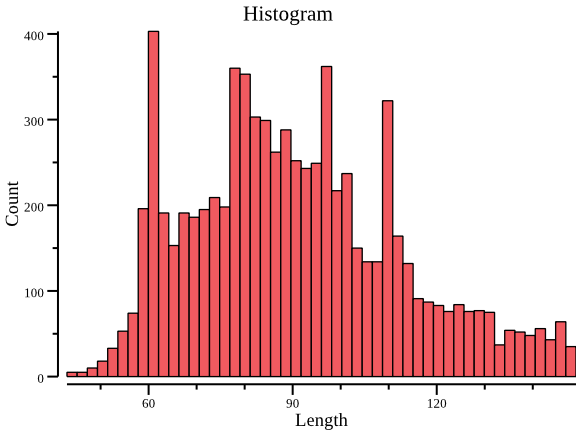
plot histogram with data of the second column:
csvtk -t plot hist testdata/grouped_data.tsv.gz -f 2 | display
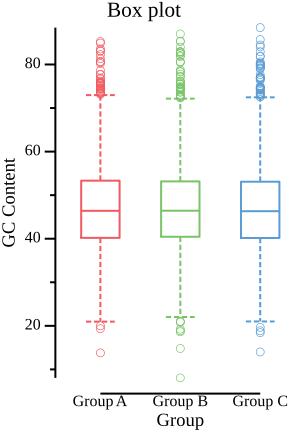
plot boxplot with data of the "GC Content" (third) column, group information is the "Group" column.
  csvtk -t plot box testdata/grouped_data.tsv.gz -g "Group" \
      -f "GC Content" --width 3 --title "Box plot" | display
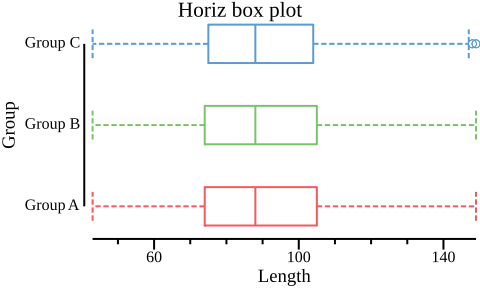
plot horiz boxplot with data of the "Length" (second) column, group information is the "Group" column.
 csvtk -t plot box testdata/grouped_data.tsv.gz -g "Group" -f "Length"  \
     --height 3 --width 5 --horiz --title "Horiz box plot" | display
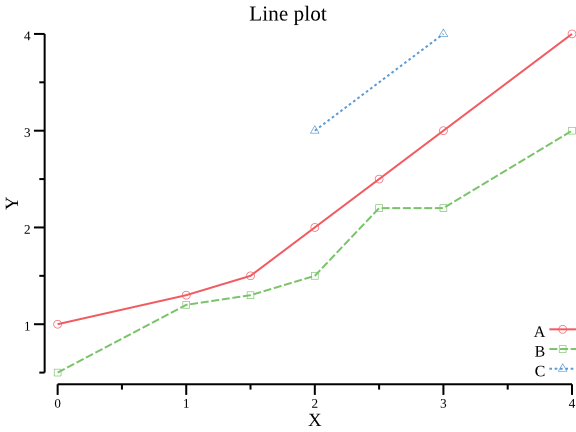
plot line plot with X-Y data
csvtk -t plot line testdata/xy.tsv -x X -y Y -g Group | display
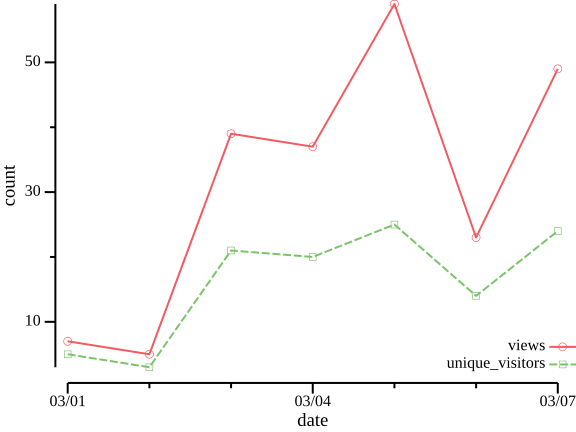
plot line plot with X-Y data (where X values are dates or other sortable values)
  cat testdata/date2value.csv \
      | csvtk gather -f 2- -k type -v count \
      | csvtk plot line --group-field type -x date -y count --data-field-x-nominal \
          -o testdata/figures/line_plot_date.png
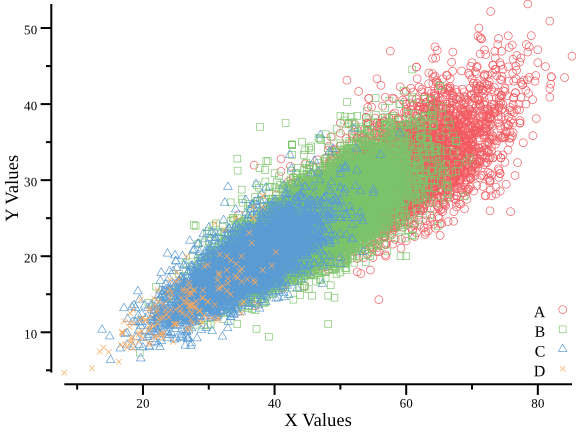
plot scatter plot with X-Y data
csvtk -t plot line testdata/xy.tsv -x X -y Y -g Group --scatter | display
We are grateful to Zhiluo Deng and Li Peng for suggesting features and reporting bugs.
Thanks Albert Vilella for feature suggestions, which makes csvtk feature-rich。
Create an issue to report bugs, propose new functions or ask for help.
Or leave a comment.
Overall
Maintained
Code review
Go module
Latest release
Releases this year
142 followers · starred May 2026
17 followers · starred Feb 2020
25 followers · starred Jul 2026
761 followers · starred Nov 2016
A cross-platform, efficient and practical CSV/TSV toolkit in Golang
See the code
Similar to FASTA/Q format in field of Bioinformatics, CSV/TSV formats are basic and ubiquitous file formats in both Bioinformatics and data science.
People usually use spreadsheet software like MS Excel to process table data. However this is all by clicking and typing, which is not automated and is time-consuming to repeat, especially when you want to apply similar operations with different datasets or purposes.
You can also accomplish some CSV/TSV manipulations using shell commands, but more code is needed to handle the header line. Shell commands do not support selecting columns with column names either.
csvtk is convenient for rapid data investigation
and also easy to integrate into analysis pipelines.
It could save you lots of time in (not) writing Python/R scripts.
csvkit-f "-id,-name" for all fields except "id" and "name",
-F -f "a.*" for all fields with prefix "a.".sep=,) of separator declaration used by MS Excel59 subcommands in total.
Information
headers: prints headersdim: dimensions of CSV filenrow: print number of recordsncol: print number of columnssummary: summary statistics of selected numeric or text fields (groupby group fields)watch: online monitoring and histogram of selected fieldcorr: calculate Pearson correlation between numeric columnsFormat conversion
pretty: converts CSV to a readable aligned tablecsv2tab: converts CSV to tabular formattab2csv: converts tabular format to CSVspace2tab: converts space delimited format to TSVcsv2html: converts CSV/TSV to a standalone responsive HTML tablecsv2md: converts CSV to markdown formatcsv2rst: converts CSV to reStructuredText formatcsv2json: converts CSV to JSON formatcsv2xlsx: converts CSV/TSV files to XLSX filexlsx2csv: converts XLSX to CSV formatSet operations
head: prints first N recordsconcat: concatenates CSV/TSV files by rowspaste: pastes CSV/TSV files by columnssample: sampling by proportioncut: select and arrange fieldsgrep: greps data by selected fields with patterns/regular expressionsuniq: deduplicate records by selected fields without sortingfreq: frequencies of selected fieldsinter: intersection of multiple filesfilter: filters rows by values of selected fields with arithmetic expressionfilter2: filters rows by awk-like arithmetic/string expressionsjoin: join files by selected fields (inner, left and outer join)split: splits CSV/TSV by column values, rows per chunk, or number of chunkssplitxlsx: splits XLSX sheet into multiple sheets according to column valuescomb: compute combinations of items at every rowEdit
fix: fix CSV/TSV with different numbers of columns in rowsfix-quotes: fix malformed CSV/TSV caused by double-quotesdel-quotes: remove extra double-quotes added by fix-quotesadd-header: add column namesdel-header: delete column namesrename: renames column names with new namesrename2: renames column names by regular expressionreplace: replaces data of selected fields by regular expressionround: round float to n decimal placescomma: make numbers more readable by adding commasmutate: creates new columns from selected fields by regular expressionmutate2: creates a new column from selected fields by awk-like arithmetic/string expressionsmutate3: create a new column from selected fields with Go-like expressionsfmtdate: format date of selected fieldsTransform
transpose: transposes CSV datasep: separate column into multiple columnsgather: gather columns into key-value pairs, like tidyr::gather/pivot_longerspread: spread a key-value pair across multiple columns, like tidyr::spread/pivot_widerunfold: unfold multiple values in cells of one or more fieldsfold: fold multiple values of one or more fields into cells of groupslong2matrix: convert the long format to a matrixmatrix2long: convert a matrix to the long formatOrdering
Plotting
Misc
cat stream file and report progressversion print version information and check for updategenautocomplete generate shell autocompletion script (bash|zsh|fish|powershell)csvtk is implemented in Go programming language,
executable binary files for most popular operating systems are freely available
in release page.
Just download compressed
executable file of your operating system,
and decompress it with tar -zxvf *.tar.gz command or other tools.
And then:
For Linux-like systems
If you have root privilege simply copy it to /usr/local/bin:
sudo cp csvtk /usr/local/bin/
Or copy to anywhere in the environment variable PATH:
mkdir -p $HOME/bin/; cp csvtk $HOME/bin/
For windows, just copy csvtk.exe to C:\WINDOWS\system32.
pixi global install csvtk
# >= v0.31.0
conda install -c conda-forge csvtk

# <= v0.31.0
conda install -c bioconda csvtk
brew install csvtk
go install github.com/shenwei356/csvtk/csvtk@latest
yaourt -S csvtk
Bash:
# generate completion shell
csvtk genautocomplete --shell bash

# configure if never did.
# install bash-completion if the "complete" command is not found.
echo "for bcfile in ~/.bash_completion.d/* ; do source \$bcfile; done" >> ~/.bash_completion
echo "source ~/.bash_completion" >> ~/.bashrc
Zsh:
# generate completion shell
csvtk genautocomplete --shell zsh --file ~/.zfunc/_csvtk

# configure if never did
echo 'fpath=( ~/.zfunc "${fpath[@]}" )' >> ~/.zshrc
echo "autoload -U compinit; compinit" >> ~/.zshrc
fish:
csvtk genautocomplete --shell fish --file ~/.config/fish/completions/csvtk.fish
csvkitcsvkit, attention: this table wasn't updated for many years.
| Features | csvtk | csvkit | Note |
|---|---|---|---|
| Read Gzip | Yes | Yes | read gzip files |
| Fields ranges | Yes | Yes | e.g. -f 1-4,6 |
| Unselect fields | Yes | -- | e.g. -1 for excluding first column |
| Fuzzy fields | Yes | -- | e.g. ab* for columns with name prefix "ab" |
| Reorder fields | Yes | Yes | it means -f 1,2 is different from -f 2,1 |
| Rename columns | Yes | -- | rename with new name(s) or from existed names |
| Sort by multiple keys | Yes | Yes | bash sort like operations |
| Sort by number | Yes | -- | e.g. -k 1:n |
| Multiple sort | Yes | -- | e.g. -k 2:r -k 1:nr |
| Pretty output | Yes | Yes | convert CSV to readable aligned table |
| Unique data | Yes | -- | unique data of selected fields |
| frequency | Yes | -- | frequencies of selected fields |
| Sampling | Yes | -- | sampling by proportion |
| Mutate fields | Yes | -- | create new columns from selected fields |
| Replace | Yes | -- | replace data of selected fields |
Similar tools:
Attention
By default, csvtk assumes input files have header row, if not, switch flag -H on.
By default, csvtk handles CSV files, use flag -t for tab-delimited files.
Column names should be unique.
By default, lines starting with # will be ignored, if the header row
starts with #, please assign flag -C another rare symbol, e.g. $.
Do not mix use field (column) numbers and names to specify columns to operate.
The CSV parser requires all the lines have same numbers of fields/columns.
Even lines with spaces will cause error.
Use -I/--ignore-illegal-row to skip these lines if necessary.
You can also use "csvtk fix" to fix files with different numbers of columns in rows.
If double-quotes exist in fields not enclosed with double-quotes, e.g.,
x,a "b" c,1
It would report error:
bare `"` in non-quoted-field.
Please switch on the flag -l or use csvtk fix-quotes to fix it.
If some fields have a double-quote only at the beginning or end, e.g.,
x,d "e","a" b c,1
It would report an error:
extraneous or missing " in quoted-field
Please use csvtk fix-quotes to fix it, and use csvtk del-quotes to reset to the
original format as needed.
Examples
Pretty result
 $ csvtk pretty names.csv
 id   first_name   last_name   username
 --   ----------   ---------   --------
 11   Rob          Pike        rob
 2    Ken          Thompson    ken
 4    Robert       Griesemer   gri
 1    Robert       Thompson    abc
 NA   Robert       Abel        123

 $ csvtk pretty names.csv -S 3line
 ━━━━━━━━━━━━━━━━━━━━━━━━━━━━━━━━━━━━━━━━
  id   first_name   last_name   username
 ────────────────────────────────────────
  11   Rob          Pike        rob
  2    Ken          Thompson    ken
  4    Robert       Griesemer   gri
  1    Robert       Thompson    abc
  NA   Robert       Abel        123
 ━━━━━━━━━━━━━━━━━━━━━━━━━━━━━━━━━━━━━━━━

 $ csvtk pretty names.csv -S round -w 5 -m 1-
 ╭───────┬────────────┬───────────┬──────────╮
 │  id   │ first_name │ last_name │ username │
 ├───────┼────────────┼───────────┼──────────┤
 │  11   │    Rob     │   Pike    │   rob    │
 ├───────┼────────────┼───────────┼──────────┤
 │   2   │    Ken     │ Thompson  │   ken    │
 ├───────┼────────────┼───────────┼──────────┤
 │   4   │   Robert   │ Griesemer │   gri    │
 ├───────┼────────────┼───────────┼──────────┤
 │   1   │   Robert   │ Thompson  │   abc    │
 ├───────┼────────────┼───────────┼──────────┤
 │  NA   │   Robert   │   Abel    │   123    │
 ╰───────┴────────────┴───────────┴──────────╯
Summary of selected numeric fields, supporting "group-by"
 $ cat testdata/digitals2.csv \
     | csvtk summary -i -f f4:sum,f5:sum -g f1,f2 \
     | csvtk pretty
 f1    f2     f4:sum   f5:sum
 bar   xyz    7.00     106.00
 bar   xyz2   4.00     4.00
 foo   bar    6.00     3.00
 foo   bar2   4.50     5.00
Select fields/columns (cut)
csvtk cut -f 1,2csvtk cut -f first_name,usernamecsvtk cut -f -1,-2 or csvtk cut -f -first_namecsvtk cut -F -f "*_name,username"csvtk cut -f 2-4 for column 2,3,4 or csvtk cut -f -3--1 for discarding column 1,2,3csvtk cut -f 1- or csvtk cut -F -f "*"Search by selected fields (grep) (matched parts will be highlighted as red)
csvtk grep -f first_name -p Robert -p Robcsvtk grep -f first_name -r -p Robcsvtk grep -f first_name -P name_list.txtcsvtk grep -F -f "*" -r -p "^$" -v Rename column names (rename and rename2)
csvtk rename -f A,B -n a,b or csvtk rename -f 1-3 -n a,b,ccsvtk rename2 -f 1- -p "(.*)" -r 'prefix_$1' for adding prefix to all column names.Edit data with regular expression (replace)
csvtk replace -F -f "*_name" -p "\p{Han}+" -r ""Create new column from selected fields by regular expression (mutate)
csvtk mutate -f id csvtk mutate -f sample -n group -p "^(.+?)\." --after sampleSort by multiple keys (sort)
csvtk sort -k 1 or csvtk sort -k last_namecsvtk sort -k 1,2 or csvtk sort -k 1 -k 2 or csvtk sort -k last_name,agecsvtk sort -k 1:n or csvtk sort -k 1:nr for reverse numbercsvtk sort -k region -k age:n -k id:nrcsvtk sort -k chr:NJoin multiple files by keys (join)
csvtk join -f id file1.csv file2.csvcsvtk join -f "username;username;name" names.csv phone.csv adress.csv -kFilter by numbers (filter)
csvtk filter -f "id>0"csvtk filter -f "1-3>0"--any to print record if any of the field satisfy the condition: csvtk filter -f "1-3>0" --anycsvtk filter -F -f "A*!=0"Filter rows by awk-like arithmetic/string expressions (filter2)
csvtk filter2 -f '$3>0'csvtk filter2 -f '$id > 0'csvtk filter2 -f '$id > 3 || $username=="ken"'csvtk filter2 -H -t -f '$1 > 2 && $2 % 2 == 0'Plotting
plot histogram with data of the second column:
csvtk -t plot hist testdata/grouped_data.tsv.gz -f 2 | display
plot boxplot with data of the "GC Content" (third) column, group information is the "Group" column.
  csvtk -t plot box testdata/grouped_data.tsv.gz -g "Group" \
      -f "GC Content" --width 3 --title "Box plot" | display
plot horiz boxplot with data of the "Length" (second) column, group information is the "Group" column.
 csvtk -t plot box testdata/grouped_data.tsv.gz -g "Group" -f "Length"  \
     --height 3 --width 5 --horiz --title "Horiz box plot" | display
plot line plot with X-Y data
csvtk -t plot line testdata/xy.tsv -x X -y Y -g Group | display
plot line plot with X-Y data (where X values are dates or other sortable values)
  cat testdata/date2value.csv \
      | csvtk gather -f 2- -k type -v count \
      | csvtk plot line --group-field type -x date -y count --data-field-x-nominal \
          -o testdata/figures/line_plot_date.png
plot scatter plot with X-Y data
csvtk -t plot line testdata/xy.tsv -x X -y Y -g Group --scatter | display
We are grateful to Zhiluo Deng and Li Peng for suggesting features and reporting bugs.
Thanks Albert Vilella for feature suggestions, which makes csvtk feature-rich。
Create an issue to report bugs, propose new functions or ask for help.
Or leave a comment.
Overall
Maintained
Code review
Go module
Latest release
Releases this year
142 followers · starred May 2026
17 followers · starred Feb 2020
25 followers · starred Jul 2026
761 followers · starred Nov 2016