
README
Heima
This repository provides all resources for the ICML 2026 paper "Efficient Reasoning with Hidden Thinking".
Demo
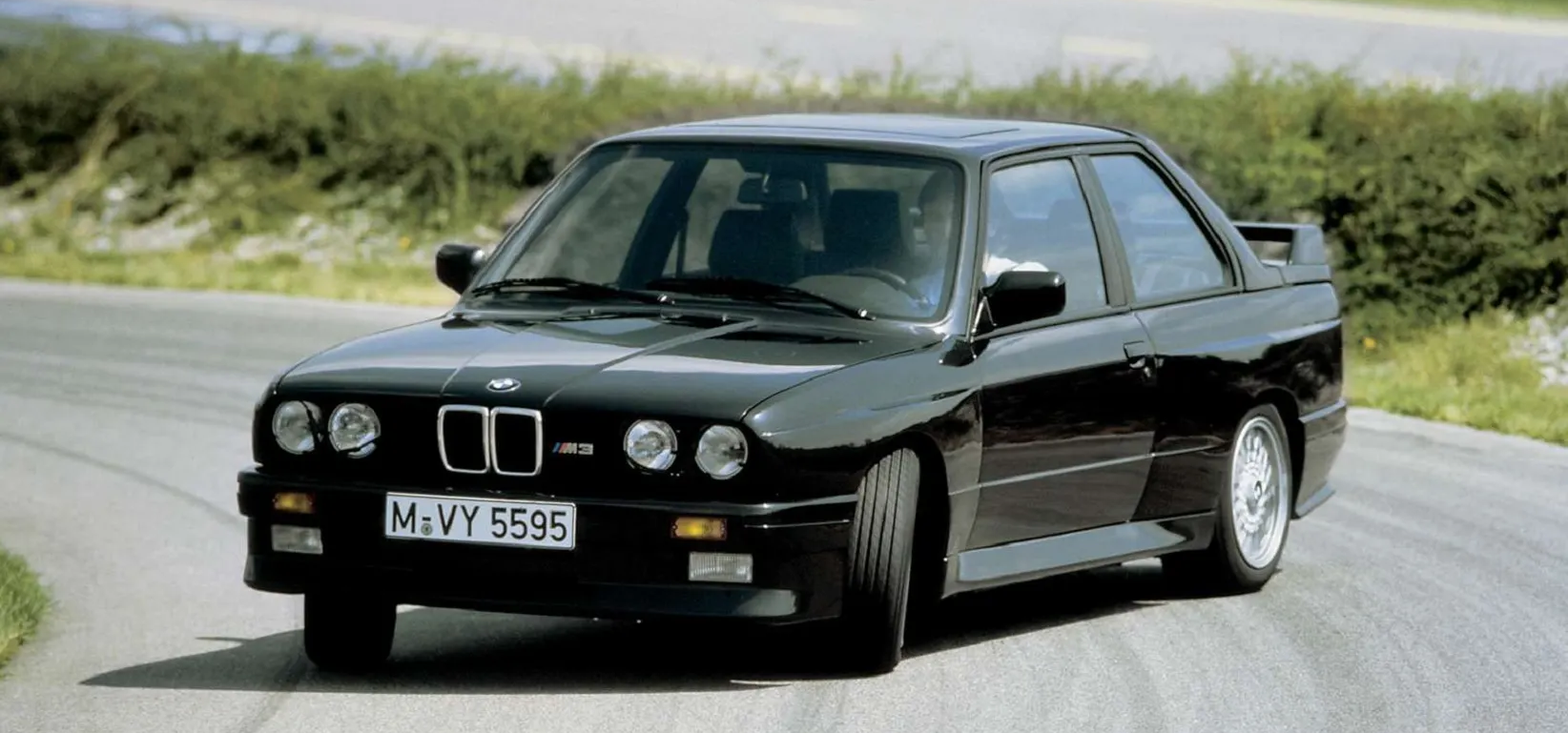
Input Question:
Which automotive brand does this car belong to, and what visual cues or badges indicate that?
Heima Encoder (MLLMs):
<SUMMARY> <THINKING_OF_SUMMARY> </SUMMARY>

<CAPTION> <THINKING_OF_CAPTION> </CAPTION>

<REASONING> <THINKING_OF_REASONING> </REASONING>

<CONCLUSION> The image shows a black BMW M3 driving down a road. </CONCLUSION>
Heima Decoder (LLMs):
Summary:
Below is the sequence of thought used for the summary:
I will identify the car brand by examining visual cues such as logos,
color schemes, and design elements present in the image.

Caption:
The step-by-step thinking process for the caption can be described as:
The image shows a sleek, modern sports car with a black exterior.
It has a distinct logo on the side, which resembles a cross with a circle.

Reasoning:
The thinking progress for the reasoning of the given question is illustrated as follows:
The key to identifying the brand lies in the visible badge.
The badge on the front grille of the car is crucial for determining the brand.
In this image, the badge on the car is "BMW," which is a common symbol for the BMW brand.
BMW is known for its distinctive badge, and the presence of this badge confirms the brand.
Quick Start
Install torchtune and vlmevalkit
- Go to
torchtune_pkg/torchtuneand install bypip install -e .. - Go to
zero-shot-evaluation/VLMEvalKitand install bypip install -e ..
Prepare dataset
- Download the LLaVA-CoT-100k dataset.
- Go to
heima/scripts/. - Set the data path in
run-1_1-... shandrun-1_2-... .sh. - Run by
sh .shto generate the data.
Prepare LoRA checkpoints
- We provide the checkpoints on HuggingFace: shawnricecake/Heima.
- There are both Heima Encoder and 3 Heima Decoders for summary, caption, and reasoning, separately.
Train Heima
- We also provide the training code.
- Set the right checkpoint path and data path for
LLaVA-CoTandLlama3.1-8B-Instructinheima/configsfrom2_1... .yamlto2_5... .yaml. - Go to
heima/scripts/and run withsh run-2-... .sh. - You will get the final Heima Encoder after step 4 and 3 decoders after step 5.
Evaluation for Heima Encoder
- Set the checkpoint path in
zero-shot-evaluation/VLMEvalKit/configs/3-...-lora.yaml. - Go to
zero-shot-evaluation/VLMEvalKit/and runsh run-eval.sh.
Evaluation for Heima Decoder
- Set the right checkpoint path and data path for
LLaVA-CoTandLlama3.1-8B-Instructinheima/configsin4_1... .yaml. - Generate CoT reconstruction results by: go to
heima/scriptsand run withsh run-4_1-... .sh. - You can split into 8 GPUs for parallel running by revise:
GPU_split_num: 0  # 0,1,2,3,4,5,6,7
GPU_total_split_num: 8
- Compute the evaluation metrics by go to
heima/scriptsand runsh run-4_2-... .sh.
Compute number of generated tokens
- Go to
zero-shot-evaluation/VLMEvalKit/vlmeval/inference.py. - Uncomment 139 and run the evaluation.
- Evaluate Heima Encoder again.
python3 compute_avg_num_token.py
Demo
- Set the checkpoint path, your question, and your image in
heima/configs/5-... .yaml. - Go to
heima/scripts/and run withsh run-5-... .sh.
Similar repos


Languages
Python
99.7%
README
Heima
This repository provides all resources for the ICML 2026 paper "Efficient Reasoning with Hidden Thinking".
Demo
Input Question:
Which automotive brand does this car belong to, and what visual cues or badges indicate that?
Heima Encoder (MLLMs):
<SUMMARY> <THINKING_OF_SUMMARY> </SUMMARY>

<CAPTION> <THINKING_OF_CAPTION> </CAPTION>

<REASONING> <THINKING_OF_REASONING> </REASONING>

<CONCLUSION> The image shows a black BMW M3 driving down a road. </CONCLUSION>
Heima Decoder (LLMs):
Summary:
Below is the sequence of thought used for the summary:
I will identify the car brand by examining visual cues such as logos,
color schemes, and design elements present in the image.

Caption:
The step-by-step thinking process for the caption can be described as:
The image shows a sleek, modern sports car with a black exterior.
It has a distinct logo on the side, which resembles a cross with a circle.

Reasoning:
The thinking progress for the reasoning of the given question is illustrated as follows:
The key to identifying the brand lies in the visible badge.
The badge on the front grille of the car is crucial for determining the brand.
In this image, the badge on the car is "BMW," which is a common symbol for the BMW brand.
BMW is known for its distinctive badge, and the presence of this badge confirms the brand.
Quick Start
Install torchtune and vlmevalkit
- Go to
torchtune_pkg/torchtuneand install bypip install -e .. - Go to
zero-shot-evaluation/VLMEvalKitand install bypip install -e ..
Prepare dataset
- Download the LLaVA-CoT-100k dataset.
- Go to
heima/scripts/. - Set the data path in
run-1_1-... shandrun-1_2-... .sh. - Run by
sh .shto generate the data.
Prepare LoRA checkpoints
- We provide the checkpoints on HuggingFace: shawnricecake/Heima.
- There are both Heima Encoder and 3 Heima Decoders for summary, caption, and reasoning, separately.
Train Heima
- We also provide the training code.
- Set the right checkpoint path and data path for
LLaVA-CoTandLlama3.1-8B-Instructinheima/configsfrom2_1... .yamlto2_5... .yaml. - Go to
heima/scripts/and run withsh run-2-... .sh. - You will get the final Heima Encoder after step 4 and 3 decoders after step 5.
Evaluation for Heima Encoder
- Set the checkpoint path in
zero-shot-evaluation/VLMEvalKit/configs/3-...-lora.yaml. - Go to
zero-shot-evaluation/VLMEvalKit/and runsh run-eval.sh.
Evaluation for Heima Decoder
- Set the right checkpoint path and data path for
LLaVA-CoTandLlama3.1-8B-Instructinheima/configsin4_1... .yaml. - Generate CoT reconstruction results by: go to
heima/scriptsand run withsh run-4_1-... .sh. - You can split into 8 GPUs for parallel running by revise:
GPU_split_num: 0  # 0,1,2,3,4,5,6,7
GPU_total_split_num: 8
- Compute the evaluation metrics by go to
heima/scriptsand runsh run-4_2-... .sh.
Compute number of generated tokens
- Go to
zero-shot-evaluation/VLMEvalKit/vlmeval/inference.py. - Uncomment 139 and run the evaluation.
- Evaluate Heima Encoder again.
python3 compute_avg_num_token.py
Demo
- Set the checkpoint path, your question, and your image in
heima/configs/5-... .yaml. - Go to
heima/scripts/and run withsh run-5-... .sh.
Similar repos
Languages
Python
99.7%